Search is no longer limited to a person typing a text query and receiving a list of blue links.
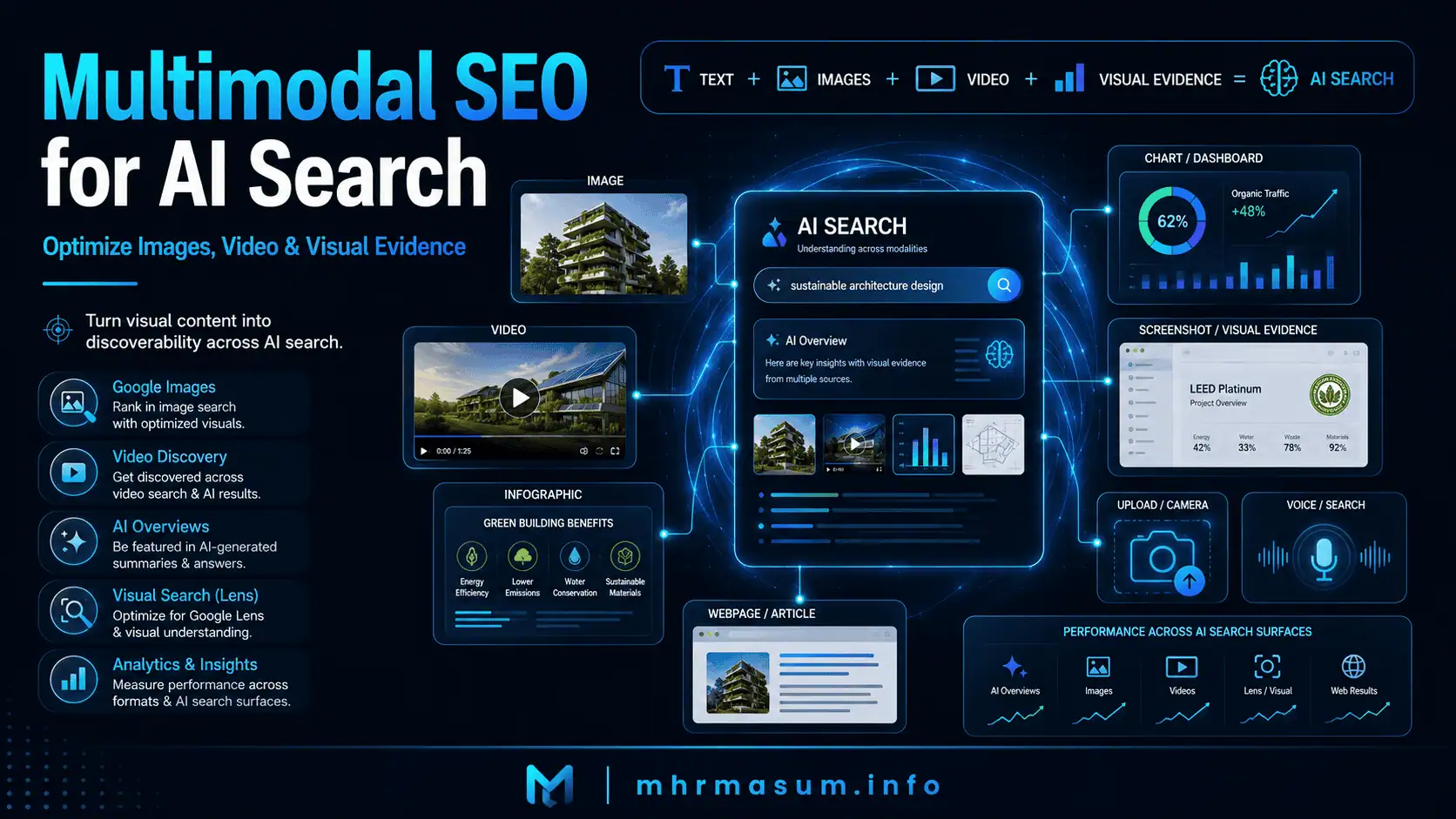
Users can now search by typing, speaking, uploading an image, taking a photograph, watching a video, exploring a chart, using Google Lens, or combining text and visual input in the same search journey.
Google AI Mode, for example, allows users to type, speak, take a photo or upload an image. Google describes the experience as using multimodal understanding to interpret a user’s question regardless of how it is submitted.
This creates a broader SEO opportunity.
A website may now be discovered through:
- Standard web results
- Google Images
- Video results
- Google Lens
- Google Discover
- AI Overviews
- AI Mode
- Product results
- Visual shopping experiences
- Charts, diagrams and screenshots
Google also states that its generative AI search features can include relevant images and video, creating opportunities beyond ordinary webpage links.
This is where multimodal SEO becomes important.
Multimodal SEO is the process of optimizing written content, images, videos, charts, diagrams, screenshots, infographics and structured data as one connected content system.
The objective is not simply to add decorative visuals to an article.
The objective is to help users and search systems understand:
- What the visual shows
- Why it matters
- How it relates to the page
- Which entity, product, service or topic it represents
- Whether it provides original evidence
- Who created it
- What the user should do next
This guide explains how to create a practical multimodal SEO strategy for WordPress websites, publishers, consultants, local businesses, eCommerce stores and content teams.
What Is Multimodal SEO?
Multimodal SEO is the practice of optimizing content that communicates through more than one format.
These formats may include:
- Text
- Images
- Videos
- Audio
- Charts
- Diagrams
- Maps
- Screenshots
- Infographics
- Product feeds
- Structured data
- Interactive elements
The word “multimodal” refers to systems that can process and combine different forms of information.
For example, a user may upload a photograph of a product and ask:
What is this product, how does it work, and where can I buy it?
A search system may need to understand:
- The product’s visual appearance
- The category
- The manufacturer
- The model
- The surrounding page text
- Product structured data
- Price
- Availability
- Reviews
- Shipping information
- Related demonstration videos
Multimodal SEO helps make these signals consistent, understandable and technically accessible.
The Quick Answer
Multimodal SEO means optimizing several content formats together rather than relying only on written copy.
A complete multimodal page may include:
- A clear written explanation
- An original featured image
- A process diagram
- A comparison table
- A chart based on real data
- A product photograph
- A tutorial video
- A video transcript
- Descriptive alt text
- Captions
- Structured data
- Image or video sitemap information
- Relevant internal links
- A fast and mobile-friendly experience
Google’s generative AI guidance confirms that established image and video SEO practices also support visibility in generative AI search.
Google does not require:
- A special multimodal AI schema
- A separate AI-only version of the page
- An AI-specific image sitemap
- A special visual ranking file
The strongest approach is to:
- Create useful and original visual content.
- Place each visual near relevant explanatory text.
- Make the visual crawlable.
- Add accurate filenames, alt text and captions.
- Use supported structured data where appropriate.
- Optimize page speed and mobile delivery.
- Connect visuals with clear entities and search intent.
- Measure web, image, video and AI visibility separately.
Is Multimodal SEO an Official Google Ranking System?
Google does not describe multimodal SEO as a separate ranking system or official ranking factor.
It is better understood as a modern application of established SEO practices across written and visual content.
Google says that generative AI features remain rooted in its core Search ranking and quality systems. It also states that website owners do not need special AI files, AI-only markup or separate machine-readable content versions to become eligible.
There is no confirmed:
- Multimodal SEO ranking factor
- AI image ranking switch
- AI Overview image schema
- ChatGPT image citation schema
- Visual authority meta tag
- Universal AI video submission file
Multimodal SEO is valuable because useful visual content can improve understanding, evidence, discovery, engagement and conversion.
It is not valuable because of a hidden technical shortcut.
Why Multimodal SEO Matters
Multimodal SEO matters because people increasingly express their needs visually.
A user may find it easier to photograph a problem than describe it in words.
Examples include:
- Identifying a damaged roof
- Recognizing a plant
- Finding a clothing item
- Diagnosing an appliance part
- Comparing product packaging
- Understanding a chart
- Identifying a technical error from a screenshot
- Locating a business from a storefront image
- Asking about an object inside a room
- Comparing two products visually
Google AI Mode supports text, voice, photographs and uploaded images.
Businesses that publish only generic text may miss visual discovery opportunities.
Businesses that publish original, useful and technically accessible visuals can build a wider search footprint.
How AI Search Uses Text and Visual Content Together
A multimodal search experience can combine information from several sources and formats.
The process may involve:
- Interpreting the user’s text
- Analysing an uploaded image
- Identifying objects or entities
- Running related searches
- Retrieving webpages
- Reviewing page content
- Finding relevant images
- Finding relevant videos
- Comparing products
- Generating a response with supporting links
Google explains that generative AI search can use retrieval-augmented generation and query fan-out to locate relevant webpages from the Search index.
Visual content should therefore not be treated independently from regular SEO.
An image or video becomes stronger when supported by:
- A relevant page
- Descriptive headings
- Useful explanatory text
- Accurate metadata
- Clear entities
- Structured data
- Internal links
- A trustworthy author or publisher
Multimodal SEO vs Traditional Image SEO
Traditional image SEO focuses mainly on helping individual images appear in Google Images or visual search features.
Multimodal SEO uses the same foundations but connects images with text, video, entities, data and conversion pathways.
| Traditional Image SEO | Multimodal SEO |
|---|---|
| Focuses mainly on image discovery | Connects images, video, text and entities |
| Uses filenames and alt text | Uses filenames, alt text, context and evidence |
| Targets Google Images | Supports broader search and AI experiences |
| Often treats images individually | Treats visuals as part of a content system |
| Measures image clicks | Measures image, video, page and AI visibility |
| May depend heavily on stock imagery | Prioritizes useful original visual evidence |
| Focuses on media files | Includes authority, intent and conversion |
Traditional image SEO remains essential.
Multimodal SEO expands its strategic role.
Multimodal SEO vs Video SEO
Video SEO focuses on helping search engines find, understand and display video content.
Multimodal SEO combines video optimization with:
- Written explanations
- Chapters
- Transcripts
- Screenshots
- Images
- Structured data
- Internal linking
- Conversion pathways
A video should not exist as an isolated iframe with no surrounding information.
A strong video page should explain:
- What the video covers
- Who created it
- Why it is useful
- Which steps are demonstrated
- Which related resources are available
- What the viewer should do next
Multimodal SEO vs GEO and AEO
Generative Engine Optimization and Answer Engine Optimization focus on visibility within generated answers and direct-answer experiences.
Multimodal SEO supports those objectives by improving the availability and quality of visual evidence.
For example, a detailed answer may be strengthened by:
- A process diagram
- An original comparison chart
- A labelled screenshot
- A demonstration video
- A product photograph
- A visual checklist
Visual optimization does not replace relevance, source quality or authority.
Read GEO vs AEO vs SEO for a detailed explanation of how these disciplines relate.
What Google Recommends for Multimodal Content
Google’s current generative AI guidance emphasizes established SEO rather than separate AI tricks.
Google recommends:
- Unique and useful content
- Clear page organisation
- High-quality images and videos
- Crawlable technical structures
- Strong page experience
- Accurate business and product information
- Appropriate structured data
- Search Console measurement
Google states that standard image and video best practices can support content visibility in generative AI search.
The practical conclusion is:
Create visuals that help people understand the topic, then make those visuals accessible to search systems.
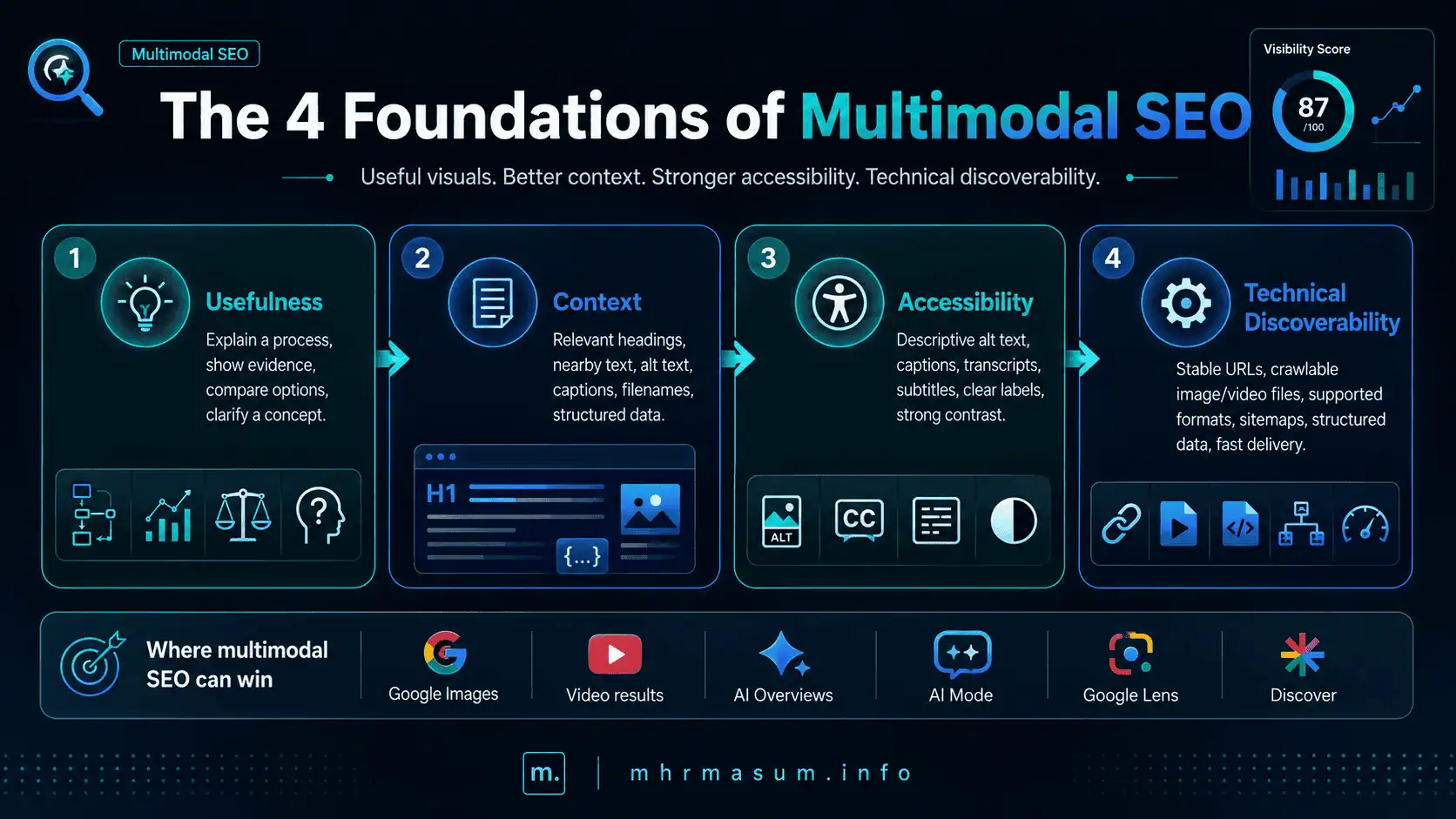
The Four Foundations of Multimodal SEO
A practical multimodal SEO strategy can be organized around four foundations.
These foundations help ensure that visual content is useful, understandable, accessible and technically discoverable.
Usefulness
Every visual should contribute meaningful information.
A visual may:
- Explain a process
- Demonstrate a result
- Show evidence
- Compare alternatives
- Display a product
- Clarify a complex concept
- Help a user complete a task
Decorative images can improve design, but they should not be mistaken for substantive visual content.
Context
Search systems need surrounding context to understand a visual accurately.
Useful context includes:
- Page title
- Relevant heading
- Nearby paragraph
- Alt text
- Caption
- Filename
- Structured data
- Internal links
Google recommends placing images near relevant text because the surrounding content helps explain the image.
Accessibility
Visual information should remain understandable to users who cannot see or play it.
Accessibility can include:
- Descriptive alt text
- Captions
- Video transcripts
- Video subtitles
- Text summaries
- Keyboard-accessible controls
- Clear labels
- Sufficient colour contrast
Accessibility also improves the machine-readable context surrounding the visual.
Technical Discoverability
The visual must be available to search crawlers.
Important requirements include:
- Stable URLs
- Standard HTML elements
- Crawlable image and video files
- Correct robots.txt rules
- Supported file formats
- Image or video sitemap data
- Accurate structured data
- Fast delivery
A useful visual that search systems cannot retrieve has limited SEO value.
Image SEO for Multimodal AI Search
Images can appear across standard web results, Google Images, Discover, product experiences and AI-supported search features.
A strong image strategy should combine originality, quality, relevance, technical accessibility and contextual explanation.
Create Original and Useful Images
Original images can provide information that generic stock photography cannot.
Useful visual formats include:
- Original photographs
- Process diagrams
- Audit screenshots
- Before-and-after comparisons
- Data visualisations
- Annotated screenshots
- Product-use images
- Location photographs
- Step-by-step illustrations
- Original infographics
Originality alone does not guarantee rankings.
The image must add value.
For example, an article about Google core updates can include:
- A ranking-loss diagnosis flowchart
- A Search Console comparison screenshot
- A 30–90 day recovery roadmap
- A traffic trend chart
- A content audit checklist
These visuals directly support the article’s practical purpose.
Avoid Meaningless Stock Images
Stock images may improve the appearance of a page, but they frequently provide little informational value.
An article about Technical SEO may use a generic photograph of a laptop.
That photograph does not demonstrate:
- Crawl errors
- Canonical problems
- Indexing changes
- Structured data errors
- Core Web Vitals
- Audit findings
A more useful visual may be:
- A Technical SEO dashboard
- A crawl-priority diagram
- A schema-validation screenshot
- A Core Web Vitals comparison
- An indexing workflow
Before publishing an image, ask:
Does this image help the reader understand, verify or apply the information?
Place Images Near Relevant Text
Image placement helps search systems and users understand meaning.
A chart showing organic click growth should appear close to the section explaining:
- The date range
- The metric
- The reason for the change
- The business impact
- The recommended action
Do not place all substantive images inside a gallery at the bottom of the page when each image explains a different section.
Use Descriptive Image Filenames
A filename should briefly describe the visual.
Weak filename:
IMG_6842.jpg
Another weak filename:
final-new-image-v7.png
Stronger filename:
google-core-update-recovery-roadmap.png
Another stronger filename:
chatgpt-traffic-ga4-dashboard.webp
A good filename should be:
- Descriptive
- Concise
- Lowercase
- Hyphen-separated
- Relevant to the visual
- Free from unnecessary keyword repetition
Write Accurate Alt Text
Alt text should explain what the image represents in the context of the page.
For an infographic:
Google core update recovery roadmap covering diagnosis, content auditing, Technical SEO and a 30–90 day recovery process
For a screenshot:
GA4 Traffic acquisition report filtered to show chatgpt.com referral sessions
For a chart:
Line chart showing non-branded organic clicks increasing between January and June
Weak alt text:
SEO image
Keyword-stuffed alt text:
best SEO AI SEO consultant Google SEO ranking SEO services
Alt text should help accessibility and understanding.
It should not become a hidden keyword list.
Use Empty Alt Text for Decorative Images
Purely decorative shapes, dividers and background elements should generally use an empty alt attribute.
Example:
<img src="cyan-gradient-decoration.svg" alt="">
This prevents screen readers from announcing meaningless decorative elements.
Informational and decorative images should not be handled in the same way.
Add Captions When They Improve Understanding
Captions can provide visible context that is not immediately obvious.
A useful chart caption may say:
Organic clicks declined by 38% during the update rollout, while branded clicks remained stable.
A useful screenshot caption may say:
Search Console comparison showing the landing pages responsible for the largest ranking decline.
The caption should not merely repeat the alt text.
Explain Charts and Visuals in the Article Text
Important conclusions should not appear only inside an image.
The article should explain:
- What the chart measures
- The date range
- What changed
- Why it matters
- Whether the conclusion is certain
- What action is recommended
This makes the information accessible even when the image does not load.
Use Standard HTML Image Elements
Important visual content should use a standard <img> element.
Recommended structure:
<figure>
    <img
        src="https://example.com/wp-content/uploads/ai-seo-roadmap.webp"
        alt="AI SEO roadmap covering crawlability, entities, content, visual evidence and measurement"
        width="1600"
        height="900"
    >
    <figcaption>
        A practical AI SEO roadmap connecting technical, entity,
        content and measurement work.
    </figcaption>
</figure>
Avoid publishing an important infographic only as a CSS background.
CSS backgrounds are suitable for design decoration, not for primary informational visuals.
Use Responsive Images
Responsive images help browsers deliver the right file size for different screens.
WordPress normally generates multiple image sizes and can output srcset automatically.
Example:
<img
    src="ai-seo-dashboard-1200.webp"
    srcset="
        ai-seo-dashboard-600.webp 600w,
        ai-seo-dashboard-1200.webp 1200w,
        ai-seo-dashboard-1800.webp 1800w
    "
    sizes="(max-width: 768px) 100vw, 1200px"
    alt="AI SEO dashboard showing content visibility, citations and conversion metrics"
    width="1200"
    height="675"
>
Keep a fallback src value even when using srcset or <picture>.
Use Appropriate Image Formats
Common supported formats include:
- JPEG
- PNG
- WebP
- AVIF
- GIF
- SVG
A practical format strategy is:
- JPEG for detailed photographs
- PNG for transparency and certain screenshots
- WebP for efficient general delivery
- AVIF when supported and tested
- SVG for icons, logos and scalable diagrams
The filename extension should match the actual image format.
Use Stable Image URLs
Image URLs should remain stable.
Stable URLs support:
- Crawling
- CDN caching
- Search history
- Social sharing
- Structured data
- Sitemap processing
Avoid temporary image URLs containing expiring tokens unless the file genuinely requires protected access.
Make Image Files Crawlable
Important images should not be blocked by:
- robots.txt
- CDN security rules
- Hotlink protection
- Firewall rules
- Authentication
- Expiring signatures
- Incorrect file permissions
When images are hosted on a separate CDN domain, verify that domain in Search Console where practical.
Use Image Sitemaps When Needed
An image sitemap can help Google discover images that are otherwise difficult to find.
It can be useful when images are:
- Loaded through JavaScript
- Hosted on a CDN
- Inside complex galleries
- Connected with large product catalogues
- Not easily reached through normal HTML
Simplified example:
<url>
    <loc>https://example.com/ai-seo-guide/</loc>

    <image:image>
        <image:loc>
            https://example.com/wp-content/uploads/ai-seo-roadmap.webp
        </image:loc>
    </image:image>
</url>
Check whether your existing SEO plugin already includes image data before installing another sitemap plugin.
Add Image Metadata Where Appropriate
Image metadata can provide information such as:
- Creator
- Credit
- Copyright
- License
- Licensing page
This is especially relevant for:
- Photographers
- News publishers
- Creative agencies
- Image libraries
- Research publishers
For standard SEO graphics and infographics, clear authorship, branding and page context may be sufficient.
Disclose AI-Generated Images When Necessary
AI-generated visuals should not mislead users.
Useful disclosure may explain that:
- The visual was generated with AI
- The data was reviewed manually
- The illustration is conceptual
- The image does not represent a real customer result
- The chart uses specified source data
Do not present an AI-generated building, dashboard or project result as real evidence.
Video SEO for Multimodal AI Search
Video can demonstrate processes, software workflows, products and real-world results that are difficult to explain through text alone.
Google states that generative AI search can include relevant video, creating additional opportunities beyond ordinary webpage results.
Create Videos That Solve a Specific Problem
A video should have a clear purpose.
Useful video formats include:
- Step-by-step tutorials
- Product demonstrations
- Screen recordings
- SEO audit walkthroughs
- Case-study explanations
- Software demonstrations
- Expert commentary
- Before-and-after comparisons
- Frequently asked questions
- Troubleshooting guides
A generic promotional montage is less useful than a video solving a clearly defined problem.
Use a Dedicated Watch Page for Important Videos
When a video is the main content, create a dedicated watch page.
The page should include:
- A descriptive title
- The video
- A clear introduction
- A summary
- A transcript
- Chapters or timestamps
- Supporting screenshots
- Internal links
- Presenter information
- A relevant CTA
A video embedded as a minor element across unrelated pages is less likely to establish a clear primary video page.
Write Descriptive Video Titles
The title should explain what the viewer will learn.
Weak title:
SEO Video 4
Stronger title:
How to Diagnose a Google Core Update Traffic Drop in Search Console
Avoid misleading clickbait.
Add a Detailed Video Description
The video description should explain:
- The topic
- The intended audience
- The main steps
- The expected outcome
- Important limitations
- Related resources
Do not fill the description with repeated keyword variations.
Publish a Video Transcript
A transcript makes the spoken information available as text.
A transcript supports:
- Accessibility
- Search understanding
- Long-tail relevance
- Users who prefer reading
- Users with low-bandwidth connections
- Quotation and reference
The transcript should reflect the actual video.
Add Accurate Captions
Captions support users who:
- Cannot hear the audio
- Watch without sound
- Use assistive technology
- Speak another first language
- Need clarification of technical terms
Review automated captions carefully.
Incorrect names, numbers and technical terms can reduce trust.
Use a High-Quality Thumbnail
A thumbnail should accurately represent the video.
A strong thumbnail may include:
- The primary subject
- A relevant screenshot
- A concise title
- Consistent branding
- Strong contrast
- Minimal clutter
Avoid using a misleading image that does not appear in the video.
Keep the Video File Accessible
Search engines must be able to retrieve the video file when indexing is desired.
Use:
- Stable video URLs
- Crawlable streaming files
- Supported formats
- Sufficient hosting resources
- Correct
contentUrlorembedUrlvalues
Do not block the video file through robots.txt when search visibility is required.
Add VideoObject Structured Data
VideoObject structured data can describe:
- Name
- Description
- Thumbnail
- Upload date
- Duration
- Content URL
- Embed URL
Example:
<script type="application/ld+json">
{
    "@context": "https://schema.org",
    "@type": "VideoObject",
    "name": "How to Diagnose a Google Core Update Traffic Drop",
    "description": "A step-by-step Search Console workflow for identifying affected pages, queries and content clusters after a Google core update.",
    "thumbnailUrl": [
        "https://example.com/wp-content/uploads/core-update-video-thumbnail.webp"
    ],
    "uploadDate": "2026-07-13T09:00:00+06:00",
    "duration": "PT12M35S",
    "embedUrl": "https://example.com/videos/core-update-diagnosis/",
    "contentUrl": "https://cdn.example.com/videos/core-update-diagnosis.mp4"
}
</script>
All values must match the visible page and actual video.
Add Key Moments
Key moments help users move directly to important sections.
Example:
00:00 Introduction
01:20 Confirm the update timeline
03:10 Compare Search Console periods
05:40 Separate branded and non-branded losses
08:15 Audit affected landing pages
10:30 Build the recovery plan
Key moments can be provided through:
- YouTube timestamps
Clipstructured dataSeekToAction
Use a Video Sitemap When Appropriate
A video sitemap can provide:
- Video landing-page URL
- Thumbnail URL
- Video title
- Description
- Video file or player URL
- Duration
- Publication date
A custom video sitemap is most useful for websites with a meaningful video library.
A website with one embedded video may not need one.
Infographic SEO for AI Search
Infographics can combine data, processes, comparisons and recommendations into one shareable asset.
However, important information should not exist only inside the infographic.
Add a Written Summary
Explain the infographic within the page.
The article should describe:
- Its purpose
- Main findings
- Key steps
- Data sources
- Recommended actions
This supports accessibility and search understanding.
Divide Long Infographics Into Sections
Very long infographics can be difficult to read on mobile.
Consider publishing:
- One complete infographic
- Several sectional graphics
- A text explanation for each section
A 90-day SEO roadmap could be separated into:
- Days 1–30
- Days 31–60
- Days 61–90
Each section can appear near its corresponding explanation.
Include Data Sources
A data-based infographic should identify:
- Source
- Date range
- Sample size
- Calculation method
- Limitations
Do not publish invented statistics simply because they look attractive.
Brand the Visual Carefully
Useful branding may include:
- Website name
- Logo
- Author name
- Short URL
- Copyright notice
Avoid large watermarks that make the information difficult to read.
Offer a High-Resolution Version
A high-resolution version can help:
- Journalists
- Bloggers
- Clients
- Presenters
- Social media users
When reuse is permitted, publish clear attribution and licensing instructions.
Chart and Data Visualisation SEO
Charts can provide original evidence and make an article more useful.
A chart should communicate a genuine finding rather than functioning as decoration.
Choose the Correct Chart Type
Match the visual format with the data.
Examples include:
- Line chart for trends
- Bar chart for category comparisons
- Scatter plot for relationships
- Table for exact values
- Funnel chart for conversion stages
- Map for geographic distribution
Avoid complicated charts when a simple table would be clearer.
Add a Clear Chart Title
The title should identify the subject, metric and period.
Weak title:
Performance
Stronger title:
Non-Branded Organic Click Growth, January–June 2026
Add Labels and Units
Charts should clearly display:
- Axis labels
- Dates
- Categories
- Percentages
- Currency
- Units
Users should not need to guess what the numbers represent.
Publish the Underlying Data
Where practical, add an accessible table beneath the chart.
| Month | Non-Branded Clicks |
|---|---|
| January | 1,850 |
| February | 2,040 |
| March | 2,290 |
| April | 2,670 |
| May | 2,940 |
| June | 3,380 |
This supports accessibility and precise interpretation.
Explain the Conclusion
The article should explain whether the change resulted from:
- Increased impressions
- Improved rankings
- Higher CTR
- New content
- Seasonal demand
- Campaign activity
- A Google update
The chart shows what changed.
The analysis explains why it matters.
Screenshot SEO and Optimization
Screenshots can provide evidence of real experience and implementation.
They are especially useful for:
- Search Console tutorials
- GA4 workflows
- WordPress instructions
- Technical SEO audits
- Plugin demonstrations
- CRM systems
- Website speed reports
- Schema validation
Crop Screenshots to the Relevant Area
Remove unnecessary browser tabs, blank space and unrelated interface elements.
The screenshot should focus on the step or issue being explained.
Add Clear Annotations
Annotations can highlight:
- A filter
- A warning
- A metric
- A button
- A configuration
- An error message
Use arrows, boxes and numbers sparingly.
Too many annotations can make the screenshot harder to understand.
Protect Confidential Information
Before publishing, remove:
- Client names
- Email addresses
- Account IDs
- API keys
- Revenue data when confidential
- User IDs
- Private URLs
- Personal information
Do not use weak blurring that can be reversed.
Keep Screenshots Current
Review screenshots when:
- Search Console changes
- GA4 navigation changes
- WordPress releases a major update
- A plugin interface changes
- A platform renames a feature
Outdated screenshots can reduce trust even when the written instructions remain accurate.
Multimodal SEO for eCommerce
eCommerce websites are highly suited to multimodal search because product discovery is often visual.
A customer may use a photo, screenshot or product image to identify and compare an item.
Publish Multiple Useful Product Images
A product page may include:
- Front view
- Side view
- Rear view
- Detail view
- Scale comparison
- Product in use
- Packaging
- Accessories
- Colour variants
- Size variants
Every image should represent the actual product accurately.
Keep Product Variant Images Accurate
Variant images should match the selected:
- Colour
- Size
- Pattern
- Model
- Material
- Configuration
Do not display a blue product while the product data describes a red variant.
Add Product Structured Data
Product structured data can describe:
- Price
- Availability
- Reviews
- Shipping
- Returns
- Variants
- Product identifiers
Google recommends combining page-level structured data with Merchant Center feeds where appropriate.
Maintain Merchant Center Data
Merchant Center information should remain consistent with the website.
Review:
- Price
- Availability
- Images
- Product identifiers
- Shipping
- Returns
- Condition
- Variant information
Publish Product Demonstration Videos
A demonstration video can show:
- Assembly
- Operation
- Size
- Performance
- Compatibility
- Use cases
- Maintenance
Connect the video with the product page and relevant buying guides.
Multimodal SEO for Local Businesses
Local businesses can use visual content to demonstrate location, service quality and real-world experience.
Useful visuals include:
- Storefront photographs
- Team-at-work images
- Service vehicles
- Completed projects
- Before-and-after images
- Equipment
- Local landmarks
- Interior photographs
- Product displays
Use Authentic Local Images
Generic stock photography cannot prove that a business actually operates in a location.
Authentic images can support:
- Trust
- Local relevance
- Brand recognition
- Project evidence
- Service quality
Protect customer privacy and obtain permission where necessary.
Update Google Business Profile Images
Maintain accurate:
- Logo
- Cover image
- Exterior photographs
- Interior photographs
- Product images
- Service images
- Opening hours
- Contact details
Visual optimization should support accurate business information rather than replace it.
Connect Images With Local Case Studies
A project image becomes more valuable when the page explains:
- Customer problem
- Location
- Service provided
- Process
- Result
- Timeframe
- Limitations
For more guidance, read Local SEO in 2026: Complete Guide for Small Businesses.
Reviews can strengthen the credibility of visual evidence, as explained in How Reviews Help Local SEO and AI Search Visibility.
Multimodal SEO for Consultants and Service Businesses
Consultants often sell services that are difficult to photograph directly.
Visual evidence can make expertise, process and results more concrete.
Useful formats include:
- Audit dashboards
- Workflow diagrams
- Reporting examples
- Case-study graphs
- Website speed comparisons
- Content architecture maps
- Keyword cluster diagrams
- Process screenshots
Show the Service Process
A process diagram can make a service easier to understand.
An AI SEO project may include:
- Technical discovery
- Entity review
- Content-gap analysis
- AI crawler audit
- Visual-content planning
- Structured data
- Measurement
- Iteration
A clear visual process can reduce uncertainty for potential clients.
Show Evidence Without Exposing Clients
Use anonymised screenshots or obtain permission.
A case-study visual may show:
- Percentage growth
- Trend direction
- Search visibility
- Core Web Vitals improvements
- Lead growth
Do not fabricate results or imply that one result is guaranteed for every client.
Connect Visuals to Portfolio Evidence
Relevant internal links include:
- Technical SEO and keyword research
- Website speed optimization
- Local SEO portfolio
- Roofing Brisbane Local SEO case study
- Pest Control Melbourne GMB case study
Structured Data for Multimodal Content
Structured data can help Google understand the entities and media associated with a page.
It is not a special AI ranking shortcut.
Google does not require special AI schema for generative search.
Article Structured Data
Article structured data can describe:
- Headline
- Author
- Publication date
- Modification date
- Images
- Publisher
Example:
<script type="application/ld+json">
{
    "@context": "https://schema.org",
    "@type": "BlogPosting",
    "headline": "Multimodal SEO for AI Search",
    "image": [
        "https://mhrmasum.info/wp-content/uploads/multimodal-seo-1x1.webp",
        "https://mhrmasum.info/wp-content/uploads/multimodal-seo-4x3.webp",
        "https://mhrmasum.info/wp-content/uploads/multimodal-seo-16x9.webp"
    ],
    "datePublished": "2026-07-13T09:00:00+06:00",
    "dateModified": "2026-07-13T09:00:00+06:00",
    "author": {
        "@type": "Person",
        "name": "MD Harunur Rashid",
        "url": "https://mhrmasum.info/about/"
    },
    "publisher": {
        "@type": "Organization",
        "name": "mhrmasum.info",
        "url": "https://mhrmasum.info/"
    }
}
</script>
The schema must match the visible page.
VideoObject Structured Data
Use VideoObject when a page contains an important video.
Include accurate:
- Name
- Description
- Thumbnail
- Upload date
- Duration
- Content URL
- Embed URL
Do not add video schema when the described video is not present.
Product Structured Data
Use Product structured data on appropriate product pages.
The information should match:
- Product name
- Images
- Price
- Availability
- Reviews
- Variants
- Shipping
- Returns
ImageObject Structured Data
ImageObject properties may describe:
- URL
- Caption
- Creator
- Credit
- Copyright
- License
Do not create excessive image markup without accurate information or a clear purpose.
Validate Structured Data
Use Google’s Rich Results Test and Search Console URL Inspection.
Confirm that Google can access:
- The page
- Structured data
- Important images
- Video thumbnails
- Product data
- Supporting resources
WordPress Multimodal SEO Implementation
WordPress can support strong multimodal SEO when media, themes and plugins are configured carefully.
Useful WordPress features include:
- Media attachment fields
- Responsive image sizes
srcset- Featured images
- Captions
- Alt text fields
- Video embeds
- XML sitemaps
- Schema plugins
The main challenge is maintaining consistency.
Complete WordPress Media Fields Properly
Review the following fields when uploading an important image:
- Filename
- Alt text
- Title
- Caption
- Description
Each field has a different purpose.
Filename: Technical identifier for the image.
Alt text: Accessible contextual description.
Title: Internal WordPress media title or optional advisory text.
Caption: Visible explanatory text.
Description: Additional attachment information depending on the theme and setup.
Do not copy the same keyword-filled sentence into every field.
Avoid Thin Attachment Pages
Some WordPress setups create a separate attachment page for every media file.
These pages may contain little more than the image.
Depending on the site structure, redirect thin attachment pages to:
- The parent post
- The media file
- A relevant landing page
Do not redirect attachment pages that contain substantial original content and have a valid strategic purpose.
Confirm Featured Images Are Crawlable
The featured image should:
- Load without authentication
- Use a stable URL
- Be accessible through the CDN
- Remain unblocked in robots.txt
- Match social metadata
- Match Article structured data
- Use sufficient dimensions and quality
Use a Consistent Naming Workflow
A practical naming structure is:
topic-purpose-format.ext
Examples:
multimodal-seo-ai-search-feature.webp
multimodal-seo-checklist-infographic.webp
google-lens-product-optimization-diagram.webp
video-seo-wordpress-workflow.webp
Use the WordPress Image Block Correctly
For important visuals:
- Insert the Image block.
- Select an appropriate size.
- Add alt text.
- Add a caption when useful.
- Link the image only when helpful.
- Check mobile display.
- Confirm that the image is not stretched.
Avoid uploading a very large image and displaying it at a small size.
Choose Appropriate Video Hosting
Possible options include:
- YouTube
- Vimeo
- Video CDN
- Specialized video platform
- Optimized self-hosting
Consider:
- Performance
- Privacy
- Branding
- Analytics
- Captions
- Search indexing
- Cost
- Control
Check Plugin Conflicts
Several plugins may try to generate:
- Article schema
- Video schema
- Image metadata
- Open Graph images
- XML sitemaps
- Lazy-loading rules
Choose a clear source of truth for:
- Primary schema
- Additional schema
- Sitemap output
- Image optimization
- Video metadata
Multimodal SEO and Website Performance
High-resolution images and videos can damage performance when implemented poorly.
A visually rich page should remain fast and stable.
Optimize Largest Contentful Paint
The largest image near the top of the page may become the LCP element.
Improve it by:
- Compressing the file
- Serving appropriate dimensions
- Using an efficient format
- Using a CDN
- Avoiding unnecessary redirects
- Preloading when appropriate
- Keeping the image discoverable in HTML
- Avoiding lazy loading for the main above-the-fold image
Prevent Layout Shifts
Add explicit dimensions.
Example:
<img
    src="multimodal-seo-feature.webp"
    alt="Multimodal SEO dashboard combining image, video and AI search signals"
    width="1600"
    height="900"
>
This helps the browser reserve space before the image loads.
Lazy-Load Below-the-Fold Media
Lazy loading can reduce initial page weight for media farther down the page.
Example:
<img
    src="technical-seo-audit-diagram.webp"
    alt="Technical SEO audit process diagram"
    loading="lazy"
    width="1200"
    height="675"
>
Do not lazy-load the main hero or featured image when it is visible immediately.
Compress Images Carefully
Compression should reduce file size without making:
- Text unreadable
- Charts blurry
- Screenshots unclear
- Product details inaccurate
- Brand assets distorted
Test the result on mobile and desktop.
Replace Heavy GIFs
Animated GIF files can be extremely large.
Consider:
- MP4
- WebM
- Short embedded video
- Lightweight CSS animation
Provide controls and respect reduced-motion accessibility preferences.
Accessibility and Multimodal SEO
Accessibility and SEO should work together.
A multimodal page should communicate effectively across devices, environments and different user abilities.
Provide Alternatives for Visual Information
Important visual information should have a text equivalent.
Examples include:
- Alt text
- Captions
- Transcripts
- Data tables
- Written summaries
- Audio descriptions where appropriate
Use Sufficient Colour Contrast
Charts and diagrams should remain understandable for users with colour-vision differences.
Do not depend only on red and green.
Use:
- Labels
- Shapes
- Icons
- Patterns
- Text values
Use Readable Text Sizes
Infographic text must remain readable on mobile.
When a visual contains too much text, consider:
- Larger text
- Separate sections
- A downloadable version
- A full written explanation
Make Video Controls Accessible
Users should be able to:
- Play and pause
- Adjust volume
- Enable captions
- Navigate with a keyboard
- Understand control labels
Building a Multimodal Content Workflow
A consistent workflow helps improve quality and prevent unnecessary media production.
Identify the User Need
Start with the user’s problem.
Ask:
- Does the user need to see the process?
- Would a chart explain the result?
- Would a video demonstrate the action?
- Would a screenshot verify the instruction?
- Would a diagram simplify the concept?
Do not produce a video when a short paragraph would be clearer.
Choose the Right Format
Match the format to the task.
| User Need | Recommended Format |
|---|---|
| Understand a process | Flowchart or video |
| Compare options | Table or comparison chart |
| Verify a result | Screenshot or data chart |
| Learn software steps | Annotated screenshots or screen recording |
| Identify a product | High-quality photographs |
| Understand a location | Map and authentic local images |
| Follow a checklist | Infographic and HTML checklist |
| Review exact data | Chart plus accessible table |
Create the Written Foundation
Write the page so it remains useful even without the visuals.
The article should include:
- Clear headings
- Explanations
- Examples
- Evidence
- Conclusions
- Recommended actions
Visuals should strengthen strong writing, not compensate for weak writing.
Create the Visual Asset
Build the visual around the actual page content.
Do not create a generic infographic first and then write unrelated content around it.
Optimize Before Uploading
Prepare:
- Filename
- File format
- Dimensions
- Compression
- Alt text
- Caption
- Credits
- Licensing information
- AI disclosure where relevant
Add Technical Signals
Depending on the content, add:
- Article schema
- VideoObject
- Product schema
- Image sitemap data
- Video sitemap data
- Merchant Center feed
- XML sitemap inclusion
Test the Page
Test:
- Mobile display
- Desktop display
- Image loading
- Video playback
- Captions
- Transcript
- Structured data
- Page speed
- Crawlability
- Accessibility
- CDN response
Measure Results
Monitor:
- Web search
- Image search
- Video search
- AI feature visibility
- Engagement
- Conversions
- Revenue
How to Measure Multimodal SEO Performance
Multimodal SEO should not be measured through one metric.
Use Search Console, GA4 and platform-specific reports to understand where the content appears and what visitors do afterwards.
Search Console Web Performance
The Web search type can show whether visually improved pages gain:
- Clicks
- Impressions
- CTR
- Ranking visibility
Compare performance before and after substantial content improvements.
Do not attribute every change to one image.
Search Console Image Performance
Change the Search type to Image.
Review:
- Image clicks
- Image impressions
- CTR
- Landing pages
- Queries
- Countries
- Devices
This reveals which topics and images attract visual discovery.
Search Console Video Performance
Use Video search reporting where enough data exists.
Review:
- Video landing pages
- Queries
- Clicks
- Impressions
- Countries
- Devices
Confirm that the correct watch page receives visibility.
Generative AI Performance Reports
Google’s generative AI performance reports can provide visibility data for supported AI features when available for the property.
Compare:
- Pages containing original visuals
- Text-only pages
- Video pages
- Product pages
- Updated content
- Topic clusters
Read Google Search Console Generative AI Performance Reports for a complete reporting workflow.
GA4 Engagement and Conversion Data
GA4 can show what visitors do after reaching the page.
Monitor:
- Engaged sessions
- Average engagement time
- Scroll events
- Video starts
- Video completion
- Image downloads
- Contact submissions
- Telephone clicks
- WhatsApp clicks
- Purchases
- Revenue
For external AI referral measurement, read How to Track ChatGPT Search Traffic in GA4.
Track Video Events
Useful events include:
video_start
video_progress
video_complete
Useful parameters include:
video_title
video_provider
page_path
video_percent
Track Infographic Downloads
A downloadable infographic can use an event such as:
infographic_download
Useful parameters include:
asset_name
article_title
page_path
file_type
Track Visual CTA Clicks
Track when a user moves from a visual asset to:
- Service page
- Product page
- Contact page
- Consultation form
- Download page
These interactions can reveal the commercial value of visual content.
Multimodal SEO and Entity SEO
Visuals can reinforce entity understanding when they consistently represent the correct person, organisation, product, service or place.
A personal brand should use consistent:
- Name
- Profile image
- Logo
- Professional title
- Website
- Service descriptions
- Author information
On mhrmasum.info, the central professional entity is:
MD Harunur Rashid — Digital Growth & Web Solutions Expert
The About MD Harunur Rashid page, article authorship, structured data and visual branding should reinforce the same identity.
Read Entity SEO: The Missing Part of Modern SEO for a complete entity framework.
Multimodal SEO and Brand Authority
Original visual content can make a brand more recognisable and reference-worthy.
Examples include:
- Original research charts
- Reusable frameworks
- Process diagrams
- Case-study screenshots
- Expert videos
- Audit templates
- Detailed infographics
A useful visual may earn:
- Links
- Mentions
- Social shares
- Newsletter references
- Presentation use
- Brand searches
Visual content does not create authority automatically.
It must be accurate, useful and connected with a trustworthy source.
Read How to Build Brand Authority for AI Search for the broader strategy.
Multimodal SEO and AI-Generated Content
Generative AI can assist with:
- Illustrations
- Image concepts
- Video scripts
- Storyboards
- Charts
- Transcripts
- Captions
- Alt-text drafts
Human review remains essential.
Check:
- Accuracy
- Labels
- Spelling
- Numbers
- Brand colours
- Product details
- Copyright implications
- Misleading elements
- Accessibility
An attractive AI-generated infographic containing inaccurate information can damage credibility.
Read Why Generic AI Content Does Not Rank Anymore for a wider content-quality framework.
What Multimodal SEO Does Not Require
Modern AI search has created several unsupported claims.
Website owners should focus on useful and confirmed practices rather than speculative shortcuts.
No Special AI Image Schema Is Required
There is no confirmed schema that forces an image into AI Overviews.
Use supported structured data such as:
- Article
- VideoObject
- Product
- LocalBusiness
- Organization
- Person
No Separate AI Version of Every Image Is Required
Do not create duplicate image files labelled for:
- ChatGPT
- Gemini
- AI Overviews
- Perplexity
- Claude
Create one strong, accessible and technically optimized asset.
llms.txt Is Not Required for Google Image or AI Visibility
Google states that it does not use llms.txt for Search or its generative AI features.
Read llms.txt for WordPress: Useful File or AI SEO Myth? for a detailed explanation.
Images Are Not Required in Every Paragraph
Too many images can:
- Slow the page
- Interrupt reading
- Increase layout shifts
- Create visual noise
- Reduce focus
Use visuals only where they add value.
Keyword-Stuffed Alt Text Is Not Required
Alt text should describe the image accurately.
It should not function as a hidden keyword section.
Common Multimodal SEO Mistakes
Multimodal SEO often fails when media is added without editorial, technical or measurement planning.
Using Decorative Images as Evidence
A generic stock image does not prove experience or results.
Use original screenshots, charts, photographs or diagrams where evidence is needed.
Publishing Important Text Only Inside Images
Important information should also appear as HTML text.
This improves:
- Accessibility
- Search understanding
- Mobile readability
- Translation
- Updating
Blocking Images Through robots.txt
An image cannot appear in visual search when crawlers cannot retrieve it.
Review rules affecting:
Googlebot-Image
Also review CDN and firewall settings.
For broader crawler management, read AI Crawler Control for WordPress.
Using CSS Backgrounds for Important Visuals
Important diagrams, product images and infographics should use HTML image elements.
CSS backgrounds should be reserved for decoration.
Missing Alt Text
Informational images without alt text lose valuable accessibility and context.
Repeating the Same Alt Text
Alt text should reflect the purpose of the image within the specific page.
Uploading Oversized Images
A 5 MB image displayed at 600 pixels wide wastes bandwidth.
Resize and compress media appropriately.
Lazy-Loading the Hero Image
Lazy loading the main above-the-fold image can delay Largest Contentful Paint.
Publishing Inaccurate Structured Data
Schema must match:
- Visible content
- Image
- Video
- Product
- Price
- Availability
- Author
- Dates
Hiding Important Videos Far Down the Page
When a video is the main content, place it prominently and make it easy to find on mobile.
Publishing Unreviewed AI Visuals
AI-generated visuals can contain:
- Misspellings
- Incorrect data
- False logos
- Unrealistic product details
- Misleading interface screenshots
Review every visual before publication.
A 30-Day Multimodal SEO Implementation Plan
A structured plan can improve visual visibility without creating unnecessary production work.
Days 1–7: Audit Existing Visual Content
During the first week, establish the current condition of the website.
Complete these tasks:
- Review top landing pages
- Identify pages without useful visuals
- Review image filenames
- Check alt text
- Check captions
- Find oversized files
- Review featured images
- Review important video pages
- Test image crawlability
- Check structured data
- Check image and video sitemap output
- Review Core Web Vitals
Days 8–14: Improve Priority Images
During the second week, improve important pages that already receive search visibility.
Complete these tasks:
- Replace weak stock images
- Add original diagrams
- Compress large files
- Improve filenames
- Improve alt text
- Add captions
- Move visuals near relevant text
- Add width and height attributes
- Check responsive delivery
- Test CDN access
Days 15–21: Build Video and Data Assets
During the third week, expand into formats that genuinely help users.
Possible tasks include:
- Record one tutorial video
- Publish a transcript
- Add captions
- Add VideoObject structured data
- Add timestamps
- Create an original chart
- Publish the underlying data
- Design a process infographic
- Add a written explanation
Days 22–30: Measure and Document
During the final week, establish a reporting baseline.
Record:
- Image search clicks
- Image impressions
- Video clicks
- Video impressions
- AI feature impressions
- Engagement time
- Video completion
- Infographic downloads
- Leads
- Revenue
Document implementation dates for future comparisons.
A 90-Day Multimodal SEO Roadmap
A longer roadmap can build a sustainable visual-content system.
Month 1: Fix the Foundation
Focus on:
- Crawlability
- Filenames
- Alt text
- Page performance
- Featured images
- Structured data
- Sitemaps
- Mobile display
Month 2: Create Original Visual Evidence
Focus on:
- Charts
- Screenshots
- Case-study visuals
- Infographics
- Product photographs
- Local project images
- Process diagrams
Month 3: Expand Video and Measurement
Focus on:
- Tutorial videos
- Watch pages
- Transcripts
- Chapters
- Video schema
- GA4 event tracking
- Search Console reporting
- Conversion measurement
Multimodal SEO Audit Checklist
Use this checklist to review important pages.
Content and Strategy
This part checks whether each visual has a useful purpose.
- The page has a clear search intent
- Visuals support the user’s task
- Important images are original where practical
- Charts use accurate data
- Screenshots demonstrate real processes
- Videos solve a specific problem
- Decorative images are not presented as evidence
- Visuals connect with relevant services or resources
Image Optimization
This part checks whether images are understandable and technically accessible.
- Filenames are descriptive
- Informational images have alt text
- Decorative images use empty alt text
- Captions are added where useful
- Images appear near relevant text
- Important images use
<img>elements - Responsive image markup is present
- A fallback
srcURL exists - Supported formats are used
- Image URLs are stable
- robots.txt does not block important images
- CDN rules allow crawling
- Image sitemap information is present where required
Video Optimization
This part checks whether important videos can be discovered and understood.
- Important videos have dedicated watch pages
- Video titles are descriptive
- Video descriptions are accurate
- Transcripts are available
- Captions are accurate
- Thumbnails are crawlable
- Video files use stable URLs
- VideoObject structured data is valid
- Key moments or timestamps are provided
- Video sitemaps are used where appropriate
- Mobile users can find the video easily
Structured Data
This part checks whether schema accurately matches visible content.
- Article schema references the correct image
- Author information is accurate
- Publication and modification dates are correct
- VideoObject matches the actual video
- Product structured data matches the page
- Product images match variants
- Structured data passes validation
- Google can crawl all referenced URLs
Performance
This part checks whether visual content harms the user experience.
- Images are compressed
- Correct dimensions are served
- Above-the-fold images are not lazy-loaded unnecessarily
- Below-the-fold visuals use safe lazy loading
- Width and height attributes are present
- Layout shifts are controlled
- Video embeds are optimized
- Core Web Vitals are monitored
- Mobile performance is tested
Measurement
This part checks whether visual SEO results can be evaluated.
- Web search performance is monitored
- Image search performance is monitored
- Video search performance is monitored
- Generative AI performance is reviewed
- Video events are tracked
- Download events are tracked
- Leads and revenue are connected
- Implementation dates are documented
Frequently Asked Questions About Multimodal SEO
The following questions address common issues relating to images, video, AI search, Google Lens and WordPress.
What Is Multimodal SEO?
Multimodal SEO is the practice of optimizing written content, images, video, charts, diagrams, structured data and other formats as one connected search experience.
It helps users and search systems understand content regardless of whether discovery begins through text, image, voice or video.
Is Multimodal SEO a Google Ranking Factor?
Google has not announced a separate ranking factor called multimodal SEO.
The strategy applies established content-quality, image, video and Technical SEO practices to modern visual and AI-supported search experiences.
Can Images Appear in Google AI Overviews?
Google states that generative AI search features can include relevant images and videos.
Inclusion is not guaranteed.
Can Videos Appear in AI Mode?
Relevant video may be included in generative AI search when the video and page meet applicable quality, crawling and indexing requirements.
Does Google AI Mode Support Image Search?
Yes.
Users can take a photograph or upload an image along with text or voice input.
What Is Google Lens SEO?
Google Lens SEO involves optimizing products, images, pages and structured data so visual search systems can understand and discover them.
For eCommerce, Product structured data and Merchant Center feeds are particularly important.
Does Alt Text Help AI Search?
Alt text provides accessible contextual information about an image.
It can help search systems understand what the image represents and how it relates to the page.
Alt text does not guarantee AI visibility.
Should Alt Text Contain Keywords?
Alt text can contain a relevant term when it accurately describes the visual.
Do not add unrelated keywords or repeat the same phrase.
Should Every Image Have Alt Text?
Informational images should use descriptive alt text.
Purely decorative images should generally use an empty alt attribute.
Do Captions Help Image SEO?
Captions provide visible context and can help users understand why an image matters.
They should be useful rather than repetitive.
Should Important Images Use CSS Backgrounds?
No.
Important product images, diagrams and infographics should use standard HTML image elements.
CSS backgrounds are better suited to decoration.
Do I Need an Image Sitemap?
Not every website requires a separate image sitemap.
It can help when images are difficult to discover or delivered through complex JavaScript or CDN systems.
Does WordPress Generate Responsive Images?
WordPress normally generates several image sizes and can output srcset and sizes attributes.
The exact implementation depends on the theme and plugins.
Should I Use WebP or AVIF?
Both formats can provide efficient compression.
The final choice should consider:
- Browser compatibility
- Visual quality
- Transparency
- WordPress support
- Hosting support
- CDN configuration
Should I Lazy-Load Every Image?
No.
Lazy-load non-critical images lower on the page.
Avoid lazy loading the main above-the-fold image when it is the likely LCP element.
How Should I Optimize an Infographic?
Use:
- A descriptive filename
- Alt text
- Caption
- Relevant surrounding text
- Mobile-readable design
- Written summary
- Source information
- High-resolution version
Can Google Read Text Inside Images?
Visual systems may interpret text inside images, but important information should also appear in HTML text.
Do not depend on an image as the only accessible version of the information.
Do Videos Need Transcripts?
A transcript is strongly recommended.
It supports accessibility, search understanding and users who prefer reading.
Do I Need VideoObject Schema?
VideoObject can help Google understand important video details.
It should accurately match the video displayed on the page.
Can YouTube Videos Rank Through My Website?
An embedded YouTube video can support your page, although Google may associate the primary video result with YouTube.
A useful dedicated page with a transcript and supporting content creates a stronger website asset.
Does Structured Data Guarantee a Visual Result?
No.
Valid structured data can create eligibility for supported features but does not guarantee that Google will show a particular presentation.
Is There Special Schema for AI Overviews?
No special AI Overview schema has been announced.
Does llms.txt Improve Image or Video SEO?
Google states that it does not use llms.txt for Search or generative AI capabilities.
Should AI-Generated Images Be Labelled?
Transparency is recommended when it helps users understand how a visual was created.
Illustrative AI images should not be presented as real photographic evidence.
Can Multimodal SEO Help Local Businesses?
Yes.
Authentic local photographs, completed-project images, service videos and case-study visuals can support trust and local relevance.
Can Multimodal SEO Help eCommerce Websites?
Yes.
Product images, demonstration videos, Product structured data, Merchant Center feeds and accurate variants can support visual product discovery.
Can Multimodal SEO Improve AI Citations?
Useful visual evidence may strengthen a page’s quality and distinctiveness.
No image, video or schema implementation guarantees citation in an AI-generated answer.
How Can I Measure Multimodal SEO?
Use:
- Search Console web performance
- Image search performance
- Video search performance
- Generative AI performance reports
- GA4 engagement
- Video events
- Download events
- Leads
- Revenue
How Often Should Visual Content Be Audited?
Review important visual pages quarterly and after:
- Website migrations
- Theme changes
- CDN changes
- Major plugin changes
- Platform interface changes
- Product updates
- Brand redesigns
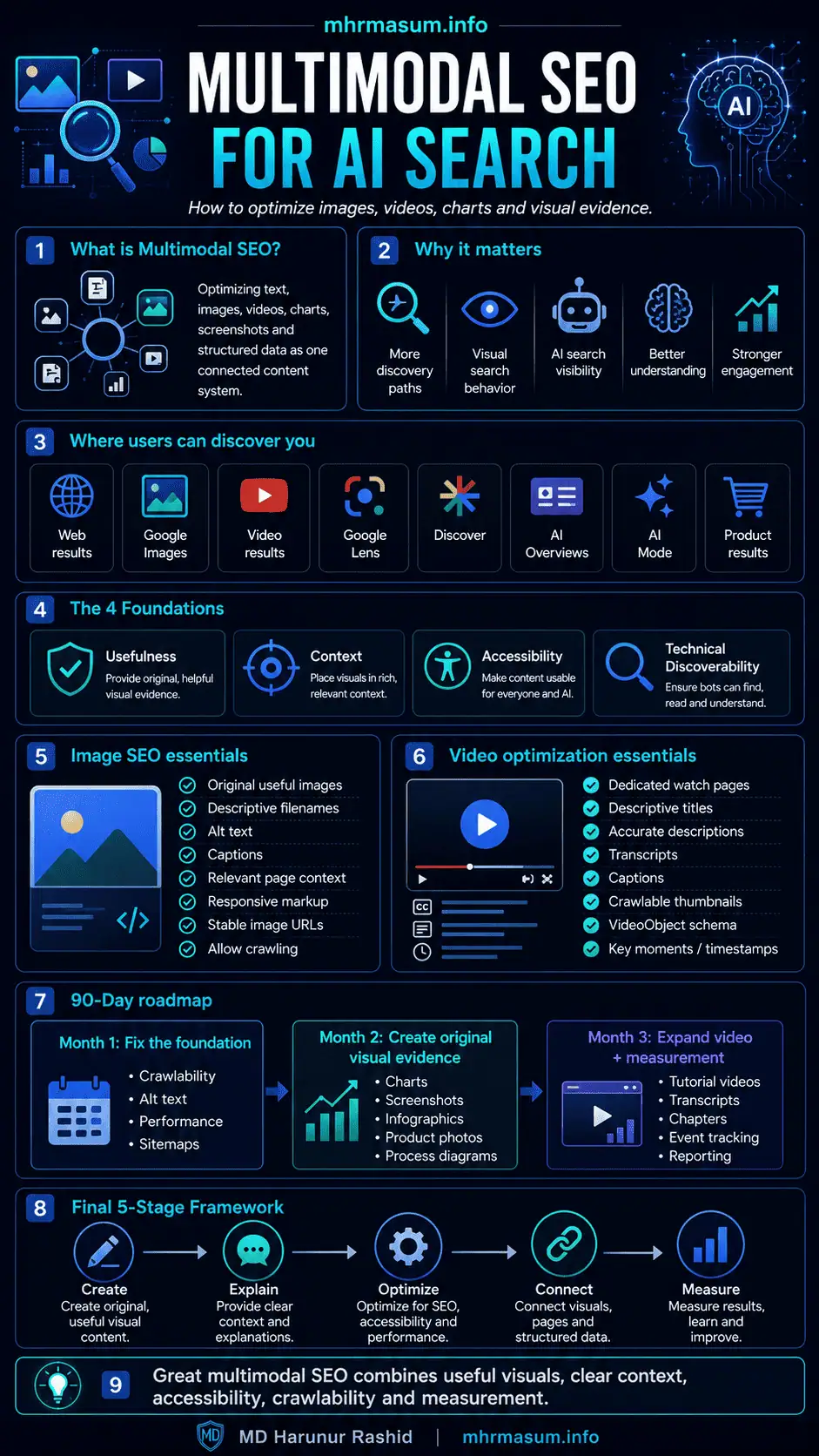
Final Multimodal SEO Framework
A practical multimodal SEO strategy can be summarized in five stages.
Create
Produce useful visual content based on real user needs, evidence and expertise.
Explain
Support important visuals with headings, paragraphs, captions, alt text, transcripts or data tables.
Optimize
Use stable URLs, supported formats, responsive delivery, sitemaps, structured data and strong page performance.
Connect
Link visuals with relevant entities, topic clusters, service pages, case studies and conversion pathways.
Measure
Track web, image, video, AI-feature and conversion performance separately.
Final Thoughts
Multimodal SEO is not about filling every article with stock images, videos and decorative graphics.
It is about communicating information through the format that helps the user understand it most effectively.
Sometimes the best format is text.
Sometimes it is a chart.
Sometimes it is a screenshot.
Sometimes it is a detailed infographic.
Sometimes it is a demonstration video.
The strongest pages combine these formats thoughtfully.
Google’s guidance confirms that high-quality, relevant images and videos can create additional visibility opportunities in generative AI search. At the same time, Google continues to emphasize established SEO fundamentals, crawlability, people-first content, technical quality and page experience.
A successful multimodal strategy therefore requires:
- Original expertise
- Useful visual evidence
- Clear writing
- Accurate metadata
- Accessible design
- Technical crawlability
- Fast delivery
- Structured data
- Strong entities
- Brand authority
- Reliable measurement
For mhrmasum.info, the strategy should prioritize:
- Branded SEO infographics
- Search Console and GA4 screenshots
- Technical SEO flowcharts
- AI search diagrams
- Local SEO case-study charts
- WordPress performance comparisons
- Video tutorials
- Downloadable checklists
- Original visual frameworks
These visual assets can strengthen existing content clusters around AI SEO, Entity SEO, Technical SEO, Local SEO and brand authority.
For professional help with multimodal SEO, AI search visibility, WordPress Technical SEO, image optimization, video strategy, structured data and digital growth, explore my SEO and digital growth services or contact MD Harunur Rashid for a detailed consultation.