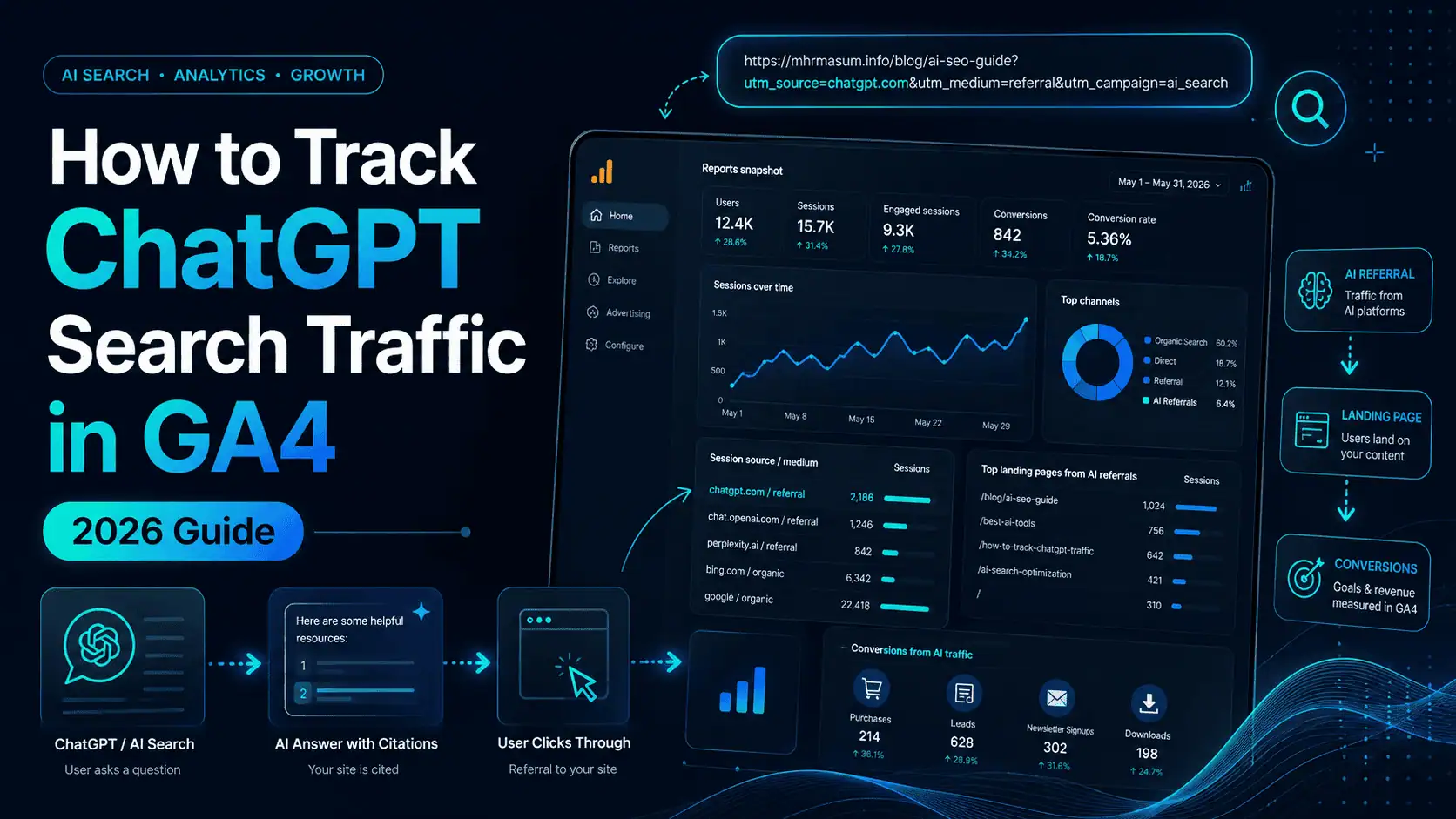
ChatGPT is no longer only a tool people use to generate text. It has become an important discovery, research and recommendation platform where users search for products, compare service providers, research businesses and find useful websites.
When ChatGPT references your website and a user clicks the citation or source link, that visit may appear inside Google Analytics 4 as referral traffic from ChatGPT. However, simply seeing a few sessions from chatgpt.com is not enough.
Website owners, SEO consultants, agencies and marketing teams need to know:
- Which pages receive ChatGPT traffic
- Whether visitors engage with the content
- Which services or products attract AI-referred visitors
- Whether those users submit forms, call, message or purchase
- How ChatGPT traffic compares with Google organic search
- Whether AI visibility is contributing to business growth
This guide explains how to track ChatGPT search traffic in GA4, create a dedicated ChatGPT reporting channel, identify high-performing landing pages, measure conversions and build an actionable AI search reporting process.
What Is ChatGPT Search Traffic?
ChatGPT search traffic refers to website visits generated when someone clicks a link to your website from a ChatGPT response, search result, citation, recommendation or research output.
For example, a user may ask ChatGPT:
- Who is the best Local SEO consultant for small businesses?
- What is the best way to recover after a Google core update?
- Which WordPress Technical SEO problems affect rankings?
- How can an eCommerce website appear in AI search results?
- What is the difference between GEO, AEO and SEO?
If ChatGPT uses one of your articles as a source and the user clicks through to your website, that session may be attributed to ChatGPT inside GA4.
This type of traffic is part of a broader shift toward AI-powered discovery. I explain that shift in more detail in my guide to AI SEO for Google AI Overviews, ChatGPT, Gemini and Perplexity.
Why Tracking ChatGPT Traffic Matters
Tracking ChatGPT traffic helps you understand whether your website is gaining measurable visibility beyond conventional Google search results.
Traditional SEO reporting usually focuses on rankings, impressions, clicks, organic sessions and conversions. Those metrics remain important, but they do not provide a complete picture of how modern users discover brands and content.
AI platforms can influence a customer before the customer performs a branded search, visits a Google Business Profile or directly contacts a company. A person may discover your brand in ChatGPT, research you on Google and convert during a later visit.
Tracking ChatGPT referrals therefore helps you evaluate several important areas.
Measure the Business Value of AI Visibility
A website appearing in ChatGPT is valuable only when that visibility contributes to meaningful outcomes.
A referral report can show whether ChatGPT visitors:
- Read multiple pages
- View service pages
- Open case studies
- Submit a contact form
- Click a telephone number
- Start a WhatsApp conversation
- Book a consultation
- Purchase a product
- Return through another channel later
The objective is not simply to increase AI referral sessions. The objective is to attract relevant visitors who can become leads, customers, subscribers or brand advocates.
Identify Content That AI Platforms Prefer
ChatGPT referral data can reveal which pages are being discovered or recommended through AI-generated answers.
You may find that practical guides, comparison articles, original research, checklists, case studies and specialist service pages attract more AI referrals than generic blog posts.
This information can help you develop a more effective content strategy around:
- Specific customer questions
- Clearly defined entities
- Expert commentary
- Original evidence
- Actionable processes
- Case-study results
- Updated statistics
- Transparent authorship
This approach connects closely with Entity SEO and building brand authority for AI search.
Report AI Search Performance to Clients
Agencies and consultants increasingly need to explain how AI discovery contributes to website performance.
A dedicated ChatGPT or AI Assistants channel in GA4 can support clearer client reporting. Instead of combining all AI referrals with ordinary referral traffic, you can report them separately.
A monthly AI search report may include:
- ChatGPT sessions
- ChatGPT users
- Engaged sessions
- Engagement rate
- Average engagement time
- Top landing pages
- Key events
- Lead conversion rate
- Revenue
- Assisted conversions
- Month-over-month growth
This gives clients a more realistic view of how search behaviour is evolving.
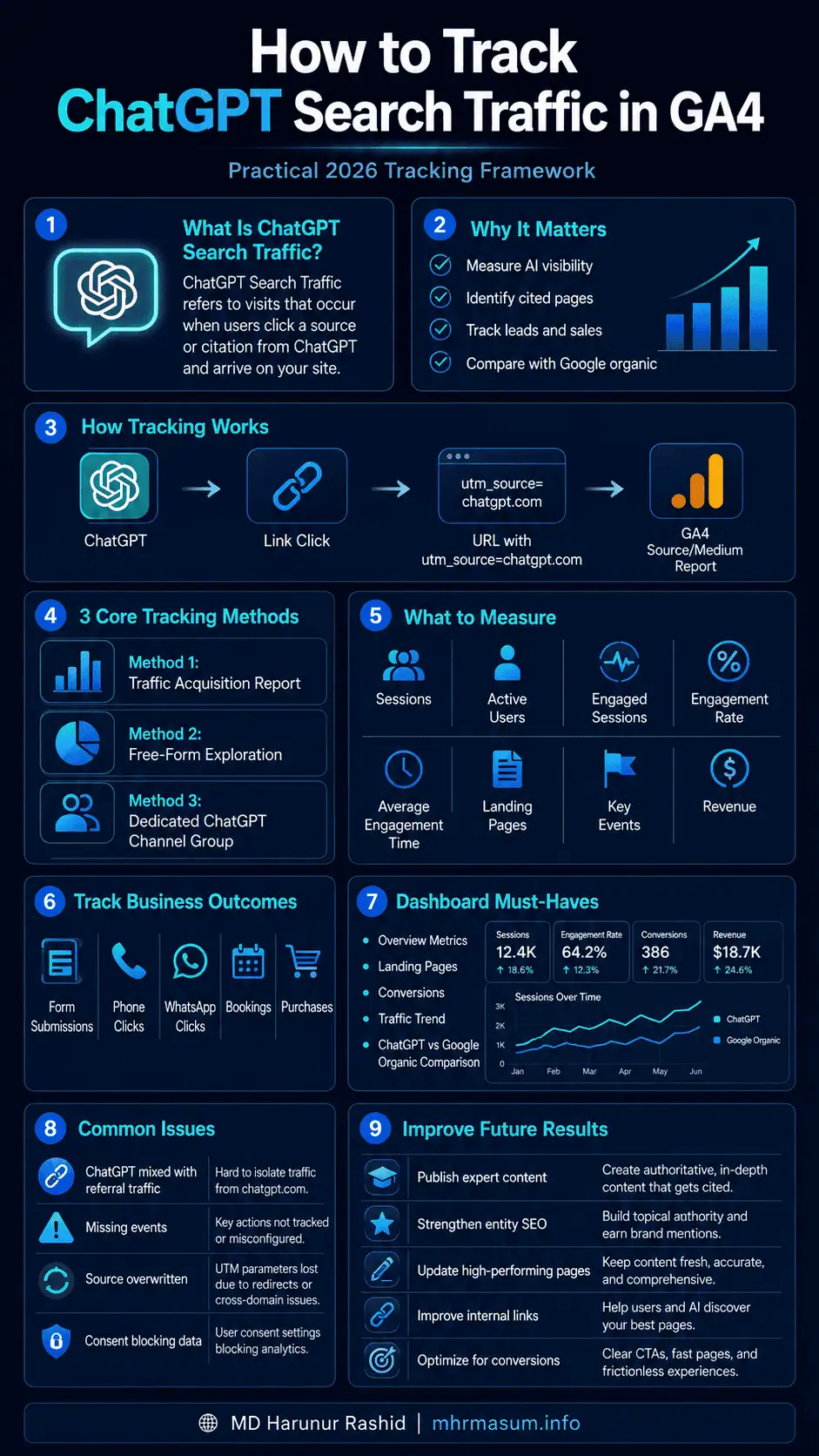
How ChatGPT Referral Tracking Works
OpenAI states that referral URLs from ChatGPT search results automatically include the parameter utm_source=chatgpt.com. This enables publishers to identify inbound ChatGPT search traffic in analytics platforms such as Google Analytics. You can review the official explanation in the OpenAI Publishers and Developers FAQ.
A ChatGPT-generated destination URL may therefore contain a parameter similar to:
https://example.com/article/?utm_source=chatgpt.com
GA4 can use this information to associate the session with chatgpt.com as the traffic source.
Depending on the referring environment, redirect process, browser, consent settings and available campaign information, the traffic may appear using values such as:
chatgpt.com / referral
Historical data may also contain values associated with:
chat.openai.com / referral
The exact value can vary, so your reporting setup should look for both current and relevant legacy source patterns.
What GA4 Can and Cannot Show About ChatGPT Traffic
GA4 can provide useful information about users after they arrive on your website, but it cannot reveal everything that happened inside ChatGPT.
GA4 can usually show:
- The traffic source
- The traffic medium
- The landing page
- Session count
- User count
- Device category
- Country or region
- Engagement data
- Events
- Key events
- Revenue
- Subsequent website behaviour
GA4 normally cannot show:
- The exact prompt entered into ChatGPT
- The complete ChatGPT conversation
- The exact answer that contained your website
- Why ChatGPT selected your page
- The position of your citation within the response
- Every impression where your brand was mentioned
- The total number of times your website was cited without receiving a click
This means GA4 measures click-through traffic, not total ChatGPT visibility.
You should not describe ChatGPT referral sessions as the complete measurement of your AI search performance. They represent one measurable part of a larger AI visibility picture.
Before You Start Tracking ChatGPT Traffic
Before building your reports, confirm that your GA4 implementation is collecting reliable website data.
A sophisticated AI traffic dashboard will not be useful if your underlying analytics setup is incomplete or inaccurate.
Check the following items:
- GA4 is installed on every important page
- The correct GA4 property is being used
- Internal staff traffic is filtered where appropriate
- Cross-domain tracking is configured when required
- Contact forms generate successful events
- Telephone clicks are tracked
- WhatsApp clicks are tracked
- Appointment bookings are tracked
- eCommerce events are implemented correctly
- Key events have been defined
- Cookie consent does not unnecessarily block all measurement
- Payment gateways do not overwrite the original traffic source
A strong tracking setup should measure both traffic and business outcomes.
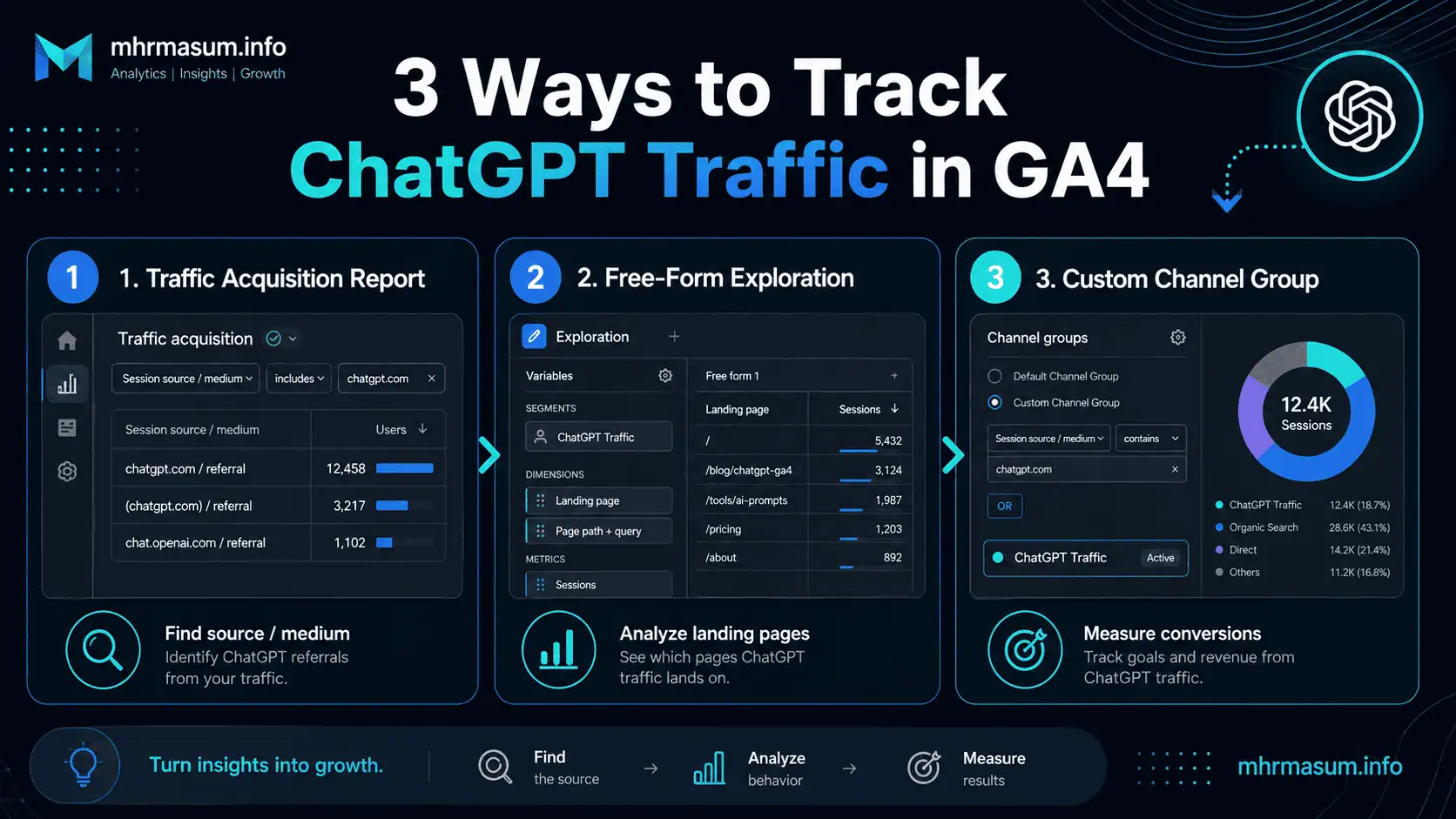
Method 1: Find ChatGPT Traffic in the GA4 Traffic Acquisition Report
The fastest way to check for ChatGPT traffic is through the standard Traffic acquisition report.
Google describes the Traffic acquisition report as a session-scoped report that shows where new and returning users came from during their sessions. It is different from User acquisition, which focuses on how users were acquired for the first time.
Open the Traffic Acquisition Report
The Traffic acquisition report can be found through the standard GA4 reporting navigation.
Follow these steps:
- Sign in to Google Analytics.
- Select the correct GA4 account and property.
- Open Reports.
- Select Acquisition.
- Open Traffic acquisition.
- Change the primary dimension to Session source / medium.
- Search for
chatgpt. - Check whether
chatgpt.comor a related source appears.
Google’s official Traffic acquisition report guide confirms that the report is available under Reports → Acquisition → Traffic acquisition and can be searched for a particular source.
Use Session Source Rather Than First User Source
For regular ChatGPT traffic reporting, use a session-scoped dimension such as:
- Session source
- Session medium
- Session source / medium
- Session campaign
- Session default channel group
Session dimensions tell you which source generated a particular visit.
A first-user dimension answers a different question. It shows how the user was originally acquired.
For example, a user may first discover your website through Google and return one month later through ChatGPT. In that situation:
- First user source may remain Google.
- Session source for the later visit may be ChatGPT.
Use Traffic acquisition when you want to measure the sessions ChatGPT is currently sending. Use User acquisition when you want to know how many users were first introduced to your website by ChatGPT.
Add a Landing-Page Dimension
Knowing the referral source is only the first step. You also need to know which page the ChatGPT visitor entered.
Add a secondary dimension such as:
Landing page + query string
This can reveal whether ChatGPT is sending traffic to:
- Blog articles
- Service pages
- Product pages
- Case studies
- Portfolio pages
- About pages
- Contact pages
A landing-page report can help you identify which content formats and topics are earning AI-driven clicks.
Review the Right Metrics
Do not evaluate ChatGPT traffic using sessions alone. Add engagement and conversion metrics to understand traffic quality.
Useful metrics include:
| Metric | What It Helps You Understand |
|---|---|
| Sessions | Number of visits attributed to ChatGPT |
| Active users | Number of users who actively engaged |
| New users | Number of first-time visitors |
| Engaged sessions | Visits that met GA4 engagement criteria |
| Engagement rate | Percentage of sessions considered engaged |
| Average engagement time | Time users actively engaged with the site |
| Views per session | Depth of website interaction |
| Event count | Total measured interactions |
| Key events | Important business actions |
| Session key event rate | Percentage of sessions producing a key event |
| Total revenue | Revenue associated with the traffic |
| Transactions | Number of completed purchases |
Google defines an engaged session as one that lasts at least 10 seconds, includes a key event, or produces at least two page or screen views.
Method 2: Create a ChatGPT Free-Form Exploration
A standard acquisition report is useful for a quick check, but an Exploration gives you more control over dimensions, metrics, filters and visualisations.
Google’s Free-form exploration allows users to build tables and charts, compare metrics, create nested rows and apply custom filters.
Create the Exploration
A dedicated exploration makes it easier to analyse ChatGPT traffic without repeatedly changing your standard reports.
Follow these steps:
- Open your GA4 property.
- Select Explore from the left navigation.
- Choose Free form.
- Rename the exploration to
ChatGPT Traffic Analysis. - Select an appropriate date range.
- Import the required dimensions.
- Import the required metrics.
- Add a ChatGPT source filter.
- Save the exploration.
The report will update as additional ChatGPT traffic is collected.
Add the Recommended Dimensions
Dimensions determine how your data is organised.
Add these dimensions:
- Session source
- Session medium
- Session source / medium
- Landing page + query string
- Page path and screen class
- Page title and screen name
- Device category
- Country
- City
- New / established
- Date
- Event name
You do not need to display every dimension simultaneously. Import them first and use them when analysing specific questions.
Add the Recommended Metrics
Metrics provide the numerical values you need to compare performance.
Add these metrics:
- Sessions
- Active users
- New users
- Engaged sessions
- Engagement rate
- Average engagement time per session
- Views
- Views per session
- Event count
- Key events
- Session key event rate
- Transactions
- Purchase revenue
- Total revenue
For lead-generation websites, key events and session key event rate will usually be more valuable than revenue unless monetary lead values have been configured.
Configure the Main ChatGPT Report
A practical exploration configuration is:
Rows:
Landing page + query string
Values:
Sessions
Active users
Engaged sessions
Engagement rate
Average engagement time per session
Key events
Session key event rate
Total revenue
Filter:
Session source contains chatgpt
This report will show which landing pages receive ChatGPT traffic and how those sessions perform.
Add Legacy ChatGPT Sources Where Necessary
If your GA4 property contains older data, you may want to include previous ChatGPT-related source values.
You can create an OR-based filter that includes:
Session source contains chatgpt
OR
Session source exactly matches chat.openai.com
Avoid adding every URL containing openai, because that could include visits from OpenAI’s corporate website, developer documentation or other unrelated sources.
Method 3: Create a Dedicated ChatGPT Channel Group
A custom channel group is one of the best ways to separate ChatGPT traffic from the general Referral channel.
Google now provides an official example for creating an “AI assistants” channel using source-based rules. Custom channel groups can be used in acquisition reports, custom reports, Explorations and audience conditions. They can also apply retroactively to reporting data.
Why Create a ChatGPT Channel?
Without a custom channel, ChatGPT visits may be combined with:
- News websites
- Business directories
- Partner websites
- Social-profile referrals
- Forum links
- Industry publications
- Other AI assistants
A dedicated ChatGPT channel gives you a clearer view of its contribution.
You can create either:
- A ChatGPT-only channel
- A broader AI Assistants channel
- Both, if your GA4 limits and reporting requirements allow it
Create a ChatGPT-Only Channel Group
Google requires Editor-level access to create or edit custom channel groups.
Follow these steps:
- Open Admin.
- Under Data display, select Channel groups.
- Select Create new channel group.
- Name the group
MHR Custom Channel Group. - Add a new channel.
- Name the channel
ChatGPT. - Add a source condition.
- Place the ChatGPT channel above Referral.
- Save the channel.
- Save the channel group.
Google explains that traffic is assigned to the first channel whose criteria it matches. Therefore, your ChatGPT channel should normally appear above Referral.
Use a Focused ChatGPT Regex
For a ChatGPT-only channel, use a focused expression rather than an overly broad AI regex.
A practical source regex is:
.*chatgpt.*|chat\.openai\.com
Your condition can be configured as:
Source matches regex:
.*chatgpt.*|chat\.openai\.com
This should capture the current chatgpt.com source and the common legacy chat.openai.com source without classifying every OpenAI-related referral as ChatGPT.
Create a Broader AI Assistants Channel
You may also create an AI Assistants channel containing ChatGPT, Gemini, Claude, Copilot and Perplexity.
Google’s official custom-channel documentation now includes an AI-assistant example covering several major platforms. Google recommends updating the regex when AI-assistant URLs or platforms change.
A more controlled starting regex for common platforms could be:
.*chatgpt.*|chat\.openai\.com|.*perplexity.*|.*claude.*|.*copilot.*|.*gemini.*
Review the matched sources regularly. AI product domains and referral structures can change, and broad expressions can sometimes capture unrelated traffic.
How to Track ChatGPT Landing Pages
Landing pages show which content brought ChatGPT users to your website.
This information can answer questions such as:
- Which articles are being cited?
- Which services attract AI-assisted discovery?
- Are old posts receiving new visibility?
- Do case studies perform better than generic articles?
- Are visitors entering through informational or commercial pages?
- Which content deserves an update?
Create a report using:
Dimension:
Landing page + query string
Filter:
Session source contains chatgpt
Metrics:
Sessions
Engagement rate
Average engagement time
Key events
Session key event rate
Revenue
Sort the report by sessions first, then review conversion quality.
A page with 20 ChatGPT sessions and three qualified leads may be more valuable than a page with 200 sessions and no meaningful actions.
How to Track ChatGPT Conversions and Leads
Traffic measurement becomes commercially useful when it is connected to key events.
Google allows an existing event to be marked as a key event. New events can also be created and marked as key events for important business actions. Marking an event affects reporting from that point forward and does not change historical event data.
Define Meaningful Lead-Generation Events
A service business should track actions that indicate commercial intent.
Recommended events include:
generate_lead
form_submit_success
click_phone
click_whatsapp
click_email
book_consultation
download_proposal
view_contact_page
Do not mark every minor interaction as a key event. A page scroll or button hover may be useful for behavioural analysis, but it is not necessarily a business conversion.
Track Successful Form Submissions
Tracking a submit-button click is not the same as tracking a successful form submission.
A user may click the button while:
- Required fields are missing
- Validation fails
- The server rejects the request
- The form encounters a technical error
- Spam protection blocks the submission
A more reliable setup triggers an event only after the form is successfully submitted.
For WordPress websites, this can be implemented using:
- A dedicated thank-you page
- Google Tag Manager
- A form plugin’s success event
- A custom JavaScript data-layer event
- Server-side tracking
Google provides an official method for creating an event from a page_view when a user reaches a confirmation or thank-you page.
Mark the Lead Event as a Key Event
Once GA4 receives the successful lead event:
- Open Admin.
- Under Data display, select Events.
- Find the event.
- Click the star icon to mark it as a key event.
- Wait for the event to appear in standard reports.
- Test it through Realtime and DebugView.
Google notes that newly marked key events may take up to 24 hours to appear in standard reports, although Realtime reports update more quickly.
Assign a Value to Leads
Not every lead has the same probability of becoming a customer, but assigning an estimated lead value can improve reporting.
For example:
- Contact form lead: $50
- Consultation booking: $100
- Qualified audit request: $200
- Product demo request: $250
Google permits monetary values to be associated with key events using value and currency parameters.
Use realistic values based on:
Average customer value × lead-to-customer conversion rate
For example:
$2,000 average customer value × 5% close rate = $100 estimated lead value
You can then compare the estimated commercial contribution of ChatGPT, Google organic search, referrals, social media and paid campaigns.
How to Track ChatGPT eCommerce Revenue
WooCommerce and other eCommerce websites should measure the complete purchasing journey rather than only product-page visits.
Relevant eCommerce events include:
view_itemadd_to_cartbegin_checkoutadd_payment_infopurchaserefund
Your ChatGPT traffic report should include:
- Product views
- Add-to-cart events
- Checkout starts
- Purchases
- Purchase revenue
- Average order value
- eCommerce conversion rate
You may discover that ChatGPT sends fewer visitors than Google organic search but attracts users researching highly specific products. That possibility should be tested with your own data rather than assumed.
For eCommerce websites, combine AI traffic measurement with strong WooCommerce SEO, accurate product information, Product schema, transparent shipping details, return policies, reviews and entity consistency.
How to Build a ChatGPT Traffic Dashboard
A dedicated dashboard can make monthly reporting faster and easier to understand.
You can create the dashboard in GA4 Explorations or connect GA4 to Google’s reporting and visualisation platform.
Your dashboard should contain several sections.
ChatGPT Traffic Overview
The overview should communicate the size and general quality of ChatGPT traffic.
Include scorecards for:
- Sessions
- Active users
- New users
- Engaged sessions
- Engagement rate
- Average engagement time
- Key events
- Session key event rate
- Revenue
Compare the current period with the previous period and the same period in the previous year when sufficient data exists.
ChatGPT Landing Pages
The landing-page table should identify the content responsible for attracting AI-referred users.
Include:
- Landing page
- Page title
- Sessions
- Engagement rate
- Average engagement time
- Key events
- Key event rate
- Revenue
This table can guide content updates and internal-linking improvements.
ChatGPT Conversion Performance
The conversion section should focus on actions connected to business value.
Include:
- Event name
- Event count
- Key event count
- Key event rate
- Estimated event value
- Revenue
- Landing page
- Device category
This helps determine whether visitors are merely reading or progressing toward becoming customers.
ChatGPT Traffic Trend
Use a time-series chart showing ChatGPT sessions by day, week or month.
Annotate important events such as:
- Major content publication dates
- Content updates
- Digital PR campaigns
- Google core updates
- Website migrations
- Technical SEO fixes
- Brand campaigns
- Important ChatGPT product changes
A sudden increase may result from one article being cited frequently, while a decrease may result from a change in attribution, content relevance or AI answer composition.
How to Compare ChatGPT Traffic With Google Organic Search
ChatGPT and Google organic traffic should not be compared only by volume.
Google Search may generate far more sessions, while ChatGPT may influence a smaller but highly researched audience. The reverse could also occur for certain informational content.
Build a comparison containing:
| Metric | ChatGPT | Google Organic |
|---|---|---|
| Sessions | ||
| Active users | ||
| Engagement rate | ||
| Average engagement time | ||
| Views per session | ||
| Key events | ||
| Session key event rate | ||
| Revenue | ||
| Revenue per session |
Evaluate:
- Traffic quantity
- Traffic quality
- Commercial intent
- Landing-page distribution
- Device usage
- Geographic relevance
- Lead value
- Revenue contribution
Avoid making conclusions from very small samples. A conversion rate based on three sessions is not a reliable performance benchmark.
How to Separate ChatGPT From Other AI Platforms
Combining all AI traffic into one channel is useful for a high-level report, but it can hide important differences.
ChatGPT, Gemini, Perplexity, Claude and Copilot may send visitors with different intentions and behaviour patterns.
Create individual reports for:
- ChatGPT
- Perplexity
- Gemini
- Claude
- Microsoft Copilot
- Other AI assistants
Then create a combined AI Assistants view for executive reporting.
This structure gives you:
- A high-level AI traffic total
- Platform-specific performance
- Better landing-page analysis
- Clearer conversion comparisons
- Improved content-strategy decisions
It also supports a more accurate understanding of GEO vs AEO vs SEO.
Why Some ChatGPT Traffic May Appear as Direct or Unassigned
Analytics attribution is not perfect. Some ChatGPT-originated visits may not retain complete referral or campaign information.
Possible causes include:
- Browser privacy controls
- Consent restrictions
- Redirect chains
- Link-opening behaviour
- Mobile application environments
- Missing referrer information
- Incorrect UTM processing
- Cross-domain tracking problems
- Payment-gateway redirects
- Server-side tracking errors
- Analytics tags loading too late
- Ad blockers or tracking prevention
This means chatgpt.com referral sessions should be treated as confirmed measurable traffic, not necessarily the complete volume of ChatGPT-influenced visits.
Common ChatGPT Tracking Problems and How to Fix Them
Tracking issues should be investigated systematically rather than solved by repeatedly changing reports.
No ChatGPT Traffic Appears in GA4
The absence of ChatGPT traffic does not automatically mean your website has never appeared in a ChatGPT response.
The most likely possibilities are:
- Nobody clicked the citation
- The website has not been cited
- Referral data was removed
- The traffic appears under another source
- The selected date range is too short
- GA4 was not active when the visit occurred
- Consent prevented analytics collection
- Your report filter is too restrictive
Search your source data for:
chatgpt
openai
chat.openai.com
Also inspect Direct, Referral and Unassigned traffic for unusual landing-page patterns.
ChatGPT Is Included in General Referral Traffic
This is expected when no custom AI or ChatGPT channel has been created.
Create a custom channel group and place ChatGPT above the Referral channel. Google assigns traffic to the first matching channel in the custom group.
ChatGPT Was Added to Unwanted Referrals
Do not add ChatGPT to the unwanted-referral list when you want to measure it as a traffic source.
Google’s unwanted-referral feature is intended for domains that should not be credited as referral sources, such as certain third-party payment processors. Adding ChatGPT may prevent it from receiving the attribution you are trying to measure. Google explains the purpose of this feature in its unwanted referrals documentation.
ChatGPT Sessions Show No Conversions
This may be a tracking problem rather than a traffic-quality problem.
Test whether:
- The form-success event fires
- The event name is correct
- The event is marked as a key event
- Phone and WhatsApp clicks are measured
- Booking confirmations are captured
- Cross-domain booking tools retain attribution
- Purchase events contain transaction IDs and values
Use GA4 Realtime, DebugView and Google Tag Manager Preview mode to validate the complete journey.
ChatGPT Data Is Too Small to Analyse
AI referral traffic may initially be limited.
When the sample is small:
- Use a 90-day or 180-day date range
- Focus on landing pages
- Review individual key events
- Avoid percentage-based claims
- Compare quarter over quarter
- Combine AI assistants for an executive view
- Retain platform-specific raw data
Do not describe a channel as “high converting” based on one conversion from a few sessions.
How to Improve Traffic From ChatGPT and AI Search
Tracking tells you what happened. The next step is using the data to improve future visibility and conversions.
Publish Clear, Answer-Focused Content
AI systems need content that clearly addresses a subject.
Use:
- Direct answers
- Logical heading structures
- Definitions
- Step-by-step processes
- Comparison tables
- Examples
- Checklists
- FAQs
- Original recommendations
Each heading should contain useful explanatory text. Avoid placing headings one after another without content between them.
Demonstrate Real Experience and Expertise
Generic AI-generated articles often repeat information already available across hundreds of websites.
Improve your content with:
- Original screenshots
- Audit examples
- Case-study results
- First-hand observations
- Practical warnings
- Tested workflows
- Expert analysis
- Named authors
- Clear revision dates
- References to authoritative sources
My guide explaining why generic AI content does not rank anymore provides a deeper framework for creating differentiated content.
Strengthen Entity Signals
Your website should make it easy to understand:
- Who you are
- What you specialise in
- Which services you provide
- Which industries you work with
- Where you operate
- What experience you have
- Which projects you have completed
- How you can be contacted
Connect articles naturally to your About page, Services, Portfolio and relevant case studies.
Build Strong Internal-Linking Paths
A ChatGPT visitor may enter through an informational article but still need a clear route toward a commercial decision.
Each important article should link naturally to:
- Relevant service pages
- Supporting guides
- Case studies
- Portfolio examples
- Author information
- Contact or consultation pages
For example, an article about AI traffic measurement can link to your Technical SEO and keyword research portfolio and contact page.
Maintain Strong Technical SEO
AI visibility does not eliminate the need for Technical SEO.
Your website should remain:
- Crawlable
- Indexable
- Fast
- Mobile-friendly
- Secure
- Canonically consistent
- Structurally clear
- Accessible
- Supported by accurate structured data
- Free from unnecessary duplication
Use the Technical SEO checklist for WordPress websites to review the core technical requirements.
Update Important Content Regularly
AI platforms and search engines prefer information that remains accurate and useful.
Review priority content when:
- Platform interfaces change
- GA4 navigation changes
- New AI platforms emerge
- Referral domains change
- Official documentation changes
- Search behaviour evolves
- New case-study evidence becomes available
Do not change the publication date without making meaningful improvements. Add genuine updates, new examples and revised instructions.
Monthly ChatGPT Traffic Reporting Template
A consistent monthly report makes long-term trends easier to identify.
Your report should include the following sections.
Executive Summary
The executive summary should explain what changed and why it matters.
Include:
- Total ChatGPT sessions
- Month-over-month change
- Number of leads or sales
- Highest-performing page
- Important visibility changes
- Recommended next action
Traffic and Engagement
This section should explain whether the channel is growing and whether users interact with the website.
Report:
- Sessions
- Users
- New users
- Engagement rate
- Average engagement time
- Views per session
Landing-Page Performance
This section should identify the pages responsible for attracting and converting ChatGPT visitors.
Report:
- Top landing pages
- New pages receiving traffic
- Pages with declining traffic
- Pages producing key events
- Pages requiring stronger CTAs
- Pages requiring content updates
Conversion Performance
This section should connect AI referral traffic with measurable business outcomes.
Report:
- Contact submissions
- Calls
- WhatsApp clicks
- Consultation bookings
- Purchases
- Revenue
- Estimated lead value
- Key event rate
Recommended Actions
The final section should turn the data into a practical optimisation plan.
Recommendations may include:
- Expand a high-performing topic
- Improve an underperforming CTA
- Add internal links
- Update outdated statistics
- Create a supporting case study
- Improve the service-page pathway
- Fix form tracking
- Strengthen author and entity information
A 30-Day ChatGPT Traffic Tracking Plan
A structured implementation plan prevents the project from becoming another unused analytics report.
Days 1–7: Audit the Measurement Setup
During the first week, verify your GA4 and conversion-tracking foundation.
Complete the following:
- Confirm GA4 coverage
- Test Realtime reporting
- Audit lead and purchase events
- Review referral exclusions
- Check cross-domain tracking
- Validate consent behaviour
- Record current ChatGPT source values
Days 8–14: Build the Reports
During the second week, create the reports required for ongoing measurement.
Complete the following:
- Build a Traffic acquisition filter
- Create a Free-form exploration
- Add a ChatGPT custom channel
- Create an AI Assistants channel
- Build a landing-page table
- Add engagement and key event metrics
Days 15–21: Analyse Content and Conversions
During the third week, identify which content and commercial pathways perform best.
Review:
- Top ChatGPT landing pages
- Service-page visits
- Contact-page visits
- Form completions
- Call and WhatsApp clicks
- Purchase behaviour
- Weak conversion pathways
Days 22–30: Improve the Website
During the final week, implement changes based on the data.
Possible improvements include:
- Add stronger contextual CTAs
- Improve internal links
- Expand high-performing articles
- Add original evidence
- Improve service-page messaging
- Fix broken conversion tracking
- Strengthen entity and author information
- Update outdated content
Frequently Asked Questions About Tracking ChatGPT in GA4
These frequently asked questions address common concerns about ChatGPT referral attribution, GA4 reports and AI search measurement.
Can GA4 Track Traffic From ChatGPT?
Yes. GA4 can track identifiable sessions generated when users click links from ChatGPT and the referral or campaign information is preserved.
OpenAI states that ChatGPT search referral URLs automatically include utm_source=chatgpt.com, which helps analytics platforms identify the source.
What Source Does ChatGPT Use in GA4?
The current source may appear as chatgpt.com. Historical properties may also contain chat.openai.com.
Check Session source and Session source / medium rather than relying only on the default channel group.
Does ChatGPT Traffic Count as Organic Search?
ChatGPT traffic will not necessarily be classified as Organic Search in GA4. It may be classified as Referral or another channel depending on the available source and medium information.
For clearer reporting, create a dedicated ChatGPT or AI Assistants custom channel.
Can GA4 Show the Prompt Someone Used in ChatGPT?
No. GA4 does not normally show the user’s ChatGPT prompt or complete conversation.
It measures the user’s activity after the user arrives on your website.
Can I See Which Article ChatGPT Cited?
GA4 can show the landing page the visitor entered, which often indicates which page was linked.
However, GA4 does not show the complete ChatGPT answer or every citation impression.
Should I Add ChatGPT to Referral Exclusions?
No, not when you want to track ChatGPT as an acquisition source.
Adding it to unwanted referrals can prevent the source from receiving the attribution you want to analyse.
How Can I Measure Leads From ChatGPT?
Create reliable events for successful form submissions, telephone clicks, WhatsApp clicks, bookings and other commercial actions. Mark the most important events as key events and filter the reports by ChatGPT source.
How Often Should I Review ChatGPT Traffic?
Review it monthly for regular reporting. High-traffic publishers, agencies and eCommerce websites may also review it weekly.
Use longer comparison periods when traffic volume is still small.
Final Thoughts
Tracking ChatGPT search traffic in GA4 is an essential part of modern AI SEO measurement.
The process should not stop at counting referral sessions. A complete tracking framework should show:
- Which pages attract ChatGPT visitors
- How those visitors engage
- Which actions they complete
- How much commercial value they produce
- How ChatGPT compares with other acquisition channels
- Which content should be improved next
Start with the GA4 Traffic acquisition report, create a Free-form exploration, build a dedicated ChatGPT channel and connect the traffic to properly configured key events.
AI search visibility is valuable, but measurable business growth is the real objective.
For support with AI SEO, GA4 tracking, Technical SEO, content systems, WordPress optimisation and digital growth strategy, explore my SEO and digital growth services or contact MD Harunur Rashid for a detailed consultation.