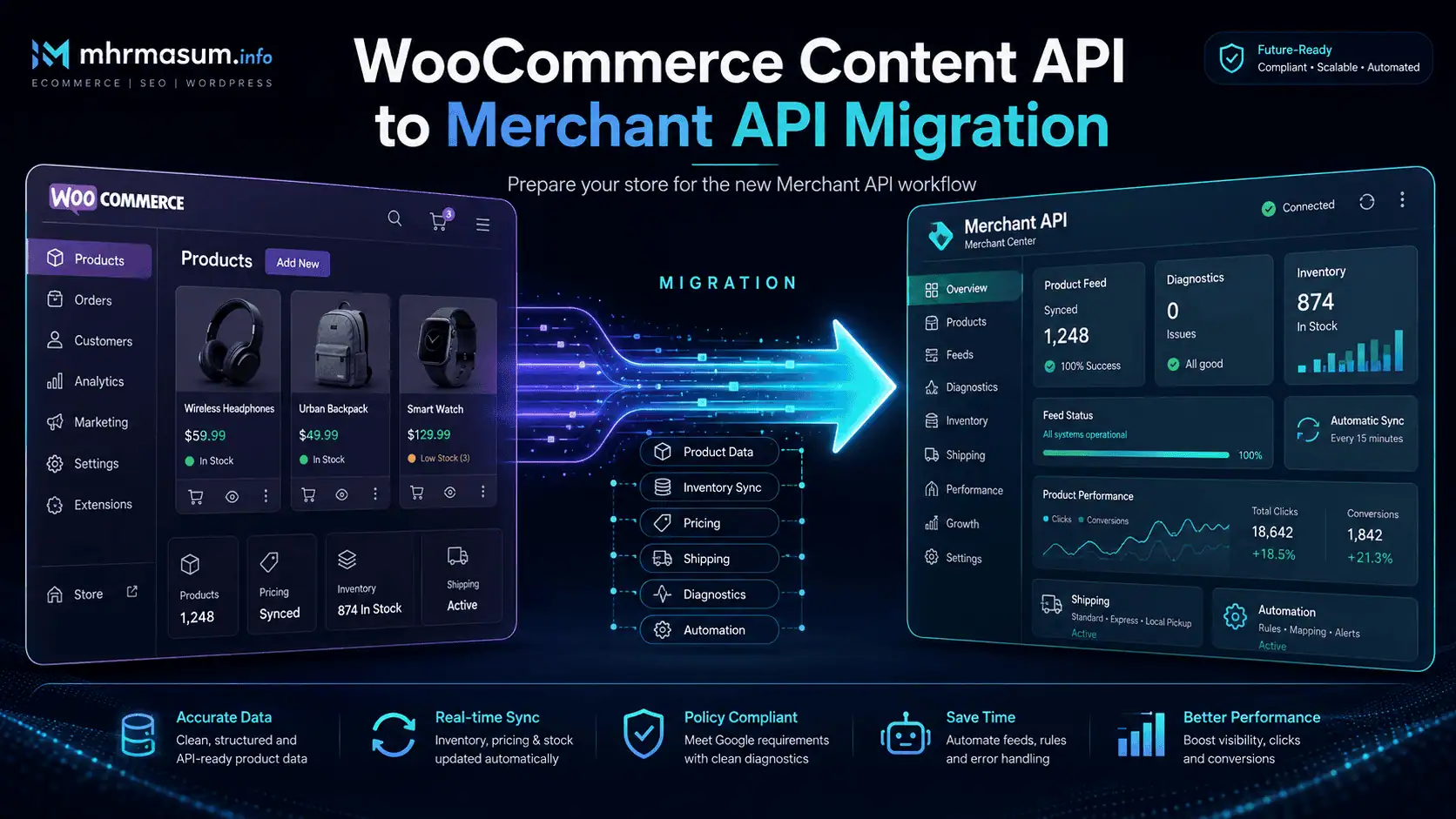
Google is shutting down the Content API for Shopping.
After years of powering product uploads, inventory updates, Merchant Center account management and ecommerce reporting, the legacy API will stop working on August 18, 2026.
Google has designated Merchant API as its official successor.
For WooCommerce store owners, the required action depends on how product data is currently sent to Google Merchant Center.
Stores using the official Google for WooCommerce extension should update the extension to version 3.8.1 or later. WooCommerce states that this version contains the changes required for the transition and that existing product synchronisation and Google Ads campaigns should continue without interruption.
Businesses using a custom WordPress plugin, middleware platform, agency feed system or direct Content API integration face a more complex task.
They must review and migrate their:
- Product insertion and update methods
- Product-status requests
- Data-source management
- Inventory operations
- Merchant account management
- Reports
- Authentication
- Batch-processing logic
- Error handling
- Product identifiers
- Price representations
This is not simply an endpoint replacement.
Merchant API introduces a different resource structure, explicit data sources, new product identifiers, separated input and processed-product resources, revised reporting fields and a different approach to bulk requests.
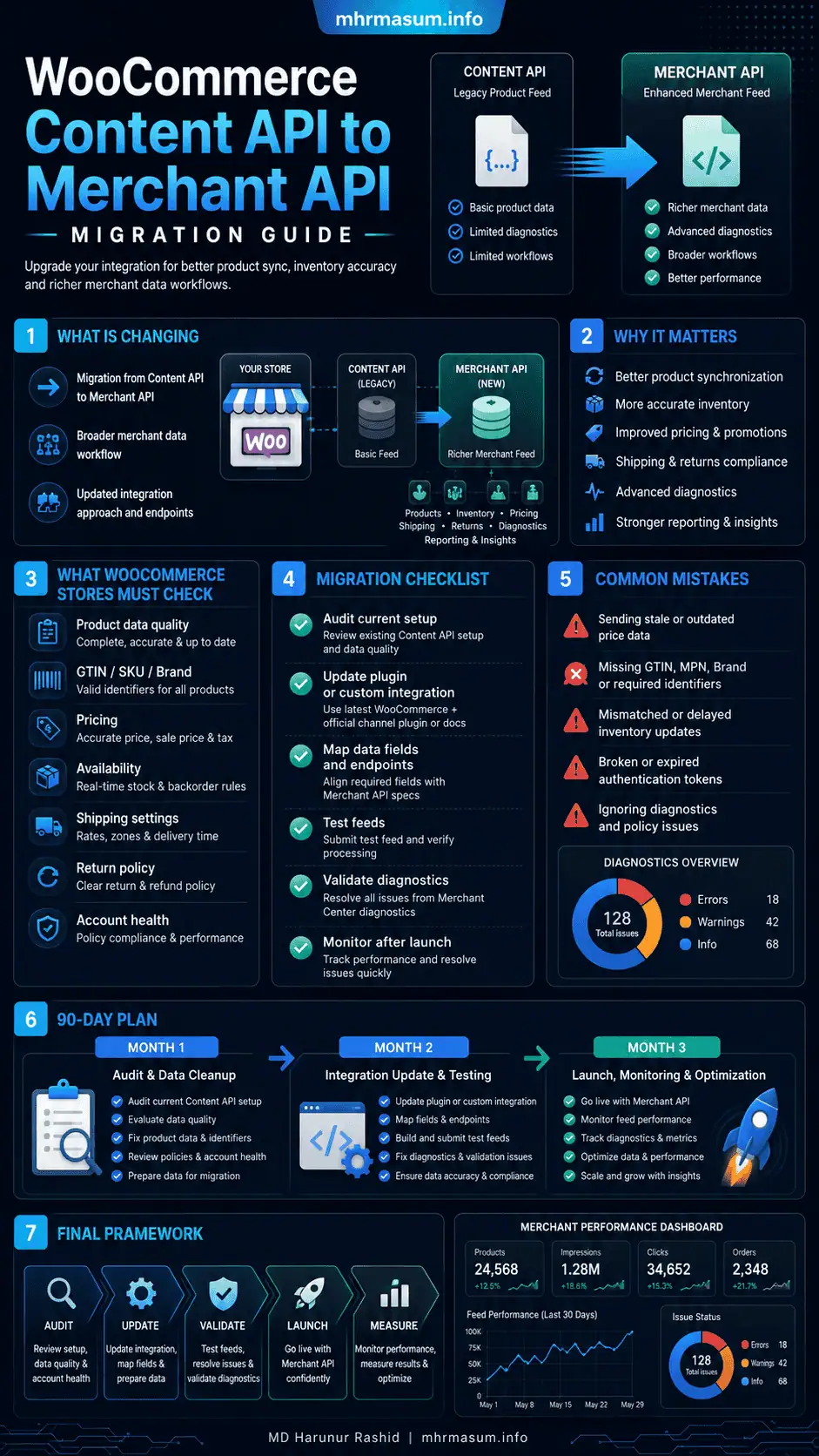
This guide explains what WooCommerce store owners, developers and agencies need to do before the Content API for Shopping shutdown.
For more practical resources covering WooCommerce SEO, AI search, WordPress, Google Merchant Center and digital growth, visit the MD Harunur Rashid SEO and AI SEO homepage.
Content API Shutdown: Key Facts
| Migration detail | Current information |
|---|---|
| Legacy API | Content API for Shopping v2.1 |
| Replacement | Google Merchant API |
| Content API deprecation announced | August 18, 2025 |
| Final shutdown date | August 18, 2026 |
| Merchant API status | Generally available |
| Current stable API generation | Merchant API v1 |
| Official WooCommerce extension | Google for WooCommerce |
| Minimum migration-ready extension version | Google for WooCommerce 3.8.1 or later |
| Custom integrations | Must be migrated by the developer or provider |
| Product-feed files | Review whether the feed system also uses Content API functions |
| Product history | Preserve the same offerId during migration |
| Recommended approach | Test gradually and migrate one sub-API or workflow at a time |
Google says Content API access will continue until August 18, 2026, after which the API will be shut down. Merchant API v1 became generally available in July 2025 as the official successor.
At the time this article was updated on July 30, 2026, the deadline was less than three weeks away.
Custom integrations that have not started testing should treat the migration as urgent.
What Is the Content API for Shopping?
The Content API for Shopping is Google’s legacy programmatic interface for managing Merchant Center data.
It has been used to automate tasks such as:
- Adding products
- Updating product information
- Removing products
- Updating prices
- Updating availability
- Managing inventory
- Retrieving product statuses
- Managing data feeds
- Configuring Merchant Center accounts
- Retrieving performance reports
- Managing promotions
- Working with local inventory
Many ecommerce plugins and feed-management platforms use the API behind the scenes.
A WooCommerce store owner may therefore depend on Content API without ever writing code or seeing an API request.
For example, when a WooCommerce product’s price changes from $99 to $89, a connected extension may send that updated value to Merchant Center through an API.
Similarly, when a product goes out of stock, the extension may send an availability update so Google does not continue advertising an unavailable item.
The API operates between ecommerce systems and Merchant Center. It is different from:
- Google Search indexing
- WordPress REST API
- WooCommerce REST API
- Google Ads API
- Google Search Console API
- Google Merchant Center feed files
- Product structured data
The shutdown does not mean Google Shopping or Merchant Center is closing.
It means integrations that still communicate through the old Content API must transition to Merchant API.
What Is Google Merchant API?
Merchant API is Google’s newer platform for managing Merchant Center accounts and commerce data programmatically.
It supports core workflows such as:
- Product management
- Inventory management
- Account management
- Data-source management
- Reporting
- Issue resolution
- Order-tracking signals
- Return policies
- Promotions
- Local inventory
- Regional inventory
- Product and merchant reviews
Google describes Merchant API as the official successor to Content API for Shopping. Merchant API v1 is generally available, while some newer or experimental functionality may be available through v1alpha resources.
Merchant API is divided into focused sub-APIs rather than placing every operation inside one large service.
Important sub-APIs include:
- Accounts
- Products
- Inventories
- Data Sources
- Reports
- Promotions
- Issue Resolution
- Order Tracking
- Quota
- Notifications
- Product Reviews
- Merchant Reviews
This modular structure gives developers more precise control, but it also means that a legacy integration must be mapped carefully.
Why Is Google Replacing Content API?
Merchant API provides a more modern and structured interface.
Important improvements include:
- Focused sub-APIs
- More explicit resource relationships
- Improved product-update behaviour
- Multiple API data sources
- Better account-management separation
- Integrated product issues
- New issue-resolution capabilities
- Order-tracking signals
- Online return-policy management
- Product and merchant review uploads
- Higher maximum page sizes for some requests
- REST and gRPC support
- More consistent Google API conventions
Google’s migration documentation says Merchant API is designed to automate account, product, inventory and reporting workflows while providing capabilities that were not available through Content API.
The migration also standardises how Google identifies resources.
Content API frequently relied on numeric IDs and custom product-ID strings. Merchant API uses standard resource names such as:
accounts/{account}/products/{product}
This makes the API more consistent with other modern Google Cloud APIs.
Does Every WooCommerce Store Need a Developer?
No.
The required migration path depends on the integration.
Scenario 1: You Use Google for WooCommerce
If your store uses the official Google for WooCommerce extension, WooCommerce has implemented the required Merchant API transition inside the extension.
WooCommerce’s current documentation instructs store owners to update to version 3.8.1 or later and continue installing future updates. It states that the update is intended to transition the store without interrupting current product synchronisation or Google Ads campaigns.
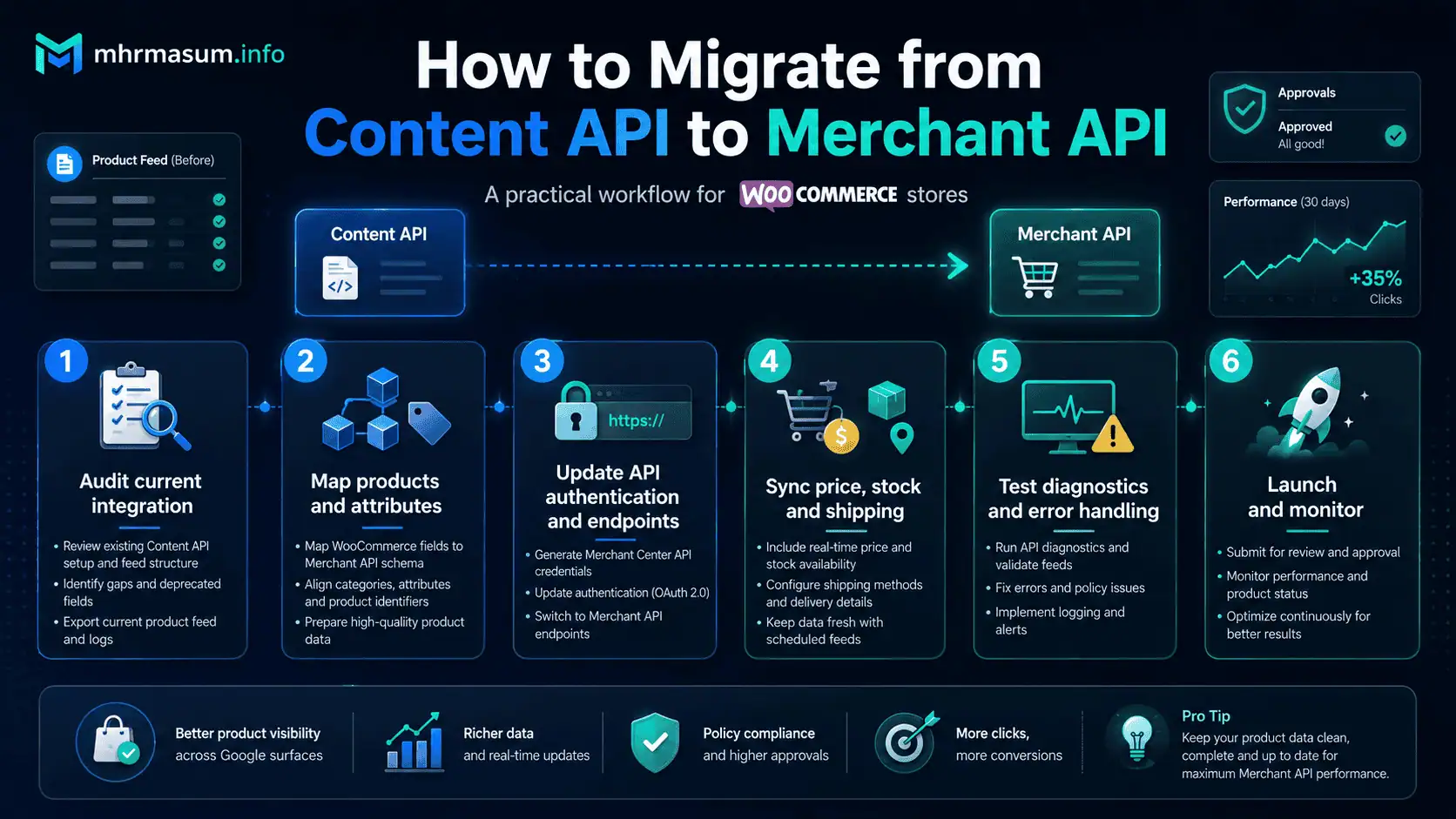
The normal process is:
- Create a current website backup.
- Check WordPress and WooCommerce compatibility.
- Update Google for WooCommerce to version 3.8.1 or later.
- Complete any migration prompt shown in WooCommerce.
- Confirm that Google accounts remain connected.
- Check the product synchronisation status.
- Review Merchant Center diagnostics.
- Confirm that new product changes reach Google.
- Continue updating the extension as new versions are released.
Most standard stores using this extension should not need to rewrite API code.
However, they should still verify the result.
A successful plugin update does not guarantee that every product, variation or attribute remains correct.
Scenario 2: You Use Another Feed Plugin
Third-party WooCommerce product-feed plugins may use:
- Content API
- Merchant API
- Scheduled XML feeds
- CSV feeds
- Google Sheets
- SFTP
- Merchant Center file uploads
- A combination of several methods
Check the plugin developer’s documentation and recent changelog.
Ask:
- Does the plugin use Content API?
- Has Merchant API support been released?
- Which plugin version is required?
- Is migration automatic?
- Must the Google account be reconnected?
- Will product IDs remain unchanged?
- Are supplemental feeds affected?
- Are shipping and tax settings migrated?
- Does the migration preserve product history?
- Is a manual resynchronisation required?
Google says merchants using third-party technology providers generally rely on those providers to perform the API migration. The merchant should nevertheless confirm that the provider has implemented it before the shutdown.
Scenario 3: You Use a Custom Integration
A custom integration requires developer work.
Examples include:
- A custom WooCommerce plugin
- A PHP script using Content API client libraries
- Middleware connecting an ERP to Merchant Center
- A product-information-management system
- An agency feed platform
- A custom inventory updater
- A marketplace integration
- A multi-store synchronisation platform
- A serverless product-update process
- An internal reporting dashboard
The developer must identify every Content API method and replace it with the appropriate Merchant API resource or method.
Do not assume that changing:
shoppingcontent.googleapis.com
to:
merchantapi.googleapis.com
will complete the migration.
The data model and method behaviour have changed.
Scenario 4: You Upload a Feed File
A scheduled XML, CSV or Google Sheets data source is not necessarily the same as a direct Content API integration.
The shutdown does not automatically mean that Merchant Center will stop processing supported feed files.
However, the plugin or platform that creates, submits, monitors or supplements the file may still use Content API for:
- Data-source creation
- Upload-status checks
- Diagnostics
- Account management
- Inventory updates
- Supplemental updates
Confirm the complete workflow rather than checking only the visible feed URL.
Google for WooCommerce Migration Instructions
For stores using the official extension, use the following process.
Step 1: Identify the Extension Version
In WordPress, go to:
Plugins → Installed Plugins
Find Google for WooCommerce and check the installed version.
WooCommerce currently identifies version 3.8.1 or later as migration-ready.
Step 2: Create a Full Backup
Back up:
- WordPress files
- Database
- WooCommerce product data
- Product variations
- Extension settings
- Product attributes
- Shipping settings
- Tax settings
- Tracking configuration
A backup is important because an ecommerce integration touches product, account and synchronisation data.
Step 3: Test the Update on Staging
Where possible, test the extension update on a staging site.
Check compatibility with:
- WooCommerce
- WordPress
- PHP
- Theme
- SEO plugin
- Caching system
- Consent platform
- Product attribute plugins
- GTIN plugins
- Currency plugins
- Multilingual plugins
- Product bundles
- Subscription products
- Booking products
Some external Google connections may not behave identically on staging, but compatibility and PHP errors can still be checked.
Step 4: Update the Extension
Update Google for WooCommerce to the latest available stable version, provided it is compatible with the store.
Do not stop permanently at version 3.8.1 merely because it contains the initial migration support. Continue applying maintenance and migration updates released by WooCommerce.
Step 5: Check the Google Connection
After updating, open the Google for WooCommerce settings.
Confirm that the following accounts remain connected:
- Google account
- Merchant Center account
- Google Ads account, where used
Do not disconnect and reconnect accounts unnecessarily.
Reconnection may create avoidable account-selection or permissions problems.
Step 6: Check Product Synchronisation
Review:
- Total WooCommerce products
- Products submitted to Google
- Approved products
- Pending products
- Disapproved products
- Products excluded by store rules
- Variations
- Recently updated products
Make a controlled change to a test product and confirm that the update reaches Merchant Center.
Possible test changes include:
- Price
- Availability
- Description
- Image
- GTIN
- Sale price
Use a low-risk test product rather than changing a top-selling item.
Step 7: Review Merchant Center Diagnostics
Check Merchant Center for:
- Account-level issues
- Product disapprovals
- Price mismatch
- Availability mismatch
- Missing GTIN
- Invalid product identifiers
- Image problems
- Shipping issues
- Return-policy issues
- Website crawling problems
- Data-source problems
The API migration should not be considered complete until the product data remains healthy after synchronisation.
Content API vs Merchant API: Main Differences
The following changes are especially important for developers.
| Area | Content API for Shopping | Merchant API |
|---|---|---|
| Base URL | shoppingcontent.googleapis.com |
merchantapi.googleapis.com |
| API structure | Large combined API | Focused sub-APIs |
| Resource identifier | IDs and custom strings | Standard resource name |
| Child resources | Varies | Uses parent relationships |
| Product writes | products |
ProductInput |
| Processed product | products |
Read-only Product |
| Product status | Separate productstatuses service |
Included in processed Product |
| Data source | Often implicit | Required for product-input writes |
| Batch method | custombatch |
Async or HTTP batching |
| Price representation | Varies by service | Structured Price using micros and currency |
| Product separator | Colon-based IDs | Tilde-based resource identifier |
| Reporting fields | Legacy table and metric names | Revised tables and fields |
| Authentication | OAuth-based | OAuth, service accounts or ADC; no API keys |
| Developer registration | Not the same model | Cloud project must be registered |
Google’s compatibility guide identifies resource names, parent relationships, explicit data sources, price-type changes and the removal of customBatch as central migration differences.
New Merchant API Endpoint Structure
Content API requests typically used formats such as:
https://shoppingcontent.googleapis.com/content/v2.1/{merchantId}/products
Merchant API uses:
https://merchantapi.googleapis.com/{SUB_API}/{VERSION}/{RESOURCE_NAME}:{METHOD}
For example, a Merchant API product-listing request can use:
GET https://merchantapi.googleapis.com/products/v1/accounts/{account}/products
Product insertion uses:
POST https://merchantapi.googleapis.com/products/v1/accounts/{account}/productInputs:insert
Google provides separate sub-API paths because products, accounts, reports and data sources are now managed through distinct services.
Developer Registration Is Required
To use Merchant API, a Google Cloud project must be linked with a primary Merchant Center account through developer registration.
Google describes this as a one-time registration for each Cloud project used with Merchant API.
The registration request uses a format such as:
POST https://merchantapi.googleapis.com/accounts/v1/accounts/{ACCOUNT_ID}/developerRegistration:registerGcp
The authenticating identity must have appropriate access to the Merchant Center account.
This registration step is separate from merely enabling the API in Google Cloud.
A migration checklist should therefore include:
- Google Cloud project identification
- Merchant API enablement
- OAuth or service-account setup
- Merchant Center user permissions
- Developer registration
- Production credential security
- Token-refresh testing
Merchant API Authentication
Merchant API requires authenticated requests.
Supported approaches include:
- OAuth 2.0
- Service accounts
- Application Default Credentials for appropriate development environments
API keys are not supported.
Use OAuth for Client Accounts
An agency, SaaS provider or plugin that accesses customers’ Merchant Center accounts should normally use OAuth 2.0.
Third-party applications may also need OAuth verification.
Google’s current guidance says unverified apps can receive warnings and limited functionality, and third-party apps must request the appropriate Merchant Center scope.
Use a Service Account for an Internal Integration
A service account can be suitable when an application accesses the business’s own Merchant Center account.
The service-account email must be added to Merchant Center with the required permissions.
Store private keys securely.
Do not:
- Commit credentials to GitHub
- Store JSON keys in a public web directory
- Add credentials directly to a theme file
- Expose tokens through frontend JavaScript
- Log complete access tokens
- Share one unrestricted credential across clients
ProductInput vs Product
One of the largest structural changes is the separation between submitted data and processed product data.
ProductInput
ProductInput represents the information submitted by your application.
Use it to:
- Insert products
- Update product inputs
- Delete product inputs
Product
Product is the read-only processed product.
It can reflect:
- Submitted product data
- Supplemental data
- Merchant Center rules
- Google processing
- Product issues
- Destination statuses
This separation makes it easier to distinguish between what your integration submitted and what Google ultimately processed.
The separate productstatuses service used in Content API has been removed. Product issues and statuses are included within the processed Product resource.
For WooCommerce developers, this means that write and diagnostic operations should no longer be treated as if they use the same resource.
Explicit Data Sources Are Now Required
Content API could automatically create a default “Content API” data source after the first product insertion.
Merchant API requires product write operations to specify a data source.
This gives integrations more control but creates an important migration responsibility.
Google says Merchant API supports:
- Multiple API data sources
- Primary data sources
- Supplemental product data sources
- Local inventory sources
- Regional inventory sources
- Promotion sources
- Product-review sources
- Merchant-review sources
It can also create a primary data source that accepts different combinations of feed labels and content languages.
Data-Source Migration Questions
Document:
- Which data source owns each product?
- Which feed label is used?
- Which content language is used?
- Are Merchant Center rules attached?
- Are supplemental sources involved?
- Are local inventories separate?
- Are multiple countries served?
- Do products move between sources?
- Does the local database store the data-source resource name?
Google recommends storing the appropriate dataSource name locally rather than requesting the data-source list before every product operation.
Prevent Accidental “Offer Stealing”
Google uses the term “offer stealing” for a situation in which a product is inserted into a different primary data source from the one that currently owns it.
Because products are uniquely identified through fields such as language, feed label and offer ID, sending the same product through the wrong primary source can move it away from the original source.
That can affect:
- Data-source rules
- Product ownership
- Supplemental information
- Product status
- Historical continuity
Before updating or deleting a product, confirm that the request targets the correct data source.
This is especially important for:
- Multi-country stores
- Multilingual stores
- Agency platforms
- Marketplaces
- Stores with supplemental feeds
- Local inventory programmes
- Complex Merchant Center accounts
Google recommends checking the exact associated data source when rules or multiple sources are involved.
Preserve the Existing Offer ID
Google recommends using the same offerId during the migration.
Changing an offer ID can cause Google to treat the item as a different product and may result in the loss of product history.
For WooCommerce, the offer ID may be based on:
- Product ID
- Variation ID
- SKU
- A plugin-generated identifier
- A custom mapping
Do not change the mapping during the API migration unless there is a separate, carefully planned reason.
Before cutover, export a table containing:
| WooCommerce field | Merchant Center field |
|---|---|
| Product ID | Offer ID |
| Variation ID | Variant offer ID |
| SKU | SKU or identifier |
| GTIN | GTIN |
| Parent product | Item group |
| Language | Content language |
| Country/feed label | Feed label |
| Data source | Merchant data-source name |
This table becomes essential when diagnosing missing or duplicated products.
Product-Identifier Format Has Changed
Content API commonly represented a product ID as:
online:en:US:sku123
Merchant API uses a standard resource name with the product section separated using tildes:
accounts/12345/products/en~US~sku123
The channel segment is no longer included in the same way.
Product identifiers containing reserved characters may require unpadded base64url encoding.
Developers should not construct or parse product IDs using old colon-based assumptions.
Review:
- Database fields
- Logging
- Cache keys
- Queue payloads
- Webhook handlers
- Report exports
- Admin interfaces
- Error messages
- Product-deletion logic
CustomBatch Is Not Supported
Content API offered a custombatch method that allowed several product operations to be sent in one request.
Merchant API does not support that same method.
Google recommends alternatives such as:
- Asynchronous requests
- HTTP batching
- Concurrent requests
- Client libraries
- gRPC channel pools for high-volume operations
A direct replacement is therefore required for any code using:
products.custombatch
or similar batch endpoints.
Migration Risk
Do not replace batch requests with uncontrolled concurrency.
Excessive simultaneous requests can:
- Hit quota limits
- Create retries
- Increase duplicate writes
- Make error analysis difficult
- Overload the WooCommerce server
- Delay Action Scheduler jobs
Implement:
- Controlled concurrency
- Exponential backoff
- Idempotent operations
- Retry limits
- Dead-letter logging
- Quota monitoring
- Per-product error records
Merchant API exposes quota information, and Google notes that high-concurrency implementations should monitor API errors and usage carefully.
Price Representation Changes
Merchant API uses a structured Price type.
Google’s compatibility documentation describes price using:
amountMicroscurrencyCode
For example, a price of $25.99 is represented conceptually as:
{
  "amountMicros": "25990000",
  "currencyCode": "USD"
}
One currency unit equals 1,000,000 micros.
Developers must check every part of the integration that reads, writes or compares prices.
Potential failure points include:
- Decimal conversion
- Sale prices
- Currency mapping
- Multicurrency stores
- Zero-decimal currencies
- Rounding
- Tax-inclusive prices
- Variation prices
- Report calculations
Never assume the old price representation can be passed to Merchant API unchanged.
Account Management Has Been Split Into Focused Resources
Content API used a large Account resource containing many settings.
Merchant API separates account information into more focused resources.
Examples include:
Accountfor core account detailsBusinessInfofor business informationHomepagefor website URL and claim statusUserfor user managementBusinessIdentityfor identity declarationsAccountServiceandAccountRelationshipfor account connections
Google says this enables more precise updates. For example, changing a business address can target BusinessInfo rather than updating the complete Account resource.
Custom integration developers must audit calls involving:
- Business details
- Customer service information
- Website claiming
- User permissions
- Account links
- Multi-client relationships
- Business identity
- Advanced-account management
Reporting Migration
Merchant Reports API uses a new request path:
POST https://merchantapi.googleapis.com/reports/v1/{PARENT}/reports:search
The reporting query language remains conceptually familiar, but table and field names have changed.
Examples include:
| Content API | Merchant API |
|---|---|
MerchantPerformanceView |
product_performance_view |
ProductView |
product_view |
PriceInsightsProductView |
price_insights_product_view |
BestSellersBrandView |
best_sellers_brand_view |
segments.program |
marketing_method |
metrics.ctr |
clickThroughRate |
SHOPPING_ADS |
ADS |
FREE_PRODUCT_LISTING |
ORGANIC |
Merchant API queries use snake-case field names, while responses may use CamelCase. Some legacy metrics and fields are not available in the same form.
Review any:
- Reporting dashboards
- Scheduled exports
- Data warehouses
- Looker Studio connectors
- Agency reports
- Product-performance tools
- Price-competitiveness reports
- Best-seller reports
Do not wait until the product sync is migrated before checking reporting.
A store can continue syncing products while its internal reporting system silently fails.
Data-Source Rules May Need Manual Migration
Merchant API can continue using data sources originally created through Content API.
However, businesses creating new Merchant API data sources may need to move existing rules.
Google says data-source rules cannot be migrated through the API and must be handled manually in the Merchant Center interface. This can require significant effort in advanced accounts where rules apply across many sub-accounts.
Audit rules involving:
- Title transformations
- Brand assignments
- GTIN mapping
- Product-type mapping
- Custom labels
- Condition
- Gender
- Age group
- Colour
- Size
- Shipping labels
- Excluded destinations
Take screenshots or export documentation before changing data sources.
WooCommerce Product Data to Validate
An API migration should preserve the accuracy of the complete product record.
Validate:
Core Identification
- Product ID
- Variation ID
- SKU
- GTIN
- MPN
- Brand
- Item group ID
Customer-Facing Content
- Title
- Description
- Link
- Mobile link
- Image link
- Additional images
Commercial Data
- Price
- Sale price
- Sale date
- Availability
- Condition
- Quantity
- Cost of goods
Product Attributes
- Colour
- Size
- Material
- Pattern
- Gender
- Age group
- Product type
- Google product category
Merchant Information
- Shipping
- Tax
- Returns
- Handling time
- Transit time
- Country availability
- Excluded destinations
Variants
- Unique variation identifier
- Correct parent relationship
- Unique image where needed
- Correct price
- Correct availability
- Correct GTIN
- Correct attributes
Read WooCommerce AI Product Advisor: Improve Product Listings Without Generic AI Copy for a complementary process covering product titles, descriptions, categories, tags and variation details.
Product Structured Data Still Matters
Merchant API does not replace Product structured data.
WooCommerce stores should continue maintaining accurate schema for:
- Product name
- Description
- Image
- SKU
- Brand
- GTIN
- Price
- Currency
- Availability
- Condition
- Reviews
- Shipping
- Return policy
- Product variations
The following data sources should remain aligned:
- WooCommerce product page
- Product structured data
- Merchant API product data
- Merchant Center processed product
- Google Ads landing page
- Checkout price and availability
A mismatch can produce Merchant Center errors or poor user experiences.
Common examples include:
- WooCommerce price differs from Merchant Center price.
- Variation availability is sent at parent level.
- Sale price has expired on the website but remains in Google.
- Schema marks a product in stock while the API marks it out of stock.
- GTIN differs between the page and Merchant Center.
- Currency changes through a geolocation plugin after Google crawls the page.
Use my Technical SEO Checklist for WordPress Websites to review crawlability, canonicalisation, schema and WordPress technical foundations.
Migration Testing Framework
Do not cut over the complete catalogue without structured testing.
Stage 1: Inventory the Existing Integration
List every Content API service and method used.
Example migration inventory:
| Current workflow | Content API method | Merchant API destination | Priority |
|---|---|---|---|
| Insert product | products.insert |
productInputs.insert |
Critical |
| Update product | products.update |
productInputs.patch |
Critical |
| Delete product | products.delete |
productInputs.delete |
Critical |
| Product status | productstatuses.get |
products.get |
Critical |
| Data feeds | datafeeds.* |
Data Sources API | High |
| Feed upload status | datafeedstatuses.* |
fileUploads.get |
High |
| Reports | reports.search |
Merchant Reports API | High |
| Account data | accounts.* |
Accounts sub-API resources | Medium |
Stage 2: Create a Test Data Source
Use an appropriate development or test account where possible.
Do not send test products into a production data source without:
- Distinct offer IDs
- Clear exclusion rules
- Appropriate destinations
- A deletion plan
Stage 3: Test One Product
Select a simple product and test:
- Insert
- Read processed product
- Update title
- Update price
- Update availability
- Retrieve issues
- Delete input
Stage 4: Test a Variable Product
Test a parent product with several variations.
Confirm:
- Variation offer IDs
- Item group relationship
- Prices
- Availability
- Images
- Attributes
- Product issues
Stage 5: Test Error Handling
Intentionally submit controlled invalid values to verify:
- Error capture
- Logging
- Retry behaviour
- Admin notification
- Failed-job handling
- Product-level status storage
Stage 6: Run a Small Production Segment
Google recommends implementing one sub-API or method at a time, starting with a small segment and monitoring continuously.
Select a low-risk segment such as:
- One product category
- One country
- A small group of SKUs
- Non-advertised products
- Products with stable inventory
Stage 7: Compare Results
Compare old and new outputs:
- Product count
- Offer IDs
- Titles
- Prices
- Availability
- GTIN
- Data-source ownership
- Product issues
- Destination status
Stage 8: Complete the Cutover
Move remaining operations after the test segment is stable.
Do not remove the old integration until:
- New writes succeed
- Product counts match
- Status retrieval works
- Reports work
- Error rates remain acceptable
- Merchant Center diagnostics are stable
Merchant API can operate alongside some existing Content API workflows during migration, allowing developers to transition incrementally before the shutdown.
Emergency Migration Plan Before August 18, 2026
Days 1–2: Identify the Integration
- Identify every WooCommerce-to-Google plugin.
- Identify custom code.
- Check the Google for WooCommerce version.
- Review plugin changelogs.
- Contact external providers.
- Search logs for
shoppingcontent.googleapis.com. - Search code for
/content/v2.1/. - Search for
custombatch.
Days 3–4: Create the Migration Map
- List Content API methods.
- Map each method to Merchant API.
- Identify account workflows.
- Identify product workflows.
- Identify reporting workflows.
- Identify data-source rules.
- Record offer-ID logic.
Days 5–7: Configure Merchant API
- Create or confirm the Google Cloud project.
- Enable Merchant API.
- Configure OAuth or service-account access.
- Register the Cloud project.
- Test account access.
- Review quotas.
- Secure credentials.
Days 8–10: Migrate Critical Workflows
Prioritise:
- Product insert
- Product update
- Product delete
- Product status
- Price
- Availability
- Inventory
Days 11–12: Migrate Supporting Workflows
- Data sources
- Reports
- Account settings
- Shipping
- Returns
- Promotions
- Local inventory
Days 13–14: Production Test
- Deploy to a small product group.
- Monitor errors.
- Compare product data.
- Review Merchant Center.
- Validate variations.
- Confirm ads remain eligible.
Final Cutover
- Deploy all migrated workflows.
- Disable old writes.
- Preserve logs.
- Monitor product counts.
- Monitor Google Ads.
- Review Merchant Center daily.
- Maintain rollback documentation.
Post-Migration Monitoring Checklist
Monitor the integration for at least several weeks.
Daily During the First Week
- Successful API requests
- Failed API requests
- Authentication errors
- Quota errors
- Product count
- Disapprovals
- Price mismatch
- Availability mismatch
- Sync queues
- Action Scheduler failures
- Google Ads product eligibility
Weekly
- New-product sync time
- Update latency
- Deleted-product removal
- Variation accuracy
- Data-source ownership
- Product issue trends
- Organic Shopping traffic
- Paid Shopping traffic
- Conversion and revenue
Monthly
- Credential health
- Plugin updates
- API release notes
- Quota usage
- Product-data quality
- Merchant Center account health
- Reporting accuracy
- Deprecated fields or methods
Common Migration Errors
1. Using the Wrong Endpoint
Symptom: Requests return 404, 400 or unsupported-method errors.
Cause: Content API endpoint format was reused.
Fix: Use the correct Merchant API sub-API, version and resource name.
2. Missing Developer Registration
Symptom: Authentication succeeds but the project cannot access Merchant API resources correctly.
Cause: The Google Cloud project was not registered with the primary Merchant Center account.
Fix: Complete developer registration with an eligible Merchant Center administrator.
3. Attempting to Use an API Key
Symptom: 401 UNAUTHENTICATED.
Cause: Merchant API does not support API-key authentication.
Fix: Use OAuth 2.0, a service account or appropriate application credentials.
4. Missing Data Source
Symptom: Product insertion or update fails.
Cause: Merchant API product-input writes require a data source.
Fix: Create or identify the correct source and include its resource name.
5. Wrong Offer ID
Symptom: Duplicate products appear or historical performance disappears.
Cause: The migration generated new offer IDs.
Fix: Preserve the identifiers used in Content API.
6. Updating the Processed Product
Symptom: The write request fails.
Cause: The integration attempted to modify the read-only Product resource.
Fix: Write to ProductInput.
7. Old Batch Logic
Symptom: custombatch requests fail.
Cause: Merchant API does not support Content API’s custom batch method.
Fix: Implement asynchronous requests, supported HTTP batching or controlled concurrency.
8. Incorrect Price Conversion
Symptom: Product prices are too large, too small or rejected.
Cause: Decimal prices were not converted correctly to micros.
Fix: Use the Merchant API Price structure and test currency handling.
9. Data-Source Rule Loss
Symptom: Product attributes change after migration.
Cause: The new data source does not have the rules used by the old source.
Fix: Rebuild required rules manually in Merchant Center.
10. Reporting Queries Fail
Symptom: Product dashboards stop updating.
Cause: Legacy table and field names were retained.
Fix: Update reporting endpoints, views, field names and marketing-method values.
SEO and Revenue Risks of Failing to Migrate
The shutdown is primarily an integration issue, but the business impact can extend into SEO, paid advertising and revenue.
Potential consequences include:
- New products not appearing in Merchant Center
- Price changes not syncing
- Stock changes not syncing
- Discontinued products remaining active
- Product disapprovals
- Shopping ads becoming ineligible
- Free listings becoming inaccurate
- Local inventory becoming outdated
- Reporting dashboards failing
- Increased price-mismatch errors
- Poor customer experience
- Wasted advertising budget
A stale product feed can show a customer:
- An incorrect price
- An unavailable product
- An expired sale
- A missing variation
- Incorrect shipping information
This creates friction before the customer even reaches the website.
For ecommerce businesses, technical feed integrity is part of the complete search and conversion experience.
Merchant API, AI Shopping and Agentic Commerce
Merchant API is not only a replacement for a legacy feed API.
It forms part of Google’s modern commerce infrastructure.
Merchant API now supports workflows involving:
- Product data
- Inventory
- Account information
- Return policies
- Order-tracking signals
- Reviews
- Promotions
- Reports
- Issue resolution
- Local commerce
Google has also released Merchant API resources designed to work with AI-assisted development, including an official documentation MCP service intended to help developers build and migrate integrations using authoritative API information.
Accurate product data is increasingly important for:
- Google Shopping
- Free listings
- Google Images
- Google Lens
- AI-assisted shopping
- Product comparisons
- Shopping agents
- Conversational commerce
- Multimodal search
Read my guide to Agentic Commerce and UCP for WooCommerce for a broader explanation of how structured product data can support future AI purchasing workflows.
You can also review AI SEO for Google AI Overviews, ChatGPT, Gemini and Perplexity to understand how ecommerce visibility is expanding beyond conventional blue-link rankings.
Frequently Asked Questions
When will Content API for Shopping shut down?
Google will shut down Content API for Shopping on August 18, 2026.
What replaces Content API for Shopping?
Google Merchant API is the official successor.
Is Merchant API v1 generally available?
Yes. Google announced general availability for Merchant API v1 in July 2025.
Do WooCommerce store owners need to migrate manually?
Stores using Google for WooCommerce should update the extension to version 3.8.1 or later. Custom integrations and unsupported third-party integrations may require developer work.
Will Google Shopping stop working after August 18?
Google Shopping is not shutting down. Integrations still using Content API will stop being able to use that API after the deadline.
Will existing Merchant Center products disappear immediately?
The shutdown concerns API access. However, products may become outdated or expire when an integration can no longer refresh them. Store owners should not rely on existing data remaining usable indefinitely.
Does Google for WooCommerce support Merchant API?
WooCommerce says version 3.8.1 contains the update required to transition to Merchant API.
Should I update Google for WooCommerce now?
Yes. Create a regular backup, check compatibility and update to the latest stable version that includes Merchant API support.
Do I need to reconnect Merchant Center?
Not necessarily. Follow the extension’s migration workflow and reconnect only when the plugin specifically requires it or the existing connection is broken.
Can Content API and Merchant API run together?
Google says Merchant API can work alongside existing Content API functionality during migration. This allows a gradual transition before the shutdown.
Can I keep my existing Content API data source?
Merchant API can use data sources originally created through Content API. However, developers must identify the correct source and respect its feed-label and language configuration.
Does Merchant API use the same product ID format?
No. Merchant API uses standard resource names and a different product-identifier format.
Should I change my offer IDs?
No. Google recommends preserving the same offer IDs to avoid losing product history.
Is custombatch supported?
No. Merchant API uses alternatives such as asynchronous requests, HTTP batching and controlled concurrent calls.
Does Merchant API use API keys?
No. Merchant API requires authenticated access such as OAuth 2.0 or service-account credentials. API keys are not supported.
Do I need a Google Cloud project?
Custom Merchant API integrations require an enabled and registered Google Cloud project.
Will product schema change automatically?
No. Product structured data is a separate website implementation and should be reviewed independently.
Is Merchant API migration an SEO task?
It is primarily a technical ecommerce integration task, but failures can affect free listings, Shopping visibility, product accuracy, advertising and customer experience.
Final Thoughts
The Content API for Shopping shutdown is not a future planning issue anymore.
The final deadline is August 18, 2026.
WooCommerce stores using the official Google for WooCommerce extension have a relatively direct path: update to version 3.8.1 or later, complete any presented migration workflow and verify product synchronisation.
Custom integrations require more substantial preparation.
Developers must account for:
- New endpoints
- Developer registration
- Authentication
- ProductInput and Product separation
- Explicit data sources
- New resource identifiers
- Offer-ID continuity
- Price micros
- Revised account resources
- Reporting changes
- Removal of
custombatch - Quota and concurrency management
Do not treat migration success as “the API returned 200.”
A successful migration should preserve:
- Products
- Variations
- Prices
- Availability
- Identifiers
- Data-source ownership
- Product history
- Merchant Center eligibility
- Free listings
- Google Ads continuity
- Reporting accuracy
The safest approach is controlled migration, small-segment testing and continuous Merchant Center monitoring.
Need Help With WooCommerce Merchant API Migration?
I am MD Harunur Rashid, an SEO, AI SEO and Digital Growth Consultant with more than 17 years of experience helping ecommerce brands, agencies and website owners improve organic visibility and technical performance.
My services can include:
- WooCommerce Technical SEO
- Merchant Center diagnostics
- Product-feed audits
- Content API migration reviews
- Merchant API integration planning
- Product structured data
- Product variant optimisation
- WooCommerce product SEO
- WordPress performance optimisation
- Custom WooCommerce functionality
- Custom WordPress plugin development
- Search Console and GA4 reporting
- AI-ready ecommerce content systems
Visit the mhrmasum.info homepage for practical resources covering SEO, WooCommerce, WordPress, AI search and digital growth.
Explore my:
- SEO and Digital Growth Services
- Professional Background and Experience
- SEO and WordPress Portfolio
- Technical SEO and Keyword Research Portfolio
- Website Speed Optimisation Portfolio
For a WooCommerce integration audit, Merchant Center review or custom migration plan, contact MD Harunur Rashid.
Official Resources
- Google’s Merchant API introduction and Content API shutdown announcement
- Google’s Content API to Merchant API compatibility guide
- Google’s Merchant API migration-planning guide
- Google’s product-management migration guide
- Google’s data-source migration guide
- Google’s Merchant Reports migration guide
- WooCommerce’s Google for WooCommerce documentation