← Products / MHR Backup
v6.1.1WordPress plugin · backup & migration · by MHRMasumMHR Backup Back up, restore and move your WordPress site from one page.
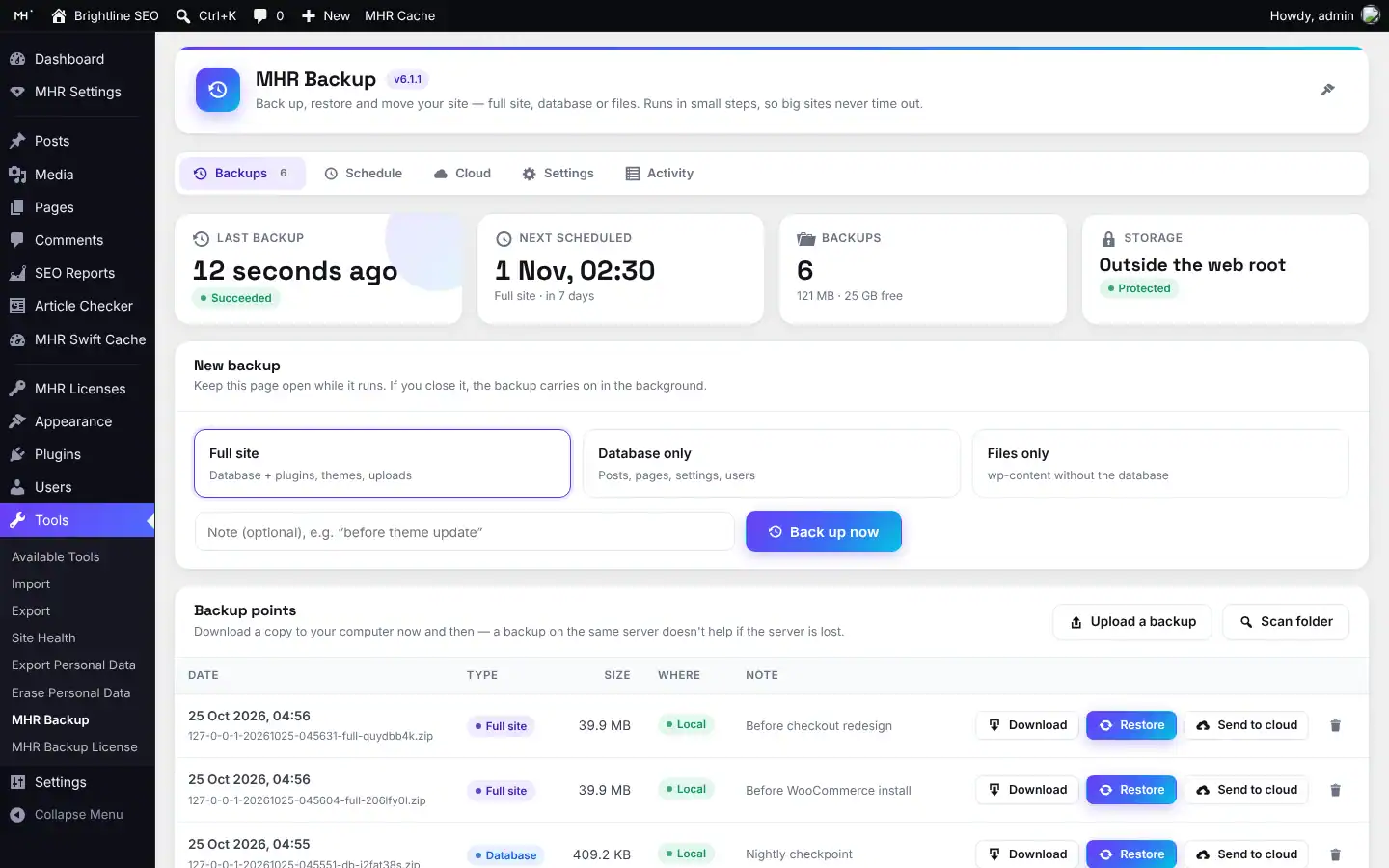
Press Back up now, pick Full site, Database only or Files only, and your backup appears in a list with Download, Restore, Send to cloud and Delete. MHR Backup uses the server’s own mysqldump and zip when the host allows it and falls back to PHP automatically. Restores check the backup first, keep a safety copy and switch the site over in one step at the end.
From $49/year · Key within 2 hours · Pay with bKash
Illustration of the MHR Backup flow
- 7-day free trial
- wp-config.php is never included in a backup
- Safety backup before every restore (on by default)
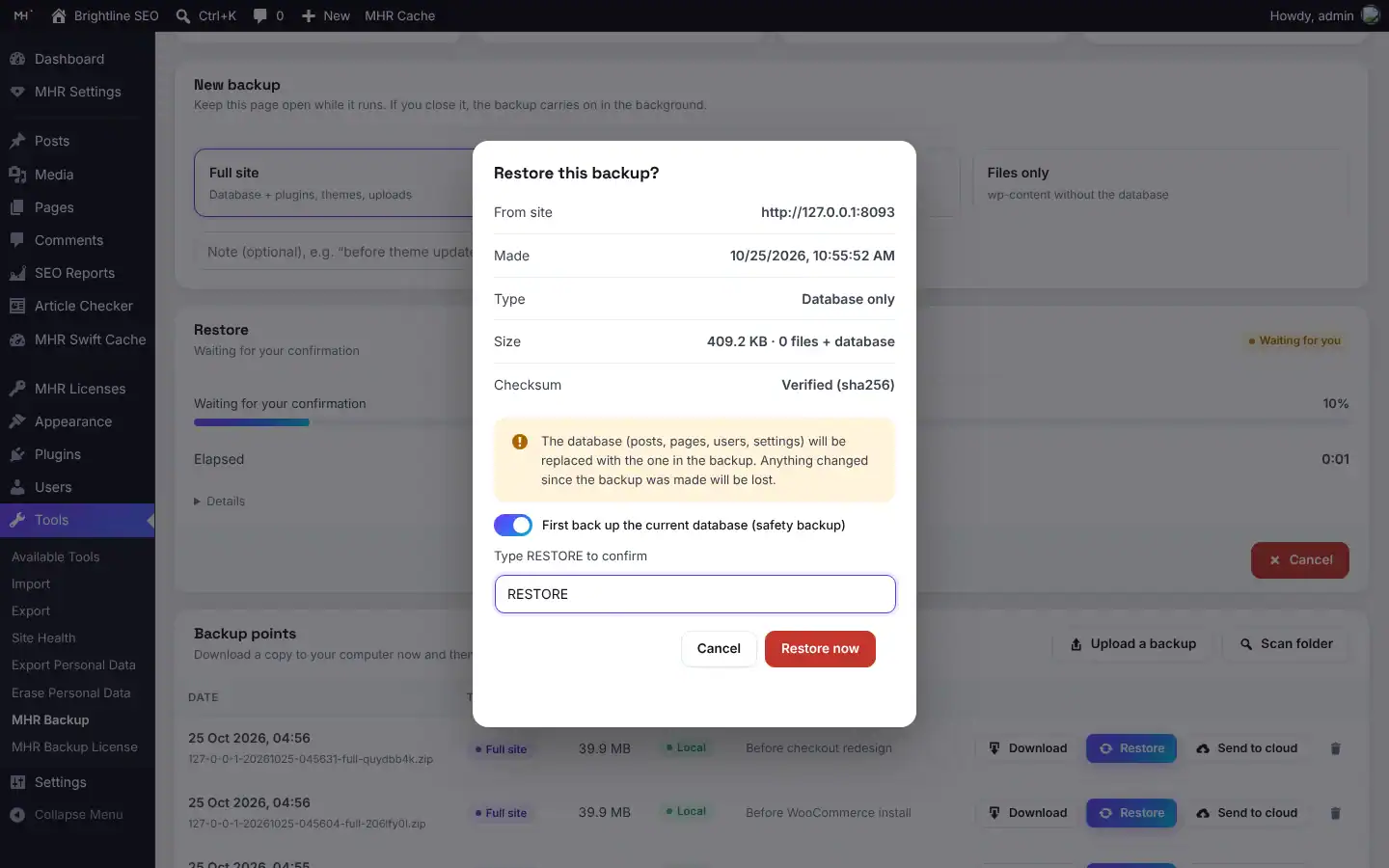
- You type RESTORE before anything changes
- Backups stored outside the web root when the server allows it
- WordPress 5.9+ · PHP 7.4+
One button to back up, one check before every restore.
A simple one-page backup plugin that uses your server’s own tools when it can, built for shared hosting by an SEO consultant with 14+ years of hands-on work.
Fast with server tools, safe without them
When the host allows it, backups use the server’s own mysqldump and zip; in our test a 184 MB site was backed up in 8 seconds. The output is verified, and if a tool is missing or fails, MHR Backup switches to its PHP engine automatically and logs why.
Works in small steps, even when you close the page
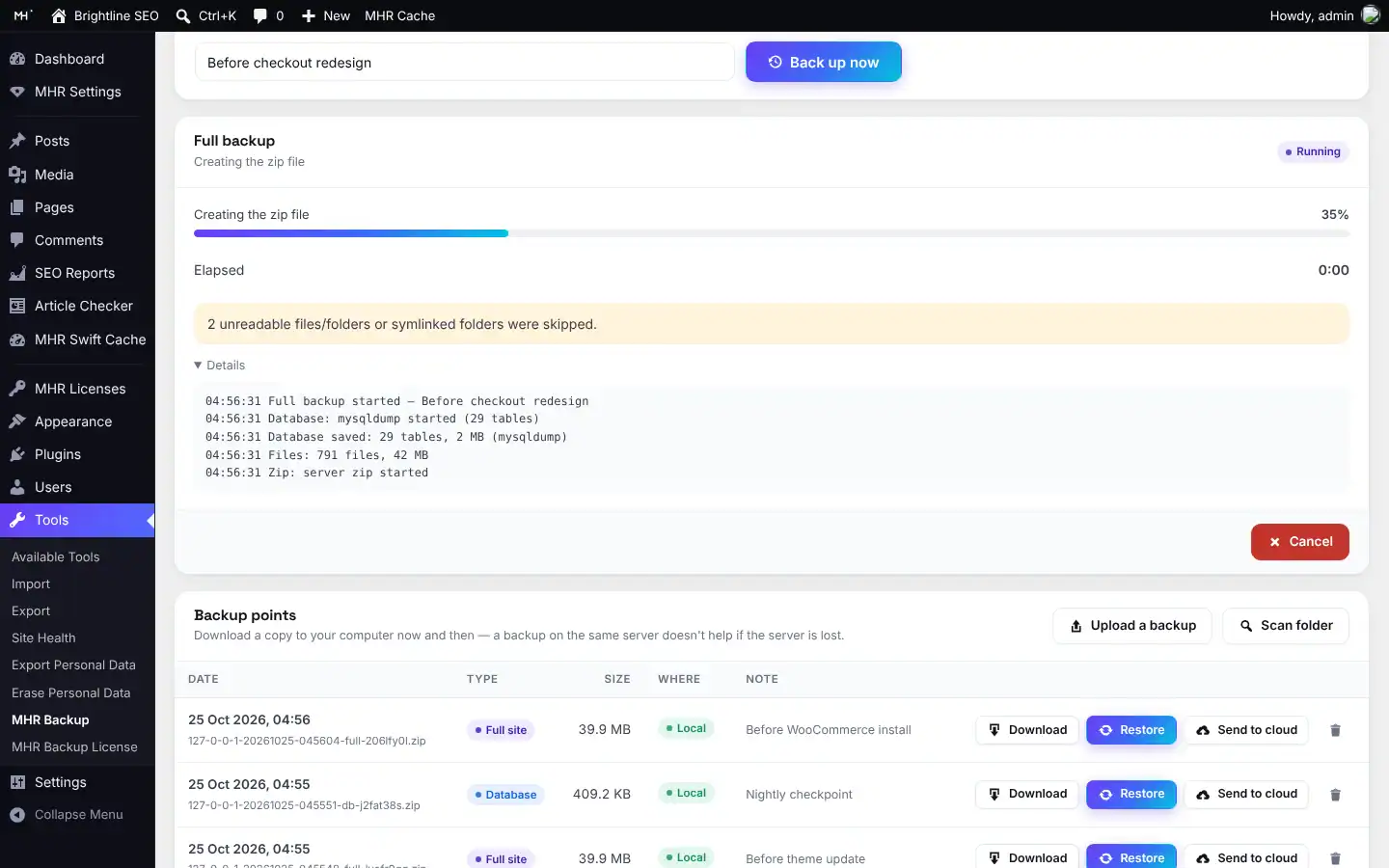
Each job runs in short steps. While the page is open it drives them; when you close it, a background request chain and a WP-Cron watchdog carry on. Only one job runs at a time, and Cancel cleans up.
Restores that protect the live site
It checks the zip, manifest and database checksum, makes a safety backup, imports into temporary tables while the site keeps running, then swaps the tables in one atomic step. If anything fails, the folders roll back.
Move to a new domain and table prefix
Restore on a new site and the old address and server path are replaced everywhere, including inside serialized and JSON-escaped settings. A different table prefix is handled. Tested with a real domain and prefix migration.
Upload backups bigger than your upload limit
Backups are uploaded in small pieces (5 MB or the server’s upload limit, whichever is smaller), so any size works. A zip copied in by FTP is picked up with Scan folder.
Cloud copies
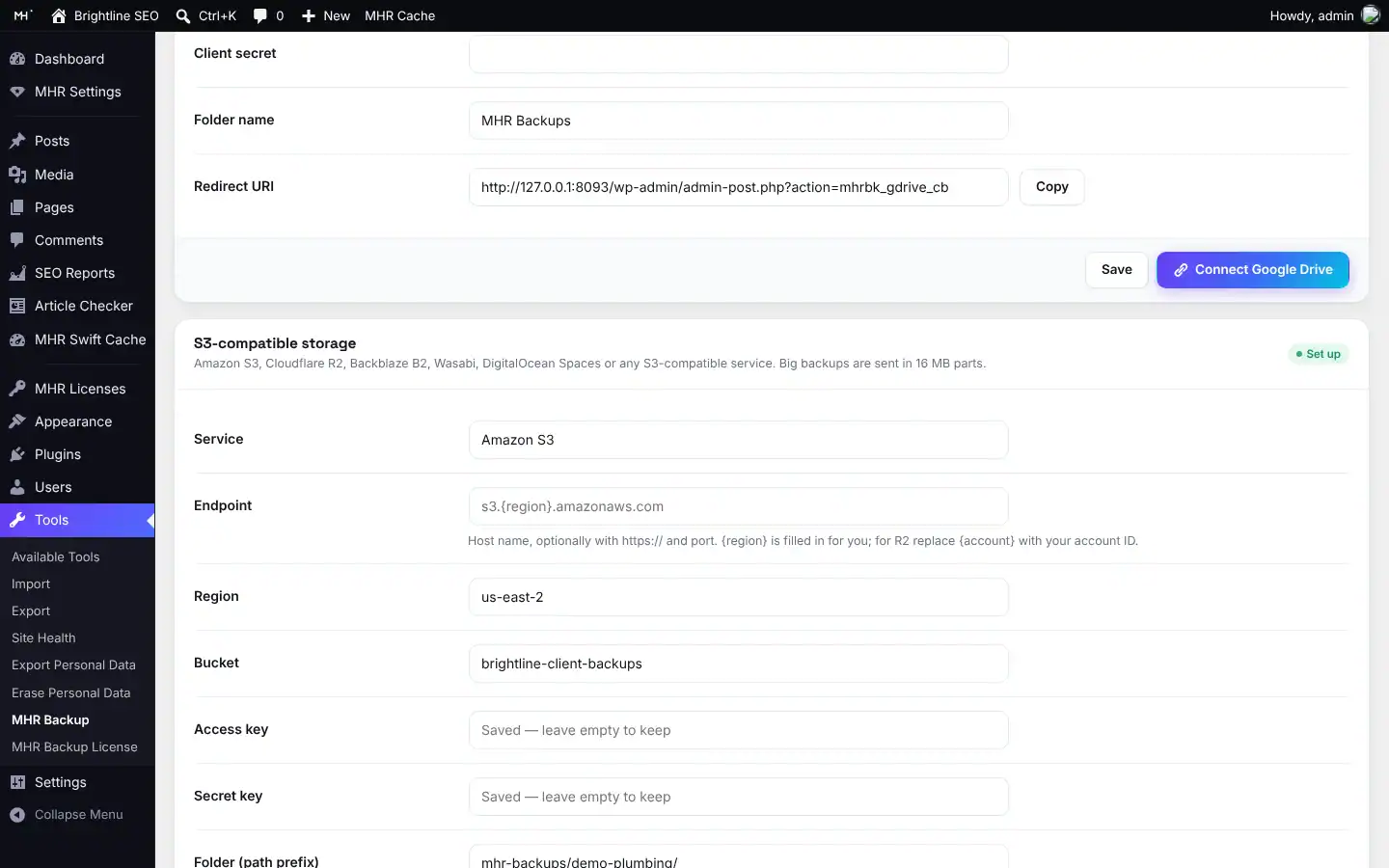
Send any backup to S3-compatible storage (AWS, Cloudflare R2, Backblaze B2, Wasabi, DigitalOcean Spaces or MinIO) or, new in 6.0, to Google Drive with your own OAuth client.
Up and running in three steps.
- 1Back up
Tools → MHR Backup → Back up now. Choose Full site, Database only or Files only and add a note if you like.
- 2Keep or copy it
The backup appears in the list. Download it, send it to S3-compatible storage or Google Drive, or let the schedule keep the last few.
- 3Restore or move
Click Restore, check the summary (date, size, any domain or table-prefix change), type RESTORE and confirm.
31 features in 6 groups.
One plan with every feature: unlimited sites.
Full site, Database only or Files only, with an optional note.
Plugins, themes, uploads and everything else in wp-content; wp-config.php is never included.
.gitignore-style rules, with defaults for caches, other backup plugins’ folders, node_modules, .git and log files.
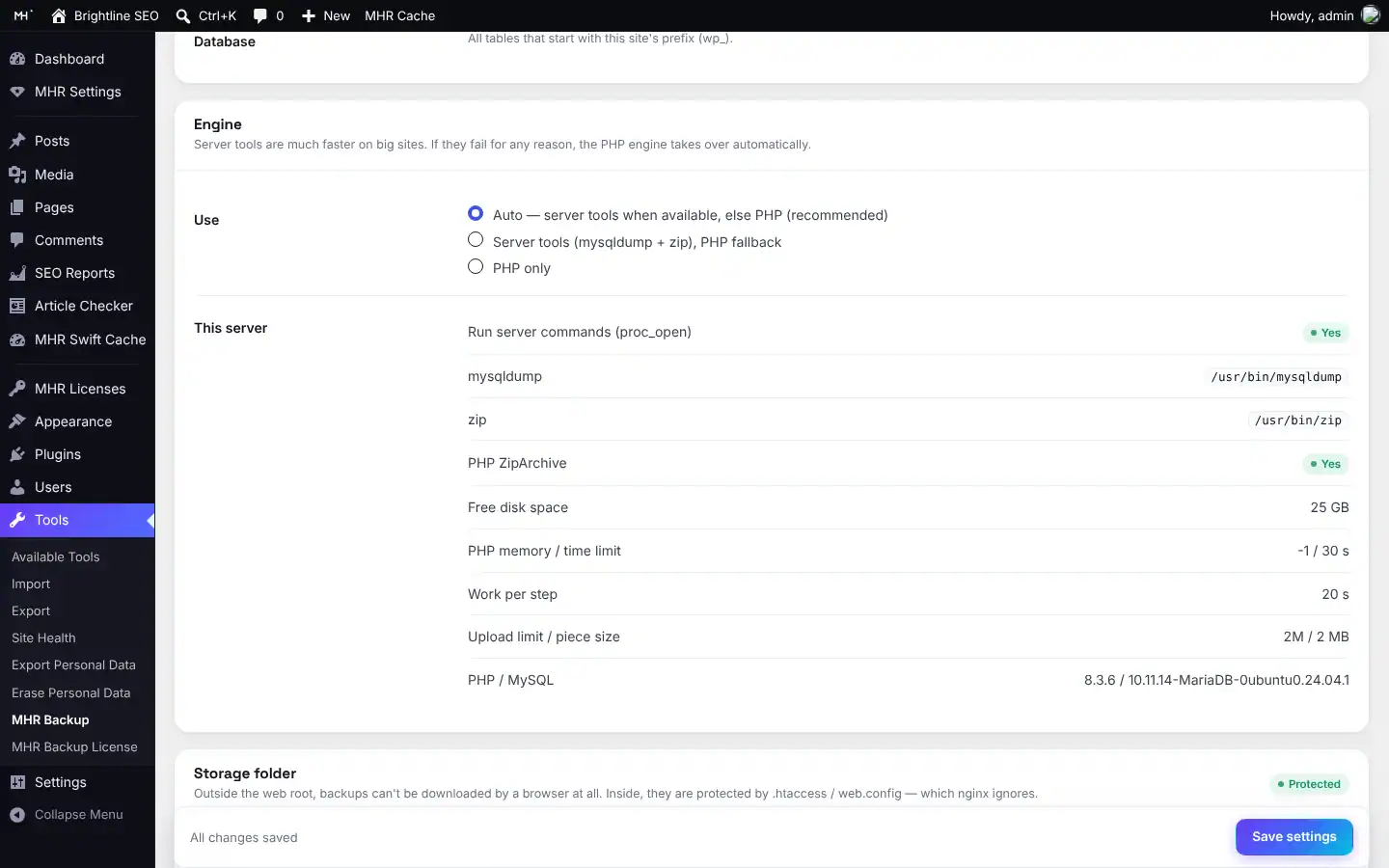
Auto, Server tools (mysqldump and zip) or PHP only. Auto falls back to PHP if a tool is missing or fails.
The database dump, the files and a manifest with the site address, table prefix, versions and a SHA-256 of the dump.
Current step, percentage, elapsed time, a details log and a Cancel button.
Date, type, size, where it is kept (Local, Google Drive, S3) and your note.
One click on each row.
You type DELETE to confirm.
Sent in small pieces, so backups bigger than the server’s upload limit work.
Finds zips you copied into the storage folder by FTP.
Reads the zip and manifest, rejects unsafe paths, checks free disk space and verifies the database checksum.
Shows the source, date, type, size and any domain or table-prefix change; you type RESTORE.
A database-only backup of the current site first (on by default).
The import runs into temporary tables while the site keeps running; one RENAME TABLE switches over, and the folders roll back if anything fails.
Replaces http, https, //host, JSON-escaped and URL-encoded addresses and the old server path without breaking serialized data; renames prefix-based keys.
Keeps this plugin active and logs you back in when your username exists in the restored database.
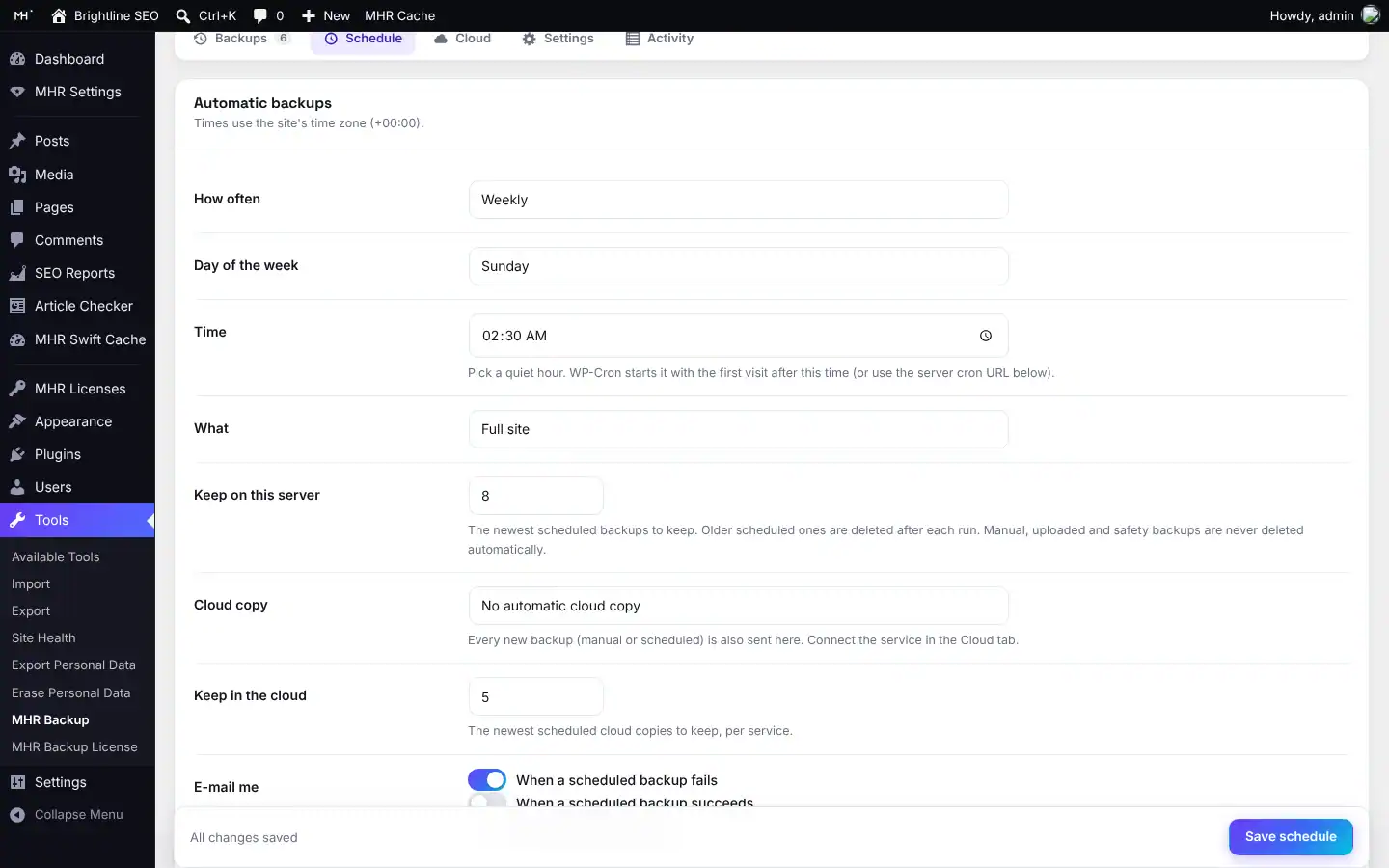
At a set time in the site’s time zone; pick the weekday or the date.
Choose how many scheduled backups to keep on the server and in the cloud (default 5). Manual, uploaded and safety backups are never removed automatically.
On failure (on by default) and on success.
Send each scheduled backup to S3, Google Drive or both.
An optional URL with a secret key for hosts where WP-Cron is unreliable.
Presets for AWS, Cloudflare R2, Backblaze B2, Wasabi, DigitalOcean Spaces and Other/MinIO, multipart upload and Test connection.
Connect with your own Google OAuth client (drive.file scope), with step-by-step setup help.
Download to this site, or delete.
Masked on screen, never printed in the page source and never exported.
Shows whether the server tools can run, free disk space, memory and time limits, upload limit and PHP and MySQL versions.
Outside the web root when the server allows it; you can move it, and “Check web access again” tests it.
Without any secrets.
The last 200 jobs with start, end, result, size and errors.
Delete data and delete backup files are separate boxes, both off by default.
See it inside WordPress.
Real screens from MHR Backup (demo data). Click to enlarge.
Facts from the code.
Counted from the plugin code — no made-up users, ratings or speed claims.
Made by MHRMasum (MD Harunur Rashid), an SEO consultant with 14+ years of hands-on work. MHR Backup v6.1.1.
WordPress 5.9+ · PHP 7.4+ · PHP ZipArchive · single sitesOne plan, every feature. Staging is always free.
Prices in US dollars, with the Taka amount you send by bKash (৳125 per US dollar). Yearly or lifetime — the same plan either way.
- Every feature
- Unlimited live sites
- Updates while your key is active
- Staging, local & dev sites free
- 7-day free trial
Staging, local and dev sites never use a license. 7-day free trial, tracked per website.
Pay with bKash, then send us the Transaction ID.
Your license key and the plugin download arrive by email within 2 hours. Trying it first? Pick “Free 7-day trial” — no payment needed.
- Open the bKash app and choose Send MoneySend to 01841497987
- Amount: the price of your planChoose your plan in the form.
- Reference: your website addressFor example example.com
- Send us your payment detailsUse the form — or email info@mhrmasum.info with the Transaction ID, your email address and your website.
- Get your key by emailWithin 2 hours. Install the plugin, paste the key on its License screen, done.
Your site keeps working. Nothing is deleted.
We’ll email you a renewal link before your plan ends. If you don’t renew, the plugin locks a few days after the end date. Your settings are kept, and paying again unlocks everything.
- Your backup list, and Download for every backup
- Restore any backup, with the safety backup first, also from an uploaded zip or a cloud copy
- Deleting old backups and the old 5.x clean-up
- Back up now (new backups)
- Scheduled backups are skipped and logged; your schedule is kept
- Send to cloud and automatic cloud copies
- Changing schedule, cloud and other settings
Why this split: A backup plugin must never lock you out of your own backups, so getting your data back always works.
Questions before you install
Straight answers from how the plugin actually works.
Not sure it fits your site? Ask me directly — I built MHR Backup.
What does a backup include?
+
A Full site backup has the database plus the wp-content folders you choose: plugins, themes, uploads and everything else. You can also back up the database only or the files only. wp-config.php is never included.
How do I move my site to a new domain or host?
+
Make a Full site backup and download it. Install WordPress and MHR Backup on the new site, upload the backup (any size), click Restore and type RESTORE. Addresses, the server path and a different table prefix are handled. In our test a real migration to a new domain and a new table prefix passed on WordPress 7.1.3 with MariaDB 10.11.
Will it work on shared hosting?
+
It is built for it. Every job runs in small steps. If the host does not allow mysqldump and zip, it uses its PHP engine automatically. When you close the page, a background request chain and a WP-Cron watchdog keep the job going, and a server cron URL helps where WP-Cron is unreliable.
What if a restore fails halfway?
+
The database is imported into temporary tables while the live site keeps running, and the live tables are only swapped in one atomic step at the end. If anything fails before that, the folders are rolled back and the live database was never touched. A safety backup of the current database is made first (on by default).
Can it copy backups to the cloud?
+
Yes. S3-compatible storage (AWS, Cloudflare R2, Backblaze B2, Wasabi, DigitalOcean Spaces, MinIO) and Google Drive, which is new in 6.0. You can send any backup by hand or copy every scheduled backup automatically, and keep a set number in the cloud.
Are my backups safe from download by strangers?
+
Backups are stored outside the web root when the server allows it, with random folder and file names. If they have to sit inside the web root, deny rules are added and the plugin checks whether they are reachable: a Public badge and a red warning appear if the server ignores the rules (as Nginx does).
Can I restore backups from MHR Backup 5.x?
+
No. 6.0 uses a different backup format, so old 5.x zips cannot be restored by it. After the update a notice shows where the old backups are, so you can download or delete them.
How large a site can it handle?
+
With the server tools (mysqldump and zip) large sites are fine. The PHP-only engine works on any host but is slow for multi-GB sites, so on such sites use a host that allows the server tools.
Is anything left out of a backup?
+
wp-config.php and the backup folder itself. Symlinked folders inside wp-content are not followed; they are reported as skipped. Uploads kept outside wp-content (a custom UPLOADS path) are not backed up, and only tables with the site’s prefix are included.
Does it work on multisite?
+
No. MHR Backup supports single sites only; on a multisite network it shows a notice and every action is refused.
What happens when my trial or license ends?
+
Your data is never trapped. Your backups stay on the server, are still listed and can still be downloaded and restored, including from an uploaded zip or a cloud copy, with the safety backup first. Back up now, scheduled backups (skipped and logged), cloud sends and settings changes pause until you renew. Nothing is deleted, and renewing unlocks everything at once.
What does the plan include?
+
One plan: Unlimited sites, with every feature, paid yearly or once for lifetime (see Pricing on this page). There is a 7-day free trial, and staging, local and dev sites never use a license.
How do I pay, and when do I get my key?
+
Pay with bKash Send Money to 01841497987, then send us the Transaction ID with the form on this page (or email info@mhrmasum.info). Your license key and the plugin download arrive by email within 2 hours. A renewal reminder is emailed 5 days before your plan ends — there are no automatic card charges.
How do I try it before buying?
+
Choose “Free 7-day trial” in the form on this page — no payment needed. The trial has every feature, is tracked per website, and reinstalling the plugin does not restart it.
Does a staging site use one of my sites?
+
No. Staging, local and dev sites are free and never use a site slot.
Release timeline
Every update arrives in Dashboard → Updates while your key is active.
Licensing: 7-day trial, license key and automatic updates from mhrmasum.info; License screen under Tools → MHR Backup License. When a trial or license ends, backups can still be downloaded and restored.
Rebuilt from scratch: one page with Back up now (Full, Database only, Files only), server tools with PHP fallback, chunked upload and restore, domain and table-prefix migration, schedule with keep-last-N and e-mails, S3-compatible and Google Drive cloud copies.
Previous generation. Its backups use a different format and are not restored by 6.0.
Back up, restore and move with one plugin.
From $49/year. 7-day free trial, staging sites free, key within 2 hours.
More MHR plugins: all products · free plugins · MHR LumeRank SEO