← Products / Stay & Tour CRM
v1.1.0WordPress plugin · booking CRM for WooCommerce · by MHRMasumMHR Stay & Tour CRM Take room and tour bookings on WooCommerce and never sell the same room twice.
Turn any WooCommerce product into a bookable room type or a dated tour. Guests pick dates on a live availability calendar, see the price and pay a deposit or in full with any WooCommerce payment method. Every order becomes a booking with its guest, payments and ledger lines, and your front desk runs check-in, check-out, payments and refunds from one dashboard. No other booking plugin needed.
From $49/year · Key within 2 hours · Pay with bKash
Illustration of a booking from the calendar to the ledger
- 7-day free trial
- Works on WooCommerce alone — no YITH or WooCommerce Bookings
- Block and classic checkout
- Uses your WooCommerce payment methods: EPS, bKash, cards, bank, cash on arrival
- Tested: 30 guests, 3 rooms, exactly 3 bookings
- Staff app for phones
- WordPress 6.0+ · PHP 7.4+ · WooCommerce 8+
Your own booking engine on WooCommerce, with the accounting built in.
Built by an SEO consultant and developer who runs booking sites for hotels and tour operators in Bangladesh — the lessons of a booking CRM in daily use, rebuilt as one plugin that needs nothing but WooCommerce.
No double booking, even under load
Capacity lives in one table. Adding to the cart places a short hold, and every booking is written inside a database lock that re-checks what is left. In our test, 30 guests tried to book the last 3 rooms at the same moment: exactly 3 got one. On a tour with 12 seats, exactly 12 were sold.
A real availability calendar
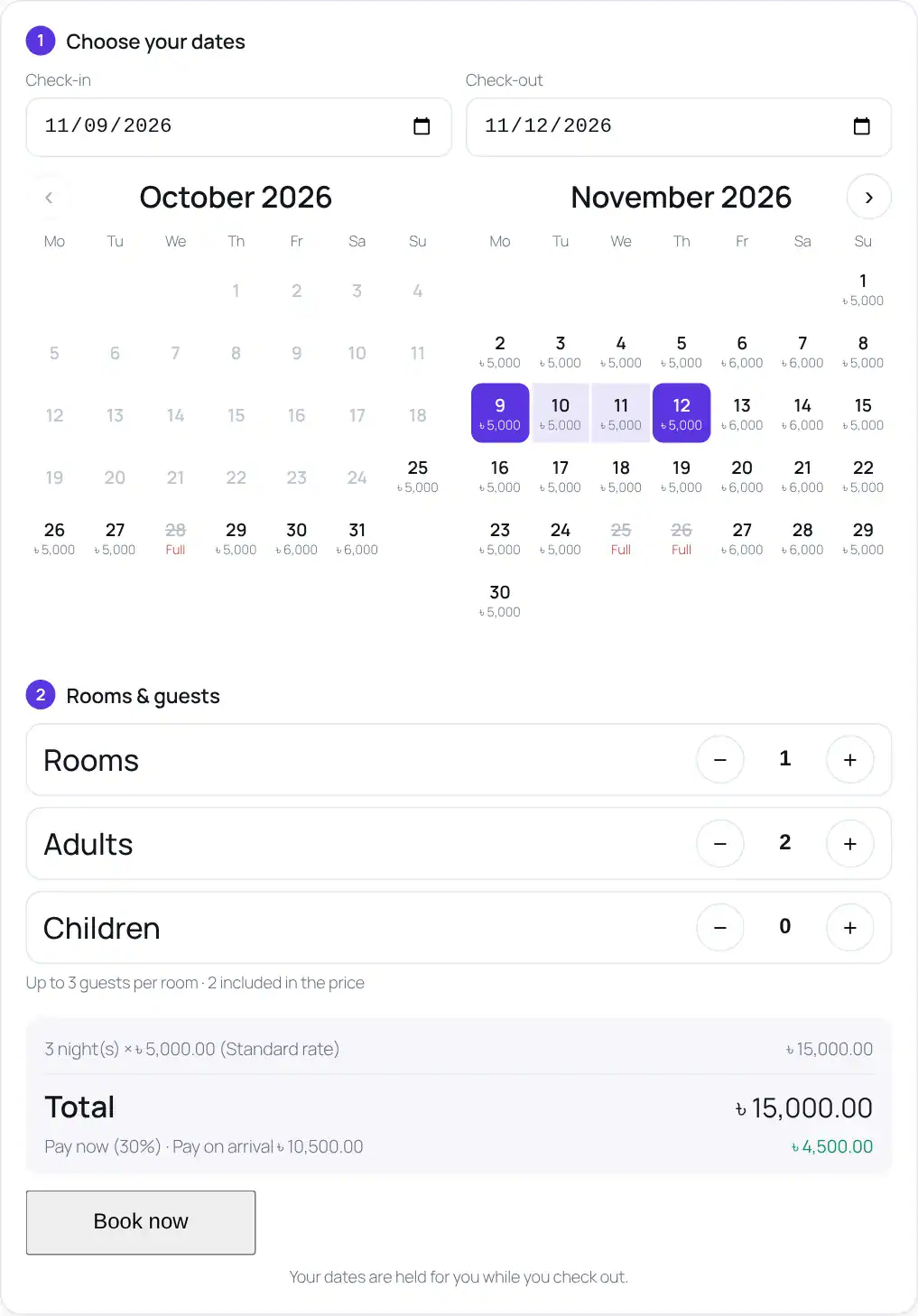
Guests see two months with the nightly price on every free day and full or closed days marked. Check-in, check-out, rooms, adults and children — with the live price and deposit before they click Book now.
Prices that follow your seasons
Base, weekend and season prices with priorities and minimum nights, extra-adult and child prices, closed dates, and a deposit per product or for the whole store. Tours price each departure on its own if you want.
WooCommerce orders become bookings
Paid orders confirm the booking and post the payment; refunds post a reversing entry; cancelled or failed orders free the dates. A nightly check re-syncs recent orders, and running it twice never creates duplicates.
A front desk, not just a calendar
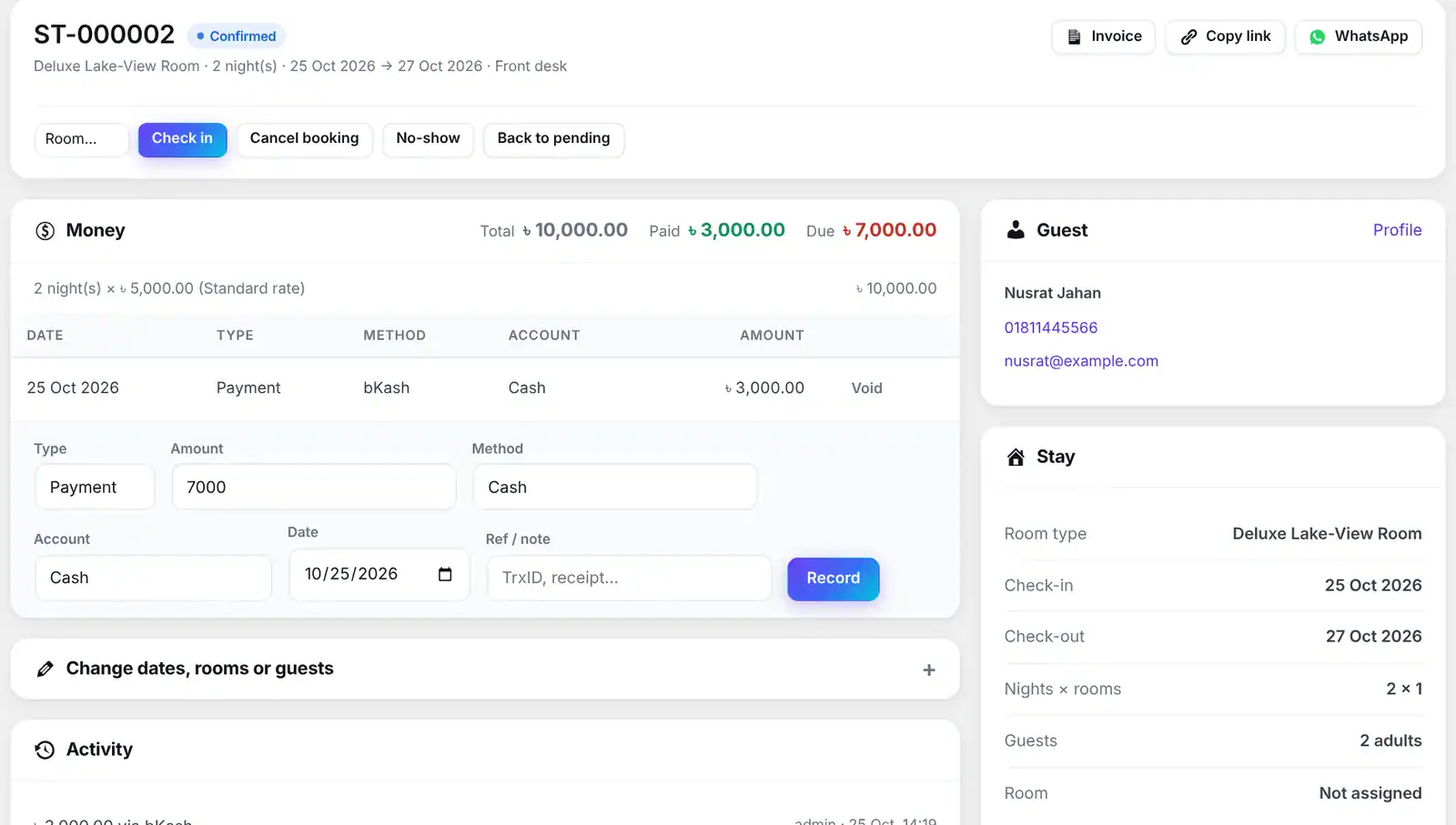
Walk-in and phone bookings with the same prices and the same no-double-booking rule, check-in with room numbers, check-out, payments by cash, bKash or Nagad, refunds and voids — each change in the booking’s activity log.
One ledger for every taka
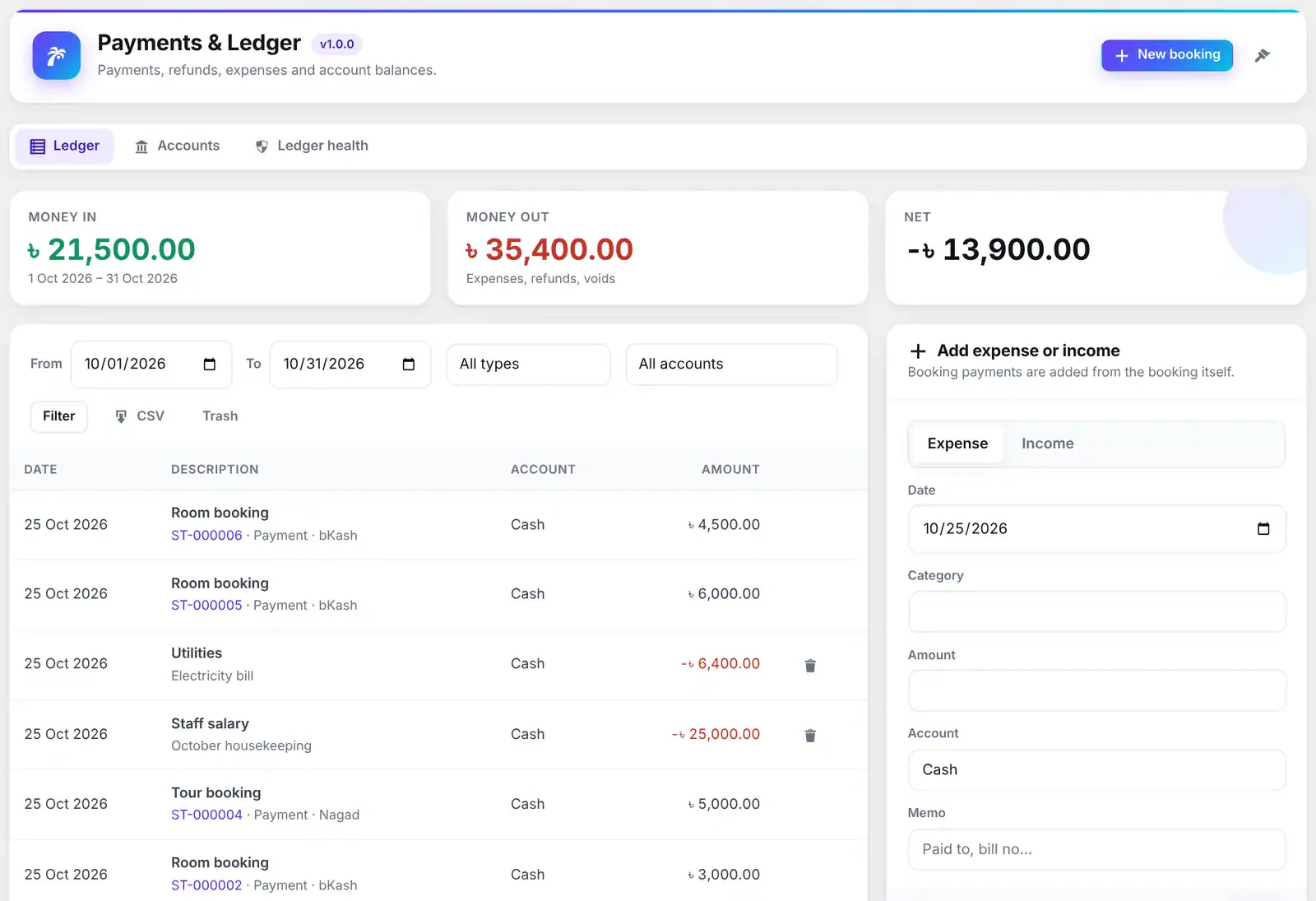
Payments, refunds and expenses go through one ledger with accounts, vendors, transfers and statements, plus investor funds, loans, owner lease and tour statements — kept apart from profit and loss. A health check finds and repairs anything out of step.
Run the hotel, not just the bookings
A room board for today shows who is in each room, who arrives and leaves, and whether it is clean, dirty or out of order. A month tape chart assigns rooms (or auto-assigns them), extras go on the guest’s bill, groups share one invoice, and the night audit closes the day with occupancy, ADR and RevPAR.
A front desk in your pocket
Put the staff app on any page and your team signs in on their phones: today’s arrivals and departures, check-in with a room, check-out, take a payment by cash, bKash or Nagad, and update room status. It installs on Android like an app.
Up and running in three steps.
- 1Create a Stay or Tour product
Products → Add new → Product type: Stay (rooms) or Tour. Set rooms, guests, nightly and weekend price, deposit — or the price per adult and child for a tour.
- 2Add seasons, closed dates or departures
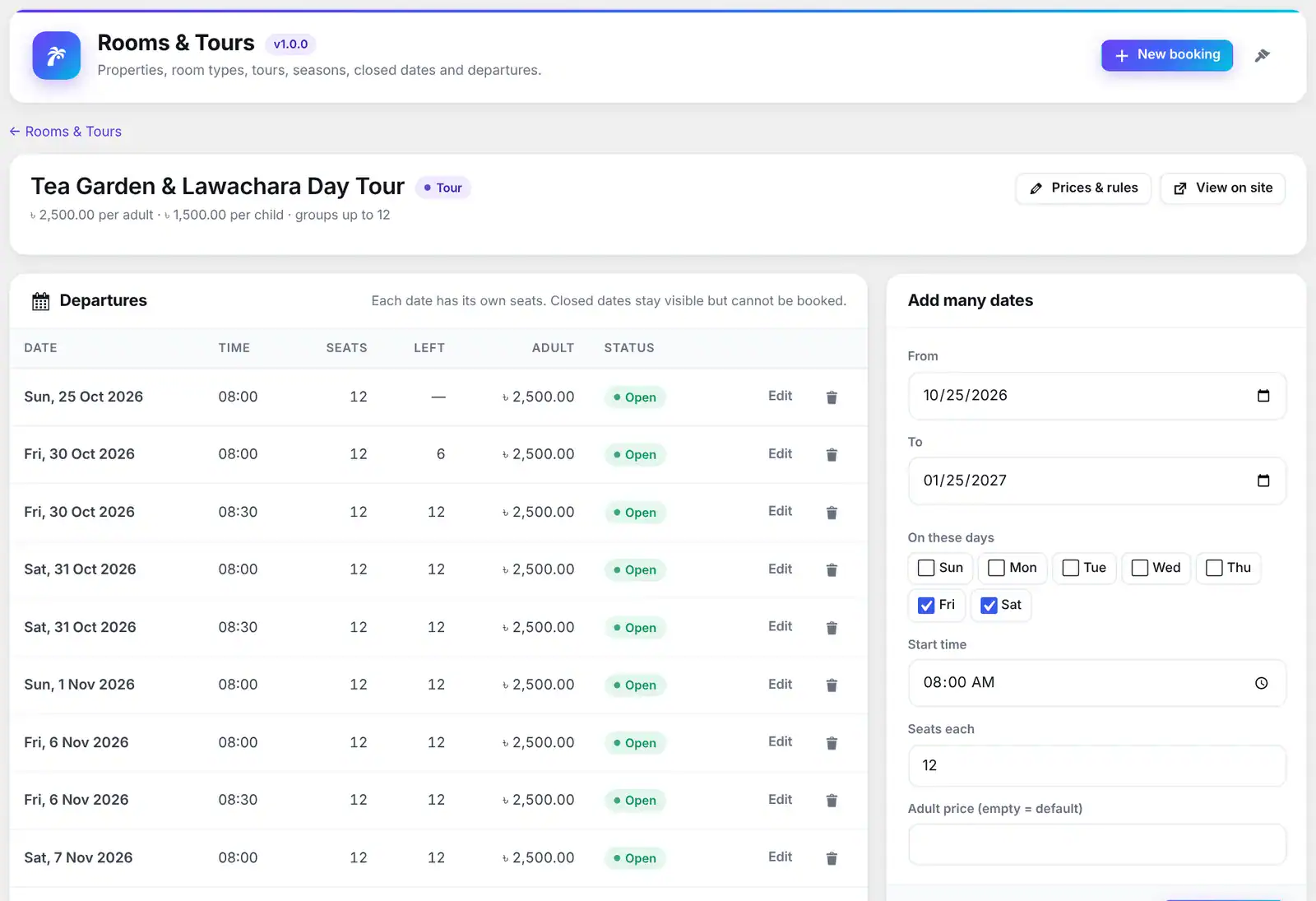
Under Stay & Tour → Rooms & Tours: season prices with minimum nights, closed dates, room numbers, and tour departures — add many dates at once.
- 3Guests book, you run the front desk
Orders become bookings automatically. Check guests in and out, take the balance, refund, and see dues, occupancy and income on the dashboard.
42 features in 7 groups.
Every plan includes every feature — plans differ only by the number of live sites.
Real WooCommerce products, so tax, coupons, payment gateways, e-mails and reports keep working.
Two months on the product page, nightly price on free days, full and closed days marked; one month on phones.
Number of rooms, guests included, maximum guests per room, extra adults and children.
Departures with their own date, time, seats, price and note; add every Friday and Saturday for three months in one go.
A 15-minute cart hold, renewed on the cart and checkout pages, and a database lock on every booking write.
The line is removed before payment and the guest is told why on the cart page.
Choose which nights count as the weekend (Friday and Saturday by default).
A nightly price for a date range and weekdays, with a priority and minimum nights.
Maintenance or private use — nobody can book them.
Guests pay a share online and the rest on arrival; per product or a store default.
How far ahead guests can book and the minimum notice; the front desk ignores both.
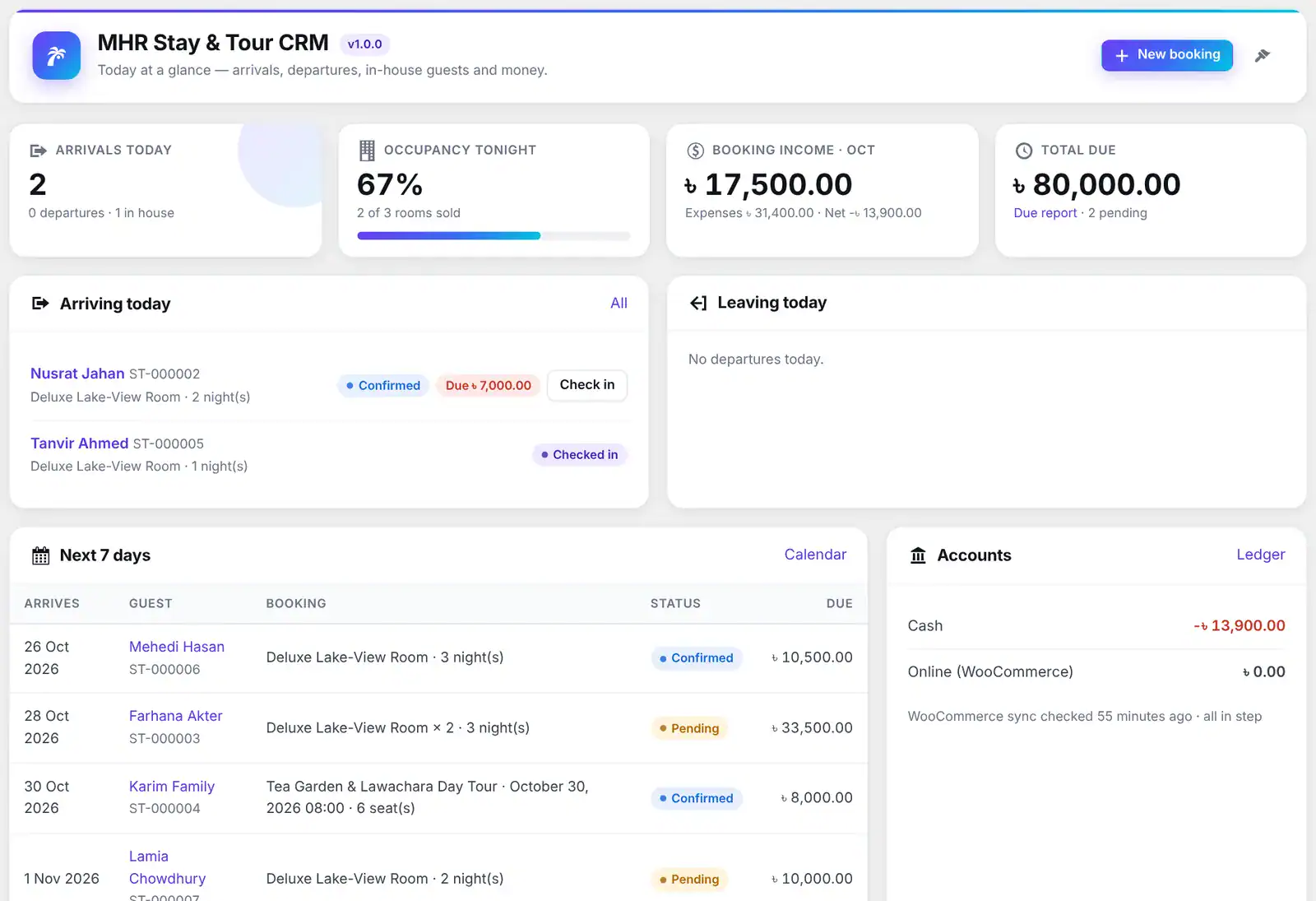
Arrivals, departures, guests in house, occupancy tonight, income this month and total due.
Search by reference, guest, phone or order; filter by status, dates and room type; CSV export.
Pending → Confirmed → Checked in → Checked out, or Cancelled / No-show; cancelling frees the dates.
Live price and rooms left while you fill the form; pay now by cash, bKash, Nagad, card or bank.
Re-checked for availability, with the option to re-price from current rates.
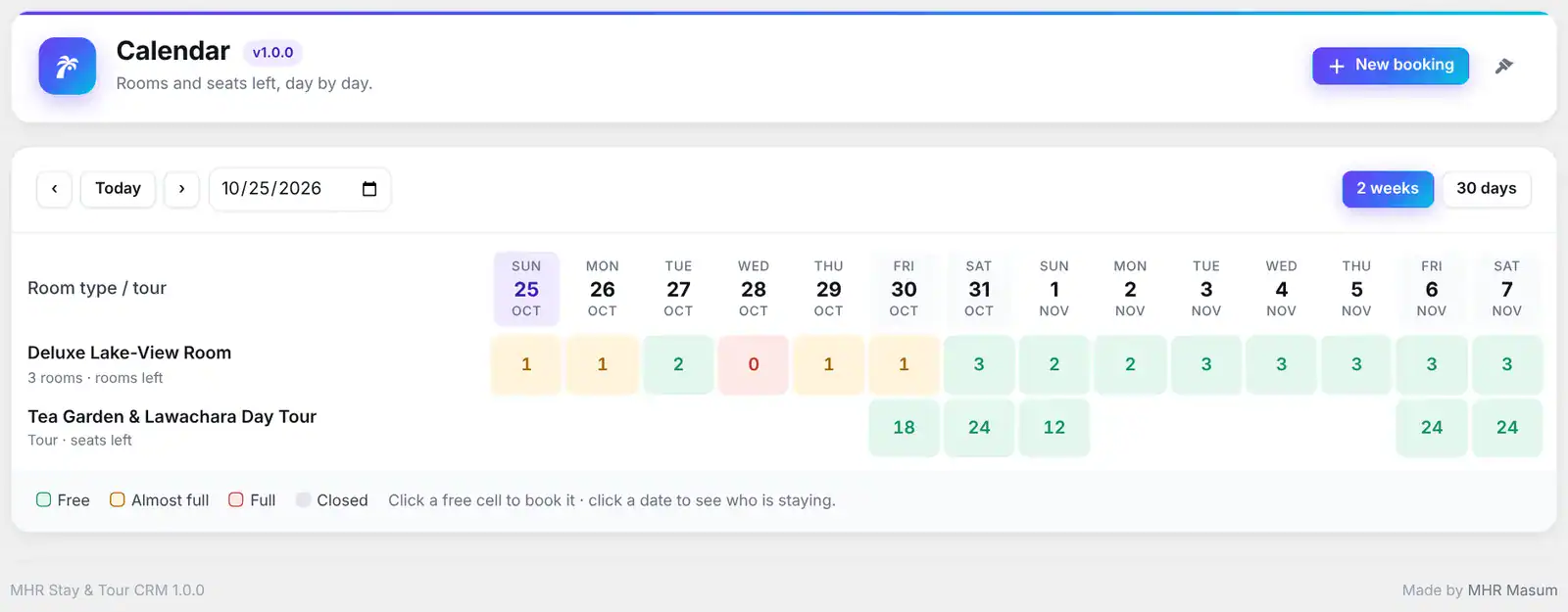
Rooms and seats left per day for every room type and tour; click a free day to book it.
Every room today: in house, arriving, departing or vacant, with its housekeeping status and notes.
A month per room with every stay, an Unassigned row, and auto-assign that skips rooms out of order.
Clean, dirty, cleaning, inspected or out of order; check-out marks the room dirty. A Housekeeping role sees only the room board.
Food, laundry, transport, minibar — added to the booking total and listed on the invoice.
Several rooms or a room and a tour for one party, with group totals and one group invoice.
No-shows and late check-outs to review, then close the day and keep its occupancy, ADR, RevPAR and money figures.
Refunds can never be more than what was paid; voided payments stay visible with a reversing line.
Cash, bank, mobile wallet and online accounts with balances; add expenses and other income.
Finds payments without ledger lines and repairs them; the WooCommerce sync check runs nightly.
Monthly income, refunds, expenses, net, room-nights and occupancy; by room type and tour; dues; expenses by category.
A printable invoice with a share link — no login needed for the guest.
Occupancy, ADR, RevPAR, average stay, lead time, cancellations, income vs expenses, sources, payment methods and receivables aging.
January to December by room type and tour: room-nights or seats and revenue — print or CSV.
The people and shops you pay, picked on expenses, with spend per vendor.
Move money between cash, bank and wallets; a statement per account with a running balance.
Upload your bank CSV, check every line, add only what is new.
Investor capital in and withdrawals out; loans with monthly instalments and reminders when they are due.
Pay a building owner a fixed monthly rent or a share of the property’s income — expected vs paid each month.
Revenue, costs (guide, transport, food) and profit for every departure.
One profile per e-mail or phone, with booking history, notes and ID number.
A ready message with the booking, total, paid, due and invoice link — edit the template in Settings.
[mhrst_booking_lookup]: guests find their booking with the reference and phone number (rate-limited).
Manager, Front Desk, Accountant and Housekeeping, with a permission editor.
[mhrst_staff_app]: a phone front desk for check-in, check-out, payments and room status — installable on Android.
Settings export, import and reset, an activity log and a system health check.
See it inside WordPress.
Real screens from Stay & Tour CRM (demo data). Click to enlarge.
Facts from the tests.
Counted from the plugin code — no made-up users, ratings or speed claims.
Made by MHRMasum (MD Harunur Rashid), an SEO consultant with 17+ years of hands-on work. MHR Stay & Tour CRM v1.1.0.
WordPress 6.0+ · PHP 7.4+ · WooCommerce 8.0+ (tested on 10.2 and 11.2) · HPOS readyOne key per plan. Staging is always free.
Prices in US dollars, with the Taka amount you send by bKash (৳125 per US dollar). Every plan includes every feature.
1 site
For one website- Every feature
- Updates while your key is active
- Staging, local & dev sites free
- 7-day free trial
5 sites
For freelancers & small agencies- Everything in 1 site
- One key on up to 5 live sites
- Staging, local & dev sites free
- 7-day free trial
Unlimited sites
For agencies- Everything in 5 sites
- Unlimited live sites
- Staging, local & dev sites free
- 7-day free trial
Staging, local and dev sites never use a license. 7-day free trial, tracked per website. Lifetime = 2 × the yearly price.
Pay with bKash, then send us the Transaction ID.
Your license key and the plugin download arrive by email within 2 hours. Trying it first? Pick “Free 7-day trial” — no payment needed.
- Open the bKash app and choose Send MoneySend to 01841497987
- Amount: the price of your planChoose your plan in the form.
- Reference: your website addressFor example example.com
- Send us your payment detailsUse the form — or email info@mhrmasum.info with the Transaction ID, your email address and your website.
- Get your key by emailWithin 2 hours. Install the plugin, paste the key on its License screen, done.
Your site keeps working. Nothing is deleted.
We’ll email you a renewal link before your plan ends. If you don’t renew, the plugin locks a few days after the end date. Your settings are kept, and paying again unlocks everything.
- Guests can still book Stay and Tour products — nothing is ever double-booked
- New orders, payments and refunds keep syncing into your bookings and ledger
- Invoice links and the guest booking lookup keep working
- Every booking, guest, payment and report is kept
- The admin screens: dashboard, bookings, room board, ledger, finance and reports
- Front-desk bookings and payments, the night audit and the staff app
- Editing seasons, closed dates and tour departures
Why this split: A booking system must never stop taking bookings or lose a payment, so your store keeps working while the licence is renewed.
Questions before you install
Straight answers from how the plugin actually works.
Not sure it fits your site? Ask me directly — I built Stay & Tour CRM.
Do I need YITH Booking or WooCommerce Bookings?
+
No. MHR Stay & Tour CRM has its own booking engine built on WooCommerce products, cart and checkout. You only need WooCommerce.
Which payment methods work?
+
It uses the normal WooCommerce checkout, so your WooCommerce payment methods work as they are — for example EPS, bKash, cards, bank transfer and cash on arrival. A paid order posts the payment to the booking; cash on arrival confirms the booking and keeps the money due until it is collected.
Can two guests book the last room at the same time?
+
No. Adding to the cart takes a short hold, and every booking is written inside a database lock that re-checks the rooms left. In our test 30 guests tried for the last 3 rooms at the same moment and exactly 3 succeeded.
Does it work with the new block checkout?
+
Yes, and with the classic checkout shortcode. It is also compatible with WooCommerce HPOS order tables.
Can guests pay a deposit?
+
Yes. Set a percentage per product or a store default. The guest pays that share at checkout, the booking shows the rest as due, and the front desk records it on arrival.
What happens on a refund or cancellation?
+
A WooCommerce refund posts a reversing entry to that booking, so paid and due stay right. A full refund or a cancelled or failed order cancels the booking and frees the dates. Both rules can be switched off in Settings.
Can I take walk-in and phone bookings?
+
Yes. New booking shows the live price and rooms left while you type, applies the same no-double-booking rule and records what the guest paid.
Does it handle tours as well as rooms?
+
Yes. A Tour product has departures with their own date, time, seats and optional prices. Guests choose a date from the list and how many adults and children; seats left are shown when they run low.
Can I run more than one hotel?
+
Yes. Add properties under Rooms & Tours and assign each room type or tour to one; invoices use that property’s name, address and phone.
What happens when my trial or license ends?
+
Your store keeps taking bookings and syncing orders, payments and refunds, so nothing is double-booked and no money is lost. The admin screens lock until you renew; nothing is deleted.
Does it handle housekeeping and the night audit?
+
Yes. The room board shows every room’s status, check-out marks it dirty, and housekeeping staff can update it from the admin or the staff app. The night audit lists guests who did not arrive and those who should have left, then closes the day with its figures.
Can my staff use it on their phones?
+
Yes. Put [mhrst_staff_app] on a page. Staff sign in with their WordPress account and see today’s arrivals and departures, check guests in and out, take payments and update rooms. It can be added to an Android home screen like an app.
I use Global Booking CRM & Accounting. Can I move my data?
+
Yes. Settings → Import brings in bookings, customers, payments, expenses, vendors, tour statements, owner lease, funds, loans and bank lines from version 1.9. It is safe to run again — nothing is added twice.
Are hourly rentals supported?
+
Not yet. The plugin books nights (rooms, cottages, boats per day) and dated tour departures. Hourly slots are planned.
What does the plan include?
+
Every plan has every feature. Pick 1 site, 5 sites or unlimited sites, yearly or lifetime. There is a 7-day free trial, and staging, local and dev sites never use a license.
How do I pay, and when do I get my key?
+
Pay with bKash Send Money to 01841497987, then send us the Transaction ID with the form on this page (or email info@mhrmasum.info). Your license key and the plugin download arrive by email within 2 hours. A renewal reminder is emailed 5 days before your plan ends — there are no automatic card charges.
How do I try it before buying?
+
Choose “Free 7-day trial” in the form on this page — no payment needed. The trial has every feature, is tracked per website, and reinstalling the plugin does not restart it.
Does a staging site use one of my sites?
+
No. Staging, local and dev sites are free and never use a site slot.
Release timeline
Every update arrives in Dashboard → Updates while your key is active.
Hotel operations: room board, tape chart, housekeeping, extras on the bill, group bookings and night audit. Occupancy, ADR and RevPAR; analytics and monthly summary. Finance: vendors, transfers, statements, bank import, funds, loans, owner lease and tour statements. WhatsApp templates, staff app, Housekeeping role and permission editor, and import from Global Booking CRM 1.9.
First release: Stay and Tour product types, availability calendar, seasonal pricing and deposits, no-double-booking holds and locks, order/payment/refund sync, front desk, guests, invoices, WhatsApp, ledger, reports and staff roles.
Your rooms and tours, booked online without the double bookings.
From $49/year. 7-day free trial, staging sites free, key within 2 hours.
More MHR plugins: all products · free plugins · MHR LumeRank SEO