← Products / MHR AppBox
v1.2.0Windows app · Android on your PC · by MHRMasumMHR AppBox Android apps and games, right on your Windows PC.
MHR AppBox runs real Android devices on your computer with Google’s official Android Emulator engine. Sign in to Google Play, drag in an APK, run phones and tablets side by side, map keys for games, and give every device its own group, notes and proxy — ideal for testing apps, checking local results and managing client devices.
From $9/year · Key within 2 hours · Pay with bKash
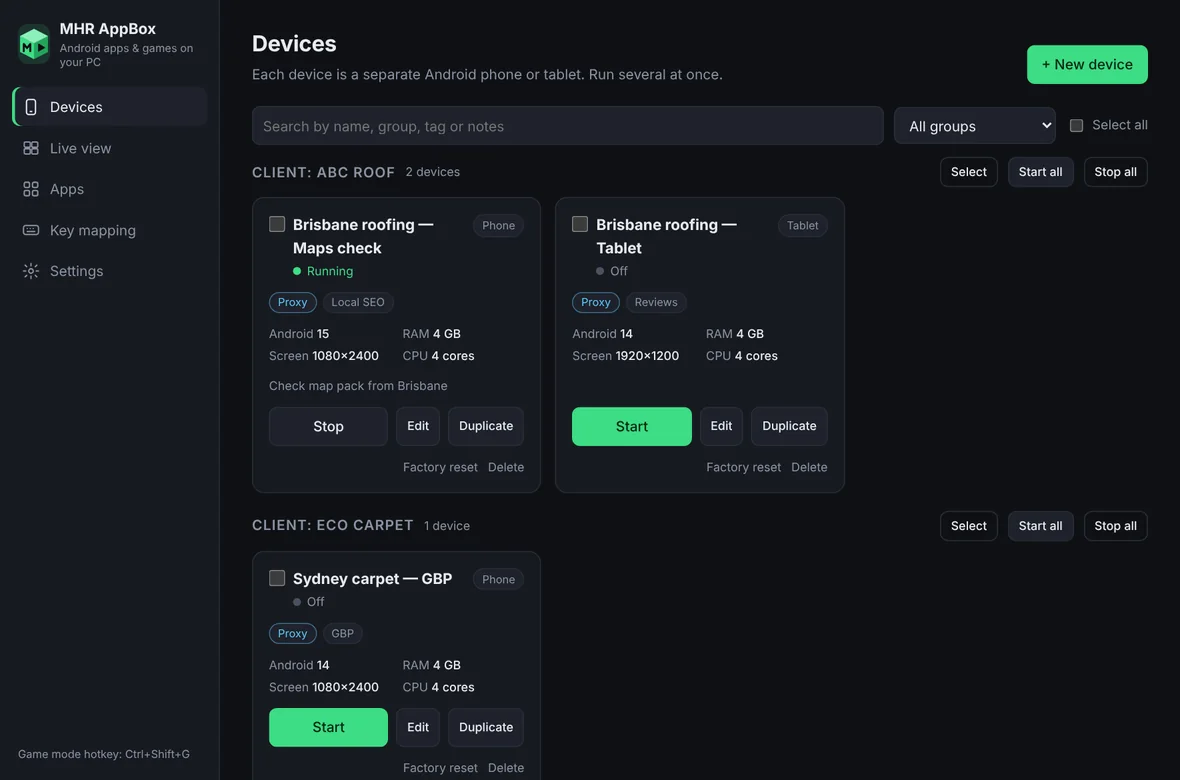
The real Devices screen, shown with sample devices.
- Google’s official Android Emulator engine
- Google Play inside every device
- Android 12 to 17
- Several devices at once
- A proxy per device
- Installer or portable version
Real Android devices on your PC, organised like a client workspace.
Built by an SEO consultant and developer who needed Android phones and tablets for local-search checks, app testing and client work — without a drawer full of handsets.
Google’s official engine
Devices run on the Android Emulator from Google with Google Play, so apps behave like they do on a real phone — including ARM apps — instead of a modified Android build.
Phone, tablet and gaming devices
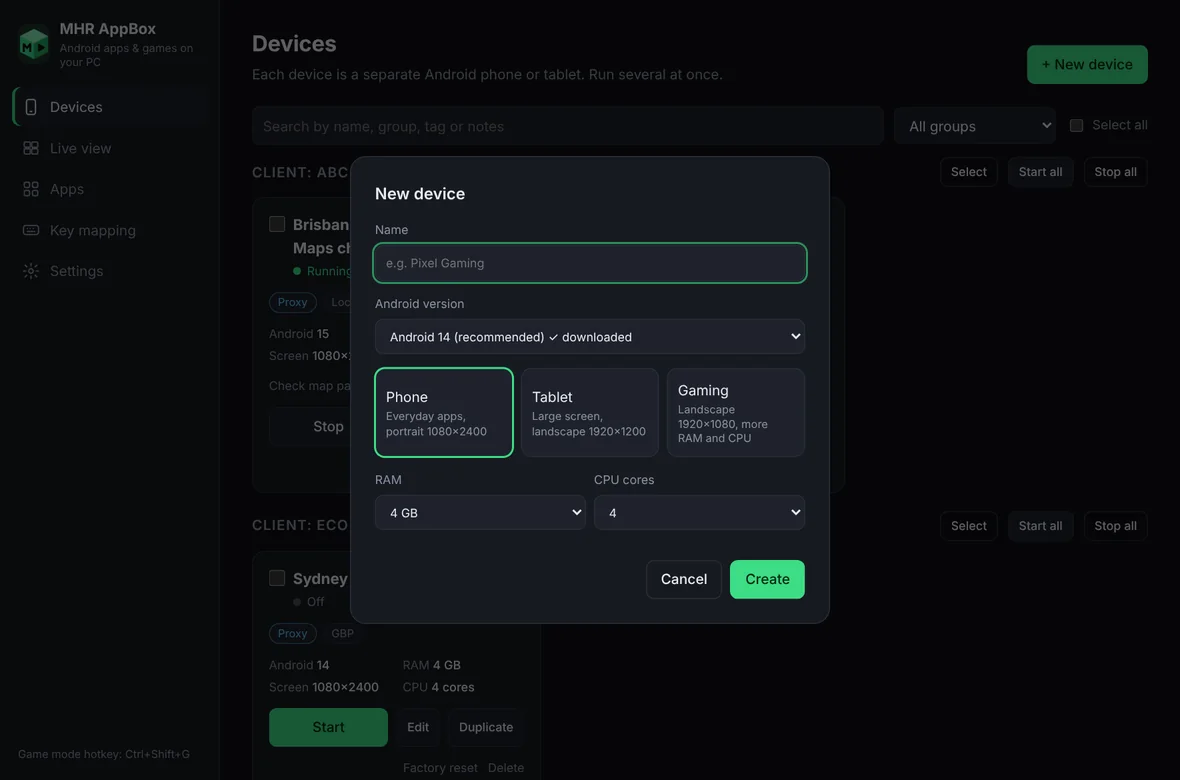
Three presets with sensible screen, RAM and CPU settings. Run several devices at the same time, each with its own apps, Google account and data.
Drag and drop apps
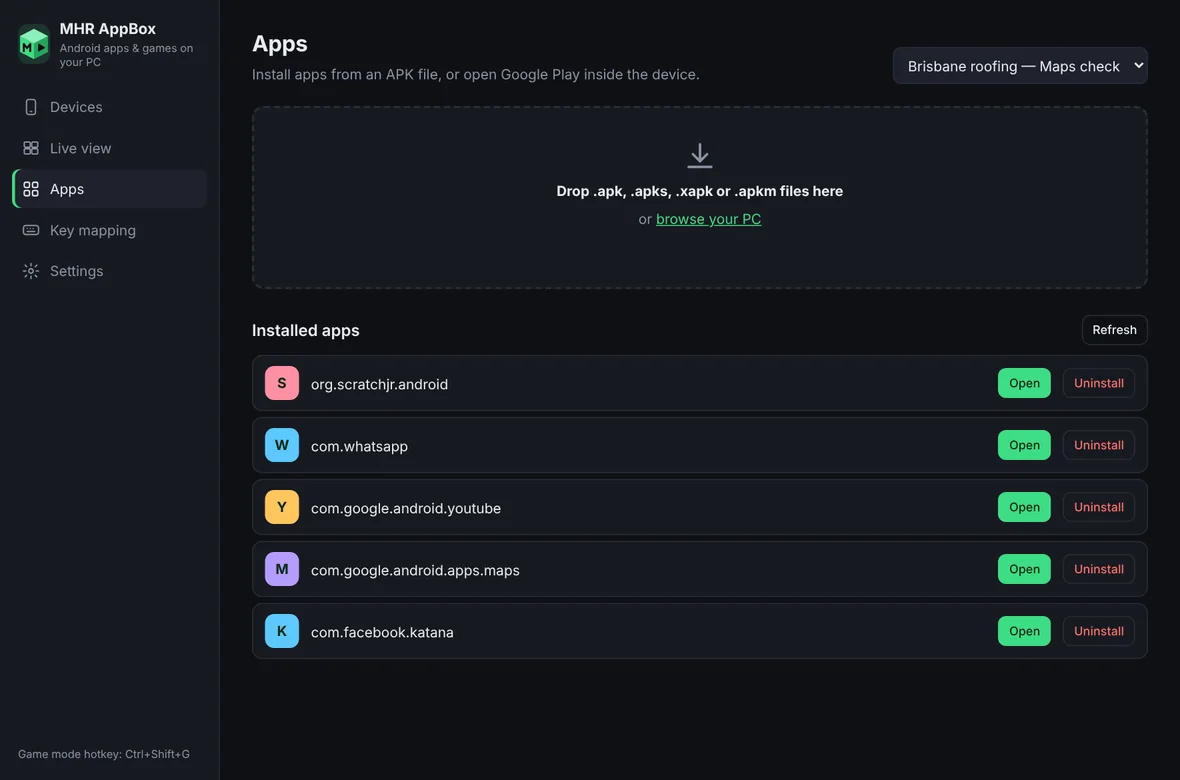
Drop .apk, .apks, .xapk or .apkm files — split apps and game data included — or install from Google Play inside the device.
Key mapping for games
Capture the game screen, click where a button is and press a key. Taps and swipes per profile; Ctrl+Shift+G turns game mode on and off.
A proxy per device
Give each device its own HTTP/HTTPS proxy and test it before you start: the app shows the IP and city that device will appear from — handy for checking local results in Brisbane, London or New York.
Groups, batch actions and live view
Group devices by client with tags and notes, start or stop a whole group, install an app on many devices at once, save screenshots of all screens, and watch every running device in one live view.
Android 12 to 17
Pick the Android version per device from Google’s own catalogue — 12, 12L, 13, 14, 15, 16 and 17 — and run them side by side to compare.
Fast, resumable setup
The one-time download uses 8 separate connections, resumes after a dropped connection and shows speed and time left. Or download the files with IDM and import them.
Up and running in three steps.
- 1Install and activate
Run the installer (or unzip the portable version) and paste your license key on the activation screen. One key covers the number of PCs in your plan.
- 2One-time setup
On first launch the app downloads Google’s Android engine (about 2 GB, once) over 8 parallel connections and checks that hardware acceleration works.
- 3Create a device and add apps
Pick Phone, Tablet or Gaming and an Android version, press Start, then install apps from Google Play or drop an APK onto the window.
Before you install: turn on virtualization (2 minutes, once)
- Check Task Manager first
Press Ctrl + Shift + Esc, open Performance → CPU and look at “Virtualization”. If it says Enabled, skip the BIOS step.
- Open the BIOS from Windows
Right-click Start → Terminal (Admin), type shutdown /r /fw /t 0 and press Enter. The PC restarts straight into the BIOS — no key-timing needed.
- Enable the setting
Intel PCs: Intel Virtualization Technology (VT-x). AMD PCs: SVM Mode (on Gigabyte boards under Tweaker → Advanced CPU Settings, or M.I.T. → Advanced Frequency Settings → Advanced CPU Core Settings). Press F10 to save.
- Turn on Windows Hypervisor Platform
In Terminal (Admin) run: dism /online /enable-feature /featurename:HypervisorPlatform /all — then restart the PC.
- Check inside the app
Settings → Hardware acceleration → Check now should say acceleration is working. Then start your device.
- “Hypervisor driver is not installed”
- Windows Hypervisor Platform is off or SVM/VT-x is still disabled in the BIOS. Do the two steps above and restart.
- Black or flickering Android screen
- Settings → Graphics mode → Software (or ANGLE / DirectX), then start the device again.
- Very slow first download
- Use “Download the files with IDM or your browser” on the setup screen, then Import downloaded files.
26 features in 5 groups.
Every plan includes every feature — plans differ only by the number of PCs.
Phone (portrait 1080×2400), Tablet (landscape 1920×1200) and Gaming (more RAM and CPU).
Android 12, 12L, 13, 14, 15, 16, 16.1 and 17 from Google’s catalogue; each version downloads once.
Run several devices side by side, each with its own apps, Google account and storage.
Name, group, tags and notes per device; Duplicate makes a fresh device with the same settings.
Wipe a device’s apps and data, or remove it completely.
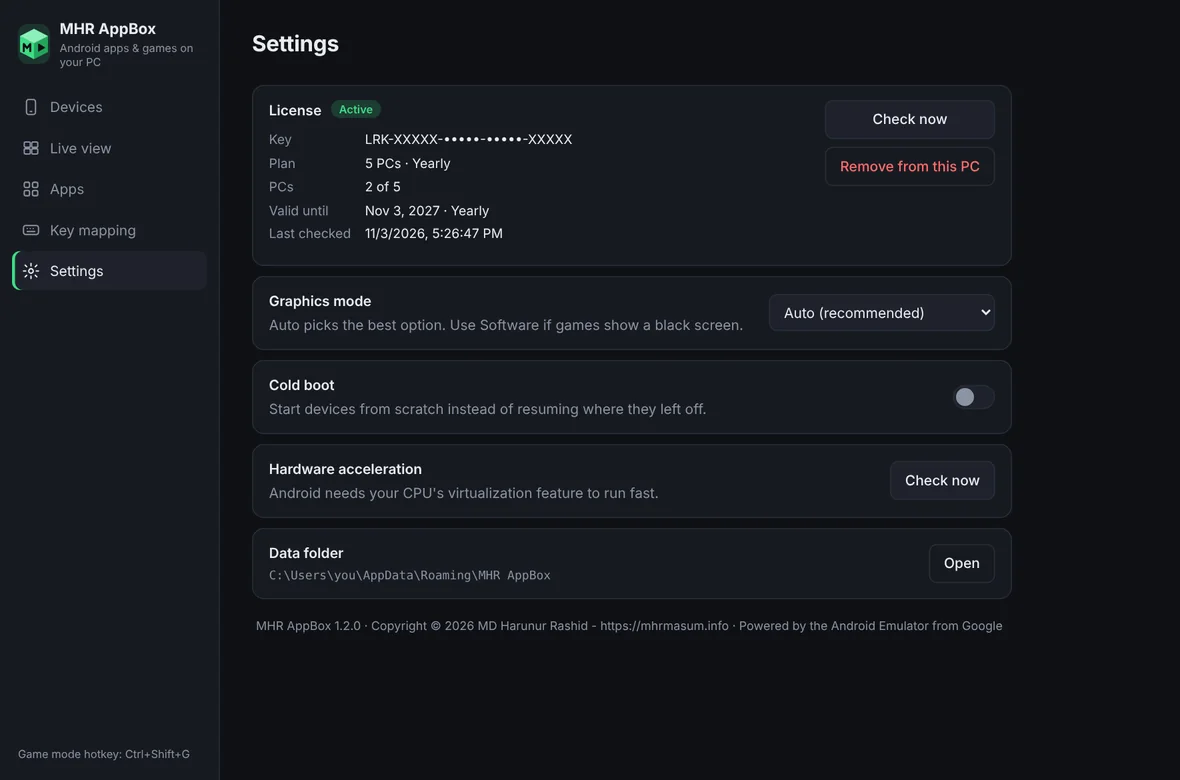
Start devices from scratch instead of resuming where they left off.
Sign in inside the device and install apps as on a phone.
.apk, .apks, .xapk and .apkm files, including split apps and game data.
Open or uninstall installed apps on any running device.
Profiles of taps and swipes on the game screen, mapped to keys.
Ctrl+Shift+G switches your keyboard to the game and back.
Devices grouped by client on the Devices page, with search and a group filter.
host:port, user:pass@host:port or host:port:user:pass; Test shows the IP and city. HTTP/HTTPS proxies.
Start, stop, install an app on, or screenshot many devices — or a whole group — at once.
Every running device’s screen in one window: click to tap, drag to swipe, Back/Home/Apps buttons.
Batch screenshots are saved to Pictures\MHR AppBox.
Downloads the Android engine, system image and app-install tools from Google — no Java or Android Studio needed.
8 connections, automatic retries, resume after a drop, speed and time left on screen.
Copy the direct Google links, download them your way, and import — renamed files are recognised.
Settings → Hardware acceleration → Check now explains what is missing.
Auto, or Software / ANGLE (DirectX) for PCs with display issues.
Desktop and Start-menu shortcuts, or unzip-and-run from any folder or USB drive.
The app opens locked until a valid key is entered.
Each PC uses one slot of your plan; Settings → License shows the plan, PCs used and expiry date.
Remove from this PC frees the slot for another computer.
Re-checks every 12 hours and keeps working offline for up to 7 days.
See the app.
Real screens from MHR AppBox (demo data). Click to enlarge.
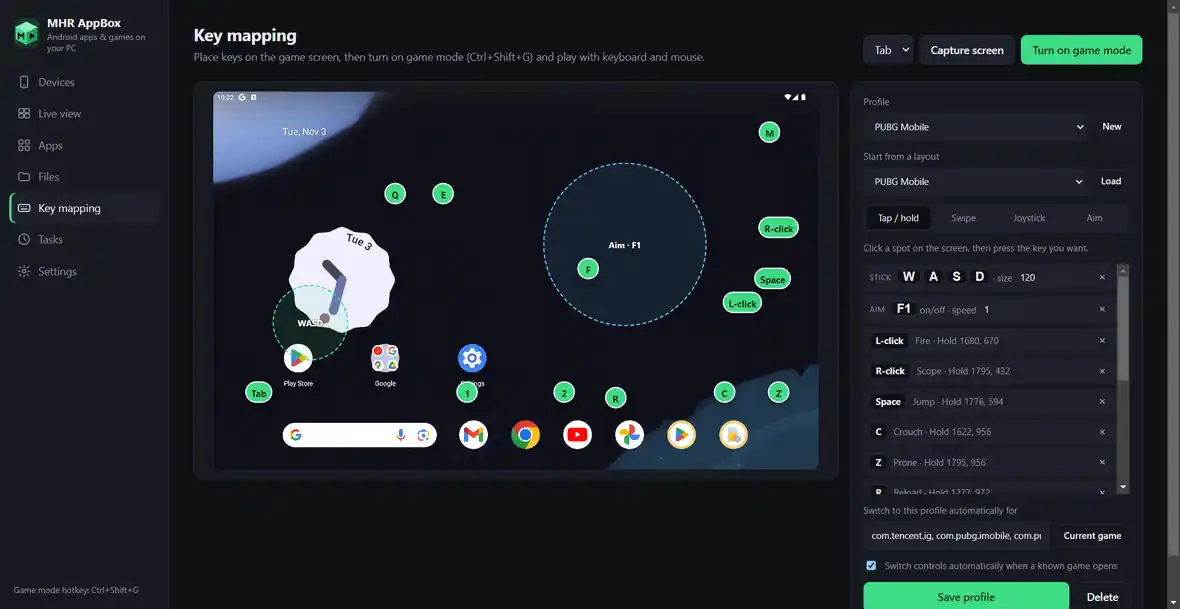
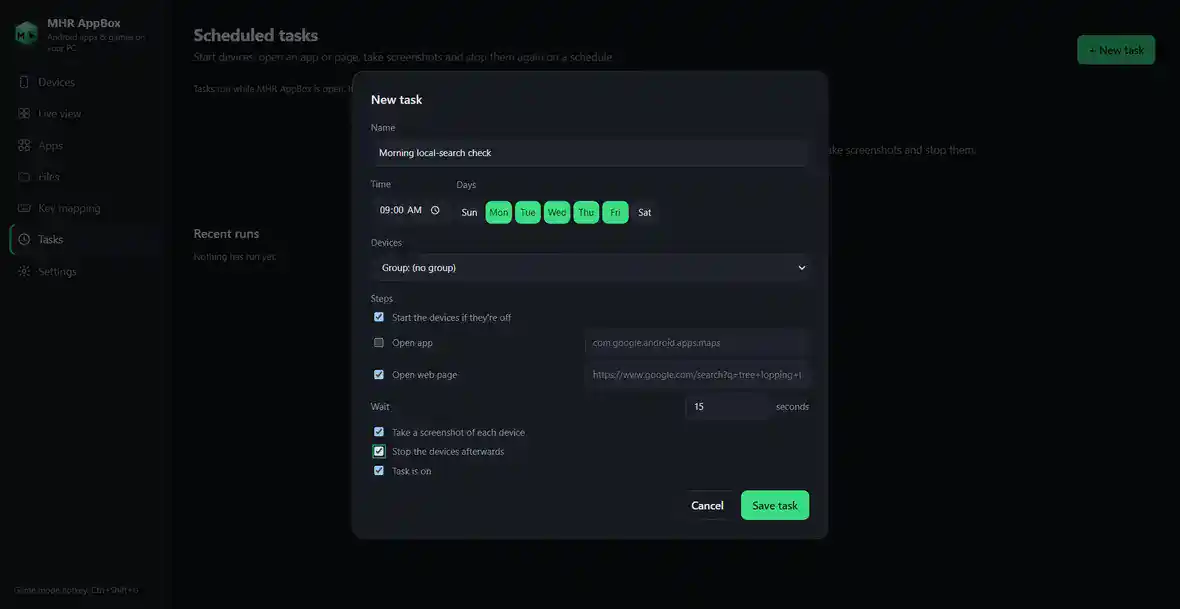
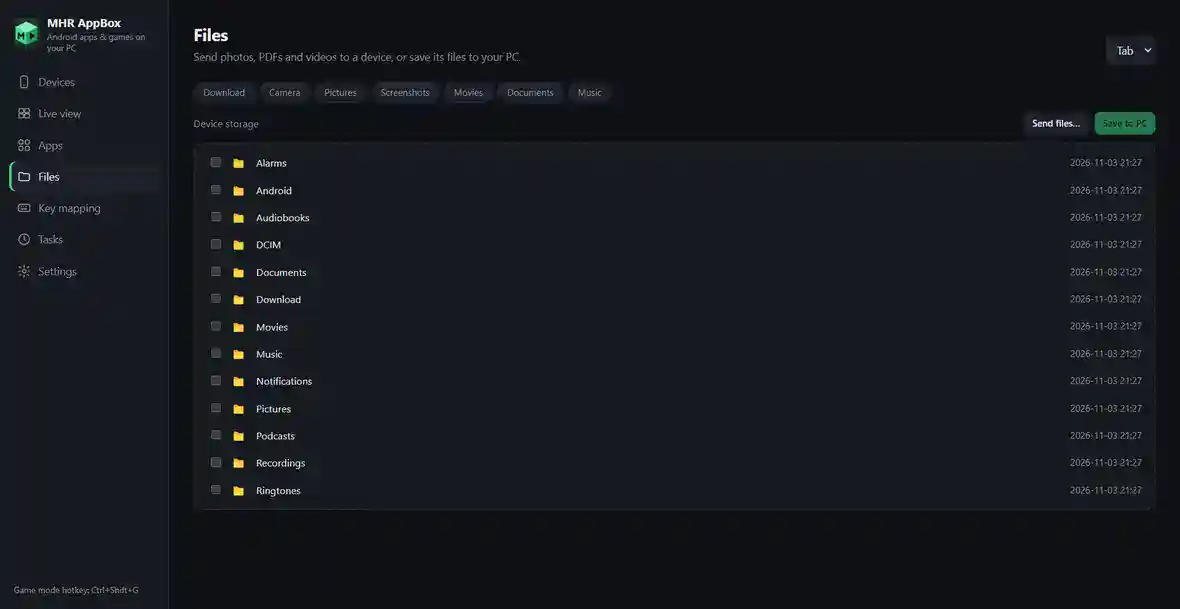
Facts from the app.
Counted from the app code and its tests — no made-up users, ratings or speed claims.
Made by MHRMasum (MD Harunur Rashid), an SEO consultant with 17+ years of hands-on work. MHR AppBox v1.2.0. Powered by the Android Emulator from Google.
Windows PC (64-bit) · CPU virtualization (Intel VT-x or AMD SVM) on · Windows Hypervisor Platform · about 2 GB one-time download on first launchOne key per plan. Every feature on every plan.
Prices in US dollars, with the Taka amount you send by bKash (৳125 per US dollar). Every plan includes every feature.
1 PC
For one Windows computer- Every feature
- One Windows PC
- Updates while your key is active
- Move it to a new PC any time
5 PCs
For a small team or office- Everything in 1 PC
- One key on up to 5 PCs
- Updates while your key is active
- Move PCs any time
Unlimited PCs
For agencies, labs & schools- Everything in 5 PCs
- Unlimited PCs
- Updates while your key is active
- For teams, labs and schools
Each PC uses one slot of your plan — remove a PC in Settings → License to free its slot. Lifetime = 2 × the yearly price.
Pay with bKash, then send us the Transaction ID.
Your license key and the MHR AppBox download link arrive by email within 2 hours.
- Open the bKash app and choose Send MoneySend to 01841497987
- Amount: the price of your planChoose your plan in the form.
- Reference: your email addressThe one you want your key sent to
- Send us your payment detailsUse the form — or email info@mhrmasum.info with the Transaction ID, your email address and your plan.
- Get your key by emailWithin 2 hours. Install MHR AppBox and paste the key on the activation screen.
Your devices stay on your PC. Nothing is deleted.
We’ll email you a renewal link before your plan ends. If you don’t renew, MHR AppBox locks at its next license check. Your devices, apps and settings are kept, and renewing unlocks everything.
- Your Android devices, apps, Google accounts and data stay on your PC
- Settings, key-mapping profiles, groups, notes and proxies are kept
- The downloaded Android engine and versions stay — nothing downloads again
- The app opens on the activation screen until you renew
- Starting devices, installing apps, batch actions and live view
Why this split: Your work should never be lost because a payment is late — renew and carry on exactly where you were.
Questions before you install
Straight answers from how the app actually works.
Not sure it fits your PC? Ask me directly — I built MHR AppBox.
What do I need to run MHR AppBox?
+
A 64-bit Windows PC with CPU virtualization switched on (Intel VT-x or AMD SVM in the BIOS) and Windows Hypervisor Platform turned on in Windows features. The app checks both and explains the fix if something is missing.
Does it have Google Play?
+
Yes. Every device runs Android with Google Play, so you sign in with your Google account and install apps the usual way.
Which Android versions can I use?
+
Android 12, 12L, 13, 14, 15, 16 and 17, read live from Google’s catalogue. Each device keeps its own version, so you can run Android 17 next to Android 14. A new version downloads once (about 1.4–2.2 GB).
Why does the first launch download about 2 GB?
+
The app downloads Google’s Android engine and system image directly from Google. Google’s licence doesn’t allow bundling those files into an installer, and they would make it about 2 GB. The download uses 8 connections, resumes after a drop, and only happens once.
How do I install APK files?
+
Start a device, open the Apps tab and drop the .apk, .apks, .xapk or .apkm file onto it — split apps and game data are supported. Or install from Google Play inside the device.
Can I play games with my keyboard?
+
Yes. Capture the game screen, click where a button is and press a key; profiles store taps and swipes. Version 1.2 doesn’t yet support holding a key to walk (WASD or a joystick), and each key press takes about 50–150 ms to reach the game, so very fast shooters feel slower than on dedicated gaming emulators.
Can every device use a different proxy?
+
Yes. Paste an HTTP or HTTPS proxy per device and press Test to see the IP and city it will appear from. SOCKS proxies aren’t supported by the Android engine. A changed proxy applies the next time that device starts.
Is this an anti-detect or fake-device tool?
+
No. MHR AppBox keeps every device separate — its own apps, accounts and storage — but it doesn’t fake device IDs, IMEI numbers or fingerprints. For managing many client social or ad accounts, the official business suites are the safer route.
Windows says “Windows protected your PC” — is that normal?
+
Yes, for now. The installer isn’t code-signed yet, so Windows SmartScreen shows a warning for new programs. Click More info, then Run anyway.
Do I lose my devices when I update?
+
No. Updates replace only the program. Devices, apps, accounts, settings and the downloaded Android engine are stored separately in your Windows user folder and are kept.
Can I use it without installing?
+
Yes. The portable version unzips anywhere, including a USB drive. It shares devices and settings with the installed version.
How do I pay, and when do I get my key?
+
Pay with bKash Send Money to 01841497987, then send us the Transaction ID with the form on this page (or email info@mhrmasum.info). Your license key and the MHR AppBox download link arrive by email within 2 hours. A renewal reminder is emailed 5 days before your plan ends — there are no automatic card charges.
How many PCs can use one key?
+
As many as your plan: 1 PC, 5 PCs or unlimited. Each activated PC uses one slot.
Can I move my key to a new PC?
+
Yes. On the old PC open Settings → License → Remove from this PC. The slot is freed and you can activate the new PC straight away.
Does it need the internet all the time?
+
No. After activation it re-checks the license every 12 hours in the background and keeps working offline for up to 7 days.
Is there a free trial?
+
No. MHR AppBox opens on the activation screen until a key is entered. Not sure it fits? Ask me on WhatsApp or by email before you buy.
Release timeline
New versions install over the old one — your devices and settings are kept.
License activation through MHR License Server: activation screen, PC slots, Settings → License, offline grace of 7 days.
Device profiles with groups, tags and notes; Duplicate; a proxy per device with Test; batch start, stop, install and screenshots; Live view.
Android version picker: Android 12 to 17 from Google’s catalogue, each device with its own version.
True 8-connection download, KB/s speed display, and import from IDM or your browser.
First release: Google’s Android Emulator engine, Phone / Tablet / Gaming devices, Google Play, APK drag and drop, key mapping and one-click setup.
Your Android phones and tablets, on one Windows PC.
From $9/year. Key within 2 hours · pay with bKash · installer or portable version.
More MHR software: all products · free plugins · MHR LumeRank SEO