← Products / MHR Screen Recorder
v3.1.0Windows app · Screen recorder · by MHRMasumMHR Screen Recorder Record your screen. Small files, super-sharp video.
MHR Screen Recorder captures and encodes on your graphics card, so recording barely touches the CPU and a static screen costs almost nothing in file size. Record a screen, a window or an area with your voice and PC sound, draw on screen while you talk, then add captions, cut mistakes and share a link — all from one app.
$29 one-time · Key within 2 hours · Pay with bKash
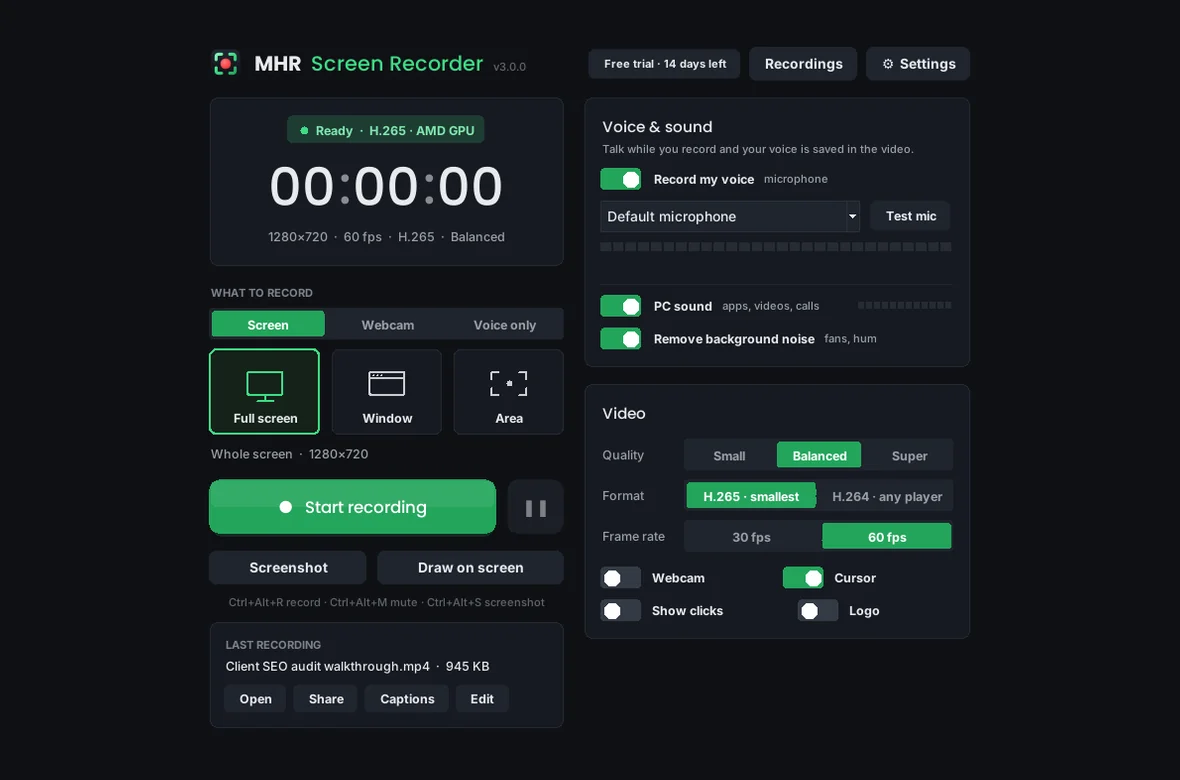
The real main window, shown with sample recordings.
- GPU recording: AMD, NVIDIA or Intel
- H.265 or H.264, 30 or 60 fps
- Voice + PC sound in sync
- Offline captions (English & Bangla)
- Crash-safe recording
- Installer or portable
Fast to record, small to send.
Built by an SEO consultant who records audit walkthroughs and tutorials for clients every week — and wanted crisp text, small files and a link to send, without paying for a subscription.
GPU capture and encoding
The screen is captured on the graphics card and encoded by its built-in H.265 or H.264 encoder (AMD, NVIDIA or Intel), so recording stays smooth and your PC stays fast. No GPU encoder? It falls back to the CPU.
Small files, crisp text
Constant-quality encoding keeps text sharp, and a still screen costs almost nothing. Choose Small, Balanced or Super quality; “Make smaller” re-encodes a finished video — about 45% smaller in testing.
Your voice, in sync
Record your microphone and PC sound with separate volumes, live level meters and noise reduction. Mute your voice mid-recording with Ctrl+Alt+M; muted parts stay silent and in sync.
Draw and highlight
Draw on screen with a pen, arrows and boxes in 5 colours (Ctrl+Alt+D), show a ring where you click, and take a screenshot any time (Ctrl+Alt+S). The toolbar never appears in the video.
Auto-zoom on clicks
Clicks are remembered while you record. Afterwards, one click makes a copy that zooms smoothly toward each click — the polished look of an edited tutorial, with no editing.
Captions and transcript
Speech-to-text runs on your PC, offline, in English, Bangla and other languages. Get an .srt file and a transcript, add switchable captions or burn them into the video.
Simple editor
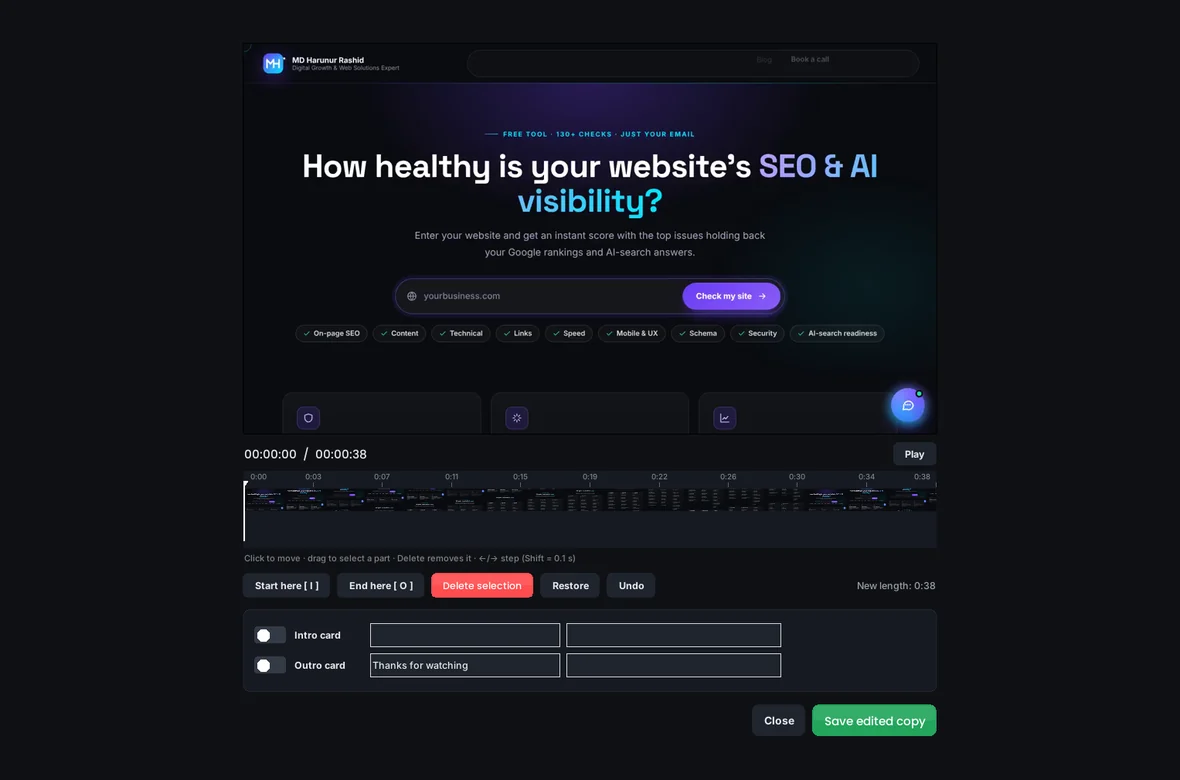
Trim the ends, cut mistakes from the middle, join clips and add intro and outro cards with your logo. Make a GIF or save the sound as MP3.
Share in one click
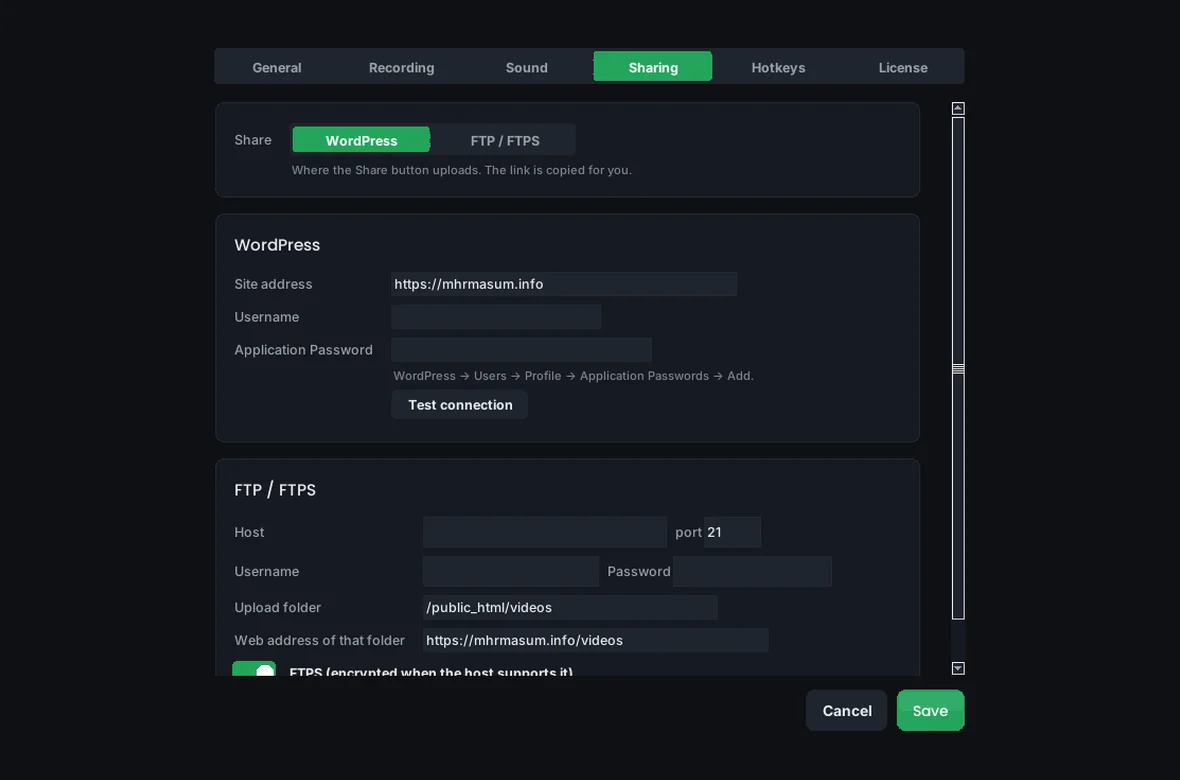
Upload to your WordPress Media Library or FTP hosting and the link is copied for you. Or “Copy file” and paste the video straight into WhatsApp, Slack or email.
Up and running in three steps.
- 1Install
Run MHR-Screen-Recorder-Setup.exe — no admin password needed. It adds Start-menu and desktop shortcuts. Or unzip the portable version.
- 2Record
Pick Full screen, Window or Area, switch on your voice, and press Record (or Ctrl+Alt+R). The first recording checks which encoder your PC has, once.
- 3Finish and share
Stop with Ctrl+Alt+R. Trim, add captions or auto-zoom in the Recordings library, then upload and copy the link.
26 features in 5 groups.
One plan with every feature: 1 pc.
Full screen, a single window (click it; it follows the window if it moves before you start) or a dragged area.
Screen, Webcam only or Voice only.
Small, Balanced or Super; H.265 for the smallest files or H.264 to play everywhere; 30 or 60 fps.
Record a big screen as 1080p or 720p for smaller files.
Picture-in-picture in any corner, in three sizes.
3- or 5-second countdown; auto-stop after 5 minutes to 2 hours.
While recording, a small draggable bar shows the timer, sound meters, pause, mic, draw and stop — never in the video.
Your logo in any corner, for client branding.
Each with its own switch and volume, kept in sync even through silent parts.
Choose your mic, press Test mic and watch the level bars.
Ctrl+Alt+M or the MIC button on the mini bar; muted parts are saved as silence.
Removes fan and hum from your voice.
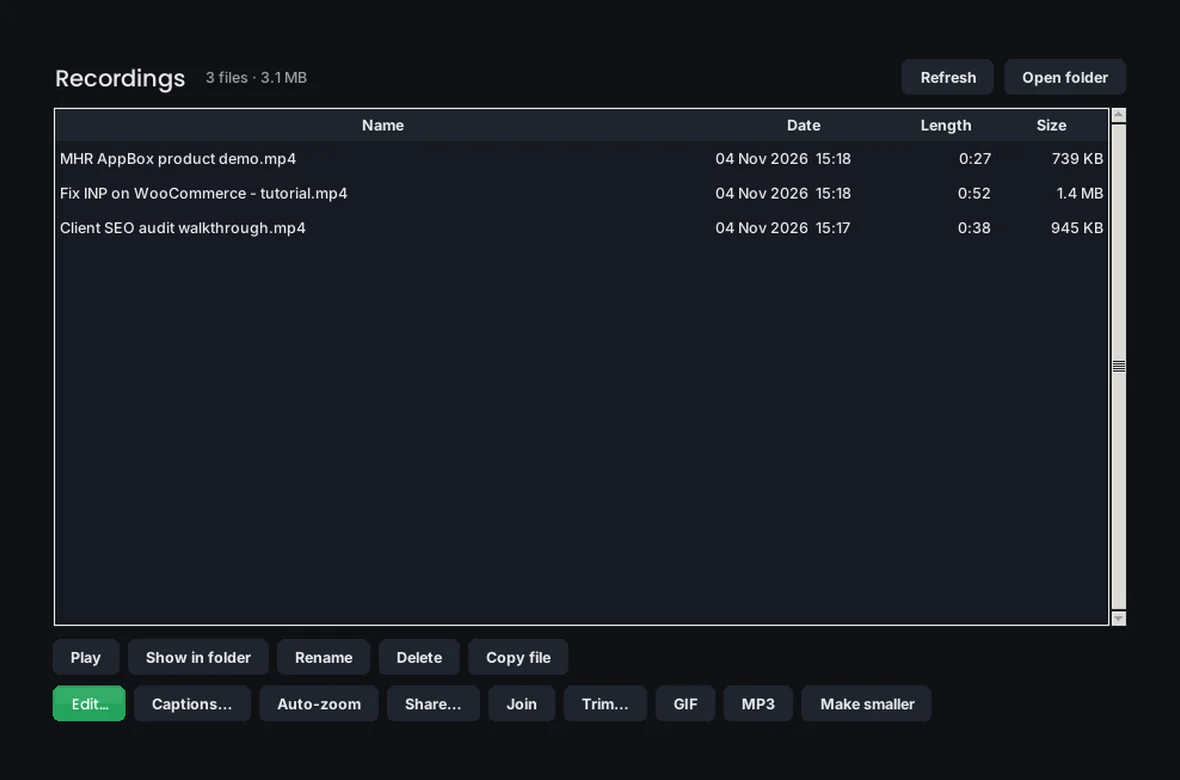
Every file with length and size: play, show in folder, rename, delete to the Recycle Bin.
Trim (instant or exact), cut out mistakes, join clips, intro and outro cards.
Offline speech-to-text: .srt, transcript, switchable or burned-in captions.
A copy that zooms toward each click.
GIF, MP3 sound, and “Make smaller”.
Upload to WordPress Media Library or FTP and copy the link; or copy the file to paste anywhere.
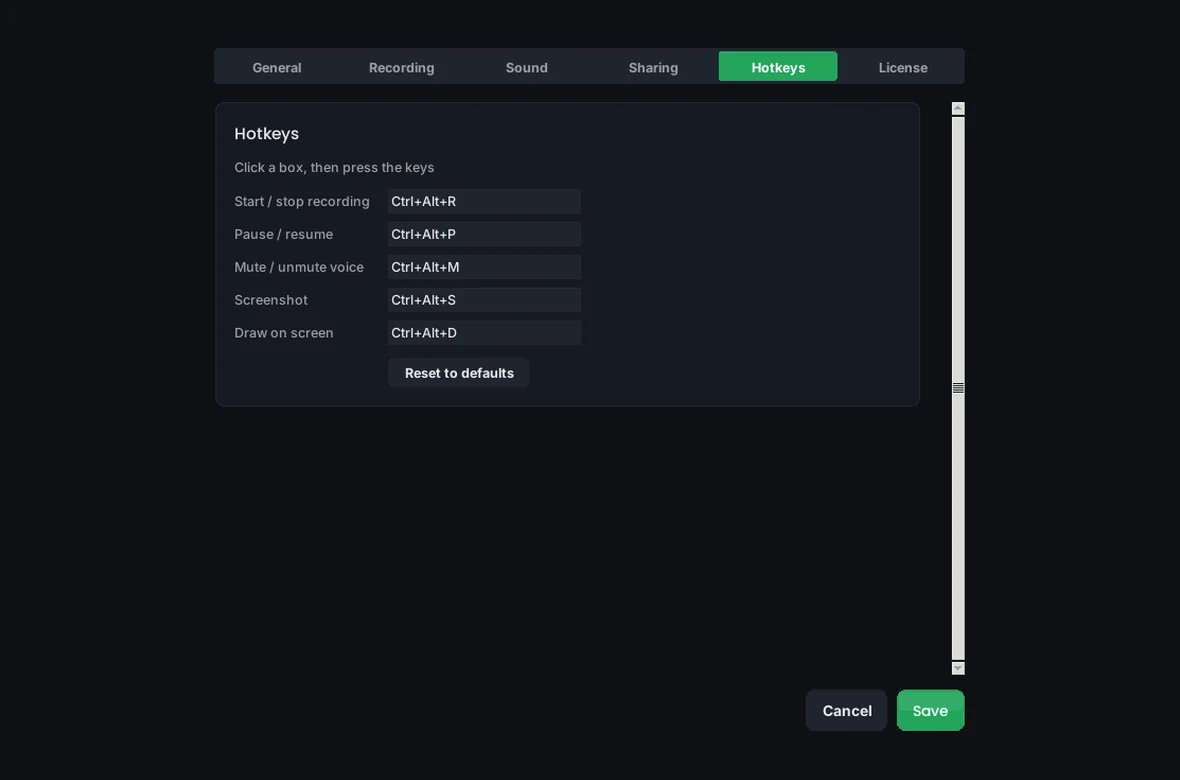
Ctrl+Alt+R start/stop, Ctrl+Alt+P pause, Ctrl+Alt+M mute, Ctrl+Alt+D draw, Ctrl+Alt+S screenshot — all can be changed.
Start minimised and record from the system tray; optional start with Windows.
Switch the app to Bangla in Settings → General.
Setup with shortcuts and an uninstaller that keeps your recordings, or a portable zip.
New versions install themselves and the app reopens.
Every feature, no key needed.
Pay once and keep it — no subscription.
Paste your key in the app; it’s checked by the MHR License Server.
See the app.
Real screens from MHR Screen Recorder (demo data). Click to enlarge.
Facts from the app.
Counted from the app code and its tests — no made-up users, ratings or speed claims.
Made by MHRMasum (MD Harunur Rashid), an SEO consultant with 17+ years of hands-on work. MHR Screen Recorder v3.1.0. GPU encoding with AMD, NVIDIA or Intel, and a CPU fallback.
Windows PC (64-bit) · works best with an AMD, NVIDIA or Intel graphics encoder (falls back to the CPU) · speech model downloads once the first time you use captionsOne price. Pay once, keep it for life.
Prices in US dollars, with the Taka amount you send by bKash (৳125 per US dollar). A one-time payment — no subscription and no renewals.
- Every feature
- One Windows PC
- Free updates
- Move it to a new PC any time
- 14-day free trial first
One key per PC — remove a PC in the app to move your key to another computer.
Pay with bKash, then send us the Transaction ID.
Your license key and the MHR Screen Recorder download link arrive by email within 2 hours. Trying it first? Pick “Free 14-day trial” — no payment needed.
- Open the bKash app and choose Send MoneySend to 01841497987
- Amount: the price of your planChoose your plan in the form.
- Reference: your email addressThe one you want your key sent to
- Send us your payment detailsUse the form — or email info@mhrmasum.info with the Transaction ID, your email address and your plan.
- Get your key by emailWithin 2 hours. Install MHR Screen Recorder and paste the key in the app.
Pay once. Your recordings are always yours.
MHR Screen Recorder is a one-time purchase. Videos are saved as normal MP4 files on your PC, so they open in any player — with or without the app.
- Every recording, screenshot, caption and transcript stays on your PC
- Settings, hotkeys and your logo watermark are kept on updates
- After the 14-day trial, recording needs a key
Why this split: No subscription to remember — buy it once and keep recording.
Questions before you install
Straight answers from how the app actually works.
Not sure it fits your PC? Ask me directly — I built MHR Screen Recorder.
Why are the files so small?
+
It records with your graphics card’s own encoder using constant quality, so text stays crisp and parts of the screen that don’t change cost almost nothing. H.265 gives the smallest files; H.264 plays on every device.
Does it slow down my PC?
+
Very little. The screen is captured and encoded on the graphics card, so the CPU is mostly free. If your PC has no supported GPU encoder, it uses the CPU instead.
Can it record my voice and PC sound together?
+
Yes. Switch on Record my voice and PC sound; each has its own volume, and they stay in sync with the video. You can mute your voice mid-recording with Ctrl+Alt+M.
Does it make captions in Bangla?
+
Yes. Captions run offline on your PC in English, Bangla and other languages. The speech model downloads once, the first time you use captions.
What happens if the PC crashes while recording?
+
It writes to disk every second. When you open the app again it offers to save what was recorded.
Windows says “Windows protected your PC” — is that normal?
+
Yes, for now. The installer isn’t code-signed yet, so Windows SmartScreen shows a warning for new programs. Click More info, then Run anyway.
Can I use it without installing?
+
Yes. The portable version unzips anywhere and runs MHR Screen Recorder.exe directly.
How do I pay, and when do I get my key?
+
Pay with bKash Send Money to 01841497987, then send us the Transaction ID with the form on this page (or email info@mhrmasum.info). Your license key and the MHR Screen Recorder download link arrive by email within 2 hours. It’s a one-time payment: no subscription, no renewals and no automatic card charges.
Is it really a one-time price?
+
Yes. $29 once — no subscription and no renewals. Updates are included.
Is there a free trial?
+
Yes. The app runs for 14 days with every feature before it asks for a key. Choose the free trial in the form on this page to get the download link.
Can I move my key to a new PC?
+
Yes. Remove it from the old PC in the app’s license screen and activate it on the new one.
Release timeline
New versions install over the old one — your recordings and settings are kept.
Redesigned interface: smooth rounded controls, dark Windows title bar, new dropdowns, slim scrollbars and a cleaner Recordings list. Fixed the 3-2-1 countdown stopping a recording from starting.
Fixed the mouse and PC feeling stuck while recording with click highlights on; PC sound now records on USB sound cards (such as Razer); live file size while recording; a debug log for support.
Offline captions and transcript, share to WordPress or FTP, auto-zoom, editor (cut, join, intro/outro), webcam-only and voice-only modes, logo watermark, tray icon, custom hotkeys, Bangla interface, license and auto-update.
Premium two-column interface, new icon and logo, Record my voice switch, Test mic, mute mid-recording.
Window recording, webcam overlay, countdown, auto-stop, mini control bar, drawing, click highlights, screenshots, noise reduction, Recordings library with trim, GIF and MP3; Windows installer.
First release: GPU capture and encoding, full screen or area, Small/Balanced/Super, voice and PC sound, pause, hotkeys and crash recovery.
Record it once. Send it in a minute.
$29 one-time. 14-day free trial · key within 2 hours · pay with bKash.
More MHR software: all products · free plugins · MHR LumeRank SEO