Social media content is no longer limited to social media platforms.
Instagram posts, TikTok videos, YouTube videos and X posts can appear in Google Search results. Some may also receive visibility through Google Discover or Google News. However, measuring that visibility has historically been difficult because creators did not control the domains hosting their social content.
Google Search Console Platform Properties changes that.
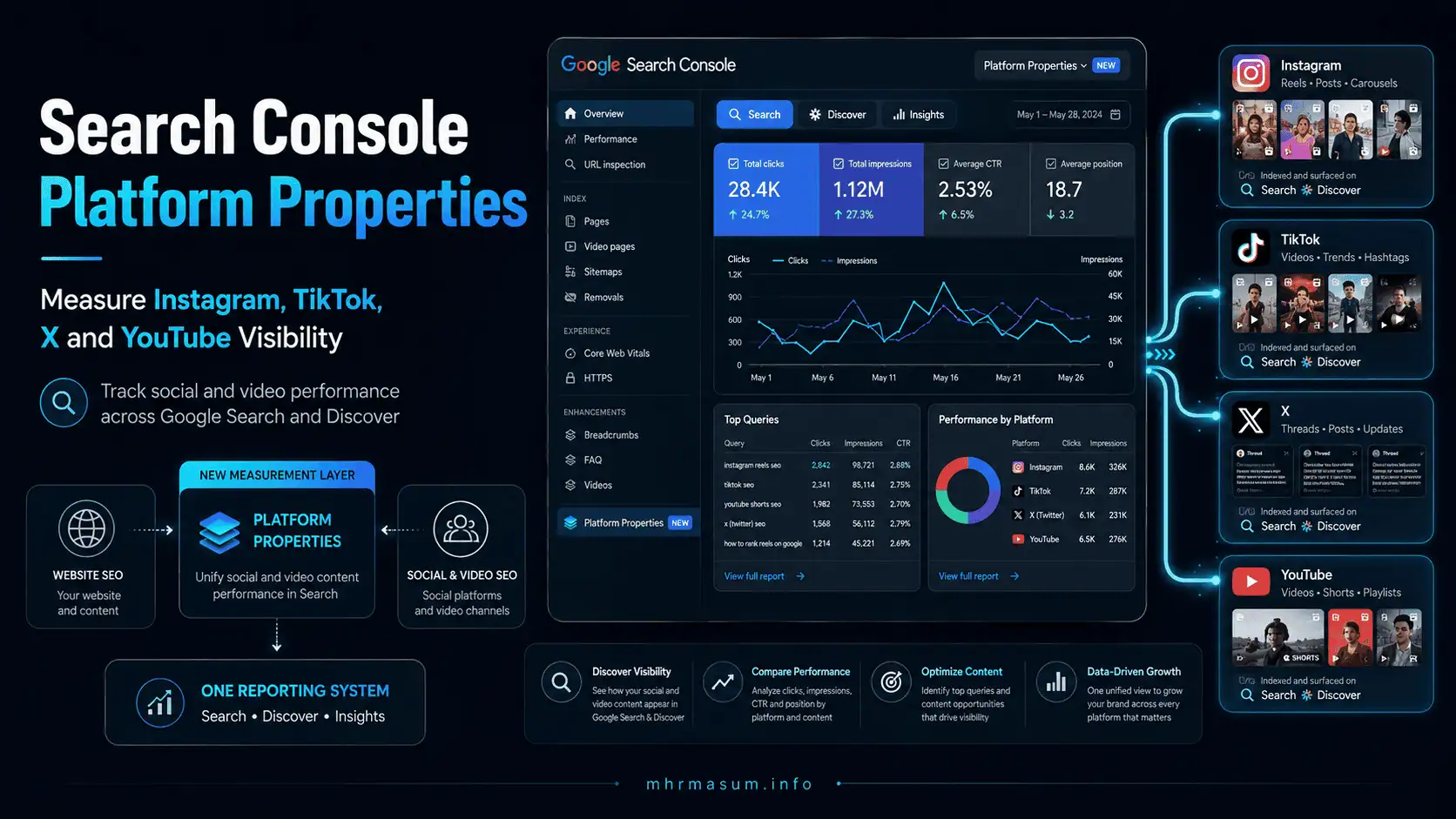
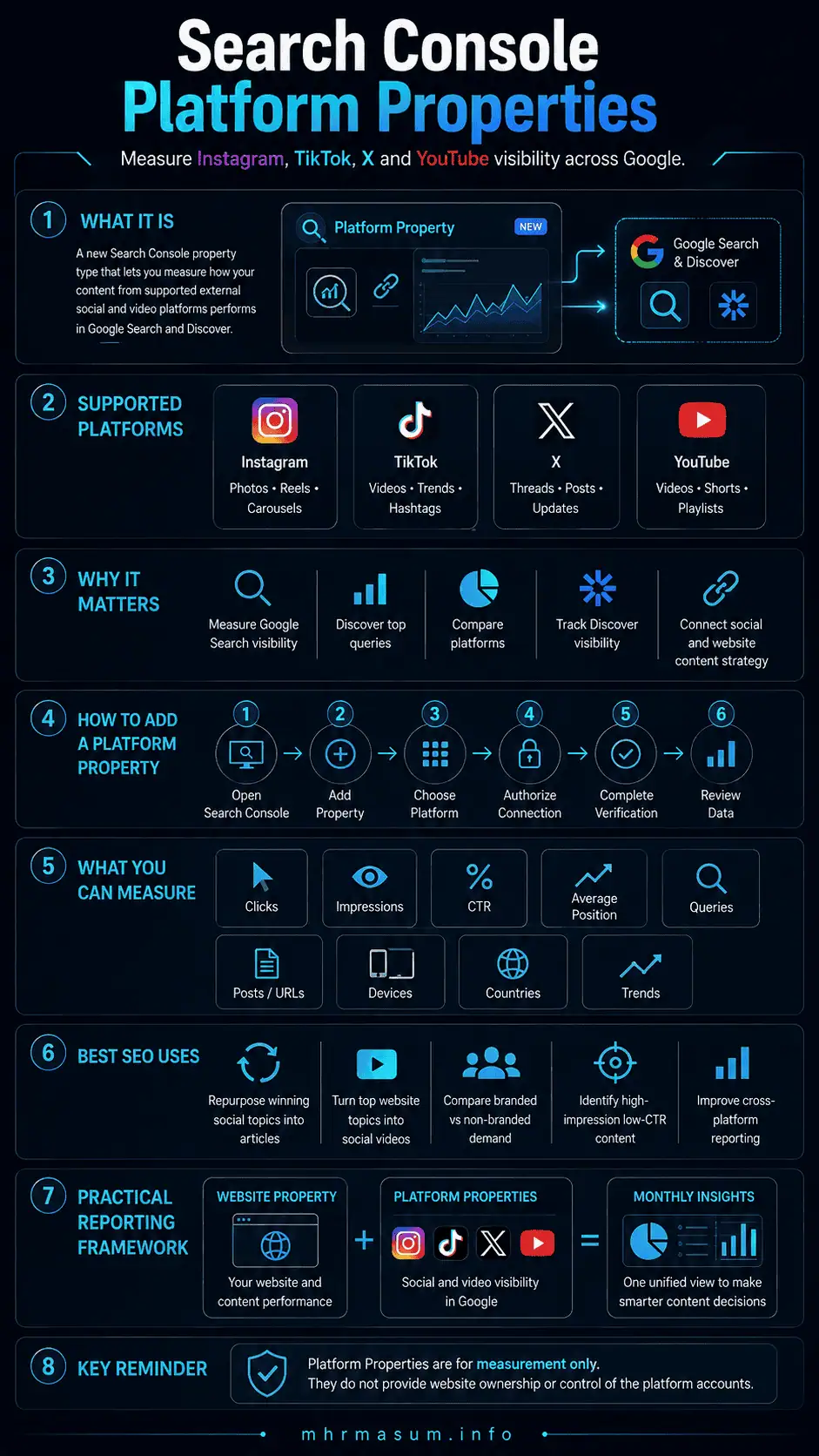
On July 7, 2026, Google introduced Platform Properties as a new Search Console property type. It allows eligible creators and publishers to connect supported social media accounts and see how their social and video content performs across Google surfaces.
The supported platforms are:
- TikTok
- X
- YouTube
After connecting an account, you can analyse Google impressions, clicks, click-through rates, search queries, individual posts and recent visibility trends.
This creates a new measurement layer between traditional website SEO, social media marketing, video SEO and Google Discover optimisation.
For businesses, agencies, publishers and creators, Search Console is no longer only a website-reporting tool. It can now help measure how a wider digital content ecosystem is discovered through Google.
This guide explains what Search Console Platform Properties are, how to connect each supported account, how to interpret the reports and how to combine website and social SEO data into a practical monthly reporting system.
For more guides covering SEO, AI search, WordPress and digital growth, visit the MD Harunur Rashid SEO and AI SEO website.
What Are Search Console Platform Properties?
A Platform Property is a Search Console property connected to an account or channel hosted on a supported external platform.
Traditional Search Console properties represent websites or specific website URL prefixes. Platform Properties represent social or video accounts that you manage but do not host on your own domain.
For example, you may have separate Search Console properties for:
- Your primary website
- Your Instagram account
- Your TikTok account
- Your X account
- Your YouTube channel
Each connected account is treated as an independent property.
You can then review how content from that account appears and performs when Google surfaces it.
Google’s official announcement explains that Platform Properties help creators understand how their social and video posts perform in Google Search and Discover. Google’s Help Center also indicates that relevant reporting may be available for Google News when content appears there. Properties do not transfer ownership of Instagram, TikTok, X or YouTube content to Search Console. They provide an authorised reporting connection between your platform account and Google Search Console.
They should therefore be understood as measurement properties, not website-control properties.
Why Platform Properties Matter for Modern SEO
Search behaviour has become increasingly multimodal.
People do not only search for traditional webpages. They look for:
- Short videos
- Tutorials
- Product demonstrations
- Reviews
- Before-and-after examples
- Social discussions
- First-hand experiences
- Creator recommendations
- News reactions
- Visual inspiration
- Step-by-step explanations
Google may surface content from social and video platforms when it believes that content is relevant to the searcher.
Before Platform Properties, creators often had to estimate this visibility through indirect methods such as:
- Searching Google manually
- Checking referral traffic
- Monitoring social platform analytics
- Using third-party rank-tracking tools
- Reviewing indexed platform URLs
- Searching branded and non-branded terms
These methods could reveal fragments of the picture, but they did not provide an account-level Google Search performance report.
Platform Properties makes it possible to answer more useful questions:
- Which social posts receive impressions in Google?
- Which search queries lead people to my content?
- Which platform generates the most Google visibility?
- Are people clicking my Instagram, TikTok, X or YouTube content?
- Is my social content appearing in Discover?
- Which content formats perform best in Google Search?
- Does a social campaign create additional branded-search demand?
- Which topics should become detailed website articles?
- Which website articles should be repurposed into social videos?
This is a significant development for social SEO, video SEO and cross-platform content measurement.
Which Platforms Does Search Console Support?
At launch, Google supports four platforms.
| Platform | Property type | Content you may be able to measure |
|---|---|---|
| Account or profile | Posts, Reels, Stories and other indexed content | |
| TikTok | Account or profile | Videos and indexed profile content |
| X | Account or profile | Posts, threads and indexed profile content |
| YouTube | Channel | Videos, Shorts and channel content |
Google has not announced support for every major social platform.
For example, Facebook, LinkedIn, Pinterest, Reddit and Threads were not included in the initial supported-platform list.
Google is also rolling out Platform Properties gradually. Therefore, the option may not immediately appear in every Search Console account. ou Use Platform Properties Without a Website?
Yes.
Google specifically positioned the feature for creators and publishers, including creators who do not operate their own websites.
A website remains valuable because it gives you greater control over:
- Content ownership
- Conversion tracking
- Structured data
- Internal linking
- Lead generation
- Email collection
- Product or service pages
- Brand presentation
- First-party analytics
However, owning a website is not a requirement for creating an eligible Platform Property.
For businesses that operate both a website and social channels, the strongest approach is to measure both.
Your website remains the central owned asset, while Platform Properties show how supporting content performs across Google.
How to Add a Platform Property in Search Console
Google has made the setup process relatively straightforward.
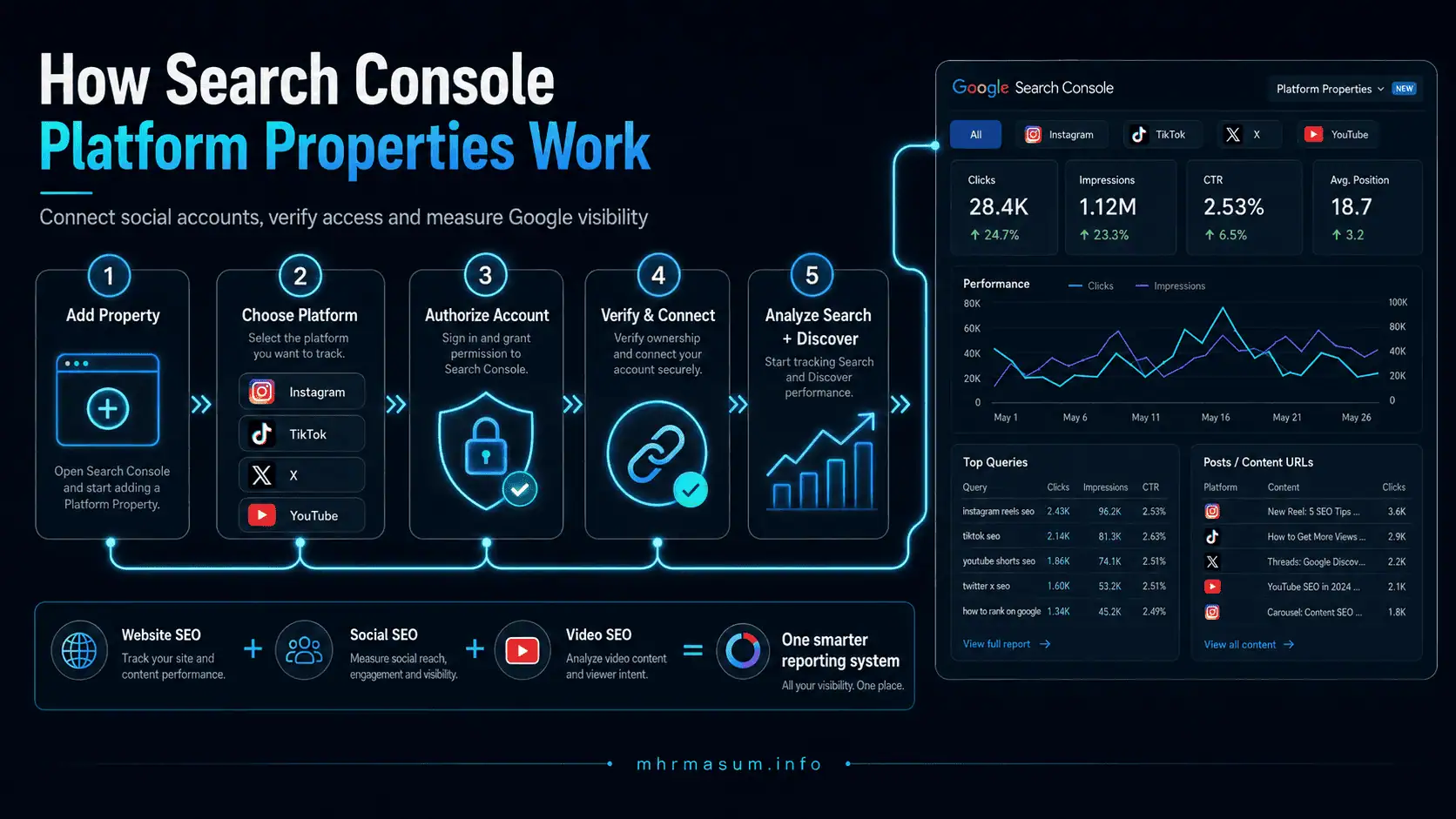
Step 1: Open Google Search Console
Sign in to the Google account that has administrative access to the social or video account you want to connect.
Open Google Search Console and access the property selector.
Step 2: Select “Add Property”
Open the property-selection menu in the left sidebar and choose Add property.
You should see the available website-property options and, once the feature is available to your account, the supported platform options.
Step 3: Select the Platform
Choose one of the following:
- TikTok
- X
- YouTube
Step 4: Authorise the Connection
Follow the on-screen instructions and sign in to the selected platform.
Google will ask you to authorise the connection securely.
The exact authorisation interface may vary by platform, but the purpose is the same: to confirm that you have permission to access the account or channel.
Step 5: Complete Verification
After successful authorisation, Search Console should display a confirmation message.
Select Go to property to complete the setup and access the new property.
It may take several days for performance data to begin appearing.
Step 6: Add Other Accounts Separately
Each social account or channel must be added as a separate Search Console property.
For example, a business managing two YouTube channels and three Instagram accounts would need to create five Platform Properties.
Google also periodically checks the authorised connection. If the external login expires or the connection is interrupted, access to the property may be paused until it is verified again. After reconnection, the previous reporting history should remain available. o Connect an Instagram Account
To connect Instagram:
- Open the Search Console property selector.
- Select Add property.
- Choose Instagram from the supported platforms.
- Sign in to the relevant Instagram account.
- Approve the requested authorisation.
- Complete the verification process.
- Open the new Instagram Platform Property.
Once data becomes available, review which Instagram URLs, posts or content formats receive impressions and clicks from Google.
Do not expect the report to reproduce Instagram Insights.
Search Console will not tell you how many people saw a Reel inside Instagram, how many followers watched a Story or how many users engaged with a post within the Instagram application.
It shows how eligible Instagram content performs when surfaced by Google.
How to Connect a TikTok Account
To connect TikTok:
- Select Add property in Search Console.
- Choose TikTok.
- Sign in to the TikTok account you manage.
- Authorise the connection.
- Complete verification.
- Wait for the reporting data to populate.
The TikTok Platform Property can help identify videos that Google associates with informational or commercial searches.
For example, a dental training school might discover that a short TikTok video receives Google impressions for:
- How to become a dental assistant
- Dental assistant training requirements
- Dental assistant course near me
- Dental assistant interview tips
That information can improve future TikTok content and guide the creation of more comprehensive website resources.
How to Connect an X Account
To connect X:
- Open the Search Console property menu.
- Choose Add property.
- Select X.
- Sign in to the correct X account.
- Approve the requested access.
- Complete the verification process.
The resulting report may help you identify posts, discussions or threads that appear in Google Search.
X content is often timely, concise and discussion-oriented. Platform data may reveal opportunities to expand a successful post into:
- A detailed article
- A case study
- A video
- A downloadable checklist
- A service page
- A frequently asked question
- A comparison page
A post that performs well for a non-branded query may represent search demand that your website has not yet addressed.
How to Connect a YouTube Channel
To connect YouTube:
- Select Add property in Search Console.
- Choose YouTube.
- Sign in using the Google account that manages the channel.
- Select or authorise the relevant channel.
- Complete the verification process.
- Open the Platform Property after verification.
YouTube already provides detailed native analytics, but Search Console adds a different perspective.
YouTube Analytics measures activity within YouTube and related traffic sources. The Search Console Platform Property focuses on how YouTube content performs when it is discovered through Google surfaces.
This can help you distinguish between:
- YouTube-native discovery
- Google Search discovery
- Google Discover visibility
- Google News visibility, where applicable
You may find that a video has modest YouTube Browse traffic but strong Google Search visibility because it answers a specific question.
Search Console Performance Report vs Insights Report
Platform Properties provide more than one reporting view.
The two most important are the Performance report and Insights report.
Platform Property Performance Report
The Performance report is the more detailed analytical interface.
Depending on the selected Google surface and available data, it can include:
- Total clicks
- Total impressions
- Average click-through rate
- Average position in Search
- Queries
- Individual posts or content URLs
- Countries
- Devices
- Dates
- Search appearance or surface-related filters
Google’s launch announcement says users can filter and sort the report to identify the posts and queries generating the most Google Search traffic. The data can also be exported for further analysis. Performance report when you need to:
- Compare date ranges
- Find declining posts
- Find emerging queries
- Analyse branded and non-branded searches
- Compare mobile and desktop performance
- Identify content with high impressions but low CTR
- Export information for a client report
- Evaluate individual posts
- Investigate Discover or Google News visibility
Queries apply primarily to activity involving an actual Google search. Discover is a recommendation feed rather than a conventional query-based search experience, so Discover analysis should focus more heavily on content, impressions, clicks and trends.
Platform Property Insights Report
The Insights report provides a simplified overview.
It is designed to help creators quickly understand:
- Recent traffic trends
- Top-performing content
- Content gaining visibility
- How audiences discover the connected account
- Changes in Google Search performance
Insights is useful for a fast weekly or monthly review.
However, it should not replace the Performance report when detailed diagnosis is required.
A practical workflow is:
- Open Insights to identify major changes.
- Open Performance to investigate the posts, queries, countries and devices responsible.
- Compare the findings with native platform analytics.
- Decide what to optimise, update or repurpose.
Achievements in Platform Properties
Google also includes an Achievements section.
Achievements can mark growth milestones, such as reaching a new threshold for total Google Search clicks during the previous 28 days.
Achievements are motivational rather than diagnostic. They can help creators notice progress, but strategic decisions should still be based on the underlying Performance and Insights reports.
How Search Console Counts Social Content
Understanding how Google counts impressions and clicks is important.
Instagram Stories
Google’s documentation explains that an Instagram Story can count as an impression when it appears in Google Search.
When a user clicks the Story result, Search Console may count that interaction as a click.
This does not mean every Instagram Story will be indexed or shown in Search. It explains how Search Console treats the interaction when eligible content is surfaced.
Videos Played Within Google
When a video appears in Search or Discover, that appearance may count as an impression.
If a user clicks the result, Search Console may count a click even when the video opens inside a Google video viewer rather than immediately opening the original platform application or website. tinction is important when comparing Search Console clicks with native platform sessions or referral data.
The numbers may not match because the systems count different interactions.
How to Find Social Posts Ranking in Google
Once the Platform Property contains sufficient data, open the Performance report.
Use the following process.
1. Select a Suitable Date Range
Begin with the previous 28 days.
For trend analysis, compare it with:
- The preceding 28 days
- The same period last year
- The previous three months
- The period before and after a content campaign
2. Open the Content or Pages Dimension
Look for the section showing individual posts, videos or content URLs.
Sort by impressions to identify the content Google surfaces most frequently.
Then sort by clicks to find the content driving actual visits or interactions.
3. Review High-Impression, Low-CTR Content
A post with high impressions but a low CTR may have strong relevance but weak presentation.
Depending on what the platform allows, review:
- Post title
- Video title
- Caption
- Thumbnail
- Opening text
- Topic clarity
- Profile name
- Publication date
- Search-intent alignment
Do not optimise only for clicks. The content must still satisfy the user after the click.
4. Analyse Queries
Review the queries that generate impressions and clicks.
Group them into categories such as:
- Branded
- Informational
- Commercial
- Local
- Product-related
- Comparison
- How-to
- Problem-solving
- Navigational
For a more structured approach to query analysis, read my guide to Search Console Query Groups for Content Strategy.
You can also separate company-name searches from general discovery using the framework in Branded vs Non-Branded SEO in Google Search Console.
5. Compare Posts Covering Similar Topics
Identify whether one content format performs better than another.
For example:
- Short video vs long video
- Single image vs carousel
- Short post vs detailed thread
- Product demonstration vs promotional video
- Educational post vs sales-focused post
This can help determine which format best matches Google’s interpretation of the query.
How to Measure Instagram SEO
Instagram SEO measurement should combine Platform Property data with Instagram’s native analytics.
Use Search Console to understand Google discovery.
Use Instagram Insights to understand native reach and engagement.
A practical Instagram SEO report could include:
| Metric | Source |
| Google impressions | Search Console |
| Google clicks | Search Console |
| Google queries | Search Console |
| Google CTR | Search Console |
| Top posts in Google | Search Console |
| Instagram reach | Instagram Insights |
| Profile visits | Instagram Insights |
| Saves and shares | Instagram Insights |
| Follower growth | Instagram Insights |
| Website clicks | Instagram Insights or analytics |
Look for posts that receive strong Google impressions but limited Instagram reach. These may be evergreen search assets even when they are no longer prominent in the social feed.
Also identify posts that generate both Google clicks and native engagement. These are strong candidates for:
- Updated versions
- Related posts
- Website articles
- YouTube videos
- Lead magnets
- Email content
- Service-page FAQs
How to Measure TikTok SEO
TikTok discovery often depends on clear topics, questions, demonstrations and search-oriented content.
The Platform Property can reveal whether Google is surfacing particular TikTok videos for relevant searches.
Measure:
- Search impressions by video
- Clicks by video
- Queries generating visibility
- CTR
- Visibility by country
- Visibility by device
- Changes after publishing or updating related content
Compare those findings with:
- TikTok video views
- Average watch time
- Completion rate
- Shares
- Saves
- Profile visits
- Link clicks
A video that receives many Google impressions but few clicks may need a clearer title, caption or visual preview.
A video receiving clicks but weak native engagement may satisfy the search snippet without retaining the visitor after arrival.
How to Measure YouTube Visibility in Google Search
YouTube videos frequently appear for tutorials, reviews, demonstrations, comparisons and question-based searches.
Use the YouTube Platform Property to identify:
- Videos receiving Google impressions
- Queries associated with specific videos
- Videos with rising search visibility
- Videos losing Google traffic
- High-impression videos with weak CTR
- Countries producing Google discovery
- Mobile-versus-desktop differences
Then compare that information with YouTube Analytics.
A complete report may include:
- Google Search impressions
- Google Search clicks
- Google CTR
- Search queries
- YouTube impressions
- YouTube CTR
- Watch time
- Average view duration
- Subscriber growth
- End-screen clicks
- Website traffic
- Leads or sales
This creates a stronger picture than relying on either platform alone.
How to Measure X Content in Google Search
X content may appear for:
- Current events
- Brand announcements
- Expert commentary
- Technical discussions
- Product updates
- Public conversations
- Industry reactions
- Breaking news
Use Platform Property data to identify the posts or threads that continue receiving Google visibility after their initial social engagement declines.
Evergreen X posts can reveal topics that deserve expansion.
For example, a short post about an SEO update may attract impressions for several weeks. That can justify publishing:
- A detailed analysis
- A WordPress implementation guide
- A checklist
- A client advisory
- A case study
- A frequently asked questions section
How Social Content Appears in Google Discover
Google Discover recommends content based on user interests rather than requiring a typed query.
Social and video content may appear in Discover when Google considers it relevant to an individual user.
The Discover report will only appear when the connected property receives enough eligible Discover traffic.
Therefore, the absence of a Discover report does not automatically indicate a technical problem.
When Discover data is available, review:
- Posts receiving impressions
- Posts receiving clicks
- CTR
- Publication dates
- Content formats
- Topic patterns
- Changes after major Google updates
- Short-lived spikes
- Repeat visibility from evergreen topics
Discover performance can be volatile. A post may receive a large burst of traffic and then decline quickly.
Avoid judging success from one spike. Look for repeatable patterns across topics, formats and publication schedules.
Search Console Does Not Replace Native Platform Analytics
This is one of the most important limitations.
Search Console Platform Properties measure how content performs through Google.
They do not show complete platform-native activity.
For example, the reports do not tell you:
- How many times a TikTok video appeared inside TikTok
- How many users watched an Instagram Reel in Instagram
- How many people liked an X post
- How many YouTube subscribers watched a video
- How many users saved or shared a social post
- How long viewers watched a video inside the platform
- Whether a platform algorithm recommended the content
Google explicitly states that Platform Properties do not track when people see content on the underlying social platform. reporting systems.
Search Console answers:
How did people discover this content through Google?
Native analytics answers:
What happened when people encountered or consumed this content on the platform?
How to Combine Website and Social SEO Reporting
Businesses should avoid reporting website SEO and social SEO as completely disconnected channels.
The same topic can move through several stages:
- A user sees a video in Google Search.
- The user remembers the brand.
- The user searches for the brand later.
- The user visits the website.
- The user reads a service page or article.
- The user completes a form.
- The lead is recorded in a CRM.
No single report may capture that entire journey perfectly.
Google recommends using Search Console and Google Analytics together because Search Console measures activity before a website visit, while Google Analytics measures behaviour after users arrive on the website. The platforms use different measurement and attribution systems, so their numbers should not be expected to match exactly. ed reporting system should include four layers.
Layer 1: Website Search Visibility
Use your website Search Console property to measure:
- Website impressions
- Website clicks
- CTR
- Average position
- Website queries
- Landing pages
- Search features
- Discover performance
Layer 2: Platform Search Visibility
Use Platform Properties to measure:
- Instagram visibility
- TikTok visibility
- X visibility
- YouTube visibility
- Top social posts in Google
- Queries leading to social content
- Discover or News performance
Layer 3: Website Engagement and Conversion
Use GA4 or another analytics system to measure:
- Organic sessions
- Engaged sessions
- Landing pages
- Key events
- Form submissions
- Purchases
- Revenue
- Assisted conversions
For AI-platform measurement, you can create a separate reporting layer using my guide on tracking ChatGPT search traffic in GA4.
Layer 4: Business Outcomes
Use your CRM, ecommerce system or lead-management platform to measure:
- Qualified leads
- Sales
- Revenue
- Cost per lead
- Customer acquisition
- Lead source
- Assisted touchpoints
- Repeat customers
This prevents reporting from stopping at impressions and clicks.
Monthly Social-Search Reporting Template
Use the following structure for a monthly report.
Executive Summary
Include:
- Total Google visibility across all connected accounts
- Largest increases and decreases
- Best-performing platform
- Best-performing post
- Most valuable non-branded query
- Main business outcome
- Priority action for the next month
Platform Scorecard
| Property | Impressions | Clicks | CTR | Top content | Change |
| Website | — | — | — | — | — |
| — | — | — | — | — | |
| TikTok | — | — | — | — | — |
| X | — | — | — | — | — |
| YouTube | — | — | — | — | — |
Query Analysis
Separate queries into:
- Brand searches
- Service searches
- Product searches
- Local searches
- Informational searches
- Comparison searches
- Problem-based searches
Content Analysis
Document:
- Posts gaining visibility
- Posts losing visibility
- High-impression, low-CTR posts
- Content appearing in Discover
- Topics performing across multiple platforms
- Topics requiring a website article
- Website pages that should become videos or social posts
Conversion Analysis
Record:
- Website visits from social platforms
- Branded-search growth
- Form submissions
- Calls
- Ecommerce transactions
- Revenue
- Assisted conversions
- CRM-qualified leads
Next-Month Actions
Assign clear actions such as:
- Rewrite three video titles.
- Expand a successful TikTok topic into a blog article.
- Create a YouTube video from a high-performing website guide.
- Improve the thumbnail of a high-impression video.
- Add internal links to a supporting service page.
- Create a localised version of a successful post.
- Update the website’s author and entity information.
Platform Properties and Entity SEO
Platform Properties are primarily a measurement feature, but they support a broader Entity SEO strategy.
A strong brand entity may have a connected ecosystem consisting of:
- Website
- Author profile
- Organization information
- Social profiles
- YouTube channel
- Google Business Profile
- Portfolio
- Case studies
- Reviews
- External references
- Consistent branding
Your website should clearly connect these assets.
Useful actions include:
- Link official social profiles from the website.
- Use consistent brand names and descriptions.
- Add accurate Organization or Person structured data.
- Include relevant
sameAsproperties. - Maintain a detailed author page.
- Publish original expertise and evidence.
- Link social posts back to relevant website resources where appropriate.
Read Entity SEO: The Missing Part of Modern SEO for a deeper explanation of entity relationships, brand recognition and topic associations.
You can also review how to build brand authority for AI search to strengthen visibility across search engines and AI-generated discovery systems.
Platform Properties and AI Search
Platform Properties currently focus on Google performance rather than complete visibility across ChatGPT, Gemini, Claude, Perplexity or Copilot.
However, the feature supports the broader principle behind AI SEO: brands must measure visibility across multiple content formats and discovery systems.
AI systems may evaluate or reference:
- Website articles
- Videos
- Social profiles
- Product data
- Reviews
- Author information
- External citations
- Structured entities
- Original research
- First-hand evidence
A website-only content strategy can therefore miss important parts of modern discovery.
Learn more in my complete guide to AI SEO for Google AI Overviews, ChatGPT, Gemini and Perplexity.
You may also find the comparison of GEO vs AEO vs SEO useful when building a multi-platform search strategy.
Platform Properties and Multimodal SEO
Platform Properties make multimodal content performance easier to observe.
Multimodal SEO involves optimising different content types such as:
- Text
- Images
- Video
- Audio
- Product data
- Visual demonstrations
- Social posts
A single topic may perform differently depending on its format.
For example, “how to clean solar panels” might perform best as:
- A website checklist for traditional Search
- A short video for TikTok
- A detailed demonstration for YouTube
- A visual carousel for Instagram
- A concise safety thread on X
Platform Properties help identify which formats Google surfaces for specific topics.
Read my guide to Multimodal SEO for AI Search for a more complete content-format strategy.
Common Limitations of Platform Properties
Gradual Availability
The feature is being rolled out gradually. You may not see it immediately.
Limited Platform Support
Only Instagram, TikTok, X and YouTube were included at launch.
Separate Properties Are Required
Every account or channel must be added independently.
No Native Platform Engagement Data
The report does not replace Instagram Insights, TikTok Analytics, X Analytics or YouTube Analytics.
Reporting Data May Take Time
Newly verified properties may take several days to show performance data.
Discover and News Reports Are Conditional
These reports may only appear when content receives eligible traffic from the corresponding surface.
Search Visibility Is Not Conversion Attribution
A Google click does not automatically reveal whether the user became a lead or customer.
Measurement Systems Will Differ
Search Console, GA4, native social analytics and CRM platforms use different definitions and attribution models.
Connecting a Property Does Not Improve Rankings
Adding an Instagram, TikTok, X or YouTube account to Search Console is a measurement action.
It does not automatically increase the account’s Google rankings, indexing or Discover visibility.
Performance improvements still depend on useful content, relevance, quality, clarity, authority and user satisfaction.
A 30-Day Platform Property Action Plan
Days 1–3: Connect and Verify
- Check whether Platform Properties are available.
- Add every eligible account.
- Confirm that you are using the correct administrator login.
- Document each connected property.
- Check the connections after verification.
Days 4–10: Establish a Baseline
- Record impressions, clicks and CTR.
- Export the available data.
- Identify top posts and queries.
- Separate branded and non-branded discovery.
- Compare website and platform visibility.
Days 11–17: Identify Content Opportunities
- Find high-impression, low-CTR posts.
- Find posts receiving non-branded queries.
- Identify topics appearing across several properties.
- Find social topics missing from the website.
- Find website topics that should become videos.
Days 18–24: Improve Content
- Improve unclear titles and descriptions.
- Strengthen thumbnails where relevant.
- Add supporting website resources.
- Improve internal linking.
- Update related articles.
- Add first-hand evidence.
- Connect relevant content to service or product pages.
Avoid publishing large volumes of undifferentiated AI-generated copy. Generic content without experience, evidence or a clear purpose is unlikely to build durable visibility. Read why generic AI content does not rank anymore for a practical quality framework.
Days 25–30: Build the Monthly Report
- Compare performance with the baseline.
- Record meaningful gains or losses.
- Connect visibility to website traffic.
- Review leads and revenue.
- Select the next month’s priority topics.
- Create a cross-platform publishing calendar.
Frequently Asked Questions
What are Search Console Platform Properties?
Platform Properties are a Search Console property type that lets eligible account owners monitor how content hosted on supported social and video platforms performs through Google.
Which platforms are supported?
The initial supported platforms are Instagram, TikTok, X and YouTube.
When did Google launch Platform Properties?
Google officially announced Platform Properties on July 7, 2026. I connect multiple social accounts?
Yes. Each account or channel must be added as a separate Platform Property.
Can I use Platform Properties without owning a website?
Yes. Google designed the feature for creators and publishers, including those without their own websites.
Why can’t I see Platform Properties in my account?
Google is gradually rolling out the feature. It may not yet be available in every Search Console account.
Does Search Console show Instagram or TikTok views?
It does not show complete native platform views. It reports eligible visibility and interactions occurring through Google surfaces.
Can Platform Properties show Google Discover traffic?
Yes, when the connected content receives eligible Discover traffic. The Discover report may not appear when there is insufficient data.
Can Platform Properties show Google News performance?
Google’s Help Center says Google News reporting may be available when connected content appears and receives traffic there.
Does connecting my account improve its Google ranking?
No. Connecting the account provides reporting access. It is not a ranking boost.
Can I export Platform Property data?
Google’s announcement says Performance report data can be exported for additional analysis.
Should I use Search Console or native social analytics?
Use both. Search Console measures Google discovery, while native analytics measures activity occurring within the social or video platform.
Final Thoughts
Google Search Console Platform Properties represents an important shift in SEO measurement.
Businesses and creators can now evaluate more than their website URLs. They can begin understanding how Instagram posts, TikTok videos, X content and YouTube videos contribute to Google visibility.
The feature will be particularly valuable for:
- Creators
- Publishers
- SEO consultants
- Social media teams
- Video marketers
- Local businesses
- Ecommerce brands
- Agencies
- Personal brands
- Multi-channel content teams
The greatest value will not come from looking at another dashboard.
It will come from connecting the information.
A successful social post can inspire a website article. A high-performing website query can become a video. A YouTube tutorial can support a service page. An Instagram post can strengthen brand discovery. A TikTok video can reveal new customer questions.
That is how website SEO, social SEO, video SEO, Entity SEO and AI visibility begin working as one connected digital growth system.
Need Help Building a Connected SEO Reporting System?
I am MD Harunur Rashid, an SEO, AI SEO and Digital Growth Consultant with more than 17 years of experience helping businesses improve their visibility through Local SEO, Technical SEO, WordPress, WooCommerce SEO, content strategy and AI-ready optimisation.
Explore my:
- SEO and digital growth services
- Professional background and experience
- SEO and WordPress portfolio
- Technical SEO and keyword research work
- Website speed optimisation projects
- Local SEO portfolio
- Roofing Brisbane Local SEO case study
- Pest Control Melbourne Google Business Profile case study
Visit the mhrmasum.info homepage for more practical SEO, AI search, WordPress and digital-growth resources.
For an SEO audit, reporting strategy or customised growth plan, contact MD Harunur Rashid.
Official Google Resources
- Google Search Central announcement: See how content from social and video platforms performs on Google Search
- Google Search Console Platform Properties documentation
- Google Search Console
- Using Search Console and Google Analytics data together
Recommended WordPress Tags
Search Console Platform Properties, Google Search Console, Social SEO, Instagram SEO, TikTok SEO, YouTube SEO, X SEO, Video SEO, Google Discover, Google News SEO, Social Media Analytics, Search Performance, Multimodal SEO, AI SEO, Entity SEO, Digital Marketing Analytics