Google Search Console can show hundreds or thousands of search queries connected with a website.
However, individual query lists can become difficult to interpret because people often express the same need in many different ways.
For example, users searching for information about Technical SEO may type:
- Technical SEO checklist
- WordPress Technical SEO checklist
- Technical SEO audit checklist
- SEO technical checklist for websites
- How to audit WordPress Technical SEO
- Technical SEO issues affecting rankings
- Website Technical SEO best practices
These queries use different words, but many represent the same underlying topic or search intent.
Looking at each query separately can hide the bigger picture. Website owners may focus on individual keyword variations without recognising that the website is gaining or losing visibility across an entire subject.
Google introduced Query Groups in Search Console Insights to solve this problem.
Query Groups use AI-assisted classification to combine similar search queries into broader groups. Instead of reviewing an unstructured list of keyword variations, website owners can identify the main subjects attracting their audience, the topics gaining clicks and the topics beginning to decline.
Google announced Query Groups on October 27, 2025. Google explained that the feature groups queries with similar user intent, including variations caused by different phrasing, misspellings and languages. The groups are designed for high-level analysis and do not influence rankings.
This guide explains how to use Search Console Query Groups to:
- Discover topic clusters
- Understand search intent
- Find content gaps
- Identify growing subjects
- Diagnose declining content
- Improve internal linking
- Consolidate overlapping articles
- Strengthen service-page pathways
- Plan new content
- Support AI SEO and Entity SEO
- Create practical monthly content reports
The Quick Answer
Search Console Query Groups organise semantically similar search queries into broader topic groups inside the Search Console Insights report.
Instead of treating the following searches as completely separate:
how to track ChatGPT traffic
track ChatGPT traffic in GA4
ChatGPT referral traffic GA4
measure ChatGPT visits
ChatGPT analytics tracking
Google may place them within one Query Group because they represent similar user intent.
Each group contains:
- A group name based on the highest-click query
- The combined clicks generated by all queries in the group
- Examples of high-performing queries within the group
- A link to the detailed Performance report
- A Top, Trending up or Trending down classification
Google states that the group name is based on the best-performing query, while the click total represents all queries within that group. The Insights interface shows several high-click examples, and clicking the group opens the Performance report for more detailed analysis.
Query Groups are useful for content strategy because they shift analysis away from isolated keywords and toward broader audience needs.
What Are Search Console Query Groups?
Search Console Query Groups are AI-generated collections of search queries that Google considers similar in meaning or user intent.
The feature appears within Search Console Insights under the section showing queries leading to the website.
Google introduced the feature because users can phrase the same question in many different ways.
These variations may include:
- Different word order
- Singular and plural versions
- Misspellings
- Abbreviations
- Long-tail questions
- Short search phrases
- Different languages
- Related wording with the same intent
Google’s system groups these variations to provide a clearer high-level view of the subjects attracting clicks.
The official announcement explains that Query Groups are intended to replace a long, cluttered list with groups representing the main interests of a website’s search audience. The groups are computed using AI and may change as Google’s classification evolves.
Why Google Introduced Query Groups
Traditional keyword analysis often treats every search phrase as a separate item.
This creates several problems.
A website may receive clicks from hundreds of long-tail variations, but the individual click count for each query may appear small.
For example:
| Query | Clicks |
|---|---|
| how to recover from Google update | 26 |
| Google update recovery checklist | 21 |
| website traffic dropped after Google update | 17 |
| recover rankings after core update | 15 |
| Google algorithm update recovery | 12 |
| what to do after core update | 9 |
Looking at each query separately may make the opportunity appear limited.
When combined, the topic has generated:
26 + 21 + 17 + 15 + 12 + 9 = 100 clicks
The group-level view shows that Google core-update recovery is a meaningful audience interest.
Query Groups make it easier to identify that pattern without manually clustering every keyword variation.
When Google Launched Query Groups
Google announced Query Groups on October 27, 2025.
The feature began rolling out gradually within Search Console Insights for websites with a sufficiently large volume of query data.
Google explained that lower-volume websites would continue to see a regular query list because grouping is less necessary when a website has only a small number of queries.
The feature is therefore not guaranteed to appear for every property.
Where to Find Query Groups
Query Groups appear inside the Search Console Insights report rather than as a separate main report.
The general navigation is:
Google Search Console
→ Insights
→ Queries leading to your site
Eligible websites may see grouped query cards instead of only individual query lists.
The cards can be organised into:
- Top
- Trending up
- Trending down
Selecting a group opens a more detailed view or redirects to the Search Console Performance report with the relevant query information.
Google explains that Insights is intended to provide a simplified overview, while the Performance report provides more granular analysis across queries, pages, countries, devices, dates and search appearances.
Why Query Groups May Not Appear
The feature is available only when Google determines that grouping will be useful for the property.
Several conditions may affect availability.
The Website Needs Sufficient Query Data
Google states that Query Groups are intended for sites with a significant volume of query data.
A small or new website may continue to see an ordinary query list.
Google has not published a specific minimum number of:
- Clicks
- Impressions
- Queries
- Pages
- Months of data
The feature may appear after the website accumulates more search visibility.
The Website May Have Too Few Distinct Query Variations
A website could receive a reasonable number of clicks while ranking for only a small number of distinct searches.
In that situation, Google may determine that query grouping is unnecessary.
The Rollout May Differ by Property
Search Console features can be introduced gradually.
Different websites within the same account may not receive the feature at exactly the same time.
The Wrong Property May Be Selected
Search Console can contain:
- Domain properties
- URL-prefix properties
- HTTP properties
- HTTPS properties
- Subdomain properties
- Path-specific properties
Check whether the main domain property contains more complete data than a narrowly scoped property.
How Query Groups Are Created
Google uses AI-assisted classification to identify queries with similar intent or meaning.
The grouping is not limited to exact keyword matching.
For example, these queries may be related even though they do not use the same complete phrase:
how to improve local rankings
local business SEO strategy
rank higher on Google Maps
Local SEO for small businesses
improve Google Business Profile visibility
Some may belong within one broad Local SEO group, while others could be separated into a more specific Google Business Profile group.
Google’s classification can consider semantic similarity rather than only repeated words.
This makes Query Groups more flexible than a basic spreadsheet filter or exact-match keyword rule.
How to Read a Query Group
Each Query Group contains several pieces of information.
Understanding each element prevents incorrect conclusions.
Group Name
The group is named after the query with the highest number of clicks inside that group.
For example, a group may be named:
technical SEO checklist
That does not mean every query in the group contains those exact words.
The group may also contain:
- WordPress Technical SEO audit
- Technical website checklist
- SEO technical issues
- Technical SEO best practices
- How to fix Technical SEO problems
The name is a representative label based on performance, not a manually created topic title.
Google confirms that the group name comes from the best-performing query within that group.
Total Clicks
The click total shown for the group includes clicks from all queries assigned to the group.
It is not the click count of only the group-name query.
For example:
Group name: Local SEO strategy
Total group clicks: 640
The exact query “Local SEO strategy” may have produced only 140 clicks. The remaining clicks may come from related variations within the group.
Google confirms that total group clicks represent the combined clicks of all grouped queries.
Query Examples
The Insights card shows several example queries from the group.
Google orders these examples by clicks.
The list may be truncated, meaning the interface may not display every query assigned to the group.
If the group contains only one query, the example list may appear empty because the group-name query already represents the only member.
Drill-Down Link
Clicking the group can open the detailed Performance report.
This allows the website owner to inspect individual queries and apply additional filters.
Possible dimensions include:
- Queries
- Pages
- Countries
- Devices
- Search appearance
- Dates
The Performance report also allows comparisons across periods and search types.
What Top, Trending Up and Trending Down Mean
Search Console Insights classifies Query Groups into three useful categories.
These categories can support different content decisions.
Top Query Groups
Top groups are the subjects generating the highest number of clicks.
They represent the website’s largest current search audiences.
A top group may indicate:
- Strong topical relevance
- Established rankings
- High search demand
- Successful content
- Strong brand demand
- A mature content cluster
Top groups should normally be protected and expanded carefully.
Trending Up Query Groups
Trending up groups are the groups with the largest increase in clicks compared with the previous period.
Google ranks trending items based on the absolute increase in clicks, not the percentage increase.
For example:
| Group | Previous Clicks | Current Clicks | Increase | Percentage |
|---|---|---|---|---|
| AI SEO | 400 | 600 | +200 | +50% |
| Agentic SEO | 10 | 35 | +25 | +250% |
The AI SEO group may appear above Agentic SEO because it gained 200 clicks, even though Agentic SEO had a larger percentage increase.
Trending up groups can reveal:
- Growing audience interest
- Improving rankings
- Seasonal demand
- Successful content updates
- Emerging terminology
- New market opportunities
- Greater brand visibility
Trending Down Query Groups
Trending down groups are the subjects with the largest decrease in clicks compared with the previous period.
A decline can result from:
- Ranking losses
- Lower search demand
- Seasonality
- Outdated content
- Stronger competitors
- Search-result changes
- Reduced click-through rate
- Google algorithm updates
- Search-intent changes
- Technical issues
A declining group should be investigated before the content is rewritten.
Google recommends examining traffic drops through Search Console, Google Trends, indexing reports and page-level comparisons rather than assuming that every decline is caused by poor content.
Query Groups Do Not Affect Rankings
Query Groups are a reporting feature.
They do not:
- Increase rankings
- Reduce rankings
- Create topical authority
- Change crawling
- Change indexing
- Combine pages
- Redirect URLs
- Influence Google’s ranking systems
- Create a new search feature
- Act as a keyword target
Google states that the groups are designed to provide a high-level view and do not affect rankings.
The value comes from how website owners interpret and act on the data.
Why Query Groups Matter for Content Strategy
Search Console Query Groups help move content strategy beyond isolated keywords.
Traditional keyword planning often starts with a list such as:
AI SEO
AI SEO consultant
AI SEO services
AI search optimization
AI Overviews SEO
ChatGPT SEO
Gemini SEO
A query-group approach asks broader questions:
- What problem is the audience trying to solve?
- Which stage of the customer journey does this group represent?
- Which page currently serves the group?
- Does the website cover the subject completely?
- Are several pages competing for the same intent?
- Is the group growing or declining?
- Does the group lead to services or conversions?
- Which supporting content is missing?
This produces a more strategic content plan.
Keywords vs Query Groups
Keywords and Query Groups are related, but they serve different purposes.
| Keyword Analysis | Query Group Analysis |
|---|---|
| Focuses on individual search phrases | Focuses on broader intent clusters |
| Useful for detailed optimisation | Useful for topic-level strategy |
| Can become fragmented | Reduces long-tail fragmentation |
| Often uses third-party estimates | Uses actual Search Console clicks |
| May focus on one page | Can reveal a broader content ecosystem |
| Useful for title and copy decisions | Useful for clusters, hubs and content gaps |
A complete strategy should use both.
Query Groups provide the high-level topic.
Individual queries provide the detailed language, questions and modifiers required to improve content.
Query Groups vs Topic Clusters
A Query Group represents a collection of searches Google considers similar.
A topic cluster is a website architecture and content-planning framework created by the publisher.
The two are not automatically identical.
For example, Google may create a Query Group around:
Google core update recovery
Your website topic cluster may include:
- Core-update diagnosis
- Search Console traffic analysis
- Content quality audits
- Technical SEO checks
- E-E-A-T
- Spam-update impact
- Recovery timelines
- Internal linking
- AI search visibility
The Query Group shows audience demand.
The topic cluster shows how your website responds to that demand.
A strong content strategy uses query data to build a logical content system rather than merely copying Google’s group label.
Query Groups vs Search Intent
Search intent describes what the user is trying to accomplish.
A Query Group may contain searches with closely related intent, but you should still review the individual members.
Typical intent categories include:
- Informational
- Commercial investigation
- Transactional
- Navigational
- Local
- Comparison
- Problem-solving
- Brand verification
For example, the following queries all involve AI SEO but may not have identical intent:
what is AI SEO
This is primarily informational.
best AI SEO consultant
This is commercial.
AI SEO services
This is service-oriented.
MD Harunur Rashid AI SEO
This is branded and navigational.
Google may group some related searches, but your content strategy should distinguish when separate page types are required.
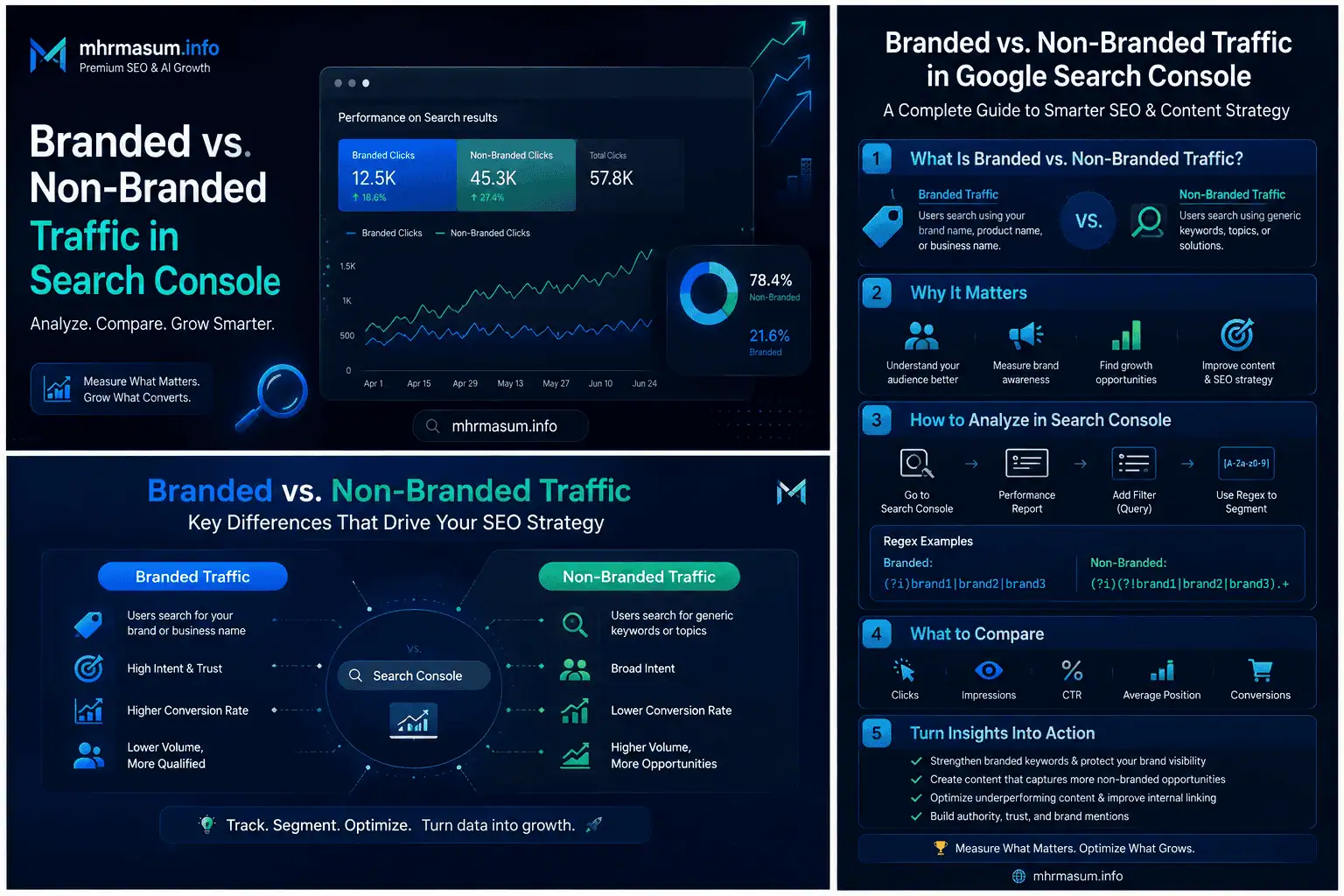
Query Groups vs Branded and Non-Branded Queries
Query Groups and the branded-query filter solve different analytical problems.
Query Groups answer:
Which subjects and intents are bringing users to the website?
The branded-query filter answers:
Are users searching specifically for the brand or discovering the website through general searches?
A Query Group could contain branded searches, non-branded searches or a combination depending on Google’s classification and the subject.
For example, an AI SEO group might contain:
AI SEO consultant
mhrmasum AI SEO
MD Harunur Rashid AI SEO guide
how to rank in AI Overviews
Use the two features together when available.
A useful workflow is:
- Review the strongest Query Groups.
- Identify the major topic.
- Open the Performance report.
- Apply the branded or non-branded filter.
- Determine whether the topic reflects existing brand demand or new discovery.
- Plan the appropriate content or brand action.
Query Groups vs Search Console Performance Queries
The standard Performance report shows individual queries.
Query Groups provide a simplified semantic overview inside Insights.
Use Query Groups when you need to identify:
- Main audience interests
- Growing themes
- Declining subjects
- Broad content opportunities
Use the Performance report when you need:
- Individual queries
- Clicks
- Impressions
- CTR
- Average position
- Page associations
- Device data
- Country data
- Date comparisons
- Search appearance
The best workflow begins with the grouped overview and then moves into the granular Performance data.
How to Use Query Groups for Content Strategy
A practical content-strategy workflow should convert each important group into a decision.
The process includes identification, investigation, mapping, prioritisation and implementation.
Step 1: Review Top Query Groups
Start with the groups generating the most clicks.
Ask:
- Which business area does this group represent?
- Which page attracts most of the clicks?
- Is the topic central to the website’s expertise?
- Does the content lead to relevant services?
- Is the group protected by strong content?
- Are competitors publishing better resources?
- Is the group mainly branded or non-branded?
Top groups often deserve maintenance before new topics are pursued.
Step 2: Review Trending Up Groups
Trending up groups can identify subjects gaining momentum.
Ask:
- Did a new article create the growth?
- Did rankings improve?
- Did search demand increase?
- Is the topic connected with a recent update?
- Is the growth seasonal?
- Does the website have enough supporting content?
- Is there a relevant service pathway?
A growing group may deserve additional content before competitors capture the demand.
Step 3: Review Trending Down Groups
Trending down groups require diagnosis.
Ask:
- Did impressions decline?
- Did CTR decline?
- Did average position decline?
- Did one page lose visibility?
- Did several pages lose visibility?
- Did search demand change?
- Did Google launch an update?
- Is the content outdated?
- Has search intent changed?
- Is there a technical issue?
Avoid making major changes until the cause is understood.
Step 4: Open the Detailed Query List
Click the group and inspect its individual queries.
Review:
- Exact wording
- Questions
- Modifiers
- Locations
- Products
- Problems
- Comparison terms
- Commercial terms
- Brand references
This detailed language can improve:
- Headings
- Introductions
- FAQs
- Service descriptions
- Comparison tables
- Internal-link anchors
- Content briefs
Step 5: Identify the Ranking Pages
Open the Pages dimension while analysing the group or its major queries.
Determine whether:
- One strong page serves the group
- Several pages contribute appropriately
- The wrong page ranks
- Multiple pages compete
- No dedicated page exists
- A blog post ranks instead of a service page
- A category page ranks instead of a guide
The page relationship determines the appropriate action.
How to Find Content Gaps With Query Groups
A content gap exists when the website does not adequately address a proven audience need.
Query Groups can reveal several types of gaps.
Missing Topic Gap
A group may contain searches related to a subject that the website mentions but does not cover comprehensively.
For example, the website may rank through a general AI SEO article for queries about:
AI crawler robots.txt
GPTBot WordPress
OAI-SearchBot control
block AI crawlers
This indicates demand for a dedicated guide.
The correct response may be a specialised article such as:
AI Crawler Control for WordPress
Missing Intent Gap
A website may cover the topic but not the user’s intent.
For example:
- Informational guide exists
- Service page is missing
- Comparison page is missing
- Case study is missing
- Tool or checklist is missing
A query group around “Technical SEO consultant” should not be served only by a general educational article.
The content system may also need:
- A service page
- Portfolio evidence
- A technical audit process
- A consultation CTA
Missing Depth Gap
The current page may address the topic superficially.
Individual queries may reveal missing subtopics.
For example, a Local SEO group may include:
- Google Business Profile
- Reviews
- Local citations
- Service-area pages
- Map rankings
- Local schema
- AI recommendations
A page discussing only keywords and directory listings may need a deeper update.
The Local SEO strategy guide can serve as a central resource connecting these areas.
Missing Format Gap
The subject may require a different format.
Possible formats include:
- Checklist
- Comparison
- Calculator
- Template
- Case study
- Infographic
- Tutorial
- Video
- Downloadable resource
- Step-by-step process
A user searching “Technical SEO checklist” may respond better to a structured checklist than a general essay.
Missing Evidence Gap
The website may explain the topic without demonstrating expertise.
Evidence can include:
- Screenshots
- Case-study results
- Audit examples
- Before-and-after data
- Original charts
- Real implementation notes
- Expert commentary
- Portfolio examples
For Technical SEO topics, link naturally to the Technical SEO and keyword research portfolio.
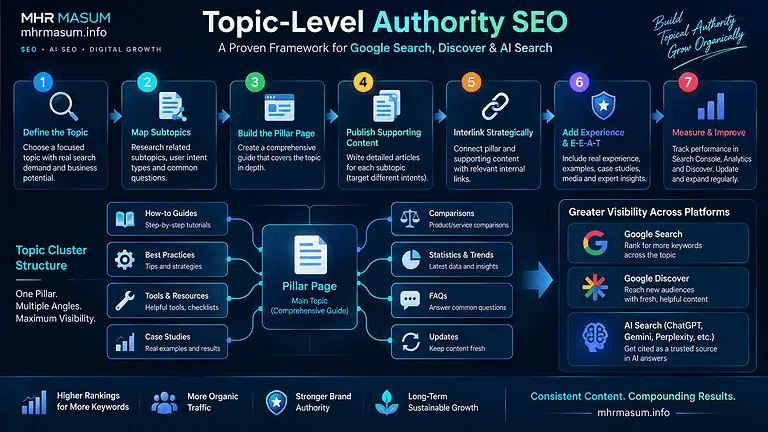
How to Find Topic Clusters With Query Groups
Query Groups can help identify the subjects around which a complete content cluster should be built.
For example, a broad AI SEO cluster could include Query Groups related to:
- AI Overviews
- ChatGPT visibility
- Entity SEO
- GEO
- AEO
- AI crawler control
- AI referral tracking
- Brand authority
- Agentic SEO
- AI content quality
A central pillar page can explain the overall subject:
AI SEO: How to Rank in Google AI Overviews, ChatGPT, Gemini and Perplexity
Supporting content can address specialised needs.
The cluster should use natural internal links so users and search engines can understand the relationship between each resource.
How to Map Query Groups to Existing Content
Create a content-mapping sheet with one row for each important group.
A useful structure is:
| Query Group | Trend | Main Intent | Current Page | Page Type | Gap | Action |
|---|---|---|---|---|---|---|
| AI SEO | Up | Informational/commercial | AI SEO guide | Pillar | Needs case studies | Expand |
| Technical SEO checklist | Stable | Informational | Technical SEO guide | Guide | No major gap | Maintain |
| Local SEO consultant | Up | Commercial | Services page | Service | Needs stronger proof | Improve |
| Core update recovery | Down | Informational | Recovery checklist | Guide | Needs current examples | Update |
| Website speed service | Stable | Commercial | Portfolio page | Portfolio | Missing service CTA | Improve |
This mapping prevents random publishing.
Every new article should solve an identified gap or strengthen an important cluster.
How to Identify Search Intent From a Group
A Query Group name alone may not reveal the full intent.
Review its individual queries for modifiers.
Informational Modifiers
Common informational terms include:
- What is
- How to
- Why
- Guide
- Checklist
- Examples
- Tutorial
- Meaning
- Tips
- Best practices
These searches generally require educational content.
Commercial Modifiers
Commercial terms include:
- Best
- Top
- Services
- Consultant
- Expert
- Agency
- Pricing
- Cost
- Reviews
- Comparison
- Company
These searches may require a commercial page, service page or comparison resource.
Local Modifiers
Local intent may include:
- Near me
- City name
- Region
- Country
- Local
- Nearby
- Service area
These searches should connect with Local SEO pages, business information and relevant case studies.
Transactional Modifiers
Transactional terms may include:
- Buy
- Order
- Book
- Hire
- Download
- Sign up
- Contact
- Request quote
These searches need a clear action pathway.
Branded Modifiers
Branded terms may include:
- Company name
- Domain
- Consultant name
- Product name
- Brand plus service
- Brand plus reviews
These queries reflect awareness and navigation.
How to Use Trending Up Groups
Trending up groups can inform proactive content investment.
A growing topic should be reviewed for several opportunities.
Expand the Existing Page
Add:
- New sections
- Updated examples
- Better definitions
- Original screenshots
- Practical recommendations
- FAQs
- Internal links
- Stronger CTAs
Do not add irrelevant text merely to make the page longer.
Create Supporting Articles
A broad growing group may justify specialised supporting resources.
For example, a growing AI SEO group could support:
- AI crawler control
- ChatGPT traffic tracking
- Entity optimisation
- Brand authority
- AI content quality
- Generative AI reporting
Improve Commercial Pathways
Informational growth should connect naturally to:
- Services
- Portfolio evidence
- Case studies
- Contact page
- Consultation CTA
For professional support, readers can be directed to SEO and digital growth services.
Monitor Whether the Trend Continues
One reporting period may reflect:
- News interest
- A temporary platform change
- Seasonal demand
- A viral social post
- A one-time ranking gain
Track the group across several periods before making a major investment.
How to Use Trending Down Groups
A declining group does not automatically mean the article is poor.
The cause should be diagnosed with multiple metrics.
Check Whether Impressions Declined
Lower impressions may indicate:
- Reduced demand
- Lower rankings
- Seasonal changes
- Google showing fewer traditional results
- Competitors gaining visibility
Use Google Trends to check whether broader interest changed.
Check Whether CTR Declined
Stable impressions with fewer clicks may indicate:
- Lower rankings
- More ads
- AI Overviews
- Featured snippets
- Stronger competitor titles
- Less compelling search presentation
- Changed search intent
Check Whether Position Declined
A persistent position decline may justify a quality or relevance review.
Google advises against focusing excessively on absolute average position, but a major and sustained decline can help identify pages requiring investigation.
Check Whether One Page Caused the Decline
A group-level loss may come mainly from one page.
Compare:
- Page clicks
- Page impressions
- Query distribution
- Indexing status
- Canonical URL
- Publication date
- Content changes
Check for Google Updates
Use the official Google Search Status Dashboard and the Google Core Update Recovery Checklist to determine whether the decline aligns with a confirmed update.
Check for Technical Issues
Review:
- Noindex tags
- Robots.txt
- Canonicals
- Redirects
- Server errors
- Internal links
- Sitemap inclusion
- Mobile usability
- Page speed
- JavaScript rendering
Use the Technical SEO checklist for WordPress for a structured audit.
How to Find Content Cannibalisation
Content cannibalisation occurs when multiple pages compete for substantially similar searches and intent.
Query Groups can help identify potential cannibalisation, but they do not prove it by themselves.
Open the group and review the Pages dimension.
Warning signs include:
- Several pages alternate for the same queries
- A weaker page receives impressions instead of the preferred page
- A tag or category archive ranks instead of the article
- A blog post competes with a service page
- Several articles cover the same intent without distinction
- Rankings fluctuate between URLs
Possible solutions include:
- Consolidating overlapping pages
- Clarifying search intent
- Improving internal links
- Updating canonical tags
- Redirecting obsolete content
- Differentiating page purposes
- Strengthening the preferred page
Do not merge content solely because two pages share a broad topic.
Separate pages may be appropriate when the intent differs.
How to Use Query Groups for Internal Linking
Internal linking should connect related audience needs.
A Query Group can show which supporting resources belong within the same subject ecosystem.
For example, an Entity SEO article can link naturally to:
- AI SEO
- GEO vs AEO vs SEO
- Brand authority for AI search
- Generic AI content quality
- About MD Harunur Rashid
Use group members to identify natural anchor language, but avoid repeatedly using the exact same keyword anchor.
Internal links should be:
- Relevant
- Contextual
- Descriptive
- Useful to readers
- Connected with the next logical step
How to Use Query Groups for Content Refreshes
Existing content often provides faster opportunities than publishing a completely new page.
A content refresh may be appropriate when a group is:
- Trending down
- Receiving high impressions but low clicks
- Ranking through outdated content
- Missing recent developments
- Losing visibility to stronger competitors
- Attracting queries not answered clearly
A meaningful refresh can include:
- Updated platform information
- New official references
- Additional examples
- Improved heading structure
- Stronger introductions
- Corrected outdated claims
- Original screenshots
- New comparison tables
- Better internal links
- Improved CTAs
Avoid changing the publication date without making substantial improvements.
How to Use Query Groups for New Content
A new article should be created when the query evidence shows a distinct need that the existing content cannot serve properly.
Create new content when:
- The intent is materially different
- The topic requires a dedicated explanation
- The existing page would become unfocused
- A commercial page is needed
- A comparison format is needed
- A case study is needed
- A specialised technical guide is justified
- The audience needs a reusable resource
Do not create separate pages for every minor keyword variation.
For example, these queries may belong on one comprehensive page:
what is Entity SEO
Entity SEO meaning
Entity SEO guide
how Entity SEO works
Creating four nearly identical pages would likely weaken the content system.
How to Use Query Groups for Service-Page Strategy
Service businesses should connect informational demand with commercial solutions.
Suppose a Query Group contains:
WordPress Technical SEO audit
technical SEO consultant
technical website audit service
SEO audit for WordPress
Review whether the website has:
- A clear service description
- Deliverables
- Audit process
- Relevant experience
- Case-study evidence
- FAQs
- Consultation CTA
- Pricing approach where appropriate
- Contact pathway
A blog post may attract awareness, but a dedicated service or portfolio page is needed to support conversion.
Link relevant readers to the Technical SEO and keyword research portfolio and contact page.
How to Use Query Groups for Local SEO
Local businesses can use groups to understand how customers search for services, locations and problems.
Possible groups include:
- Roofing services Brisbane
- Pest control Melbourne
- Emergency plumber near me
- Google Business Profile optimisation
- Local SEO consultant
- Customer reviews and rankings
Review individual queries for:
- City names
- Suburbs
- Service areas
- “Near me” searches
- Emergency terms
- Price modifiers
- Review terms
- Comparison intent
The data can inform:
- Local landing pages
- Service-area pages
- Google Business Profile content
- Local FAQs
- Review strategies
- Case studies
- Internal links
The Roofing Brisbane Local SEO case study and Pest Control Melbourne GMB case study can provide relevant proof for local-search topics.
How to Use Query Groups for eCommerce SEO
eCommerce Query Groups can reveal how customers search by:
- Product category
- Brand
- Model
- Feature
- Problem
- Use case
- Price
- Comparison
- Compatibility
- Size
- Material
For example, a power-station store may see groups related to:
- Portable power stations
- Solar generators
- EcoFlow products
- Anker SOLIX products
- Battery capacity
- Camping power solutions
- Home backup power
The appropriate content may include:
- Category pages
- Brand pages
- Product pages
- Comparison guides
- Buying guides
- Compatibility tables
- FAQs
- Product-support content
Do not send every query to a blog article.
Commercial product intent should be served by accurate category and product pages.
Query Groups and AI SEO
AI search systems often break complex questions into related subtopics.
A strong content cluster can provide several relevant resources across that expanded journey.
Query Groups help identify the language and subjects already associated with your website.
For example, a broad AI visibility cluster may include:
- AI Overviews
- ChatGPT citations
- Entity SEO
- Brand authority
- AI crawlers
- Generative Engine Optimization
- AI referral tracking
- Search Console AI reporting
These groups can guide a more complete AI SEO strategy.
However, Query Groups reflect Google Search query performance. They do not show prompts entered directly into ChatGPT, Claude or Perplexity.
Query Groups and Entity SEO
Entity SEO helps search engines understand the relationships between:
- People
- Organisations
- Services
- Products
- Topics
- Locations
- Content
Query Groups can reveal which entities Google Search users associate with the website.
For example, groups may connect the website with:
- MD Harunur Rashid
- AI SEO
- Technical SEO
- Local SEO
- WordPress
- WooCommerce
- Search Console
- Google Business Profile
A consistent content system can strengthen those relationships.
Read Entity SEO: The Missing Part of Modern SEO for a broader entity framework.
Query Groups and Brand Authority
A website may receive groups involving:
- Brand name
- Consultant name
- Product names
- Reviews
- Services
- Portfolio searches
These groups show that users recognise and actively search for the brand.
Non-branded topic groups show where the website attracts users who do not yet know the brand.
The strongest growth cycle is:
- Non-branded discovery
- Helpful content
- Brand recognition
- Returning visits
- Branded searches
- Service or product conversion
This process supports brand authority for AI search.
Query Groups and Google Trends
Search Console shows how your website performs.
Google Trends shows broader search interest.
Use both when investigating a group.
For example, if clicks decline for a “Google core update recovery” group:
- Search Console can show whether your page lost clicks or position.
- Google Trends can show whether broader public interest declined.
- The Search Status Dashboard can show whether an update occurred.
- GA4 can show whether onsite engagement changed.
Google recommends using Search Console and Google Trends together when investigating organic traffic changes.
Query Groups and GA4
Search Console Query Groups show search demand before the user reaches the website.
GA4 shows what users do after arriving.
Search Console can help answer:
- Which topics attract clicks?
- Which query groups are growing?
- Which searches lead to the website?
- Which pages rank?
GA4 can help answer:
- Which landing pages engage visitors?
- Which users view service pages?
- Which sessions produce leads?
- Which content assists conversions?
- Which pages produce revenue?
Google does not pass most organic query data directly into GA4.
Connect the analysis at the landing-page or content-cluster level.
A Query Group Content Scorecard
A practical scorecard can help prioritise opportunities.
Score each group from 1 to 5 across the following factors:
| Factor | Question |
|---|---|
| Business relevance | Does the topic support a core service or product? |
| Click volume | Does the group attract meaningful traffic? |
| Trend | Is the group growing or declining? |
| Conversion potential | Can the topic lead to commercial action? |
| Content quality | Is the current content strong? |
| Competition | Can the website realistically improve? |
| Coverage gap | Are important subtopics missing? |
| Authority fit | Does the topic match established expertise? |
A simple priority score can be:
Priority score =
Business relevance
+ Click opportunity
+ Conversion potential
+ Coverage gap
+ Authority fit
Do not use the formula mechanically.
Professional judgement remains necessary.
Example Query Groups for mhrmasum.info
A website like mhrmasum.info may eventually show groups such as:
AI SEO
Possible queries may include:
- AI SEO guide
- Rank in Google AI Overviews
- ChatGPT SEO
- Gemini SEO
- Perplexity SEO
- AI search optimization
The pillar content should connect with AI crawler control, Entity SEO, GEO and brand authority.
Technical SEO
Possible queries may include:
- Technical SEO checklist
- WordPress Technical SEO
- Technical website audit
- Fix indexing issues
- SEO crawl problems
The main guide can link to services and portfolio evidence.
Local SEO
Possible queries may include:
- Local SEO strategy
- Local SEO for small businesses
- Google Maps ranking
- Google Business Profile optimisation
- Reviews and Local SEO
These queries can support the Local SEO guide and Local SEO portfolio.
Google Core Updates
Possible queries may include:
- Google core update recovery
- Rankings dropped after Google update
- Core update checklist
- Recover lost organic traffic
- Google algorithm update diagnosis
These searches should connect with the Google Core Update Recovery Checklist.
Website Speed
Possible queries may include:
- WordPress speed optimisation
- Website speed service
- Improve Core Web Vitals
- Speed up WordPress website
- PageSpeed optimisation
Commercial readers can be directed to the website speed optimisation portfolio.
Manual Query Grouping When the Feature Is Unavailable
A website without Google-generated Query Groups can create its own topic clusters.
Export Search Console queries and classify them manually.
Spreadsheet Method
Create columns for:
| Query | Clicks | Impressions | CTR | Position | Topic | Intent | Page |
|---|
Assign topic labels such as:
- AI SEO
- Technical SEO
- Local SEO
- WordPress
- WooCommerce
- Brand
- Search Console
- Core updates
Assign intent labels such as:
- Informational
- Commercial
- Transactional
- Local
- Navigational
Use pivot tables to combine clicks and impressions by group.
Regex Method
Search Console regex filters can combine queries containing known terms.
For example:
ai seo|ai overview|chatgpt|gemini|perplexity|generative engine|answer engine
This creates a broad AI SEO segment.
Regex grouping is based on matching words rather than semantic meaning, so it will be less flexible than Google’s AI-assisted Query Groups.
Looker Studio Method
Connect Search Console to Looker Studio and create calculated fields using CASE statements.
A simplified example is:
CASE
  WHEN REGEXP_MATCH(Query, ".*(ai seo|chatgpt|ai overview|gemini|perplexity).*")
    THEN "AI SEO"
  WHEN REGEXP_MATCH(Query, ".*(technical seo|crawl|indexing|canonical).*")
    THEN "Technical SEO"
  WHEN REGEXP_MATCH(Query, ".*(local seo|google maps|business profile).*")
    THEN "Local SEO"
  ELSE "Other"
END
This allows reusable reporting, although the categories require maintenance.
Can Query Groups Be Exported?
Google’s Insights documentation allows users to click through from a group to the Performance report and inspect the individual queries.
Google’s public Search Analytics API supports standard dimensions such as query, page, country and device, but it does not currently document a Query Group dimension or return Google’s group labels directly. This means automated reporting generally requires exporting individual queries and creating your own clustering logic. This is an inference based on the currently documented API dimensions.
Do not assume that a manually created cluster will exactly match Google’s internal Query Group.
Can Query Groups Be Accessed Through the Search Console API?
The Search Analytics API can retrieve query-level metrics using dimensions and filters.
The documented API can return:
- Clicks
- Impressions
- CTR
- Average position
- Query
- Page
- Country
- Device
- Search appearance
- Dates
Google’s API documentation does not currently list Query Group as a supported dimension.
Agencies that need automated clustering can use:
- Regex rules
- Keyword dictionaries
- Natural language processing
- Embedding-based clustering
- Manual topic taxonomies
- Looker Studio calculated fields
- Spreadsheet formulas
The methodology should be documented so monthly results remain consistent.
Search Console Data Limitations
Query Group analysis inherits limitations from Search Console performance data.
Important limitations include:
- Not every query is reported
- Anonymised searches may be omitted
- Tables and exports have row limits
- Recent data may be preliminary
- Data is normally assigned to canonical URLs
- Average position is aggregated
- Search results vary by user, device, location and time
- Groups may evolve
- Not every query may be grouped
Google states that the Search Analytics API does not guarantee every data row and may return only top rows within internal limits.
Use Query Groups for directional strategy rather than treating them as a complete record of every search.
Why Groups May Change Over Time
Google states that Query Groups are computed using AI and may evolve.
A query could be:
- Added to a group
- Removed from a group
- Moved to another group
- Represented under a different group name
- Separated into a new group
- Combined with another group
This can happen because:
- Search behaviour changes
- New queries appear
- Google improves classification
- The top query changes
- User intent evolves
- More data becomes available
Do not build a reporting system that depends on every Google-generated group remaining permanently unchanged.
Common Query Group Mistakes
Several errors can lead to weak content decisions.
Treating the Group Name as the Only Keyword
The group name represents the highest-click query.
It is not the complete topic definition.
Review the individual members.
Creating a New Page for Every Group
Some groups should be served by existing pages.
Create new content only when there is a distinct gap.
Ignoring Search Intent
Queries that share a topic may require different page types.
Separate informational, commercial and transactional needs when necessary.
Rewriting Trending Down Content Immediately
Investigate demand, rankings, CTR, technical issues and seasonality first.
Assuming Trending Up Means Long-Term Demand
A trend may be temporary.
Monitor it over several periods.
Using Clicks Without Impressions
Clicks alone do not show whether the opportunity is growing or whether CTR is changing.
Use the detailed Performance report.
Ignoring Business Relevance
A high-click group may have little commercial value.
Prioritise topics aligned with business objectives.
Ignoring Conversion Data
Search Console cannot show leads and revenue.
Connect groups to GA4 landing-page performance.
Creating Overlapping Articles
Publishing several pages for minor keyword variations can create cannibalisation and maintenance problems.
Treating Query Groups as a Ranking Signal
The feature is for analysis only.
It does not create rankings or topical authority by itself.
A Monthly Query Group Reporting Template
A monthly report should explain which audience interests changed and what action should follow.
Executive Summary
The summary should identify:
- Largest group
- Fastest-growing group
- Largest declining group
- Most important new opportunity
- Main risk
- Recommended next action
Example:
AI SEO remained the largest non-branded topic group, while Agentic SEO recorded the strongest click increase. Core-update recovery declined after the previous month’s update-related demand normalised. The priority is to expand the Agentic SEO cluster and refresh internal links from the AI SEO pillar.
Top Groups
Report:
- Group name
- Total clicks
- Period change
- Main page
- Intent
- Business relevance
Trending Up Groups
Report:
- Click increase
- Percentage increase
- Main ranking pages
- Potential cause
- Recommended content action
Remember that Google’s Insights ordering uses absolute click changes rather than percentage changes.
Trending Down Groups
Report:
- Click decline
- Impression decline
- CTR change
- Position change
- Demand trend
- Technical findings
- Recommended action
Content Actions
List:
- Pages to update
- New articles to create
- Pages to consolidate
- Internal links to add
- Service pages to improve
- Case studies to connect
- CTAs to strengthen
A 30-Day Query Group Content Strategy Plan
A structured implementation plan helps turn Search Console data into publishable work.
Days 1–7: Audit Query Groups
During the first week, document the main topic groups.
Complete these tasks:
- Open Search Console Insights
- Record Top groups
- Record Trending up groups
- Record Trending down groups
- Open each priority group
- Export individual queries
- Identify main pages
- Classify search intent
- Mark branded and non-branded themes
Days 8–14: Map Groups to Content
During the second week, connect audience demand with the existing website.
Complete these tasks:
- Assign one main page to each group
- Identify supporting pages
- Find missing intents
- Identify overlapping content
- Review internal links
- Review service pathways
- Review case-study evidence
- Score opportunities
Days 15–21: Improve Priority Content
During the third week, implement changes on the highest-value pages.
Possible improvements include:
- Updating introductions
- Adding missing sections
- Improving titles
- Adding original evidence
- Improving internal links
- Adding FAQs
- Strengthening service CTAs
- Updating examples
- Improving page speed
Days 22–30: Build the Next Content Plan
During the final week, create a data-backed editorial calendar.
For each planned article, document:
- Target Query Group
- Search intent
- Primary audience
- Supporting queries
- Main internal links
- Relevant service
- Conversion objective
- Publication date
- Measurement period
This ensures every article has a strategic role.
A 90-Day Content Cluster Plan
Query Groups can support a longer publishing roadmap.
Month 1: Strengthen Existing Winners
Focus on:
- Top groups
- High-value pages
- Internal linking
- Conversion pathways
- Content freshness
- Technical quality
Month 2: Expand Growing Topics
Focus on:
- Trending up groups
- Supporting articles
- Original examples
- Comparison content
- Service connections
- Visual resources
Month 3: Recover or Consolidate Declining Topics
Focus on:
- Trending down groups
- Demand validation
- Content updates
- Cannibalisation
- Technical issues
- Consolidation
- Redirects where appropriate
Review results at the end of the 90-day period.
Query Group Audit Checklist
Use this checklist for regular analysis.
- Search Console Insights is available
- Top Query Groups are recorded
- Trending up groups are recorded
- Trending down groups are recorded
- Group click totals are interpreted correctly
- Group names are not treated as complete topic definitions
- Individual queries are reviewed
- Main ranking pages are identified
- Search intent is classified
- Branded and non-branded demand is considered
- Content gaps are documented
- Cannibalisation risks are checked
- Internal-link opportunities are identified
- Service pathways are reviewed
- GA4 engagement is analysed
- Conversion potential is considered
- Google Trends is checked where relevant
- Technical problems are reviewed
- Content actions are prioritised
- Results are documented monthly
Frequently Asked Questions About Search Console Query Groups
The following questions address common issues involving eligibility, classification, reporting and content planning.
What Are Search Console Query Groups?
Query Groups are AI-generated collections of similar search queries shown inside Search Console Insights.
They provide a high-level view of the main subjects attracting clicks to a website.
When Did Google Launch Query Groups?
Google announced Query Groups on October 27, 2025.
The feature began rolling out gradually to eligible properties with substantial query data.
Where Can I Find Query Groups?
Open:
Google Search Console
→ Insights
→ Queries leading to your site
Eligible websites may see Top, Trending up and Trending down query groups.
Why Do I Not See Query Groups?
Your website may have too little query data, too few distinct queries or may not yet have received the feature.
Lower-volume sites continue to see a standard query list.
How Does Google Name a Query Group?
Google uses the highest-click query in the group as its name.
The name is therefore a representative query rather than a manually written topic label.
Does the Click Number Apply Only to the Group Name?
No.
The displayed click total includes clicks from all queries within the group.
Can I See Every Query in a Group?
The Insights card shows several high-click examples.
Click the group to open the Performance report and review the more detailed query list.
Are Query Groups Created With AI?
Yes.
Google states that the groups are computed using AI and may evolve over time.
Do Query Groups Affect Rankings?
No.
They are a reporting and analysis feature and do not affect Google Search rankings.
What Does Trending Up Mean?
Trending up groups are those with the greatest increase in clicks compared with the previous period.
The ordering is based on absolute click increase rather than percentage increase.
What Does Trending Down Mean?
Trending down groups are those with the greatest decrease in clicks compared with the previous period.
A decline should be investigated using impressions, CTR, position, demand and technical data.
Are All Queries Included in Groups?
No.
Google states that sites ranking for many queries may not have every query grouped.
Search Console data also has normal privacy and reporting limitations.
Can Query Groups Show Impressions and CTR?
The Insights group card focuses primarily on clicks.
Open the Performance report to analyse impressions, CTR and average position for individual queries and related pages.
Can I Export Query Groups?
Google allows drill-down into the Performance report, but its public Search Analytics API does not currently document Query Group as a dimension.
For automated reporting, export individual queries and create your own clustering system.
Can I Rename a Query Group?
Google does not currently provide a method for manually renaming its generated groups.
You can create your own labels in a spreadsheet, dashboard or content plan.
Can I Move a Query to Another Group?
Google does not provide manual control over group membership.
The groups are generated by Google’s systems.
Are Query Groups the Same as Keyword Clusters?
They are similar in concept, but not identical.
Google generates Query Groups from actual Search Console data. Keyword clusters may be created manually or through third-party tools using broader keyword databases.
Are Query Groups the Same as Topic Clusters?
No.
A Query Group represents related searches.
A topic cluster is a website content architecture created by the publisher.
Can Query Groups Find Content Cannibalisation?
They can help identify potential cannibalisation when several pages appear for the same queries.
You must inspect page-level data before confirming a cannibalisation issue.
Can Query Groups Find Content Gaps?
Yes.
Groups can reveal missing topics, missing search intents, shallow coverage, missing formats and weak service pathways.
Should I Create One Page for Each Query Group?
No.
Some groups belong within an existing comprehensive page. Others may require several pages with distinct intents.
Create new pages only when they provide unique value.
How Often Should I Review Query Groups?
Review them monthly for standard content planning.
High-volume publishers and fast-changing industries may review them weekly.
Can Query Groups Be Used for Local SEO?
Yes.
They can reveal service, location, review, “near me” and Google Business Profile search patterns.
Can Query Groups Be Used for eCommerce?
Yes.
They can reveal demand around products, categories, brands, models, features, comparisons and buying questions.
Can Query Groups Measure AI Search Prompts?
No.
They reflect Google Search queries connected with Search Console performance.
They do not show prompts entered directly into ChatGPT, Claude, Perplexity or other external platforms.
Can Query Groups Help With AI SEO?
Yes, indirectly.
They can identify topic relationships, questions and content gaps that support a more complete AI SEO content ecosystem.
Should I Use Query Groups With Google Trends?
Yes.
Search Console shows your website’s performance, while Google Trends helps show whether broader search demand changed.
Should I Use Query Groups With GA4?
Yes.
Use Search Console to understand search demand and GA4 to measure engagement, leads, sales and revenue after users arrive.
Final Query Group Content Strategy Framework
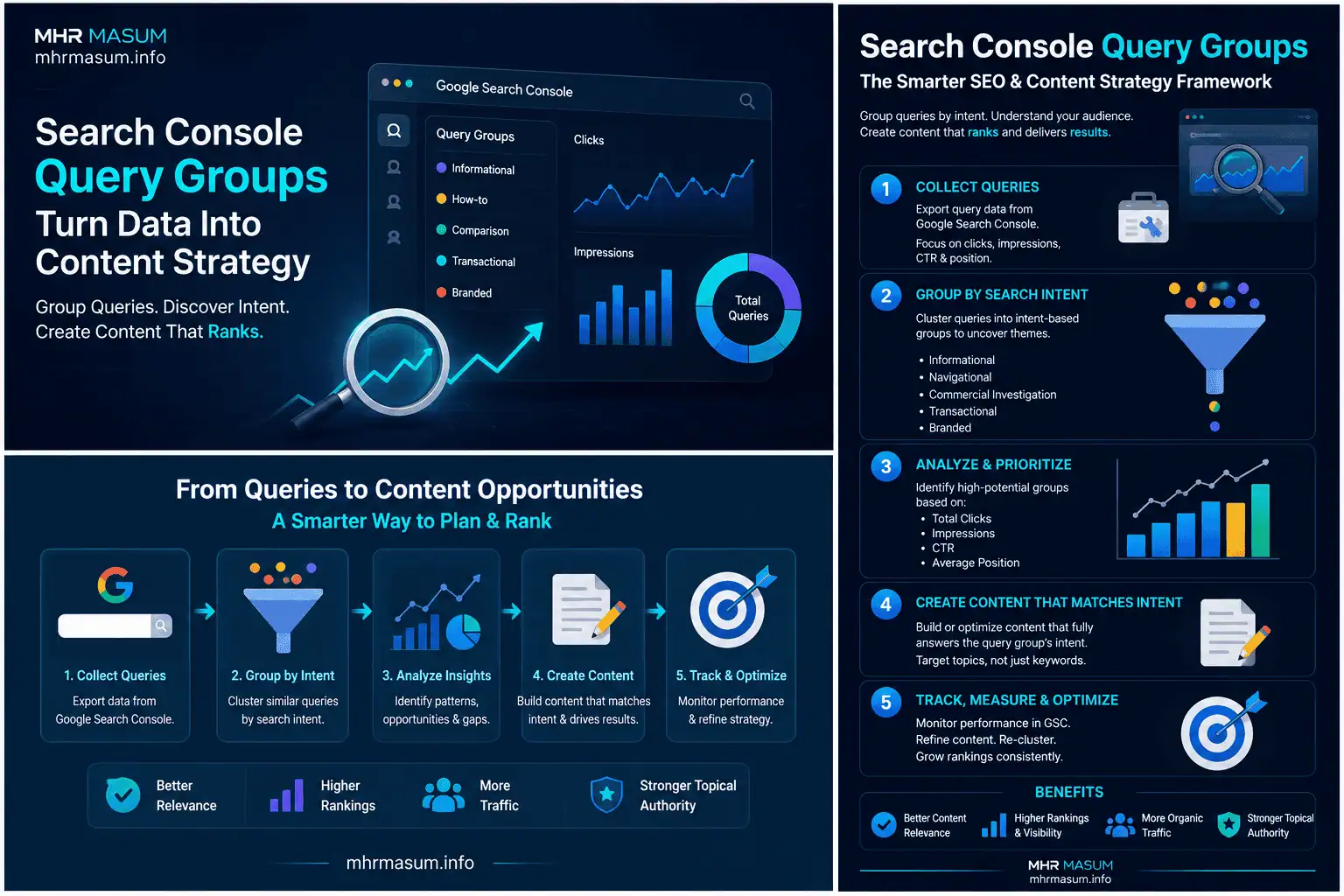
A practical Query Group strategy can be summarised in five stages.
1. Discover
Use Top, Trending up and Trending down groups to identify the main interests of your search audience.
2. Diagnose
Review individual queries, pages, impressions, CTR, position, devices and countries.
3. Map
Connect each important group with an existing page, service, topic cluster and customer-journey stage.
4. Improve
Update strong pages, create missing content, consolidate overlaps, improve internal linking and strengthen conversion pathways.
5. Measure
Compare group performance over time and connect Search Console data with GA4, Google Trends, portfolio evidence and business outcomes.
Final Thoughts
Search Console Query Groups represent an important improvement in SEO reporting because they help website owners see the audience need behind many individual keyword variations.
The feature moves analysis from:
Which single keyword gained five clicks?
Toward:
Which broader subject is growing, which content serves it, and what should we improve next?
That is a more useful content-strategy question.
Query Groups can help businesses and publishers:
- Identify high-value topic clusters
- Understand search intent
- Discover missing content
- Prioritise updates
- Detect declining subjects
- Improve internal linking
- Connect informational content with services
- Reduce unnecessary duplicate articles
- Build stronger authority around core expertise
However, the groups should not be used in isolation.
Remember that:
- The groups are generated with AI
- Group names represent the highest-click query
- Group totals combine several queries
- Not every query may be grouped
- Classifications can change
- Query Groups do not affect rankings
- Search Console does not show conversions
- Group-level trends still require detailed investigation
For mhrmasum.info, Query Groups can support a structured content strategy across AI SEO, Entity SEO, Technical SEO, Local SEO, WordPress optimisation, Google Search updates and digital growth.
The strongest approach is to use the groups as evidence of audience interest, then combine that evidence with professional expertise, content quality, technical performance, brand authority and clear conversion pathways.
For help with Search Console analysis, content-cluster strategy, Technical SEO, AI SEO, Local SEO and WordPress growth planning, explore my SEO and digital growth services or contact MD Harunur Rashid for a detailed consultation.