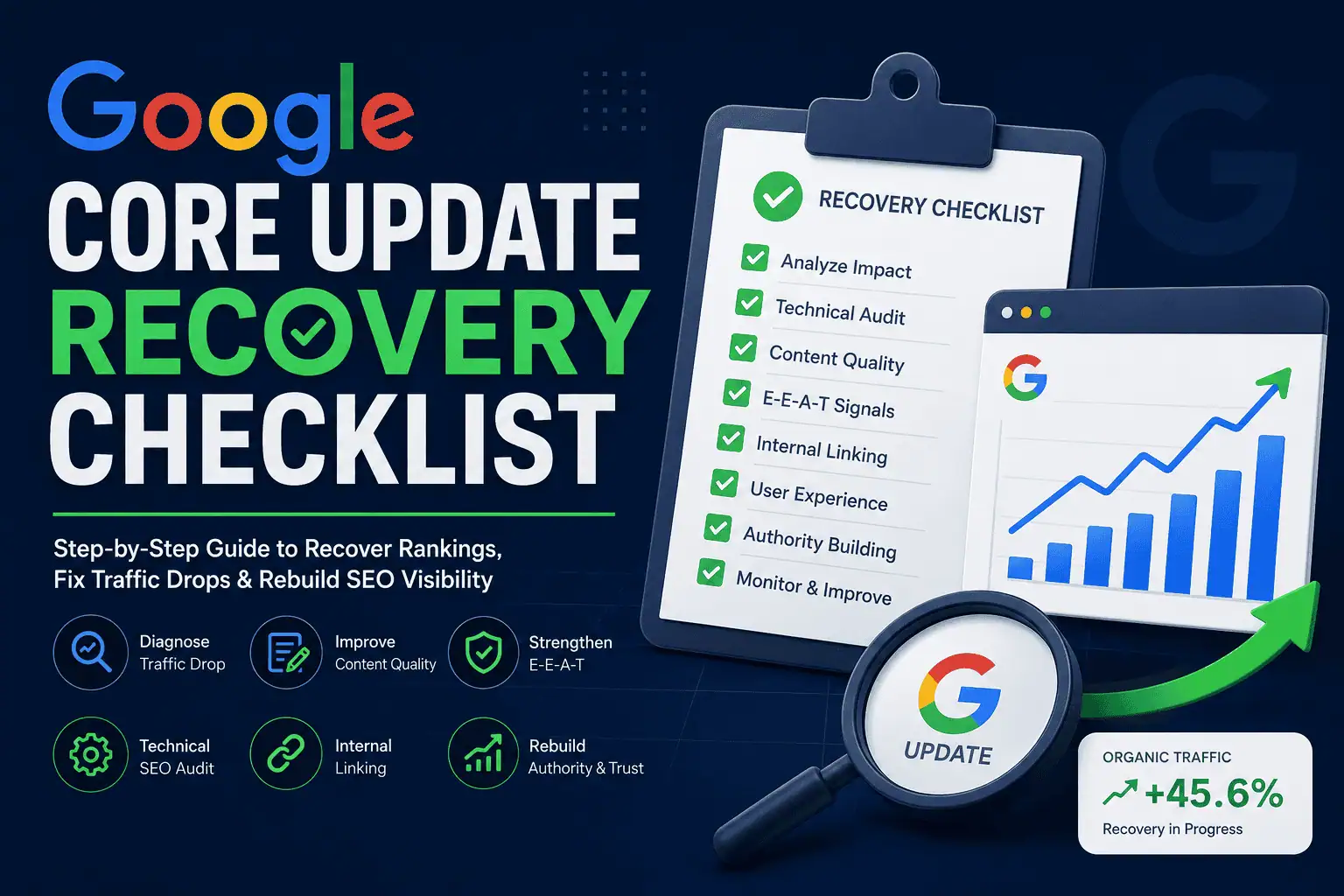
A Google core update is a broad change to Google’s search ranking systems. It is not usually a penalty against one specific website. Instead, it is a large-scale adjustment to how Google evaluates and ranks content across many topics, websites, and search results.
When a core update rolls out, some websites gain visibility, some lose visibility, and many websites see little or no change.
If your website loses traffic during or after a core update, it does not always mean your site is technically broken. It may mean Google’s systems are now rewarding other pages that appear more helpful, more trustworthy, more relevant, more original, or more satisfying for users.
That is why recovery should not be treated as a quick fix.
A Google core update recovery plan should include:
- Data analysis
- Google Search Console review
- Content quality audit
- Helpful content improvement
- E-E-A-T strengthening
- Technical SEO audit
- Internal linking improvement
- Entity SEO improvement
- User experience improvement
- Authority and trust building
- Long-term content strategy
A strong recovery plan should not focus on one ranking trick. It should include content quality, Technical SEO checklist for WordPress websites, Entity SEO, AI SEO, internal linking, E-E-A-T, brand trust, and user experience.
If your website is built with WordPress, technical issues can make recovery harder. If your content is generic or mass-produced, content quality can make recovery harder. If your brand signals are weak, trust and authority can make recovery harder.
Google core update recovery is not about chasing the algorithm.
It is about improving the website.
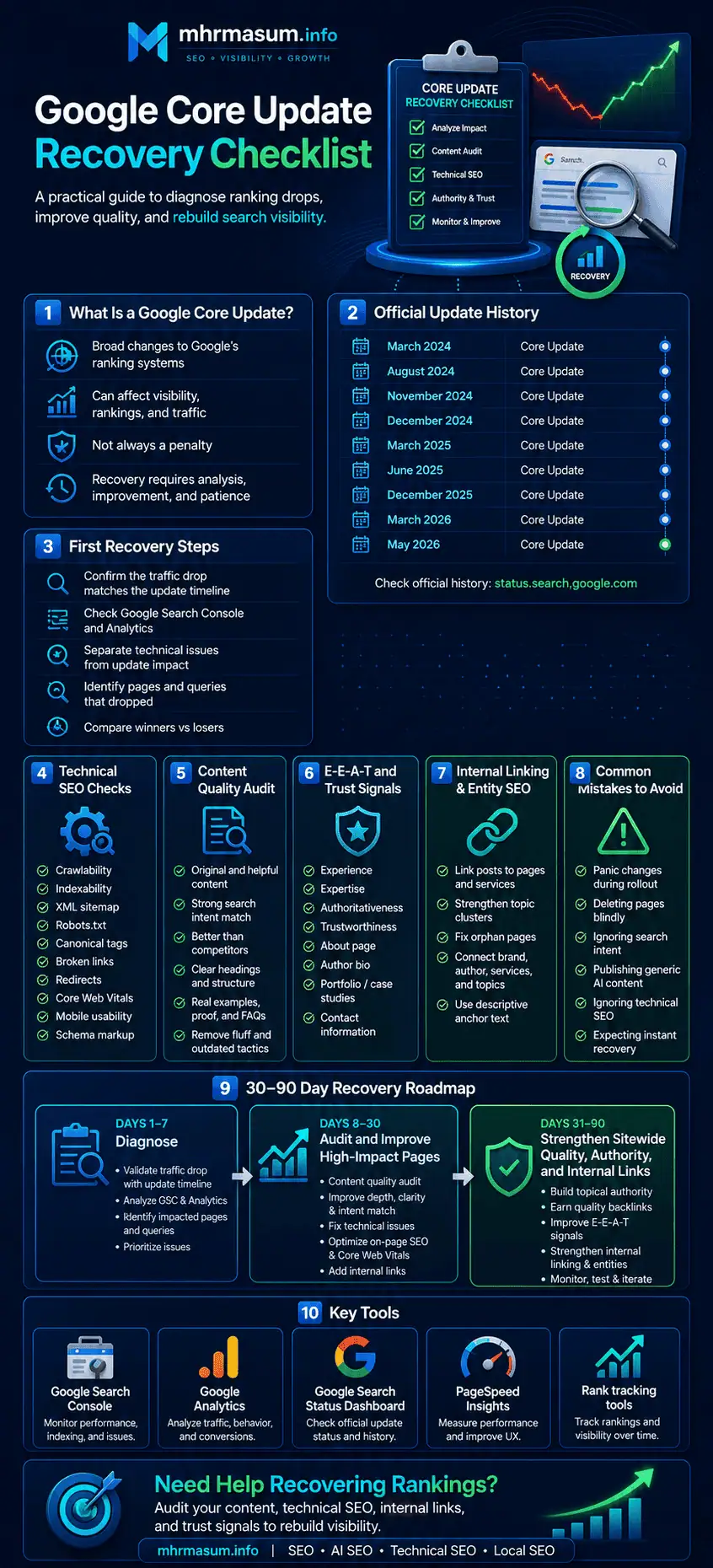
Google Core Update List and Official Update History
Before starting any Google core update recovery work, first check the official Google Search Status Dashboard.
Official Google ranking update history URL:
This page lists official ranking-related updates and incidents from Google, including core updates, spam updates, helpful content updates, reviews updates, product reviews updates, link spam updates, Discover updates, and ranking system incidents.
Checking this page is important because not every traffic drop is caused by a core update. Sometimes a website loses traffic because of technical SEO issues, content quality problems, indexing mistakes, spam updates, Discover changes, seasonal demand, competitor improvements, or website changes.
A proper recovery process should always start by matching your Google Search Console traffic drop with the confirmed Google update timeline.
Google Ranking Update History List
How to Use This Google Update List for SEO Recovery
Do not only look at the update name. Compare the update date with your website data.
Use this process:
- Open Google Search Console.
- Go to Performance.
- Compare traffic before and after the Google update date.
- Check which pages lost clicks.
- Check which queries lost impressions.
- Compare desktop and mobile data.
- Check if the loss happened during a core update, spam update, Discover update, reviews update, product reviews update, link spam update, or ranking incident.
- Review affected pages based on the update type.
- Improve content, technical SEO, internal linking, authority, and trust signals.
- Monitor future updates and recovery patterns.
Core Update vs Spam Update vs Discover Update
Not all Google updates mean the same thing.
A core update usually means Google has changed how it evaluates content quality, relevance, trust, search intent, and overall ranking signals.
A spam update usually means Google is improving how it detects spam, manipulative SEO tactics, scaled low-quality content, fake authority, link spam, doorway pages, or other policy-violating practices.
A Discover update can affect visibility in Google Discover separately from normal organic search results.
A reviews update can affect product review, service review, comparison, and evaluation-style content.
A ranking incident is different from an algorithm update. It usually means Google had a temporary ranking issue that may affect search results for a period of time.
That is why diagnosis is important before starting recovery work.
First Rule: Do Not Panic During the Rollout
When a Google core update starts rolling out, rankings can fluctuate heavily.
Some pages may drop. Some may recover. Some may move up and down multiple times before the update finishes.
This means you should not make aggressive changes on the first day of an update.
What to Do During the Rollout
- Monitor rankings but do not panic
- Track affected pages carefully
- Compare Google Search Console data
- Check analytics data
- Check if the update is still rolling out
- Note ranking volatility
- Wait until the update is fully complete before major recovery decisions
What Not to Do During the Rollout
- Do not rewrite the whole site overnight
- Do not delete hundreds of posts without analysis
- Do not remove service pages quickly
- Do not change URL structure without redirects
- Do not switch SEO plugins during volatility
- Do not buy backlinks to recover quickly
- Do not publish mass AI content to replace lost traffic
- Do not assume every ranking movement is permanent
Core update recovery starts with patience and data.
Step 1: Confirm Whether the Drop Matches a Google Update
Before starting recovery, confirm whether the traffic drop actually matches the timing of a Google update.
Not every ranking drop is caused by a core update.
Traffic can drop because of:
- Tracking issues
- Website migration problems
- Robots.txt mistake
- Noindex tag added accidentally
- Server downtime
- Expired SSL issue
- Manual action
- Security issue
- Competitor improvements
- Seasonal demand change
- Lost backlinks
- Changed search intent
- Deindexed pages
- Technical SEO errors
- Content removed or changed
- WordPress plugin conflict
How to Confirm Update Timing
Use:
- Google Search Status Dashboard
- Google Search Console
- Google Analytics
- Rank tracking data
- Server logs if available
- Website change logs
- CMS publishing history
- Plugin or theme update history
Check whether your visibility drop started during or shortly after a confirmed Google update.
Recovery Diagnosis Question
Ask:
“Did the traffic drop start around the update date, or did something on the website change before the drop?”
If the drop started immediately after a website change, the problem may be technical.
If the drop matches a core update and affects many pages, the issue may be content quality, relevance, trust, authority, or search intent alignment.
Step 2: Separate Core Update Impact from Technical Issues
A core update is not the same as a technical SEO error.
However, technical problems can look like a core update drop if they happen around the same time.
Before assuming the update hit your site, check the technical foundation.
Technical Checks to Run First
- Is the site live?
- Is the site loading properly?
- Is the site blocked by robots.txt?
- Are important pages accidentally noindexed?
- Are canonical tags correct?
- Is the sitemap working?
- Are important pages returning 200 status codes?
- Are old URLs redirected correctly?
- Did the site move from HTTP to HTTPS?
- Did the domain change?
- Did a plugin update change SEO settings?
- Did a theme update break layout or schema?
- Did server downtime affect crawling?
- Did Google Search Console report indexing issues?
If you find a technical issue, fix that first.
For WordPress websites, technical problems are common after plugin updates, theme changes, migrations, permalink changes, cache changes, or speed optimization work.
Use this Technical SEO checklist for WordPress websites to review crawlability, indexability, sitemap, robots.txt, internal links, redirects, canonical tags, mobile usability, Core Web Vitals, schema markup, and broken links.
Step 3: Use Google Search Console to Identify Affected Pages
Google Search Console is one of the most important tools for core update recovery.
Do not only look at total traffic.
You need to identify exactly what changed.
Search Console Comparison Setup
Compare:
- Last 28 days vs previous 28 days
- Last 3 months vs previous 3 months
- Update period vs pre-update period
- Same period year-over-year if seasonality matters
Check These Search Console Areas
- Total clicks
- Total impressions
- Average position
- CTR
- Top pages
- Top queries
- Countries
- Devices
- Search appearance
- Discover performance if relevant
- Indexed pages
- Pages not indexed
- Manual actions
- Security issues
Questions to Answer
- Which pages lost the most clicks?
- Which pages lost impressions?
- Which pages lost rankings but not impressions?
- Which pages lost CTR?
- Which keywords dropped?
- Which countries were affected?
- Did mobile traffic drop more than desktop?
- Did blog content drop more than service pages?
- Did product pages drop?
- Did category pages drop?
- Did one topic cluster drop or the whole site?
You need to find patterns.
A core update recovery plan should be based on patterns, not assumptions.
Step 4: Identify the Type of Traffic Loss
Different types of traffic loss need different recovery actions.
Impression Drop
If impressions dropped, Google may be showing your page less often.
Possible reasons:
- Lower relevance
- Lower authority
- Search intent changed
- Competitors improved
- Content quality issue
- Page no longer matches query
- Topic lost demand
- Page was replaced by better content
Position Drop
If average position dropped, your page may still be indexed but no longer considered as strong as before.
Possible reasons:
- Competitor pages are better
- Content lacks depth
- Weak E-E-A-T
- Poor freshness
- Thin content
- Weak internal links
- Low authority
- Poor engagement signals
- Search intent mismatch
CTR Drop
If impressions are stable but clicks dropped, the issue may be SERP presentation.
Possible reasons:
- Weak title tag
- Weak meta description
- Competitor title is more attractive
- Rich results changed
- AI Overviews reduced clicks
- Featured snippet changed
- Brand trust issue
- Page date looks outdated
Discover Drop
If Google Discover traffic dropped, the issue may be different from regular Search.
Possible reasons:
- Topic freshness changed
- Headline appeal changed
- Content quality shift
- Image quality issue
- Publisher trust signals
- Discover system update
- User interest changes
Step 5: Do Not Look Only at Lost Pages
Core update recovery is not only about pages that dropped.
You also need to study pages that improved.
Compare Winners and Losers
Create two lists.
Pages That Lost Traffic
Track:
- URL
- Main keyword
- Traffic loss
- Ranking loss
- Content type
- Topic
- Publish date
- Last updated date
- Internal links
- Backlinks
- Word count
- Author
- Search intent
- SERP competitors
Pages That Gained Traffic
Track:
- URL
- Main keyword
- Traffic gain
- Ranking gain
- Content type
- Topic
- Structure
- Helpful elements
- Internal links
- Trust signals
- Unique value
- Search intent match
Questions to Ask
- What do winning pages have that losing pages do not?
- Are winners more detailed?
- Are winners more recent?
- Are winners more original?
- Do winners show stronger experience?
- Do winners have better internal links?
- Do winners have better author trust?
- Are winners better aligned with intent?
- Do winners have better UX?
- Do winners answer questions more directly?
Your own winning pages can show what Google is rewarding on your site.
Step 6: Analyze Competitors That Replaced You
If your page dropped, another page likely replaced it.
Study the pages that now rank above you.
Competitor Analysis Checklist
Check:
- Content depth
- Search intent match
- Page structure
- Title and headings
- Author information
- Sources and references
- First-hand experience
- Original images
- Data and examples
- Content freshness
- Internal links
- Backlinks
- Schema markup
- Page speed
- UX quality
- Topical authority
- Brand trust
- Reviews or testimonials
- FAQs
- CTA quality
Important Question
Ask:
“Why would Google choose this competitor page instead of mine?”
Do not only copy competitors.
Find the quality gap.
Then create something better, more useful, more trustworthy, and more complete.
Step 7: Audit Content Quality
Content quality is the heart of core update recovery.
Recovery usually comes from meaningful improvements, not small cosmetic edits.
Content Quality Checklist
For each affected page, ask:
- Does the page fully answer the topic?
- Is the content original?
- Does it provide unique value?
- Does it show first-hand experience?
- Does it include examples?
- Does it include data or proof?
- Is it written by a knowledgeable author?
- Is the information accurate?
- Is the page updated?
- Is the content better than competitors?
- Does it satisfy search intent?
- Is it easy to read?
- Does it have clear headings?
- Does it include helpful visuals?
- Does it include FAQs?
- Does it have internal links?
- Does it have a clear next step?
- Would a user need to search again after reading?
If your website has many low-value AI-generated posts, review this guide on why generic AI content does not rank anymore. It explains why Google and AI search systems now prefer helpful, original, experience-based, and people-first content.
Step 8: Remove or Improve Thin Content
Thin content is content that provides little value.
It may be short, generic, outdated, duplicated, or created mainly for search traffic.
Common Thin Content Types
- Short blog posts with basic information
- Duplicate location pages
- Tag pages with one post
- Category pages with no unique content
- AI-generated posts with no human value
- Old news posts with no lasting value
- Product pages with copied descriptions
- Service pages with only a few paragraphs
- Doorway pages
- Similar pages targeting tiny keyword variations
- Low-quality guest posts
- Auto-generated pages
What to Do With Thin Content
You can:
- Improve it
- Merge it
- Noindex it
- Redirect it
- Delete it
- Rewrite it
- Add original examples
- Add FAQs
- Add internal links
- Add author expertise
- Add fresh information
Do not delete content blindly.
Check traffic, backlinks, conversions, and relevance first.
Step 9: Improve Helpful Content Signals
Helpful content should be created for people, not only search engines.
Helpful Content Checklist
Your content should:
- Answer the main question clearly
- Help the user solve a real problem
- Show real experience
- Be accurate and trustworthy
- Avoid fluff
- Avoid generic AI language
- Include practical examples
- Be easy to scan
- Be written for a clear audience
- Provide original value
- Include useful next steps
- Avoid misleading titles
- Avoid exaggerated claims
- Avoid rewriting competitors without adding value
Helpful Content Questions
Ask:
- Who is this content for?
- What problem does it solve?
- What does it add that competitors do not?
- Is this written by someone with real knowledge?
- Would I trust this content?
- Would I recommend it to a client?
- Would a user be satisfied after reading it?
If the answer is weak, improve the content.
Step 10: Strengthen E-E-A-T
E-E-A-T stands for Experience, Expertise, Authoritativeness, and Trustworthiness.
It is especially important for topics where trust matters.
But even for SEO, business, local services, software, eCommerce, education, travel, and finance, E-E-A-T can affect how users and search engines evaluate content quality.
Experience
Add:
- Real examples
- Case studies
- Screenshots
- Before-and-after results
- Client examples
- Product usage
- Service experience
- Lessons learned
- Common mistakes
- Original process
Expertise
Add:
- Author bio
- Credentials
- Industry knowledge
- Detailed explanations
- Advanced insights
- Correct terminology
- Expert recommendations
- Updated information
Authoritativeness
Add:
- Backlinks
- Brand mentions
- Testimonials
- Reviews
- Portfolio pages
- Case studies
- Guest posts
- Media mentions
- Social profiles
Trustworthiness
Add:
- About page
- Contact page
- Author profile
- Privacy policy
- Terms page
- Editorial standards
- Clear business information
- Secure HTTPS
- Accurate sources
- Updated content dates
E-E-A-T is not only about adding an author name. Your About MD Harunur Rashid page, author identity, portfolio proof, client examples, reviews, and transparent business details all help strengthen trust.
Step 11: Improve Author and Brand Signals
Anonymous content is weaker than content connected to a real expert, brand, or business.
Author Signal Checklist
- Add author name
- Add author bio
- Add author photo if appropriate
- Link to author page
- Show expertise
- Add social profiles
- Add related articles
- Add credentials
- Add experience
- Use Person schema where appropriate
Brand Signal Checklist
- Improve About page
- Improve Contact page
- Add service pages
- Add portfolio pages
- Add testimonials
- Add case studies
- Add business information
- Add social profile links
- Add Organization schema
- Add consistent brand descriptions
- Build external mentions
Google and AI systems need to understand who is behind the content and why they should be trusted.
This connects strongly with Entity SEO and brand authority.
Step 12: Improve Entity SEO
Entity SEO helps search engines understand your website, brand, author, services, topics, products, and locations.
After a core update, weak entity signals can make recovery harder.
Entity SEO Checklist
- Define your main brand entity
- Define author entities
- Define organization entity
- Define service entities
- Define location entities
- Define topic clusters
- Add Organization schema
- Add Person schema
- Add Service schema where useful
- Add LocalBusiness schema where relevant
- Add sameAs links to official profiles
- Link About page, Services, Portfolio, and Contact pages
- Build topical content clusters
- Keep NAP consistent for local businesses
- Improve third-party brand mentions
For a deeper explanation of how search engines understand brands, authors, services, topics, and locations, read this guide on Entity SEO.
Why Entity SEO Helps Recovery
Entity SEO helps Google understand:
- Who you are
- What you do
- What topics you cover
- What services you provide
- Where you operate
- Why your brand is trustworthy
- Which content belongs to your expertise area
A clear entity is stronger than disconnected pages.
Step 13: Improve Internal Linking
Internal linking is a major recovery opportunity.
Many sites lose visibility because important pages are isolated, weakly linked, or disconnected from topical clusters.
Internal Linking Checklist
- Link related posts together
- Link blog posts to service pages
- Link service pages to case studies
- Link portfolio pages to services
- Link About page to important services
- Link homepage to key pages
- Link old posts to new posts
- Link new posts to old posts
- Fix orphan pages
- Use descriptive anchor text
- Avoid over-optimized anchors
- Add breadcrumbs
- Link to conversion pages naturally
Good Internal Link Anchors
Use anchors like:
- AI SEO
- Entity SEO
- Technical SEO checklist for WordPress websites
- Local SEO strategy
- GEO vs AEO vs SEO
- brand authority for AI search
- SEO and digital marketing services
- SEO portfolio
- contact page
Internal links help users and search engines understand relationships between pages.
Step 14: Review Content Pruning Carefully
Content pruning means removing, merging, noindexing, or improving weak content.
It can help, but only if done carefully.
Content Pruning Candidates
- Pages with no traffic
- Pages with no impressions
- Pages with no backlinks
- Pages with outdated information
- Pages with duplicate content
- Thin tag pages
- Low-quality AI content
- Old irrelevant posts
- Duplicate location pages
- Low-value archive pages
Before Pruning, Check
- Does the page have backlinks?
- Does it get impressions?
- Does it get conversions?
- Does it support topical authority?
- Can it be improved?
- Can it be merged?
- Is it still relevant?
- Does it have internal links?
- Does it rank for long-tail terms?
Pruning Options
- Improve the page
- Merge with another page
- Redirect to a relevant page
- Noindex the page
- Delete only if it has no value
- Keep if it supports users or topical relevance
Do not remove content just because traffic is low.
Some pages support trust, conversion, internal linking, or topic coverage.
Step 15: Fix Technical SEO Problems
A core update is not usually a technical penalty, but technical SEO still matters.
If your technical foundation is weak, recovery becomes harder.
Technical SEO Recovery Checklist
- Check crawlability
- Check indexing
- Check sitemap
- Check robots.txt
- Check canonical tags
- Fix broken links
- Fix redirect chains
- Improve site architecture
- Improve internal linking
- Improve page speed
- Improve Core Web Vitals
- Fix mobile usability
- Check schema markup
- Remove duplicate metadata
- Fix duplicate pages
- Check HTTPS
- Check server errors
- Fix thin category and tag pages
For WordPress sites, also check:
- Theme performance
- Plugin conflicts
- SEO plugin settings
- Cache plugin settings
- Page builder bloat
- Database bloat
- Image optimization
- Taxonomy indexing
- Author archive settings
- WooCommerce filter URLs
Before blaming a Google update, audit crawlability, indexability, sitemap, robots.txt, canonical tags, speed, schema, mobile usability, and internal links. Use this Technical SEO checklist for WordPress websites as a practical guide.
Step 16: Improve Page Experience
Page experience is not only about Core Web Vitals.
It includes how users feel when using your website.
Page Experience Checklist
- Fast loading pages
- Mobile-friendly layout
- Clear navigation
- Easy-to-read fonts
- No intrusive popups
- Clear CTA buttons
- Good visual spacing
- Accessible design
- No broken elements
- Forms work properly
- Images load correctly
- No layout shifts
- No horizontal scrolling
- Helpful table of contents
- Clear content hierarchy
- Good internal links
A page that is hard to use may lose users, even if the content is good.
If affected pages are slow, check this website speed optimization project page to understand how speed, Core Web Vitals, caching, image optimization, and mobile UX can support SEO performance.
Step 17: Improve Search Intent Alignment
Core updates often change which type of page Google prefers for a query.
A keyword may remain the same, but the search intent can shift.
Search Intent Types
- Informational
- Commercial
- Transactional
- Navigational
- Local
- Comparative
- Problem-solving
- Tutorial-based
- Review-based
Intent Audit Questions
- What type of pages rank now?
- Are they guides, product pages, tools, videos, forums, or local results?
- Does Google prefer short answers or detailed guides?
- Are competitors using examples, templates, or checklists?
- Are users looking for a service or information?
- Are users looking for fresh content?
- Does your content format match the SERP?
If your content format does not match intent, update the page.
For AI-powered and answer-based search intent, read GEO vs AEO vs SEO to understand the difference between ranking, answering, and AI-generated visibility.
Step 18: Improve Titles and Meta Descriptions
If rankings are stable but clicks drop, your title and meta description may need improvement.
Title Tag Checklist
- Include main keyword naturally
- Match search intent
- Avoid clickbait
- Keep it clear
- Include value proposition
- Use current year only if relevant
- Avoid duplicate titles
- Avoid overstuffing keywords
- Make it compelling
Meta Description Checklist
- Summarize the page clearly
- Include benefit
- Include keyword naturally
- Add CTA where useful
- Avoid duplicate descriptions
- Avoid misleading claims
- Keep it human-friendly
Example:
Bad title:
SEO Tips
Better title:
Google Core Update Recovery Checklist: How to Diagnose and Fix Ranking Drops
Step 19: Improve Content Freshness
Freshness matters more for some topics than others.
SEO, technology, finance, health, legal, products, tools, and local business strategy often need updates.
Content Freshness Checklist
- Update outdated facts
- Add current examples
- Update screenshots
- Add new FAQs
- Add latest Google guidance
- Remove outdated tactics
- Add recent case studies
- Update internal links
- Add new related resources
- Improve outdated title or intro
- Update date only after real improvements
Do not simply change the publish date without improving the page.
Step 20: Improve Backlink and Authority Signals
Core update recovery is not only on-page.
Authority still matters.
Authority Checklist
- Audit lost backlinks
- Reclaim broken backlinks
- Build relevant links
- Earn brand mentions
- Publish original research
- Create link-worthy assets
- Improve digital PR
- Build citations for local businesses
- Get featured in industry sites
- Publish case studies
- Use guest posting carefully
- Avoid spammy link building
Avoid
- Buying low-quality links
- Using private blog networks
- Over-optimized anchor text
- Irrelevant guest posts
- Mass directory spam
- Automated link schemes
Quality matters more than volume.
Case studies can help prove real experience and strengthen E-E-A-T. You can review this roofing Local SEO case study and pest control GMB case study as examples of practical SEO work.
Step 21: Check for Spam Update Impact
Sometimes a ranking drop may align with a spam update, not a core update.
Spam update recovery requires a different approach.
Spam Risk Checklist
Check for:
- Scaled low-quality AI content
- Expired domain abuse
- Site reputation abuse
- Thin affiliate pages
- Doorway pages
- Cloaking
- Hidden text
- Keyword stuffing
- Scraped content
- Auto-generated content without value
- Spammy backlinks
- Misleading redirects
- Hacked content
- Fake reviews
- Low-quality guest posting
If the drop matches a spam update, review Google’s spam policies carefully.
If your website has many generic AI posts, this article on why generic AI content does not rank anymore can help you understand what needs to be improved.
Step 22: Check AI-Generated Content Quality
AI content is not automatically bad, but generic AI content can be risky if it adds no value.
AI Content Checklist
- Was the content human-edited?
- Does it add original value?
- Does it include real examples?
- Does it show expertise?
- Is it fact-checked?
- Does it satisfy search intent?
- Does it avoid generic filler?
- Does it include internal links?
- Does it support topical authority?
- Does it have a clear author?
- Does it help users more than competitors?
Improve AI Content By Adding
- Real examples
- Expert insights
- Case studies
- Screenshots
- Original frameworks
- Better headings
- FAQs
- Internal links
- Sources
- Author bio
- Clear CTA
Google core update recovery should also consider AI-powered search visibility. This guide on AI SEO explains how to improve visibility in Google AI Overviews, ChatGPT, Gemini, and Perplexity.
Step 23: Check Local SEO Impact
Local businesses can lose visibility after updates due to website quality, Google Business Profile signals, reviews, service pages, local relevance, and trust.
Local SEO Recovery Checklist
- Check Google Business Profile performance
- Check local rankings
- Check map pack visibility
- Check reviews and rating trends
- Check business categories
- Check services
- Check local landing pages
- Check NAP consistency
- Check citations
- Check LocalBusiness schema
- Check location-specific content
- Check local backlinks
- Check competitor GBP changes
- Check service-area pages
If a local business loses traffic or map visibility after an update, review your Local SEO strategy, Google Business Profile, reviews, citations, service pages, and local trust signals.
Reviews can support trust, prominence, and local business credibility. This guide on how reviews help Local SEO and AI search visibility explains how review quality, review recency, and review responses can support local SEO and AI visibility.
Step 24: Check Product and Review Content
If your site publishes product reviews, comparisons, affiliate content, or buying guides, review quality matters heavily.
Review Content Checklist
- Does the content show real product experience?
- Does it include original photos?
- Does it include testing details?
- Does it compare alternatives?
- Does it explain pros and cons?
- Does it explain who the product is for?
- Does it avoid copying manufacturer descriptions?
- Does it include updated pricing or availability?
- Does it disclose affiliate relationships?
- Does it provide real value beyond summaries?
Generic product review content can lose visibility.
Step 25: Build a Recovery Priority List
Do not try to fix everything at once.
Prioritize based on impact.
Priority 1: Critical Issues
Fix immediately:
- Noindex mistakes
- Robots.txt blocking
- Server errors
- Deindexed important pages
- Broken redirects
- Manual actions
- Security issues
- Major page speed problems
- Lost important pages
- Hacked content
Priority 2: High-Impact Pages
Improve:
- Pages with biggest traffic loss
- Pages with best conversion potential
- Service pages
- Product pages
- Main blog guides
- Category pages
- Portfolio or case study pages
Priority 3: Sitewide Quality
Improve:
- About page
- Author profiles
- Internal linking
- Navigation
- Schema markup
- Content clusters
- Thin content
- UX
- Speed
- Trust signals
Priority 4: Authority Building
Work on:
- Digital PR
- Backlinks
- Brand mentions
- Case studies
- Reviews
- Citations
- Thought leadership
- Original research
Recovery needs order and patience.
Step 26: Create a Core Update Recovery Roadmap
A recovery roadmap should be structured over weeks or months.
First 7 Days: Diagnosis
- Confirm update timing
- Check Google Search Status Dashboard
- Check Google Search Console
- Check analytics
- Identify affected pages
- Check technical issues
- Compare winners and losers
- Check manual actions
Days 8–21: Deep Audit
- Audit content quality
- Audit search intent
- Audit competitors
- Audit internal links
- Audit technical SEO
- Audit E-E-A-T
- Audit schema
- Audit backlinks
- Audit thin content
Days 22–45: High-Impact Fixes
- Improve top affected pages
- Fix technical issues
- Improve internal links
- Improve author bios
- Add examples and proof
- Update outdated sections
- Improve titles and meta descriptions
- Add FAQs
- Add schema where appropriate
Days 46–90: Sitewide Quality Improvement
- Improve topic clusters
- Merge weak content
- Prune low-value pages carefully
- Improve About and Contact pages
- Build case studies
- Strengthen service pages
- Improve speed and UX
- Build authority signals
90+ Days: Authority and Monitoring
- Track progress
- Publish high-quality content
- Earn backlinks
- Build brand mentions
- Improve reviews
- Refresh content regularly
- Monitor future updates
- Compare traffic trends
Core update recovery may take time. The goal is to improve the whole site quality, not only one page.
Google Core Update Recovery Checklist Summary
Use this checklist to audit your website after a Google core update.
Data and Diagnosis
- Check update timing
- Compare Search Console data
- Compare Analytics data
- Identify affected pages
- Identify affected queries
- Separate technical issues from update impact
- Compare winners and losers
- Study competitor pages
Content Quality
- Improve helpfulness
- Add original value
- Add first-hand experience
- Improve search intent match
- Add examples
- Add FAQs
- Remove fluff
- Update outdated content
- Improve content structure
- Add sources where needed
E-E-A-T
- Add author bios
- Improve About page
- Add Contact page details
- Add case studies
- Add testimonials
- Add portfolio proof
- Add credentials
- Add trust signals
- Improve transparency
Technical SEO
- Check crawlability
- Check indexability
- Fix sitemap issues
- Fix robots.txt issues
- Fix canonicals
- Fix redirects
- Fix broken links
- Improve mobile UX
- Improve Core Web Vitals
- Add schema markup
Internal Linking
- Fix orphan pages
- Link related posts
- Link posts to services
- Link services to case studies
- Link portfolio pages to services
- Use descriptive anchor text
- Add breadcrumbs
- Improve topic clusters
Authority
- Audit backlinks
- Build quality links
- Earn brand mentions
- Improve reviews
- Build citations
- Publish original assets
- Strengthen topical authority
AI and Entity SEO
- Improve entity clarity
- Add schema
- Connect author, brand, services, and topics
- Improve AI content quality
- Add unique insights
- Build source-worthy content
Common Mistakes After a Google Core Update
Mistake 1: Making Changes Too Quickly
Do not make major changes before the update finishes rolling out.
Mistake 2: Assuming It Is a Penalty
A core update is usually not a manual penalty. It is a broad reassessment of ranking signals and content quality.
Mistake 3: Only Updating Dates
Changing the date without improving content does not fix quality issues.
Mistake 4: Deleting Content Without Analysis
Some low-traffic pages support topical authority or conversions.
Mistake 5: Ignoring Search Intent
If intent changed, your old page format may no longer be the best match.
Mistake 6: Blaming Only Backlinks
Backlinks matter, but core update losses are often related to content quality, relevance, trust, and intent.
Mistake 7: Publishing More Generic AI Content
Mass publishing weak content can make recovery harder.
Mistake 8: Ignoring Technical SEO
Technical problems can block recovery even when content improves.
Mistake 9: Not Studying Competitors
Competitors that replaced you reveal what users and Google may prefer.
Mistake 10: Expecting Instant Recovery
Core update recovery can take weeks or months, and sometimes improvement is reflected more strongly in a later update.
FAQs About Google Core Update Recovery
Google core updates can create confusion because ranking drops often happen suddenly and recovery is not always immediate. These FAQs answer common questions about diagnosing update impact, improving content quality, and rebuilding organic visibility.
What Is a Google Core Update?
A Google core update is a broad update to Google’s ranking systems. It changes how Google evaluates content and rankings across many topics and websites.
Is a Core Update a Penalty?
No. A core update is usually not a penalty. It is a broad reassessment of ranking signals and content quality.
How Do I Know If My Site Was Hit by a Core Update?
Check whether your traffic or rankings dropped during or shortly after a confirmed update on the Google Search Status Dashboard. Then compare Google Search Console and analytics data.
How Long Does Recovery Take?
Recovery can take weeks or months. Sometimes improvements may not be fully reflected until a future core update.
Should I Delete Low-Traffic Pages?
Not automatically. First check whether the page has backlinks, impressions, conversions, topical value, or internal linking value. Improve or merge before deleting when possible.
Can Technical SEO Fix a Core Update Drop?
Technical SEO can help, especially if there are crawlability, indexing, speed, mobile, or schema issues. But core update recovery often requires content quality and trust improvements too.
Does AI Content Cause Core Update Losses?
AI content is not automatically the problem. Generic, low-value, mass-produced, unhelpful AI content can contribute to poor performance.
Should I Change All Titles After a Core Update?
No. Change titles only where data shows CTR issues, intent mismatch, duplication, or weak relevance.
What Is the Best First Step After a Core Update?
Start with data. Confirm update timing, identify affected pages and queries, compare winners and losers, and check for technical problems.
What Is the Main Recovery Strategy?
The main strategy is to improve overall site quality. Focus on helpful content, E-E-A-T, internal linking, technical SEO, entity clarity, trust signals, and user satisfaction.
Need Help Recovering from a Google Core Update?
A Google core update can expose weaknesses in your content, technical SEO, internal linking, authority, user experience, and trust signals.
If your website lost rankings or traffic after a Google update, do not guess.
Start with a proper recovery audit.
A strong recovery plan should identify:
- Which pages dropped
- Which queries dropped
- Whether the issue is technical or quality-related
- Which competitors replaced your pages
- Which content needs improvement
- Which pages should be merged, updated, noindexed, or removed
- Which internal links are missing
- Which trust signals need strengthening
- Which technical SEO issues are blocking growth
If your website lost traffic after a Google core update, do not guess. A proper recovery audit should review content quality, technical SEO, internal links, search intent, AI SEO, Entity SEO, and trust signals.
Explore my SEO and digital marketing services or contact me here for a consultation.
Conclusion
Google core updates are not random attacks on websites.
They are broad ranking system improvements designed to surface better, more helpful, more trustworthy, and more relevant content.
If your website loses traffic after a core update, the solution is not panic.
The solution is diagnosis, improvement, and patience.
Start by confirming the update timing. Review Google Search Console. Identify affected pages. Compare competitors. Improve content quality. Strengthen E-E-A-T. Fix technical SEO issues. Improve internal links. Build entity clarity. Remove or improve weak content. Strengthen authority and trust.
Recovery is not always instant.
But a website that becomes more helpful, technically stronger, better structured, more trustworthy, and more aligned with search intent has a stronger chance of recovering and growing long term.
The best recovery strategy is simple:
Do not chase the algorithm.
Improve the website.
Improve the content.
Improve the user experience.
Improve trust.
That is how you recover from a Google core update and build stronger SEO visibility for the future.