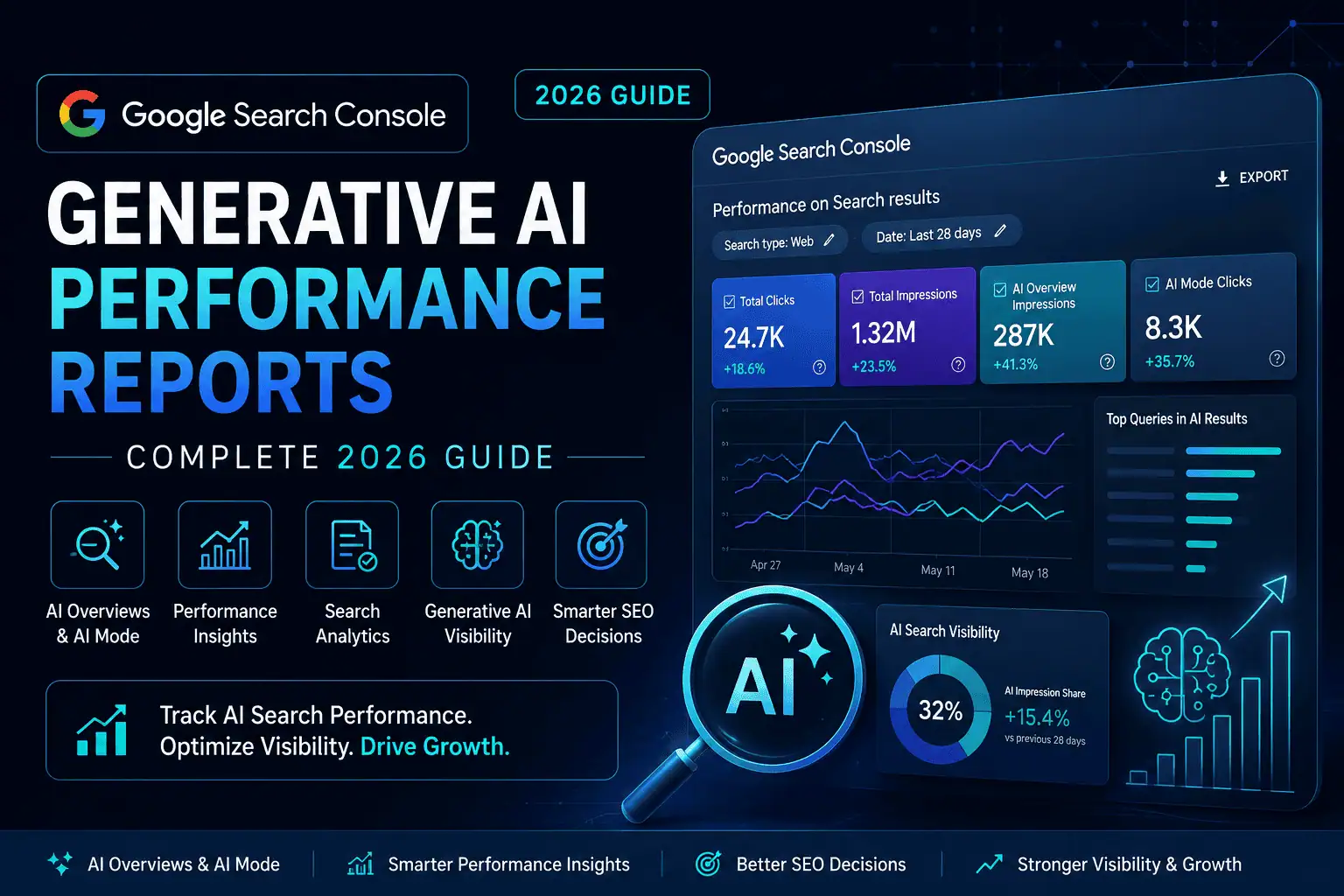
Google Search is evolving from a traditional list of links into a more interactive discovery platform powered by AI Overviews, AI Mode, complex query interpretation, follow-up questions, and generative experiences.
For website owners, SEO professionals, agencies, publishers, eCommerce businesses, and local companies, this transformation creates an important measurement challenge:
How can you determine whether your website is actually appearing inside Google’s generative AI search experiences?
Until recently, Google Search Console included AI-related performance within the standard Search performance data, but website owners could not isolate their visibility inside AI Overviews and AI Mode.
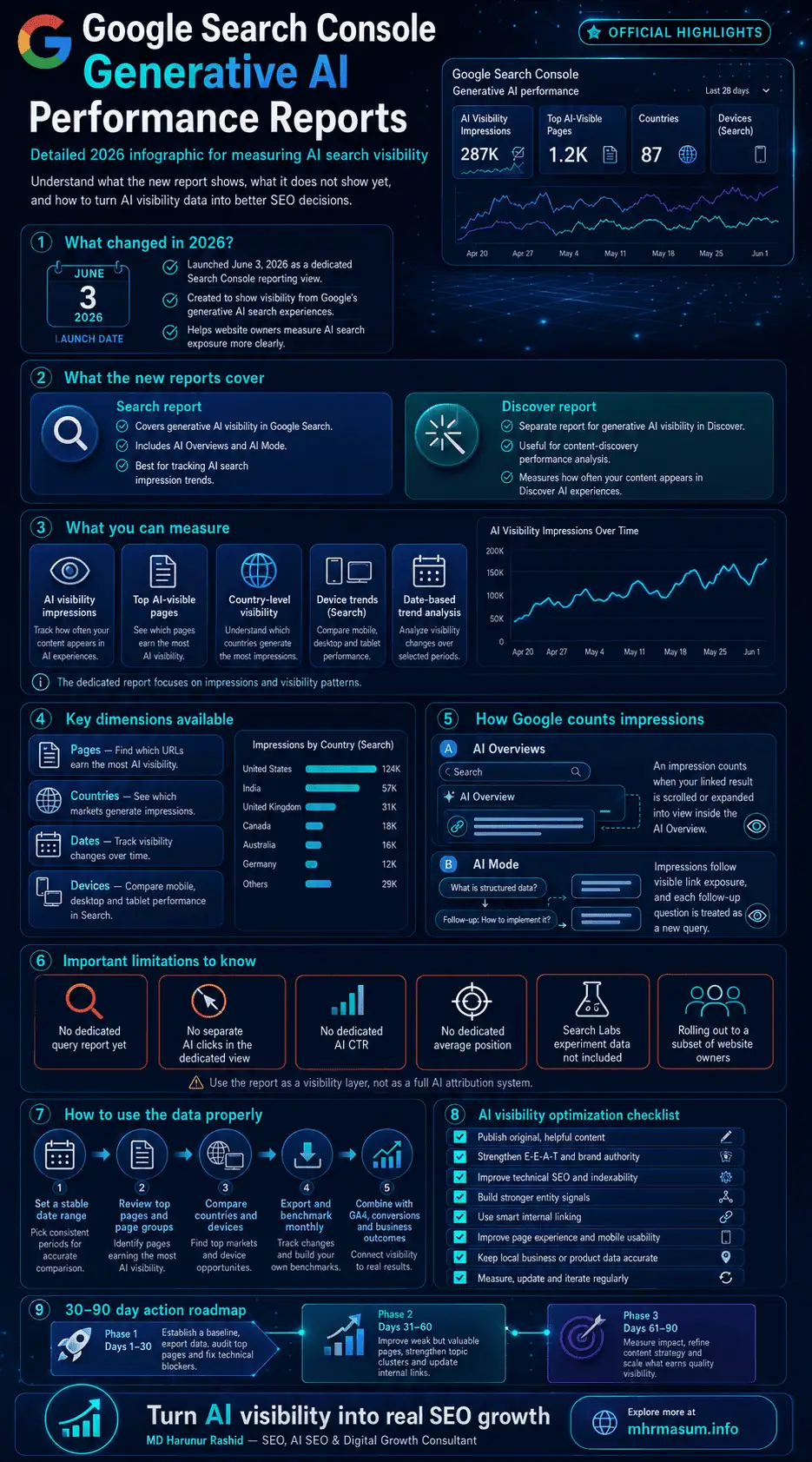
That changed on June 3, 2026, when Google announced dedicated Generative AI performance reports for Search and Discover. These reports give eligible website owners a separate view of impressions generated when their website appears in supported generative AI features.
The report is an important step forward, but it must be interpreted correctly. It is currently focused on visibility and impressions. It does not provide every metric SEO professionals may want, such as separate generative AI queries, clicks, click-through rates, or average positions.
This complete guide explains:
- What the Generative AI performance reports are
- What information Google currently provides
- How AI Overview and AI Mode impressions are counted
- Why some websites cannot see the report
- How to analyse pages, countries, devices, and dates
- How to combine the report with regular Search Console and analytics data
- How to improve your website’s generative AI visibility
- How to report AI search performance to clients
- Which limitations and measurement mistakes to avoid
If your goal is to improve visibility across Google AI Overviews, AI Mode, ChatGPT, Gemini, Perplexity, and other answer engines, start with my complete guide to AI SEO for Google AI Overviews, ChatGPT, Gemini and Perplexity.
What Is the Google Search Console Generative AI Performance Report?
The Google Search Console Generative AI performance report is a dedicated reporting view that shows how often URLs from a verified website appear within supported generative AI experiences on Google Search and Google Discover.
Google currently provides two separate report types:
- Generative AI performance report for Search
- Generative AI performance report for Discover
The Search report includes impressions from AI Overviews and AI Mode. The Discover report includes impressions generated through supported generative AI experiences within Google Discover.
These reports do not replace the standard Search and Discover performance reports. Google states that generative AI visibility remains included within the overall performance data, while the new reports provide a dedicated view of that visibility.
This distinction is important because the new report does not add a completely separate traffic source to your total Search Console numbers. It separates a portion of your existing visibility so that you can understand where generative AI features are involved.
Why Google Introduced Dedicated Generative AI Reporting
Generative AI search experiences are structurally different from traditional search results. A user may ask a complex question, receive a generated explanation, view several supporting sources, explore a carousel, or submit multiple follow-up questions without returning to a conventional search results page.
That made traditional SEO measurement increasingly difficult.
A page could be selected as a supporting source inside an AI Overview or AI Mode response, but website owners previously had limited visibility into how often that happened. The dedicated report begins to address this problem by showing which pages received generative AI impressions and where those impressions originated.
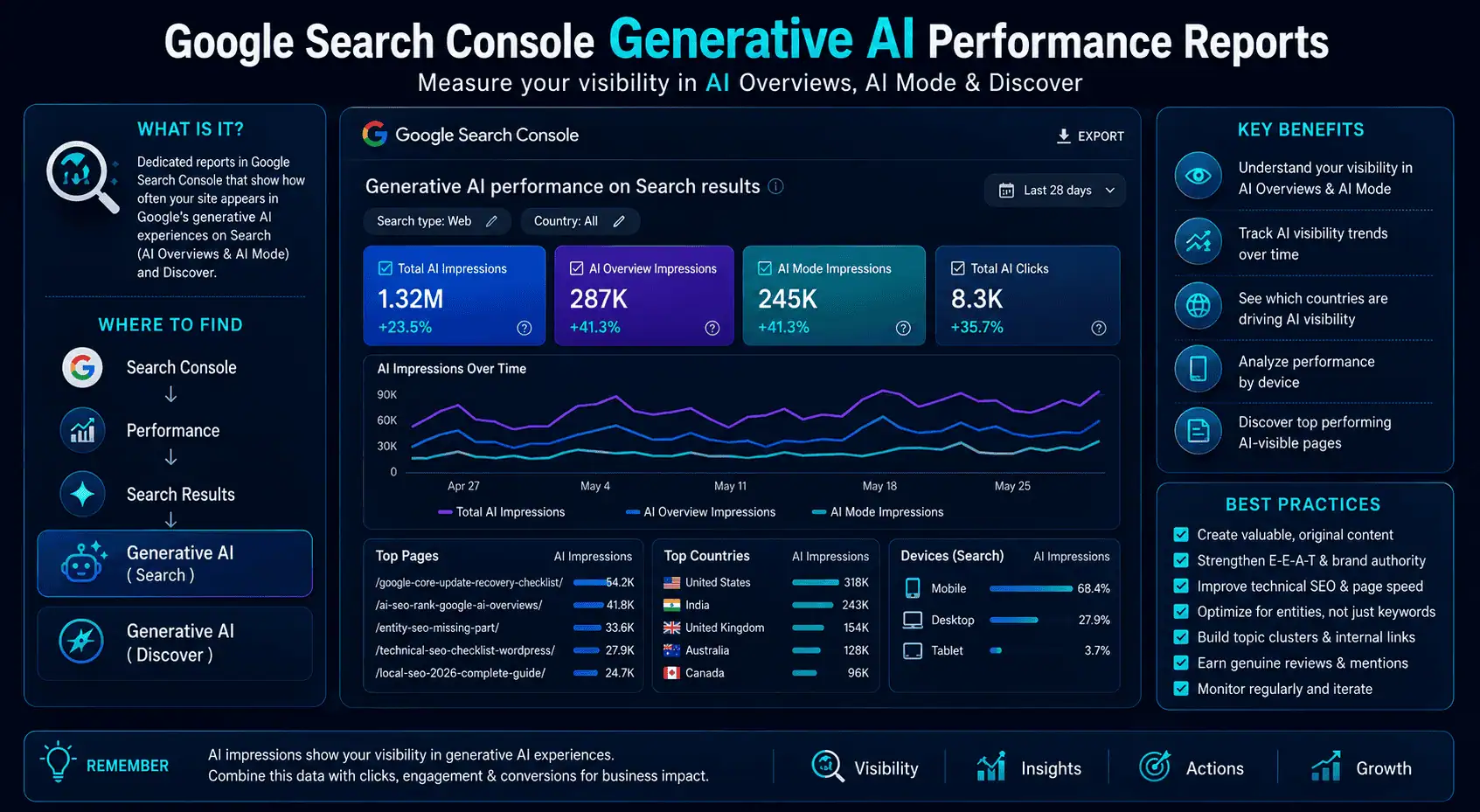
Google says the reports are designed to help website owners understand:
- How organic generative AI impressions change over time
- Which pages receive the most or fewest AI impressions
- Which countries generate the visibility
- Which device types generate visibility in Search
- How AI visibility develops across selected dates
This information can help you evaluate whether your content strategy is becoming more visible in Google’s AI-driven search environment.
However, it should not be treated as a complete AI SEO attribution system. It is an important visibility report, but not yet a full conversion, citation, query, or revenue measurement platform.
What Is Included in the Generative AI Performance Report for Search?
The Search report currently includes impression data from AI Overviews and AI Mode.
Google may expand this list as its generative AI search products continue to develop, but these are the two confirmed Search capabilities included at the time of writing. Data from active Search Labs experiments is not included.
AI Overviews
AI Overviews are generated summaries that appear within Google Search for queries where Google determines that a generated explanation can add value beyond the standard search results.
An AI Overview may include:
- A generated answer
- Supporting links
- Expandable sections
- Images
- Product information
- Local business information
- Follow-up exploration options
For a link to your website to receive an impression inside an AI Overview, the link must be scrolled or expanded into view. A link hidden in a collapsed or unseen section does not automatically receive an impression simply because the AI Overview appeared on the page.
This means AI Overview impressions represent actual visual exposure under Google’s impression-counting rules, not merely the generation of an AI response somewhere on the results page.
AI Mode
AI Mode provides a more interactive search experience that allows users to ask detailed questions, compare options, explore subtopics, and submit follow-up questions.
Google explains that AI Mode can break a user’s question into multiple related subtopics and search for information across those areas simultaneously. This process is related to what is commonly called query fan-out.
A website may therefore appear as a supporting source for a subtopic that was not stated word-for-word in the original query.
When a user submits a follow-up question inside AI Mode, Google treats it as a new query for reporting purposes. Impressions, clicks, and positions associated with the new response are counted against that new interaction.
The dedicated Generative AI performance report, however, currently shows impression-focused visibility rather than exposing the individual queries that triggered those impressions.
What Is Included in the Generative AI Performance Report for Discover?
The Discover version of the report shows how a website performs within supported generative AI features in Google Discover.
Google Discover is a personalised content-discovery environment rather than a conventional keyword-driven search results page. Users usually encounter content based on their interests, activity, location, followed topics, and other relevance signals.
The Generative AI report for Discover can help website owners understand:
- How Discover AI impressions change over time
- Which pages are selected as sources
- Which countries generate the impressions
- Which dates produce increases or decreases
The Discover report is also being rolled out gradually and may not be available to every property.
How Discover AI Impressions Are Counted
An impression is counted when a link to your website is scrolled into view inside a generative AI experience in Discover.
Google counts only one impression per result during a session. If a user scrolls past the same card, returns to it, and views it again, that repeated viewing does not create another impression for the same result in that session.
The page listed in the report is the canonical page that served as the source of the information. It may not always be the exact URL where a user ultimately lands after clicking.
That makes canonical configuration particularly important when analysing Discover AI performance.
What Data Does the Search Report Provide?
The dedicated Search Generative AI performance report currently provides one primary metric—impressions—alongside several dimensions that help you segment those impressions.
The available dimensions are:
- Pages
- Countries
- Dates
- Devices
Google’s launch announcement also referenced hourly, daily, weekly, and monthly performance granularity, while the supporting report documentation explains that date views can be grouped based on the available time-granularity settings.
Impressions
An impression represents a situation in which a link to your website was shown to a user within a supported generative AI feature.
This should be interpreted as a visibility metric.
An AI impression does not automatically mean:
- The user clicked your website
- The user read your content
- The user remembered your brand
- The user converted
- Your page ranked first
- Your website was the primary source
- Google used every part of your page
- The AI response mentioned your business name
The report confirms exposure under Google’s impression rules. It does not prove engagement or commercial impact.
Pages
The Pages dimension shows which URLs from your website appeared inside supported generative AI search features.
For Search, Google groups the data using the final URL linked by the AI feature after redirects. Most performance data is then assigned to the canonical URL rather than duplicate URL variations.
This dimension can help you identify:
- Articles receiving AI visibility
- Service pages appearing in AI responses
- Product pages appearing for shopping-related questions
- Local landing pages receiving exposure
- Old content continuing to perform
- Newly updated content gaining visibility
- Pages losing AI impressions over time
The Pages report is currently the most actionable part of the system because it lets you connect AI visibility with specific content assets.
Countries
The Countries dimension groups data according to the country where the search originated.
Country-level analysis can help you determine whether your content is gaining generative AI visibility in the locations that matter to your business.
For example, a consultant serving businesses in Australia, Bangladesh, the United Kingdom, and the United States may find that AI visibility is growing in one market but not another.
This information can inform decisions about:
- International content
- Localised examples
- Regional terminology
- Country-specific service pages
- Multilingual content
- Local business optimization
- Market expansion
Country-level impressions should still be interpreted alongside business relevance. More impressions are not automatically valuable if they originate from markets your business cannot serve.
Devices
The Devices dimension is available in the Search report and groups data into desktop, mobile, and tablet categories.
Device analysis matters because user behaviour can vary considerably across AI search experiences.
Mobile users may be more likely to:
- Ask conversational questions
- Search for local services
- use voice-based queries
- Explore immediate problems
- Compare nearby businesses
- Look for quick answers
Desktop users may be more likely to:
- Conduct deeper research
- Compare software or agencies
- Read long guides
- Evaluate professional services
- Explore complex business topics
A significant mobile-versus-desktop difference may indicate that certain content types are more compatible with specific user journeys.
Dates
The Dates dimension allows you to monitor how generative AI impressions change over time.
Google groups dates according to Pacific Time, which is important for international website owners comparing Search Console data with Google Analytics, server logs, advertising platforms, CRM records, or local reporting systems.
Date analysis can help you identify:
- Growth after publishing new content
- Changes after updating an article
- Drops during a core update
- Changes after a technical issue
- Seasonal AI visibility
- Sudden market interest
- Differences after improving internal links
- Visibility changes following indexing or canonical corrections
The newest data may be preliminary and can change while Google completes processing. Preliminary data is represented by a dotted line in the report.
What the Generative AI Report Does Not Currently Show
The report is useful, but its limitations are equally important. SEO professionals should avoid presenting assumptions as confirmed measurements.
At the time of writing, the dedicated report does not provide several metrics that many website owners expected.
No Query Dimension
The report does not currently provide a Queries tab showing the exact searches that caused a website to appear in an AI Overview or AI Mode response.
The available documented dimensions are Pages, Countries, Dates, and Devices.
This means you cannot use the dedicated report to confirm:
- The precise user question
- The original long-tail keyword
- The AI Mode follow-up question
- The query fan-out variation
- The subtopic that selected your page
- Whether the query was branded or non-branded
- The commercial intent behind the query
You may infer likely topics by analysing the page that received impressions, but this remains an inference rather than confirmed query data.
No Separate AI Click Metric
Google explains how clicks from AI Overviews and AI Mode are counted in the wider Search Console system. Clicking an external website link inside either feature counts as a click.
However, the dedicated Generative AI report currently focuses on impressions and does not provide a separate AI-click metric in its documented configuration.
This prevents website owners from calculating a confirmed AI-specific click-through rate directly from the dedicated report.
No Dedicated AI Click-Through Rate
Because the report does not provide separate AI clicks, it also does not provide an AI-specific CTR.
You should not divide dedicated AI impressions by total organic clicks and present the result as an AI CTR. Total organic clicks may include traditional blue links, images, videos, local results, and other search features.
That calculation would mix different datasets and could produce a misleading result.
No Dedicated Average Position
The dedicated report does not display an AI-specific average-position metric.
Google does document how position is counted inside AI Overviews and AI Mode within its broader performance methodology. All links in one AI Overview are assigned the same position, while AI Mode follows standard position rules for its result layout.
However, that does not mean the dedicated Generative AI report exposes average position as a selectable metric.
No Search Labs Experiment Data
Search Console does not include data from active Search Labs experiments because those experiences are still under development.
A website could therefore appear in an experimental Google search experience without that exposure being included in the report.
No Complete AI Attribution
The report does not provide full attribution across Google Search, Gemini, ChatGPT, Perplexity, Copilot, or other AI platforms.
It only covers supported generative AI experiences within Google’s documented Search and Discover environments.
To measure a broader AI search strategy, you still need:
- Google Search Console
- Google Analytics 4
- CRM lead data
- Referral traffic analysis
- Conversion tracking
- Server logs
- Brand monitoring
- Manual citation testing
- Third-party tools used with appropriate caution
Google specifically warns that third-party tools do not have access to Google’s internal AI or ranking systems. Their reports can support a workflow, but their proprietary scores should not be presented as official Google metrics.
How Google Counts AI Overview Impressions
AI Overview impressions follow Google’s standard impression methodology, with an important visibility condition.
A link must be scrolled or expanded into view before it receives an impression.
Consider an AI Overview containing ten supporting sources:
- Three sources may be visible immediately
- Four may appear after expanding the response
- Three may appear lower in a carousel
A URL does not necessarily receive an impression just because it exists somewhere inside the generated response. The user must bring the link into view under Google’s reporting rules.
This makes the metric more meaningful than a simple count of all pages technically associated with a response.
However, an impression still does not confirm that the user noticed, read, or clicked the result.
How Google Counts AI Mode Impressions
AI Mode uses standard impression rules for visible external links.
When a user asks a follow-up question, Google treats the follow-up as a new query. Any new impressions, clicks, and position data are associated with that new query interaction.
This creates a more complex search journey than a traditional one-query, one-results-page model.
A user could begin with:
How can I recover from a Google core update?
The user might then ask:
How do I know whether the drop is technical or content-related?
The next follow-up might be:
Which Search Console reports should I compare?
Each interaction can generate a new response, a new set of supporting links, and new impression opportunities.
This is one reason modern SEO content should cover a topic comprehensively rather than targeting only one exact keyword.
For a wider explanation of how modern search combines traditional SEO, answer optimization, and generative discovery, read GEO vs AEO vs SEO.
Why the Generative AI Report May Not Appear in Your Search Console
Not every verified Search Console property currently has access to the report.
Google is rolling out the Generative AI performance reports to a subset of websites so that it can test the system, collect feedback, and improve the reporting before making it more widely available.
The report may be missing for several reasons.
The Report Has Not Reached Your Property
A property may be fully verified and receiving organic traffic but still not have access because the rollout is incomplete.
In this situation, there is no confirmed method for manually forcing activation.
Your Website Has Insufficient Generative AI Impressions
Google says the report may not appear when a website has not received enough impressions in supported generative AI features.
This threshold protects user privacy and avoids displaying extremely limited datasets.
A missing report therefore does not automatically mean there is an error.
Your Site Is Excluded from Generative AI Features
Google now provides Search generative AI controls that can affect whether a site is eligible for inclusion in supported generative AI experiences.
If the site has been excluded, the dedicated report may not show performance because the pages are not eligible for those experiences.
Website owners should review any Search Console AI controls, robots directives, snippet controls, and indexing settings before assuming the problem is content quality.
Your Pages Are Not Properly Indexed
To appear as a supporting link in AI Overviews or AI Mode, a page must be indexed and eligible to appear in Google Search with a snippet. Google says there are no additional technical requirements beyond the normal Search eligibility requirements.
Technical problems that may prevent eligibility include:
noindexdirectives- Robots.txt blocking
- Incorrect canonicals
- Broken redirects
- Crawl failures
- Server errors
- Soft 404s
- Duplicate content
- JavaScript rendering problems
- Snippet restrictions
- Manual actions
- Spam-policy violations
Use this WordPress Technical SEO Checklist to review the foundational issues that may affect both traditional search and generative AI visibility.
How to Access the Generative AI Performance Report
When the report is available for your property, it should appear within the Search Console performance reporting area.
The exact interface may continue to change while Google expands and tests the feature, but the analysis process should remain consistent.
Step 1: Select the Correct Property
Start by selecting the correct Search Console property.
A Domain property usually provides the most complete view because it combines protocols and subdomains, while a URL-prefix property covers only the specified prefix.
Confirm that you are not accidentally reviewing:
- An HTTP property instead of HTTPS
- A
wwwproperty instead of non-www - A staging domain
- A subdirectory property
- An outdated property
- A property without sufficient access
Step 2: Open the Generative AI Report
Navigate to the available Generative AI performance report for Search or Discover.
If the section is missing, review the rollout, impression-threshold, eligibility, and indexing explanations covered above.
Step 3: Set a Meaningful Date Range
Avoid making conclusions from only a few days of data.
Use a date range that allows you to identify a meaningful pattern, such as:
- Last 28 days
- Previous 28 days
- Last three months
- Month-over-month comparison
- Before and after a major content update
- Before and after a Google core update
Remember that the newest data may be preliminary.
Step 4: Review the Pages Dimension
Identify which pages receive the highest AI impressions.
Do not review only the top-performing URL. Look for page groups such as:
- Informational articles
- Commercial service pages
- Local landing pages
- Product pages
- Category pages
- Case studies
- Comparison pages
- Research-based resources
Patterns across page types often reveal more than one isolated result.
Step 5: Review Countries and Devices
Compare the markets and device types responsible for the impressions.
A page receiving strong mobile visibility in a core local market may be more commercially relevant than a page receiving a larger number of desktop impressions in countries the business does not serve.
Step 6: Export the Data
Google provides an export option for the chart and table data. Values displayed as a tilde or dash in the interface are exported as zeros.
Exporting data allows you to:
- Preserve monthly snapshots
- Compare reporting periods
- Build a client report
- Tag pages by content type
- Add business-value classifications
- Combine results with analytics and CRM data
- Track visibility trends before Google changes the interface
The standard 1,000-row reporting limitation and other ordinary Search performance limitations also apply to this report.
How to Read the Chart and Table Correctly
The chart and table can show different totals because they may use different aggregation methods.
This is not necessarily a reporting error.
Chart Aggregation
The chart normally aggregates Search generative AI impression data at the property level.
If two results from the same website appear within one generative AI search feature, they may count as a single property-level impression in the chart.
When a URL filter is added, the chart changes to URL-level aggregation.
Table Aggregation
The table groups data according to the selected dimension.
Country, device, and date data is aggregated at the property level, while page data is aggregated at the page level.
That difference can cause the table’s summed page impressions to differ from the property-level chart total.
Why the Totals May Not Match
A generated response may display more than one page from the same website.
At the property level, Google may count one website impression. At the page level, separate URLs may each receive their own recorded impression.
You should therefore avoid adding all page rows and assuming the result must equal the chart total.
Google confirms that chart and table discrepancies can result from differences between property-level and page-level aggregation.
How to Perform a Generative AI Visibility Audit
A structured audit turns the report from an interesting dashboard into a practical SEO tool.
The objective is not simply to find the page with the most impressions. The objective is to understand which topics, page types, markets, and optimization patterns are creating AI visibility.
Establish a Baseline
Record the total generative AI impressions for a stable reporting period.
A useful baseline should include:
- Reporting period
- Total Search AI impressions
- Total Discover AI impressions
- Number of visible pages
- Top ten pages
- Top countries
- Device distribution
- Major updates during the period
- Technical changes
- Content changes
This baseline gives you something meaningful to compare against later.
Categorise the Visible Pages
Group pages according to their purpose.
Suggested categories include:
- Educational guide
- Service page
- Product page
- Local landing page
- Case study
- Review
- Comparison
- Checklist
- Research page
- Brand or company page
This classification can reveal whether Google’s generative AI features prefer certain types of content from your website.
For example, you may discover that detailed educational guides receive strong AI impressions while thin service pages receive almost none.
That finding would support a strategy combining informational expertise with stronger pathways to commercial pages.
Identify Topic Clusters
Group the visible pages by topic rather than analysing every URL in isolation.
A consultant’s website may have clusters for:
- AI SEO
- Local SEO
- Technical SEO
- WordPress optimization
- eCommerce SEO
- Google Business Profile
- Content quality
- Core update recovery
If one topic cluster earns substantially more AI visibility, study its content depth, internal linking, authority, format, freshness, and entity signals.
Strong topic clusters often help search systems understand what a website is genuinely knowledgeable about.
For more guidance on building machine-understandable topic and brand relationships, review Entity SEO: The Missing Part of Modern SEO.
Compare New and Updated Content
Record when important pages were published or substantially updated.
Then compare whether their AI impressions changed after:
- Adding original examples
- Improving the introduction
- Expanding weak sections
- Adding visual evidence
- Clarifying headings
- Updating outdated information
- Adding internal links
- Improving author information
- Correcting schema
- Improving page speed
Avoid assuming that one change caused the growth. Search visibility can be influenced by many factors, including demand, competition, indexing, ranking-system updates, and changes in Google’s AI features.
Compare AI Visibility with Business Value
Not every impression is commercially equal.
Assign pages to business-value categories such as:
- High commercial value
- Assisted commercial value
- Brand-building value
- Educational value
- Low strategic value
A service page receiving 500 relevant AI impressions may be more valuable than a broad article receiving 10,000 impressions from unrelated markets.
How to Combine the AI Report with the Standard Performance Report
The dedicated report should not be analysed alone.
Its strongest use comes from combining it with the standard Search performance report, Google Analytics 4, conversions, and business data.
Review the Same Page in the Standard Search Report
After identifying a page with growing AI impressions, find the same URL in the standard Search results performance report.
Review:
- Total clicks
- Total impressions
- CTR
- Average position
- Search queries
- Countries
- Devices
- Date trends
The standard report cannot necessarily tell you which clicks came specifically from AI Overviews or AI Mode, but it can show whether the page’s overall search performance changed during the same period.
Compare Dates Carefully
Use identical date ranges whenever possible.
Differences in date settings, time zones, preliminary data, and reporting delays can create false patterns.
Search Console dates use Pacific Time, while your analytics or CRM may use a different business timezone.
Add Google Analytics 4 Engagement Data
Search Console measures search visibility and clicks, while GA4 helps you analyse on-site behaviour.
For high-AI-impression landing pages, review:
- Organic sessions
- Engaged sessions
- Engagement rate
- Average engagement time
- Key events
- Form submissions
- Phone clicks
- WhatsApp clicks
- Purchases
- Assisted conversions
Do not label all organic sessions to the page as AI traffic. GA4 does not automatically make every Google organic visit attributable to AI Mode or AI Overviews.
Instead, use GA4 to understand whether the pages gaining AI visibility are also producing valuable engagement.
Add CRM and Lead Quality Data
For a service business, the most important outcome may not be traffic.
It may be:
- Qualified enquiries
- Booked consultations
- Quote requests
- Phone calls
- WhatsApp conversations
- Demo requests
- Closed sales
- Retainer clients
A page can generate fewer visits but attract users with stronger intent.
Google’s official AI-search guidance notes that generative experiences can create opportunities to reach visitors who may be more inclined to engage, subscribe, or purchase.
That does not guarantee higher-quality traffic for every website, but it is a reason to connect visibility reporting with actual business outcomes.
How to Interpret Common AI Visibility Patterns
Generative AI reporting will create new patterns that require careful interpretation.
The following scenarios can help you avoid premature conclusions.
AI Impressions Increase but Organic Clicks Stay Flat
This can happen when your pages receive more exposure inside AI features without generating a matching increase in total clicks.
Possible explanations include:
- Users received enough information from the generated response
- Your link appeared but was not prominent
- The link required expansion or scrolling
- The topic had informational rather than commercial intent
- Traditional search clicks declined while AI exposure increased
- Demand shifted between devices or countries
- The page appeared for broader fan-out subtopics
The report alone cannot confirm which explanation is correct.
Review the page, standard performance data, engagement, conversions, and search-result presentation before deciding what happened.
AI Impressions Increase on Only One Page
One dominant page may indicate that Google sees it as particularly useful for a certain topic.
Review that page for transferable strengths:
- Original insight
- Clear explanations
- Strong topic coverage
- Useful examples
- Clear authorship
- Supporting visuals
- Relevant internal links
- Reliable citations
- Good technical accessibility
- Strong brand or entity context
Do not copy the wording across multiple pages. Instead, apply the successful quality principles to other relevant content.
AI Impressions Are Strong but Come from Irrelevant Countries
This may represent informational reach without commercial value.
Review whether the content is:
- Too broad
- Missing service-area context
- Using globally ambiguous terminology
- Ranking for educational queries rather than buyer intent
- Attracting research audiences outside your market
You do not necessarily need to remove the content. Instead, improve pathways to geographically relevant service pages and clarify where your services are available.
For location-focused businesses, combine AI visibility analysis with a complete Local SEO strategy for small businesses.
Mobile AI Visibility Is Much Higher Than Desktop
This may be positive for local, immediate, and conversational search journeys.
Check whether the page provides:
- Clear mobile navigation
- Readable text
- Fast loading
- Click-to-call functionality
- Visible contact options
- Simple forms
- Location information
- Useful summaries
- Accessible expandable content
A poor mobile experience can waste valuable AI visibility even when Google selects the page as a supporting source.
AI Impressions Drop During a Google Update
Do not immediately assume that Google has applied an AI-specific penalty.
A drop may be connected to:
- A core update
- A spam update
- Content reassessment
- Indexing problems
- Canonical changes
- Search demand
- Competitor improvements
- Changes to AI Overview triggering
- Changes to the report rollout
- Technical website changes
Compare the drop with Google’s confirmed update timeline and follow a structured diagnosis using this Google Core Update Recovery Checklist.
How to Improve Visibility in Google’s Generative AI Features
Google says that existing SEO best practices remain relevant because its generative AI experiences are connected to the core Search ranking and quality systems.
A page must be indexed, eligible for a search snippet, technically accessible, and compliant with Google’s policies. No additional special technical requirement is necessary for inclusion in AI Overviews or AI Mode.
Create Valuable, Non-Commodity Content
Google’s 2026 guidance places particular emphasis on content that provides original value rather than repeating common information available everywhere.
Examples of stronger content include:
- First-hand experience
- Original analysis
- Case studies
- Unique data
- Expert commentary
- Practical workflows
- Screenshots
- Before-and-after comparisons
- Real implementation examples
- Industry-specific recommendations
Generic content that simply paraphrases top-ranking articles is unlikely to build durable authority.
This is especially important when using AI tools. AI can help organise ideas and accelerate research, but the final article should contain expertise, judgment, evidence, and value that cannot be produced through basic prompting.
Read Why Generic AI Content Does Not Rank Anymore for a deeper content-quality framework.
Strengthen Technical SEO
Google’s AI search features depend on content that its systems can crawl, render, index, and understand.
Review:
- Indexability
- Canonical tags
- Redirects
- XML sitemaps
- Robots directives
- JavaScript rendering
- Mobile usability
- Core Web Vitals
- Internal links
- Duplicate content
- Server performance
- Structured data accuracy
- Image accessibility
Google also recommends a good page experience across devices, reduced latency, and a layout that makes the primary content easy to distinguish from secondary elements.
You can review practical examples of this work in my Technical SEO and Keyword Research portfolio and Website Speed Optimization portfolio.
Build Clear Entity Signals
Entity SEO helps search systems understand who created the content, what the website specialises in, which services the business provides, and how different pages relate to the same person or organisation.
Strengthen entity clarity through:
- Consistent brand naming
- Detailed About pages
- Author biographies
- Service descriptions
- Organisation schema
- Person schema
- SameAs profiles
- Relevant portfolio evidence
- Case studies
- Trusted third-party mentions
- Consistent business information
- Topic clusters
- Logical internal linking
For example, my About page for MD Harunur Rashid establishes professional identity, while the portfolio provides evidence of practical SEO, WordPress, Local SEO, and digital growth work.
Improve Internal Linking
Internal links help users and search systems discover related information and understand topical relationships.
A strong AI SEO content cluster should connect:
- Broad guides to specialist guides
- Informational pages to service pages
- Articles to case studies
- Case studies to relevant services
- Technical guides to implementation evidence
- Local SEO articles to local success stories
- Author pages to expertise content
Use descriptive anchor text that explains where the link leads.
Avoid generic anchors such as:
- Click here
- Read more
- Learn more
- This page
Better anchors include:
- AI SEO strategy for Google AI Overviews
- WordPress Technical SEO Checklist
- Local SEO case study for roofing businesses
- Entity SEO implementation guide
Natural internal linking should improve the reader’s journey rather than exist only to manipulate rankings.
Strengthen Brand Authority
Generative AI systems may evaluate information from multiple sources when producing answers.
A stronger brand footprint can help clarify:
- Who you are
- What you specialise in
- Whether your experience is verifiable
- Whether other sources recognise the business
- Whether customers trust your services
- Whether your website demonstrates genuine expertise
Brand authority can be strengthened through:
- Expert-led content
- Consistent public profiles
- Original research
- Case studies
- Testimonials
- Reviews
- Media contributions
- Professional partnerships
- Clear authorship
- Business transparency
- Consistent entity information
Use this guide to learn How to Build Brand Authority for AI Search.
Improve Reviews and Reputation Signals
For local businesses and professional service providers, reviews support trust, conversion, reputation, and Local SEO.
They may also help AI-driven discovery systems understand public sentiment and whether customers consistently associate a business with a service, location, or quality attribute.
A sustainable review strategy should focus on:
- Genuine customer feedback
- Consistent review acquisition
- Professional responses
- Service-specific details
- Location relevance
- Resolving negative experiences
- Displaying selected testimonials
- Avoiding fake reviews
Read How Reviews Help Local SEO and AI Search Visibility for a complete reputation strategy.
Optimise Local Business and eCommerce Information
Google’s generative AI guidance confirms that AI responses may include local business information, products, and product listings.
Google recommends maintaining accurate information through Google Business Profile and Merchant Center where appropriate.
Local businesses should maintain:
- Accurate business name
- Correct address
- Current phone number
- Business hours
- Service areas
- Relevant categories
- Products and services
- Photos
- Reviews
- Local landing pages
- Consistent citations
eCommerce businesses should maintain:
- Accurate product feeds
- Product schema
- Offer data
- Price
- Availability
- Shipping information
- Return policies
- High-quality images
- Product identifiers
- Customer reviews
See practical examples in my Local SEO portfolio, Roofing Brisbane Local SEO case study, and Pest Control Melbourne Google Business Profile case study.
Do You Need Special AI SEO Schema?
Google says there is no special structured data required to appear in its generative AI search experiences.
Structured data should still be used where it accurately represents visible page content and qualifies a website for supported rich results, but adding random schema types does not guarantee inclusion in AI Overviews or AI Mode.
Continue using appropriate schema such as:
- Organization
- Person
- Article
- Product
- Offer
- LocalBusiness
- BreadcrumbList
- VideoObject
- FAQPage where eligible and appropriate
- Review or AggregateRating where policy-compliant
Do not create misleading schema, mark up hidden information, or add irrelevant properties simply to make a page look more “AI optimized.”
Do You Need an llms.txt File for Google AI Visibility?
Google states that it does not use llms.txt files or other special AI text files for visibility in Google Search, including its generative AI features.
Creating an llms.txt file does not improve or damage Google rankings because Google Search ignores it.
Other platforms may choose to use such files, but they should not be presented as a confirmed Google AI SEO requirement.
For Google Search, your priority should remain:
- Crawlability
- Indexability
- Helpful content
- Technical clarity
- Authority
- Internal linking
- Page experience
- Accurate structured data
- Brand trust
- Search policy compliance
Do You Need to Rewrite Every Article for AI Search?
Google says website owners do not need to rewrite content in a special format solely for generative AI systems.
Its systems can understand synonyms, meaning, related concepts, and relevant passages without every long-tail keyword variation appearing word-for-word.
Content should still be well organised.
Useful practices include:
- Descriptive headings
- Clear paragraphs
- Direct explanations
- Supporting examples
- Logical sections
- Relevant images
- Helpful tables
- Accurate terminology
- Natural internal links
- Clear conclusions
The objective is not to write for a machine. The objective is to create content that people can understand, trust, and use.
A Practical Monthly AI Search Reporting Framework
A monthly report should separate confirmed Google data from interpretation.
This protects clients from misleading claims and gives decision-makers a clearer view of what the data actually means.
Executive Summary
Begin with a short summary explaining whether generative AI visibility increased, decreased, or remained stable.
Include:
- Main visibility change
- Top-performing topic
- Most important page
- Highest-value market
- Main risk
- Main opportunity
- Recommended next action
Visibility Metrics
Report the available confirmed metrics.
A practical table may include:
| Metric | Current Period | Previous Period | Change |
|---|---|---|---|
| Search generative AI impressions | |||
| Discover generative AI impressions | |||
| Number of visible pages | |||
| Top country | |||
| Mobile share | |||
| Desktop share |
Do not include AI clicks, CTR, or average position unless Google has added those metrics to the dedicated report and they are directly available for the reporting period.
Top Pages
List the pages generating the most AI impressions.
Add useful context such as:
- Content type
- Topic cluster
- Publish date
- Last major update
- Commercial relevance
- Conversion path
- Recommended action
Content Opportunities
Use visible page patterns to recommend improvements.
Examples include:
- Expand a high-performing topic cluster
- Add a supporting case study
- Improve a service-page pathway
- Update outdated statistics
- Add original screenshots
- Strengthen author information
- Improve local relevance
- Add internal links
- Improve mobile speed
Limitations Statement
Every professional report should explain the current limitations.
A suitable statement is:
Google Search Console’s dedicated Generative AI performance report currently provides impression-focused visibility data. It does not currently provide a generative AI query dimension or separate AI clicks, CTR, and average-position metrics. Business-impact analysis therefore combines the dedicated report with standard Search Console, analytics, conversion, and CRM data.
This prevents clients from assuming that every AI impression produced a visit or lead.
A 30-Day Generative AI Visibility Action Plan
The following roadmap can help a business move from basic reporting to a structured AI SEO improvement process.
Days 1–5: Establish the Baseline
During the first stage, document the website’s current visibility and technical condition.
Complete the following actions:
- Export available AI performance data
- Record the top pages
- Record countries and devices
- Capture the current reporting period
- Check indexing
- Review canonicals
- Review robots directives
- Confirm Search Console ownership
- Review recent website changes
- Record recent Google updates
Days 6–10: Audit the Top AI-Visible Pages
The next stage should focus on understanding why certain pages may be receiving visibility.
Review:
- Content depth
- Originality
- First-hand experience
- Heading clarity
- Internal links
- Supporting sources
- Author information
- Visuals
- Structured data
- Mobile experience
- Page speed
- Conversion pathways
Days 11–15: Improve Weak but Valuable Pages
Prioritise pages with business value but limited AI visibility.
Possible improvements include:
- Rewriting weak introductions
- Adding original examples
- Answering important follow-up questions
- Improving factual accuracy
- Adding comparison tables
- Adding screenshots
- Strengthening internal links
- Clarifying the service offered
- Improving calls to action
- Updating outdated content
Days 16–20: Strengthen Topic Clusters
Connect related pages into clear subject areas.
For an SEO consultancy, clusters may include:
- AI SEO
- Entity SEO
- Local SEO
- Technical SEO
- Core update recovery
- WordPress performance
- Google Business Profile
- eCommerce SEO
Each cluster should contain a strong primary guide supported by specialist articles, case studies, service pages, and relevant portfolio evidence.
Days 21–25: Strengthen Brand and Entity Signals
Use this period to improve the website’s professional credibility.
Review:
- About page
- Author biography
- Service descriptions
- Contact information
- Social profiles
- Schema
- Portfolio examples
- Testimonials
- Review profiles
- Business consistency
Days 26–30: Measure and Document
At the end of the first month, export the report again and compare it with the baseline.
Record:
- Changes in total AI impressions
- New visible pages
- Lost visible pages
- Country changes
- Device changes
- Overall organic performance
- Engagement changes
- Leads and conversions
- Work completed
- Priorities for the next month
Thirty days may be sufficient to identify early movement, but sustainable SEO and AI visibility usually require ongoing improvement rather than one-time changes.
Common Generative AI Reporting Mistakes
Incorrect interpretation can make an AI SEO report look impressive while providing little business value.
Avoid the following mistakes.
Treating Every AI Impression as a Citation
An impression confirms that a website link was shown under Google’s reporting rules.
It does not necessarily confirm that:
- The business name was mentioned
- The page was quoted
- The page was the primary source
- The user noticed the link
- The user clicked
- The user converted
Use “generative AI impression” or “AI search visibility” unless you have evidence of a direct citation or mention.
Reporting AI CTR Without AI Click Data
Do not calculate an AI CTR using total organic clicks and dedicated AI impressions.
The numerator and denominator would represent different datasets.
Assuming a Missing Report Means Zero AI Visibility
The report may be unavailable because:
- The rollout has not reached the property
- The website has insufficient reportable impressions
- The property is incorrectly selected
- Generative AI eligibility has been restricted
- Google is still testing the feature
A missing report is not definitive proof that a site has never appeared.
Ignoring Canonical URLs
Search Console normally assigns page data to Google-selected canonical URLs.
If canonical configuration is incorrect, the report may assign visibility to a different URL than expected.
Comparing Different Date Ranges
Small differences in dates can create misleading conclusions, particularly when one report contains preliminary data or another platform uses a different timezone.
Focusing Only on Impression Volume
High impression volume is not the final goal for most businesses.
The wider objective is to create:
- Qualified visibility
- Relevant engagement
- Trust
- Leads
- Sales
- Subscribers
- Bookings
- Long-term brand demand
Frequently Asked Questions About Generative AI Performance Reports
The following questions address the most common issues website owners and SEO clients may have about the new Search Console reporting.
Does Google Search Console Now Show AI Overview Traffic?
Google Search Console now provides a dedicated impression-focused report for supported generative AI Search features, including AI Overviews and AI Mode.
Clicks from those features are counted within Google’s broader performance methodology, but the dedicated report does not currently provide a separate AI-click metric.
Can I See Which Queries Triggered My AI Impressions?
No. The dedicated report currently does not provide a Queries dimension.
The documented dimensions are Pages, Countries, Dates, and Devices for Search.
Can I See Separate AI Overview and AI Mode Performance?
The report includes both AI Overviews and AI Mode, but Google’s current documentation does not describe a filter that separates the two experiences into individual performance totals.
Do not claim separate performance unless that capability is directly available in your Search Console interface.
Does the Report Show Clicks?
The dedicated report currently focuses on impressions.
Google counts external-link clicks in AI Overviews and AI Mode within its overall Search Console methodology, but separate AI clicks are not currently documented as a metric in the dedicated report.
Does the Report Show AI CTR?
No dedicated AI CTR is currently documented because the report does not provide separate AI clicks.
Does the Report Show Average Position?
The dedicated report does not currently document average position as an available metric.
Google has explained how position is counted for AI Overviews and AI Mode in the overall Search Console methodology, but that is different from providing a selectable position metric inside the dedicated report.
Why Can’t I See the Report?
The report may not yet be available for your property, your site may not have enough generative AI impressions, or the site may not be eligible for generative AI features.
Google is still rolling the reports out to a subset of websites.
Are AI Impressions Already Included in My Normal Search Data?
Yes. Google states that this data is included in the overall performance reporting and will continue to be tracked there.
The dedicated report provides a separate visibility view rather than creating a completely new set of impressions outside the main totals.
Are Search Labs Experiments Included?
No. Data from active Search Labs experiments is not included because those experiments are still under development.
Does My Website Need Special AI Schema?
No special AI schema is required for Google’s generative AI features.
Continue using accurate, relevant structured data where it supports normal Search features and correctly represents visible content.
Does llms.txt Improve Google AI Visibility?
No. Google states that Google Search does not use llms.txt files and that such files neither help nor harm Google Search visibility.
Can Local Businesses Appear in Generative AI Search?
Yes. Google’s generative AI experiences can include local business information.
Accurate Google Business Profile information, strong local landing pages, reviews, business consistency, and Local SEO remain important.
Can Product Pages Appear in Generative AI Search?
Yes. Generative AI responses can include product information and listings.
eCommerce businesses should maintain accurate product pages, Merchant Center feeds, availability, pricing, images, shipping information, and product structured data.
Is Traditional SEO Still Important for AI Search?
Yes. Google states that its generative AI features are rooted in its core Search ranking and quality systems.
Technical SEO, helpful content, crawlability, indexing, page experience, authority, and policy compliance remain essential.
Final Thoughts on Measuring Google Generative AI Visibility
The Google Search Console Generative AI performance reports represent an important development in AI search measurement.
For the first time, eligible website owners can access a dedicated view showing which pages appear in supported Google generative AI experiences, where those impressions originate, which devices are involved, and how visibility changes over time.
However, the report must be used accurately.
It currently provides an impression-focused visibility view, not a complete AI search attribution system. It does not currently expose generative AI queries or separate AI clicks, CTR, and average-position metrics.
The strongest measurement strategy combines:
- Generative AI impression data
- Standard Search Console performance
- Google Analytics 4
- Conversion tracking
- CRM lead data
- Content-quality audits
- Technical SEO
- Entity SEO
- Brand authority
- Local SEO
- Business outcomes
Generative AI visibility should not be pursued as an isolated metric.
It should be connected to a wider strategy that helps search engines and users understand your expertise, trust your brand, discover your services, and take meaningful action.
MD Harunur Rashid provides practical SEO, AI SEO, Local SEO, Technical SEO, WordPress optimization, content strategy, and digital growth support for businesses, agencies, eCommerce websites, and professional services including website design and custom crm development.
Explore my complete SEO and digital growth services, review practical work in my SEO portfolio, or contact MD Harunur Rashid to discuss a tailored AI SEO and organic growth strategy.