Search is moving beyond a model where users enter a keyword, review ten links, and manually navigate a website.
AI systems can now research options, compare services, inspect product information, complete forms, manage bookings, add products to carts, and perform other multi-step tasks on behalf of users.
This creates a new type of website visitor: the AI agent.
An AI agent does more than retrieve information. It can interpret a user’s objective, create a plan, visit websites, interact with interfaces, evaluate results, and continue until the task is completed or human approval is required.
For businesses, this means that future website performance will not depend only on whether a page can rank or appear in an AI-generated answer. A website may also need to be understandable and operable by an agent trying to complete a real task.
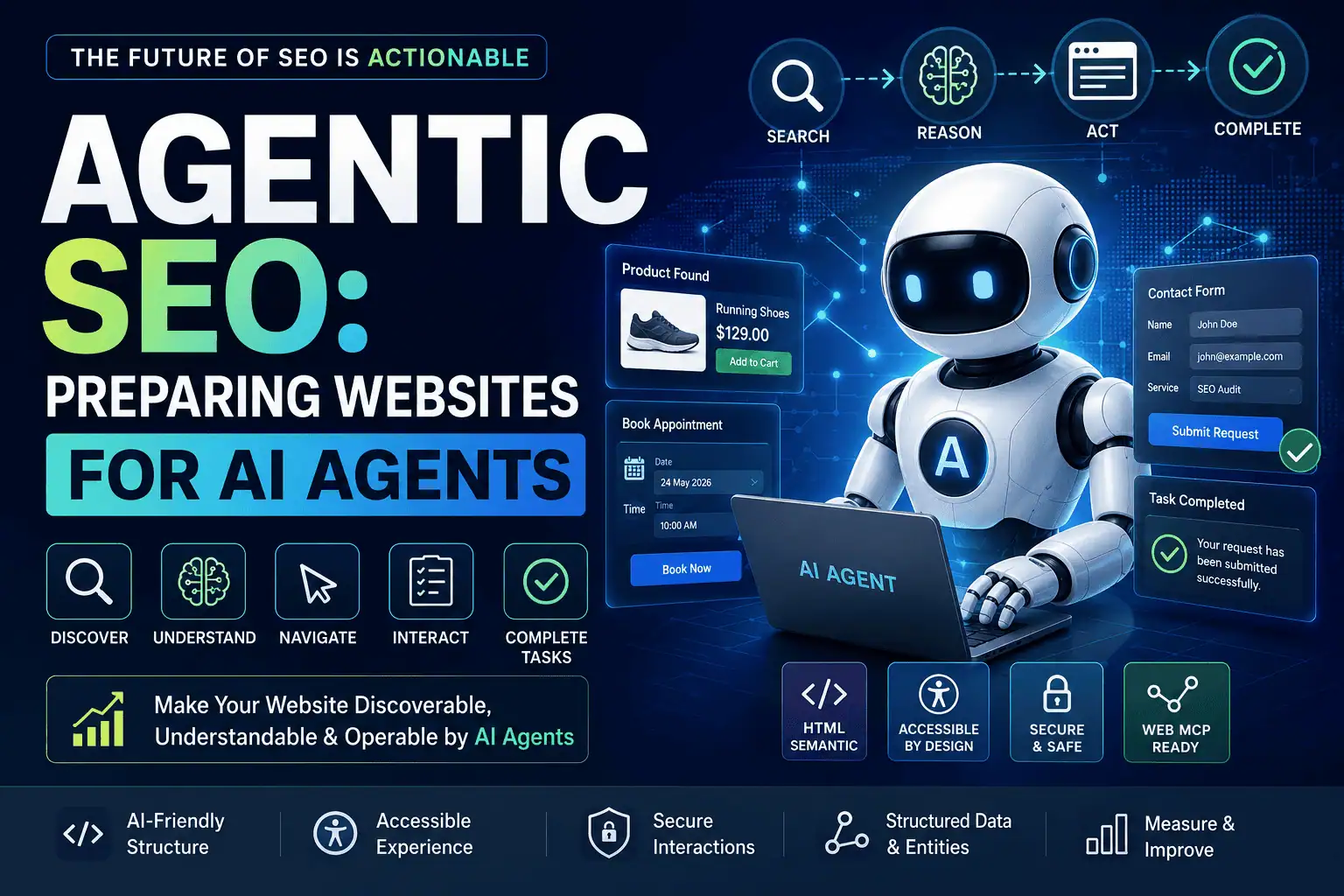
This emerging discipline can be described as Agentic SEO.
Agentic SEO combines traditional SEO, technical SEO, accessibility, user experience, structured data, interface design, security, and machine-readable website architecture. Its objective is to make a website:
- Discoverable by search and AI systems
- Understandable through content and structured signals
- Navigable by humans and AI agents
- Operable through clear interfaces
- Reliable during multi-step workflows
- Secure when agents perform consequential actions
- Measurable through analytics, logs, Search Console, and conversion data
Agentic SEO is not a replacement for traditional SEO. It is an extension of the technical and user-experience work that already helps search engines and people understand a website.
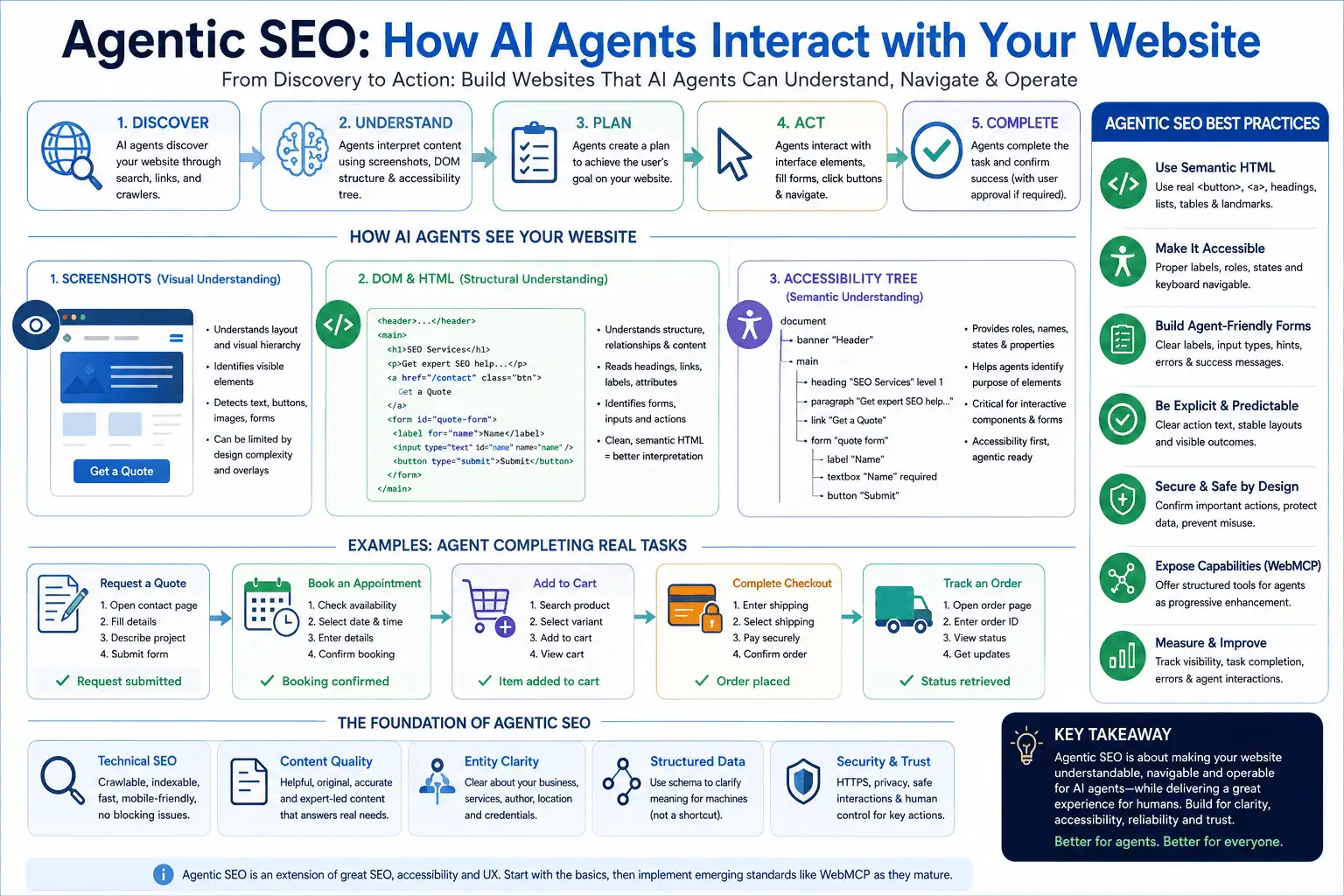
Google’s official guide to optimizing websites for generative AI search explains that AI agents may interact with websites by analysing screenshots, inspecting the Document Object Model, and interpreting the accessibility tree. Google also recommends reviewing emerging agent-friendly website practices where agentic experiences are relevant to a business.
This guide explains how business owners, SEO professionals, WordPress developers, agencies, eCommerce stores, SaaS companies, and local businesses can begin preparing for an agent-driven web.
What Is Agentic SEO?
Agentic SEO is the process of optimizing a website so that AI systems can find its information, understand its purpose, navigate its pages, interact with its features, and safely complete user-directed tasks.
Traditional SEO primarily focuses on helping search engines discover, index, understand, rank, and display website content.
Agentic SEO extends this objective from visibility to actionability.
A traditional search journey might look like this:
- A user searches for a service.
- Google displays several results.
- The user visits a website.
- The user reads the page.
- The user completes a contact form.
An agentic journey may look like this:
- A user asks an AI agent to find three suitable providers.
- The agent researches multiple websites.
- It compares services, locations, experience, reviews, and availability.
- It opens the most relevant website.
- It completes a quote or booking form using information supplied by the user.
- It asks the user to approve submission.
- It confirms whether the request was successfully sent.
The agent therefore needs more than indexable content. It needs a clear, predictable, and machine-operable website journey.
Google describes AI agents as autonomous systems that can perform tasks such as comparing product specifications or booking reservations. Browser agents may gather the information they need by reading visual renderings, DOM structure, and accessibility-tree information.
Agentic SEO is an emerging industry term rather than a confirmed Google ranking factor. Making a website agent-friendly does not create a guaranteed ranking advantage. It does, however, reduce the technical and interface friction that may prevent AI systems from understanding or using a website.
Why Agentic SEO Matters in 2026
Agentic SEO matters because AI systems are moving from answering questions to completing workflows.
ChatGPT agent, for example, can use a visual browser, text browser, terminal, direct integrations, and other tools to research and perform online tasks.
OpenAI’s introduction to ChatGPT agent explains that the agent can interact with websites by clicking, filtering, typing, scrolling, gathering information, and requesting user approval for consequential actions.
Google has also begun publishing official guidance for websites that may be accessed by browser agents. Its web.dev guidance describes AI agents as a new type of website visitor that can interpret a goal, create a plan, and execute actions on behalf of a person.
Google’s guide to designing websites for AI agents describes AI agents as a new category of website visitor that can interpret a goal, create a plan, and perform actions on behalf of a user.
This transition may affect many online journeys, including:
- Finding and contacting a local service provider
- Booking a hotel, restaurant, consultation, or appointment
- Comparing products and specifications
- Building a shopping cart
- Checking delivery or return conditions
- Requesting an insurance or service quote
- Searching a property database
- Selecting software plans
- Completing onboarding forms
- Downloading reports or documents
- Checking account or order status
- Managing reservations
- Researching agencies or consultants
- Comparing professional services
A website that works perfectly for a human may still create difficulties for an agent.
For example, an agent may struggle when:
- Buttons are built from generic
<div>elements - Form fields have no programmatic labels
- Menus open only on hover
- Important content appears only after complex JavaScript interactions
- Cookie banners cover essential controls
- Pop-ups repeatedly interrupt the workflow
- Buttons move as the page loads
- Errors are shown only through colour
- A successful submission produces no clear confirmation
- Prices or availability are hidden inside images
- Product variants are ambiguously labelled
- Navigation changes unpredictably between pages
- Anti-bot systems block every automated browser
- Forms rely on inaccessible CAPTCHA challenges
Agentic SEO attempts to identify and reduce this friction.
Agentic SEO Is Not a Replacement for Traditional SEO
Agentic optimization begins with the same foundations as modern SEO.
A page still needs to be:
- Crawlable
- Indexable
- Technically accessible
- Useful to visitors
- Relevant to the topic
- Trustworthy
- Properly linked
- Mobile-friendly
- Fast enough to use
- Eligible to appear in search
Google states that its generative AI search experiences remain rooted in its core ranking and quality systems. Pages must meet normal technical requirements, be indexed, and be eligible to appear with a search snippet. No separate technical requirement is necessary simply to appear in AI Overviews or AI Mode.
Agentic SEO therefore sits on top of—not outside—traditional SEO.
A useful hierarchy is:
- Technical SEO makes the website accessible to crawlers and search systems.
- Content SEO makes the website relevant and valuable.
- Entity SEO clarifies people, organizations, products, services, and relationships.
- AI SEO and GEO improve the website’s suitability for generative discovery.
- Agentic SEO improves the ability of an AI system to navigate and perform tasks.
For the broader generative-search foundation, review my guide to AI SEO for Google AI Overviews, ChatGPT, Gemini and Perplexity.
Agentic SEO vs SEO, AEO, GEO and AI SEO
These terms overlap, but they describe different parts of the search and discovery process.
Traditional SEO Focuses on Search Visibility
Traditional SEO helps search engines crawl, index, evaluate, rank, and display content.
Typical activities include:
- Keyword research
- Content optimization
- Internal linking
- Technical SEO
- Backlink acquisition
- Local SEO
- Structured data
- Page experience
- Search Console monitoring
The primary goal is usually to earn qualified organic visibility and traffic.
AEO Focuses on Answer Extraction
Answer Engine Optimization aims to make information easy for answer-based systems to identify and present.
AEO commonly involves:
- Clear definitions
- Direct answers
- Question-based sections
- Helpful summaries
- Accurate factual information
- Structured content
- FAQ-style explanations where appropriate
The goal is to increase the chance that a system can extract or present a useful answer.
GEO Focuses on Generative Visibility
Generative Engine Optimization focuses on how brands, pages, products, and experts appear in generative AI responses.
GEO may involve:
- Entity clarity
- Brand authority
- Original information
- Expert authorship
- Trusted mentions
- Citations and evidence
- Comprehensive topic coverage
- Machine-readable content
The goal is to increase meaningful visibility within generated responses.
My detailed comparison of these disciplines is available in GEO vs AEO vs SEO.
Agentic SEO Focuses on Task Completion
Agentic SEO focuses on whether an agent can move from understanding to action.
It examines whether an AI agent can:
- Find the correct page
- Identify the correct action
- Understand available options
- Select the right product or service
- Complete required fields
- Navigate multiple steps
- Detect errors
- Confirm success
- Request approval at the appropriate stage
- Avoid unsafe or unintended actions
The goal is not only to help an AI system talk about the website. The goal is to help it interact with the website accurately and safely.
The Four Types of AI Visitors a Website May Receive
Not every AI system interacts with a website in the same way. Website owners should distinguish between crawlers, retrieval systems, browser agents, and structured tool agents.
Search and Training Crawlers Retrieve Website Content
Crawlers request website resources so that a platform can index, analyse, or process publicly available information.
For example, OpenAI documents OAI-SearchBot and GPTBot as separate crawlers with different purposes. OAI-SearchBot supports website visibility within ChatGPT search, while GPTBot relates to the potential use of content for training generative AI foundation models. Their controls are independent.
These crawlers generally retrieve content but do not behave like a customer completing a form.
Retrieval Systems Find Information for Generated Answers
A retrieval system searches for relevant information that can support an AI-generated response.
Google explains that its generative search experiences may use retrieval-augmented generation and query fan-out to find relevant, current web pages and supporting information.
This type of system is concerned mainly with:
- Relevance
- Accuracy
- Freshness
- Authority
- Supporting evidence
- Indexability
- Search eligibility
It may send a user to the site, but it does not necessarily interact with the interface.
Browser Agents Operate the Website Interface
Browser agents interact with pages more like human users.
They may:
- Open a menu
- Click a button
- Fill a form
- Select a product variation
- Apply filters
- Add an item to a cart
- Move through checkout
- Download a file
- Submit a booking request
OpenAI’s computer-use guidance describes models that inspect screenshots and return interface actions that can be executed in a browser or other graphical environment.
These agents require clear and stable user interfaces.
Structured Tool Agents Use Declared Capabilities
Structured tool agents do not always need to infer every action from the visible interface.
Emerging technologies such as WebMCP allow websites to declare structured tools that describe capabilities and accepted inputs. Chrome describes WebMCP as a proposed web standard that can expose website features to AI agents through JavaScript and annotated HTML forms.
A website might expose tools such as:
- Search products
- Check availability
- Request a quote
- Book an appointment
- Add an item to a cart
- Calculate shipping
- Retrieve an order
- Cancel a reservation
This is more reliable than forcing an agent to guess the meaning of every visual control.
However, WebMCP remains an emerging proposed standard. It should be treated as progressive enhancement rather than a replacement for accessible HTML, standard forms, and normal website functionality.
How AI Agents See a Website
AI agents do not necessarily experience a page in the same way as a human visitor.
Google’s agent-friendly website guidance identifies three main ways agents may interpret a website:
- Screenshots
- Raw HTML and the DOM
- The accessibility tree
Modern agents may combine all three sources to reduce uncertainty.
Screenshots Provide Visual Context
A browser agent can capture a rendered screenshot and use a vision model to identify visible elements.
From the screenshot, an agent may infer:
- Which text is a heading
- Which button is most important
- Which fields belong to a form
- Which price belongs to a product
- Which warning appears significant
- Whether a modal is blocking the page
- Whether a button is disabled
- Whether an element is visually hidden
Screenshots provide useful layout and visual-priority information, but they can be computationally expensive and ambiguous.
An agent may misinterpret:
- Decorative icons as buttons
- Images containing text as actual controls
- Two closely positioned buttons as one action
- Hidden overlays as clickable elements
- Animation states as permanent layouts
- Low-contrast controls as disabled elements
A stable and visually clear interface therefore supports more reliable agent interaction.
HTML and the DOM Provide Structural Context
The DOM shows how page elements relate to one another.
An agent can use this structure to understand that:
- A button belongs to a particular product card
- A label belongs to a particular input
- A price belongs to a specific product variation
- A heading introduces a particular content section
- A link leads to a service or booking page
- A group of controls belongs to a filter
Google’s guidance notes that agents can inspect element nesting, IDs, classes, attributes, and raw data strings to understand structural relationships.
Clean DOM structure reduces ambiguity.
The Accessibility Tree Provides Functional Meaning
The accessibility tree is a browser-generated representation of the page that emphasises roles, names, states, and relationships.
It can communicate that an element is:
- A button
- A link
- A checkbox
- A menu
- A heading
- A dialog
- A search field
- A selected tab
- An expanded accordion
- A required input
- An invalid field
- A loading indicator
Google describes the accessibility tree as a semantic summary that can provide an agent with a high-fidelity map of interactive website elements.
This is why accessibility is central to agent readiness.
WAI-ARIA provides standardized roles, states, and properties that help browsers and assistive technologies interpret interface elements. However, W3C warns that incorrectly implemented ARIA can misrepresent the interface, meaning that native semantic HTML should be used wherever possible.
W3C’s Label in Name guidance recommends ensuring that visible control text is also included in the component’s accessible name.
Build Agent-Friendly Websites with Semantic HTML
Semantic HTML communicates the intended purpose of page elements.
Instead of styling generic elements to imitate interactive controls, use elements that already contain the correct browser semantics.
Use Real Buttons for Actions
A button should normally be created with the <button> element.
Poor implementation:
<div class="quote-button" onclick="openQuoteForm()">
    Get a Quote
</div>
Better implementation:
<button type="button" class="quote-button" onclick="openQuoteForm()">
    Get a Quote
</button>
The second version provides built-in button semantics, keyboard support, focus behaviour, and accessibility information.
Google’s agent-friendly website guidance recommends using semantic <button> and <a> elements instead of modified <div> or <span> elements.
Use Links for Navigation
Use an anchor element when the user or agent is being taken to another URL.
<a href="/services/technical-seo/">
    Explore Technical SEO Services
</a>
Do not use a button with custom JavaScript when a normal link can perform the action.
The distinction helps agents understand whether an element:
- Opens another page
- Submits data
- Changes a setting
- Opens a dialog
- Triggers a calculation
Google’s JavaScript SEO guidelines explain how Google processes JavaScript content through crawling, rendering, and indexing.
Use Correct Headings
Headings should create a logical content hierarchy.
A strong structure usually follows this pattern:
<h1>Primary Page Topic</h1>
<h2>Major Section</h2>
<h3>Supporting Subsection</h3>
Do not select heading levels based only on visual size.
A logical heading structure helps users, search engines, assistive technology, and AI agents understand how topics relate to one another.
Google recommends organizing content with paragraphs, sections, and headings that provide a clear structure.
Use Lists, Tables and Landmarks Properly
Use semantic structures when information naturally belongs in them.
Examples include:
<ul>or<ol>for lists<table>for tabular data<nav>for navigation<main>for primary content<header>for page or section headers<footer>for supporting footer information<article>for standalone content<section>for meaningful grouped content
These elements make relationships easier to interpret.
Make the Accessibility Tree Clear and Accurate
An accessible website benefits people first. It can also provide AI agents with clearer machine-readable information.
Provide Accessible Names for Controls
Every interactive control should have a meaningful accessible name.
For example:
<button type="button" aria-label="Close booking form">
    ×
</button>
The visible “×” character alone may not communicate the purpose of the button. The accessible label clarifies the action.
W3C explains that aria-label is useful when no visible text provides an appropriate accessible name.
Visible text should still be preferred whenever practical because it helps all users.
Keep Visible and Programmatic Labels Consistent
A button visually labelled “Request SEO Audit” should not have an accessible name such as “Submit.”
The visible and programmatic names should reflect the same action.
W3C’s Label in Name guidance recommends ensuring that visible label wording is also represented in the programmatic name of a component.
Consistency reduces uncertainty for people, voice-control systems, assistive technology, and agents.
Communicate States
Dynamic elements should expose their current state.
Examples include:
<button
    type="button"
    aria-expanded="false"
    aria-controls="service-menu">
    View Services
</button>
When the menu opens, JavaScript should update aria-expanded to true.
Other useful states include:
aria-selectedaria-checkedaria-currentaria-disabledaria-invalidaria-busy
An agent can use these states to understand whether an option is active, selected, invalid, unavailable, or still processing.
Avoid Incorrect ARIA
Adding ARIA attributes everywhere does not automatically improve accessibility or agent compatibility.
For example, this is incomplete:
<div role="button">
    Submit
</div>
A custom button may also require:
- Keyboard focus
- Enter and Space key support
- Correct disabled behaviour
- Focus styling
- State handling
The better solution is normally:
<button type="submit">
    Submit
</button>
Native HTML should be the default. ARIA should fill genuine semantic gaps rather than recreate controls that HTML already provides.
Design Forms That AI Agents Can Complete Reliably
Forms are among the most important components of agentic website journeys.
A form may be used to:
- Request a quote
- Book an appointment
- Contact a business
- Register an account
- Complete checkout
- Search availability
- Submit an application
- Upload documents
- Configure a product
Poor form structure can stop an agent even when the rest of the website is excellent.
Give Every Field a Real Label
Placeholder text is not a reliable replacement for a label.
Poor implementation:
<input type="text" placeholder="Name">
Better implementation:
<label for="full-name">Full name</label>
<input
    type="text"
    id="full-name"
    name="full_name"
    autocomplete="name"
    required>
The for attribute links the visible label to the field.
Google specifically recommends connecting <label> elements to inputs because it helps agents understand the purpose of form fields.
W3C also requires labels or instructions when content requires user input.
Use Clear Field Names
Avoid vague labels such as:
- Details
- Information
- Type
- Option
- Message 2
Prefer specific labels such as:
- Project description
- Preferred appointment date
- Website URL
- Number of rooms
- Service required
- Delivery postcode
- Company size
Specific labels help both humans and agents select the correct information.
Identify Required Fields Programmatically
A required field should use the required attribute.
<label for="email">
    Email address <span aria-hidden="true">*</span>
</label>

<input
    type="email"
    id="email"
    name="email"
    autocomplete="email"
    required>
The form should also explain what the asterisk means.
Do not rely only on colour to indicate required fields.
Use Appropriate Input Types
Select input types that describe the expected data.
Examples include:
<input type="email">
<input type="tel">
<input type="url">
<input type="date">
<input type="number">
These types support validation, mobile keyboards, browsers, accessibility systems, and agent interpretation.
Use Autocomplete Attributes
Autocomplete values clarify the purpose of common personal and business fields.
Examples include:
autocomplete="name"
autocomplete="email"
autocomplete="tel"
autocomplete="organization"
autocomplete="street-address"
autocomplete="postal-code"
autocomplete="country"
This can improve completion accuracy and reduce unnecessary manual input.
Group Related Options
Radio buttons and checkboxes should be grouped with <fieldset> and <legend> when appropriate.
<fieldset>
    <legend>Preferred contact method</legend>

    <label>
        <input type="radio" name="contact_method" value="email">
        Email
    </label>

    <label>
        <input type="radio" name="contact_method" value="phone">
        Phone
    </label>
</fieldset>
This makes it clear that the options belong to one question.
Display Specific Validation Errors
An unhelpful error message might say:
Something went wrong.
A better message might say:
Enter a valid email address, such as name@example.com.
The second message explains what failed and how to correct it.
For invalid fields, use programmatically connected error messages and attributes such as aria-invalid and aria-describedby.
W3C documents aria-invalid as a way to identify invalid fields and recommends accessible techniques for notifying users when errors are injected dynamically.
Confirm Successful Completion
After submission, clearly communicate the result.
A useful confirmation might say:
Your SEO audit request has been submitted successfully. Reference number: SEO-2487. We will reply within one business day.
This is more useful than:
Done.
For dynamically updated confirmations, consider a status region:
<div role="status" aria-live="polite">
    Your request has been submitted successfully.
</div>
W3C explains that role="status" allows assistive technologies to announce status changes without unnecessarily moving focus.
The same clarity helps an AI agent determine whether its task succeeded.
Make Actions and Outcomes Explicit
An agent should not have to guess what a button will do.
Weak labels include:
- Continue
- Go
- Submit
- Next
- Click here
- Proceed
These labels may be acceptable in a strongly contextual interface, but descriptive labels are usually more reliable.
Better labels include:
- Submit quote request
- Check room availability
- Add selected product to cart
- Save billing address
- Book consultation
- Download SEO audit
- Confirm reservation
- Apply selected filters
The button text should match the actual result of the action.
A “Check Availability” button should not immediately place an order. A “Save Details” button should not send a public message.
Clear action language improves trust and reduces accidental behaviour.
Maintain a Stable and Predictable Layout
Agents that use screenshots may become confused when important elements move unexpectedly.
Layout shifts can occur when:
- Images load without dimensions
- Advertisements appear late
- Cookie notices push content down
- Fonts change after loading
- Pop-ups appear unexpectedly
- JavaScript inserts banners
- Product options rearrange the page
- Sticky elements cover controls
Google’s agent-friendly guidance recommends maintaining stable layouts and keeping important actions in predictable positions.
A stable interface also improves the human experience and can support Core Web Vitals.
Review my Website Speed Optimization portfolio for examples of performance-focused website improvements.
Keep Primary Actions Consistent
A product’s “Add to Cart” button should appear in a consistent area across product pages.
A service website’s “Request a Quote” action should not move between the header, sidebar, footer, and hidden menu depending on the page.
Consistency helps agents develop a reliable model of the website.
Avoid Invisible Overlays
Transparent overlays can prevent a browser agent from interacting with an apparently visible element.
Common causes include:
- Broken pop-up wrappers
- Hidden menu layers
- Full-screen animation containers
- Cookie-consent backdrops
- Page-builder overlays
- Incorrect
z-indexrules
Google warns that ghost elements and transparent overlays may cause visual-analysis systems to discard or misinterpret underlying controls.
Avoid Hover-Only Interactions
A menu, tooltip, or action should not depend entirely on mouse hover.
Browser agents and keyboard users may not trigger hover behaviour in the same way as a human using a mouse.
Provide click, focus, or direct navigation alternatives.
Make JavaScript-Powered Websites Agent-Friendly
JavaScript is not inherently incompatible with search engines or agents, but complex JavaScript interfaces create additional failure points.
Google processes JavaScript pages through crawling, rendering, and indexing stages. Search systems can process JavaScript, but implementation becomes more complicated when essential content or links are unavailable before rendering.
Render Important Content Reliably
Critical information should not depend on:
- User-specific hover events
- Delayed third-party scripts
- Unreliable API responses
- Infinite scroll without pagination
- Client-only routes with no crawlable URLs
- Content injected only after user interaction
Where practical, use server-side rendering or reliable pre-rendering for essential public content.
Use Real URLs
Important pages and application states should have useful URLs where appropriate.
Examples include:
- Product category pages
- Service pages
- Search results
- Filtered collections
- Booking confirmation pages
- Knowledge-base articles
Avoid hiding every state behind a single URL and JavaScript event.
Keep Links in HTML
Use standard anchors for crawlable navigation:
<a href="/portfolio/local-seo/">
    View Local SEO Case Studies
</a>
Do not rely exclusively on JavaScript such as:
<div onclick="loadPortfolio('local-seo')">
    View Local SEO Case Studies
</div>
The standard link is clearer for crawlers, agents, keyboards, and users.
Communicate Loading States
When a process is running, indicate that state programmatically and visually.
<button type="submit" aria-busy="true" disabled>
    Submitting request…
</button>
When the process completes, update the interface with a clear success or error message.
Without this feedback, an agent may:
- Click repeatedly
- Submit duplicate requests
- Assume failure
- Leave the page too early
- Continue before data is ready
Build Clear Navigation and Information Architecture
An agent should be able to understand where it is, what is available, and how to reach the next step.
A strong website architecture normally includes:
- Clear primary navigation
- Descriptive menu labels
- Breadcrumbs
- Logical categories
- Related internal links
- Consistent service-page structures
- Search functionality
- Useful footer navigation
Avoid menu labels such as:
- Solutions
- Explore
- More
- Discover
- Other
These may be visually attractive but semantically ambiguous.
More descriptive labels include:
- SEO Services
- WordPress Services
- Local SEO Case Studies
- AI SEO Resources
- Contact
- Request a Consultation
Internal linking also helps search systems understand relationships between topics.
For example, an Agentic SEO article should naturally connect to:
These relationships help establish a coherent AI SEO topic cluster.
Create Content That Agents Can Evaluate Confidently
Agentic SEO is not limited to interface code. Agents need reliable information before they can choose or recommend an action.
A service page should clearly explain:
- What the service includes
- Who the service is for
- Which locations are served
- What outcomes are realistic
- What the process involves
- What information the customer must provide
- Whether prices are fixed or customised
- How long delivery usually takes
- What limitations apply
- How to begin
An eCommerce product page should clearly explain:
- Product name
- Brand
- Price
- Availability
- Variants
- Dimensions
- Compatibility
- Shipping
- Returns
- Warranty
- Reviews
- Product identifiers
Ambiguous content makes comparison and action more difficult.
Use Original, Non-Commodity Content
Google recommends creating useful, expert-led content that provides something beyond information already repeated across the web. Its guidance specifically advises against merely recycling information that could be easily produced by a generic AI system.
Useful original content may include:
- First-hand implementation experience
- Original screenshots
- Process documentation
- Real case studies
- Proprietary research
- Before-and-after data
- Industry-specific examples
- Expert commentary
- Testing results
- Clear limitations
For a deeper content-quality framework, read Why Generic AI Content Does Not Rank Anymore.
Answer Follow-Up Questions
AI agents often work through a sequence of decisions.
A user searching for an SEO consultant may also need to know:
- Does the consultant work with WordPress?
- Does the service include Local SEO?
- Can the consultant work with an agency?
- Is technical implementation included?
- Are reporting and analytics included?
- Is the consultant experienced with eCommerce?
- How does the engagement begin?
Comprehensive content should support these realistic follow-up questions without creating hundreds of thin pages for every wording variation.
Google warns against producing excessive pages designed only to target fan-out queries or manipulate generative AI responses.
Strengthen Entity SEO for Agent Understanding
Agents need to identify the people, companies, products, locations, and services represented on a website.
Entity SEO helps establish these relationships.
Important entity signals include:
- Consistent business name
- Clear author information
- Detailed About page
- Accurate contact information
- Service descriptions
- Portfolio evidence
- Case studies
- External professional profiles
- Reviews
- Organization and Person schema
- Consistent social profiles
- Relevant media or directory references
For a consultant website, an agent should be able to determine:
- Who MD Harunur Rashid is
- What services he provides
- How much experience he has
- Which industries he serves
- What practical work he has completed
- How a prospective client can contact him
My About page establishes professional identity, while my SEO and WordPress portfolio provides practical evidence of completed work.
Read Entity SEO: The Missing Part of Modern SEO for a more complete entity-building strategy.
Use Structured Data Without Treating It as an Agentic Shortcut
Structured data can help machines interpret website content, but it does not automatically make a website agent-ready. Google’s structured data documentation explains how valid structured data can make pages eligible for supported rich-result features.
Relevant schema types may include:
- Organization
- Person
- LocalBusiness
- ProfessionalService
- Product
- Offer
- Service
- Article
- BreadcrumbList
- Event
- VideoObject
- Review
- AggregateRating
Structured data should:
- Match visible page content
- Use accurate values
- Identify correct entities
- Avoid misleading claims
- Follow applicable search-engine policies
- Be validated after implementation
Google explains that structured data can make pages eligible for supported rich-result features. However, Google also states that no special AI-specific schema is required for generative search.
Agentic readiness still depends on the actual website interface and content.
A perfect Product schema implementation does not help an agent complete checkout if:
- Product options have no labels
- The Add to Cart button is inaccessible
- The cart fails to update
- The checkout form cannot be completed
- The success state is unclear
Prepare Local Business Websites for AI Agents
Local service journeys are strong candidates for agentic interaction.
A user may ask an agent to:
- Find a roofing company in Brisbane
- Compare nearby carpet cleaners
- Book a restaurant
- Request a pest-control quote
- Check business hours
- Find an emergency plumber
- Schedule a consultation
A local business website should provide clear information about:
- Business name
- Address
- Phone number
- Service areas
- Opening hours
- Services
- Emergency availability
- Pricing approach
- Booking process
- Contact options
- Licence or certification information
- Review sources
Google notes that generative AI responses may include local business information and recommends maintaining accurate business data through Google Business Profile.
For a comprehensive local strategy, read Local SEO in 2026: Complete Guide for Small Businesses.
Practical examples are available in my Roofing Brisbane Local SEO case study and Pest Control Melbourne Google Business Profile case study.
Prepare eCommerce Websites for Shopping Agents
Shopping agents may research products, compare features, build carts, and assist with checkout.
An agent-ready product journey should provide accurate information at every stage.
Make Product Data Consistent
The following data should remain consistent across the product page, structured data, feed, cart, and checkout:
- Name
- SKU
- Brand
- Price
- Currency
- Availability
- Variant
- Quantity
- Shipping cost
- Delivery estimate
- Tax
- Return conditions
Conflicting information can cause an agent to reject the product or select an incorrect option.
Label Product Variants Clearly
Avoid unclear options such as:
- Option 1
- Style A
- Default
- Standard
- Other
Use descriptive values such as:
- Colour: Navy Blue
- Storage: 512 GB
- Size: Large
- Cable length: 10 metres
- Voltage: 230 V EU
- Package: Battery with charger
Expose Shipping and Returns Before Checkout
Agents comparing products may need to know the complete purchase conditions before adding an item to the cart.
Clearly publish:
- Delivery areas
- Shipping cost
- Estimated delivery
- Return period
- Return cost
- Restocking fees
- Warranty
- Cancellation terms
Prepare for Emerging Commerce Protocols
The Universal Commerce Protocol is an emerging open standard designed to support commerce interactions between agents, platforms, and businesses.
Its documented capabilities include:
- Catalog search
- Product lookup
- Cart building
- Identity linking
- Checkout
- Order management
UCP is not a universal SEO requirement. Most WordPress and WooCommerce stores should first focus on accurate feeds, accessible interfaces, structured product data, functional checkout, and secure transaction processing.
Protocol-level integrations can be evaluated later as adoption becomes clearer.
Prepare WordPress Websites for AI Agents
WordPress websites can be agent-friendly, but themes, plugins, page builders, forms, and custom JavaScript can create structural problems.
Choose a Semantic Theme
A WordPress theme should use:
- Proper heading hierarchy
- Native navigation elements
- Semantic buttons and links
- Accessible menus
- Clear landmarks
- Keyboard-operable controls
- Correct form markup
- Stable responsive layouts
Avoid themes that generate deeply nested generic elements for every component.
Audit Page-Builder Output
Page builders can create attractive designs while producing:
- Excessive DOM depth
- Generic
<div>controls - Duplicate headings
- Hidden desktop and mobile content
- Unlabelled icon buttons
- Empty links
- Overlay conflicts
- Large layout shifts
Inspect important pages in Chrome DevTools rather than evaluating only the visible design.
Review Contact Form Plugins
Whether you use Contact Form 7, Gravity Forms, WPForms, Fluent Forms, or another system, confirm that:
- Every field has a label
- Labels are connected to inputs
- Required fields are identified
- Errors are field-specific
- Success messages are clear
- Submission status is programmatically exposed
- Duplicate submissions are prevented
- The mobile layout remains usable
- Spam protection does not create an impossible barrier
Review WooCommerce Templates
WooCommerce stores should audit:
- Variation selectors
- Add to Cart buttons
- Quantity fields
- Mini-cart updates
- Cart notices
- Coupon messages
- Checkout labels
- Address validation
- Shipping choices
- Payment status
- Order confirmation
A customized visual checkout may accidentally remove the semantics that browsers and agents require.
Keep WordPress Performance Stable
Heavy plugins, delayed scripts, animation libraries, and external widgets can make a workflow unpredictable.
Review:
- Core Web Vitals
- Script execution
- Third-party requests
- Font loading
- Image dimensions
- Cache behaviour
- AJAX errors
- REST API availability
- Security-plugin challenges
- CDN and firewall rules
Use this Technical SEO Checklist for WordPress Websites to review the wider technical foundation.
Manage Crawlers, Agents and Robots Controls Correctly
Website owners should distinguish between indexing controls, AI search crawlers, training crawlers, and user-triggered browser agents. Google’s official robots.txt documentation clarifies that robots.txt manages crawler access but should not be used to protect confidential information.
A robots.txt file manages crawler access but is not a security system.
Google explains that robots.txt is primarily used to manage crawler traffic and should not be used to protect confidential information. Disallowed URLs may still appear in search if they are discovered through other sources.
Sensitive content should use:
- Authentication
- Authorization
- Password protection
- Server-side access controls
- Correct permissions
- Private APIs
- Secure session handling
Do Not Accidentally Block Necessary Resources
Blocking scripts, stylesheets, images, or API resources may prevent a crawler or browser agent from understanding the page.
Review robots.txt and firewall settings for:
- JavaScript files
- CSS files
- Images
- JSON endpoints
- Search APIs
- Product data
- Booking systems
Understand OpenAI Crawler Controls
OpenAI documents separate controls for OAI-SearchBot and GPTBot.
A site may allow OAI-SearchBot for ChatGPT search visibility while disallowing GPTBot for training-related crawling.
This is different from a user-triggered ChatGPT agent visiting a website to complete a task.
The fact that one crawler is allowed does not necessarily mean every AI agent or automated browser will have unrestricted access.
Protect Agentic Journeys with Strong Security
An agent-friendly website should not become an insecure website.
Agents may operate within authenticated sessions and could perform consequential actions. This requires careful safeguards.
Require Confirmation for High-Impact Actions
Actions that should usually require explicit confirmation include:
- Making a payment
- Deleting an account
- Cancelling an order
- Sending a public message
- Submitting a legally significant form
- Changing security settings
- Publishing content
- Confirming a reservation
- Sending sensitive information
Confirmation pages should state:
- What will happen
- What data will be submitted
- What amount will be charged
- Which account is affected
- Whether the action is reversible
Protect Against Prompt Injection
Prompt injection occurs when malicious or untrusted content attempts to influence an AI agent’s behaviour.
OpenAI describes hidden or visible website instructions as a potential risk when an agent can access private data or take action.
Website owners should:
- Avoid placing hidden instructions intended to manipulate agents
- Sanitize user-generated content
- Separate untrusted content from administrative controls
- Require server-side authorization
- Validate every consequential request
- Limit tool permissions
- Log sensitive actions
- Use approval steps
- Avoid exposing secrets in HTML or JavaScript
- Rate-limit automated workflows
An agent’s interpretation should never replace proper server-side security.
Do Not Trust User-Agent Strings Alone
A user-agent string can be imitated.
Do not authorize sensitive actions simply because a request claims to originate from a known agent or crawler.
Use:
- Authentication
- Signed requests where appropriate
- Session controls
- Authorization checks
- Verified IP ranges where officially supported
- Fraud detection
- Rate limiting
Preserve Human Control
An agentic workflow should allow the user to:
- Review information
- Correct mistakes
- Approve consequential actions
- Stop the process
- Take over manually
- Understand the result
Agent-friendly does not mean fully autonomous in every context.
Use WebMCP as Progressive Enhancement
WebMCP is a proposed browser standard designed to help websites expose structured tools to AI agents.
Instead of forcing an agent to identify and click every visual component, a website could expose a clearly defined capability.
Chrome’s official WebMCP documentation describes a proposed browser standard that allows websites to expose structured capabilities to AI agents.
Examples might include:
search_servicescheck_availabilityrequest_quoteadd_to_cartcalculate_shippingbook_consultation
Chrome’s documentation says WebMCP can use JavaScript and annotated HTML forms to describe available actions and accepted inputs to agents.
WebMCP Does Not Replace the Website
A website should still work without WebMCP.
Human users, search crawlers, assistive technology, older browsers, and agents without WebMCP support still need:
- Functional forms
- Semantic HTML
- Standard navigation
- Visible content
- Secure server-side processing
Treat WebMCP as an additional interaction layer.
Tool Names and Descriptions Must Be Clear
A structured tool should explain:
- What it does
- When it should be used
- What inputs are required
- What output it returns
- Which actions are consequential
- Whether human confirmation is required
Chrome’s WebMCP best-practice guidance recommends creating a tool strategy, using clear language and semantic HTML, designing input schemas carefully, building reliable tools, and testing their behaviour.
WebMCP Tools Need Security Boundaries
Tools exposed to agents must not bypass normal security.
A quote-request tool should not be able to:
- Access unrelated customer records
- Submit unlimited spam
- Execute arbitrary code
- Retrieve private form entries
- Change administrator settings
Chrome has published separate security guidance because browser agents may operate within authenticated user sessions.
How to Measure Agentic SEO Performance
Traditional SEO metrics do not fully measure agent performance.
A complete measurement framework should combine visibility, accessibility, technical reliability, and task completion.
Measure Search and AI Visibility
Use Google Search Console to monitor:
- Organic impressions
- Clicks
- Queries
- Pages
- Countries
- Devices
- Indexing
- Core Web Vitals
- Generative AI impressions where available
Google’s dedicated Generative AI performance report can show impression-focused visibility for supported Google generative AI experiences. Read my Google Search Console Generative AI Performance Reports guide for a detailed measurement framework.
Review Server Logs
Server logs may help identify:
- Known AI crawlers
- Automated browser patterns
- Failed resource requests
- Repeated form attempts
- Access-denied responses
- Rate-limit events
- Crawl inefficiencies
- Agent visits to important pages
Do not assume every automated request is legitimate. Validate known crawler information using official documentation where possible.
Track Task Completion
For agent-relevant workflows, measure whether the task can be completed.
Useful metrics include:
- Form completion rate
- Form error rate
- Duplicate submission rate
- Checkout completion
- Booking completion
- Search success
- Filter success
- Time to completion
- Abandoned workflow stage
- Failed CAPTCHA rate
- API error rate
Test with Real Browser Agents
Use controlled testing prompts such as:
Find the Local SEO service page, identify the consultant’s experience, and begin a contact request without submitting it.
Or:
Find a product under £500, confirm that it is in stock, add it to the cart, and stop before payment.
Observe where the agent:
- Selects the wrong control
- Misses information
- Encounters an overlay
- Cannot identify a field
- Repeats an action
- Fails to detect success
- Becomes blocked
- Requires human intervention
Document failures and fix the smallest underlying cause.
Agentic SEO Audit Checklist
A practical audit should evaluate discovery, interpretation, interaction, and security.
Discovery and Indexing Checklist
Review whether agents and search systems can reach the relevant public content.
- Important pages return a valid status code
- Pages are not unintentionally blocked
- Canonical tags are correct
- XML sitemaps are current
- Internal links are crawlable
- Important resources are accessible
- JavaScript content renders reliably
- Duplicate pages are controlled
- Staging environments are protected
- Search Console is verified
Content and Entity Checklist
Review whether the business and its offerings are clearly explained.
- Business identity is consistent
- Services are clearly described
- Products have complete information
- Author expertise is visible
- About and contact pages are complete
- Case studies support claims
- Location information is accurate
- Policies are easy to find
- Pricing or quote conditions are clear
- Important facts are written as text, not only images
Semantic HTML Checklist
Review the document structure and interactive components.
- One clear primary H1 is used
- Heading hierarchy is logical
- Buttons use
<button> - Navigation links use
<a> - Lists use list markup
- Data tables use table markup
- Page landmarks are present
- Controls are keyboard-operable
- Important elements are not empty
- Icon-only controls have accessible names
Form Checklist
Review whether forms communicate purpose, requirements, errors, and success.
- Every field has a connected label
- Required fields are identified
- Input types are appropriate
- Autocomplete is configured
- Related fields are grouped
- Instructions are visible
- Errors are specific
- Errors are programmatically exposed
- Submission status is clear
- Duplicate submissions are prevented
- CAPTCHA has accessible alternatives
- Confirmation details are meaningful
Visual Stability Checklist
Review whether the page remains predictable during interaction.
- Buttons do not move unexpectedly
- Images have dimensions
- Pop-ups do not cover essential actions
- Cookie notices are manageable
- Sticky headers do not hide content
- Menus work without hover
- Mobile layouts preserve functionality
- Transparent overlays are removed
- Loading states are visible
- Focus indicators are present
Security Checklist
Review whether agent-triggered actions remain controlled.
- Sensitive actions require authentication
- Consequential actions require confirmation
- Server-side validation is implemented
- Permissions are enforced
- Requests are rate-limited
- User-generated content is sanitized
- Private data is not exposed in markup
- Activity logs are retained
- Sessions are protected
- Agent or crawler identity is not trusted blindly
A 30–90 Day Agentic SEO Roadmap
Agent readiness should be approached in phases rather than through a rushed site-wide rebuild.
Days 1–30: Audit the Critical Journeys
During the first month, identify the actions that matter most to the business.
These may include:
- Request a quote
- Contact the consultant
- Book an appointment
- Add to cart
- Complete checkout
- Check availability
- Download a document
- Find a service area
Audit these journeys using:
- Chrome DevTools
- Keyboard navigation
- Accessibility inspection
- Mobile testing
- Browser-agent testing
- Search Console
- Server logs
- Form submission tests
Fix high-impact blockers first.
Days 31–60: Improve Structure and Reliability
During the second phase, improve the website’s technical and semantic foundation.
Priority work may include:
- Replacing fake buttons
- Correcting labels
- Fixing heading hierarchy
- Improving navigation
- Adding useful status messages
- Reducing layout shifts
- Improving JavaScript rendering
- Fixing mobile form issues
- Updating product or service data
- Strengthening entity signals
- Improving internal links
This phase should improve both human usability and machine interpretation.
Days 61–90: Add Measurement and Emerging Integrations
During the third phase, build a repeatable agent-readiness process.
Actions may include:
- Creating agentic test scenarios
- Tracking form and checkout failures
- Reviewing known crawler access
- Building log dashboards
- Testing structured tool prototypes
- Evaluating WebMCP
- Evaluating commerce protocols where relevant
- Adding human approval steps
- Documenting security boundaries
- Training developers and content teams
The objective is not to implement every emerging technology. The objective is to make the most important customer journeys reliable across humans, search systems, assistive technology, and AI agents.
Common Agentic SEO Mistakes
Agentic SEO is still developing, which makes it vulnerable to exaggerated claims and unsupported shortcuts.
Treating Agentic SEO as a Ranking Hack
There is no confirmed “agent-ready” Google ranking factor.
Agentic optimization should be treated as technical preparation, accessibility improvement, and user-experience enhancement.
Ignoring Traditional SEO
An excellent booking form cannot generate value if search systems cannot discover the business.
Continue investing in:
- Technical SEO
- Content quality
- Internal linking
- Authority
- Entity clarity
- Local SEO
- Page experience
Building Only for One Agent
Different agents use different tools, browsers, models, and capabilities.
A site should not depend on one vendor-specific implementation.
Strong semantic HTML and accessible interfaces provide the widest foundation.
Overusing ARIA
Incorrect ARIA can make a page more confusing.
Use native HTML first and test the accessibility tree after implementation.
Hiding Essential Information
Agents may not reliably extract critical information from:
- Images
- PDFs
- Pop-ups
- Tooltips
- Carousels
- Hover states
- Videos without transcripts
Publish essential facts as accessible HTML text.
Automating Consequential Actions Without Confirmation
Payments, cancellations, deletions, and public submissions should have appropriate review and authorization steps.
Reliability should never come at the expense of security or user control.
Implementing Experimental Protocols Too Early
WebMCP and UCP are promising, but a broken core website should not be ignored while experimental features are added.
Fix the foundational journey first.
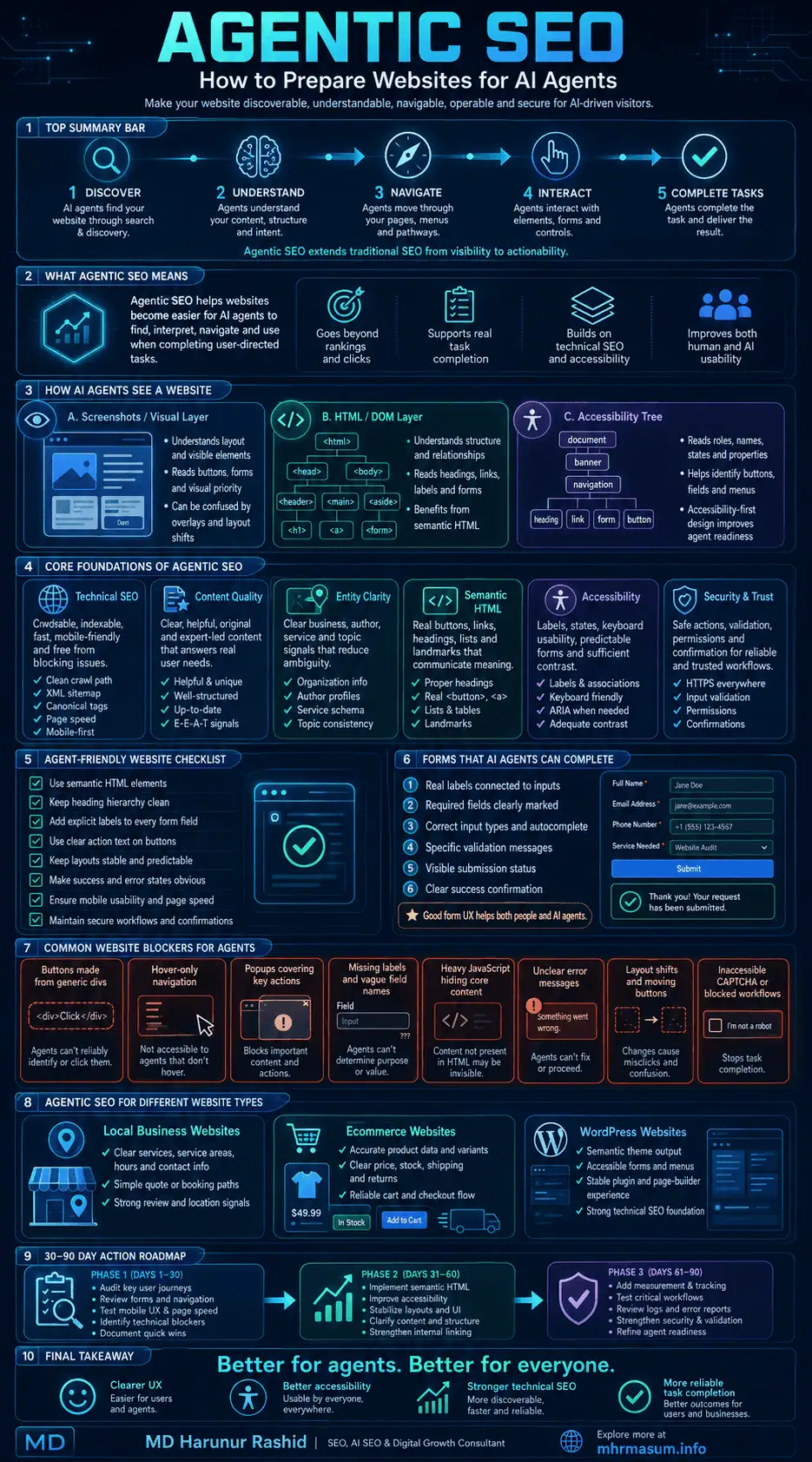
Frequently Asked Questions About Agentic SEO
The following questions address common concerns about AI agents, website optimization, WordPress, accessibility, and future search behaviour.
What Is the Main Purpose of Agentic SEO?
The purpose of Agentic SEO is to make websites easier for AI agents to discover, understand, navigate, and operate while completing user-directed tasks.
It extends SEO from search visibility into practical website interaction.
Is Agentic SEO an Official Google Ranking Factor?
No. Google has not announced Agentic SEO as a ranking factor.
Google has published guidance explaining how browser agents may interact with websites and how website owners can make interfaces more agent-friendly.
Does Agentic SEO Replace AI SEO or GEO?
No. AI SEO and GEO generally focus on generative search visibility, citations, discovery, and brand representation.
Agentic SEO focuses more heavily on whether an agent can perform an action after discovering the website.
Do I Need WebMCP?
Most websites do not currently need WebMCP to function for AI agents.
Start with:
- Semantic HTML
- Accessible forms
- Clear navigation
- Stable layouts
- Secure workflows
- Complete content
- Accurate structured data
WebMCP can be evaluated as progressive enhancement for important website tools.
Does Accessibility Help AI Agents?
Yes. The accessibility tree provides programmatic information about the roles, names, states, and relationships of interface components.
Google specifically identifies the accessibility tree as one of the primary representations browser agents may use.
Accessibility should still be implemented primarily to support people with disabilities, not merely as an AI optimization tactic.
Can AI Agents Complete Contact Form 7 Forms?
They may be able to complete Contact Form 7 forms when fields are properly labelled, visible, accessible, and not blocked by problematic CAPTCHA or JavaScript behaviour.
The form should also provide clear error and success messages.
Should I Allow Every AI Bot?
No. Different crawlers and agents have different purposes.
Review official documentation, privacy requirements, business goals, server capacity, and content policies before deciding which crawlers to allow.
Can Agentic SEO Improve Conversions?
It may improve task completion by removing interface ambiguity and technical friction.
The same improvements—clear labels, stable pages, specific errors, accessible forms, and predictable actions—can also improve the experience for human users.
However, conversion improvement is not guaranteed and should be measured through controlled testing.
Is Structured Data Required for Agentic SEO?
Structured data is useful for clarifying entities, products, services, and other information, but it is not sufficient by itself.
An agent still needs a functional interface or structured action mechanism to complete tasks.
Is llms.txt Required for Agentic SEO?
No universal requirement exists.
Google states that it does not use llms.txt for Google Search or its generative search features.
Other platforms may choose to support different machine-readable files, but they should not replace standard technical SEO.
How Can I Test Whether My Website Is Agent-Ready?
Define a specific customer task and ask a browser agent to complete it without final submission.
Observe every point where it becomes confused, blocked, or uncertain.
Also inspect:
- Semantic HTML
- Accessibility tree
- Keyboard operation
- Mobile interface
- Form states
- Error handling
- Security confirmation
- Server logs
Which Websites Should Prioritize Agentic SEO First?
The strongest immediate candidates include:
- eCommerce stores
- Booking websites
- Travel and hotel platforms
- Local service businesses
- Healthcare appointment systems
- SaaS platforms
- Professional service websites
- Marketplaces
- Restaurants
- Property portals
- Financial comparison websites
Any website where a customer must complete a structured multi-step action can benefit from an agent-readiness audit.
Final Thoughts on Preparing Websites for AI Agents
The web is moving from an environment designed only for human browsing and search-engine crawling toward one where AI systems can research, interpret, compare, and act.
This does not mean every website needs a completely new platform.
The strongest Agentic SEO improvements are often established web-development principles:
- Use semantic HTML
- Build accessible interfaces
- Write clear content
- Maintain predictable layouts
- Create specific labels
- Communicate errors and success
- Keep information accurate
- Strengthen technical SEO
- Protect sensitive actions
- Measure real task completion
These improvements support people, search engines, assistive technologies, and AI agents simultaneously.
The businesses that prepare early will not simply be easier for AI systems to mention. They will be easier for AI systems to evaluate and interact with when users delegate real work.
MD Harunur Rashid provides practical support across SEO, AI SEO, Entity SEO, Local SEO, Technical SEO, WordPress optimization, website performance, content systems, and custom WordPress plugin development.
Explore my complete SEO and Digital Growth Services, review relevant work in my portfolio, or contact MD Harunur Rashid to discuss an Agentic SEO, AI SEO, or WordPress technical audit.