AI platforms now use several types of automated crawlers and user-triggered fetchers to discover, index, retrieve and potentially use publicly available website content.
For WordPress website owners, this creates an important strategic question:
Should AI crawlers be allowed to access the entire website, partially restricted, completely blocked or managed differently depending on what each bot does?
The correct answer is rarely “allow everything” or “block everything.”
Some AI crawlers help your website appear in ChatGPT, Claude, Perplexity, Google AI Overviews and other AI-assisted search experiences. Other crawlers may collect publicly accessible content for model-development or training purposes. Some fetchers only visit a page after a user asks an AI assistant to open or analyse it.
These crawlers should not automatically receive the same treatment.
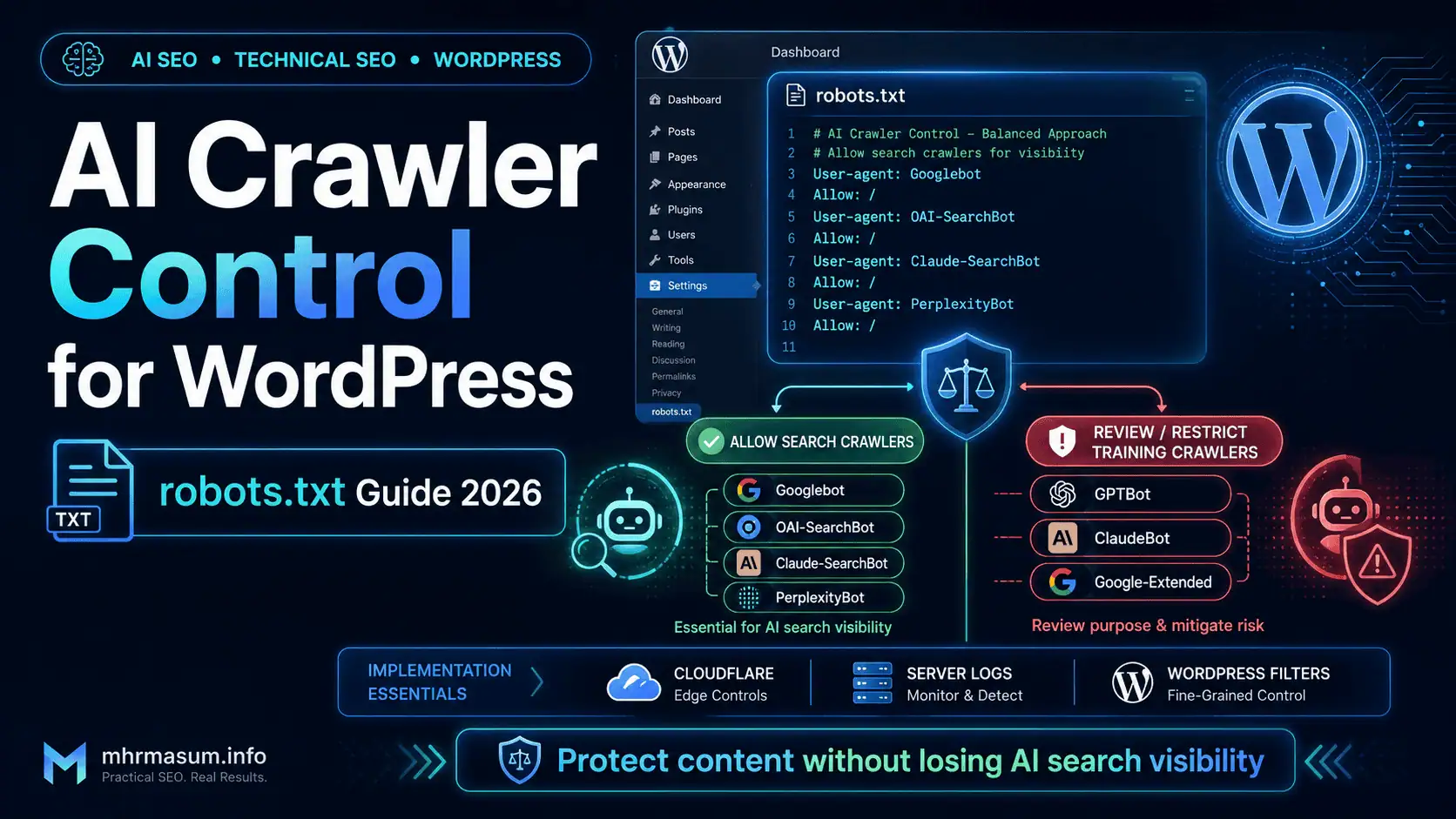
This guide explains how to control AI crawlers in WordPress using robots.txt, WordPress filters, security tools, server logs and Cloudflare. It also explains how to protect valuable content without accidentally removing your website from Google Search, Google AI features, ChatGPT Search, Claude Search or Perplexity.
What Is AI Crawler Control?
AI crawler control is the process of deciding which AI-related bots can access specific parts of your website and then communicating or enforcing those decisions through technical controls.
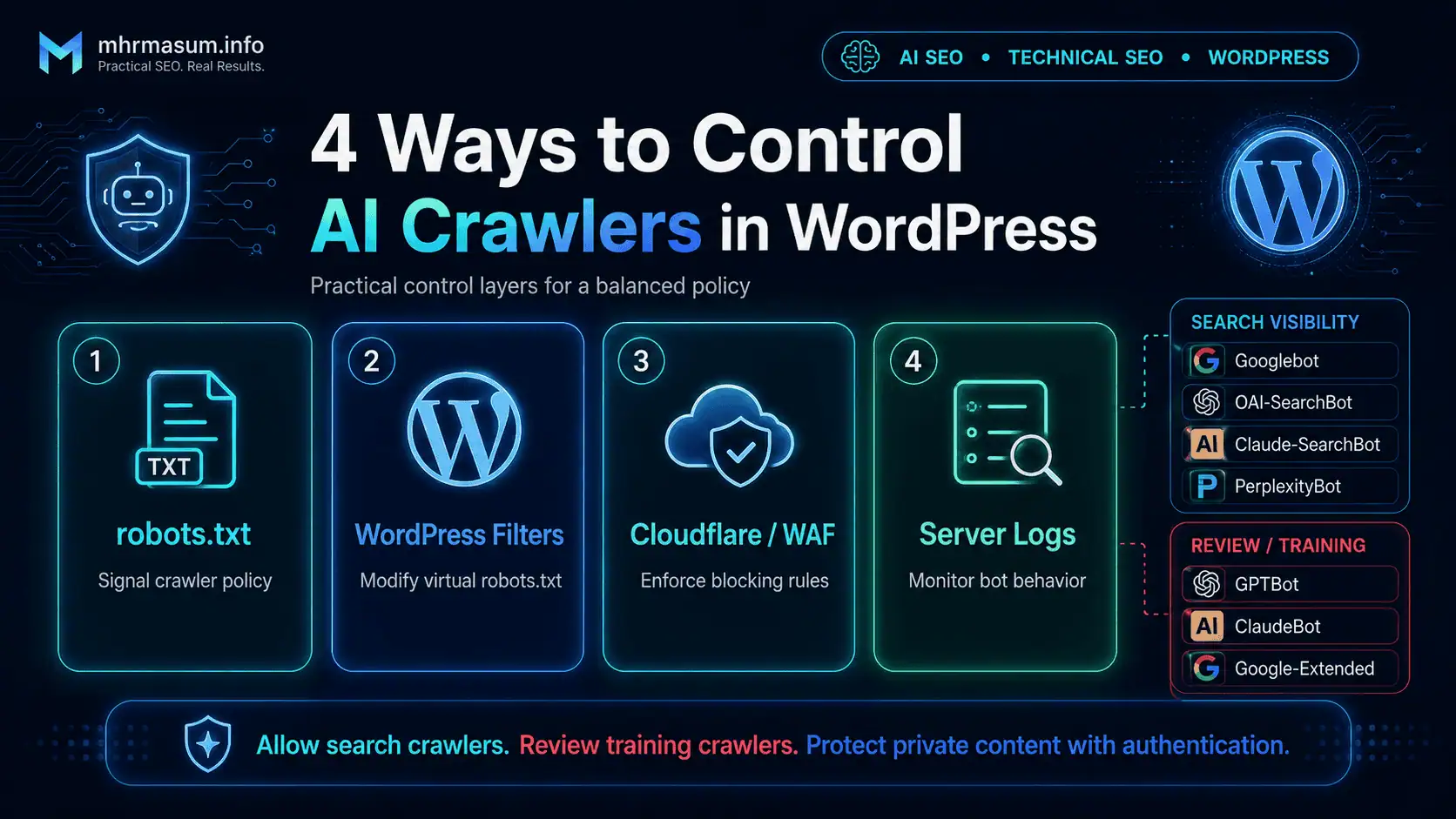
These controls may include:
robots.txtdirectives- WordPress crawler filters
- Web Application Firewall rules
- Cloudflare AI Crawl Control
- Server-level rules
- Authentication
- IP verification
- Request-rate controls
- Access-log monitoring
The purpose is not merely to block automated traffic. The purpose is to create a crawler policy aligned with your SEO, AI visibility, content protection, server performance and commercial objectives.
A public business website trying to increase AI search visibility may allow search-oriented crawlers while blocking model-training crawlers. A paid research platform may block access to premium areas while allowing public summaries. A private client portal should rely on authentication rather than robots.txt.
AI crawler control therefore needs to be treated as part of both Technical SEO and your broader AI SEO strategy.
Why AI Crawler Control Matters for WordPress Websites
AI crawler policies can influence whether content is available for AI search discovery, user-requested retrieval, model development or automated extraction.
A poorly configured policy can produce several unintended consequences:
- Blocking pages from ChatGPT Search
- Reducing visibility in Claude or Perplexity
- Preventing Googlebot from crawling important pages
- Removing pages from Google AI Overviews or AI Mode eligibility
- Allowing unnecessary bot traffic to consume server resources
- Exposing premium content through public URLs
- Blocking useful bots at the firewall despite allowing them in robots.txt
- Allowing training crawlers when the publisher intended to opt out
- Creating conflicting rules between WordPress, Cloudflare and the server
Google states that a page must be indexed and eligible to appear in Google Search with a snippet before it can appear as a supporting link in AI Overviews or AI Mode. Google also confirms that regular robots.txt access for Googlebot remains the relevant crawling control for these Google Search features.
Crawler control should therefore protect your content without undermining your organic visibility.
AI Search Crawlers and AI Training Crawlers Are Not the Same
One of the most important crawler-management principles is understanding that AI search crawling and AI model-training crawling may be controlled separately.
For example, OpenAI provides different controls for:
- ChatGPT search discovery
- Model-development crawling
- User-triggered page retrieval
Google also separates:
- Google Search crawling
- Google AI search features
- Gemini model training and grounding controls
Anthropic uses separate user agents for model development, search and user-directed retrieval.
Treating all AI bots as identical can lead to poor decisions. A publisher may block GPTBot because it does not want future content used for model development but still allow OAI-SearchBot so its pages can appear in ChatGPT search results.
OpenAI explicitly states that OAI-SearchBot and GPTBot controls are independent. A website may allow OAI-SearchBot while disallowing GPTBot.
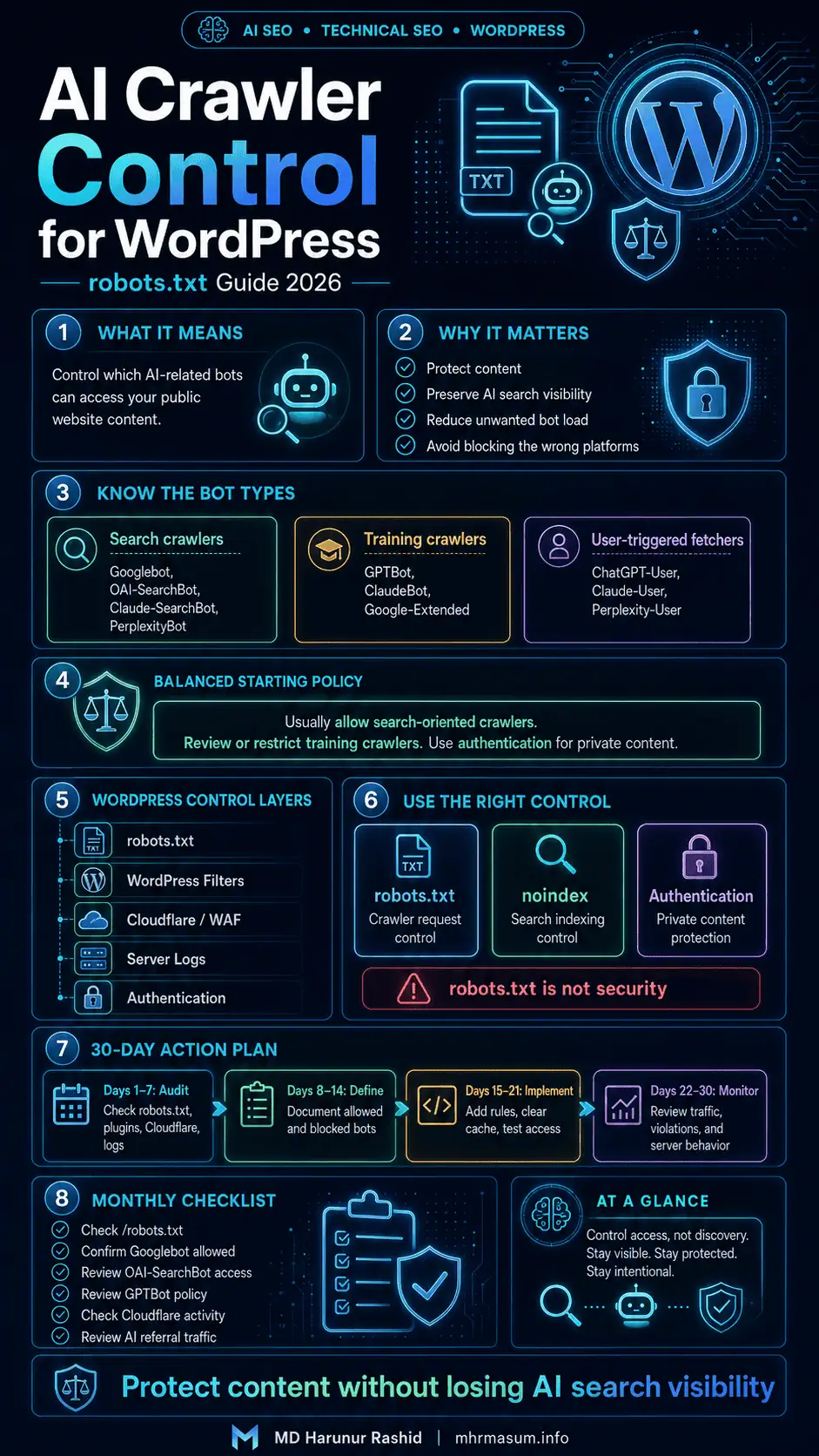
Understanding the Main AI Crawlers
Before editing robots.txt, identify what the major crawlers do and which business objective each one affects.
The following table provides a practical overview based on official crawler documentation available in July 2026.
| User Agent | Operator | Primary Purpose | Possible Policy |
|---|---|---|---|
Googlebot |
Google Search, AI Overviews, AI Mode and other Search features | Usually allow | |
Google-Extended |
Control use for certain Gemini training and grounding systems | Allow or block independently | |
OAI-SearchBot |
OpenAI | Surface websites in ChatGPT search results | Allow for ChatGPT visibility |
GPTBot |
OpenAI | Crawl content that may be used for model development | Allow or block independently |
ChatGPT-User |
OpenAI | User-triggered page access in ChatGPT or Custom GPTs | Usually allow public content |
PerplexityBot |
Perplexity | Surface and link websites in Perplexity search | Allow for Perplexity visibility |
Perplexity-User |
Perplexity | User-requested page retrieval | Usually allow public content |
Claude-SearchBot |
Anthropic | Improve search relevance and accuracy | Allow for Claude search visibility |
ClaudeBot |
Anthropic | Collect content that may contribute to model training | Allow or block independently |
Claude-User |
Anthropic | Retrieve pages at a Claude user’s direction | Usually allow public content |
The names and purposes of crawlers can change. Website owners should periodically review the official documentation rather than relying permanently on an old robots.txt template.
OpenAI Crawler Controls
OpenAI currently documents separate user agents for ChatGPT search, model-development crawling, user-triggered retrieval and advertising-page validation.
This separation allows WordPress publishers to make more precise choices.
OAI-SearchBot
OAI-SearchBot is the OpenAI crawler used to surface websites in ChatGPT’s search features.
OpenAI explains that websites opting out of OAI-SearchBot will not be shown in ChatGPT search answers, although navigational links may still appear in some situations. OpenAI recommends allowing OAI-SearchBot and requests from its published IP ranges when a publisher wants content to appear in ChatGPT search results.
For most public business, consultancy, eCommerce and informational websites, allowing OAI-SearchBot supports AI search visibility.
You can review the current details through the official OpenAI crawler documentation.
GPTBot
GPTBot is used to crawl content that may be used to improve and train OpenAI’s generative AI foundation models.
Blocking GPTBot indicates that future crawled content from the website should not be used for this model-development purpose. Blocking GPTBot does not automatically require blocking OAI-SearchBot because OpenAI treats the two controls independently.
A publisher can therefore use this policy:
Allow ChatGPT search visibility
Block OpenAI model-training crawling
That distinction is central to a balanced AI crawler strategy.
ChatGPT-User
ChatGPT-User is used for certain actions initiated by ChatGPT users or Custom GPTs.
For example, a user may ask ChatGPT to visit, summarise or interact with a publicly accessible page. OpenAI states that ChatGPT-User is not an automatic web crawler and does not determine whether content appears in ChatGPT Search. OpenAI also notes that robots.txt rules may not always apply to these user-initiated requests.
Private content should therefore never depend on a ChatGPT-User robots.txt block as its primary protection.
Use authentication, access controls or password protection for genuinely confidential pages.
OAI-AdsBot
OAI-AdsBot is used to validate the safety and relevance of landing pages submitted for advertising on ChatGPT.
It is not a general search crawler, and OpenAI states that content collected through OAI-AdsBot is not used to train generative AI foundation models. Website owners who are not running ChatGPT ads are unlikely to see significant activity from this crawler.
Do not add OAI-AdsBot rules unless there is a specific operational reason to manage it.
Anthropic and Claude Crawler Controls
Anthropic documents separate bots for model training, search improvement and user-directed retrieval.
This makes it possible to maintain Claude search visibility while independently controlling model-development crawling.
ClaudeBot
ClaudeBot collects public web content that may potentially contribute to the training and improvement of Anthropic’s generative AI models.
Anthropic states that restricting ClaudeBot signals that future website materials should be excluded from its AI model-training datasets.
Publishers who want Claude search visibility but do not want training-oriented crawling can block ClaudeBot while allowing Claude-SearchBot.
Claude-SearchBot
Claude-SearchBot navigates the web to improve the quality, relevance and accuracy of search responses presented to Claude users.
Anthropic warns that disabling Claude-SearchBot may reduce a website’s visibility and accuracy in Claude’s search results.
A public expert, local business, publisher or eCommerce website seeking AI citations should generally consider allowing this crawler.
Claude-User
Claude-User retrieves web content in response to actions initiated by Claude users.
Anthropic states that disabling Claude-User can prevent Claude from retrieving the website in response to a user query, which may reduce visibility in user-directed web search.
This user agent should normally be allowed to access public content but should not be relied upon for protecting private information.
Anthropic Crawl-Delay Support
Anthropic states that its bots support the non-standard Crawl-delay robots.txt extension.
For example:
User-agent: ClaudeBot
Crawl-delay: 2
This asks ClaudeBot to wait between requests. However, Crawl-delay is not a universally supported robots.txt directive, so it should not be treated as a reliable global rate-limiting method.
Use hosting controls, caching, CDN configuration or a firewall when actual enforcement is necessary.
Perplexity Crawler Controls
Perplexity separates automated search indexing from user-triggered page retrieval.
This allows publishers to manage the two types of access independently.
PerplexityBot
PerplexityBot is designed to discover, surface and link websites within Perplexity search results.
Perplexity states that this bot is not used to crawl content for AI foundation-model training. It recommends allowing PerplexityBot and its published IP ranges when a publisher wants the website to appear in Perplexity results.
For a public SEO, service, eCommerce or publishing website, allowing PerplexityBot can support discovery and referral traffic.
Perplexity-User
Perplexity-User accesses websites in response to direct user requests.
Perplexity states that this fetcher is not used for automatic web crawling or foundation-model training. Because the request is initiated by a user, Perplexity explains that the fetcher generally ignores robots.txt.
This is another reason robots.txt should not be treated as a security tool.
Googlebot and Google AI Features
Google handles AI Overviews and AI Mode as part of Google Search rather than through a separate AI search crawler.
Google states that regular Googlebot crawling controls are used for Search, including AI features. A page must be indexed, eligible for Search and eligible to display a snippet before it can appear as a supporting link in AI Overviews or AI Mode.
Blocking Googlebot can therefore affect:
- Conventional Google Search
- Google Images
- Google News
- Discover
- AI Overviews
- AI Mode
- Other Google Search features
Do not block Googlebot as part of a general AI crawler block unless you genuinely intend to remove the website from Google Search.
Google-Extended
Google-Extended is a separate control token that allows publishers to manage whether Google-crawled content may be used for certain Gemini model-training and grounding purposes.
Google states that Google-Extended does not affect inclusion in Google Search and is not used as a Google Search ranking signal. It also does not have a separate HTTP user-agent string; existing Google crawlers retrieve the content, while the Google-Extended token acts as a control in robots.txt.
This means the following rule can block Google-Extended without blocking Google Search:
User-agent: Google-Extended
Disallow: /
The website can remain eligible for Google Search, AI Overviews and AI Mode as long as Googlebot itself remains allowed.
Google AI Overviews Are Controlled Through Googlebot
Blocking Google-Extended does not opt a website out of Google AI Overviews or AI Mode.
Google explicitly directs publishers to use Googlebot crawling controls and search-preview controls such as nosnippet, data-nosnippet, max-snippet or noindex when managing how content can appear in Google Search AI features.
This distinction prevents one of the most common AI crawler configuration mistakes.
What robots.txt Actually Does
A robots.txt file tells compliant crawlers which URLs they are allowed or disallowed from requesting.
For a standard WordPress installation, it is normally available at:
https://example.com/robots.txt
Google describes robots.txt primarily as a mechanism for managing crawler access and reducing unnecessary crawling. Google specifically warns that robots.txt is not a mechanism for reliably keeping a web page out of search results.
A robots.txt rule is therefore a crawler instruction, not a complete privacy or security control.
What robots.txt Cannot Do
Website owners frequently expect robots.txt to provide protections it was not designed to provide.
A robots.txt file cannot reliably:
- Protect confidential information
- Require authentication
- Stop every scraper
- Prevent user-triggered fetches in all circumstances
- Guarantee content is removed from every search index
- Prevent a URL from being discovered through external links
- Stop a crawler that deliberately ignores robots.txt
- Confirm that a self-declared user agent is genuine
- Protect database records or private API endpoints
Cloudflare notes that robots.txt compliance is voluntary. It communicates a preference but does not technically prevent a crawler from accessing content. Cloudflare recommends enforcement tools such as AI Crawl Control or firewall rules when stronger blocking is required.
Private information should be protected with:
- User authentication
- Password protection
- Role-based access controls
- Server permissions
- Private storage
- Signed URLs
- Application-level authorization
- Appropriate HTTP status responses
robots.txt vs Noindex vs Authentication
Crawler control becomes easier when each method is used for its intended purpose.
The following table summarises the difference.
| Control | Main Purpose | Suitable for Private Content? | Can Affect Search Visibility? |
|---|---|---|---|
robots.txt |
Control crawler requests | No | Yes |
noindex |
Prevent indexing in supported search engines | No | Yes |
X-Robots-Tag |
Apply indexing rules through HTTP headers | No | Yes |
| Password protection | Restrict access | Yes | Yes |
| Authentication | Restrict access to authorised users | Yes | Yes |
| Firewall rule | Enforce crawler or request blocking | Partially | Yes |
| Login/role controls | Protect application content | Yes | Yes |
Google warns that a crawler must be allowed to access a page before it can see a noindex directive. If a page is simultaneously blocked in robots.txt, Google may not see the noindex tag.
Do not combine Disallow and noindex blindly.
How WordPress Generates robots.txt
WordPress can generate a virtual robots.txt file when a physical file is not present in the website’s document root.
The default WordPress output normally includes rules similar to:
User-agent: *
Disallow: /wp-admin/
Allow: /wp-admin/admin-ajax.php
WordPress provides the robots_txt filter for developers who need to modify this virtual output. The official WordPress developer documentation confirms that the filter receives the existing robots.txt output and whether the website is considered publicly visible.
You can view the current file by opening:
https://yourdomain.com/robots.txt
Do this before making changes so you understand the existing configuration.
Physical vs Virtual robots.txt in WordPress
A physical robots.txt file is an actual text file stored in the website’s root directory. A virtual robots.txt file is generated dynamically by WordPress.
The physical file is generally managed through:
- Hosting File Manager
- FTP or SFTP
- SSH
- A deployment system
- Server configuration
The virtual file is generally managed through:
- WordPress core filters
- An SEO plugin
- A code-snippet plugin
- A custom WordPress plugin
When a physical robots.txt file exists and the web server serves it directly, WordPress’s virtual robots_txt filter will not normally control the response.
Choose one management method and document it. Multiple plugins, a physical file and Cloudflare-generated directives can otherwise create confusion.
Check the WordPress Search Engine Visibility Setting
Before editing AI-specific rules, confirm that WordPress is configured as a public website.
Navigate to:
WordPress Dashboard
→ Settings
→ Reading
→ Search engine visibility
The option labelled “Discourage search engines from indexing this site” should normally remain unchecked on a production website.
If this option is enabled, WordPress may output restrictive crawler directives. That can affect Google Search and AI search visibility far more seriously than an individual GPTBot or ClaudeBot rule.
Staging and development websites should normally be protected with authentication in addition to discouraging indexing.
Decide Your AI Crawler Policy Before Editing
Do not copy a long list of AI bot rules from another website without deciding what outcome you want.
A useful crawler policy should answer four questions:
- Do I want visibility in AI search results?
- Do I permit model-training crawlers?
- Which parts of the website are public?
- Do I need advisory rules or enforced blocking?
Your answers determine the correct configuration.
Recommended Policy for Most Public Business Websites
For a public business, consultancy, agency, portfolio or eCommerce website, a balanced visibility-first policy is usually the most practical approach.
This policy normally involves:
- Allowing Googlebot
- Allowing OAI-SearchBot
- Allowing PerplexityBot
- Allowing Claude-SearchBot
- Allowing public user-triggered fetches
- Independently deciding whether to block GPTBot
- Independently deciding whether to block ClaudeBot
- Independently deciding whether to block Google-Extended
- Protecting private content through authentication
- Monitoring bot activity and server resources
This preserves opportunities in Google, ChatGPT, Claude and Perplexity while giving the publisher separate control over model-development crawling.
A crawler policy alone will not guarantee AI visibility. Your website still needs strong content, clear entities, credible authorship, internal linking and technical accessibility. These principles are explained further in my guides to Entity SEO and building brand authority for AI search.
Recommended robots.txt: Allow AI Search but Block Training Crawlers
The following example is suitable for a publisher that wants search visibility but prefers to opt out of major documented training-oriented controls.
User-agent: *
Disallow: /wp-admin/
Allow: /wp-admin/admin-ajax.php

# Block OpenAI model-training crawler
User-agent: GPTBot
Disallow: /

# Block Anthropic model-training crawler
User-agent: ClaudeBot
Disallow: /

# Block eligible Gemini training and grounding uses
User-agent: Google-Extended
Disallow: /

Sitemap: https://example.com/wp-sitemap.xml
This example does not block:
- Googlebot
- OAI-SearchBot
- ChatGPT-User
- PerplexityBot
- Perplexity-User
- Claude-SearchBot
- Claude-User
Because these search-oriented and user-oriented bots are not separately disallowed, they can follow the general public crawler policy.
Replace the sitemap URL with the actual sitemap generated by WordPress or your SEO plugin.
Recommended robots.txt: Allow Major AI Crawlers
A publisher that wants broad AI access and does not want to opt out of documented training crawlers can keep the file simple.
User-agent: *
Disallow: /wp-admin/
Allow: /wp-admin/admin-ajax.php

Sitemap: https://example.com/wp-sitemap.xml
This configuration does not contain AI-specific blocks.
It allows compliant AI bots to access public content while still discouraging crawling of the WordPress administration directory.
This does not mean every page will appear in an AI response. Crawling, indexing, citation selection and ranking remain separate processes.
Recommended robots.txt: Block Major AI Crawlers
A publisher that does not want automated AI crawlers accessing public pages can use targeted blocks.
User-agent: GPTBot
Disallow: /

User-agent: OAI-SearchBot
Disallow: /

User-agent: ChatGPT-User
Disallow: /

User-agent: ClaudeBot
Disallow: /

User-agent: Claude-SearchBot
Disallow: /

User-agent: Claude-User
Disallow: /

User-agent: PerplexityBot
Disallow: /

User-agent: Perplexity-User
Disallow: /

User-agent: Google-Extended
Disallow: /

User-agent: *
Disallow: /wp-admin/
Allow: /wp-admin/admin-ajax.php

Sitemap: https://example.com/wp-sitemap.xml
This configuration can reduce AI search visibility and will not guarantee that all user-triggered fetchers or non-compliant scrapers stop accessing public content.
Googlebot remains allowed in this example, so regular Google Search and Google’s Search AI features remain accessible.
Do Not Block Googlebot When You Only Want to Block AI Training
A broad rule such as the following can seriously damage organic search performance:
User-agent: Googlebot
Disallow: /
Google confirms that Googlebot controls access for Google Search, including AI Overviews and AI Mode. Blocking it can prevent crawling across conventional search and AI search features.
Use Google-Extended, not Googlebot, when your intention is specifically to control eligible Gemini training and grounding uses without affecting Google Search.
Partial AI Crawler Blocking by Directory
Some websites need to allow AI crawlers across public articles but block selected sections.
For example, you may want to block:
- Client reports
- Internal search pages
- Member directories
- Download archives
- Temporary files
- Private research previews
- Low-value parameter URLs
A targeted OAI-SearchBot example could be:
User-agent: OAI-SearchBot
Disallow: /wp-admin/
Allow: /wp-admin/admin-ajax.php
Disallow: /members/
Disallow: /private-reports/
Disallow: /temporary-downloads/
When creating a bot-specific group, repeat important baseline WordPress restrictions inside that group. Some crawlers select the most specific matching user-agent group rather than combining it with the general User-agent: * group.
Partial Blocking by File Type
File-type blocking may be useful when a website contains valuable downloadable resources that should not be automatically crawled.
An example is:
User-agent: GPTBot
Disallow: /*.pdf$
Disallow: /*.docx$
Disallow: /*.xlsx$
However, wildcard and end-of-line matching support can vary between crawlers.
A more dependable strategy for genuinely valuable documents is to place them behind authentication, signed URLs or access-controlled download handlers.
Do not assume robots.txt makes a publicly accessible PDF private.
WordPress Code Snippet for AI Crawler Control
WordPress developers can use the official robots_txt filter to append AI crawler directives to the virtual robots.txt output.
The following snippet implements a visibility-first policy that allows AI search crawlers while blocking GPTBot, ClaudeBot and Google-Extended.
/**
 * MHR AI Crawler Control for WordPress
 *
 * Policy:
 * - Keep Google Search and AI search crawlers accessible.
 * - Block selected model-training crawler controls.
 * - Preserve the existing WordPress robots.txt output.
 *
 * Add through:
 * - A custom functionality plugin
 * - A child theme functions.php file
 * - A trusted code-snippet plugin
 */

add_filter( 'robots_txt', 'mhr_ai_crawler_control_rules', 99, 2 );

function mhr_ai_crawler_control_rules( $output, $public ) {

    /*
     * Respect the WordPress Search Engine Visibility setting.
     * When the site is not public, return the existing restrictive output.
     */
    if ( ! $public ) {
        return $output;
    }

    $ai_rules  = "\n\n";
    $ai_rules .= "# ==================================================\n";
    $ai_rules .= "# MHR AI Crawler Control\n";
    $ai_rules .= "# Allow search visibility; block selected training use\n";
    $ai_rules .= "# ==================================================\n\n";

    /*
     * OpenAI model-development crawler.
     * OAI-SearchBot remains allowed because it is not blocked.
     */
    $ai_rules .= "User-agent: GPTBot\n";
    $ai_rules .= "Disallow: /\n\n";

    /*
     * Anthropic model-development crawler.
     * Claude-SearchBot and Claude-User remain allowed.
     */
    $ai_rules .= "User-agent: ClaudeBot\n";
    $ai_rules .= "Disallow: /\n\n";

    /*
     * Google control token for eligible Gemini training
     * and grounding uses. Googlebot remains allowed.
     */
    $ai_rules .= "User-agent: Google-Extended\n";
    $ai_rules .= "Disallow: /\n";

    /*
     * Add the WordPress sitemap only when another Sitemap
     * directive does not already exist.
     */
    if ( stripos( $output, 'Sitemap:' ) === false ) {
        $ai_rules .= "\nSitemap: " . home_url( '/wp-sitemap.xml' ) . "\n";
    }

    return rtrim( $output ) . $ai_rules;
}
The robots_txt hook is officially supported by WordPress for modifying the virtual robots.txt output.
After activating the snippet:
- Clear the WordPress cache.
- Clear the CDN cache.
- Open
/robots.txt. - Confirm that the new rules appear once.
- Check for conflicts with SEO or security plugins.
- Confirm that the sitemap URL is correct.
WordPress Snippet for Blocking Major AI Crawlers
The following version appends a broader AI crawler block.
Use it only after understanding that it may reduce visibility in ChatGPT, Claude and Perplexity.
/**
 * Block major documented AI crawlers in WordPress.
 *
 * Important:
 * This may reduce AI search visibility.
 */

add_filter( 'robots_txt', 'mhr_block_major_ai_crawlers', 99, 2 );

function mhr_block_major_ai_crawlers( $output, $public ) {

    if ( ! $public ) {
        return $output;
    }

    $blocked_bots = array(
        'GPTBot',
        'OAI-SearchBot',
        'ChatGPT-User',
        'ClaudeBot',
        'Claude-SearchBot',
        'Claude-User',
        'PerplexityBot',
        'Perplexity-User',
        'Google-Extended',
    );

    $rules  = "\n\n";
    $rules .= "# Major AI crawler restrictions\n\n";

    foreach ( $blocked_bots as $bot ) {
        $rules .= "User-agent: {$bot}\n";
        $rules .= "Disallow: /\n\n";
    }

    return rtrim( $output ) . "\n" . rtrim( $rules ) . "\n";
}
This remains an advisory robots.txt policy. It is not the same as enforcing a firewall block.
How to Edit robots.txt Using an SEO Plugin
Many WordPress SEO plugins include a robots.txt editor, although the location and availability vary by plugin and hosting configuration.
The general process is:
- Open the WordPress SEO plugin settings.
- Locate the file editor or robots.txt editor.
- Back up the existing content.
- Add the required AI user-agent groups.
- Save the changes.
- Clear all caches.
- open
/robots.txtin a private browser window. - Confirm the output.
Do not edit the file simultaneously through multiple plugins.
Choose one source of truth for robots.txt management.
How to Edit a Physical robots.txt File
A physical robots.txt file can be managed directly through the hosting environment.
The general process is:
- Connect through File Manager, FTP, SFTP or SSH.
- Open the WordPress document root.
- Look for
robots.txt. - Download a backup.
- Edit the file as plain text.
- Upload or save it.
- Confirm the file is publicly accessible.
- Check that the server returns a
200 OKresponse. - Clear CDN or reverse-proxy caches.
The file must be accessible at the root of the relevant hostname.
For example:
https://example.com/robots.txt
https://shop.example.com/robots.txt
https://members.example.com/robots.txt
Anthropic specifically advises publishers to configure each subdomain they want to control.
Controlling AI Crawlers With Cloudflare
Cloudflare provides AI Crawl Control for analysing and managing AI crawler activity.
Its crawler interface can show:
- Crawler name
- Operator
- Request volume
- Crawler category
- Failed requests
- robots.txt violations
- Current allow or block action
Cloudflare allows website owners to permit or block individual AI crawlers. It can also create or update Web Application Firewall rules to enforce blocking rather than merely requesting compliance.
This is useful when:
- AI crawlers ignore robots.txt
- Bot traffic consumes server resources
- You need request-level enforcement
- You want crawler-activity reporting
- You need path-specific rules
- You want to separate useful bots from unwanted scrapers
Review the current options in the official Cloudflare AI Crawl Control documentation.
robots.txt Rules vs Cloudflare Blocking
robots.txt and Cloudflare do different jobs.
A robots.txt rule communicates your crawler preference:
User-agent: GPTBot
Disallow: /
A Cloudflare block actively rejects the request, usually before it reaches the WordPress server.
A strong crawler-control setup may use both:
- robots.txt to communicate policy
- Cloudflare or WAF rules to enforce policy
- server logs to monitor compliance
- authentication to protect private areas
Cloudflare states that AI Crawl Control can monitor robots.txt violations and enforce crawler blocking.
Do Not Trust User-Agent Strings Alone
A crawler can claim to be Googlebot, GPTBot, PerplexityBot or another known user agent without actually being operated by that company.
User-agent strings can be spoofed.
Google recommends verifying Google crawler requests using published IP ranges or reverse DNS validation.
OpenAI publishes current IP-address lists for:
- OAI-SearchBot
- GPTBot
- ChatGPT-User
- OAI-AdsBot
Perplexity also publishes IP-address lists for PerplexityBot and Perplexity-User.
When creating an allow rule in a firewall, combine:
Expected user agent
AND
Verified official IP range
Do not permanently hard-code IP addresses from an old article. Use the current official JSON endpoints because ranges can change.
How to Review AI Crawler Activity in Server Logs
Server logs provide direct evidence of which crawlers are requesting your pages.
For Apache or Nginx logs, you can search for common user agents with a command similar to:
grep -Ei \
'OAI-SearchBot|GPTBot|ChatGPT-User|OAI-AdsBot|PerplexityBot|Perplexity-User|ClaudeBot|Claude-SearchBot|Claude-User' \
access.log
To count requests by user agent:
grep -Eio \
'OAI-SearchBot|GPTBot|ChatGPT-User|OAI-AdsBot|PerplexityBot|Perplexity-User|ClaudeBot|Claude-SearchBot|Claude-User' \
access.log \
| sort \
| uniq -c \
| sort -nr
These commands help identify:
- Which bots are active
- How frequently they crawl
- Which pages they request
- Whether they request blocked paths
- Whether activity increased after publishing content
- Whether a crawler is causing performance issues
Google-Extended will not appear as a separate log user agent because Google states that it is a control token rather than a separate HTTP user-agent string.
How to Check Which Pages AI Bots Crawl
A useful log analysis should identify both the crawler and the requested path.
Depending on your log format, you may use:
grep -Ei 'OAI-SearchBot|GPTBot|PerplexityBot|Claude-SearchBot|ClaudeBot' access.log \
| awk '{print $7}' \
| sort \
| uniq -c \
| sort -nr \
| head -50
This can reveal whether bots focus on:
- Recent articles
- Old evergreen guides
- Service pages
- Product pages
- Author archives
- Category archives
- XML sitemaps
- Feed URLs
- WordPress search URLs
- Parameter-based duplicates
When bots repeatedly crawl low-value URLs, improve the underlying Technical SEO rather than only blocking every crawler.
Review canonical tags, internal links, sitemap inclusion, faceted navigation, search pages and duplicate archives using the Technical SEO checklist for WordPress websites.
How to Test Your robots.txt File
Testing should confirm that the file is accessible, valid and aligned with your actual policy.
Start by opening:
https://yourdomain.com/robots.txt
Then confirm:
- The response returns successfully
- The content is plain text
- There is only one policy for each intended crawler
- The sitemap URL is correct
- Googlebot is not accidentally blocked
- OAI-SearchBot is not blocked when ChatGPT visibility is desired
- Claude-SearchBot is not blocked when Claude visibility is desired
- PerplexityBot is not blocked when Perplexity visibility is desired
- Training-bot decisions are intentional
- Rules do not contain spelling mistakes
- CDN and WordPress output match
You can also check the response headers with:
curl -I https://example.com/robots.txt
A normal result should include a successful HTTP response such as:
HTTP/2 200
content-type: text/plain
Test robots.txt After Every Cache Clear
Caching can cause an old crawler policy to remain visible after the WordPress file or snippet has been updated.
Clear:
- WordPress page cache
- Object cache when relevant
- Hosting cache
- Cloudflare cache
- Reverse-proxy cache
- Security-plugin cache
Then open robots.txt in:
- A private browser window
- A different network
- A command-line request
- A third-party HTTP header checker
OpenAI states that search-related robots.txt changes may take approximately 24 hours to be reflected in its systems. Perplexity also states that crawler-control changes may take up to 24 hours.
Common AI Crawler Control Mistakes
Many AI crawler problems result from configuration errors rather than crawler behaviour.
The following mistakes should be avoided.
Blocking Googlebot Instead of Google-Extended
Blocking Googlebot can remove access to conventional Google Search and Google AI features.
Use Google-Extended when your objective is to control eligible Gemini training and grounding uses without affecting Google Search.
Blocking OAI-SearchBot When You Want ChatGPT Visibility
OAI-SearchBot is the crawler associated with ChatGPT search discovery.
Blocking it can prevent pages from appearing as sources in ChatGPT search answers.
Block GPTBot instead when the objective is specifically to opt out of OpenAI model-training crawling.
Blocking Claude-SearchBot Instead of ClaudeBot
ClaudeBot and Claude-SearchBot serve different documented purposes.
Blocking ClaudeBot addresses model-development crawling. Blocking Claude-SearchBot may reduce Claude search visibility.
Assuming robots.txt Protects Private Content
robots.txt is publicly visible, voluntary and not an authentication system.
Anyone can open the file and see the paths you have listed.
Never place confidential URLs in robots.txt and assume they are protected.
Creating Conflicting Rules
Conflicts may occur between:
- A physical robots.txt file
- WordPress virtual robots.txt
- An SEO plugin
- A security plugin
- Cloudflare managed robots.txt
- A hosting control panel
- Server rewrite rules
- A custom code snippet
Document which system owns the final output.
Blocking CSS, JavaScript or Images Unnecessarily
Modern search and AI systems may need supporting resources to understand or render a page accurately.
Google recommends ensuring that crawling is permitted through robots.txt, CDN and hosting infrastructure. It also recommends maintaining textual content, useful images, structured data and strong page experience for AI search eligibility.
Do not broadly block /wp-content/ or all image, CSS and JavaScript files without a specific reason.
Using Old Bot Lists Forever
AI crawler names, products, IP ranges and documented purposes can change.
Review the official documentation quarterly and after major platform announcements.
AI Crawler Control and Website Performance
AI crawler traffic can increase server load when bots request many pages, large media files or dynamically generated URLs.
Before blocking a useful crawler, investigate whether the performance problem can be solved through:
- Full-page caching
- CDN delivery
- Image optimisation
- Database optimisation
- Rate limiting
- Removal of duplicate URLs
- Improved canonicalisation
- Blocking parameter traps
- Server-resource upgrades
- Bot-specific crawl controls
A slow website can affect users, conversion rates and organic performance. My website speed optimisation portfolio includes examples of improving technical performance without sacrificing search visibility.
AI Crawler Control and Entity SEO
Allowing a crawler does not guarantee that an AI platform will understand or trust your brand.
AI systems still need clear entity information, including:
- Person or organisation name
- Services and areas of expertise
- Author information
- Business location
- Contact details
- Social profiles
- Portfolio evidence
- Case studies
- Consistent brand descriptions
- Relevant structured data
- External mentions and citations
Connect informational articles to your About MD Harunur Rashid page, SEO and digital growth services and portfolio.
Crawler access opens the door. Entity clarity, content quality and authority influence what happens afterwards.
AI Crawler Control and Content Quality
Crawler access should not become a substitute for creating useful content.
AI search systems are more likely to find value in content that provides:
- Clear answers
- Original expertise
- First-hand experience
- Practical examples
- Transparent authorship
- Current references
- Accurate terminology
- Supporting evidence
- Helpful visual elements
- Strong internal context
Publishing hundreds of generic AI-generated pages and allowing every crawler will not automatically create AI visibility.
My article on why generic AI content does not rank anymore explains why differentiation, evidence and expert contribution remain essential.
AI Crawler Control and Internal Linking
Internal links help search engines and AI discovery systems understand relationships between your pages.
Google specifically recommends making content easily discoverable through internal links when optimising for AI features in Search.
A strong content cluster may connect:
- AI SEO
- Entity SEO
- Technical SEO
- GEO
- AEO
- Local SEO
- Brand authority
- Core-update recovery
- Website performance
- Case studies
This creates a clearer topical structure than isolated articles with no contextual pathways.
For a broader explanation of modern discovery channels, read GEO vs AEO vs SEO.
Should Local Businesses Block AI Crawlers?
Most local businesses should be cautious about blocking search-oriented AI crawlers.
Potential customers increasingly use AI platforms to ask questions such as:
- Who provides this service near me?
- Which company has strong reviews?
- What does this service cost?
- Which consultant specialises in my industry?
- Which local company has relevant experience?
Blocking OAI-SearchBot, Claude-SearchBot or PerplexityBot may reduce opportunities to appear in those discovery journeys.
Local businesses should normally prioritise:
- Consistent business information
- Strong reviews
- Local service pages
- Clear location relevance
- Detailed FAQs
- Case studies
- Google Business Profile optimisation
- Local citations
- Entity consistency
These principles are covered in my Local SEO strategy for small businesses and guide to how reviews support Local SEO and AI search visibility.
Should Publishers Block Training Crawlers?
Publishers need to make a business decision based on content value, licensing, distribution strategy and expected visibility benefits.
Factors to consider include:
- Is the content freely available?
- Does the business benefit from AI referrals?
- Is the content sold through subscriptions?
- Does it contain original research?
- Are licensing agreements available?
- Could automated access undermine the product?
- Is attribution commercially valuable?
- Does the publisher want model-training participation?
- Is crawler load affecting infrastructure costs?
There is no universal answer.
A practical middle position is to allow search-oriented crawlers while blocking documented model-training crawlers until a clear licensing or content-use policy has been established.
Should eCommerce Websites Block AI Crawlers?
Most eCommerce websites benefit from making public product information accessible to search and shopping systems.
Useful public information includes:
- Product name
- Description
- Price
- Availability
- Brand
- Specifications
- Shipping details
- Return policy
- Reviews
- Product images
- Structured data
However, eCommerce websites may need to restrict:
- Customer accounts
- Internal search-result pages
- Cart URLs
- Checkout URLs
- Wishlists
- Private pricing
- Supplier documents
- Order data
- Customer information
- Parameter-generated duplicates
Private customer and order data must be protected through application-level access controls, not robots.txt.
A Practical AI Crawler Decision Matrix
The following matrix can help website owners choose an initial policy.
| Website Type | Search Crawlers | Training Crawlers | Private Content |
|---|---|---|---|
| Public business website | Usually allow | Owner decision | Authenticate |
| Personal portfolio | Usually allow | Owner decision | Authenticate |
| Local service business | Usually allow | Owner decision | Authenticate |
| eCommerce store | Usually allow public products | Owner decision | Protect accounts and orders |
| News publisher | Usually allow selectively | Review licensing strategy | Protect subscriptions |
| Paid research platform | Allow public summaries | Often restrict | Strong authentication |
| Membership website | Allow public marketing pages | Restrict member areas | Strong authentication |
| Staging website | Block and password-protect | Block | Authentication required |
| Client portal | Usually block | Block | Strong authentication |
| Private intranet | Block | Block | Network and login controls |
This matrix is a starting point rather than a substitute for a technical and legal review.
A 30-Day AI Crawler Control Plan
A structured implementation process reduces the risk of accidental deindexing or unnecessary bot blocking.
The following plan can be adapted for a WordPress website.
Days 1–7: Audit the Existing Setup
The first week should focus on understanding the current crawler environment before making changes.
Complete the following:
- Open the current robots.txt file
- Identify whether it is physical or virtual
- Check WordPress Search Engine Visibility
- Review SEO plugin settings
- Review security plugin settings
- Review Cloudflare bot controls
- Check Google Search Console indexing
- Analyse server logs
- List active AI crawlers
- Record current organic and AI referral traffic
Days 8–14: Define the Crawler Policy
The second week should translate business objectives into clear crawler decisions.
Document:
- Which search crawlers should be allowed
- Which training crawlers should be allowed
- Which directories should be restricted
- Which content is private
- Which content needs authentication
- Which bots require WAF enforcement
- Who owns future policy updates
Avoid making changes until this written policy is approved.
Days 15–21: Implement and Test
The third week should focus on controlled implementation.
Complete the following:
- Back up robots.txt
- Add the selected directives
- Add WordPress filters when appropriate
- Configure Cloudflare or WAF rules
- Clear all caches
- Test robots.txt accessibility
- Confirm Googlebot remains allowed
- Confirm intended AI search crawlers remain allowed
- Test private-page authentication
- Monitor server errors and crawl behaviour
Days 22–30: Monitor and Refine
The final week should evaluate whether the policy produces the expected outcome.
Review:
- AI crawler request volume
- robots.txt violations
- Server performance
- Google Search Console coverage
- AI referral traffic
- Important landing pages
- Unexpected blocked requests
- Security logs
- Content-access complaints
- Crawl changes after implementation
Adjust the policy based on evidence rather than assumptions.
Monthly AI Crawler Audit Checklist
AI crawler controls should be reviewed regularly because platforms, products and user agents evolve.
A monthly or quarterly audit should include:
- Check
/robots.txt - Confirm the file returns
200 OK - Verify the sitemap directive
- Confirm Googlebot is not blocked
- Review OAI-SearchBot access
- Review GPTBot policy
- Review Claude crawler policies
- Review Perplexity crawler policies
- Review Google-Extended policy
- Check Cloudflare crawler activity
- Review robots.txt violations
- Review server logs
- Verify official IP ranges
- Check for spoofed bots
- Review private content protection
- Review AI referral traffic
- Document policy changes
Keep a dated record of every crawler-policy change.
Frequently Asked Questions About AI Crawler Control
The following questions address common concerns about AI bots, WordPress robots.txt rules and search visibility.
Does Blocking GPTBot Block ChatGPT Search?
No. OpenAI documents GPTBot and OAI-SearchBot as independent controls.
GPTBot is associated with content that may be used for model development, while OAI-SearchBot is used for ChatGPT search visibility. A website may block GPTBot while allowing OAI-SearchBot.
Does Blocking Google-Extended Block Google AI Overviews?
No. Google-Extended does not control inclusion in Google Search.
Google states that Googlebot controls crawling for Search, including AI Overviews and AI Mode. Google-Extended controls eligible use in certain Gemini model-training and grounding systems and does not affect Google Search rankings.
Can I Allow Claude Search but Block Claude Training?
Yes. Anthropic documents Claude-SearchBot and ClaudeBot separately.
Allow Claude-SearchBot for search-related visibility and block ClaudeBot when you want to opt out of future training-oriented crawling.
Can I Allow Perplexity Without Allowing Model Training?
Perplexity states that PerplexityBot is used to surface and link websites in search results and is not used to crawl content for AI foundation-model training.
Allowing PerplexityBot can therefore support Perplexity search visibility according to its documented purpose.
Does robots.txt Guarantee That AI Bots Cannot Access My Content?
No. robots.txt is an advisory protocol.
Compliant crawlers may respect it, but it is not a technical access-control mechanism. Use a firewall, authentication or application-level authorization when enforcement is required.
Can I Use Noindex in robots.txt?
Do not place a noindex directive inside robots.txt and expect Google to support it.
Google states that noindex should be implemented through a robots meta tag or an X-Robots-Tag HTTP header. The page must remain crawlable for the crawler to see the directive.
Should I Block ChatGPT-User?
Blocking ChatGPT-User may prevent some user-triggered retrieval, but OpenAI states that robots.txt rules may not apply to all user-initiated requests.
Use authentication for private content. Keep ChatGPT-User accessible when you want public pages to be retrievable through user-directed ChatGPT actions.
Should I Block Perplexity-User?
Perplexity states that Perplexity-User supports direct user requests and generally ignores robots.txt because the fetch is user initiated.
Protect sensitive pages with authentication rather than depending on a robots.txt rule.
Do I Need an llms.txt File for AI Search Visibility?
Google states that websites do not need special AI text files, special AI markup or new schema types to appear in Google AI features.
Strong SEO fundamentals, crawlability, indexability, people-first content and accurate structured data remain the primary requirements.
How Long Do AI Crawler Changes Take?
The timing varies by platform.
OpenAI states that search-related robots.txt changes may take approximately 24 hours to be reflected. Perplexity states that its crawler-control changes may also take up to 24 hours. Other systems may require a later recrawl.
Can an SEO Plugin Manage AI Crawler Rules?
Yes, provided the plugin includes a robots.txt editor and is controlling the file currently served by the website.
Always verify the final output directly at /robots.txt because another plugin, physical file, hosting tool or CDN may override it.
What Is the Best AI Crawler Policy for a Portfolio Website?
A professional portfolio normally benefits from allowing search-oriented crawlers because its purpose is public discovery.
A balanced policy would usually:
- Allow Googlebot
- Allow OAI-SearchBot
- Allow Claude-SearchBot
- Allow PerplexityBot
- Allow public user-triggered fetches
- Make a separate decision about GPTBot
- Make a separate decision about ClaudeBot
- Make a separate decision about Google-Extended
- Protect private documents through authentication
This supports visibility while retaining control over documented model-development use.
Final AI Crawler Control Checklist
Before completing the implementation, confirm that every technical and strategic requirement has been reviewed.
Use this final checklist:
- The website has a documented AI crawler policy
- WordPress Search Engine Visibility is configured correctly
- The active robots.txt source is known
- Googlebot is allowed when Google Search visibility is required
- OAI-SearchBot is allowed when ChatGPT visibility is required
- Claude-SearchBot is allowed when Claude visibility is required
- PerplexityBot is allowed when Perplexity visibility is required
- GPTBot policy is intentional
- ClaudeBot policy is intentional
- Google-Extended policy is intentional
- Private content uses authentication
- robots.txt is not being treated as a security system
- Cloudflare and firewall rules match the published policy
- Official crawler IP ranges are verified
- Spoofed user agents are considered
- Server logs are monitored
- The sitemap URL is correct
- Important CSS, JavaScript and images remain accessible
- Google Search Console shows no accidental crawl problems
- The policy is scheduled for regular review
Final Thoughts
AI crawler control for WordPress is not simply about deciding whether to block AI.
It is about understanding the difference between search discovery, model-development crawling, user-triggered retrieval, Google Search crawling and enforced access control.
For most public websites, the strongest approach is selective rather than absolute:
- Allow crawlers that can create useful search visibility
- Make separate decisions about model-training crawlers
- Use authentication for private content
- Use robots.txt to communicate policy
- Use Cloudflare or firewall rules when enforcement is required
- Monitor logs and referral traffic
- Review crawler documentation regularly
A correctly configured crawler policy can preserve organic visibility, support AI search discovery, reduce unwanted crawling and protect commercially valuable content without accidentally blocking the platforms your customers use.
For support with AI crawler auditing, robots.txt configuration, Technical SEO, WordPress optimisation, AI search visibility and digital growth strategy, explore my SEO and digital growth services or contact MD Harunur Rashid for a detailed consultation.