A website can receive thousands of clicks from Google Search without necessarily attracting thousands of new prospective customers.
Some users search for a company, consultant, product or website they already know. Other users search for a general problem, service, product category or informational topic without having a specific brand in mind.
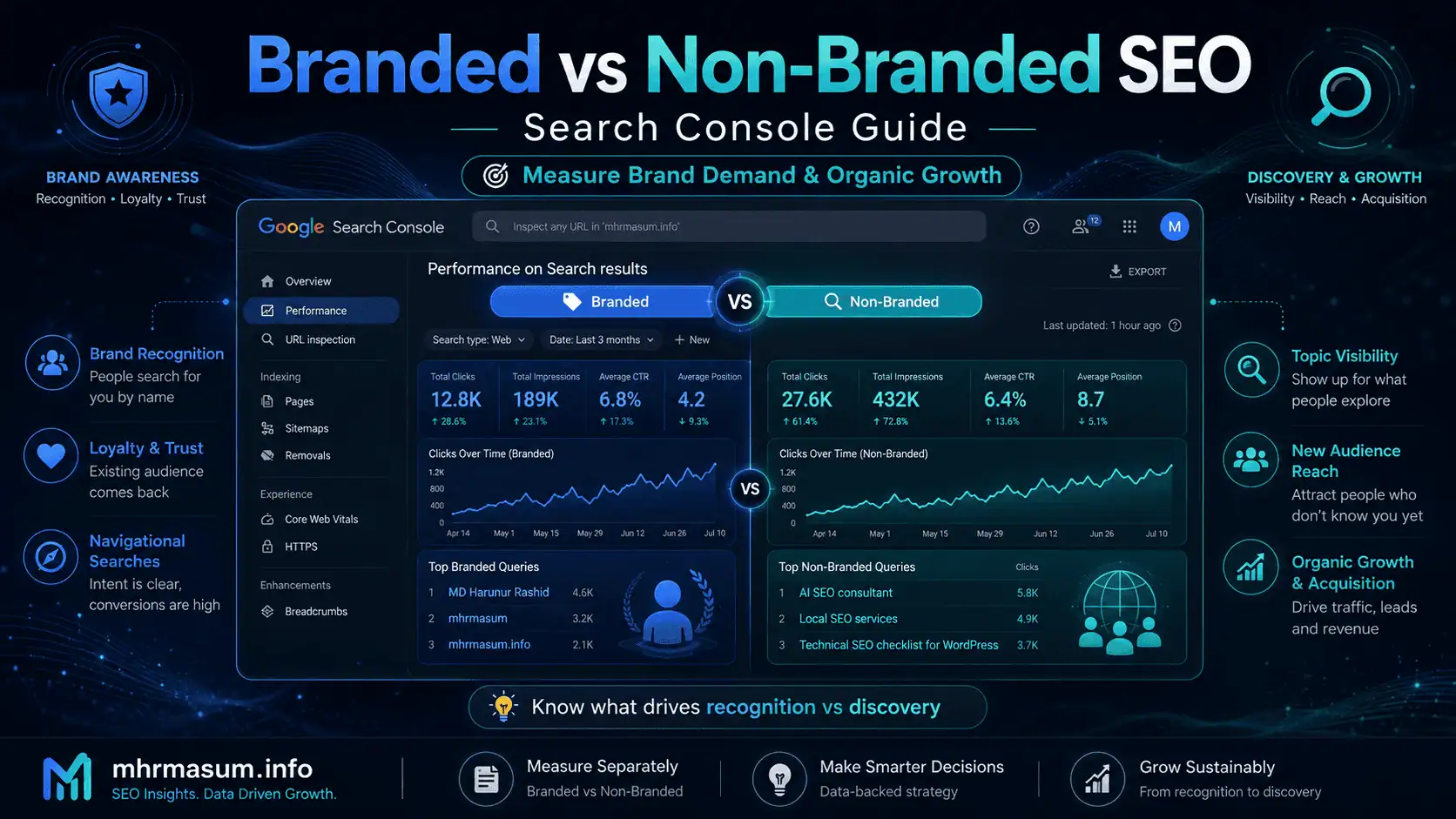
These two groups represent different types of search demand:
- Branded search demand comes from people who are already familiar with your brand, website, product or service.
- Non-branded search demand comes from broader searches where users have not explicitly named your brand.
Both types of traffic are valuable, but they answer different business questions.
Branded traffic can help you understand:
- Brand awareness
- Existing audience demand
- Reputation
- Customer loyalty
- Offline campaign impact
- Returning-user behaviour
- Navigational searches
Non-branded traffic can help you understand:
- New audience discovery
- SEO market reach
- Topic visibility
- Service-category demand
- Content growth
- Competitive performance
- Customer-acquisition opportunities
Until recently, separating these groups inside Google Search Console required manually maintained query filters and regular expressions.
Google introduced a dedicated branded-queries filter in the Search Console Performance report on November 20, 2025. Google later confirmed on March 11, 2026, that the feature had become available to all eligible websites. The system uses AI-assisted classification to separate branded and non-branded searches rather than depending only on exact keyword matching. plains how to use the branded and non-branded query filter, interpret the data correctly, avoid misleading conclusions, build useful SEO reports, and turn both query groups into practical growth strategies.
The Quick Answer
The branded and non-branded query filter in Google Search Console divides eligible search-query data into two main groups.
Branded queries can include:
- Your brand name
- Your domain name
- Common brand misspellings
- Brand-name variations
- A unique product associated with your brand
- A service closely identified with your website
Non-branded queries include general searches that do not explicitly identify your brand or a closely associated branded product.
For example, branded searches for mhrmasum.info might include:
- MD Harunur Rashid
- mhrmasum
- mhrmasum.info
- MD Harunur Rashid SEO consultant
- mhrmasum AI SEO
- SEO Squirrel Ultimate
- MHR WordPress plugins
Possible non-branded searches could include:
- AI SEO consultant
- Technical SEO checklist for WordPress
- Local SEO services
- How to recover from a Google core update
- WooCommerce SEO expert
- How to rank in Google AI Overviews
- WordPress speed optimisation service
Google’s filter is designed for reporting and analysis. Its classifications do not change how Google ranks your website. Google also warns that the AI-assisted system can occasionally classify a query incorrectly. Branded Search Query?
A branded search query contains a reference to a specific company, person, product, website or recognisable brand entity.
The searcher already has some level of awareness before completing the search.
For example:
MD Harunur Rashid
mhrmasum SEO
mhrmasum.info services
MD Harunur Rashid Local SEO
SEO Squirrel Ultimate plugin
These queries indicate that the user is not merely looking for any SEO consultant or WordPress plugin. The user is searching for a particular person, website or product.
Google defines branded queries as searches that may include the brand name, variations, misspellings, closely associated products or brand-specific services. Non-Branded Search Query?
A non-branded query describes a topic, service, problem, product or need without naming a particular brand.
Examples include:
best AI SEO consultant
technical SEO audit service
Local SEO strategy for small businesses
how to track ChatGPT traffic in GA4
WordPress website speed optimisation
Google core update recovery checklist
These queries represent broader market demand.
The searcher may not yet know which company, expert, website or product will provide the best solution.
Non-branded visibility is particularly important because it shows whether your website can reach people beyond those who already recognize your name.
Why the Difference Matters
Combining branded and non-branded data into one total can hide important performance patterns.
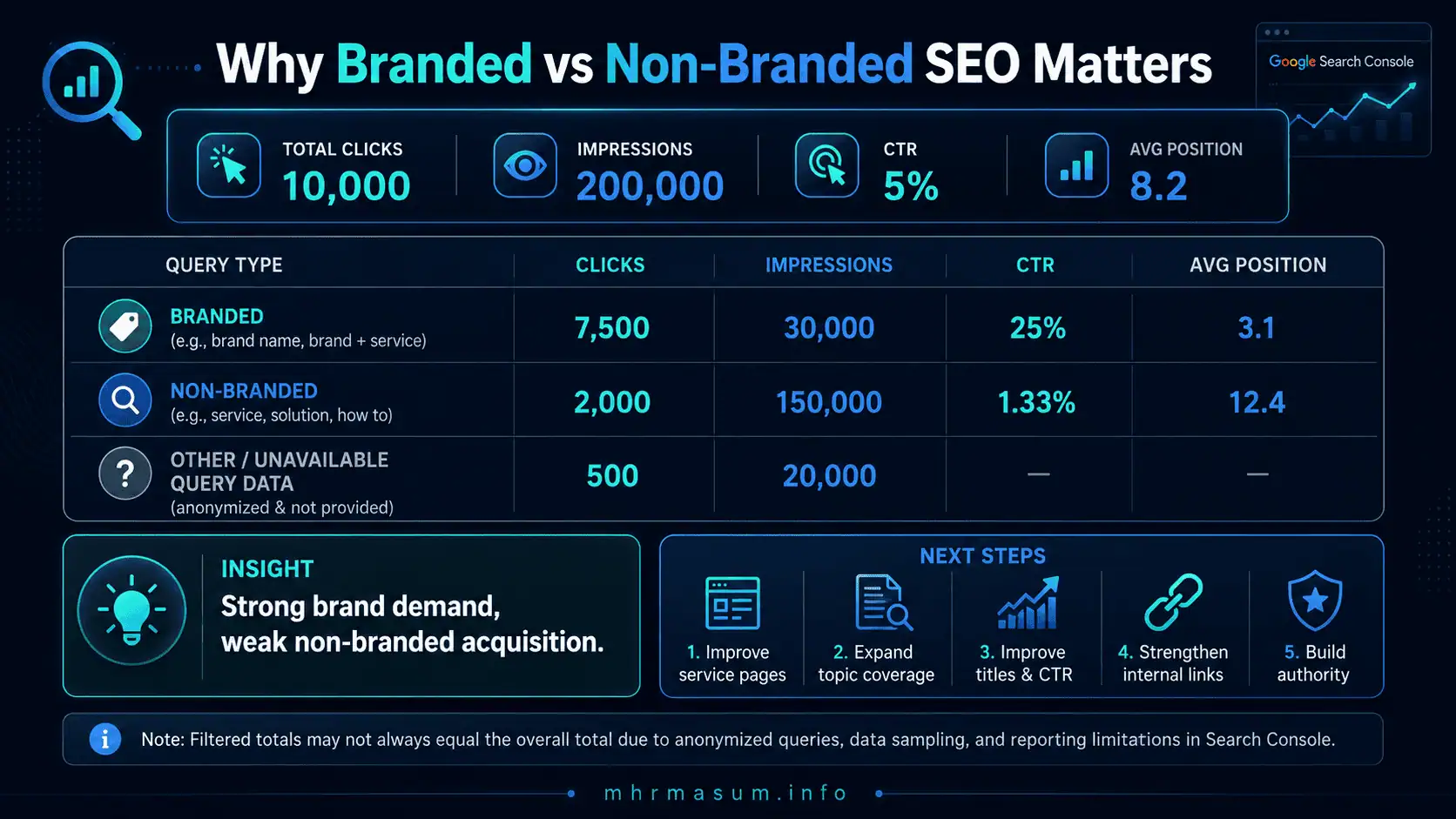
Suppose a website reports the following monthly results:
| Metric | Total |
|---|---|
| Clicks | 10,000 |
| Impressions | 200,000 |
| CTR | 5% |
| Average position | 8.2 |
At first glance, this may appear to be strong SEO performance.
However, the breakdown might reveal:
| Query Group | Clicks | Impressions | CTR |
|---|---|---|---|
| Branded | 7,500 | 30,000 | 25% |
| Non-branded | 2,000 | 150,000 | 1.33% |
| Other or unavailable query data | 500 | 20,000 | — |
The business has substantial brand demand but relatively weak non-branded acquisition.
That distinction changes the recommended strategy.
The website may not need only more brand awareness. It may need:
- Stronger service pages
- Better topic coverage
- Improved titles
- Higher-quality content
- More relevant backlinks
- Better internal linking
- Clearer search-intent alignment
- Stronger category positioning
Branded and non-branded segmentation turns a general traffic number into a more useful business diagnosis.
Why Google Added the Branded Query Filter
Before the dedicated filter, Search Console users typically created manual query rules such as:
Query contains: brand name
Or used custom regular expressions containing several brand variations.
This method had several limitations:
- Brand misspellings could be missed
- Product names could be omitted
- Multilingual variants could be missed
- Personal names could be written differently
- Brand names could overlap with common words
- The filter required ongoing maintenance
- “Does not contain” rules could exclude relevant searches incorrectly
- Manual filters did not understand context
Google’s branded-query filter uses an internal AI-assisted classification system.
Google says the system can consider:
- Brand names in different languages
- Misspellings
- Name variations
- Unique products
- Closely associated services
- Contextual relationships
The classification is not created through a simple include-or-exclude regex rule. e Launched the Feature
Google announced the branded-query filter on November 20, 2025.
The original rollout was gradual, and not every Search Console property received the feature immediately.
Google updated the announcement on March 11, 2026, confirming that the filter was available to all eligible websites. ent documentation also states that the filter can provide up to 16 months of historical data, beginning with data from March 2025. igible properties can use the filter for:
- Monthly comparisons
- Quarter-over-quarter analysis
- Year-over-year reporting
- Core-update investigations
- Brand campaign measurement
- Content growth reviews
- Seasonal trend analysis
Where to Find the Filter in Search Console
The filter appears inside the Search results Performance report for eligible properties.
The general navigation is:
Google Search Console
→ Performance
→ Search results
→ Add filter
→ Query
→ Branded or Non-branded
Depending on interface updates, the option may appear as a query-type choice within the query filter.
Google’s official process is:
- Open the Search results Performance report.
- Click the filter bar.
- Select the Query filter.
- Choose Branded or Non-branded.
- Apply the selection.
- Review the updated metrics and dimensions.
The filter can be applied across web, image, video and news search types. the Filter Shows
Once the filter is applied, the Performance report limits its metrics to the selected query group.
The primary metrics are:
- Total clicks
- Total impressions
- Average CTR
- Average position
You can analyse those metrics by:
- Query
- Page
- Country
- Device
- Search appearance
- Date
This allows more detailed questions such as:
- Which pages attract the most non-branded clicks?
- Which countries generate the strongest branded demand?
- Does mobile branded CTR differ from desktop?
- Which non-branded topics are growing?
- Which service pages rank for commercial non-brand searches?
- Did branded demand increase after a marketing campaign?
- Did a Google update affect branded and non-branded traffic differently?
Branded and Non-Branded Data in Search Console Insights
Google also includes a branded-versus-non-branded traffic card in Search Console Insights for eligible properties.
The card can provide a simpler breakdown of clicks from:
- Users who searched specifically for the brand
- Users who searched through more general queries
Google explains that this insight is intended to help website owners measure brand recognition and identify new growth opportunities. view is useful for a quick executive summary.
The full Performance report is more appropriate when you need:
- Individual queries
- Page-level analysis
- Device comparisons
- Country analysis
- Date comparisons
- Search-type filtering
- Detailed exports
Why the Filter May Not Appear
The branded and non-branded filter is not available for every Search Console property.
Google lists two primary eligibility limitations.
The Website Must Use an Eligible Top-Level Property
The filter is intended for top-level properties.
It is not available for property views scoped only to a subdirectory, such as:
https://example.com/blog/
It may also be unavailable for a separately scoped subdomain property such as:
https://news.example.com/
Use the top-level property representing the main website when possible.
For example:
example.com
A Domain property is often the most complete option because it can include data across protocols and relevant subdomains.
The Website Needs Sufficient Search Data
Google requires enough query and impression data to classify the website’s search demand reliably.
Low-volume websites may not receive the filter.
Google has not published a fixed minimum number of impressions or queries.
A new website may need more time to accumulate enough search data before the feature becomes available.
The Property May Not Have a Clear Brand Entity
Google does not list unclear branding as a formal eligibility condition, but ambiguous identity can make classification more difficult.
A website should consistently communicate:
- Brand name
- Website name
- Organisation name
- Author name
- Product names
- Logo
- Social profiles
- Structured data
Clear entity information supports broader search understanding even though it does not guarantee access to this specific report.
How Google Classifies Branded Queries
Google’s system uses AI-assisted classification rather than a static keyword rule.
A branded query may be identified through several signals.
Direct Brand Name
The clearest branded query contains the exact brand name.
For example:
mhrmasum
Domain Name
A domain or recognisable domain variation can be branded.
For example:
mhrmasum.info
mhrmasum website
Personal Brand Name
For a professional portfolio, the person’s name may function as the main brand.
For example:
MD Harunur Rashid
Harunur Rashid SEO
Misspellings and Variations
Google may recognise common misspellings or alternative formatting.
Possible examples include:
mhr masum
mhrmasum seo
md harunur rasid
Unique Products
A unique product strongly associated with the website may be classified as branded even when the company name is absent.
Examples could include:
SEO Squirrel Ultimate
MHR HB CRM
MHR EduQuest CRM
Brand-Specific Services
Google may classify a query as branded when it references a distinctive service closely associated with the website.
This classification depends on context and Google’s understanding of the entity.
It should not be assumed that every service name will automatically be treated as branded.
Why Some Queries May Be Misclassified
Google warns that branded-query classification is dynamic and contextual.
Some searches may be incorrectly placed in either group. tion can happen when:
- The brand name is also a common word
- The company name resembles a generic service
- A product name is used by several businesses
- The personal name is common
- A misspelling resembles an unrelated term
- The site recently rebranded
- Google has incomplete entity information
- A unique product is not strongly associated with the domain
- The search has mixed brand and generic intent
For example, a company named “Advance Roofing” may find it harder to separate brand references from generic roofing-related searches than a company with a completely distinctive name.
Use the filter as a reporting aid, not as a perfect ground-truth classification system.
Does the Filter Affect Rankings?
No.
Google states that the branded and non-branded classifications are informational only.
The filter does not:
- Increase rankings
- Decrease rankings
- Change crawl behaviour
- Change indexing
- Affect page quality evaluation
- Create a brand-authority score
- Alter search results
- Influence core updates
Its purpose is to help website owners analyse existing Search performance. affic Does Not Always Mean Existing Customers
Branded search traffic often comes from people already familiar with the business, but that does not mean every branded searcher is an existing customer.
A new user may perform a branded search after discovering the company through:
- A social media post
- A referral
- A podcast
- An advertisement
- ChatGPT
- Perplexity
- Google AI Overview
- A review platform
- A business directory
- An offline recommendation
The person may be new to the website but already aware of the brand before using Google.
Branded search therefore measures brand-aware search demand, not necessarily customer retention.
Non-Branded Traffic Does Not Always Mean New Users
A returning customer can search through a non-branded query.
For example, an existing reader may search:
technical SEO checklist for WordPress
Instead of searching:
mhrmasum technical SEO checklist
That visit remains non-branded even though the user already knows the website.
Non-branded searches indicate that the query itself did not explicitly identify the brand. They do not prove that every searcher is a first-time user.
This distinction is important when combining Search Console data with GA4.
Search Console vs GA4 for Brand Analysis
Search Console and Google Analytics 4 measure different parts of the search journey.
Search Console reports what happened in Google Search before the user reached the website.
GA4 reports what happened after the user arrived.
| Question | Search Console | GA4 |
|---|---|---|
| Which Google queries showed the website? | Yes | No |
| Which queries were branded? | Yes, for eligible properties | No |
| How many impressions occurred? | Yes | No |
| Which search result received the click? | Yes | Landing page only |
| What did the visitor do onsite? | Limited | Yes |
| Did the visitor submit a form? | No | Yes, when tracked |
| Did the visitor purchase? | No | Yes, when tracked |
| Was the user new or returning? | No | Yes |
| What revenue resulted? | No | Yes |
Use Search Console to measure branded and non-branded search demand.
Use GA4 to measure:
- Engagement
- Leads
- Purchases
- Revenue
- Returning users
- Service-page journeys
- Assisted conversions
How to Analyse Branded SEO Performance
Branded analysis should go beyond counting clicks.
A strong review should examine demand, visibility, reputation and user intent.
Review Branded Click Trends
Start with branded clicks over time.
Compare:
- Current month vs previous month
- Current quarter vs previous quarter
- Current year vs previous year
- Campaign period vs pre-campaign period
An increase may reflect:
- Stronger brand awareness
- Offline advertising
- Social media activity
- Public relations
- Reviews
- Referrals
- Newsletter growth
- AI search mentions
- New product launches
- Better reputation
A decrease may reflect:
- Lower search demand
- Rebranding confusion
- Competitor advertising
- Reputation issues
- Seasonality
- Search-result changes
- Tracking limitations
Do not assume that every branded change is caused by SEO.
Review Branded Impressions
Branded impressions show how frequently the website appeared for brand-aware searches.
High impressions with declining clicks may indicate:
- Reduced CTR
- Competitor ads above the result
- Third-party profiles outranking the website
- Reputation pages competing for attention
- Weak titles
- Unclear website identity
- Knowledge-panel changes
- Search-feature changes
Investigate the actual query and result environment.
Review Branded CTR
Branded queries usually produce higher CTR because the searcher already intends to find the website.
A low branded CTR can be a warning sign.
Potential causes include:
- The homepage does not rank first
- An incorrect page ranks
- Competitor ads use the brand name
- Review websites dominate results
- The title does not clearly identify the business
- The favicon or site name is inconsistent
- Several pages compete for the same query
- Negative results attract attention
Branded CTR should be monitored by query and page rather than only at the property level.
Review Branded Average Position
Most primary brand searches should normally show the official website prominently.
If the average position declines, examine:
- Whether Google understands the official domain
- Whether the homepage is indexable
- Canonical settings
- Duplicate websites
- Old domains
- Social profiles
- Directory listings
- Reputation pages
- Brand-name ambiguity
- Site migrations
Average position should be interpreted cautiously because it is an aggregated metric. Google recommends focusing primarily on click and impression trends rather than position alone. Branded Search Intent
Not all branded queries have the same purpose.
Group them by intent.
Navigational branded queries:
mhrmasum
mhrmasum.info
Service-related branded queries:
MD Harunur Rashid SEO services
mhrmasum Local SEO
Reputation-related branded queries:
MD Harunur Rashid reviews
mhrmasum portfolio
Contact-related branded queries:
MD Harunur Rashid contact
mhrmasum WhatsApp
Product-related branded queries:
SEO Squirrel Ultimate
MHR HB CRM
This classification can reveal what users want after recognising the brand.
How to Analyse Non-Branded SEO Performance
Non-branded analysis is central to measuring SEO market expansion.
It shows whether the website is reaching users who search by need rather than by brand.
Review Non-Branded Click Growth
Non-branded click growth can indicate that the website is gaining reach across broader topics and services.
Break the data down by:
- Page
- Query
- Country
- Device
- Search type
- Search appearance
- Date
A sitewide increase is useful, but page-level analysis explains where the growth originated.
Review Non-Branded Impressions
Impressions often grow before clicks.
Increasing impressions can show that Google is testing or expanding the website’s visibility for new searches.
Look for pages with:
- Strong impression growth
- Low CTR
- Average positions between 5 and 20
- Relevant commercial or informational queries
- Clear potential for improvement
These pages may provide faster opportunities than completely new content.
Review Non-Branded CTR
Low non-branded CTR can result from:
- Weak titles
- Generic meta descriptions
- Poor search-intent alignment
- Ranking below prominent features
- Unclear value propositions
- Unrecognised brand names
- Outdated publication dates
- Competing results with stronger credibility
Improving CTR should not rely on sensational titles.
The title should accurately communicate:
- Topic
- Benefit
- Audience
- Specificity
- Freshness when relevant
- Unique value
Review Non-Branded Average Position
Non-branded average position can help identify topics where the website is close to stronger visibility.
Prioritise queries where:
- The page is relevant
- The search has business value
- The page already earns impressions
- The average position is within realistic reach
- The existing content can be improved meaningfully
Avoid chasing every high-impression keyword without considering relevance or conversion potential.
Group Non-Branded Queries by Topic
Individual queries can be fragmented.
Group them into clusters such as:
- AI SEO
- Technical SEO
- Local SEO
- WordPress optimisation
- WooCommerce SEO
- Google Business Profile
- Search Console
- Website speed
- Schema markup
- AI crawler control
Google Search Console Insights can also group semantically similar queries for eligible high-volume sites.
Google introduced Query Groups to help simplify the analysis of related search terms. The branded filter and Query Groups solve different problems:
- Query Groups organise semantically similar searches.
- The branded filter separates brand-aware and generic demand.
Branded Traffic vs Brand Awareness
Branded search demand is an important brand-awareness indicator, but it is not a complete measurement of awareness.
A brand may be widely recognised without receiving a proportional increase in branded searches.
Users may navigate through:
- Bookmarks
- Email links
- Social platforms
- Mobile apps
- Direct URLs
- AI assistant citations
- Saved browser history
Branded search should be combined with:
- Direct traffic
- Returning users
- Social mentions
- Referral traffic
- Review volume
- Newsletter subscribers
- Branded impressions
- Share of search
- AI citations
- Public relations coverage
Use the Search Console filter as one part of a broader brand measurement framework.
Branded Traffic vs Organic Acquisition
Branded clicks often capture existing demand.
Non-branded clicks are more closely associated with creating or expanding discoverability.
This does not mean branded traffic is less valuable.
Branded search can produce:
- High conversion rates
- Strong lead quality
- Repeat purchases
- Direct contact
- Reputation checks
- Product searches
However, a website whose organic growth depends almost entirely on branded queries may have limited reach outside its existing audience.
A balanced SEO strategy should:
- Protect branded visibility
- Increase non-branded discovery
- Convert non-branded visitors into brand-aware users
- Encourage returning visits
- Build future branded demand
The Branded-to-Non-Branded Growth Loop
Strong SEO can create a reinforcing growth cycle.
The process may look like this:
- A user searches a non-branded query.
- The user discovers an article or service page.
- The content creates a positive impression.
- The user remembers the brand.
- The user returns later through a branded search.
- The user contacts or purchases from the business.
- The user recommends the brand to others.
- Additional users perform branded searches.
Non-branded SEO creates discovery.
Strong content and brand experience convert that discovery into future branded demand.
This connection is central to building brand authority for AI search.
How to Calculate Branded Search Share
A simple branded-click share can be calculated as:
Branded click share =
Branded clicks ÷ (Branded clicks + Non-branded clicks) × 100
For example:
Branded clicks: 4,000
Non-branded clicks: 6,000
Branded click share:
4,000 ÷ 10,000 × 100 = 40%
The corresponding non-branded click share is:
6,000 ÷ 10,000 × 100 = 60%
Use the clicks reported within the two classification filters.
Do not automatically divide branded filtered clicks by the unfiltered property total because anonymized-query handling can create differences.
Why Branded and Non-Branded Totals May Not Match Overall Traffic
Search Console protects user privacy by omitting some low-frequency queries from query tables.
These are called anonymized queries.
Anonymized queries can still contribute to overall chart totals, but they may disappear when a query filter is applied.
Google explains that this can create situations where:
Branded filtered clicks
+
Non-branded filtered clicks
≠
Unfiltered total clicks
Query filtering can also be affected by data truncation and reporting limits. ncy does not necessarily indicate broken tracking.
When reporting branded share:
- Compare branded and non-branded filtered data with each other
- Document excluded or unavailable query data
- Avoid forcing totals to equal the unfiltered total
- Use trends consistently
- Maintain the same property and date range
Search Console Query Data Limitations
Search Console data is extremely useful, but it is not a complete log of every Google search.
Important limitations include:
- Anonymized queries
- Table row limits
- Data truncation
- Property aggregation
- Canonical URL aggregation
- Classification errors
- Preliminary recent data
- Average-position complexity
- Different totals when query filters are active
Google states that anonymized queries are omitted from the query table to protect privacy. It also notes that the standard interface can export up to 1,000 rows, while the API can provide larger daily data sets within its limits. ions should be disclosed in professional SEO reports.
How to Compare Branded and Non-Branded Performance
A useful comparison table should include several metrics.
| Metric | Branded | Non-Branded |
|---|---|---|
| Clicks | ||
| Impressions | ||
| CTR | ||
| Average position | ||
| Top landing page | ||
| Top query | ||
| Mobile clicks | ||
| Desktop clicks | ||
| Primary country | ||
| Month-over-month change | ||
| Year-over-year change |
This comparison can reveal whether the website is primarily capturing existing demand or expanding into new markets.
Monthly Branded vs Non-Branded SEO Report
A monthly report should explain what changed, why it matters and what should happen next.
Executive Summary
The executive summary should contain a clear interpretation rather than only numbers.
A useful summary might state:
Branded clicks increased by 18%, primarily through searches for MD Harunur Rashid and mhrmasum. Non-branded clicks increased by 9%, driven by AI SEO and Technical SEO guides. Non-branded impressions grew faster than clicks, indicating additional CTR and ranking opportunities.
Branded Performance
Report:
- Branded clicks
- Branded impressions
- Branded CTR
- Branded average position
- Top branded queries
- Top branded landing pages
- Notable reputation or navigational changes
Non-Branded Performance
Report:
- Non-branded clicks
- Non-branded impressions
- Non-branded CTR
- Non-branded average position
- Top generic queries
- Top discovery pages
- New topic opportunities
Conversion Performance
Search Console does not report conversions, so connect landing pages with GA4.
Report:
- Leads from organic landing pages
- Form submissions
- Calls
- WhatsApp clicks
- Consultation bookings
- Purchases
- Revenue
- Assisted conversions
Recommended Actions
Recommendations should be connected to the data.
Examples include:
- Improve a high-impression service page
- Update a declining branded result
- Build content around a growing non-brand topic
- Strengthen internal links to a commercial page
- Improve title relevance
- Add case-study evidence
- Resolve brand-name inconsistency
- Publish supporting content
How to Use the Filter for Content Strategy
The filter can identify which content creates new discovery and which content supports existing brand demand.
Find Non-Branded Pages With High Impressions
Apply the Non-branded filter and open the Pages tab.
Look for pages with:
- High impressions
- Low CTR
- Average positions near page one
- Commercially relevant queries
- Strong topic relevance
These pages may benefit from:
- Better titles
- Expanded content
- Improved introductions
- New examples
- Better internal links
- Updated evidence
- Stronger FAQs
- Improved page experience
Find Non-Branded Topics Producing Clicks
Open the Queries tab while the Non-branded filter remains active.
Group queries into content clusters.
For mhrmasum.info, possible clusters include:
- AI SEO
- Entity SEO
- Technical SEO
- Local SEO
- Google core updates
- GA4
- WordPress performance
- AI crawlers
- Search Console
- WooCommerce
This can reveal where the website already has emerging topical authority.
Identify Content Gaps
Look for non-branded queries where:
- The current page only partially answers the question
- An irrelevant page ranks
- Several similar queries show the same need
- Competitors provide stronger resources
- A service page lacks supporting content
Create or improve pages based on search intent rather than publishing content only because a keyword has impressions.
Connect Informational and Commercial Content
Non-branded blog traffic should have a clear path to relevant services.
For example, an article about crawlability can link naturally to:
- Technical SEO services and portfolio work
- WordPress Technical SEO checklist
- SEO and digital growth services
- Contact MD Harunur Rashid
Internal links should support the reader’s next logical step.
How to Use the Filter for Service-Page SEO
Service pages should attract both brand-aware and non-brand users.
A service page may receive branded searches such as:
mhrmasum technical SEO service
And non-branded searches such as:
technical SEO consultant
WordPress technical SEO audit
Compare how the page performs across both groups.
A service page with strong branded clicks but little non-branded visibility may need:
- Clearer keyword targeting
- More service detail
- Better proof
- Relevant FAQs
- Stronger internal links
- Industry examples
- Case-study links
- Geographic relevance where applicable
- External authority signals
A page with non-branded impressions but low clicks may need a stronger title and search-result proposition.
How to Use the Filter for Local SEO
Local businesses can use the filter to separate direct brand demand from service-and-location discovery.
Branded local searches may include:
ABC Roofing Brisbane
ABC Roofing reviews
ABC Roofing phone number
Non-branded local searches may include:
roofing company Brisbane
roof repair near me
Brisbane metal roofing contractor
The distinction shows whether the business is:
- Known locally
- Discoverable for service categories
- Visible across target suburbs
- Dependent on brand searches
- Expanding beyond existing reputation
My Local SEO strategy for small businesses explains how to improve service-area relevance, Google Business Profile visibility and local authority.
Reviews can also increase trust and brand demand. Read How Reviews Help Local SEO and AI Search Visibility for the connection between reputation and discovery.
How to Use the Filter for eCommerce SEO
eCommerce websites often have several types of branded queries.
These may include:
- Store name
- Manufacturer names
- Exclusive product names
- Private-label products
- Product model names
- Store-plus-product combinations
A retailer must distinguish between:
- Its own brand demand
- Manufacturer brand demand
- Generic product-category demand
For example, a store selling EcoFlow products may receive:
EcoFlow Delta 2 Max
That query is branded to the manufacturer, but it may not represent awareness of the retailer.
Google’s classification may treat unique products associated with the site as branded depending on context. Therefore, eCommerce businesses should review the actual queries before equating all “branded” traffic with store-brand awareness.
Use complementary segmentation where needed:
- Store brand
- Manufacturer brand
- Product model
- Generic category
- Problem-based query
How to Use the Filter During a Google Core Update
A ranking drop should be separated by query type before conclusions are made.
Apply the Branded filter and compare the update period with the previous equivalent period.
Then repeat the process using the Non-branded filter.
Possible patterns include:
Branded Traffic Remains Stable but Non-Branded Traffic Drops
This often indicates that:
- Brand demand remains healthy
- The homepage and navigational visibility remain intact
- Broader content or service rankings declined
- Competitors gained non-brand visibility
- Search intent shifted
- Content quality needs review
Both Branded and Non-Branded Traffic Drop
This may indicate:
- A sitewide technical issue
- Indexing problems
- Migration errors
- Brand-demand decline
- Manual actions
- Security problems
- Severe quality issues
- Tracking or property changes
Branded Traffic Drops but Non-Branded Traffic Remains Stable
This may indicate:
- Lower brand demand
- Seasonal changes
- Reputation issues
- Reduced advertising
- Competitor bidding
- Rebranding confusion
- Lower offline activity
Use the Google Core Update Recovery Checklist to investigate ranking losses systematically.
How to Use the Filter for Brand Campaign Measurement
Branded search often increases after marketing campaigns.
Possible campaign types include:
- Social advertising
- Television
- Radio
- Public relations
- Sponsorships
- Events
- Influencer campaigns
- Podcast appearances
- Email campaigns
- Product launches
- Offline promotions
Compare branded search data:
- Before the campaign
- During the campaign
- After the campaign
- With the same period last year
Monitor:
- Branded impressions
- Branded clicks
- Branded-query variety
- New product-name searches
- Geographic changes
- Mobile vs desktop behaviour
Search Console should be combined with Google Trends, GA4 and campaign reporting.
Google recommends using Search Console with other context, such as Google Trends, when investigating traffic changes. The official debugging Search traffic drops guide provides additional analysis methods.
Manual Branded Query Filtering With Regex
The dedicated branded filter is preferable when available because it can recognise variations and contextual brand associations.
Manual regex remains useful when:
- The automatic filter is unavailable
- You want to audit classification
- You need a narrower definition
- You want to separate products from the main brand
- You manage a low-volume property
- You need historical workflows for reporting consistency
Google Search Console supports regular-expression query filters and allows both matching and non-matching regex conditions. (Google Search Console regex filtering documentation)
Example Branded Regex for mhrmasum.info
A starting regex might be:
mhrmasum|mhr masum|mhrmasum\.info|md harunur rashid|harunur rashid|seo squirrel|mhr hb crm|mhr eduquest crm
Search Console regex matching is generally case-insensitive by default, so separate uppercase and lowercase versions are usually unnecessary.
This filter can capture several known brand and product variations.
However, a manual regex will not automatically understand:
- Unknown misspellings
- New products
- Multilingual variations
- Contextual brand references
- Product names not included in the expression
Update the regex whenever branding or product names change.
How to Apply the Manual Regex
The general process is:
- Open Search Console.
- Select the top-level property.
- Open Performance.
- Select Search results.
- Click Add filter.
- Select Query.
- Choose Custom regex.
- Select Matches regex.
- Paste the branded expression.
- Apply the filter.
For non-branded queries:
- Open the same query filter.
- Choose Custom regex.
- Select Does not match regex.
- Use the same brand expression.
- Apply the filter.
Search Console uses RE2-style regular expressions and supports matching or non-matching filters. Avoid unsupported features such as negative lookaheads. Branded and Non-Branded Totals Can Differ
Manual query filters are also affected by anonymized queries.
For example:
Total unfiltered clicks: 10,000
Queries matching brand regex: 3,500
Queries not matching brand regex: 5,800
The filtered groups total:
9,300
The remaining 700 clicks may include anonymized queries or data excluded through reporting limitations.
Google specifically explains that query-filtered totals can differ from unfiltered totals because anonymized queries are omitted when filters are applied. Filter vs Manual Regex
The automatic branded filter and manual regex each have advantages.
| Feature | Automatic Branded Filter | Manual Regex |
|---|---|---|
| Recognises misspellings | Potentially | Only when added |
| Understands unique products | Potentially | Only when added |
| Uses contextual classification | Yes | No |
| Available for low-volume sites | Not always | Yes |
| Works on path properties | No | Yes |
| Fully customisable | No | Yes |
| May misclassify queries | Yes | Yes |
| Requires maintenance | Low | High |
| Suitable for auditing | Yes | Yes |
Use the automatic filter for general reporting.
Use regex for validation, custom definitions and specialised business analysis.
How to Audit Google’s Classification
Because the automatic system can make mistakes, review the query table periodically.
Audit Branded Queries
Apply the Branded filter and inspect the top queries.
Look for generic queries that do not reasonably refer to the brand.
Document suspicious classifications.
Audit Non-Branded Queries
Apply the Non-branded filter and look for:
- Brand names
- Domain variations
- Product names
- Personal-name variations
- Common misspellings
Some brand-related searches may appear in the non-branded group.
Compare With a Manual Regex
Create a manually maintained regex representing the main known brand variations.
Compare:
- Automatic branded clicks
- Manual branded clicks
- Top-query differences
- Product-name classifications
Do not expect the two methods to match exactly.
The difference can reveal how broadly Google understands the brand.
Branded SEO KPIs
Useful branded-search KPIs include:
- Branded clicks
- Branded impressions
- Branded CTR
- Branded average position
- Number of visible branded queries
- Homepage branded clicks
- Service-related branded clicks
- Product-related branded clicks
- Branded growth rate
- Branded click share
- Reputation-query clicks
- Contact-query clicks
These KPIs help measure demand capture and brand recognition.
Non-Branded SEO KPIs
Useful non-branded KPIs include:
- Non-branded clicks
- Non-branded impressions
- Non-branded CTR
- Non-branded average position
- Number of discovery queries
- New ranking topics
- Non-branded landing pages
- Commercial non-brand clicks
- Informational non-brand clicks
- Non-brand growth rate
- Non-branded click share
- Conversions from discovery pages
These KPIs provide a clearer measure of organic market expansion.
What Is a Good Branded-to-Non-Branded Ratio?
There is no universal ideal ratio.
The appropriate balance depends on:
- Business model
- Brand maturity
- Search demand
- Website type
- Industry
- Content strategy
- Offline presence
- Product portfolio
- Customer lifecycle
A new business may have very little branded search.
A famous brand may receive most of its organic clicks from branded queries.
A publisher or informational website may depend more heavily on non-branded discovery.
A local service business may need both:
- Branded searches from reputation and referrals
- Non-branded searches from local service discovery
Instead of chasing a fixed percentage, evaluate whether both groups are growing in line with business objectives.
Common Reporting Mistakes
Branded and non-branded reporting can become misleading when the data is oversimplified.
Treating All Organic Clicks as New Customer Acquisition
A large portion of organic traffic may come from existing brand demand.
Separate the query groups before claiming that SEO created all organic demand.
Treating Branded SEO as Unimportant
Brand results still need protection and optimisation.
Competitors, directories, ads and reputation pages can capture branded clicks.
Assuming Every Branded Searcher Is an Existing Customer
Some new users search for a brand after discovering it through another channel.
Assuming Every Non-Branded Searcher Is New
Returning users can search through generic queries.
Ignoring Anonymized Queries
Filtered data may not equal unfiltered totals.
Document this limitation.
Using Average Position as the Main KPI
Average position is aggregated and can be affected by many contexts.
Prioritise clicks, impressions, CTR, landing pages and conversions.
Combining Manufacturer and Store Brands
An eCommerce retailer should not automatically count every manufacturer search as retailer-brand awareness.
Reporting Classification as Perfect
Google says the AI-assisted classification may make mistakes.
Review the queries.
Comparing Different Property Types
Do not compare a Domain property with a path-scoped property and expect identical totals.
Ignoring Search Intent
A branded query for reviews has a different purpose from a branded query for contact information.
How to Improve Branded Search Performance
Branded visibility should be protected even when the official website already ranks well.
Strengthen the Homepage
The homepage should clearly communicate:
- Brand name
- Professional identity
- Primary services
- Value proposition
- Trust signals
- Contact pathways
For mhrmasum.info, the homepage should consistently present:
MD Harunur Rashid — Digital Growth & Web Solutions Expert
Improve Site Name and Favicon Consistency
Google search results may display a site name and favicon.
Use consistent branding across:
- Website header
- Structured data
- Metadata
- Logo
- Favicon
- Social profiles
- Business profiles
Build Clear Branded Landing Pages
Users may search directly for:
- Services
- Portfolio
- Reviews
- Products
- Contact details
- Case studies
Maintain relevant pages such as:
Manage Reputation Results
Monitor searches involving:
brand + reviews
brand + complaints
brand + scam
brand + experience
Respond to legitimate reviews and publish transparent proof of work.
Strengthen Person and Organisation Entities
Use consistent:
- Person schema
- Organization schema
- SameAs references
- Author profiles
- Social profiles
- Professional descriptions
- Product names
Read the complete Entity SEO guide for a deeper framework.
How to Improve Non-Branded Search Performance
Non-branded growth requires a combination of relevance, quality, authority and technical accessibility.
Build Topic Clusters
Create comprehensive clusters around the business’s main areas of expertise.
For mhrmasum.info, strong clusters include:
- AI SEO
- Local SEO
- Technical SEO
- WordPress optimisation
- Entity SEO
- Google Search updates
- GA4 and reporting
- Website speed
- WooCommerce SEO
- AI crawler management
Match Search Intent
Determine whether the searcher wants:
- Information
- A comparison
- A service
- A product
- A checklist
- A tool
- A case study
- A local provider
The page format should match the intent.
Add Original Value
Use:
- First-hand experience
- Audit examples
- Screenshots
- Tested workflows
- Case studies
- Data
- Expert recommendations
- Original visuals
- Practical warnings
Generic content rarely builds durable visibility. Read Why Generic AI Content Does Not Rank Anymore for a practical quality framework.
Improve Internal Linking
Connect articles to:
- Supporting resources
- Service pages
- Portfolio examples
- Case studies
- Author information
- Contact options
Maintain Technical SEO
Ensure that important pages are:
- Crawlable
- Indexed
- Canonical
- Fast
- Mobile-friendly
- Secure
- Included in the sitemap
- Supported by accurate structured data
Use the Technical SEO Checklist for WordPress to audit the foundation.
Branded and Non-Branded SEO in AI Search
Traditional query segmentation remains relevant as users increasingly discover brands through AI-generated experiences.
A user may encounter a business through:
- Google AI Overviews
- Google AI Mode
- ChatGPT
- Gemini
- Perplexity
- Claude
- Copilot
The user may then perform a branded Google search to verify:
- Reputation
- Experience
- Services
- Contact details
- Portfolio
- Reviews
This means AI visibility can contribute indirectly to branded Google demand.
However, Search Console does not currently identify whether a branded search was influenced by an earlier AI interaction.
Use:
- AI referral traffic
- Brand-query trends
- GA4 conversion paths
- Customer surveys
- CRM lead-source fields
For a wider strategy, read AI SEO: How to Rank in Google AI Overviews, ChatGPT, Gemini and Perplexity.
Branded Search and Google Preferred Sources
Google Preferred Sources allows users to select websites they want to see more often in supported Search experiences.
A strong content and brand strategy can create this sequence:
- A user discovers a website through non-branded search.
- The user values the content.
- The user remembers the brand.
- The user adds the site as a Preferred Source.
- The site becomes more recognisable in supported personalised results.
- The user performs future branded searches.
This illustrates how non-branded discovery, audience trust and branded demand can reinforce one another.
A 30-Day Branded vs Non-Branded SEO Audit Plan
A structured audit can turn the filter into an actionable strategy.
Days 1–7: Configure the Reporting Foundation
During the first week, confirm that the correct property and date range are being used.
Complete these tasks:
- Open the top-level Search Console property
- Confirm filter availability
- Export branded data
- Export non-branded data
- Record overall totals
- Document anonymized-query limitations
- Review Search Console Insights
- Create a manual regex for validation
Days 8–14: Analyse Branded Demand
During the second week, review how users search for the business.
Analyse:
- Main brand queries
- Misspellings
- Personal-name searches
- Product searches
- Review queries
- Contact queries
- Top branded pages
- CTR changes
- Geographic patterns
Identify any reputation, indexing or brand-consistency issues.
Days 15–21: Analyse Non-Branded Growth
During the third week, focus on new discovery opportunities.
Analyse:
- Top generic queries
- High-impression pages
- Low-CTR opportunities
- Page-two rankings
- Commercial service queries
- Informational clusters
- Country and device differences
- Content gaps
Prioritise opportunities based on relevance and business value.
Days 22–30: Implement Improvements
During the final week, implement measurable changes.
Possible actions include:
- Improve titles
- Expand priority pages
- Add internal links
- Create missing service content
- Add original examples
- Strengthen author information
- Improve schema
- Update outdated pages
- Improve CTAs
- Connect GA4 conversions
Document the implementation date for later comparison.
Monthly Audit Checklist
Use this checklist to maintain accurate branded and non-branded reporting.
- The correct Search Console property is selected
- The date range is consistent
- Branded clicks are recorded
- Non-branded clicks are recorded
- Branded impressions are recorded
- Non-branded impressions are recorded
- CTR is compared
- Average position is interpreted cautiously
- Top branded queries are reviewed
- Top non-branded queries are reviewed
- Classification errors are checked
- Anonymized-query limitations are documented
- Top landing pages are analysed
- Device differences are checked
- Country differences are checked
- Month-over-month changes are explained
- Year-over-year changes are reviewed
- GA4 conversions are connected
- Recommended actions are documented
- Implementation dates are recorded
Frequently Asked Questions About Branded vs Non-Branded SEO
The following questions address common issues related to Google Search Console query classification and SEO reporting.
What Is a Branded Query?
A branded query includes a brand name, domain, recognised variation, misspelling, unique product or closely associated service.
Google uses AI-assisted classification rather than only exact text matching.
What Is a Non-Branded Query?
A non-branded query does not explicitly identify the brand.
It usually describes a general topic, service, product, location, need or problem.
Where Is the Branded Query Filter?
Open:
Search Console
→ Performance
→ Search results
→ Add filter
→ Query
Choose Branded or Non-branded when the option is available.
When Did Google Launch the Filter?
Google announced the feature on November 20, 2025.
Google updated the announcement on March 11, 2026, stating that it was available to all eligible websites.
How Much Historical Data Is Available?
Google’s current documentation states that the filter can provide up to 16 months of history beginning with data from March 2025.
Does the Filter Work for All Websites?
No.
It is limited to eligible top-level properties with sufficient query and impression data.
Does It Work for Subdirectory Properties?
No.
Google states that the feature is not available for path-scoped properties such as:
https://example.com/blog/
Does It Work for Subdomain Properties?
Google’s launch documentation says separately scoped subdomain properties are not eligible.
Use the top-level website property where possible.
Does It Work for Image Search?
Yes.
Google says the filter works across web, image, video and news search types.
Is the Classification Based on Regex?
No.
Google uses an internal AI-assisted system.
The filter can consider brand variations, misspellings, languages and unique products.
Can Google Misclassify Queries?
Yes.
Google warns that some searches may be classified incorrectly because brand identification is dynamic and contextual.
Does the Filter Affect Rankings?
No.
The classification is for reporting and analysis only.
Why Do Branded and Non-Branded Clicks Not Equal Total Clicks?
Query filters can exclude anonymized queries.
Search Console also has reporting and data-row limitations.
This can cause the sum of filtered groups to differ from the unfiltered total.
Is Branded Traffic Good for SEO?
Yes.
Branded traffic reflects awareness, demand and user trust.
However, it should not be presented as the same thing as new customer discovery.
Is Non-Branded Traffic More Valuable?
Not automatically.
Non-branded traffic can create new discovery, while branded traffic may convert at a higher rate.
Both should be measured.
What Is a Good Branded Search Percentage?
There is no universal benchmark.
The appropriate ratio depends on the business model, brand maturity, industry, content strategy and search demand.
Can I Create My Own Branded Filter?
Yes.
Use a custom regular expression containing the main brand names, variations, products and misspellings.
Should I Include Product Names in the Regex?
Include unique products closely associated with the brand.
For retailers, distinguish manufacturer brands from the retailer’s own brand.
Can Search Console Show Branded Conversions?
No.
Search Console shows search performance, not onsite conversions.
Use GA4 and CRM data to measure leads and revenue.
Can GA4 Identify Branded Queries?
GA4 does not normally receive organic Google query data at the same level as Search Console.
Use Search Console for query classification and GA4 for onsite behaviour.
Can AI Search Increase Branded Searches?
Potentially.
A user may discover a brand through ChatGPT, Google AI Overviews, Perplexity or another platform and later search for the brand on Google.
Search Console cannot prove that connection by itself.
Should Branded Traffic Be Excluded From SEO Reports?
It should not be hidden.
Report it separately from non-branded traffic so clients can understand demand capture and organic discovery.
How Often Should the Data Be Reviewed?
Review it monthly for standard reporting.
High-volume websites may review the data weekly, particularly during campaigns, migrations or Google updates.
Final Branded vs Non-Branded SEO Framework
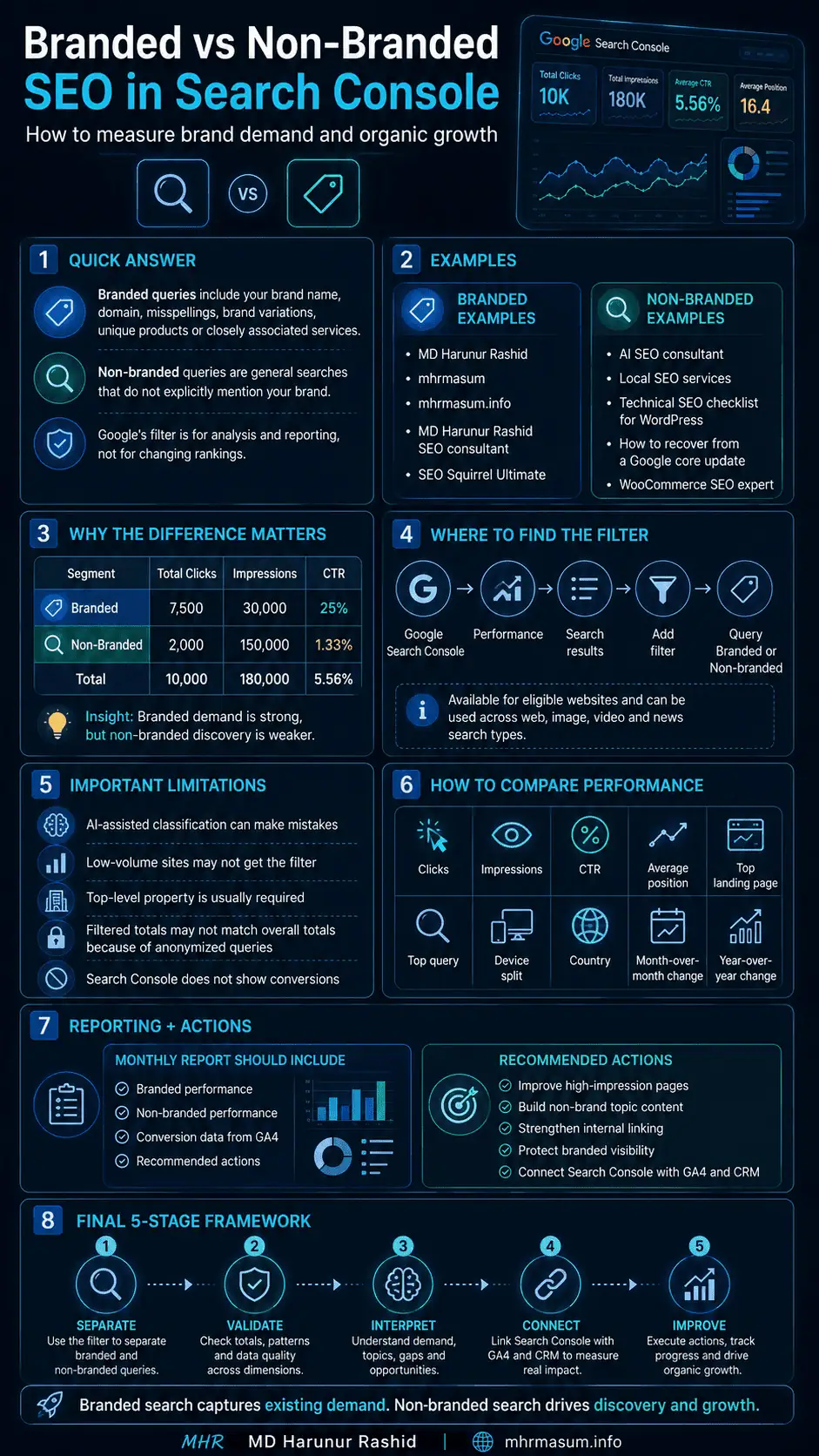
A practical reporting framework contains five stages.
1. Separate
Use Google’s branded-query filter or a manual regex to divide brand-aware and general searches.
2. Validate
Review actual queries and identify classification errors, missing brand variants or manufacturer-brand complications.
3. Interpret
Use branded searches to evaluate demand capture and non-branded searches to evaluate market discovery.
4. Connect
Combine Search Console with GA4, CRM, campaign and reputation data.
5. Improve
Protect branded visibility while building stronger non-branded content, services and topic authority.
Final Thoughts
Branded and non-branded search traffic should not be treated as competing SEO metrics.
They represent different stages of business growth.
Branded search shows whether people recognise, remember and actively look for your business.
Non-branded search shows whether your website can reach people who are still looking for an answer, service, product or expert.
A healthy SEO strategy should create a continuous cycle:
- Non-branded content creates discovery
- Helpful experiences build trust
- Trust creates brand recognition
- Brand recognition increases branded demand
- Strong branded results support conversion
- Satisfied users create referrals, reviews and further demand
Google Search Console’s branded query filter makes this distinction easier to measure, but the data must be interpreted carefully.
Remember that:
- The classification is AI-assisted
- Some queries may be misclassified
- Low-volume properties may not receive the filter
- Path and subdomain properties may be ineligible
- Filtered totals may exclude anonymized queries
- Branded demand is not the same as new-user acquisition
- Non-branded queries are not always from new users
- Search Console must be connected with GA4 and business data
For mhrmasum.info, the most effective strategy is to protect searches for MD Harunur Rashid, mhrmasum and related products while continuing to expand non-branded visibility across AI SEO, Local SEO, Technical SEO, WordPress optimisation, WooCommerce SEO and digital growth topics.
For help with Search Console analysis, branded and non-branded SEO reporting, Technical SEO, AI SEO, Local SEO and WordPress growth strategy, explore my SEO and digital growth services or contact MD Harunur Rashid for a detailed consultation.