Managing an expanding WooCommerce catalogue creates a recurring content problem.
Some products have incomplete descriptions. Others use inconsistent titles, duplicate wording, vague categories, missing tags or poorly explained variations. Product information may have been written by different team members over several years, making the catalogue difficult to manage and inconsistent for customers.
Improving hundreds or thousands of products manually requires substantial time.
Generative AI can accelerate the process, but unrestricted AI product copy creates a second problem: every listing begins to sound the same.
Generic phrases such as “elevate your experience,” “unlock the perfect solution” and “designed with quality in mind” do not explain what a product actually is, who it is suitable for or why a customer should buy it.
WooCommerce AI Product Advisor is designed to provide a more controlled alternative.
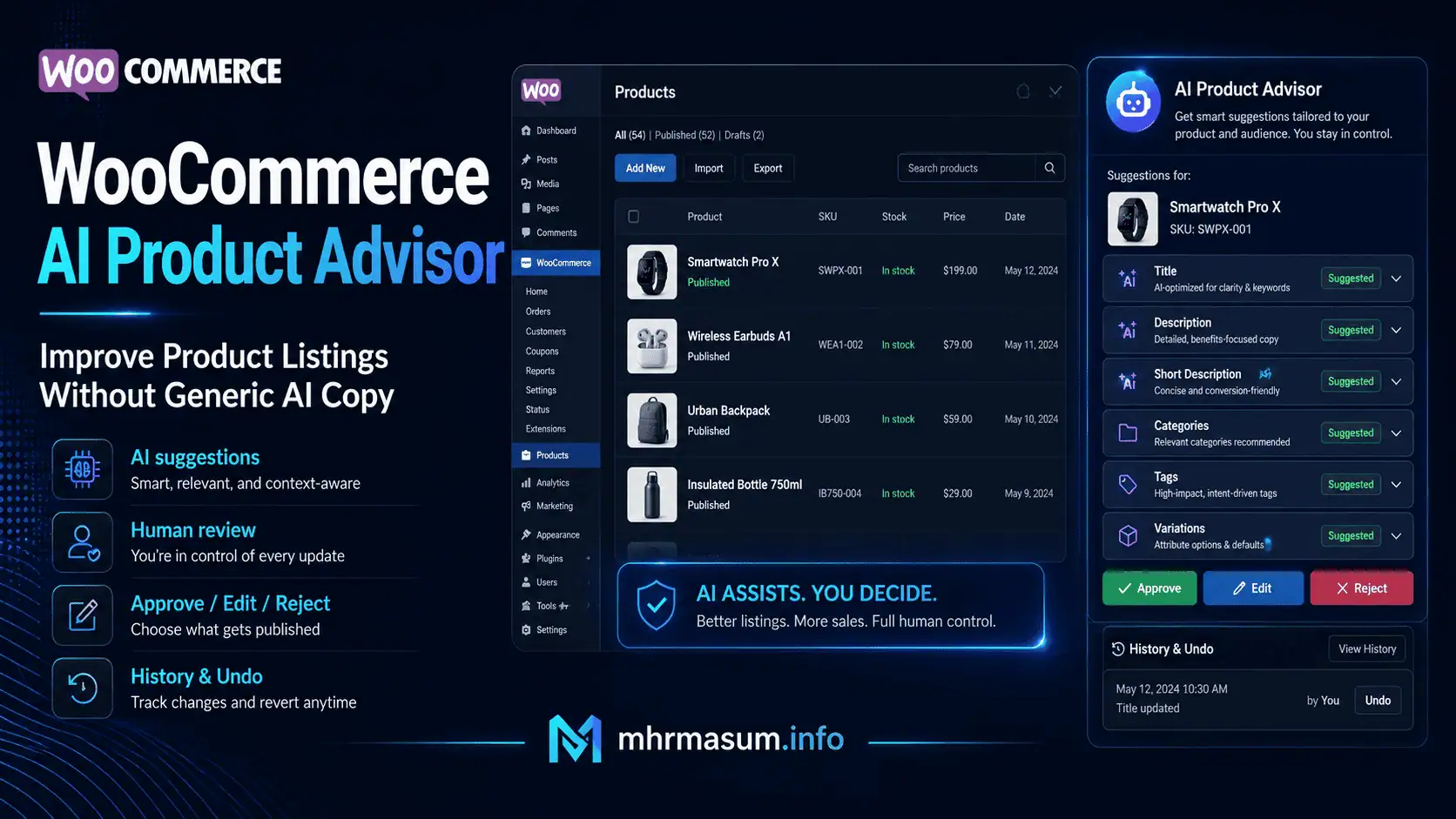
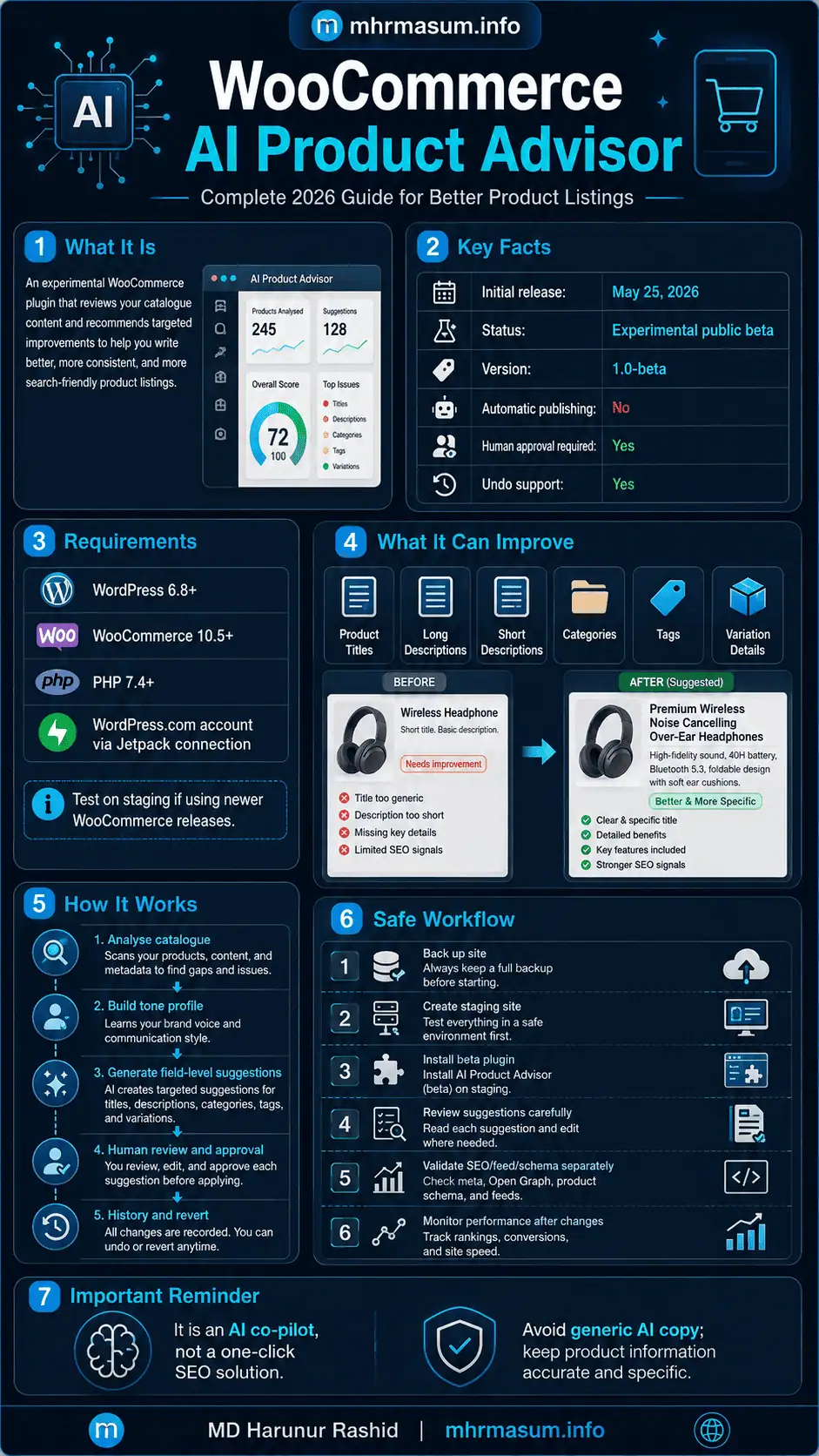
WooCommerce released the first public beta of AI Product Advisor on May 25, 2026. The experimental plugin analyses an existing catalogue, develops a profile of the store’s tone and recommends targeted changes to product titles, long descriptions, short descriptions, categories, tags and variation information. Store managers can review, edit, approve, reject or later reverse those changes.
The tool could become useful for ecommerce stores with inconsistent or incomplete product data. However, it should not be treated as a one-click SEO solution.
The quality of its recommendations will still depend on:
- The accuracy of your existing product information
- The clarity of your brand positioning
- The completeness of your attributes and variations
- Human review
- Search-intent research
- Product expertise
- Google Merchant Center requirements
- Product structured data
- Your wider WooCommerce SEO strategy
This guide explains how WooCommerce AI Product Advisor works, how to install it, which fields it can improve and how to use its recommendations without filling your store with generic AI-generated copy.
For more practical resources covering SEO, AI search, WordPress, WooCommerce and digital growth, visit the MD Harunur Rashid SEO and AI SEO homepage.
WooCommerce AI Product Advisor: Key Facts
| Detail | Current information |
|---|---|
| Product | WooCommerce AI Product Advisor |
| Developer | Automattic/WooCommerce |
| Initial release | May 25, 2026 |
| Current public status | Experimental public beta |
| Repository version | 1.0-beta |
| Main purpose | Review product listings and recommend targeted improvements |
| Supported content fields | Titles, descriptions, short descriptions, categories, tags and variation details |
| Automatic publishing | No |
| Human approval required | Yes |
| Change history | Yes |
| Undo support | Yes |
| WordPress requirement | WordPress 6.8 or later |
| WooCommerce requirement | WooCommerce 10.5 or later |
| PHP requirement | PHP 7.4 or later |
| Connection requirement | WordPress.com account through a Jetpack connection |
| Cost during beta | Confirm on the official download page before installation |
The plugin’s public repository lists version 1.0-beta and requires WordPress 6.8+, WooCommerce 10.5+, PHP 7.4+ and a WordPress.com account for the Jetpack connection. Nothing is applied to a product until the user explicitly approves the proposed change.
Important compatibility note
As of July 30, 2026, WooCommerce lists version 10.9.4 as its current stable core release. However, the AI Product Advisor plugin header says it was tested up to WooCommerce 10.7. WooCommerce 11.0 was originally planned for July 28 but was postponed provisionally to August 4, 2026. Stores using newer WooCommerce releases should therefore test the beta on a staging environment before using it on production products.
What Is WooCommerce AI Product Advisor?
WooCommerce AI Product Advisor is an experimental WordPress plugin that reviews the product information already stored in a WooCommerce catalogue.
It does not simply add a blank AI-writing box to every product.
Instead, it is intended to:
- Analyse the store’s existing content.
- Develop a tone profile based on the brand.
- Review the product catalogue.
- Identify products with improvement potential.
- Rank suggested improvements.
- Present field-level changes.
- Let a human review and edit each recommendation.
- Apply approved changes.
- Maintain a history of accepted changes.
- Allow changes to be reverted.
WooCommerce describes the plugin as an AI co-pilot rather than a completely autonomous product editor. The distinction is important because the system provides recommendations while the store owner remains responsible for approving the final product information.
Why WooCommerce Created AI Product Advisor
Large ecommerce catalogues commonly accumulate content-quality problems.
These may include:
- Product titles written in different formats
- Missing product descriptions
- Manufacturer descriptions copied across multiple stores
- Descriptions that list features but not benefits
- Incomplete short descriptions
- Products assigned to overly broad categories
- Inconsistent tags
- Variations with unclear names
- Missing size, colour or material information
- Product copy that no longer matches the brand
- Older products written in a different tone
- Duplicate information across related products
Individual problems may appear small, but catalogue-wide inconsistencies can affect:
- Customer understanding
- Product filtering
- Internal search
- Category-page relevance
- Google Shopping feeds
- Product structured data
- Conversion rates
- Returns
- Customer support
- Organic-search visibility
- AI-shopping visibility
WooCommerce AI Product Advisor attempts to help store owners identify which products require attention and where improvements could be made first.
How WooCommerce AI Product Advisor Works
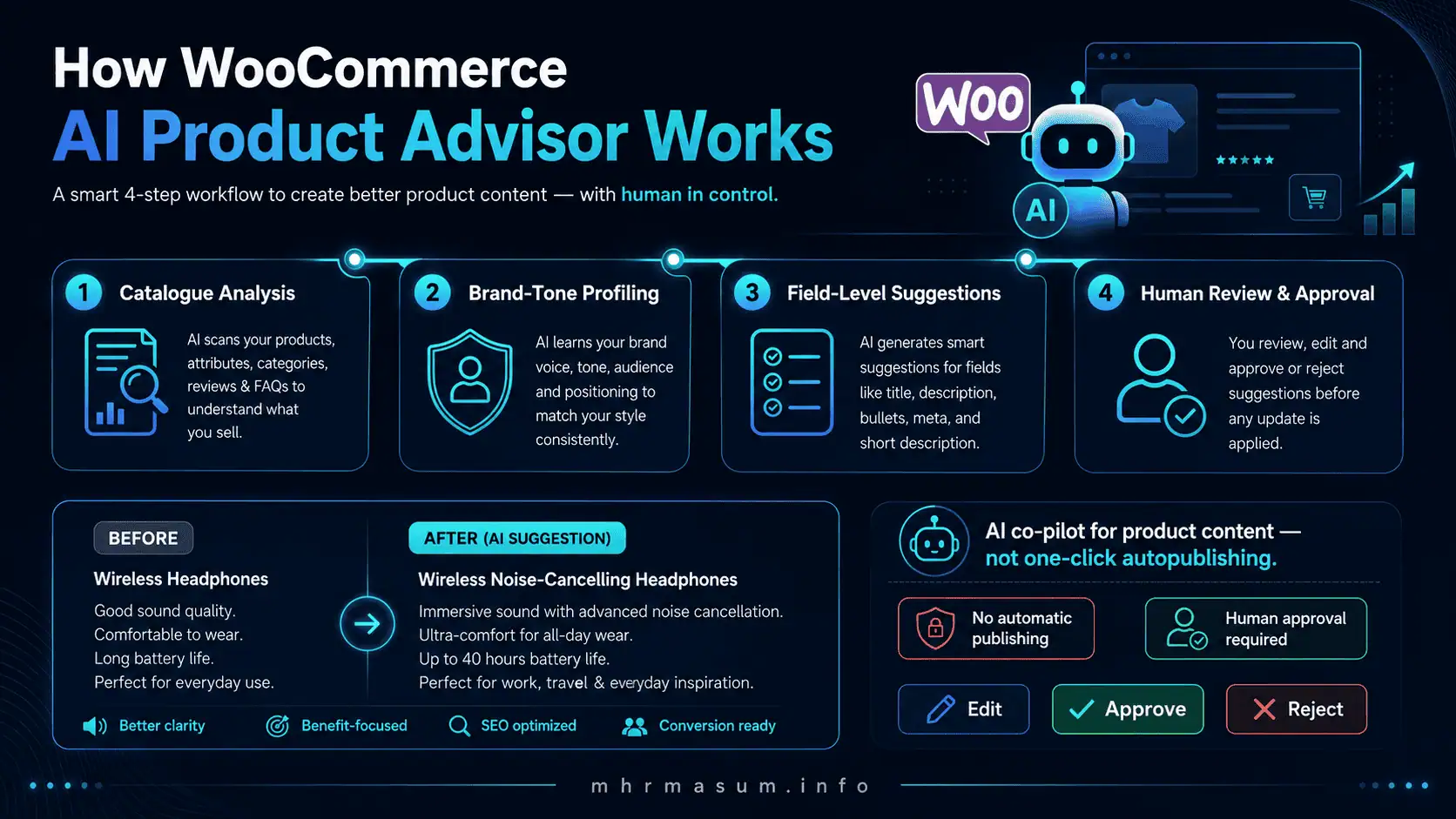
The plugin has four main operational stages.
1. Catalogue Analysis
During onboarding, Product Advisor analyses the content already available in the store.
That may include information such as:
- Product names
- Long descriptions
- Short descriptions
- Categories
- Tags
- Product types
- Variation details
- Existing tone and writing patterns
The quality of this stage matters.
When the existing catalogue contains accurate and detailed product information, the tool has stronger source material. If the catalogue contains vague, duplicated or inaccurate data, the suggestions may inherit those weaknesses.
An AI tool cannot reliably infer a product’s:
- Exact material
- Certified capacity
- Safety rating
- Compatibility
- Dimensions
- Warranty
- Country of origin
- Regulatory status
- Included accessories
unless that information is already available to the system.
Product Advisor should therefore be considered a content-improvement tool—not a replacement for accurate product data collection.
2. Brand-Tone Profiling
The plugin builds a tone profile during onboarding.
WooCommerce says this is intended to make suggestions sound more like the store’s existing brand rather than generic model-generated text.
A tone profile may help maintain consistency around characteristics such as:
- Formal or conversational language
- Technical or beginner-friendly explanations
- Premium or value-driven positioning
- Short or detailed sentences
- Product-led or lifestyle-led copy
- Specialist terminology
- Direct or descriptive calls to action
However, tone is only one part of content quality.
A product description can match your brand voice and still be inaccurate, unhelpful or poorly optimised.
The final copy must also communicate:
- What the product is
- Who it is for
- Which problem it solves
- Its important specifications
- How it differs from alternatives
- What the customer receives
- Any limitations
- Shipping, warranty or compatibility considerations
3. Field-Level Suggestions
Product Advisor generates recommendations for specific product fields instead of replacing an entire listing without explanation.
Supported fields listed in the official launch announcement include:
- Product titles
- Long descriptions
- Short descriptions
- Categories
- Tags
- Variation details
Each field serves a different ecommerce purpose.
A title helps identify the product. A short description supports rapid decision-making. The long description explains the offer in depth. Categories organise the store. Tags connect related characteristics. Variations distinguish purchasable options.
Treating these fields separately makes it easier to evaluate whether each recommendation is appropriate.
4. Human Review and Approval
The plugin presents proposed changes through a comparison interface.
Users can:
- Review the existing value
- Review the proposed value
- Edit the suggestion
- Accept it
- Reject it
- Apply it
- Reverse an accepted change through history
The official plugin documentation states that no product change is made automatically. Every recommendation remains subject to explicit human approval.
This is one of the plugin’s most important safeguards.
The Three Main Product Advisor Screens
WooCommerce AI Product Advisor provides three principal views.
Overview
The Overview screen functions as a dashboard.
WooCommerce says it can display:
- Pending suggestions
- Approval rate
- Weekly usage
- Products where changes have been applied
- A local lift or dip indicator showing whether orders moved after an update
The order indicator may be useful as an initial signal, but it should not be interpreted as proof that a content change caused the sales movement.
Orders may also change because of:
- Price changes
- Promotions
- Stock availability
- Seasonality
- Advertising
- Email campaigns
- Competitor activity
- Shipping changes
- Reviews
- Website performance
- Demand fluctuations
Use the lift/dip indicator to identify products worth investigating, not as a complete causal attribution system.
Suggestions
The Suggestions screen contains a ranked queue of recommended improvements.
Products are prioritised according to their apparent optimisation potential.
Opening a product displays a side-by-side comparison where the proposed text can be reviewed and edited.
This workflow can help teams focus on higher-priority products instead of manually reviewing every catalogue item in random order.
History
The History screen records accepted changes.
It provides:
- A record of applied recommendations
- An audit trail
- The ability to review previous changes
- The option to revert an applied update
WooCommerce confirms that accepted changes can be reversed through the plugin’s history.
History is particularly useful when:
- A revised product underperforms
- A factual error is discovered
- The wrong tone was approved
- A category assignment causes navigation problems
- A variation description becomes confusing
- A seasonal update needs to be removed
How to Install WooCommerce AI Product Advisor
Because the plugin is currently distributed as an experimental beta, it is downloaded from the official WooCommerce GitHub repository rather than installed through the standard WordPress plugin search.
Step 1: Back Up the Website
Before installing any beta plugin, create a complete backup of:
- WordPress files
- Database
- WooCommerce settings
- Product data
- Product variations
- Media library
- Theme customisations
Verify that the backup can be restored.
Step 2: Create a Staging Website
Do not begin by testing the plugin across an active production catalogue.
Create a staging copy that closely matches:
- WordPress version
- WooCommerce version
- PHP version
- Theme
- Product plugins
- SEO plugins
- Feed plugins
- Multilingual plugins
- Inventory integrations
This will help identify compatibility issues before customer-facing products are changed.
Step 3: Check the Minimum Requirements
The current beta requires:
- WordPress 6.8 or later
- WooCommerce 10.5 or later
- PHP 7.4 or later
- A WordPress.com account
- A Jetpack connection for communication with the AI service
Meeting the minimum requirement does not guarantee compatibility with every extension.
Pay particular attention to plugins that modify:
- Product fields
- Variable products
- Product attributes
- Multilingual content
- SEO metadata
- Product feeds
- Custom product types
- Subscriptions
- Bookings
- Bundles
- Composite products
Step 4: Download the Official ZIP
Download the latest release from the official WooCommerce AI Product Advisor GitHub repository.
Avoid downloading copies from unverified plugin websites.
Step 5: Upload the Plugin
In WordPress:
- Go to Plugins.
- Select Add New Plugin.
- Click Upload Plugin.
- Select the ZIP file.
- Click Install Now.
- Activate the plugin.
Step 6: Open Product Advisor
After activation, open Product Advisor from the WordPress administration menu. The official documentation says it appears below the Products menu.
Step 7: Complete the Connection
Connect the store through the required WordPress.com/Jetpack process.
Before connecting a production store, review the applicable:
- Privacy documentation
- Terms
- Data-processing requirements
- Internal ecommerce policies
- Client contractual obligations
Do not assume that every store can transmit product information to an external AI service without review.
Step 8: Complete Brand Onboarding
Define the tone and brand direction as accurately as possible.
Include concrete guidance rather than vague descriptions.
Weak guidance:
Make the text professional and engaging.
Stronger guidance:
Use clear, practical British English. Keep sentences concise. Explain technical terms. Avoid exaggerated claims, clichés, excessive adjectives and urgency. Lead with the product type, primary use and most important verified specification.
Specific instructions reduce the likelihood of generic output.
How to Optimise Product Titles With AI Product Advisor
A product title must identify the item clearly.
It should not be treated as a place to insert every keyword associated with the product.
A useful title structure may include:
Brand + Product Type + Model + Important Differentiator + Variant
Examples:
- Anker SOLIX C300 Portable Power Station – 288Wh, 300W
- Organic Cotton Men’s Polo Shirt – Navy, Large
- EcoFlow Relay Module – 16A
- Stainless Steel Water Bottle – 750ml, Insulated
- Dental Assistant Training Workbook – 2026 Edition
The appropriate format depends on the product category and customer intent.
Review Every Suggested Title for Accuracy
Check whether the proposed title correctly identifies:
- Brand
- Model
- Product type
- Capacity
- Colour
- Size
- Material
- Quantity
- Compatibility
- Condition
- Included bundle items
Never approve an AI-generated specification simply because it sounds plausible.
Avoid Keyword Stuffing
Poor title:
Best Premium Cheap Portable Power Station Solar Generator Battery Backup Emergency Power Supply for Home Camping Travel
Improved title:
Anker SOLIX C300 Portable Power Station – 288Wh, 300W
The improved version is clearer, more credible and easier to scan.
Avoid Promotional Language
Do not place unnecessary promotional claims in the core product name, such as:
- Best
- Cheapest
- Number one
- Free shipping
- Limited offer
- Buy now
- Guaranteed results
Google Merchant Center requires product titles to accurately identify the item and advises against promotional language, all-capital formatting and gimmicky characters. It also recommends including distinguishing details such as colour or size for variants.
Protect Stable Product URLs
Changing the visible product title does not always need to change the product slug.
Before modifying a URL, assess:
- Existing organic traffic
- Backlinks
- Merchant Center matching
- Advertising URLs
- Canonical tags
- Internal links
- Social links
- Customer bookmarks
Product Advisor improves listing fields, but URL changes require a separate migration decision.
How to Improve Long Product Descriptions
The long description should help the customer make an informed purchasing decision.
It should not merely repeat the title using different words.
A strong description can include:
- Clear product overview
- Primary use
- Key benefits
- Verified technical features
- Ideal customer or use case
- Dimensions or capacity
- Material
- Compatibility
- What is included
- Usage or care instructions
- Warranty information
- Limitations
- Relevant FAQs
Use Benefits Without Inventing Claims
Feature:
288Wh battery capacity.
Supported benefit:
Provides portable power for compatible devices during travel, outdoor use or short backup situations.
Unsupported claim:
Powers your entire home during any outage.
AI-generated copy often moves too quickly from a real feature to an exaggerated benefit.
Require evidence for claims involving:
- Performance
- Safety
- Medical outcomes
- Energy savings
- Durability
- Environmental impact
- Compatibility
- Lifespan
- Legal compliance
- Certifications
Add Product-Specific Evidence
Strengthen the recommended copy with information only your business can provide:
- Original product testing
- Product photographs
- Demonstration videos
- Setup notes
- Customer questions
- Compatibility testing
- Comparison results
- Real use cases
- Installation experience
- Support-team insights
Google’s guidance for AI-assisted content emphasises accuracy, quality, relevance and original value. Automatically generating many pages without meaningful added value may conflict with its spam policies on scaled content abuse.
Read Why Generic AI Content Does Not Rank Anymore for a broader framework covering original evidence, expert review and useful AI-assisted content.
How to Improve WooCommerce Short Descriptions
The short description is often displayed near the product title, price and purchase controls.
It should communicate the product’s core value quickly.
A useful structure is:
- One-sentence product summary
- Three to five differentiating features
- Main use case
- Important compatibility or size information
Example:
A compact 288Wh portable power station designed for travel, remote work and emergency backup. It delivers up to 300W output, supports multiple device types and is suitable for users who need portable power without carrying a full-size unit.
Avoid filling the short description with:
- Long brand stories
- Shipping policies
- Repeated keywords
- Every technical specification
- Unsupported superlatives
- Multiple calls to action
The short description should support the buying decision, while the long description handles detail.
Product Categories, Tags and Attributes Are Not Interchangeable
WooCommerce uses categories, tags and attributes for different purposes.
WooCommerce’s documentation explains that these taxonomies help organise, display and filter products, while variations are created from assigned attributes such as size or colour.
Product Categories
Categories provide the primary hierarchical organisation of the store.
Example:
- Electronics
- Portable Power
- Portable Power Stations
- Expansion Batteries
- Solar Panels
- Portable Power
Use categories for major product families that support:
- Store navigation
- Breadcrumbs
- Category landing pages
- Internal linking
- Customer browsing
- Search-engine understanding
Avoid creating a separate category for every small product characteristic.
Product Tags
Tags connect products through non-hierarchical characteristics.
Examples:
- Camping
- Fast charging
- Waterproof
- Organic cotton
- Beginner friendly
- USB-C
- Indoor use
Tags should be meaningful and reusable.
Do not create near-duplicate tags such as:
- Fast charge
- Fast charging
- Quick charge
- Rapid charging
unless they serve a deliberate purpose.
Product Attributes
Attributes describe structured characteristics that may support filtering or variations.
Examples:
- Colour
- Size
- Capacity
- Material
- Voltage
- Storage
- Connection type
Attributes should be prioritised over placing all product details in free-form tags.
How to Review AI Taxonomy Suggestions
Before approving a proposed category, tag or attribute, ask:
- Does this term already exist?
- Is there a duplicate or synonym?
- Will customers use it to navigate?
- Does it belong in a category, tag or attribute?
- Will it create a thin archive?
- Does it support filtering?
- Is it accurate across all assigned products?
- Is the naming format consistent?
AI can recommend useful organisation, but uncontrolled approval can make a catalogue more fragmented.
How to Optimise Product Variations
Variable products require particularly careful review.
A variation may have its own:
- SKU
- Price
- Stock level
- Image
- Weight
- Dimensions
- Description
- Attributes
WooCommerce allows individual variations to carry distinct product information, including SKU, image, price and stock.
Typical variation problems include:
- “Small,” “Medium” and “Large” without measurements
- Colour names that do not match images
- Missing variant images
- Reused SKUs
- Empty descriptions
- Inconsistent prices
- Incorrect stock
- Unclear compatibility
- Attributes that are not selected correctly
- Variants presented as separate products without a coherent canonical strategy
Variation Review Checklist
For each variation, confirm:
- Unique SKU
- Correct price
- Correct availability
- Correct image
- Clear colour or size
- Accurate dimensions
- Correct GTIN where applicable
- Consistent parent product relationship
- Correct Merchant Center item group
- Matching structured data
- Matching feed data
Product Advisor can help improve variation wording, but it should not be relied upon to independently validate inventory, identifiers or feed architecture.
AI Product Advisor and Google Product Structured Data
Improving visible product copy is only one part of product SEO.
Google can use Product structured data to understand details such as:
- Product name
- Description
- Images
- Brand
- SKU
- GTIN
- Price
- Currency
- Availability
- Condition
- Reviews
- Shipping
- Returns
Product structured data can make product pages eligible for richer ecommerce appearances in Google Search, Google Images and Google Lens. Google separates merchant-listing markup for purchasable products from product-snippet markup used for pages such as reviews.
After applying Product Advisor changes, test whether the visible page and schema still match.
For example:
| Visible product information | Structured-data value |
| Product title | Product.name |
| Product description | Product.description |
| SKU | Product.sku |
| Brand | Product.brand |
| Price | Offer.price |
| Currency | Offer.priceCurrency |
| Availability | Offer.availability |
Google may verify structured product data against the content visible on the landing page. Inconsistent values can reduce trust in the data or cause reporting errors.
Product Variant Schema
For products with meaningful variants, Google supports ProductGroup and variant Product markup.
Google states that eligible variant markup must include Product structured data alongside the relevant variant properties.
The plugin’s official feature list does not say that it automatically creates or repairs:
- Product schema
ProductGroupmarkup- GTIN values
- Merchant Center feeds
- Canonicals
- Variant URLs
These elements require separate validation.
AI Product Advisor and Google Merchant Center
Many WooCommerce stores synchronise product information with Google Merchant Center.
Product titles and descriptions may be sent through:
- A WooCommerce extension
- Google Listings & Ads
- A feed plugin
- Merchant API
- A custom integration
- Structured data
- Automated website crawling
When Product Advisor modifies a product title or description, the connected feed may also change.
Review whether the new content:
- Matches the landing page
- Accurately identifies the product
- Avoids promotional language
- Includes important variant details
- Matches price and availability
- Fits the relevant character limits
- Uses the correct product identifier
- Complies with Shopping policies
Important AI-Generated Content Disclosure
Google Merchant Center requires generative-AI-created product titles and descriptions to use the structured title and structured description attributes.
For an AI-generated product title, Google requires:
structured_titledigital_source_typeset totrained_algorithmic_media- The generated text in the content sub-attribute
For an AI-generated description, Google requires the corresponding structured_description format.
This requirement applies to product data submitted to Merchant Center.
Do not assume that WooCommerce AI Product Advisor or your existing feed plugin automatically changes standard title and description attributes into the required structured AI fields.
After using Product Advisor:
- Identify whether AI-generated text is being submitted to Merchant Center.
- Check whether your feed connector supports
structured_title. - Check whether it supports
structured_description. - Confirm the correct digital-source value.
- Validate the resulting product data.
- Monitor Merchant Center diagnostics.
This is a critical compliance step for WooCommerce stores using AI-generated catalogue content.
Does AI Product Advisor Improve SEO Automatically?
No tool can guarantee rankings simply by rewriting product fields.
Product Advisor may support SEO by helping improve:
- Product clarity
- Catalogue consistency
- Search-intent alignment
- Category organisation
- Attribute completeness
- Product differentiation
- Internal search
- Customer comprehension
- Long-tail relevance
However, organic performance also depends on:
- Crawlability
- Indexability
- Canonicals
- Site architecture
- Internal links
- Category-page quality
- Structured data
- Product feeds
- Images
- Reviews
- Price competitiveness
- Availability
- Page experience
- Backlinks
- Brand authority
- User satisfaction
Use my Technical SEO Checklist for WordPress Websites to review the technical foundation supporting your product catalogue.
For broader visibility across Google AI features and answer engines, read AI SEO for Google AI Overviews, ChatGPT, Gemini and Perplexity.
How to Prevent Generic AI Product Copy
The plugin’s brand-tone onboarding is helpful, but it cannot replace an editorial standard.
Use the following approval checklist.
1. Remove Empty Marketing Language
Delete phrases that sound impressive but communicate nothing.
Examples:
- Elevate your lifestyle
- Unlock unparalleled performance
- Experience the ultimate solution
- Crafted with quality in mind
- Take your experience to the next level
- Perfect for every occasion
Replace these with concrete information.
2. Verify Every Specification
Check:
- Numbers
- Units
- Dimensions
- Materials
- Capacity
- Compatibility
- Warranty
- Certification
- Included items
- Usage limits
3. Preserve Product Differences
Related products should not receive nearly identical copy.
Explain meaningful differences such as:
- Capacity
- Model
- Use case
- Material
- Target user
- Size
- Performance
- Accessories
- Compatibility
4. Add First-Hand Knowledge
Include information from:
- Product testing
- Installation
- Customer support
- Returns
- Reviews
- Sales questions
- Demonstrations
- Expert staff
5. Match Search Intent
A product page should satisfy transactional intent.
It should help the visitor decide:
- Is this the correct product?
- Does it fit my need?
- Is it compatible?
- What will I receive?
- How quickly can I get it?
- What happens if it is unsuitable?
6. Avoid Unsupported Comparisons
Do not claim that a product is:
- The best
- The fastest
- The safest
- The most efficient
- Better than every alternative
without reliable evidence.
7. Keep the Brand Voice Natural
Brand consistency does not mean repeating the same opening sentence on every product.
Vary the structure while maintaining consistent terminology and tone.
8. Review Regulated Claims
Products related to health, finance, safety, children, food, chemicals or regulated industries require additional expert and legal review.
9. Preserve Useful Existing Copy
Do not replace a strong, original description merely because the plugin has produced an alternative.
A suggestion is not automatically an improvement.
10. Read the Final Page as a Customer
Ignore the AI interface temporarily.
Open the live product preview and ask whether the content supports a real purchase decision.
Recommended Product Description Template
Use this framework when reviewing or editing AI Product Advisor output.
Product Overview
Explain what the product is in two or three direct sentences.
Best For
Identify the main customer or use case.
Key Benefits
Explain three to six meaningful benefits based on verified features.
Main Features
Provide a scannable list of important specifications.
Technical Specifications
Include accurate structured details such as:
- Model
- Material
- Dimensions
- Weight
- Capacity
- Voltage
- Compatibility
- Colour
- Size
What Is Included
List every item in the package.
Usage or Installation
Explain important setup or usage requirements.
Compatibility
Clarify what the product works with and what it does not support.
Warranty and Support
Include accurate warranty and support information.
Frequently Asked Questions
Answer common pre-purchase questions.
Call to Action
Use a clear, product-specific CTA rather than a generic sales phrase.
How to Use Product Advisor Across a Large Catalogue
Do not approve hundreds of recommendations in a single session.
Use a controlled prioritisation system.
Priority 1: High-Traffic Products
Start with products that already receive:
- Organic traffic
- Shopping impressions
- Paid traffic
- Category-page visibility
- Internal search demand
These products provide more reliable data after changes.
Priority 2: High-Revenue Products
Improve products that materially affect store revenue.
Even a modest conversion improvement can be meaningful.
Priority 3: High-Impression, Low-CTR Products
Use Google Search Console or Merchant Center to find products that receive visibility but limited clicks.
Review:
- Product title
- Image
- Price
- availability
- Brand
- Review information
- Search-intent match
Priority 4: Products With Incomplete Content
Identify products with:
- Missing descriptions
- Very short descriptions
- Uncategorized status
- Missing attributes
- Unclear variation labels
- Manufacturer-only copy
Priority 5: Products With High Returns or Support Requests
Content improvements may help reduce misunderstandings around:
- Size
- Compatibility
- Installation
- Included accessories
- Material
- Usage restrictions
Priority 6: New Products
Use Product Advisor as a quality-control stage before publishing new catalogue items.
Measuring the Impact of Product Advisor Changes
Measure performance before and after each controlled batch.
Product-Level Metrics
Track:
- Product-page sessions
- Organic clicks
- Organic impressions
- CTR
- Average position
- Add-to-cart rate
- Checkout initiation
- Conversion rate
- Orders
- Revenue
- Returns
- Support enquiries
Merchant Center Metrics
Track:
- Product approval
- Visibility
- Impressions
- Clicks
- CTR
- Disapprovals
- Title-related warnings
- Description-related warnings
- Price mismatch
- Availability mismatch
Catalogue-Quality Metrics
Track:
- Products without descriptions
- Products without categories
- Duplicate titles
- Duplicate descriptions
- Missing attributes
- Missing variation information
- Products using “Uncategorized”
- Products without identifiers
- Structured-data errors
Create an Annotation Log
For every change batch, record:
- Date
- Product IDs
- Fields changed
- Original values
- Approved values
- Reviewer
- Campaign activity
- Price changes
- Promotion status
- Stock status
This makes later analysis more reliable.
Suggested A/B Testing Method
Traditional A/B testing can be difficult when organic search is involved because Google may index only one canonical product version.
Instead, use a matched-group test.
Test Group
Select 20 to 50 similar products and apply carefully reviewed Product Advisor recommendations.
Control Group
Select a comparable group and leave the content unchanged.
Match Products By
- Category
- Price range
- Existing traffic
- Seasonality
- Stock
- Brand
- Product age
Compare Over 30–60 Days
Evaluate:
- Organic impressions
- Organic clicks
- CTR
- Add-to-cart rate
- Conversion rate
- Revenue per session
- Merchant Center visibility
Do not treat small short-term changes as conclusive.
Common WooCommerce AI Product Advisor Mistakes
Approving Every Suggestion
The plugin is an advisor, not the product expert.
Testing Directly on Production
The tool is currently experimental and should be evaluated in a controlled environment.
Ignoring Feed Changes
A revised title or description may be synchronised to Google Merchant Center.
Ignoring AI Disclosure Requirements
Merchant Center has specific attributes for generative-AI-created titles and descriptions.
Creating Too Many Categories
Uncontrolled category suggestions can damage navigation and create thin archives.
Treating Tags as Keywords
WooCommerce tags are catalogue taxonomies, not a place to insert every SEO keyword.
Replacing Original Expert Copy
Existing first-hand content may be more valuable than a polished but generic suggestion.
Focusing Only on Search Engines
Product copy must support customers and conversions.
Ignoring Variations
The parent description cannot compensate for unclear or inaccurate variant information.
Trusting the Lift/Dip Indicator Alone
Order movement does not prove that one content update caused the result.
Forgetting Structured Data
Visible product content, schema and feed data should remain consistent.
Limitations of WooCommerce AI Product Advisor
The beta has several important limitations.
It Is Experimental
WooCommerce explicitly describes the plugin as experimental and says it was released early to collect real-world feedback.
It Requires an External Connection
The plugin uses a WordPress.com/Jetpack connection to communicate with its AI service.
It Does Not Replace Product Expertise
It cannot independently verify specifications that are not available in the source data.
It Does Not Guarantee SEO Growth
Better copy can support SEO, but rankings depend on many additional systems.
It Does Not Replace Feed Management
The published feature list does not state that it manages Merchant Center feed architecture or AI-disclosure attributes.
It Does Not Replace Structured-Data Validation
Product and variation schema require separate testing.
It Does Not Replace Image Optimisation
The public feature list focuses on textual product fields and catalogue taxonomies.
It Does Not Replace Analytics
The dashboard provides useful signals, but complete measurement still requires Search Console, GA4, WooCommerce Analytics, Merchant Center and business data.
Compatibility May Change
The plugin is a beta and WooCommerce core continues to evolve. Verify current requirements before installation.
30-Day WooCommerce AI Product Advisor Implementation Plan
Days 1–3: Technical Preparation
- Back up the production store.
- Create a staging copy.
- Check WordPress, WooCommerce and PHP versions.
- Review plugin compatibility.
- Review privacy and data-processing requirements.
- Download the official plugin.
Days 4–7: Onboarding and Brand Rules
- Install Product Advisor on staging.
- Complete the WordPress.com connection.
- Review existing brand language.
- Create clear tone instructions.
- Define prohibited phrases.
- Define factual-review requirements.
- Identify product-information owners.
Days 8–12: Catalogue Audit
- Identify missing descriptions.
- Find duplicate titles.
- Review categories.
- Review tags.
- Review attributes.
- Identify incomplete variations.
- Group products by revenue and traffic.
Days 13–17: Controlled Testing
- Select 10 to 20 products.
- Review Product Advisor suggestions.
- Edit generic wording.
- Verify specifications.
- Check feed impact.
- Validate structured data.
- Preview mobile and desktop pages.
Days 18–22: Publish the First Batch
- Apply approved changes.
- Document the date.
- Record original content.
- Request reindexing only where appropriate.
- Monitor Merchant Center diagnostics.
- Check product-page display.
Days 23–26: Measure Early Signals
- Review organic impressions.
- Review CTR.
- Check add-to-cart rate.
- Monitor conversion rate.
- Review support enquiries.
- Check orders and revenue.
- Identify unexpected changes.
Days 27–30: Create the Ongoing Workflow
- Refine brand guidance.
- Create a human approval checklist.
- Prioritise the next product group.
- Define monthly catalogue metrics.
- Assign content ownership.
- Establish a rollback process.
WooCommerce AI Product Advisor and AI Shopping
AI shopping systems require more than persuasive descriptions.
They need structured, accurate and consistent product data.
Important fields may include:
- Product name
- Brand
- SKU
- GTIN
- Price
- Availability
- Images
- Variants
- Specifications
- Shipping
- Returns
- Reviews
- Merchant policies
A product description can help an AI system understand context and use cases, but it cannot compensate for missing identifiers, incorrect availability or inconsistent pricing.
This is why AI Product Advisor should be integrated into a broader product-data strategy.
Read Agentic Commerce and UCP for WooCommerce to understand how structured commerce data may support AI agents, shopping interfaces and future purchasing workflows.
You can also review GEO vs AEO vs SEO for a broader comparison of optimisation across search engines and answer systems.
Frequently Asked Questions
What is WooCommerce AI Product Advisor?
WooCommerce AI Product Advisor is an experimental plugin that analyses a WooCommerce catalogue and recommends improvements to product titles, descriptions, short descriptions, categories, tags and variation details.
When was WooCommerce AI Product Advisor launched?
WooCommerce announced the first public beta on May 25, 2026.
Is WooCommerce AI Product Advisor part of WooCommerce core?
The initial beta is distributed as a separate plugin through the official WooCommerce GitHub repository.
Is the plugin stable?
The current release is identified as 1.0-beta, and WooCommerce describes it as experimental.
What can Product Advisor improve?
The official launch announcement lists titles, descriptions, short descriptions, categories, tags and variation details.
Does the plugin edit products automatically?
No. Recommendations must be reviewed and explicitly approved before they are applied.
Can I edit an AI suggestion before applying it?
Yes. The plugin provides inline editing through its comparison interface.
Can I undo a Product Advisor change?
Yes. Accepted changes are recorded in history and can be reverted.
Does it require Jetpack?
It requires a WordPress.com/Jetpack connection to communicate with the AI service.
What are the minimum requirements?
The current beta requires WordPress 6.8+, WooCommerce 10.5+ and PHP 7.4+.
Does AI Product Advisor improve Google rankings?
It may help improve product-content quality and consistency, but it does not guarantee rankings.
Can it create descriptions for empty products?
The system is intended to recommend product-listing improvements, including descriptions. The quality of the result will depend on the other product information available.
Does it create Product schema?
Product schema is not listed among the initial beta’s published features. Validate structured data separately.
Does it update Google Merchant Center?
The plugin modifies WooCommerce product fields. Whether those changes reach Merchant Center depends on your feed or integration setup.
Must AI-generated product titles be labelled in Merchant Center?
Google requires generative-AI-created titles and descriptions submitted as product data to use its structured title and structured description attributes.
Should I use it on a live website?
Because the plugin is experimental, begin on a staging website and test a small product group before production deployment.
Can Product Advisor replace a product copywriter?
It can accelerate auditing and drafting, but a product expert or trained reviewer should verify accuracy, brand fit, legal claims, search intent and customer usefulness.
Final Thoughts
WooCommerce AI Product Advisor represents a practical shift in how ecommerce stores may manage catalogue content.
Instead of asking a general AI chatbot to rewrite one product at a time, the plugin works inside WooCommerce, analyses existing store content, builds a brand-tone profile, prioritises products and presents changes through a controlled approval workflow.
Its strongest features are not simply text generation.
They are:
- Catalogue-level analysis
- Product prioritisation
- Brand-tone guidance
- Field-level recommendations
- Side-by-side review
- Human approval
- Change history
- Undo support
However, these controls do not eliminate the need for professional review.
A successful product listing must remain:
- Accurate
- Specific
- Useful
- Original
- Consistent
- Search-intent aligned
- Conversion focused
- Structurally valid
- Compliant with Merchant Center
- Supported by correct product data
Use AI Product Advisor to accelerate expert work—not replace it.
The best result is not a catalogue that sounds as though it was generated by AI.
It is a catalogue that communicates each product more clearly, maintains a recognisable brand voice and gives both customers and search systems accurate information.
Need Help Optimising a WooCommerce Store for SEO and AI Search?
I am MD Harunur Rashid, an SEO, AI SEO and Digital Growth Consultant with more than 17 years of experience helping ecommerce brands, agencies, local businesses and website owners improve organic visibility.
My WooCommerce and WordPress services can include:
- WooCommerce SEO audits
- Product and category optimisation
- Technical SEO
- Product structured data
- Google Merchant Center diagnostics
- Product-feed review
- WordPress speed optimisation
- AI-ready content systems
- Custom WooCommerce functionality
- Custom WordPress plugin development
- Search Console and GA4 reporting
- Ecommerce content strategy
Visit the mhrmasum.info homepage for more practical SEO, AI-search, WooCommerce and WordPress resources.
Explore my:
- SEO and Digital Growth Services
- Professional Background and Experience
- SEO and WordPress Portfolio
- Technical SEO and Keyword Research Portfolio
- Website Speed Optimisation Portfolio
For a WooCommerce SEO audit, product-data review or custom optimisation plan, contact MD Harunur Rashid.
Official Resources
- WooCommerce AI Product Advisor launch announcement and feature overview.
- Official WooCommerce AI Product Advisor repository and requirements.
- Google Merchant Center product-data specification
- Google guidance for AI-generated product titles and descriptions.
- Google Product and Merchant Listing structured-data documentation.
- Google guidance on useful AI-assisted content