AI platforms are becoming a measurable source of website traffic.
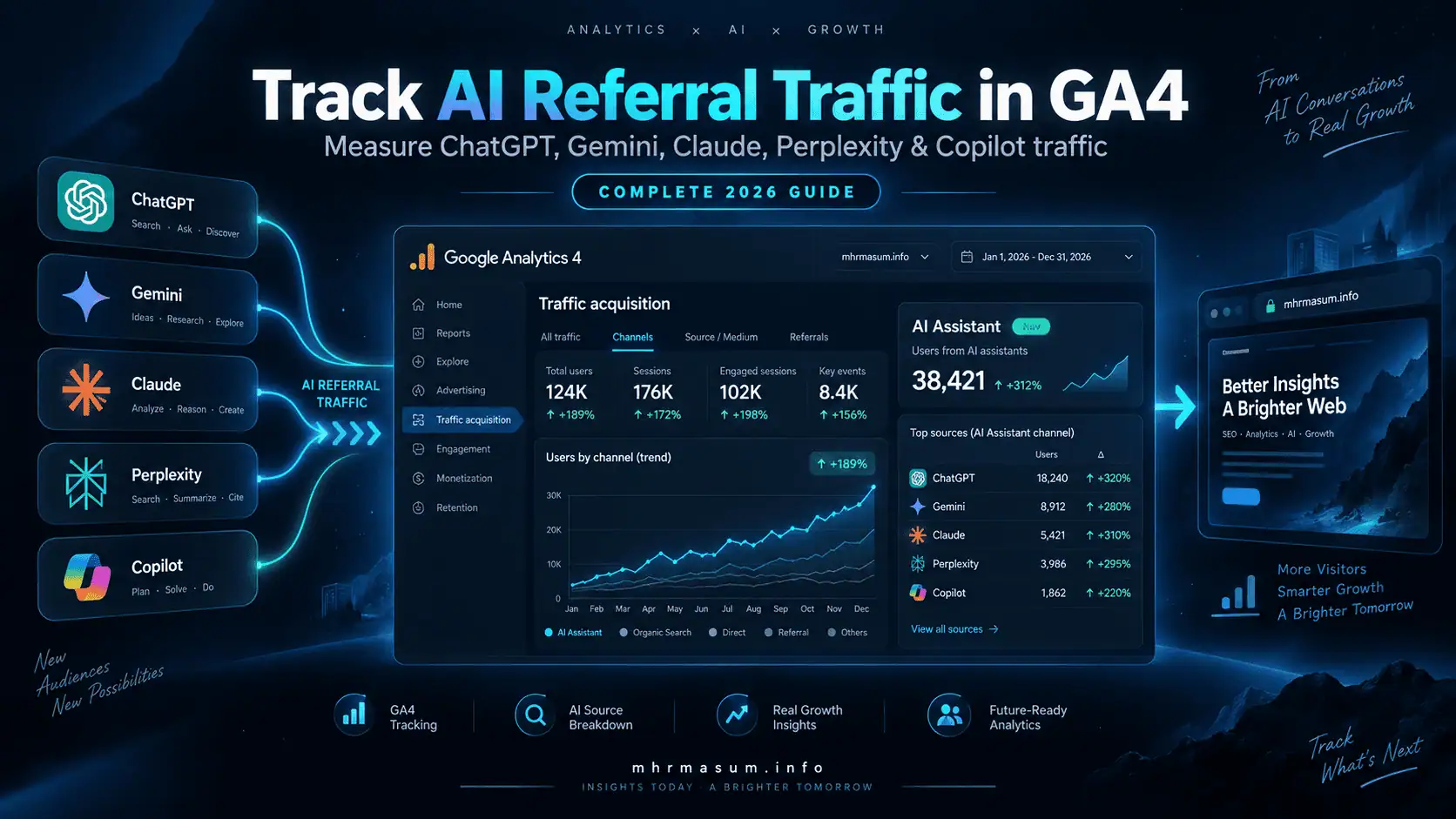
People increasingly discover businesses, products, articles, services and expert resources through conversational systems such as ChatGPT, Gemini, Claude, Perplexity and Microsoft Copilot.
A user may ask an AI assistant:
What is the best way to recover after a Google core update?
The AI response may cite or link to an article on your website. If the user follows that link, the visit can potentially appear in Google Analytics 4.
Until recently, marketers often had to create custom GA4 channel groups and regular expressions to separate AI referrals from ordinary Referral traffic.
That changed in 2026.
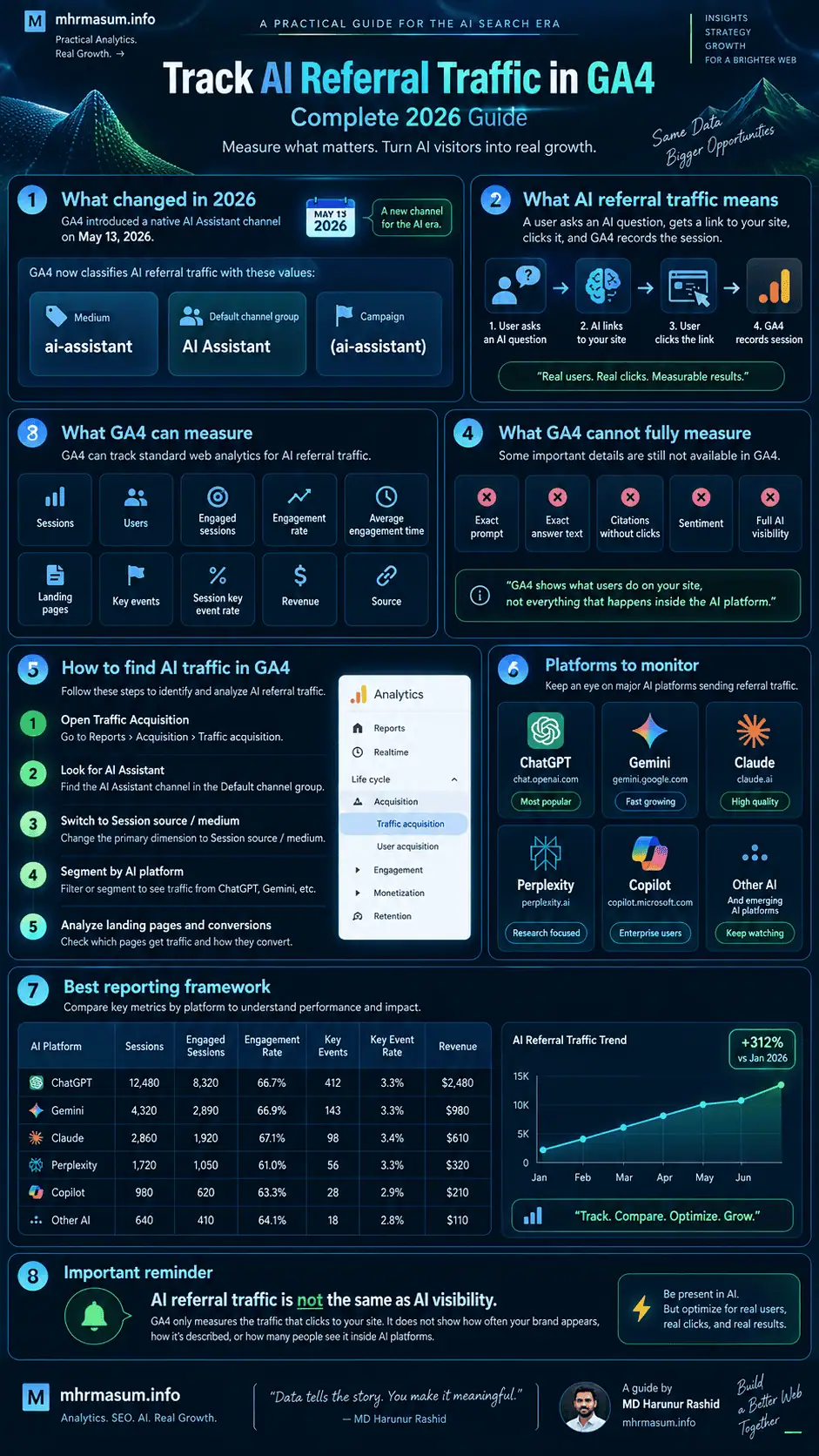
On May 13, 2026, Google Analytics introduced a native AI Assistant channel in its Default Channel Group. When GA4 recognises a referrer as an AI assistant, it can automatically assign the traffic a medium of ai-assistant, place it in the AI Assistant channel and use (ai-assistant) as the campaign value.
This significantly improves AI traffic measurement, but it does not solve every attribution problem.
You still need to understand how to analyse individual AI platforms, landing pages, engagement, key events, leads, revenue and traffic that arrives without usable referral information.
This guide explains how to build a practical AI referral reporting system in GA4 for ChatGPT, Gemini, Claude, Perplexity, Copilot and other emerging AI platforms.
For more practical resources covering SEO, AI search, Google Analytics, WordPress and digital growth, visit the MD Harunur Rashid SEO and AI SEO homepage.
Important 2026 Update: GA4 Now Has a Native AI Assistant Channel
Google Analytics introduced native AI-assistant traffic measurement on May 13, 2026.
This means many websites no longer need a custom channel group simply to separate recognised AI referrals from normal referral traffic.
GA4 now automatically classifies recognised AI-assistant referrals when enough referral information is available.
What Google Analytics Changed
Google introduced three important traffic-source values for recognised AI-assistant traffic.
| GA4 Field | AI Assistant Value |
|---|---|
| Medium | ai-assistant |
| Default channel group | AI Assistant |
| Campaign | (ai-assistant) |
Google says the new channel is intended to help businesses understand clicks from AI assistants and compare them with channels such as Organic Search.
Which AI Assistants Can Be Included?
Google maintains its own recognised AI-assistant source list.
Google’s documentation gives examples that include platforms such as:
ChatGPT, Gemini, Claude, DeepSeek, Microsoft Copilot and Grok.
The exact list should not be treated as permanently fixed because Google can update its source classifications over time.
Google AI Overviews and AI Mode Are Different
Google’s current default-channel documentation specifically states that its AI Assistant channel excludes Google AI Overviews and Google AI Mode.
That distinction is important.
A click from ChatGPT or Perplexity is traffic from an external AI platform.
A click associated with a Google AI search experience remains part of Google’s own search ecosystem rather than the external AI Assistant channel.
Therefore, do not use the GA4 AI Assistant channel as your only measurement of AI-related search visibility.
What Is AI Referral Traffic?
AI referral traffic is website traffic generated when a user follows a link from an AI assistant, conversational search system or answer engine to your website.
The journey may look like this:
User asks an AI question
        ↓
AI generates an answer
        ↓
Your website is cited or linked
        ↓
User clicks the link
        ↓
Website loads
        ↓
GA4 records the session
If the AI platform passes a recognisable referrer and the Google Analytics tag runs correctly, GA4 may identify where the session originated.
AI Referral Traffic Is Not the Same as AI Visibility
This distinction is essential.
Suppose ChatGPT mentions your business 500 times but only five users click through to your website.
GA4 can potentially measure those five website visits.
It cannot tell you that your brand appeared in 500 AI responses.
Therefore:
AI visibility includes citations, mentions and appearances.
AI referral traffic measures users who actually reach your website.
A complete AI-search measurement strategy needs both concepts.
For a broader optimisation framework, read my guide to AI SEO for Google AI Overviews, ChatGPT, Gemini and Perplexity.
What GA4 Can and Cannot Measure About AI Traffic
GA4 is useful for measuring activity after a visitor reaches your website.
It should not be treated as a complete AI-visibility monitoring platform.
What GA4 Can Measure
When a session is attributed correctly, you can analyse metrics such as:
| Metric | What It Helps You Understand |
|---|---|
| Sessions | Number of AI-originated visits |
| Users | Number of users associated with those visits |
| Engaged sessions | Whether visitors meaningfully interact |
| Engagement rate | Percentage of sessions meeting GA4 engagement criteria |
| Average engagement time | How long visitors actively engage |
| Landing pages | Pages receiving AI referrals |
| Key events | Important business actions |
| Session key event rate | Percentage of sessions producing important actions |
| Revenue | Ecommerce or other recorded revenue |
| Source | Individual AI platform where identifiable |
The GA4 Traffic Acquisition report includes sessions, engaged sessions, engagement rate, key events, session key event rate and total revenue, making it suitable for comparing AI traffic with other acquisition channels.
What GA4 Cannot Reliably Tell You
GA4 does not normally show:
- The user’s original AI prompt
- The exact answer generated
- The exact sentence where your brand appeared
- How often your website was cited without a click
- Your citation share against competitors
- Whether an AI answer positively or negatively described your brand
- Complete AI visibility across every platform
This is why AI referral reporting should eventually be combined with citation monitoring, branded-search analysis, CRM data and business outcomes.
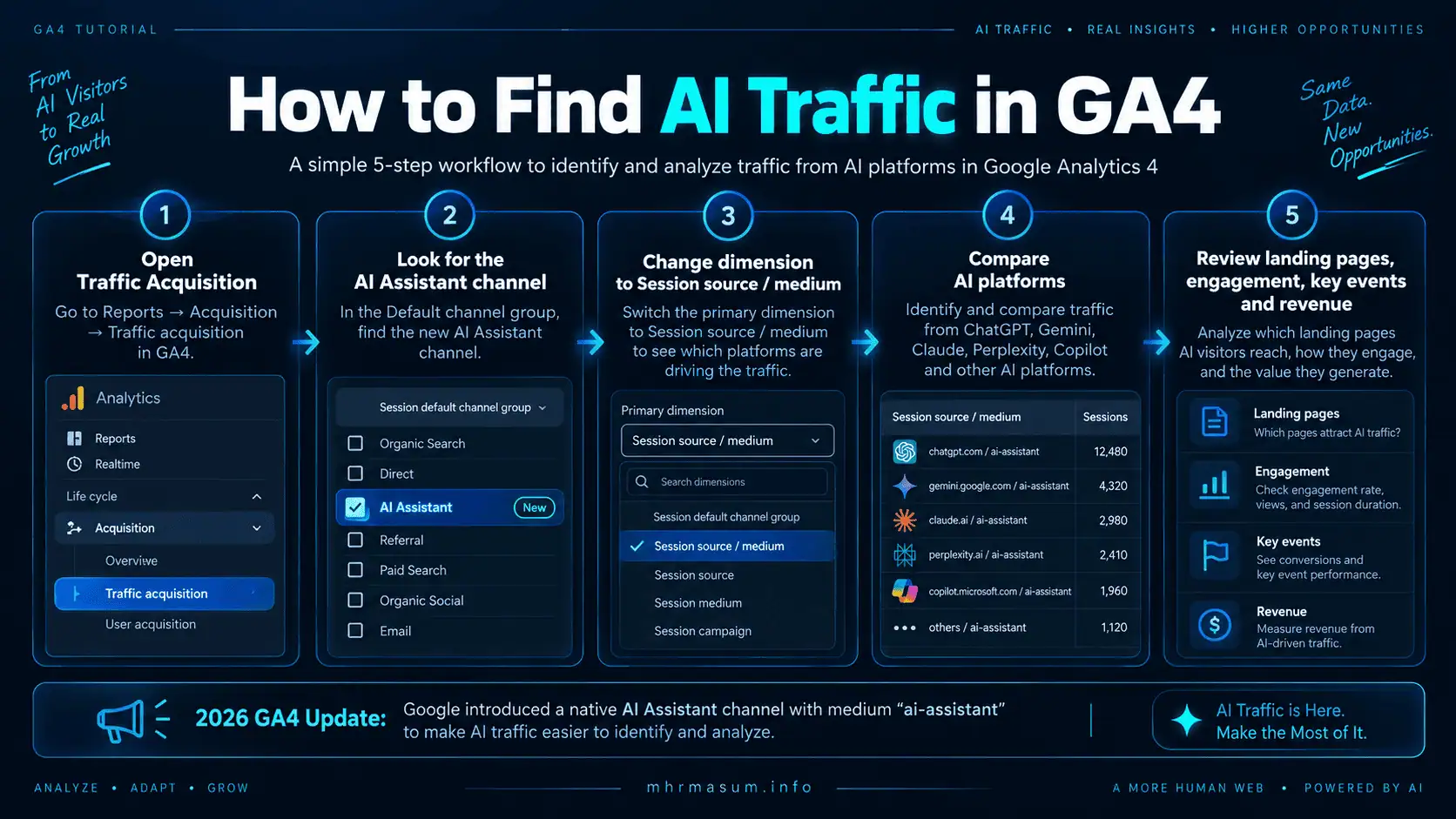
How to Find AI Assistant Traffic in GA4
The simplest 2026 workflow is to start with GA4’s native AI Assistant channel.
Use this before building any custom regex or complicated Exploration.
Open the Traffic Acquisition Report
In GA4, navigate to:
Reports → Acquisition → Traffic acquisition
Google describes Traffic Acquisition as the session-focused report for understanding where both new and returning visitors’ sessions originate.
The default dimension is usually Session default channel group.
Look for:
AI Assistant
If your site has received recognised AI-assistant referrals during the selected period, the channel can appear alongside Organic Search, Direct, Referral, Organic Social and other channels.
Why Traffic Acquisition Is Better Than User Acquisition for This Analysis
Traffic Acquisition is session-scoped.
That matters because the same person may discover your website through several channels over time.
For example:
First visit: Google Organic
Second visit: ChatGPT
Third visit: Direct
User Acquisition focuses on how the user was initially acquired.
Traffic Acquisition tells you what generated individual sessions.
For ongoing AI referral analysis, Traffic Acquisition is usually the more useful starting point. Google confirms that User Acquisition is user-scoped while Traffic Acquisition is session-scoped.
How to Identify Individual AI Platforms
The AI Assistant channel provides the combined total, but marketers usually need more detail.
You may want to know whether traffic came from:
- ChatGPT
- Gemini
- Claude
- Perplexity
- Copilot
- Another recognised AI assistant
Use Session source or Session source / medium.
Change the Primary Dimension
Inside Traffic Acquisition, change the table dimension from:
Session default channel group
to:
Session source / medium
GA4 defines Session source as the publisher or source responsible for starting the session and Session source / medium as the corresponding source and acquisition method.
You may then see source values associated with specific AI platforms.
Because domains and platform entry points can evolve, use the values actually appearing in your own GA4 property rather than assuming a fixed source format forever.
AI Platform Reporting Framework
A useful monthly AI-source table could look like this:
| AI Source | Sessions | Engaged Sessions | Engagement Rate | Key Events | Key Event Rate | Revenue |
|---|---|---|---|---|---|---|
| ChatGPT | — | — | — | — | — | — |
| Gemini | — | — | — | — | — | — |
| Claude | — | — | — | — | — | — |
| Perplexity | — | — | — | — | — | — |
| Copilot | — | — | — | — | — | — |
| Other AI | — | — | — | — | — | — |
Do not focus only on session volume.
An AI source generating 20 highly qualified visits may be commercially more valuable than another platform generating 300 low-engagement sessions.
How to Track ChatGPT Referral Traffic in GA4
ChatGPT can provide links to external sources, particularly when responses use web search or cited web information. OpenAI’s official documentation confirms that ChatGPT Search provides links to relevant web sources.
When users click those links and referral information reaches your site, GA4 may attribute the resulting session to the AI Assistant channel and identify ChatGPT-related source information.
What to Analyse for ChatGPT Traffic
For ChatGPT-originated traffic, focus on:
| Area | Question |
|---|---|
| Landing page | Which pages receive ChatGPT visits? |
| Engagement | Do those visitors read or interact? |
| Lead generation | Do they submit forms or contact you? |
| Ecommerce | Do they view products, add to cart or purchase? |
| Topic patterns | Which subjects receive repeated referrals? |
| Branded demand | Does AI exposure correspond with later brand searches? |
You already have a dedicated guide covering how to track ChatGPT search traffic in GA4. This broader article extends that framework across multiple AI platforms.
How to Track Gemini Referral Traffic
Google Gemini can direct users to external websites when its responses include supporting sources or links.
GA4’s AI Assistant classification includes Gemini among the AI platforms Google uses as examples for the new channel.
Analyse Gemini traffic separately when source information makes this possible.
Gemini Traffic vs Google Search Traffic
Do not combine Gemini referrals with ordinary Google Organic Search merely because both are Google products.
The user journeys differ.
Traditional search:
Search query
→ search results
→ website
Gemini:
Conversational prompt
→ AI response
→ source/link
→ website
Separating them helps you understand whether conversational discovery behaves differently from traditional search.
How to Track Claude Referral Traffic
Claude can work with web-based information and users may follow links provided during research or conversational workflows.
Google explicitly mentioned Claude when it announced its new AI Assistant traffic measurement in May 2026.
If Claude-generated visits appear in your GA4 source data, compare their behaviour with other AI platforms.
A useful question is not simply:
How much Claude traffic do I have?
A better question is:
Which content attracts Claude-referred users, and what do those users do next?
How to Track Perplexity Referral Traffic
Perplexity describes itself as an AI-powered search engine that searches the web and provides answers with citations and links to original sources.
This makes Perplexity particularly relevant to referral analysis because clicking original sources is a fundamental part of its research experience.
Why Perplexity Can Be Valuable to Publishers
Perplexity visitors may arrive with relatively specific informational intent.
For example, a visitor may have already asked:
What is the best WooCommerce strategy for Merchant API migration?
and then click your detailed guide as a cited source.
That context may produce a different quality of visit from a broad informational search.
Use GA4 engagement, key-event and revenue metrics to test that hypothesis with your own data rather than assuming all AI referrals are high quality.
How to Track Microsoft Copilot Referral Traffic
Microsoft operates several Copilot experiences across personal, business and Microsoft 365 environments.
Current Microsoft documentation lists entry points that include domains and experiences such as copilot.microsoft.com, copilot.com, copilot.ai, Microsoft 365 Copilot interfaces and Edge-based Copilot experiences.
This creates an important tracking consideration.
A single brand may generate referral traffic through more than one technical entry point.
Do Not Build Copilot Tracking Around One Domain Forever
Avoid designing a permanent analytics rule that assumes:
Copilot = exactly one hostname
Microsoft has changed and consolidated Copilot entry points over time.
Use GA4’s native classification as the baseline and review Session source values periodically.
Use GA4’s Native AI Assistant Channel First
For most businesses, the recommended 2026 setup is:
Native AI Assistant channel
        ↓
Session source / medium
        ↓
Landing-page analysis
        ↓
Engagement
        ↓
Key events
        ↓
Revenue / leads
This avoids unnecessary customisation.
Google maintains the default channel classifications, which means recognised AI sources can be updated without requiring you to manually modify every property.
When a Custom AI Channel Group Is Still Useful
Custom channel groups remain valuable when you need reporting that differs from Google’s native classification.
Google specifically supports custom channel groups and even provides an AI-assistant example in its official documentation.
Customisation is particularly useful when you want separate reporting categories such as:
ChatGPT
Gemini
Claude
Perplexity
Copilot
Other AI
instead of one combined AI Assistant channel.
Another Reason: Extra Coverage
You may discover a new AI platform appearing in your Session source data before Google’s default classification handles it the way you want.
A custom rule lets you add that source to your own reporting model.
Custom channel groups can also be applied retroactively to existing reporting data, which makes them useful for historical analysis.
How to Create a Custom AI Channel Group
Open the Google Analytics Admin area and locate Channel groups.
Create a new custom channel group or copy an existing configuration.
Add a channel named something like:
AI Assistants
Then create a source-matching rule.
Google currently provides this example regex for AI-assistant matching:
^.*ai|.*\.openai.*|.*chatgpt.*|.*gemini.*|.*gpt.*|.*copilot.*|.*perplexity.*|.*google.*bard.*|.*bard.*google.*|.*bard.*|.*.*gemini.*google.*$
Google recommends placing the AI Assistants rule above Referral so matching traffic is classified into your AI channel before the more general Referral rule is evaluated.
Do Not Treat Google’s Example Regex as a Permanent Universal List
AI platforms change quickly.
New tools appear, brands change domains and existing products consolidate into different services.
Therefore, review the source values appearing in your GA4 property before expanding the regex.
Google itself advises updating the regex when AI-assistant URLs or the list of platforms you want to measure changes.
Create Platform-Specific AI Channels
For deeper reporting, create separate channels rather than grouping every AI source together.
The safest approach is to inspect actual Session source values first.
Then use source rules conceptually such as:
| Channel | Source Rule Concept |
|---|---|
| ChatGPT | Source contains chatgpt or recognised OpenAI referral value |
| Gemini | Source contains gemini or relevant legacy Gemini/Bard value |
| Claude | Source contains claude |
| Perplexity | Source contains perplexity |
| Copilot | Source contains copilot |
| Other AI | Remaining recognised AI Assistant traffic |
Do not use a broad term such as google for Gemini because that could incorrectly capture Google Search and other Google traffic.
Likewise, avoid classifying all bing.com traffic as Copilot because Bing search and Copilot can share parts of Microsoft’s ecosystem.
GA4 Source Group Adds Another Useful Layer
Google introduced a new Source Group field in June 2026 to consolidate inconsistent source values into cleaner platform-level groupings.
Google specifically said the feature is designed to help standardise traffic sources and includes built-in grouping for emerging sources such as ChatGPT/OpenAI and Perplexity. Google also states that Source Group is populated retroactively.
This provides another reporting option alongside:
- AI Assistant channel
- Session source
- Session source / medium
- Custom channel groups
For sites with substantial multi-channel traffic, Source Group can reduce the fragmentation caused by several technical source values representing the same broader platform.
How to Find AI Referral Landing Pages
Knowing that ChatGPT sent 50 sessions is useful.
Knowing which pages received those 50 sessions is far more actionable.
Google’s Landing Page report identifies the first page a visitor viewed during a session.
Method 1: Start With Traffic Acquisition
Open:
Reports → Acquisition → Traffic acquisition
Set the primary dimension to an AI-related source or channel.
Then add:
Landing page + query string
as the secondary dimension.
Google documents this exact approach for connecting traffic sources with landing pages.
Method 2: Start With Landing Pages
Open the Landing Page report.
Add:
Session source / medium
as the secondary dimension.
Then filter for AI-assistant traffic.
Both approaches answer an important question:
Which pages are actually earning visits from AI systems?
What AI Referral Landing Pages Can Tell You
After identifying the pages, group them by content type.
A useful classification might look like:
| Landing Page Type | Strategic Meaning |
|---|---|
| Detailed guides | AI systems may value comprehensive explanatory content |
| Case studies | Original evidence may be earning citations |
| Comparison pages | Users may arrive with evaluation intent |
| Product pages | AI shopping discovery may be developing |
| Service pages | AI assistants may influence commercial discovery |
| Author/About pages | Brand/entity research may be occurring |
| Local pages | AI may be answering location-specific questions |
Do not assume the pattern in one website applies universally.
Use your own landing-page data to identify what is working.
How to Measure AI Referral Engagement
Session volume alone can be misleading.
A channel that sends many low-quality visits may be less valuable than a smaller channel that generates highly engaged prospects.
GA4’s Traffic Acquisition report includes engagement metrics specifically designed for this analysis.
Engaged Sessions
GA4 considers a session engaged when it meets its engagement conditions, such as lasting at least ten seconds, producing a key event or generating multiple page/screen views.
Compare:
AI Assistant engagement rate
vs
Organic Search engagement rate
vs
Referral engagement rate
vs
Organic Social engagement rate
This helps answer whether AI-referred visitors are genuinely interested in your content.
Track AI-Generated Leads With Key Events
Traffic matters less than business outcomes.
GA4 uses key events for actions that are particularly important to your business. Any collected event can be marked as a key event when it represents an important outcome.
For a consultant or service business, useful key events might include:
Contact form submission
Phone click
WhatsApp click
Email click
Booking request
Quote request
Newsletter signup
For ecommerce:
Add to cart
Begin checkout
Purchase
Once those events are configured correctly, compare AI Assistant traffic against other channels.
AI Referral Conversion Analysis
A practical AI conversion table could look like this:
| Channel | Sessions | Key Events | Session Key Event Rate | Revenue |
|---|---|---|---|---|
| AI Assistant | — | — | — | — |
| Organic Search | — | — | — | — |
| Referral | — | — | — | — |
| Organic Social | — | — | — | — |
| Direct | — | — | — | — |
This prevents the reporting conversation from stopping at:
ChatGPT sent 100 visitors.
The more valuable question is:
What commercial value did those visitors create?
Connect AI Traffic With CRM Lead Sources
GA4 can show that a visitor arrived through an AI platform.
It may not tell you whether that lead later became a qualified prospect or paying customer unless your wider tracking system connects the data.
For service businesses, capture additional lead-source information in your CRM where practical.
A stronger measurement chain looks like:
AI Assistant
     ↓
Website landing page
     ↓
Form submission
     ↓
GA4 key event
     ↓
CRM lead
     ↓
Qualified opportunity
     ↓
Customer
     ↓
Revenue
This shifts AI measurement from traffic analytics to business analytics.
Why Some AI Visits Appear as Direct Traffic
AI referral measurement will never be perfectly complete.
GA4 classifies traffic as (direct) / (none) when it does not have a clear referral source. Google lists missing campaign/referral information, redirects and tracking interference among reasons that traffic can lose identifiable source information.
The same principle affects AI referral analysis.
Referrer Information Can Be Lost
A user may click from an environment that does not pass useful referrer data.
If GA4 never receives a source, it cannot reliably reconstruct the AI platform after the fact.
Redirects Can Interfere
Redirect chains can sometimes strip or alter referral or campaign information. Google specifically identifies redirect-related loss as one cause of direct traffic.
Tracking Protection Can Interfere
Browser privacy features, ad blockers and other tracking restrictions can also affect acquisition information.
Therefore:
AI Assistant traffic in GA4 should be treated as measurable AI referral traffic, not necessarily every AI-influenced website visit.
Why Custom Regex Cannot Recover Missing Referrers
Creating a larger regex does not solve missing attribution.
A regex can classify:
Known source → AI Assistant
It cannot transform:
No source information
into:
ChatGPT
unless some other reliable tracking signal exists.
This is one of the most common mistakes in AI referral reporting.
AI Influence Can Also Produce Later Direct or Branded Visits
Consider this journey:
User asks ChatGPT for an SEO consultant
        ↓
ChatGPT mentions MD Harunur Rashid
        ↓
User does not click
        ↓
User later searches "MD Harunur Rashid SEO"
        ↓
User visits mhrmasum.info
GA4 may record that visit as Google Organic.
But AI still influenced the customer journey.
Another user might type the domain directly after seeing it in an AI response.
That visit may be classified as Direct.
This is why AI traffic and AI influence are not identical.
Track Branded Search Alongside AI Referrals
If AI platforms increasingly mention your brand, you may eventually see changes in:
- Brand-name searches
- Name + service searches
- Domain-name searches
- Direct traffic
- Returning users
- Contact enquiries
Use Search Console to monitor branded and non-branded search demand alongside GA4 AI traffic.
My guide to Branded vs Non-Branded SEO in Google Search Console explains how to separate these query groups.
Combine GA4 With Search Console Platform Properties
Search visibility is becoming increasingly distributed across websites, social platforms and AI assistants.
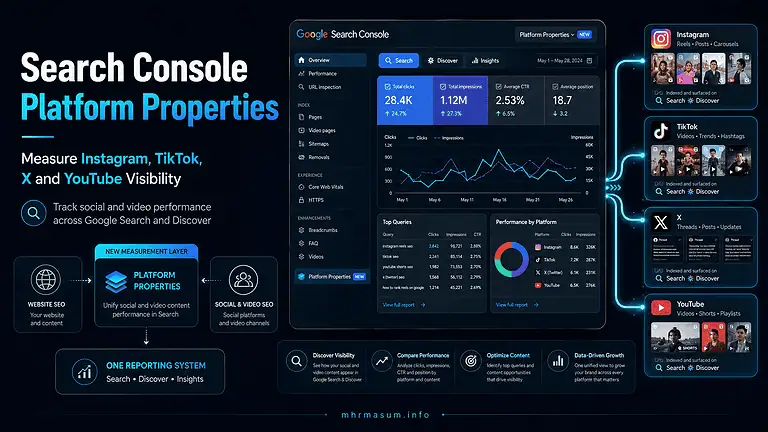
Google Search Console Platform Properties now provides Google visibility reporting for supported social and video accounts.
That creates a broader measurement framework:
Website Search Console
        +
Social Platform Properties
        +
GA4 AI Assistant traffic
        +
Native social analytics
        +
CRM data
Read my guide to Google Search Console Platform Properties for the social/video measurement side.
AI Traffic and Entity SEO
AI systems often need to understand not only pages but also entities.
A strong digital entity can connect:
- Person
- Business
- Website
- Services
- Products
- Social profiles
- Reviews
- Case studies
- External references
- Author information
If AI assistants repeatedly identify your business as relevant to a topic, some users may visit through cited links.
Improve the underlying entity structure rather than chasing referral traffic alone.
Read Entity SEO: The Missing Part of Modern SEO for a complete entity-building framework.
AI Referral Traffic and Brand Authority
Citation-worthy websites usually provide something worth citing.
This can include:
- Original research
- Professional expertise
- First-hand case studies
- Detailed technical explanations
- Unique data
- Clear definitions
- Useful comparisons
- Accurate product information
- Strong author identity
Generic content that simply rewords information already available elsewhere provides less differentiation.
My guide on how to build brand authority for AI search explains how brand signals and evidence can support broader AI visibility.
You should also review why generic AI content does not rank anymore before scaling content production primarily for AI discovery.
Recommended Monthly AI Referral Report
A useful report should combine acquisition, engagement and business value.
Do not produce a dashboard containing only AI session counts.
Use a structure like this:
| Reporting Area | Metrics |
|---|---|
| AI traffic | Sessions, users |
| AI platform mix | ChatGPT, Gemini, Claude, Perplexity, Copilot |
| Engagement | Engaged sessions, engagement rate, average engagement time |
| Content | Top AI landing pages |
| Leads | Key events, form submissions, calls |
| Ecommerce | Add to cart, checkout, purchases |
| Commercial value | Revenue, qualified leads |
| Brand demand | Branded-search changes |
| Trend | Month-over-month and quarter-over-quarter movement |
Add a written commentary explaining what actually changed.
For example:
AI Assistant sessions increased 38% month over month. ChatGPT remained the largest measurable source, while Perplexity generated the highest engagement rate. The WooCommerce Merchant API migration guide became the strongest AI landing page and produced two qualified enquiries.
That is more useful than reporting raw traffic numbers without interpretation.
30-Day AI Referral Tracking Implementation Plan
Implement AI measurement gradually so you establish a reliable baseline before drawing conclusions.
Days 1–5: Verify GA4 Data Quality
Confirm that:
GA4 is installed across all important pages, cross-domain tracking is correct where applicable, internal traffic rules are functioning, key forms and ecommerce events are being collected, and major redirects are not stripping important tracking information.
Do not build sophisticated AI reporting on top of broken analytics.
Days 6–10: Establish the Native AI Assistant Baseline
Open Traffic Acquisition and record:
AI Assistant sessions, users, engaged sessions, engagement rate, key events and revenue.
Then change the dimension to Session source / medium and identify which AI sources already appear.
Preserve this baseline for future comparison.
Days 11–15: Analyse Landing Pages
Connect AI traffic with Landing page + query string.
Group AI landing pages by:
Article
Service
Product
Case study
Homepage
Portfolio
About/author
Local page
Identify which content types attract the highest-quality traffic.
Days 16–20: Configure Business Outcomes
Make sure meaningful actions are configured as GA4 key events.
For service sites, this can include form submissions and calls.
For ecommerce, validate ecommerce events and purchase revenue.
The objective is to measure whether AI traffic contributes to actual business outcomes.
Days 21–25: Add Custom Segmentation if Needed
If the native AI Assistant channel is insufficient, create a custom channel group or Exploration that separates major AI platforms.
Use actual source data from your property rather than copying an oversized domain list without validation.
Days 26–30: Build the Monthly Dashboard
Combine:
AI source, landing page, engagement, key events, revenue, branded search and CRM-qualified leads.
Then establish a monthly reporting cadence.
AI referral traffic is still developing quickly, so monitor changes rather than assuming today’s attribution model will remain unchanged indefinitely.
Common AI Referral Tracking Mistakes
AI analytics is still a new discipline, and several measurement mistakes can produce misleading conclusions. Avoid treating GA4 as a complete AI visibility platform or assuming every AI-generated interaction is measurable.
Using an Old Custom Channel Setup Without Checking GA4’s Native AI Assistant Channel
Many older AI-tracking tutorials were written before May 2026.
Check the native channel first.
You may no longer need your original workaround for basic AI reporting.
Measuring Sessions but Ignoring Leads
AI referral volume is interesting.
AI-generated business is more valuable.
Track key events, qualified leads and revenue.
Assuming Every AI Visit Has a Referrer
Some sessions may lose attribution and appear as Direct.
Do not present GA4’s AI Assistant total as a perfect census of AI influence.
Treating Google AI Overviews as External AI Referral Traffic
Google’s AI Assistant channel excludes Google AI Overviews and AI Mode.
Keep external AI referrals and Google search experiences conceptually separate.
Building an Overly Broad Regex
Broad rules can accidentally classify normal Google, Bing, social or referral traffic as AI.
Validate your source values first.
Ignoring Landing Pages
Knowing the source without knowing the content receiving traffic provides limited optimisation value.
Treating All AI Platforms as Equal
Different AI assistants may produce different user intent, engagement and conversion behaviour.
Measure them separately where the data allows.
Confusing AI Traffic With AI Citations
A citation without a website click does not produce a normal GA4 website session.
Traffic and visibility require separate KPIs.
Ignoring CRM Outcomes
A form submission is useful, but a qualified lead or sale is the real commercial outcome.
Connect analytics with downstream business data wherever practical.
Frequently Asked Questions
AI referral tracking is evolving quickly because both GA4 and the major AI platforms continue to change how users discover and access websites. The following questions address the most common measurement issues for businesses, publishers, ecommerce sites and SEO teams.
Does GA4 automatically track ChatGPT traffic now?
GA4 can automatically classify recognised ChatGPT-related referral traffic into its AI Assistant channel when the necessary referral information is available.
Google introduced this native AI Assistant classification in May 2026.
Does GA4 have an AI traffic channel?
Yes.
The Default Channel Group now contains an AI Assistant channel for recognised AI-assistant referrals.
What medium does GA4 use for AI Assistant traffic?
Google uses:
ai-assistant
for recognised AI-assistant referrals.
What campaign does GA4 assign to AI traffic?
Google’s native classification uses:
(ai-assistant)
as the campaign value for recognised AI Assistant traffic.
Can GA4 track Gemini traffic?
Yes, when Gemini sends a recognisable referral that reaches your website.
Gemini is one of the platforms Google references in its AI Assistant traffic documentation.
Can GA4 track Claude traffic?
Yes, recognised Claude referrals can be classified as AI-assistant traffic. Google specifically referenced Claude when announcing the new AI Assistant channel.
Can GA4 track Perplexity traffic?
Yes, when the referral information reaches your website.
Google has also added platform-level Source Group improvements designed to standardise sources such as Perplexity.
Can GA4 track Microsoft Copilot traffic?
Yes, recognised Copilot referrals can be classified as AI Assistant traffic.
Because Microsoft provides several Copilot entry points, monitor actual GA4 source values rather than relying on one hostname indefinitely.
Does GA4 track Google AI Overview clicks as AI Assistant traffic?
No.
Google’s default-channel documentation specifically states that the AI Assistant channel excludes Google AI Overviews and AI Mode.
Do I still need a custom GA4 channel group for AI traffic?
Not necessarily.
Use the native AI Assistant channel first.
A custom channel group remains useful when you want different rules, additional platforms or separate ChatGPT, Gemini, Claude, Perplexity and Copilot reporting.
Are GA4 custom channel groups retroactive?
Yes.
Google says custom channel groups can be applied retroactively in reports.
Can GA4 show which AI prompt sent the visitor?
Normally no.
GA4 receives website traffic and attribution information; it does not generally receive the user’s full conversation or prompt from the AI platform.
Can GA4 measure AI citations without a click?
No.
If a user sees your website cited but does not visit the site, a normal website session is not generated for GA4 to measure.
Why is some AI traffic showing as Direct?
GA4 uses Direct when it does not have clear acquisition information. Missing referral information, redirects and tracking interference are among the reasons source information can be lost.
What are the best KPIs for AI referral traffic?
The most useful KPIs generally include sessions, engaged sessions, engagement rate, landing pages, key events, key-event rate, qualified leads and revenue.
The exact KPI set should match the site’s business model.
Should I compare AI traffic with Organic Search?
Yes.
Comparing engagement and conversion quality can reveal whether AI-referred users behave differently from traditional search visitors.
However, remember that the two channels represent different discovery experiences.
Official Resources
The following first-party resources should be treated as the main technical references for implementing and maintaining AI referral reporting because GA4 channel definitions and AI platform entry points can change over time.
Google Analytics: What’s New
Google’s official release log documents the May 13, 2026 introduction of native AI Assistant traffic measurement, including the ai-assistant medium and (ai-assistant) campaign.
https://support.google.com/analytics/answer/9164320
Google Analytics Default Channel Group
The official Default Channel Group documentation defines the AI Assistant channel and explains that Google AI Overviews and AI Mode are excluded.
https://support.google.com/analytics/answer/9756891
Google Analytics Custom Channel Groups
Google’s documentation explains how to create custom channel groups and provides an official AI-assistant regex example.
https://support.google.com/analytics/answer/13051316
Google Analytics Traffic Acquisition Report
This resource explains Session source, Session medium, Session source / medium, engagement metrics, key events and revenue reporting.
https://support.google.com/analytics/answer/12923437
Google Analytics Direct Traffic
Use Google’s direct-traffic documentation to understand why missing referral information, redirects and tracking restrictions can cause traffic to appear as (direct) / (none).
https://support.google.com/analytics/answer/15258820
Google Analytics Landing Page Report
This documentation explains how to analyse the first page users see when they enter a website and how to combine landing pages with acquisition dimensions.
https://support.google.com/analytics/answer/12931766
Google Analytics Key Events
Google’s official key-event documentation explains how to identify and measure actions important to your business.
https://support.google.com/analytics/answer/9267568
OpenAI: ChatGPT Search
OpenAI’s official documentation explains how ChatGPT Search provides timely web information and links to source websites.
https://help.openai.com/en/articles/9237897-chatgpt-search
Google Gemini
The official Gemini application and product information are available at:
Perplexity Help Center
Perplexity’s own documentation explains how its AI search experience uses web sources, citations and links.
https://www.perplexity.ai/help-center/
Microsoft Copilot Documentation
Microsoft’s official Copilot documentation covers current access points and web experiences across its personal and Microsoft 365 ecosystems.
https://learn.microsoft.com/en-us/copilot/
Final Thoughts
AI referral traffic has moved from an experimental analytics problem to a legitimate acquisition channel.
The biggest measurement improvement in 2026 is that GA4 now has a native AI Assistant channel.
That means marketers no longer need to rely entirely on manually maintained regular expressions simply to identify recognised ChatGPT, Gemini, Claude, Copilot or other AI referrals.
But the native channel is only the beginning.
A useful measurement system should connect:
AI source
     ↓
Landing page
     ↓
Engagement
     ↓
Key event
     ↓
Lead or purchase
     ↓
Qualified customer
     ↓
Revenue
You should also recognise the attribution gaps.
Not every AI mention creates a click.
Not every click passes a usable referrer.
Not every AI-influenced customer journey begins with a measurable AI session.
That is why the strongest AI-search reporting combines:
GA4 referral data + Search Console + citation visibility + branded search + CRM outcomes + revenue.
The goal is not simply to prove that ChatGPT sent traffic.
The goal is to understand whether AI systems are helping people discover your brand, consume your expertise and ultimately become customers.
Need Help Measuring AI Search and Referral Traffic?
I am MD Harunur Rashid, an SEO, AI SEO and Digital Growth Consultant with more than 17 years of experience helping local businesses, ecommerce brands, agencies and website owners improve organic visibility and digital measurement.
I can help with GA4 AI referral reporting, Search Console analysis, AI SEO, Technical SEO, Entity SEO, WordPress optimisation, WooCommerce SEO, analytics implementation and AI-ready content strategy.
Visit the mhrmasum.info homepage for more practical SEO and AI-search resources.
You can also explore my SEO and Digital Growth Services, professional background, SEO and WordPress portfolio, Technical SEO and Keyword Research Portfolio and Local SEO Portfolio.
For a customised AI referral dashboard, GA4 audit or AI-search measurement strategy, contact MD Harunur Rashid.