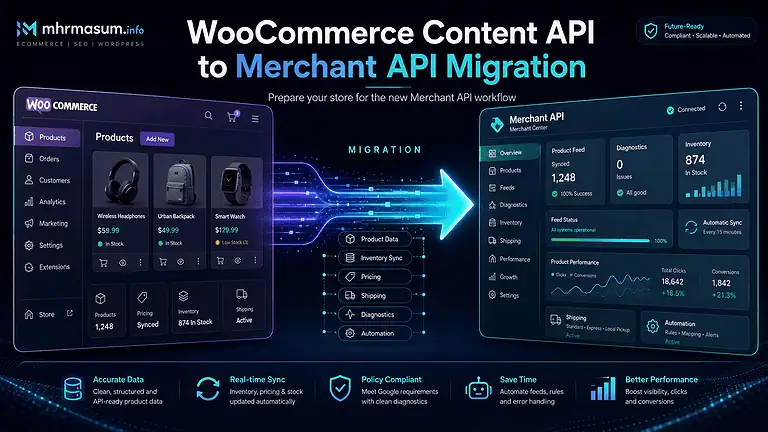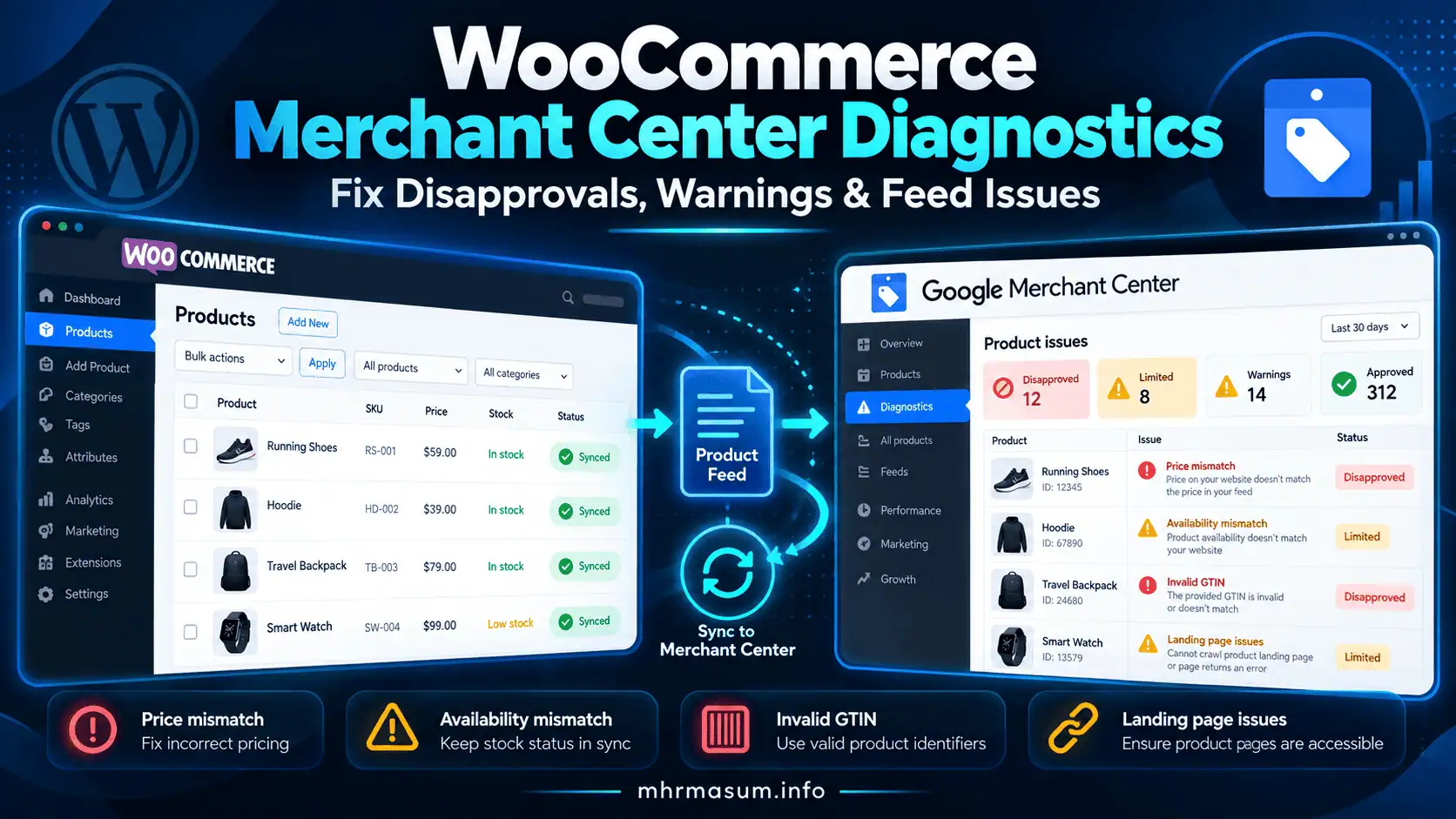
A WooCommerce product can be perfectly available for purchase on your website and still disappear from Google Shopping, free listings or other Google commerce surfaces.
The problem may not be WooCommerce itself.
Google Merchant Center continuously evaluates product data, landing pages, pricing, availability, product identifiers, images, policies and account configuration. When something does not meet Google’s requirements, a product can become Limited, Not approved, or completely disapproved.
More serious issues can affect the entire Merchant Center account.
For WooCommerce store owners, the difficult part is usually not seeing that an issue exists.
The difficult part is determining where the incorrect data originated and which system must be fixed.
A product issue may originate from:
- WooCommerce product data
- Google for WooCommerce
- Attribute mapping
- Structured data
- Product variations
- Merchant Center automations
- Merchant API
- A custom feed
- Caching
- Server errors
- robots.txt
- Product landing pages
- Merchant Center policy enforcement
Google’s current Merchant Center interface centralises many of these problems under Needs attention, while Merchant API also exposes product and account issues programmatically. (support.google.com)
This guide explains how to diagnose Merchant Center problems systematically, fix the underlying WooCommerce data, and reduce repeated disapprovals.
For more practical WooCommerce, Technical SEO and AI-search resources, visit the MD Harunur Rashid SEO and AI SEO homepage.
What Are Merchant Center Diagnostics?
Merchant Center diagnostics are the issue reports Google provides to identify problems affecting products, feeds, website eligibility and Merchant Center accounts.
These diagnostics may identify:
- Missing attributes
- Invalid attributes
- Data mismatches
- Crawl failures
- Product policy violations
- Account policy issues
- Incorrect identifiers
- Landing-page problems
- Feed-processing problems
- API submission errors
Google distinguishes between product-level issues and account-level issues. (support.google.com)
Understanding that distinction should be the first step in troubleshooting.
Product-Level Issues vs Account-Level Issues
A single product disapproval is very different from an account suspension.
Do not treat them as the same problem.
Product-Level Issues
Product-level issues affect individual items.
Google says these can occur when:
- Product data does not match the website
- Submitted data violates the product data specification
- The product violates Shopping policies
A problem with one item does not automatically affect every product in the account. (support.google.com)
Account-Level Issues
Account-level issues affect the Merchant Center account more broadly.
These may relate to:
- Website requirements
- Business information
- Policy violations
- Misrepresentation
- Checkout problems
- Account setup
- Repeated data-quality problems
Account issues can potentially prevent large portions of the catalogue from appearing.
Treat these as higher priority.
Merchant Center Warnings vs Disapprovals
Not every issue immediately removes the product.
Google currently distinguishes between warnings and disapprovals.
Warning
A product may continue appearing, but its performance or eligibility may be limited.
Warnings should still be investigated because unresolved problems can eventually lead to stronger enforcement.
Disapproval
A disapproved product cannot appear for the affected destination until the underlying issue is resolved.
Google states that disapproved products stop showing across the applicable Google surfaces. (support.google.com)
Do not ignore these simply because the WooCommerce product itself still works.
Understand Merchant Center Product Statuses
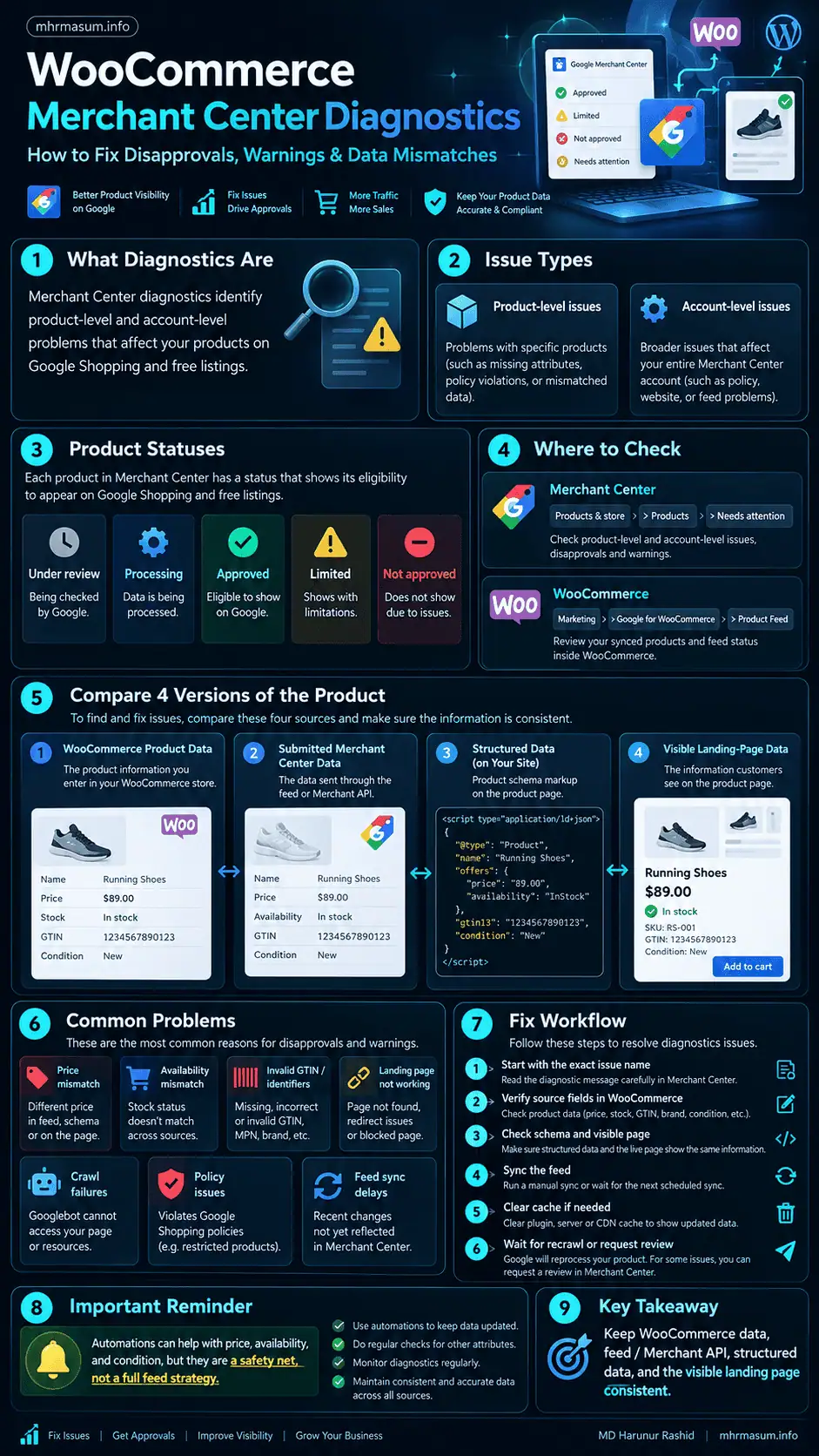
Merchant Center currently uses product statuses including:
- Under review
- Processing
- Approved
- Limited
- Not approved
Google controls approval status while merchants control whether products are otherwise eligible to be shown. (support.google.com)
Under Review
Google is evaluating the product.
Do not immediately resubmit or repeatedly modify the product unless you discover a real data problem.
Processing
Merchant Center is still processing submitted data.
Approved
The product is eligible for the applicable Google destination.
Limited
The product may show, but one or more issues are restricting its performance or destinations.
Not Approved
The product cannot show because of a blocking data or policy issue.
Where to Find WooCommerce Merchant Center Issues
A good troubleshooting workflow checks both WooCommerce and Merchant Center.
Do not rely on only one interface.
In Google Merchant Center
Go to:
Products & store → Products → Needs attention
This is the primary area for reviewing product problems.
Google’s current Merchant Center guidance directs merchants to the Needs attention tab to find product-level errors, warnings and disapprovals. (support.google.com)
In WooCommerce
If you use Google for WooCommerce, navigate to:
WordPress Admin → Marketing → Google for WooCommerce → Product Feed
WooCommerce documents separate:
- Account Issues
- Product Issues
tabs for reviewing product data problems before or after synchronisation. (woocommerce.com)
This is useful because the WooCommerce side may reveal the source field that needs correction.
Start With the Exact Merchant Center Issue
Do not begin by randomly changing:
- Product titles
- Schema
- Plugins
- Feed settings
- Merchant Center fields
Start with the exact issue name.
For example:
Mismatched product price
is a different problem from:
Invalid GTIN
and both are different from:
Landing page not working
The issue detail page normally provides:
- Issue type
- Severity
- Affected products
- Affected country
- Affected destination
- Explanation
- Recommended resolution
Use that information to identify the correct troubleshooting path.
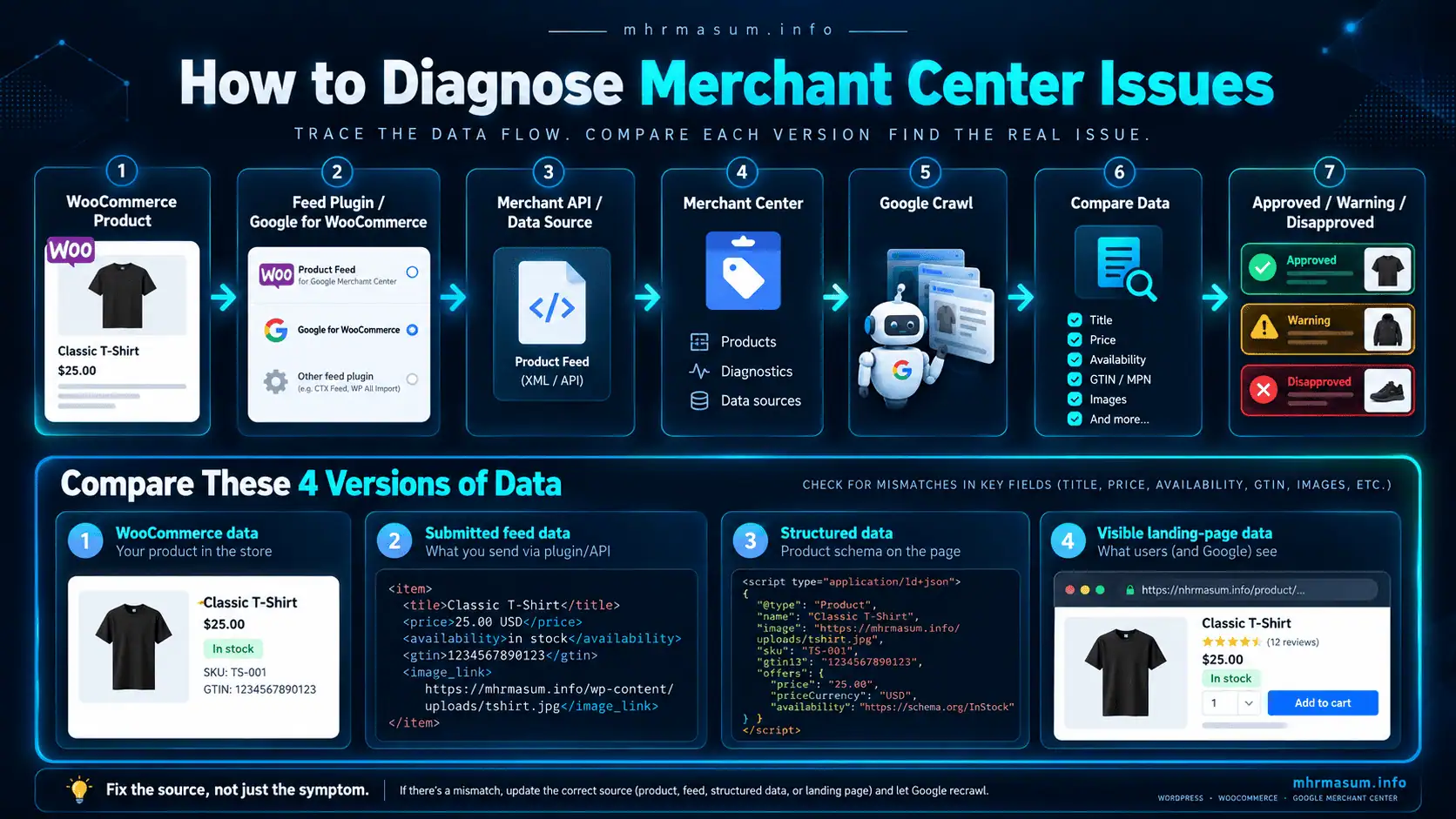
Diagnose the Complete Product Data Chain
For WooCommerce, think of a product as moving through several layers.
WooCommerce Product
        ↓
Google for WooCommerce / Feed Plugin
        ↓
Merchant API / Product Data Source
        ↓
Google Merchant Center
        ↓
Google Crawls Product Page
        ↓
Google Compares Submitted Data
        ↓
Approved / Warning / Disapproved
The correct value must remain consistent throughout that chain.
Compare Four Versions of the Product
When investigating an issue, compare:
- WooCommerce product data
- Submitted Merchant Center data
- Structured data
- Visible landing-page data
For example:
WooCommerce price:
$129

Merchant Center:
$129

Schema:
$119

Visible page:
$129
This can still create problems because Google’s crawler may use structured data to verify the product.
The objective is:
WooCommerce
=
Feed / Merchant API
=
Structured data
=
Visible landing page
Fix Price Mismatch Errors
Price mismatches are among the most common Merchant Center problems.
Google compares the submitted price with the price it finds on the landing page and in structured data.
A mismatch may result in disapproval. (support.google.com)
Common Causes of Price Mismatches
These include:
- WooCommerce sale started but feed did not update
- Sale ended but Merchant Center still has sale price
- Currency mismatch
- Cached product pages
- Incorrect Product schema
- Variable product defaulting to another price
- Regional pricing
- JavaScript-only price rendering
- Manual Merchant Center edits
- Feed sync delays
Important HTML Requirement
Google says the product price should be available in the HTML returned by the server.
If an accurate price appears only after JavaScript executes, Merchant Center verification can fail. (support.google.com)
For WooCommerce, test the rendered page carefully if a theme or pricing plugin dynamically replaces prices.
Practical Price Mismatch Example
Suppose a WooCommerce product is on sale.
Regular price:
$199

Sale price:
$149
Merchant Center still receives:
Price:
$199
while the website prominently shows:
$149
Google detects the inconsistency.
The correct fix is not to manually change Merchant Center permanently.
Instead:
- Confirm WooCommerce sale pricing.
- Check schema output.
- Trigger product sync.
- Clear page/server cache if necessary.
- Verify Merchant Center receives the updated data.
- Wait for Google to recrawl or request review where available.
Fix the source.
Fix Availability Mismatch Errors
Availability also needs to remain synchronised.
Example:
WooCommerce:
Out of stock

Merchant Center:
In stock
can cause a disapproval.
Google says the submitted availability must match what shoppers see on the website. (support.google.com)
Common Availability Problems
Check:
- WooCommerce stock status
- Variation stock
- Backorder settings
- Cached pages
- Feed sync delays
- Structured-data availability
- Regional inventory
- Custom stock plugins
Do Not Use out_of_stock Just to Pause Advertising
Google specifically advises against setting a product to out_of_stock solely to stop it from appearing.
For short pauses, use appropriate Merchant Center controls such as the pause attribute where applicable. (support.google.com)
Product availability should describe reality.
Use Merchant Center Automations Carefully
Merchant Center can automatically update certain product attributes when Google detects a mismatch between submitted data and the website.
Current automation support includes fields such as:
- Price
- Availability
- Condition
Google uses structured data and other extraction methods to make these adjustments. (support.google.com)
Automations Are a Safety Net, Not a Feed Strategy
Do not think:
Google will fix my product feed, so my WooCommerce data does not need to be accurate.
Google explicitly states that automatic updates do not replace regular product-data updates. (support.google.com)
The preferred model remains:
Accurate WooCommerce data
        ↓
Accurate structured data
        ↓
Fast Merchant API sync
        ↓
Merchant Center automation as backup
Fix Invalid or Missing GTIN
A GTIN identifies a commercial product.
Examples include:
- UPC
- EAN
- JAN
- ISBN
Google says a valid GTIN is recommended for products that have one, and products with assigned identifiers can have limited visibility when the required identifier is missing. (support.google.com)
WooCommerce Now Has a Core GTIN Field
WooCommerce introduced a built-in global unique ID field beginning with WooCommerce 9.2.
Google for WooCommerce supports that field and recommends using the built-in field for GTIN synchronisation. (woocommerce.com)
That means older custom GTIN plugins or fields should be reviewed if the store has upgraded.
Do Not Invent GTINs
A valid GTIN must come from the legitimate product identifier.
Do not generate random numbers.
Google validates GTIN format and check digits. Valid GTIN formats include 8, 12, 13 and 14 digits. (support.google.com)
Fix Missing Product Identifiers
Some products require a combination of:
- GTIN
- Brand
- MPN
depending on whether manufacturer identifiers exist.
Google recommends providing the appropriate unique product identifiers and using identifier_exists correctly when such identifiers genuinely do not exist. (support.google.com)
Handmade and Custom Products
A genuinely custom product may not have a manufacturer-assigned GTIN.
Do not create a fake one.
Instead, configure identifiers according to Google’s product-data specification.
Fix Invalid MPN
MPN stands for Manufacturer Part Number.
Google advises merchants to submit manufacturer-assigned MPNs rather than reseller-created identifiers. (support.google.com)
If no MPN exists, do not invent one.
An internal WooCommerce SKU is not automatically the manufacturer’s MPN.
These identifiers serve different purposes.
Use Google for WooCommerce Attribute Mapping
WooCommerce attributes do not automatically map perfectly to Google’s product fields.
Google for WooCommerce provides attribute mapping for fields including:
- Brand
- Colour
- Condition
- Gender
- GTIN
- Material
- MPN
- Pattern
- Size
- Size system
- Size type
- Age group
Global Attributes Are Important
WooCommerce notes that its mapping system works with global attributes and that individual product attributes may not be supported in the same way for mapping. (woocommerce.com)
If Merchant Center reports missing colour or size across many products, inspect how those values are stored inside WooCommerce.
Fix Missing Product Images
A valid product image is required.
Google says products without an image link can be disapproved. (support.google.com)
Check:
- Featured image exists
- Image URL returns HTTP 200
- Image is publicly accessible
- CDN is not blocking Googlebot-image
- Image URL has not expired
- Hotlink protection is not blocking Google
- Variation image matches variation
WooCommerce Variation Images Matter
If:
Blue shoe
is submitted to Merchant Center, the associated image should actually show the blue shoe where possible.
Using the red variation image for the blue variant can weaken data consistency.
Fix Product Page Unavailable Errors
Merchant Center must be able to access the product landing page.
Common causes include:
- HTTP 404
- HTTP 5xx
- DNS failures
- Excessive redirects
- SSL errors
- Maintenance mode
- Firewall blocking
- Security plugins
- Bot protection
- Slow hosting
Google says slow loading and server errors can cause landing-page disapprovals. (support.google.com)
Avoid Redirecting Product Links to Generic Pages
A Merchant Center link for a specific product should not redirect to:
- Homepage
- Shop homepage
- Search page
- Generic category
The landing page should represent the submitted item.
Check robots.txt and Googlebot Access
Merchant Center relies on Google crawlers to verify product pages and images.
Google specifically says stores should allow:
Googlebot
Googlebot-image
to access the necessary resources. (support.google.com)
Common WooCommerce Causes
Check whether access is being blocked by:
- robots.txt
- Cloudflare
- Wordfence
- Security plugin
- Hosting firewall
- CDN bot protection
- Maintenance plugin
A page can load normally for you while still being inaccessible to Google.
Check Product Page Speed
Merchant Center is not independent of website performance.
If a product page repeatedly times out when Google tries to fetch it, the product can become unavailable for verification.
Check:
- TTFB
- Server stability
- CDN configuration
- PHP performance
- Database load
- WooCommerce queries
- JavaScript dependency
- Image size
For broader optimisation guidance, review my Website Speed Optimisation Portfolio.
Fix Product Title and Description Problems at the Source
Google for WooCommerce requires general product information including:
- Product title
- Description
- Product ID
- Product link
- Product image
before products can be successfully submitted. (woocommerce.com)
Do not fill Merchant Center with temporary manual values while leaving WooCommerce incomplete.
Update the WooCommerce product itself whenever that is the authoritative data source.
Product Variants Need Separate Diagnostics
Variable products require extra attention because one parent product may generate many Merchant Center items.
Each variant can have its own:
- Product ID
- SKU
- GTIN
- Price
- Availability
- Colour
- Size
- Image
- URL
One variation can therefore be disapproved while others remain approved.
Example
Parent:
Running Shoe

Variants:
Black / Size 8  → Approved
Black / Size 9  → Approved
Black / Size 10 → Price mismatch
Blue / Size 8   → Missing GTIN
Blue / Size 9   → Approved
Do not assume that fixing the parent automatically fixes every variation.
For deeper guidance, read my WooCommerce Product Variant SEO and AI Shopping guide.
Check Item Grouping for Variants
Related variants should normally be grouped consistently through Merchant Center product data.
Audit:
- Unique item ID
- Stable item group ID
- Colour
- Size
- Variant option
- GTIN
- Price
- Availability
Incorrect grouping can create confusing product representation.
Understand Preemptive Item Disapproval
Google can use Preemptive Item Disapproval (PID) where it identifies serious price or availability inconsistencies.
Google says PID may be applied when price or availability on the website does not match submitted product data. (support.google.com)
This is more serious than a minor warning.
If price mismatches occur repeatedly across many products, do not fix only the individual affected SKUs.
Investigate the entire synchronisation system.
When Many Products Fail at Once, Look for a Systemic Problem
If one product fails, investigate that product.
If 4,000 products fail at the same time, suspect infrastructure.
Potential causes include:
- Broken product sync
- Plugin update failure
- Merchant API authentication
- Incorrect global mapping
- Currency configuration
- Website outage
- robots.txt change
- Structured-data plugin conflict
- Server cache
- API migration problem
Bulk failures usually have a common root cause.
Check Google for WooCommerce Version
This is especially important in September 2026.
Google’s Content API for Shopping reached its official sunset date on August 18, 2026. Beginning September 1, 2026, integrations without an approved extension can receive intermittent HTTP 410 Gone errors as Google progressively degrades the deprecated API. (developers.google.com)
WooCommerce says stores using Google for WooCommerce should run version 3.8.1 or later for the Merchant API transition and continue updating to current releases. (woocommerce.com)
Do Not Assume Old Product Sync Code Still Works
If your WooCommerce store uses:
- Custom Content API code
- An old feed plugin
- Old Google Shopping connector
- Custom API integration
review it immediately.
Intermittent failures may now be caused by the Content API sunset rather than product quality.
Content API Errors vs Merchant Center Disapprovals
These are different classes of problem.
API Failure
Example:
HTTP 410 Gone
The product may not have been successfully submitted or updated.
Product Disapproval
Example:
Invalid GTIN
The product reached Merchant Center, but Google rejected or limited it.
Diagnose the transport layer and product-quality layer separately.
Merchant API Product Status and Issues
Merchant API now provides product-status information directly through the processed Product resource.
Google documents:
destinationStatusesitemLevelIssues
for determining whether products are approved, pending or disapproved across reporting contexts. (developers.google.com)
This is particularly useful for agencies, custom WooCommerce integrations and large catalogues.
Example Merchant API Issue
Conceptually:
{
  "code": "invalid_gtin",
  "severity": "DISAPPROVED",
  "attribute": "gtins"
}
The application can then identify the affected WooCommerce product and send the problem to an internal dashboard.
Merchant API Separates Input From Processed Product Data
The newer Merchant API uses:
ProductInput
for data submitted by the merchant and:
Product
for Google’s processed product representation.
Google says the processed Product resource can include approval status and issues. (developers.google.com)
This distinction can make diagnostics easier.
You can compare:
What WooCommerce sent
with:
What Google processed
Use Merchant API Issue Resolution for Custom Dashboards
Google now provides an Issue Resolution service for third-party applications.
It can be used to create interfaces similar to Merchant Center’s:
- Account diagnostics
- Product diagnostics
and can provide recommended issue-resolution actions. (developers.google.com)
This creates an interesting opportunity for WooCommerce developers.
A custom WooCommerce admin dashboard could eventually display:
Product 5821
Invalid GTIN
Disapproved
Fix GTIN
View documentation
without requiring store managers to switch constantly between WordPress and Merchant Center.
Merchant API Diagnostics Are Also Available for API Calls
Merchant Center now has an API diagnostics add-on for Merchant API usage.
Google says it can show:
- API usage
- Successful calls
- Failed calls
- Exact API errors
This is different from product-data diagnostics.
Use it when the problem is:
WooCommerce cannot send the product successfully
rather than:
Google received the product but disapproved it
Check WooCommerce Debug Logs
Google for WooCommerce can generate useful logs inside WooCommerce.
Check:
WooCommerce → Status → Logs
Look for recent logs related to Google for WooCommerce.
Potential problems may include:
- Authentication failures
- API errors
- Missing access permissions
- Sync failures
- Product submission failures
WooCommerce also documents a hidden connection/debug page at:
/wp-admin/admin.php?page=connection-test-admin-page
which can be used for connection testing and functions such as syncing all products when appropriate. (woocommerce.com)
Product Shows Synced in WooCommerce but Is Missing in Merchant Center
WooCommerce documents a specific scenario where a product appears synced in WordPress but the corresponding Google ID cannot be found in Merchant Center.
This can happen if the product was deleted directly in Merchant Center.
WooCommerce recommends triggering a full product sync from the connection testing page. (woocommerce.com)
Avoid maintaining conflicting copies of the catalogue manually across multiple systems.
Fix Authentication and Account Connection Problems
Google for WooCommerce depends on successful connections among:
- Google account
- Merchant Center
- WooCommerce
- Required permissions
WooCommerce documents errors such as:
Request had insufficient authentication scopes
and connection failures when accounts are not correctly linked. (woocommerce.com)
If the feed suddenly stops updating across the whole store, verify account connectivity before editing hundreds of products.
Check Merchant Center Data Sources
Modern Merchant Center accounts may receive product data from several sources.
Examples include:
- Google for WooCommerce
- Merchant API
- Scheduled feed
- Supplemental data source
- Automated website data
- Manual Merchant Center edits
Conflicting sources can make diagnosis difficult.
Document which source is authoritative for:
- Product title
- Price
- Availability
- Brand
- GTIN
- Images
Avoid Manual Merchant Center Fixes for Synced Fields
If WooCommerce is the authoritative source, a manual edit inside Merchant Center can create temporary consistency but long-term confusion.
For example:
WooCommerce:
$89
Manual Merchant Center edit:
$79
Next sync:
$89
The error returns.
Fix the underlying WooCommerce field unless there is a deliberate Merchant Center override strategy.
Structured Data Is Part of Merchant Center Diagnostics
Product schema is not only an SEO rich-result feature.
Merchant Center can use structured data to validate:
- Price
- Availability
- Condition
Google’s automatic product updates rely heavily on structured data when available. (support.google.com)
WooCommerce Schema Conflicts
Check whether multiple systems output Product schema:
- WooCommerce
- Yoast SEO
- Rank Math
- Schema plugin
- Theme
- Custom code
Conflicting Offer data can lead to Google seeing the wrong price or stock status.
Test Product Structured Data
For representative products, verify:
- Product name
- SKU
- GTIN
- Price
- Currency
- Availability
- Image
- Product URL
For variable products, also review:
- ProductGroup
- Variants
- Variant price
- Variant availability
Fix contradictions before relying on Merchant Center automations.
Caching Can Cause Temporary Product Mismatches
WooCommerce stores frequently use:
- Page cache
- Object cache
- CDN cache
- Full-page hosting cache
If WooCommerce updates from:
$99
to:
$79
but Googlebot receives a cached page showing $99, Merchant Center may detect a mismatch.
When investigating price or availability issues, clear relevant caches and verify the page as an anonymous visitor.
Currency Plugins Require Extra Testing
Multi-currency WooCommerce stores are more complex.
A Google crawler may see a currency different from the one submitted in Merchant Center when:
- Currency is IP-based
- Currency uses cookies
- Country detection changes prices
- Cache stores the wrong regional version
Google’s price guidance requires the submitted currency and prominent landing-page price to align. (support.google.com)
Test the exact country and currency configuration used by the data source.
Shipping Problems Can Limit Product Eligibility
Merchant Center product eligibility may also depend on shipping configuration.
Check:
- Shipping country
- Shipping cost
- Delivery times
- Minimum order value
- Handling times
Google’s 2026 product-data specification update introduced additional product-level shipping attributes such as handling_cutoff_time and minimum_order_value. (support.google.com)
Not every WooCommerce store needs these fields, but stores with complex fulfilment rules should review current specifications.
Do Not Ignore Country-Specific Issues
A product can be approved in one country and disapproved in another.
Google notes that products targeting multiple countries may receive different warnings or disapprovals based on location-specific requirements. (support.google.com)
So:
Approved in Australia
does not necessarily mean:
Approved in United States
Always check the affected country in the issue detail.
Prioritise Merchant Center Issues by Revenue Impact
Large stores may have thousands of warnings.
Do not attempt to fix them randomly.
Prioritise:
- Account-level suspensions
- Whole-feed failures
- High-revenue disapproved products
- Large-scale price/availability mismatches
- Best-selling product identifier errors
- Limited-performance warnings
- Low-priority catalogue issues
This creates a better commercial recovery workflow.
Practical WooCommerce Diagnostics Example
Suppose Merchant Center reports:
47 products:
Mismatched availability
Do not edit those 47 products immediately.
Use this process:
Merchant Center issue
        ↓
Export affected products
        ↓
Compare WooCommerce stock
        ↓
Check structured data
        ↓
Check cache
        ↓
Check sync timestamp
        ↓
Identify common cause
You may discover all 47 products use the same third-party inventory plugin.
Fixing the integration could resolve all affected products at once.
That is faster and safer than editing every SKU manually.
Use CSV Export for Large Merchant Center Issues
Merchant Center allows affected product lists to be downloaded for many issue types.
Google recommends exporting affected products for bulk comparison when troubleshooting issues such as price mismatches. (support.google.com)
A useful spreadsheet can contain:
| Product ID | Woo SKU | Issue | Woo Value | Google Value | Fixed | Resynced |
|---|---|---|---|---|---|---|
| 101 | SHOE-BLK-8 | Price | 99 | 89 | Yes | Yes |
| 102 | SHOE-BLK-9 | GTIN | Missing | Missing | No | No |
This creates an audit trail.
Do Not Request Review Before Fixing the Issue
A review request is not a troubleshooting tool.
Do not repeatedly click:
Request review
without resolving the underlying problem.
Google warns that repeated unsuccessful reviews can result in cooldown periods during which further review requests are unavailable. (support.google.com)
Fix first.
Then request review when appropriate.
When Products Reapprove Automatically
Some data-quality issues can clear after:
- The source data is corrected.
- The product is resubmitted.
- Google recrawls the landing page.
- Google confirms the values match.
Google notes that certain price issues can be rechecked over the following hours or days. (support.google.com)
Do not make repeated unnecessary changes during this validation period.
Request a Review When Required
For some policy or account-level issues, a manual review is required.
Merchant Center may provide options such as:
- I fixed the issue
- Request review
- Request website check
- Appeal
Google explains that review controls appear where applicable on product or account issue pages. (support.google.com)
Before submitting:
- Fix all affected products.
- Fix related website issues.
- Verify checkout.
- Confirm policy compliance.
- Resync product data.
- Test landing pages.
Then request review once.
WooCommerce Merchant Center Diagnostics Checklist
Use this checklist whenever products unexpectedly lose eligibility.
Merchant Center
Check:
- Needs attention
- Account issues
- Product issues
- Affected countries
- Affected destinations
- Product status
- Data source
- Review eligibility
WooCommerce
Check:
- Product title
- Description
- SKU
- GTIN
- MPN
- Brand
- Price
- Sale price
- Stock
- Images
- Variations
Google for WooCommerce
Check:
- Plugin version
- Merchant Center connection
- Google account connection
- Product Feed issues
- Attribute Mapping
- Product sync
- WooCommerce logs
Technical SEO
Check:
- HTTP status
- robots.txt
- Googlebot access
- Googlebot-image access
- Canonical URL
- Redirect chain
- Product schema
- Page speed
- Cache
Merchant API
Check:
- ProductInput submission
- Product processing
- Product status
- Item-level issues
- API errors
- Authentication
- Developer registration
- Deprecated Content API calls
30-Day Merchant Center Diagnostics Improvement Plan
A store with repeated disapprovals should improve the underlying product-data system rather than repeatedly fixing individual errors.
Use the following phased approach.
Days 1–5: Account and Integration Audit
Review:
- Merchant Center status
- Account issues
- Google for WooCommerce version
- Merchant API usage
- Legacy Content API code
- Active product data sources
- WooCommerce versions
- Feed plugins
Identify the authoritative data source.
Days 6–10: Product Data Audit
Export affected products.
Review:
- GTIN
- MPN
- Brand
- Titles
- Descriptions
- Prices
- Stock
- Images
- Product IDs
Separate systemic problems from isolated SKU errors.
Days 11–15: Landing Page Audit
Test representative products for:
- HTTP 200
- Crawlability
- Product availability
- Price accuracy
- Currency
- Schema
- Product image
- Variant selection
Fix infrastructure issues.
Days 16–20: Attribute Mapping and Variants
Review Google for WooCommerce mappings.
Check:
- Colour
- Size
- Material
- Age group
- Gender
- GTIN
- MPN
- Brand
Then audit high-value variable products.
Days 21–24: Merchant API and Sync Audit
Review:
- Product sync logs
- Failed API calls
- Merchant API diagnostics
- Data-source configuration
- Product status
Remove dependence on obsolete Content API integrations where applicable.
Days 25–27: Fix and Resubmit
Implement corrections in WooCommerce.
Then:
- Clear caches
- Resync products
- Verify Merchant Center values
- Verify landing pages
Request review only when required.
Days 28–30: Build Monitoring
Create a recurring monitoring process for:
- Disapproved products
- Limited products
- API failures
- Feed freshness
- Price mismatches
- Availability mismatches
- GTIN errors
The goal is to detect issues before a large percentage of revenue-generating products disappear.
Common WooCommerce Merchant Center Diagnostics Mistakes
Merchant Center troubleshooting becomes slow when merchants treat every error as an isolated Google problem.
Avoid these common mistakes.
Fixing Merchant Center but Not WooCommerce
If WooCommerce remains incorrect, the next sync may overwrite the fix.
Correct the authoritative source.
Repeatedly Requesting Reviews
Do not submit reviews until the actual problem has been resolved.
Repeated failed requests can create cooldown periods.
Ignoring Structured Data
Google may compare feed data with structured data.
Check schema as part of every price and availability investigation.
Using Fake GTINs
Never generate identifiers simply to satisfy Merchant Center.
Treating SKU as GTIN
SKU and GTIN are different identifiers.
Editing Hundreds of Products Before Finding the Root Cause
Bulk issues often result from one technical problem.
Diagnose first.
Ignoring Variation-Level Problems
Each WooCommerce variation may have its own Merchant Center status.
Assuming Approved Means Fully Optimised
A product can be approved but still have warnings or limited performance.
Ignoring Merchant API Errors
If products are not reaching Merchant Center, product optimisation alone will not solve the issue.
Using an Outdated Google for WooCommerce Integration
In September 2026, continued reliance on the sunset Content API can result in intermittent failures.
Review integrations immediately.
Frequently Asked Questions
Merchant Center diagnostics can look complicated because one product may pass through WooCommerce, structured data, an integration plugin, Merchant API and Merchant Center before Google determines its eligibility. The following answers cover the most common WooCommerce troubleshooting questions.
Where do I find Merchant Center product errors?
Open Merchant Center and go to:
Products & store → Products → Needs attention
This is Google’s main area for product warnings, errors and disapprovals. (support.google.com)
Where can I see Google product issues inside WooCommerce?
With Google for WooCommerce, go to:
Marketing → Google for WooCommerce → Product Feed
WooCommerce provides Account Issues and Product Issues views. (woocommerce.com)
Why is my WooCommerce product disapproved in Merchant Center?
Common reasons include:
- Price mismatch
- Availability mismatch
- Invalid GTIN
- Missing identifiers
- Missing image
- Landing-page failure
- Crawl blocking
- Policy violation
The exact Merchant Center issue should determine your troubleshooting process.
Why does Merchant Center show the wrong product price?
The feed may not have updated, a cache may contain the older price, schema may be wrong, or Merchant Center may be receiving data from another source.
Compare WooCommerce, the feed, structured data and the visible landing page.
Why does Merchant Center say my product is out of stock when WooCommerce says it is available?
This may result from delayed synchronisation, incorrect structured data, caching or variation-level stock settings.
Check the exact affected SKU or variation.
Can Google automatically fix product prices?
Merchant Center can automatically update certain fields such as price and availability using landing-page information, but Google says automatic updates are not a replacement for submitting accurate product data. (support.google.com)
Does WooCommerce support GTIN natively?
Yes.
WooCommerce introduced a built-in global unique ID field in WooCommerce 9.2, and Google for WooCommerce supports it for GTIN synchronisation. (woocommerce.com)
Should I create a GTIN if my product does not have one?
No.
Only use legitimate product identifiers.
Follow Google’s identifier_exists, brand and MPN requirements for products without manufacturer GTINs.
Why is my product page not crawlable by Merchant Center?
Possible causes include:
- robots.txt
- Security plugin
- CDN
- Firewall
- HTTP error
- DNS error
- Excessive redirects
Google needs access to both product pages and product images for verification. (support.google.com)
Can WooCommerce caching cause Merchant Center disapprovals?
Yes.
If Googlebot sees an old cached price or availability while the submitted product data contains the new value, a mismatch can occur.
What is Preemptive Item Disapproval?
Preemptive Item Disapproval can occur when Google identifies serious or repeated inconsistencies such as price or availability mismatches.
Affected products stop appearing until the issue is resolved and reviewed where necessary. (support.google.com)
Is Content API for Shopping still supported?
Google’s Content API for Shopping reached its official sunset date on August 18, 2026.
Starting September 1, 2026, non-extended integrations can experience intermittent HTTP 410 Gone failures as Google progressively degrades the deprecated service. (developers.google.com)
New and migrated integrations should use Merchant API.
Which Google for WooCommerce version supports Merchant API migration?
WooCommerce states that version 3.8.1 or later contains the required Merchant API transition work and recommends continuing to update to current releases. (woocommerce.com)
What is Merchant API product status?
Merchant API exposes processed product status, including destination status and item-level issues.
This enables developers to diagnose disapproved products programmatically. (developers.google.com)
Can I build Merchant Center diagnostics inside WordPress?
Potentially, yes.
Merchant API’s Issue Resolution functionality can support third-party interfaces for displaying account and product diagnostics. (developers.google.com)
How long does Merchant Center take to approve a fixed product?
Timing varies by issue.
Some data-quality issues can clear after Google recrawls the product over the following hours or days.
Account and policy reviews can take longer.
Should I request a review immediately after seeing a disapproval?
No.
Diagnose and correct the issue first.
Only request review when the underlying problem is genuinely fixed.
Official Resources
The following first-party Google and WooCommerce resources should be treated as the primary references when diagnosing Merchant Center problems because product-data specifications, Merchant API behaviour and enforcement processes can change.
Google Merchant Center: Issues in Merchant Center
Google’s primary documentation explains product-level issues, warnings, disapprovals, account-level issues, preemptive item disapproval and review procedures.
https://support.google.com/merchants/answer/12153802
Google Merchant Center: Fix Product Data Quality Disapprovals
This resource covers common data-quality problems, identifiers, account warnings and review processes.
https://support.google.com/merchants/answer/13693497
Google Merchant Center Product Data Specification
Google’s official product-data specification defines required and optional product fields and should be consulted before changing feed attributes.
https://support.google.com/merchants/answer/7052112
Google Merchant Center: Automatic Product Updates
Google explains how Merchant Center can use structured data and website information to update price, availability and condition automatically.
https://support.google.com/merchants/answer/12157888
Google Merchant Center: Product Visibility and Status
This documentation explains Approved, Limited, Not approved, Under review and Processing statuses.
https://support.google.com/merchants/answer/12488713
Google Merchant API: Product Issues
Google’s Merchant API documentation explains productStatus, destination statuses and item-level product issues.
https://developers.google.com/merchant/api/guides/products/list-products-data-issues
Google Merchant API: Account Issues
The Accounts API documentation explains how integrations can retrieve account-level Merchant Center problems programmatically.
https://developers.google.com/merchant/api/guides/accounts/view-issues
Google Merchant API: Issue Resolution
Google explains how third-party applications can build account and product diagnostics interfaces.
https://developers.google.com/merchant/api/guides/accounts/render-issues
Google Merchant API: API Diagnostics
This resource explains how to monitor Merchant API success rates, failures and specific API errors.
https://developers.google.com/merchant/api/guides/usage-metrics-diagnostics
Google: Content API Sunset
Google’s official deprecation documentation confirms the August 18, 2026 sunset and September 2026 progressive service degradation.
https://developers.google.com/shopping-content/guides/deprecation-and-sunset
WooCommerce: Google for WooCommerce
WooCommerce’s primary integration documentation covers Merchant Center connection and the Merchant API transition.
https://woocommerce.com/document/google-for-woocommerce/
WooCommerce: Product Feed Information
This documentation explains the fields Google for WooCommerce submits and where to review Product Issues and Account Issues.
WooCommerce: Attribute Mapping
WooCommerce explains how store attributes can be mapped to Google fields such as GTIN, brand, colour, size, MPN and material.
https://woocommerce.com/document/google-for-woocommerce/attribute-mapping/
Final Thoughts
Merchant Center disapprovals should not be treated as random Google errors.
Most can be traced through a predictable chain:
WooCommerce
     ↓
Product data mapping
     ↓
Google for WooCommerce
     ↓
Merchant API
     ↓
Merchant Center
     ↓
Landing-page verification
     ↓
Approved / Limited / Disapproved
The most efficient troubleshooting method is therefore:
Identify exact issue
      ↓
Identify affected products
      ↓
Find authoritative data source
      ↓
Compare WooCommerce, feed, schema and page
      ↓
Fix root cause
      ↓
Resync
      ↓
Verify
      ↓
Request review only if necessary
Do not start by changing everything.
Do not invent identifiers.
Do not repeatedly appeal unresolved issues.
Do not manually patch Merchant Center fields while WooCommerce remains wrong.
And in 2026, do not ignore the API layer.
The Content API migration is now an active operational issue, not a future planning task. Stores and custom integrations still depending on the deprecated API can now experience intermittent failures.
For modern WooCommerce stores, Merchant Center diagnostics should become part of routine ecommerce monitoring alongside:
- Technical SEO
- Product schema
- Product data quality
- Merchant API health
- Variant data
- Inventory accuracy
- Website performance
The goal is not simply to get a green Approved label.
The goal is to maintain a reliable WooCommerce product-data system that Google—and increasingly AI-driven commerce systems—can understand and trust.
Need Help Fixing WooCommerce Merchant Center Issues?
I am MD Harunur Rashid, an SEO, AI SEO and Digital Growth Consultant with more than 17 years of experience helping ecommerce businesses, agencies and website owners improve organic visibility, WooCommerce performance and technical product infrastructure.
My WooCommerce services can include:
- Merchant Center diagnostics
- Product disapproval troubleshooting
- Google for WooCommerce audits
- Merchant API migration
- Product-feed optimisation
- WooCommerce Technical SEO
- Product schema audits
- GTIN and identifier audits
- Product variant SEO
- AI-shopping readiness
- WordPress performance optimisation
- Custom WooCommerce plugin development
Visit the mhrmasum.info homepage for practical resources covering WooCommerce, SEO, AI search and WordPress.
You can also explore:
- SEO and Digital Growth Services
- About MD Harunur Rashid
- SEO and WordPress Portfolio
- Technical SEO and Keyword Research Portfolio
- Content API to Merchant API Migration
- WooCommerce Product Variant SEO
- WooCommerce AI Product Advisor
- WooCommerce MCP and Canonical Abilities
For a WooCommerce Merchant Center audit, product-feed recovery or Merchant API troubleshooting project, contact MD Harunur Rashid.