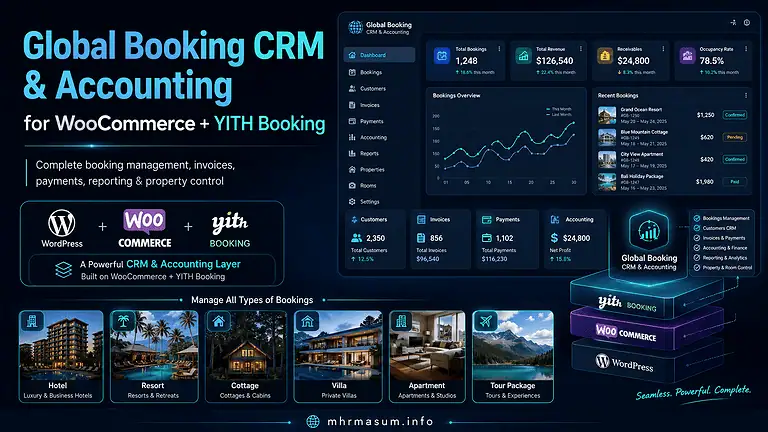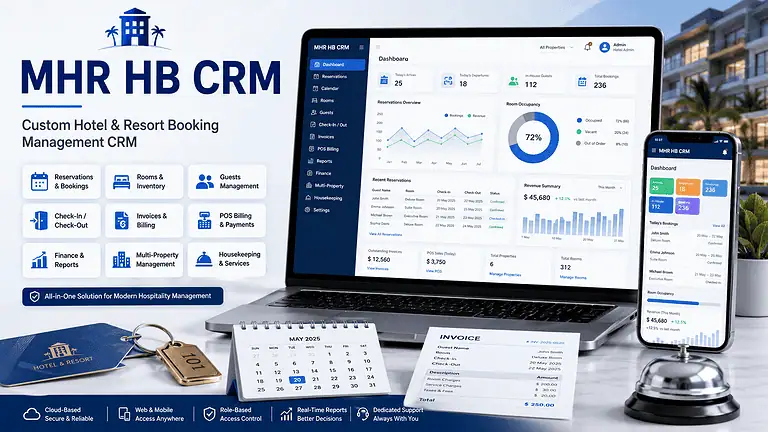
The project that originally started as a custom booking, CRM and accounting system for Check In Cherish has now been completely reshaped, redeveloped and productised as MHR Stay & Tour CRM.
This was not simply a rename.
The original project was built around the operational requirements of one hospitality and travel business. Over time, that development work revealed a larger need: hotels, resorts, cottages, room-rental businesses and tour operators using WordPress often need much more than a basic booking calendar.
They need booking availability, pricing, payments, walk-ins, room assignments, front-desk tools, accounting, invoices, housekeeping, reports and finance to work together.
That became the foundation for MHR Stay & Tour CRM.
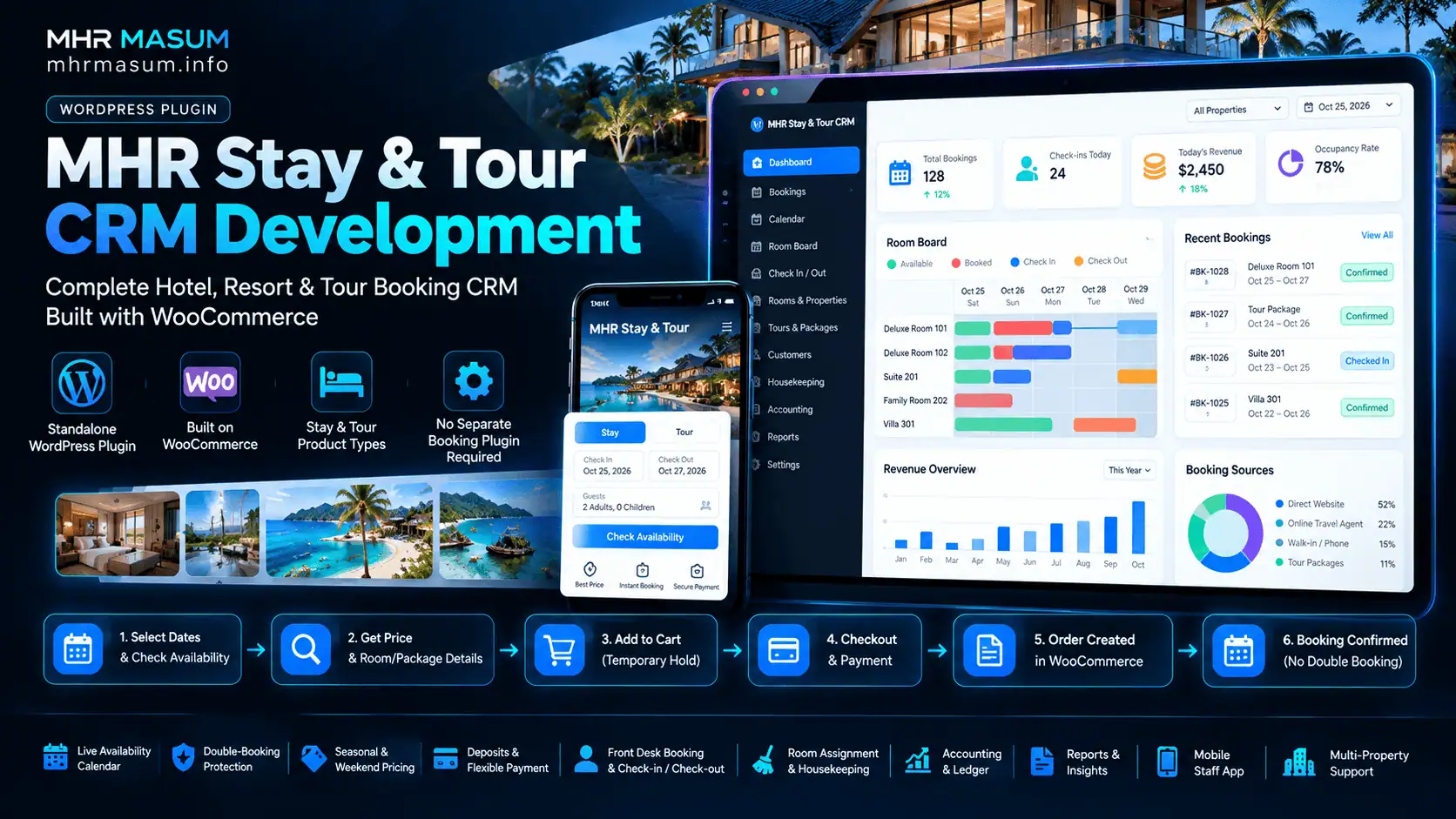
The current product is a standalone WordPress plugin built around WooCommerce. It introduces its own Stay and Tour product types, availability engine and booking-management system, so it does not require YITH Booking or WooCommerce Bookings. WooCommerce continues to handle the familiar cart, checkout, payment gateways, orders, emails and related ecommerce functionality.
You can view the current product at MHR Stay & Tour CRM.
From Check In Cherish CRM to MHR Stay & Tour CRM
The earlier Check In Cherish system began as a highly customised hospitality CRM and accounting project.
Its development gradually introduced features such as:
- Booking income
- Deposits and due payments
- Expenses
- Customer and vendor records
- Owner lease accounting
- Bank accounts
- Loans
- Fund management
- Tour statements
- Booking summaries
- Property-based reports
- Room-night calculations
- Forecasting
- WooCommerce order calculations
That development process provided useful real-world insight into what hospitality businesses actually need after a booking is received.
The original system eventually became much more than a basic CRM.
However, continuously adding separate modules to a business-specific solution was not the best long-term architecture.
Instead of continuing to extend the old system indefinitely, I rebuilt the concept around a clearer goal:
Create one reusable WooCommerce plugin that can handle the complete booking journey for stays and tours, while also supporting the daily operational and financial work that happens after the customer books.
That redevelopment became MHR Stay & Tour CRM.
This Is a Rebuilt Product, Not Just the Old CRM With a New Name
One of the biggest changes is architectural.
The earlier solution relied heavily on synchronising booking information from WooCommerce and external booking functionality into the CRM and accounting modules.
MHR Stay & Tour CRM moves the booking engine itself into the product.
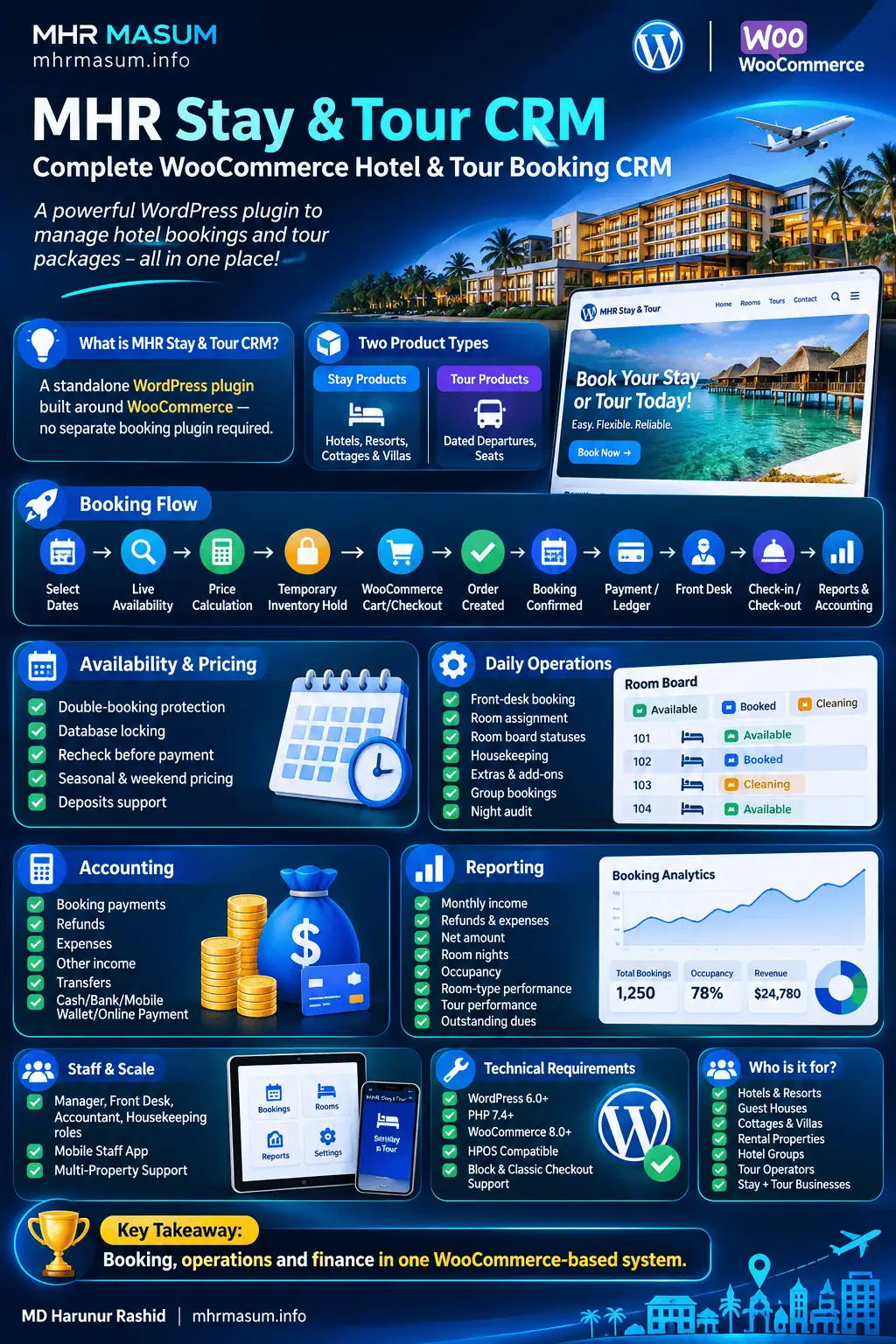
The new workflow is:
Guest selects dates
        ↓
Live availability is checked
        ↓
Price is calculated
        ↓
Temporary inventory hold
        ↓
WooCommerce cart
        ↓
WooCommerce checkout
        ↓
Order
        ↓
Booking
        ↓
Payment / Ledger
        ↓
Front Desk
        ↓
Check-in / Check-out
        ↓
Reports & Accounting
This means booking, operations and finance are now designed as parts of the same system instead of separate modules connected later.
WooCommerce Remains at the Centre
I did not want to create another completely isolated reservation platform.
WooCommerce already provides a mature foundation for:
- Cart
- Checkout
- Payment gateways
- Coupons
- Taxes
- Customer accounts
- Emails
- Orders
- Refund workflows
- Ecommerce integrations
MHR Stay & Tour CRM adds the hospitality-specific layer around that foundation.
A Stay or Tour remains a real WooCommerce product, while the plugin adds the booking logic needed for dates, rooms, seats, deposits, guests and availability.
This approach means businesses can continue using their normal WooCommerce payment methods rather than being locked into a separate payment ecosystem.
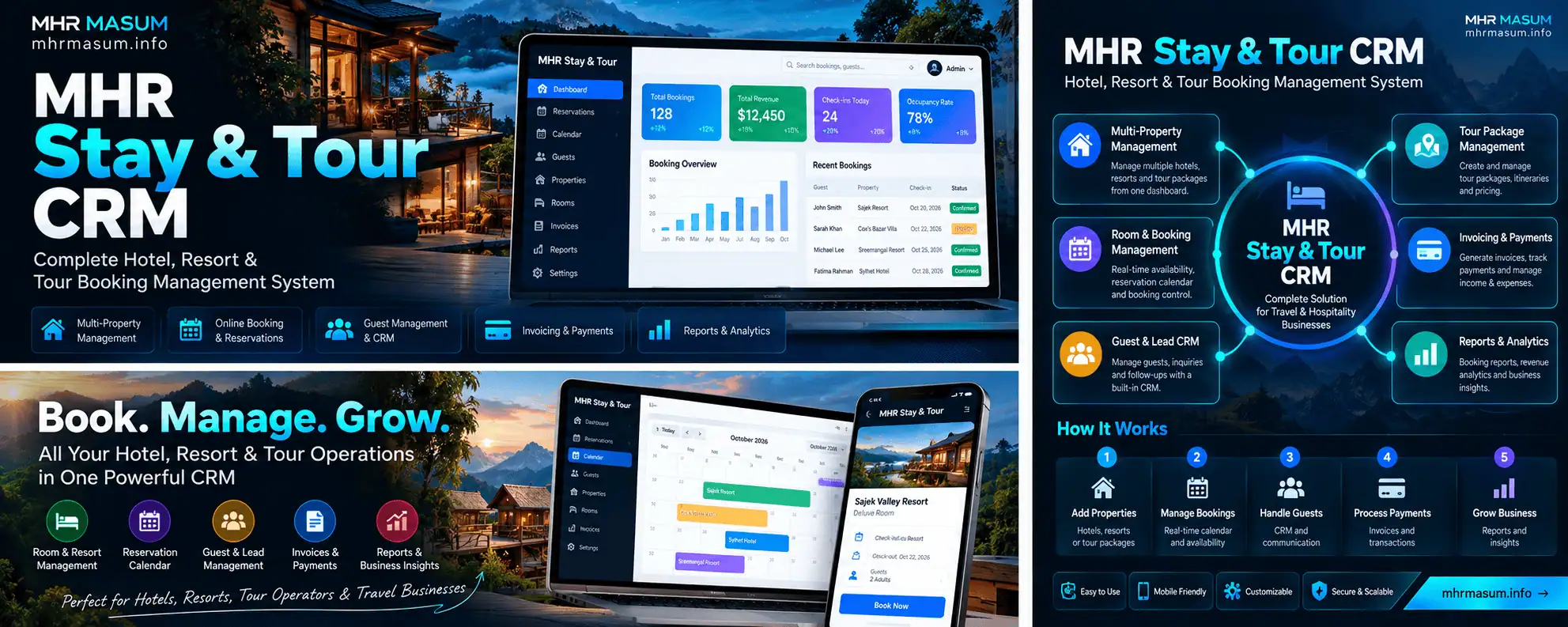
No Separate Booking Plugin Is Required
One of the most important changes from the earlier development is that MHR Stay & Tour CRM has its own booking engine.
You do not need:
- YITH Booking
- WooCommerce Bookings
- Another hotel booking plugin
You only need WooCommerce as the ecommerce foundation.
This reduces plugin dependency and allows the booking engine, availability system, front desk and accounting system to use the same internal data model.
Two Purpose-Built WooCommerce Product Types
The plugin introduces two booking-focused product types.
Stay Products
Stay products are designed for:
- Hotels
- Resorts
- Cottages
- Guest houses
- Apartments
- Villas
- Boats rented by night
- Other accommodation-based businesses
A Stay product can include:
- Number of rooms
- Included guests
- Maximum guests
- Nightly pricing
- Weekend pricing
- Seasonal pricing
- Minimum stay
- Closed dates
- Extra adult pricing
- Extra child pricing
- Deposit percentage
- Booking window
The customer selects dates and guest information directly from the WooCommerce product page.
Tour Products
Tour products are designed around dated departures rather than room nights.
A departure can have its own:
- Date
- Time
- Available seats
- Adult price
- Child price
- Notes
This makes the same plugin usable for both hospitality and tour operations.
For businesses that run both accommodation and tours, the two can operate from the same WordPress installation.
A Real Availability Calendar
The booking experience begins with availability rather than a simple date field.
For Stay products, customers can view available dates and nightly pricing.
The system can account for:
- Room capacity
- Existing bookings
- Temporary holds
- Closed dates
- Seasonal rates
- Weekend rates
- Minimum stays
The current implementation displays a broader calendar on desktop and a more compact experience on mobile.
Customers can see the expected booking price before proceeding to checkout.
Preventing Double Bookings Was a Core Requirement
A booking system is only useful if its availability data remains reliable when several customers attempt to book at the same time.
This became one of the most important technical priorities during redevelopment.
MHR Stay & Tour CRM uses two protections.
Temporary Cart Holds
When a guest places an available Stay or Tour into the WooCommerce cart, the inventory is temporarily held.
The current default hold period is 15 minutes.
This reduces the possibility that another customer takes the same inventory while the first guest is completing checkout.
Database-Level Availability Locking
The plugin also rechecks capacity during booking creation inside a database lock.
This is important because simply checking availability on the product page is not enough.
Consider:
3 rooms available

30 users check availability
at almost the same moment
Without proper locking, multiple requests could read:
3 rooms availablebefore previous booking writes finish.
MHR Stay & Tour CRM was tested by having 30 simultaneous booking attempts compete for the final three rooms.
Exactly three bookings succeeded.
The same principle was tested with limited tour seats.
This concurrency protection is one of the most important differences between a booking interface and a reliable booking engine.
Availability Is Rechecked Before Payment
Availability is not checked only when the customer first opens the calendar.
The plugin revalidates availability later in the purchasing process.
If inventory becomes unavailable between the initial selection and checkout, the affected item can be removed before payment instead of accepting money for inventory that can no longer be fulfilled.
That provides a safer WooCommerce checkout workflow.
Seasonal, Weekend and Flexible Pricing
Hospitality pricing is rarely static.
A room may cost:
Sunday–Thursday:
৳4,000

Friday–Saturday:
৳5,000

Eid holidays:
৳7,500
MHR Stay & Tour CRM therefore supports multiple pricing layers.
These include:
- Base nightly pricing
- Weekend pricing
- Seasonal pricing
- Pricing priorities
- Minimum-night rules
- Extra-adult charges
- Child charges
- Tour departure pricing
Properties can define which days count as their weekend rather than assuming the same weekend structure for every market.
Deposit Payments Are Built Into the Booking Flow
Many hotels and tour operators do not require full payment during the initial reservation.
The plugin therefore supports percentage-based deposits.
For example:
Booking total:
৳20,000

Deposit:
30%

Online payment:
৳6,000

Due:
৳14,000
The remaining balance remains attached to the booking and can be collected later by the front desk.
A deposit can be configured per product or through a store-level default.
WooCommerce Orders Automatically Become Bookings
A major goal of the redevelopment was to remove duplicate data entry.
The staff should not have to:
- Receive a WooCommerce order.
- Open another booking system.
- Re-enter the same guest.
- Re-enter the same dates.
- Enter the payment again.
Instead, the systems are connected.
When the relevant WooCommerce order reaches the required state, the booking is created or confirmed and the related payment information is posted into the CRM ledger.
Refunds Reverse the Financial Entry
Refund handling is another area where disconnected systems frequently create accounting problems.
If a WooCommerce payment is refunded, MHR Stay & Tour CRM can post a corresponding reversing entry.
That keeps:
- Amount paid
- Amount refunded
- Remaining due
- Ledger balance
in sync.
A cancelled or failed order can also release the associated inventory so those dates or seats become available again.
Front Desk Booking for Walk-Ins and Phone Reservations
Not every hotel booking begins on the website.
Guests may:
- Walk into reception
- Call the property
- Send a WhatsApp message
- Book through another communication channel
The front desk therefore needs access to the same availability and pricing engine used by the public website.
MHR Stay & Tour CRM allows staff to create bookings manually while still checking:
- Available inventory
- Current price
- Room quantity
- Guest information
- Payments
This prevents offline bookings from bypassing the core availability system.
Check-In and Check-Out Are Part of the CRM
A booking does not disappear after the customer pays.
The operational workflow continues through statuses such as:
Pending
→ Confirmed
→ Checked in
→ Checked out
with alternatives such as:
Cancelled
No-show
The front desk can therefore manage the actual guest stay, not only the reservation.
Room Numbers Can Be Assigned at Check-In
A booking may initially reserve a room type rather than a specific physical room.
For example:
Room type:
Deluxe Double

Quantity:
2 rooms
Later, reception can assign actual room numbers.
For example:
Room 203
Room 205
This creates a more realistic hotel workflow.
Room Board for Daily Operations
The Room Board provides a current operational view of the property’s physical rooms.
Staff can see whether a room is:
- Vacant
- In house
- Arriving
- Departing
- Clean
- Dirty
- Cleaning
- Inspected
- Out of order
The current product also includes a dedicated Housekeeping role that can work with room-status information without requiring full accounting or administrative access.
Monthly Tape Chart
Hotel staff often need a visual month-level room assignment view.
The tape chart provides this across physical rooms.
It can show:
- Existing stays
- Assigned rooms
- Unassigned bookings
- Room availability
The system can also help with room assignment while avoiding rooms that are marked out of order.
This moves the CRM much closer to practical daily property management.
Housekeeping Is Connected to Guest Operations
Housekeeping status should not be isolated from check-out.
When a guest checks out, the room can be marked dirty so housekeeping knows it requires attention.
Staff can then update the room through stages such as:
Dirty
→ Cleaning
→ Clean
→ Inspected
This is a small workflow detail, but these are exactly the kinds of operational requirements that became clear during real hospitality CRM development.
Extras Can Be Added to the Guest Bill
Accommodation revenue is not always limited to the room.
A guest may also purchase:
- Food
- Laundry
- Transport
- Minibar items
- Other services
These can be added to the booking so the guest’s final invoice reflects the complete amount.
Group Bookings
The system also supports grouping several reservations for one party.
For example:
Corporate group
│
├── Room 1
├── Room 2
├── Room 3
└── Airport transfer
A group can be managed together and reflected through combined totals and invoicing.
This is useful for:
- Families
- Corporate groups
- Tour groups
- Wedding parties
- Multi-room reservations
Night Audit
The new system also includes a hotel-style night audit.
This can help staff review situations such as:
- Guests expected but not checked in
- Guests expected to leave but still checked in
- Daily occupancy
- Room revenue
- ADR
- RevPAR
The day can then be closed with the relevant operational and financial figures preserved.
Payments and Accounting Are Built Into the Same System
The original Check In Cherish development placed strong emphasis on CRM accounting.
That requirement remains central to MHR Stay & Tour CRM.
The current product includes a unified ledger for:
- Booking payments
- Refunds
- Expenses
- Other income
- Account transfers
Supported account types can represent operational money locations such as:
- Cash
- Bank
- Mobile wallet
- Online payment accounts
This means the booking record and the money record remain connected.
Payment Methods Can Follow Local Business Needs
Front-desk payment recording can support methods relevant to local operations such as:
- Cash
- bKash
- Nagad
- Bank
- Card
Online bookings continue to use whatever payment gateways are enabled through WooCommerce.
That makes the system particularly practical for Bangladesh-based hospitality and travel businesses while retaining WooCommerce’s broader international gateway ecosystem.
Ledger Health Checks
Accounting systems can become unreliable if booking payments exist without the corresponding financial record.
MHR Stay & Tour CRM includes ledger-health tools designed to identify inconsistent records.
For example:
Booking payment exists
but
Ledger entry missing
The system can identify and repair supported inconsistencies.
A nightly WooCommerce synchronisation check also helps maintain order and booking consistency.
Expense Management
A useful hospitality CRM needs to show not only income but also operating expenses.
Expenses can be recorded against categories and vendors.
Examples may include:
- Food
- Cleaning supplies
- Transport
- Repairs
- Utilities
- Staff-related expenses
- Tour costs
This supports more realistic profitability reporting.
Vendor Management
Vendors can be maintained separately so expenses can be connected to the business or individual being paid.
This makes it easier to understand:
How much did we spend?and:
Who received that money?Transfers and Account Statements
Money frequently moves among:
- Cash
- Bank
- bKash
- Nagad
- Other accounts
A transfer should not be treated as income or expense simply because money changed location.
MHR Stay & Tour CRM can record transfers separately and provide account statements with running balances.
Bank CSV Import
Bank transactions can also be imported from CSV.
The workflow is designed to let staff review lines before adding new entries rather than blindly importing everything.
This can reduce duplicate financial records.
Investor Funds
One of the important lessons from the original CRM project was that capital movements should not automatically appear as business profit.
Investor funds can therefore be tracked separately from normal operating revenue.
Examples include:
Investor capital in
Investor withdrawal
These movements can then remain distinct from normal profit-and-loss calculations.
Loan Tracking
The CRM can also maintain loan information, including repayment schedules and reminders.
This allows hotel or tour operators to see liabilities alongside other financial operations without classifying loan capital as booking income.
Owner Lease Management
Some hotels and resorts operate in properties owned by another party.
The owner may receive:
- Fixed monthly rent
- Percentage of revenue
The Owner Lease section can track expected and paid amounts accordingly.
This functionality originated from real operational requirements encountered during earlier CRM development.
Tour Statements
Tours need a different profitability model from accommodation.
A departure might generate:
Revenue:
৳100,000
while incurring:
Transport:
৳25,000

Guide:
৳10,000

Food:
৳20,000
The Tour Statement feature lets these revenues and costs be analysed at the departure level.
Hotel and Tour Reporting
The system now provides reports across both booking and financial activity.
Reporting can include:
- Monthly income
- Refunds
- Expenses
- Net amount
- Room nights
- Occupancy
- Room-type performance
- Tour performance
- Outstanding dues
- Expense categories
The aim is to avoid keeping bookings in WordPress while maintaining the actual management numbers in several disconnected spreadsheets.
Hospitality Analytics
The rebuilt product also introduces broader operational analytics.
These can include:
- Occupancy
- ADR
- RevPAR
- Average length of stay
- Booking lead time
- Cancellation trends
- Income vs expenses
- Booking sources
- Payment methods
- Receivables aging
The current version includes these hotel-performance indicators alongside CRM and financial reporting.
Monthly Summary
A January-to-December summary can show room or tour activity by product.
For accommodation, this can include:
- Room nights
- Revenue
For tours:
- Seats
- Revenue
The summaries can also be printed or exported to CSV.
Guest Profiles
A hospitality CRM should remember the guest beyond one booking.
Guest profiles can connect reservations through identifiers such as email or telephone number and maintain:
- Booking history
- Notes
- ID information
This gives staff a more useful customer view than isolated WooCommerce orders.
Guest Booking Lookup
Guests can also retrieve their booking through a front-end lookup.
The shortcode:
[mhrst_booking_lookup]can be placed on a WordPress page.
Guests can then find their booking using their booking reference and telephone number. The lookup is rate-limited for protection.
Shareable Invoices
Bookings can generate printable invoices.
A shareable invoice link allows a guest to access their invoice without requiring a WordPress login.
This is particularly useful when sending booking information through WhatsApp.
WhatsApp Booking Messages
Hospitality businesses in Bangladesh frequently communicate with guests through WhatsApp.
MHR Stay & Tour CRM therefore includes templates that can contain booking information such as:
- Booking reference
- Total
- Paid amount
- Amount due
- Invoice link
The template can be customised from the plugin settings.
Staff Roles and Permissions
Not every staff member should see every part of the business.
The plugin provides dedicated roles including:
- Manager
- Front Desk
- Accountant
- Housekeeping
Permissions can be adjusted according to operational needs.
This is much safer than giving every reception or housekeeping employee full WordPress Administrator access.
Mobile Staff App
The redevelopment also includes a front-desk interface designed for phones.
Using:
[mhrst_staff_app]a dedicated WordPress page can provide staff access to practical tasks such as:
- Today’s arrivals
- Today’s departures
- Check-in
- Room assignment
- Check-out
- Taking payments
- Updating room status
The interface can be installed on an Android home screen in an app-like format.
This helps small properties operate without requiring a dedicated desktop terminal for every employee.
Multi-Property Support
MHR Stay & Tour CRM is not restricted to one accommodation property.
Properties can be created and Stay or Tour products assigned accordingly.
Property information can then be used for operational separation and invoicing.
This makes the plugin suitable for businesses operating several:
- Hotels
- Resorts
- Cottages
- Tour operations
from one WordPress installation.
Importing Data From the Earlier CRM
An important part of turning the previous development into a reusable product was providing a migration route.
The current plugin can import supported records from Global Booking CRM & Accounting 1.9, including areas such as:
- Bookings
- Customers
- Payments
- Expenses
- Vendors
- Tour statements
- Owner lease
- Funds
- Loans
- Bank entries
The importer is designed to be repeatable without simply duplicating records on every run.
This makes the redevelopment more practical for existing installations rather than forcing businesses to start with an empty database.
Designed Around Data Integrity
One of the biggest development lessons from hospitality systems is that small accounting or booking errors accumulate.
Examples include:
Duplicate booking
Missing ledger entry
Incorrect due amount
Refund recorded twice
Wrong room-night count
Duplicate import
MHR Stay & Tour CRM therefore uses several safeguards around repeatability and data consistency.
These include:
- Database booking locks
- Temporary holds
- Availability rechecks
- Refund reversal entries
- Duplicate-safe synchronisation
- Health checks
- Activity logs
- Duplicate-safe migration logic
The objective is not simply to provide more admin screens.
It is to make the underlying booking and money records more dependable.
Tested With Automated Checks
The current v1.1.0 product page reports 133 automated checks covering areas such as pricing, availability holds, finance, room operations and auditing.
Automated tests are particularly useful for a booking system because many features interact.
Changing deposit calculations, for example, should not accidentally break:
- Booking totals
- Due amounts
- Ledger records
- Refund calculations
Testing helps protect those relationships as the plugin develops.
Technical Requirements
The current MHR Stay & Tour CRM requirements are:
WordPress:
6.0+

PHP:
7.4+

WooCommerce:
8.0+
The plugin is also designed to work with WooCommerce HPOS and both block and classic checkout implementations.
No separate booking plugin is required.
Current Product Version
The current release is:
MHR Stay & Tour CRM
Version 1.1.0
The October 2026 v1.1.0 release expanded the original booking functionality with deeper hotel operations, reporting, finance, staff tools and migration functionality.
The initial 1.0.0 release established the core:
- Stay and Tour product types
- Availability calendar
- Seasonal pricing
- Deposits
- Booking holds
- Database locking
- Order sync
- Front desk
- Guests
- Invoices
- Ledger
- Reports
- Staff roles
Version 1.1.0 then added more operational depth, including:
- Room Board
- Tape Chart
- Housekeeping
- Guest extras
- Group bookings
- Night audit
- Occupancy reporting
- ADR
- RevPAR
- Advanced analytics
- Vendors
- Transfers
- Statements
- Bank import
- Funds
- Loans
- Owner lease
- Tour statements
- WhatsApp templates
- Mobile staff app
- Housekeeping role
- Permission editor
- Migration tools
Who MHR Stay & Tour CRM Is Designed For
The plugin is particularly suitable for businesses that want their booking operation to remain inside WordPress and WooCommerce.
Potential users include:
- Hotels
- Resorts
- Guest houses
- Cottages
- Villas
- Rental properties
- Small hotel groups
- Tour operators
- Travel businesses
- Combined hotel-and-tour businesses
It is especially useful where the business needs more than a simple online reservation calendar.
When It May Not Be the Right Product
No product should pretend to fit every booking model.
MHR Stay & Tour CRM currently focuses on:
Night-based accommodation
+
Dated tour departures
The current version does not yet support hourly rentals.
Businesses requiring advanced hourly appointment scheduling may therefore need a different solution at this stage.
Why I Rebuilt the Original CRM
The biggest lesson from developing the original Check In Cherish system was that hospitality software cannot be designed around only the online booking form.
The booking creates several operational responsibilities:
Booking
→ payment
→ room allocation
→ guest arrival
→ housekeeping
→ balance payment
→ departure
→ accounting
→ reporting
Tour operations add another chain:
Tour sale
→ seats
→ payment
→ departure
→ guide/transport/food costs
→ profit statement
Treating each part as a separate plugin eventually creates unnecessary complexity.
The redevelopment therefore focused on bringing these related operations into one product architecture.
What Changed From the Original Check In Cherish Development
The difference can be summarised like this:
| Earlier Development | MHR Stay & Tour CRM |
|---|---|
| Custom solution for one business | Reusable commercial WordPress plugin |
| CRM/accounting grew around bookings | Booking engine and CRM designed together |
| External booking dependency in earlier workflows | Own Stay & Tour booking engine |
| Multiple companion modules | Core functions consolidated |
| Business-specific naming | General hotel/tour product |
| Booking sync emphasis | Native availability and booking control |
| Accounting dashboard | Full booking + hotel operations + finance |
| Desktop-focused workflows | Mobile staff interface added |
| Custom development releases | Versioned licensed product |
The original development work was not discarded.
It became the practical research and operational experience behind the new system.
Why Build This on WordPress and WooCommerce?
For small and medium hospitality businesses, WordPress already powers:
- Marketing pages
- SEO
- Content
- Landing pages
- Customer information
- Ecommerce
Using WooCommerce for payment and checkout avoids creating another isolated commerce platform.
A business can therefore manage:
Website
+
SEO
+
Rooms
+
Tours
+
Payments
+
Bookings
+
Front Desk
+
Accounting
from the same WordPress ecosystem.
This can be particularly valuable for businesses that already depend on WooCommerce and do not want to migrate their website into a closed booking SaaS platform.
Booking Software Also Needs SEO-Friendly Architecture
As an SEO consultant and WordPress developer, one of my objectives was to keep the public booking experience connected to normal WooCommerce products.
That means Stay and Tour products can remain part of the site’s normal:
- Product architecture
- Internal linking
- Category structure
- Content strategy
- Search visibility
- Conversion funnel
The booking engine should support the website rather than forcing the business to send users to an unrelated external reservation system.
Current Pricing Model
MHR Stay & Tour CRM currently offers licensing based on the number of live websites.
Every plan includes the same functional feature set; the primary difference is site allowance.
The product page currently lists with yearly and lifetime options.:
1 site
5 sites
Unlimited sites
A 7-day free trial is also available, while staging, local and development sites do not consume a production license slot.
Because pricing may change over time, check the MHR Stay & Tour CRM product page for the latest plans.
What Happens if a License Expires?
A booking system should not suddenly stop accepting guest reservations because someone missed a software renewal.
The current licensing model therefore separates guest-facing continuity from restricted administration.
If a licence expires, the product page states that existing booking data remains intact and core guest-facing booking/order synchronisation continues, while protected administrative functionality remains locked until the licence is renewed.
This design reduces the risk of a licence issue disrupting live booking operations.
Frequently Asked Questions
MHR Stay & Tour CRM combines WooCommerce ecommerce functions with hospitality booking, front-desk and accounting workflows. The following answers cover the most common questions about the rebuilt product.
Is MHR Stay & Tour CRM the same as the old Check In Cherish CRM?
No.
MHR Stay & Tour CRM grew out of the development experience behind the earlier custom hospitality CRM, but it has been rebuilt as a standalone and reusable WooCommerce product.
The new product has its own booking engine, Stay and Tour product types and a broader operational architecture.
Do I need YITH Booking?
No.
MHR Stay & Tour CRM does not require YITH Booking.
Do I need WooCommerce Bookings?
No.
The plugin provides its own Stay and Tour booking functionality while using standard WooCommerce for ecommerce checkout and payment processing.
Does it prevent double bookings?
The plugin uses temporary cart holds and database-level availability locking.
The current product was tested with 30 simultaneous attempts competing for three remaining rooms; exactly three bookings were created.
Can customers pay a deposit?
Yes.
A percentage deposit can be configured, with the outstanding balance remaining attached to the booking for later collection.
Can front-desk staff create walk-in bookings?
Yes.
Walk-in and phone reservations use the same availability and booking rules as online reservations.
Can I manage tours?
Yes.
Tour products can contain scheduled departures with individual dates, times, available seats and pricing.
Can I manage several properties?
Yes.
Room types and tours can be associated with properties, allowing multiple hospitality operations to be managed from one installation.
Does it include accounting?
Yes.
The current system includes payments, refunds, expenses, accounts, transfers, vendor records, statements and additional finance modules such as funds, loans, owner lease and tour statements.
Does it include housekeeping?
Yes.
Physical rooms can be tracked with statuses such as clean, dirty, cleaning, inspected and out of order.
Can hotel staff use it on mobile?
Yes.
The staff app shortcode creates a phone-oriented interface for daily front-desk operations and can be added to an Android home screen.
Is WooCommerce HPOS supported?
Yes.
The current product states that it is HPOS ready and supports current WooCommerce order-table architecture.
Can I migrate from the earlier CRM?
The current version includes an importer for supported records from Global Booking CRM & Accounting 1.9.
Does it support hourly booking?
Not currently.
The present version focuses on night-based stays and dated tour departures.
The Development Continues
MHR Stay & Tour CRM is the result of taking a business-specific hospitality system, analysing what worked and what became unnecessarily complex, and rebuilding it around a reusable architecture.
The project has evolved from:
Custom Booking CRMinto:
WooCommerce Booking Engine
+
Hotel Operations
+
Tour Management
+
Front Desk
+
CRM
+
Accounting
+
Finance
+
Reporting
The important change is not simply the number of features.
It is that bookings, rooms, guests, payments, operations and accounting now belong to the same system.
That creates a stronger foundation for future development.
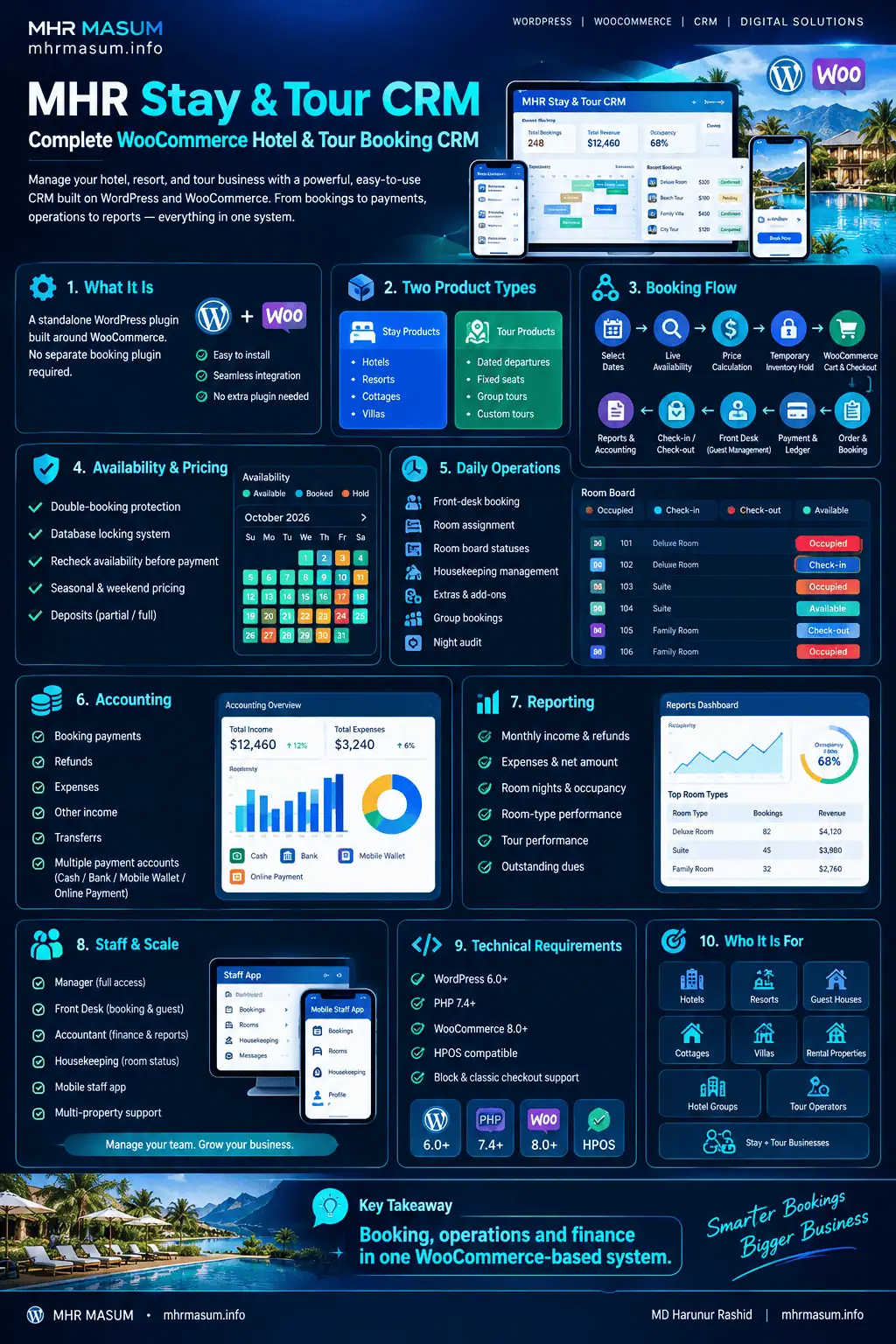
Explore MHR Stay & Tour CRM
If you run a hotel, resort, guest house, cottage, rental property or tour operation on WordPress and want to manage booking and operations through WooCommerce, you can review the complete product here:
The product page includes:
- Full feature list
- Screenshots
- Current version details
- Pricing
- Free trial
- Technical requirements
- FAQs
- Purchase information
MHR Stay & Tour CRM is developed by MD Harunur Rashid / MHRMasum as part of my wider WordPress, CRM, SEO and digital-product development work.
You can also explore: