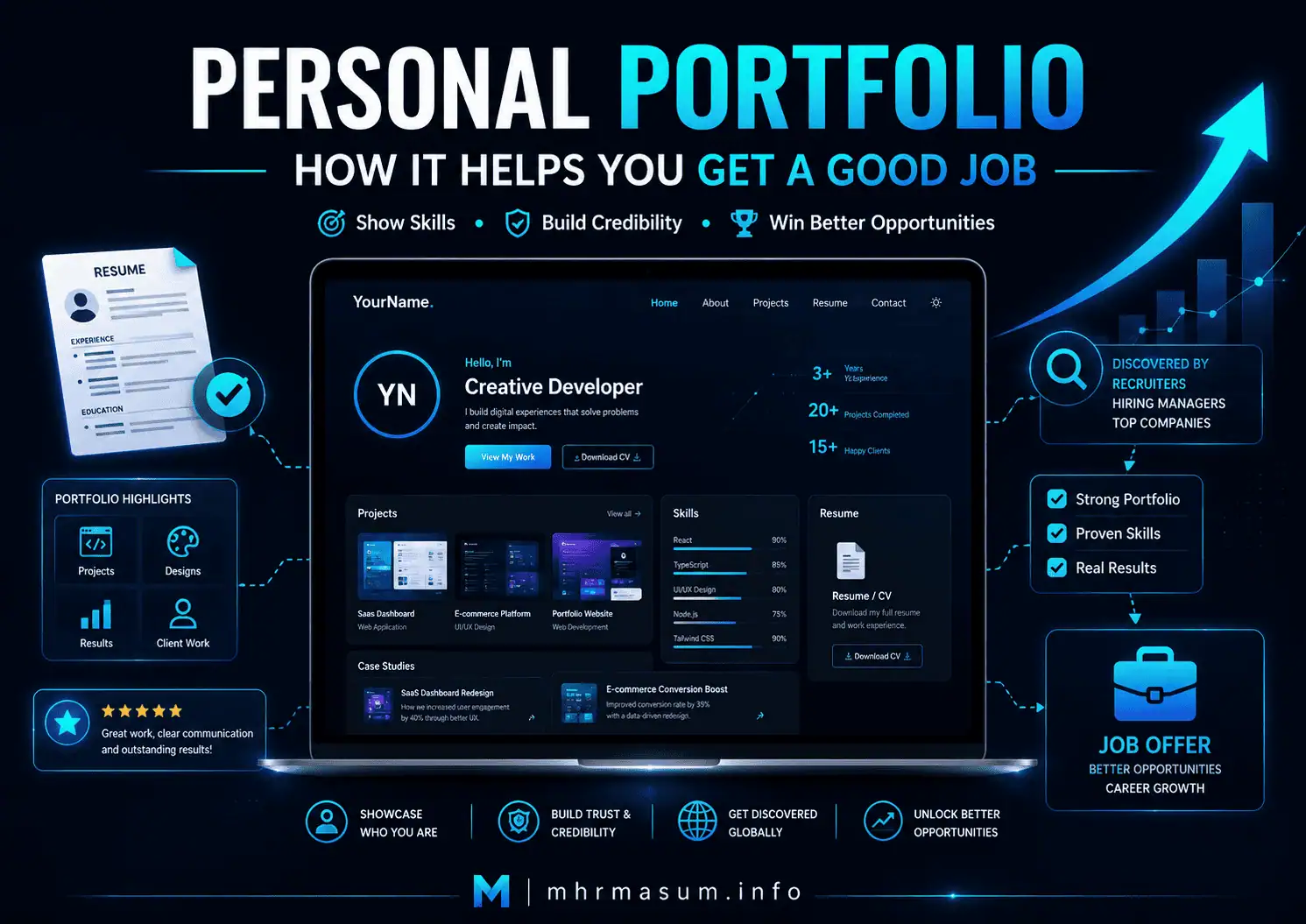
A resume tells an employer what you have done. A personal portfolio website can show the employer how you did it, what you produced, which problems you solved, and what results you achieved.
This distinction can be extremely valuable in a competitive job market.
Hiring managers regularly receive applications from candidates with similar:
- Qualifications
- Job titles
- Certifications
- Technical skills
- Years of experience
- Resume descriptions
A well-planned personal portfolio helps you move beyond general claims by presenting visible evidence of your professional ability.
Instead of only writing:
Experienced digital marketer with strong SEO skills.
You can provide:
- SEO audit examples
- Search Console improvements
- Keyword-research projects
- Content strategies
- Local SEO case studies
- Website optimization work
- Campaign results
- Client testimonials
- Reports
- Dashboards
- Published articles
Harvard’s Mignone Center for Career Success describes portfolio creation as an important way to showcase skills, accomplishments, and talents, particularly in creative, technical, and engineering fields. It also identifies portfolios as useful assets for securing internships and jobs. Review Harvard’s portfolio resources.
A personal portfolio cannot guarantee a good job. Employment decisions also depend on experience, qualifications, communication, market demand, interview performance, references, location, compensation, and cultural fit.
However, a strong portfolio can make it easier for a recruiter or employer to understand your professional value and remember you after reviewing multiple candidates.
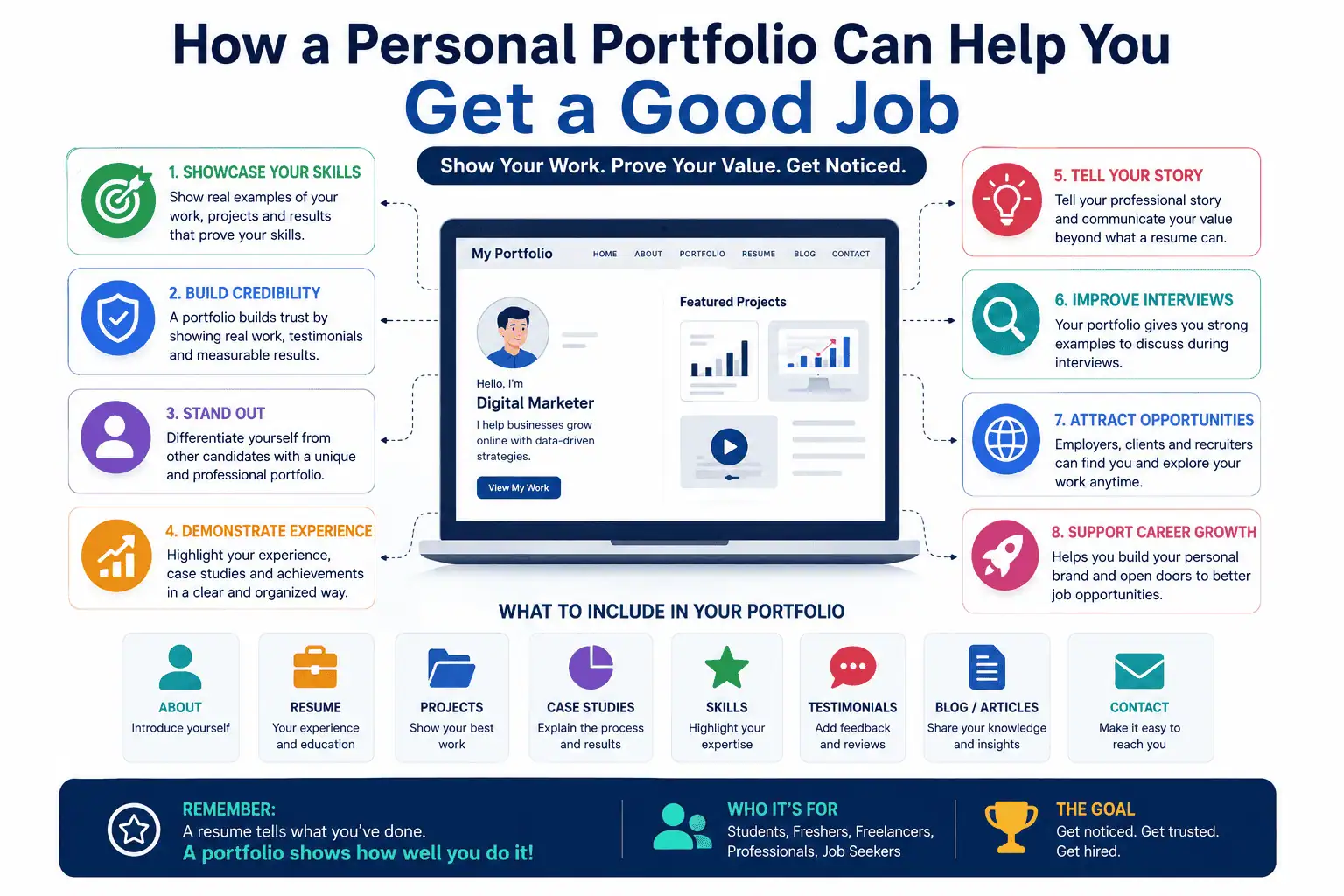
What Is a Personal Portfolio Website?
A personal portfolio website is a professional online platform that presents your identity, experience, skills, projects, achievements, knowledge, and contact information.
It may include:
- Professional introduction
- About page
- Resume or career history
- Skills
- Selected projects
- Case studies
- Work samples
- Certifications
- Testimonials
- Articles
- Contact information
- Social profiles
- Downloadable resume
The portfolio should not be a random collection of everything you have ever created.
It should be a carefully selected presentation of the work most relevant to the job opportunities you want.
The University of Pennsylvania describes an online portfolio as a collection of work, accomplishments, and professional information that can be shared with recruiters and hiring managers. It notes that a portfolio allows candidates to demonstrate skills and projects in greater depth than a resume normally permits. Read Penn Career Services’ online portfolio guidance.
Why a Resume Alone May Not Be Enough
A resume remains an essential job-search document. It summarizes the experience, education, and skills relevant to a particular role.
However, a resume has limited space.
It may tell an employer that you:
- Managed an SEO campaign
- Designed a website
- Created a marketing strategy
- Developed an application
- Improved a business process
- Produced written content
It may not provide enough room to explain:
- What the original problem was
- Which responsibilities you personally handled
- Which tools you used
- How you developed the solution
- Which challenges appeared
- What the final outcome was
- What you learned
Penn Career Services notes that an effective resume should communicate relevant education, experience, and skills succinctly because employers have limited time to evaluate candidates. Review Penn’s resume guidance.
Your portfolio provides the deeper layer of evidence that supports the concise claims made in your resume.
A Portfolio Helps You Show Instead of Only Tell
One of the strongest benefits of a portfolio is that it turns abstract claims into concrete proof.
Consider the difference between the following two candidates.
Candidate One
The first candidate writes:
I have strong WordPress website-development skills.
Candidate Two
The second candidate provides a portfolio showing:
- The original client problem
- Website screenshots
- Design decisions
- Mobile improvements
- Performance results
- Plugin customizations
- Technical challenges
- Live website link
- Client feedback
The second candidate provides evidence that can be reviewed and discussed.
The University of Michigan Career Center recommends developing personal projects such as websites, social channels, art, writing, or coding portfolios because these projects can demonstrate initiative and build a body of work that may impress future employers. Review the University of Michigan’s job-search guidance.
A Portfolio Demonstrates Proof of Skills
Employers increasingly need to distinguish between candidates who know professional terminology and candidates who can apply their knowledge.
A portfolio can demonstrate technical and professional skills such as:
- Research
- Strategy
- Problem-solving
- Communication
- Analysis
- Design
- Coding
- Writing
- Project management
- Marketing
- Data interpretation
- Presentation
Penn Career Services reported in a 2026 job-market resource that tangible proof of skills and results can differentiate candidates more effectively than broad statements about interest or enthusiasm. It specifically identified project portfolios as a credible way to demonstrate interest and measurable impact.
This is especially relevant as AI tools make it easier for people to generate polished resumes, cover letters, code fragments, designs, and written content.
A portfolio should therefore reveal your thinking, decisions, contribution, and results—not merely display attractive final outputs.
A Portfolio Can Make You More Memorable
Recruiters may review many applications containing similar phrases:
- Results-driven professional
- Strong communication skills
- Experienced team player
- Passionate problem solver
- Detail-oriented specialist
These statements are difficult to verify and easy to forget.
A distinctive portfolio can create a more memorable professional identity through:
- Consistent branding
- Strong case studies
- Original projects
- Clear specialization
- Practical insights
- Recognizable visual style
- Specific accomplishments
A recruiter may not remember every sentence in your resume, but they may remember:
- The candidate who rebuilt an outdated eCommerce store
- The marketer who recovered a website after a Google update
- The developer who created a working CRM
- The designer who documented an accessibility redesign
- The writer who produced a strong industry research series
A portfolio gives your application a professional story.
A Portfolio Strengthens Your Personal Brand
Personal branding is how people understand and remember your professional identity.
Your portfolio can communicate:
- Who you are
- What you specialize in
- Which industries you understand
- Which problems you solve
- What type of work you want
- What standards you follow
- What differentiates you
For example, the professional positioning on my About page for MD Harunur Rashid clearly connects my experience with SEO, AI SEO, Local SEO, Technical SEO, WordPress optimization, digital growth, and plugin development.
That is more effective than presenting an unrelated list of every skill or service.
A clear personal brand helps employers determine whether your experience is relevant to the role they need to fill.
A Portfolio Gives You Control Over Your Professional Story
Social platforms decide how profiles are formatted, which sections receive attention, and how content is displayed.
A personal website gives you greater control over:
- Page structure
- Project order
- Design
- Branding
- Case-study depth
- Contact options
- Search visibility
- Calls to action
- Content ownership
You can decide whether the first thing an employer sees is:
- Your strongest project
- Your specialist expertise
- A career summary
- A recent achievement
- A technical case study
- A featured testimonial
Your portfolio can also be updated as your career changes.
You might initially emphasize:
- Academic projects
- Internships
- Volunteer work
- Personal projects
Later, you can replace or expand these with:
- Professional projects
- Leadership experience
- Client work
- Published research
- Major business results
A Portfolio Can Support Different Career Types
Portfolio websites are not limited to graphic designers or photographers.
They can be valuable for many careers.
Digital Marketers
A digital marketer can showcase:
- Campaign strategies
- SEO results
- Analytics dashboards
- Content calendars
- Paid-media campaigns
- Email sequences
- Conversion improvements
- Social media growth
SEO Professionals
An SEO professional can include:
- Technical audits
- Keyword research
- Traffic-growth examples
- Core-update recovery
- Local SEO projects
- Content strategies
- Search Console analysis
- Schema implementation
Examples from my own portfolio include:
- Technical SEO and Keyword Research
- Local SEO projects
- Website Speed Optimization
- Roofing Brisbane Local SEO case study
- Pest Control Melbourne GMB case study
Developers
A developer can show:
- Applications
- GitHub repositories
- Technical architecture
- APIs
- WordPress plugins
- Testing practices
- Deployment workflows
- Performance improvements
GitHub Pages allows developers to publish websites directly from repositories, which can be useful for project demonstrations or technical portfolios. Review the official GitHub Pages documentation.
Writers and Content Professionals
A writer can include:
- Published articles
- Copywriting
- Reports
- Case studies
- Email campaigns
- Editorial work
- Content strategies
- Writing samples
Penn Career Services recommends selecting a limited number of relevant work samples based on the position, rather than overwhelming employers with every piece of writing produced. Review Penn’s writing-sample guidance.
Designers
A designer can show:
- Final designs
- Wireframes
- User research
- Design systems
- Accessibility decisions
- Prototypes
- Before-and-after improvements
- Project outcomes
Project Managers
A project manager can include:
- Project plans
- Timeline examples
- Risk management
- Team coordination
- Process improvements
- Delivery outcomes
- Retrospectives
Confidential company information should be removed or anonymized.
Students and Graduates
Students can show:
- Academic projects
- Research
- Group assignments
- Personal projects
- Volunteer work
- Internships
- Certifications
- Competition entries
- Skill-development projects
Professional employment is not required before creating a portfolio. Penn’s career guidance specifically notes that class research, extracurricular projects, writing, coding, video games, and self-directed design work can be included when formal work experience is limited.
A Portfolio Helps Candidates with Limited Work Experience
Many entry-level candidates face the same problem:
Employers want experience, but I need a job to gain experience.
A self-directed portfolio project can help reduce this gap.
A candidate can create a realistic project based on a genuine business or user problem.
Examples include:
- Conducting an SEO audit of a public website
- Redesigning a charity website concept
- Building a simple application
- Creating a marketing plan for a local business
- Writing a sample content strategy
- Developing a social campaign
- Analysing a public dataset
- Creating a WordPress plugin
- Publishing an industry research article
The project must be labelled accurately.
Do not present a concept project as paid client work.
A transparent description might say:
This was a self-directed Technical SEO audit created to demonstrate my research, prioritization, and reporting process. I was not hired by or affiliated with the company.
Honesty strengthens credibility.
A Portfolio Demonstrates Initiative
Creating a thoughtful portfolio requires effort beyond submitting a standard application.
It can demonstrate that you are willing to:
- Develop your skills
- Organize your work
- Communicate professionally
- Complete independent projects
- Learn unfamiliar tools
- Present complex information
- Maintain your professional identity
This is particularly useful when the role values:
- Self-direction
- Creativity
- Ownership
- Continuous learning
- Digital literacy
- Written communication
A portfolio does not prove every professional quality, but it can provide evidence of initiative when the work is original and well documented.
A Portfolio Can Improve Interview Conversations
Job interviews often include questions such as:
- Tell us about a challenging project.
- How did you solve a difficult problem?
- What result are you most proud of?
- How do you approach your work?
- Which tools have you used?
- What would you improve?
A portfolio gives you specific examples to discuss.
Instead of giving vague answers, you can explain:
- The project context
- Your responsibility
- The problem
- The process
- The result
- What you learned
You can also share your screen or direct the interviewer to a relevant project.
This makes the interview more concrete and can help you remain focused when answering behavioural or technical questions.
A Portfolio Helps Employers Evaluate Your Thinking
The final output is not always the most important part of a project.
Employers may want to understand:
- How you approached the problem
- Why you selected a particular method
- Which alternatives you considered
- How you handled constraints
- What evidence informed your decision
- How you measured success
- What you would do differently
A case study should therefore explain the process—not only display the final result.
For example, a website-redesign case study could include:
- Original problems
- User or business requirements
- Technical constraints
- Information architecture
- Design decisions
- Performance improvements
- Accessibility considerations
- Final outcome
A portfolio that explains professional reasoning can be more convincing than a gallery containing only screenshots.
A Portfolio Can Support Salary and Seniority Discussions
A strong portfolio may help a candidate demonstrate that their experience is broader or more advanced than a job title alone suggests.
For example, an employee with a general “Marketing Executive” title may have actually:
- Managed Technical SEO
- Built reporting dashboards
- Led website migrations
- Coordinated developers
- Improved conversion tracking
- Managed Local SEO
- Created AI-ready content systems
Documenting these responsibilities can help employers understand the true scope of the candidate’s experience.
A portfolio does not automatically justify a higher salary. However, clear evidence of ownership, complexity, results, and leadership can support a stronger professional discussion.
A Portfolio Helps You Apply for Remote and International Jobs
An online portfolio is available across locations and time zones.
Employers can review your work without requiring:
- Physical documents
- An in-person meeting
- Large email attachments
- Access to a private company system
This is helpful for:
- Remote roles
- International applications
- Freelance opportunities
- Agency partnerships
- Contract work
- Consulting positions
The portfolio should still be relevant to the employer’s market and role.
For international applications, consider:
- Clear English or relevant language
- Time-zone information
- Work authorization where appropriate
- Location
- Remote availability
- Communication tools
- Professional contact options
A Portfolio Can Create Passive Career Opportunities
A resume usually reaches employers only after you submit it.
A properly optimized public portfolio may be discovered through:
- Google Search
- Social media
- Referrals
- Industry communities
- Guest articles
- Professional directories
- Shared project links
Google explains that SEO helps search engines understand content and helps users find a website through search. Review Google’s official SEO Starter Guide.
A portfolio may therefore support both active job applications and passive professional discovery.
It does not guarantee that recruiters will find you, but it creates another searchable professional asset.
A Portfolio Complements LinkedIn
LinkedIn is valuable for professional networking, employment history, recommendations, and industry visibility.
Your portfolio and LinkedIn profile should support each other.
LinkedIn allows members to showcase external links, work samples, images, documents, articles, and other professional content through the Featured section. LinkedIn describes this section as a way to provide evidence of skills and experience. Review LinkedIn’s Featured section guidance.
LinkedIn also allows website links to be displayed within profile contact information. Review LinkedIn’s website-link instructions.
A practical setup is:
- LinkedIn provides networking and professional history.
- The portfolio provides detailed evidence and case studies.
- The resume provides a concise application-specific summary.
- GitHub, Behance, or another specialist platform provides relevant technical or creative samples.
These assets should use consistent information.
A Portfolio Can Improve Professional Credibility
A complete portfolio can support credibility by showing:
- Real name
- Professional photo where appropriate
- Work history
- Contact information
- Relevant projects
- Consistent branding
- Client or employer testimonials
- Certifications
- Publications
- External profiles
Credibility is weakened when a portfolio includes:
- Exaggerated claims
- Fake clients
- Unverifiable statistics
- Broken links
- Outdated projects
- Copied work
- Poor grammar
- Missing contact details
- Inconsistent dates
Every important claim should be supportable.
When confidentiality prevents publication of specific data, explain the limitation clearly.
For example:
Exact revenue figures are confidential. The project increased qualified organic enquiries and improved visibility for priority service terms during the reporting period.
What Should a Personal Portfolio Website Include?
A job-focused portfolio should make it easy for employers to answer five questions:
- Who are you?
- What can you do?
- What evidence supports your claims?
- What type of opportunity are you seeking?
- How can you be contacted?
Create a Clear Homepage
Your homepage should introduce your professional identity quickly.
Include:
- Name
- Professional title
- Main specialization
- Short value proposition
- Featured projects
- Primary call to action
A good introduction might say:
I am a Technical SEO and WordPress specialist helping businesses improve search visibility, website performance, and conversion opportunities through evidence-based optimization.
Avoid generic introductions such as:
Welcome to my website. I am passionate, hardworking, and creative.
The homepage should communicate professional relevance, not only personality.
Create a Detailed About Page
The About page should explain:
- Professional background
- Experience
- Areas of expertise
- Industries
- Career direction
- Working philosophy
- Relevant achievements
It should not repeat the resume word for word.
A good About page gives context to the work displayed in the portfolio.
My About page presents my experience and positioning as an SEO, AI SEO and Digital Growth Consultant.
Add a Focused Portfolio Section
The portfolio section should contain your strongest and most relevant projects.
Each project should explain:
- Project title
- Context
- Objective
- Your role
- Tools
- Process
- Challenges
- Solution
- Results
- Supporting visuals
My professional portfolio demonstrates how separate project pages can present different areas of expertise and completed work.
Create Detailed Case Studies
A case study is stronger than a screenshot because it explains what happened.
A practical case-study structure is:
Project Overview
Explain the business, user, academic, or technical context.
The Challenge
Describe the problem that needed to be solved.
Your Role
Clarify your personal contribution, especially for team projects.
The Process
Explain the research, planning, tools, and implementation.
The Result
Present measurable or observable outcomes.
Key Learning
Explain what the project taught you and what you would improve.
Include an Updated Resume
Provide:
- A readable web-based career summary
- A downloadable PDF resume
- Relevant employment history
- Education
- Certifications
- Skills
Tailor the resume used for a particular application.
Your general website resume may be broader, while the application resume should emphasize the requirements of the role.
Add Testimonials Carefully
Testimonials can support credibility when they are authentic and relevant.
They may come from:
- Clients
- Managers
- Colleagues
- Teachers
- Mentors
- Project collaborators
Where permission is available, include:
- Person’s name
- Role
- Company or organization
- Relevant quotation
- Profile link
Do not invent testimonials or use private feedback without permission.
Add Professional Contact Information
Make it easy for an employer to contact you.
Include:
- Professional email
- Contact form
- Relevant social profiles
- Location
- Availability where appropriate
My contact page provides a dedicated route for professional enquiries.
Avoid publishing unnecessary personal information such as:
- Home address
- Personal identification numbers
- Private documents
- Sensitive family details
Add Articles or Thought-Leadership Content
Publishing useful articles can demonstrate:
- Subject knowledge
- Communication
- Research
- Professional opinion
- Continuous learning
For example, a digital marketing candidate could publish articles about:
- SEO
- Analytics
- Local search
- Content strategy
- Conversion optimization
- AI search
Articles should be accurate, original, and connected to the professional direction you want to develop.
How Many Projects Should You Include?
More projects do not automatically create a stronger portfolio.
A focused portfolio containing four excellent projects can be more effective than one containing 30 weak or irrelevant projects.
Select projects based on:
- Job relevance
- Quality
- Complexity
- Personal contribution
- Variety
- Measurable results
- Recency
Place the most relevant and strongest work first.
Older work can remain in an archive if it still demonstrates useful development or experience.
How to Present Confidential Work
Many professionals cannot publicly display complete client or employer work.
You can still create a useful case study by:
- Removing the client name
- Hiding confidential data
- Replacing sensitive screenshots
- Using percentages instead of exact figures
- Describing the process
- Explaining your role
- Requesting permission
- Creating a private password-protected version
Do not publish:
- Customer data
- Internal dashboards
- Login details
- Private documents
- Proprietary code
- Unreleased products
- Confidential strategy
- Information restricted by contract
Professional judgment is part of portfolio quality.
Optimize Your Portfolio for Search Engines
A portfolio should be created primarily for people, but basic SEO can make it easier to discover.
Use a Professional Domain Name
A custom domain can be easier to remember and more professional than a long platform subdomain.
Examples include:
- yourname.com
- yourname.info
- firstnamelastname.dev
- firstnameportfolio.com
Keep the domain clear and easy to type.
Optimize Page Titles
Each important page should have a descriptive title.
Examples include:
- MD Harunur Rashid | SEO & Digital Growth Consultant
- Technical SEO and Keyword Research Portfolio
- WordPress Speed Optimization Case Study
- Contact MD Harunur Rashid
Use Clear Headings
Each page should have:
- One descriptive primary heading
- Logical subheadings
- Readable paragraphs
- Clear sections
Add Internal Links
Connect:
- Homepage to portfolio
- Portfolio to individual projects
- Projects to About page
- Articles to relevant projects
- Every important section to Contact
Internal linking helps visitors discover related information and helps search systems understand website structure.
Add ProfilePage Structured Data Where Appropriate
Google supports ProfilePage structured data for pages focused on a single person or organization. It can help Google understand information about the person or entity represented on the page, although adding structured data does not guarantee a special search appearance. Review Google’s ProfilePage structured-data documentation.
Structured data should match the visible page content and follow Google’s general guidelines.
Improve Portfolio Website Speed
A slow portfolio can create a poor first impression.
Optimize:
- Images
- Fonts
- JavaScript
- CSS
- Hosting
- Caching
- Mobile layouts
- Video embeds
Employers may view your portfolio on:
- Mobile phones
- Laptops
- Corporate networks
- Slower internet connections
Use my Site Speed Optimization guide to improve loading, responsiveness, visual stability, and Core Web Vitals.
Make the Portfolio Mobile-Friendly
A mobile-friendly portfolio should provide:
- Readable typography
- Working navigation
- Tappable buttons
- Responsive images
- Usable project galleries
- Simple contact forms
- No horizontal scrolling
- Fast loading
Do not assume employers review every application on a large desktop monitor.
Test important pages on several screen sizes.
Make the Portfolio Accessible
Accessibility helps more people understand and use your website.
A portfolio should include:
- Sufficient colour contrast
- Keyboard-friendly navigation
- Descriptive headings
- Alt text
- Form labels
- Captions or transcripts for relevant media
- Visible focus states
- Descriptive link text
W3C’s Web Accessibility Initiative recommends providing text alternatives according to the purpose and context of images. It also recommends organizing information clearly and grouping related content into manageable sections.
An accessible portfolio can also demonstrate attention to detail and professional web standards.
Keep the Design Professional and Focused
The purpose of the portfolio is to make your work easier to understand.
Avoid:
- Excessive animation
- Difficult navigation
- Auto-playing audio
- Low-contrast text
- Too many colours
- Decorative loading screens
- Tiny typography
- Large files
- Pop-ups blocking projects
Design should support the content rather than compete with it.
For technical, analytical, or business roles, clarity may be more important than elaborate visual effects.
Connect Your Portfolio with Your Professional Profiles
Your name, title, experience, dates, and contact information should be consistent across:
- Portfolio
- Resume
- GitHub
- Behance
- Professional directories
- Social profiles
Inconsistencies can create unnecessary uncertainty.
Add your portfolio link to:
- Resume header
- LinkedIn Featured section
- LinkedIn contact information
- Email signature
- Job applications where relevant
- Professional social profiles
LinkedIn officially supports external website links and featured work samples, making it a useful distribution channel for portfolio projects.

Tailor the Portfolio to the Job You Want
A general portfolio can introduce your full professional background, but employers should be directed toward the work most relevant to their vacancy.
For an SEO role, emphasize:
- Technical audits
- Keyword research
- Search visibility
- Local SEO
- Content strategy
- Analytics
For a web-development role, emphasize:
- Code
- Architecture
- Performance
- Accessibility
- Plugins
- Applications
For a content role, emphasize:
- Articles
- Content briefs
- Editorial strategy
- Research
- Campaigns
You may create:
- Role-specific landing pages
- Filtered portfolio categories
- Application-specific project collections
- Private case-study links
Do not force the employer to search through unrelated work.
Use Results and Evidence Carefully
Projects become stronger when they include measurable outcomes.
Useful metrics may include:
- Traffic growth
- Conversion improvements
- Revenue impact
- Faster loading
- Reduced errors
- Higher engagement
- Leads generated
- Customer satisfaction
- Project delivery time
- Process efficiency
Always explain the measurement context.
Avoid unsupported claims such as:
- Increased sales by 500%
- Generated millions in revenue
- Ranked every keyword
- Guaranteed business growth
Use verified data and clarify whether the result was produced solely by your work or by a wider team.
Show Your Individual Contribution
Team projects can be included, but your role must be clear.
Explain:
- What you owned
- What others handled
- Which decisions you made
- Which deliverables you created
- How you collaborated
For example:
I conducted keyword research, created the information architecture, developed the on-page recommendations, and coordinated implementation with the developer. The design and paid-media work were completed by other team members.
This is more credible than presenting the entire project as individual work.
Keep the Portfolio Updated
An outdated portfolio may suggest that your skills or professional activity have not progressed.
Review the portfolio regularly.
Update:
- Professional title
- Resume
- Featured projects
- Certifications
- Results
- Contact details
- Broken links
- Screenshots
- Testimonials
- Articles
Remove projects that:
- No longer represent your quality
- Use obsolete methods
- Contain broken links
- Conflict with your current positioning
- Reveal information that should no longer be public
A quarterly portfolio review is a practical maintenance schedule for active job seekers.
Common Personal Portfolio Mistakes
A portfolio can weaken an application when it is confusing, misleading, or poorly maintained.
Including Every Project
Too much weak or irrelevant work can hide your strongest evidence.
Showing Results Without Context
A final screenshot does not explain the problem, role, or process.
Using Generic Template Copy
Replace phrases such as “I create amazing experiences” with specific professional positioning.
Copying Other People’s Work
Never claim credit for work you did not complete.
Ignoring Mobile Performance
Broken navigation or unreadable pages can prevent employers from viewing your work.
Publishing Confidential Information
Protect client, employer, and customer data.
Using Poor Grammar
Proofread every page, project, and call to action.
Hiding Contact Information
A recruiter should not need to search for a way to contact you.
Allowing Broken Links
Regularly test project, social, resume, and contact links.
Focusing on Design but Ignoring Content
An attractive website cannot replace weak case studies or unclear professional positioning.
A 30–90 Day Portfolio Development Roadmap
A structured approach can help you create a useful portfolio without becoming overwhelmed.
Days 1–30: Define Your Career Positioning
During the first month:
- Identify the roles you want
- Review relevant job descriptions
- List required skills
- Select your strongest projects
- Define your professional title
- Write your value proposition
- Gather screenshots and evidence
- Request project permissions
- Update your resume
- Plan website pages
The goal is to determine what the portfolio must communicate.
Days 31–60: Build the Core Portfolio
During the second month:
- Create the homepage
- Write the About page
- Add a portfolio archive
- Publish three to five case studies
- Add a contact page
- Upload a resume
- Add professional profiles
- Optimize mobile layout
- Improve page speed
- Proofread content
Publish a focused first version rather than delaying indefinitely while trying to create a perfect website.
Days 61–90: Promote and Improve
During the third month:
- Add the link to your resume
- Add it to LinkedIn
- Feature important projects
- Submit it with relevant applications
- Request feedback
- Monitor analytics
- Fix weak pages
- Add one new project
- Improve SEO
- Publish an article
- Review recruiter or employer behaviour
Continue updating the portfolio as your experience grows.
How to Measure Whether Your Portfolio Is Helping
Use analytics and job-search records to monitor:
- Portfolio visits
- Project views
- Resume downloads
- Contact-form submissions
- LinkedIn referral traffic
- Google Search impressions
- Interview mentions
- Recruiter messages
- Applications that include the portfolio
- Interview invitations
- Job offers
Do not evaluate the portfolio only through total visitor numbers.
Twenty relevant employer or recruiter visits may be more valuable than thousands of unrelated visits.
You can also ask during an interview:
Was there a particular project in my portfolio that interested you?
The answer may reveal which evidence is most valuable.
Frequently Asked Questions About Personal Portfolios
The following questions address common concerns job seekers have about creating and using a professional portfolio website.
Does a Personal Portfolio Guarantee a Good Job?
No. A portfolio cannot guarantee employment.
It can improve how your work is presented and provide evidence that strengthens an application, but hiring decisions depend on many factors.
Do I Need a Portfolio for Every Career?
Not every role formally requires a portfolio.
Portfolios are especially useful for:
- Creative roles
- Technical roles
- Marketing
- Writing
- Development
- Research
- Consulting
- Project-based professions
Candidates in other fields may still benefit from presenting projects, achievements, reports, presentations, or professional writing.
Can I Create a Portfolio Without Work Experience?
Yes. You can include:
- Academic projects
- Volunteer work
- Personal projects
- Research
- Competitions
- Open-source contributions
- Self-directed case studies
Career resources from Penn and the University of Michigan specifically recommend personal, academic, and extracurricular projects as ways to demonstrate skills and initiative.
Is LinkedIn Enough Instead of a Portfolio Website?
LinkedIn is valuable, but it provides less control over project presentation and branding.
A practical approach is to use LinkedIn for networking and a portfolio website for detailed work evidence.
Should I Include My Resume on My Portfolio?
Yes. Include an updated downloadable resume and a concise career summary.
Tailor the resume submitted with each job application to the specific opportunity.
How Many Projects Should I Add?
Start with three to six strong, relevant projects.
Quality, clarity, and relevance are more important than total quantity.
Should I Use a Free Portfolio Platform?
A free platform can be suitable for starting.
Possible options include:
- GitHub Pages
- Adobe Portfolio
- Behance
- Other reputable portfolio builders
A custom domain can provide more control and a stronger professional identity, but it is not mandatory for every candidate.
Should My Portfolio Have a Blog?
A blog is useful when you can publish relevant and original professional content.
It is better to have no blog than an abandoned blog containing weak or unrelated articles.
Can I Include Team Projects?
Yes, but clearly explain your contribution and acknowledge the other participants.
Should I Include Unsuccessful Projects?
An unsuccessful or incomplete project may be valuable when it demonstrates:
- Honest reflection
- Problem-solving
- Experimentation
- Learning
- Professional judgment
Explain what happened and what you would change.
Should I Add Testimonials?
Yes, when the testimonials are authentic, relevant, and used with permission.
Should I Add Personal Information?
Include professional information that supports employment decisions.
Avoid unnecessary sensitive information.
Can a Portfolio Help with Freelance Work Too?
Yes. The same evidence that supports a job application can also help prospective clients evaluate your services and experience.
Explore my SEO and Digital Growth Services to see how a portfolio and service presentation can work together.
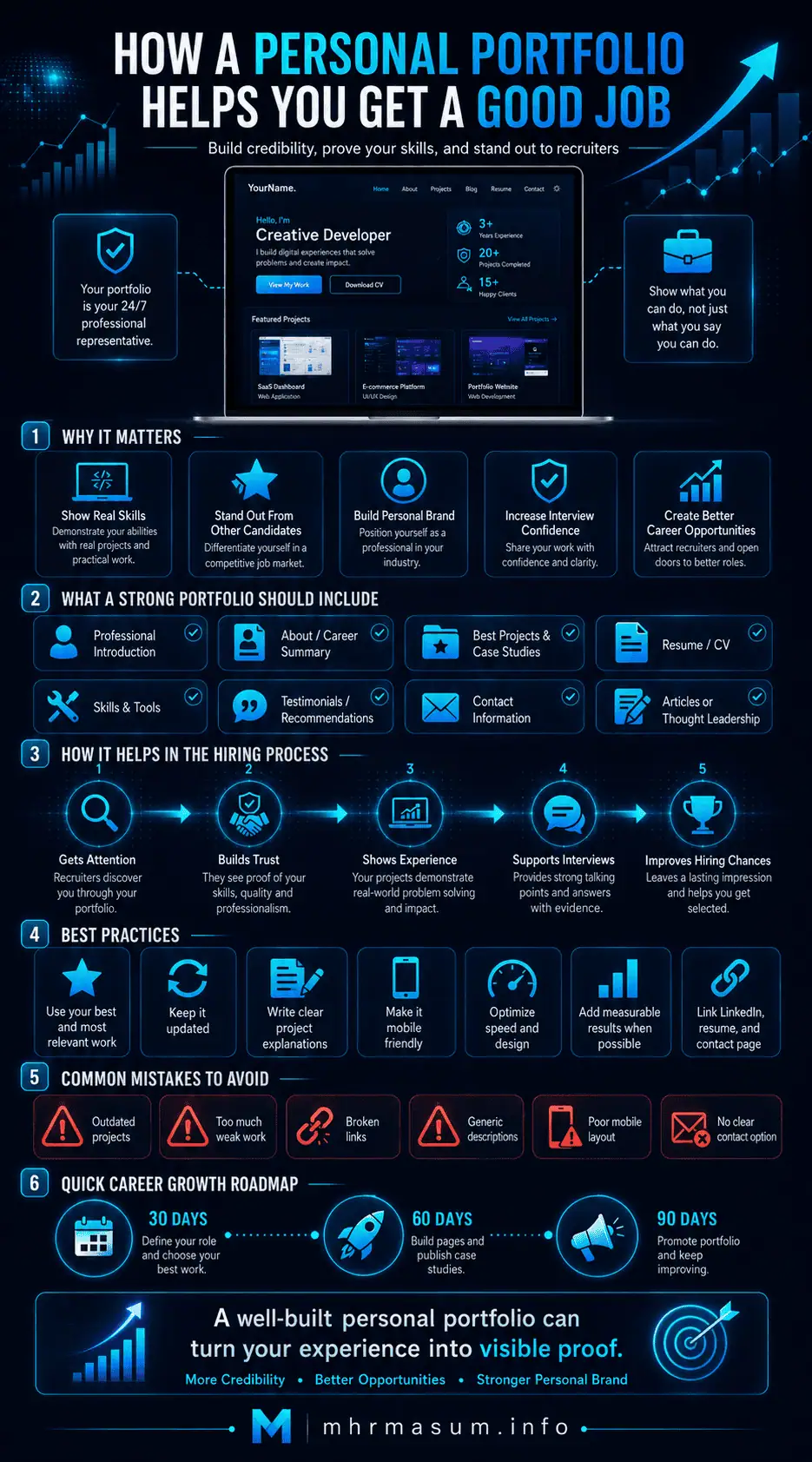
Final Thoughts on Using a Personal Portfolio to Get a Good Job
A personal portfolio website can help you move from making professional claims to presenting professional evidence.
It can show employers:
- Who you are
- What you can do
- How you think
- Which projects you have completed
- What results you have achieved
- How your experience fits the role
The strongest portfolio does not attempt to impress everyone.
It is designed for the type of employer, industry, and opportunity you want to attract.
A successful portfolio should be:
- Relevant
- Honest
- Easy to navigate
- Mobile-friendly
- Fast
- Accessible
- Professionally written
- Regularly updated
Use the portfolio together with:
- A tailored resume
- A strong LinkedIn profile
- Professional networking
- Relevant applications
- Interview preparation
- Continuous skill development
MD Harunur Rashid is an SEO, AI SEO and Digital Growth Consultant with 17+ years of experience helping businesses, professionals, agencies, and website owners strengthen online visibility, technical performance, personal branding, and digital growth.
Learn more about MD Harunur Rashid, review professional work in my portfolio, explore my SEO and Digital Growth Services, or contact MD Harunur Rashid to discuss a professional personal portfolio, SEO, WordPress, or digital branding strategy.